Samsung Galaxy Tab S 8.4 Giveaway

Feeling jealousy when your friends whip out their fancy new tablets at get-togethers? Smiling through the pain as they swipe through photos of their recent trip to the Carribean while you try to …


So watched the new two flagship Android smartphones announced this week and now you’re considering either the HTC One M9 or Samsung Galaxy S6 as your next handset. The only catch, as you see it, might be the price. Your decision will depend on how much each costs and whether you want to wait for it to arrive at your carrier. As it turns out, we might already know what to expect in terms of cost.
The suggested, or approximate, retail values for both smartphones may have been tipped as part of new sweepstakes promotions. HTC’s latest figures to run $599, or the same as last year’s model. And, based on the total package we saw introduced this week, we’re impressed with the pricing. At least, that’s what we’re led to believe based on the official HTC One M9 giveaway currently underway.

As for Samsung’s next big thing, well, it could carry a higher cost. According to T-Mobile, the Galaxy S6 may run $699, or $100 more than the previous generation. This means the Galaxy S6 edge may be valued at $749-$799 when it’s all said and done. This comes from T-Mobile’s contest which rewards random winners for signing up for details on the Galaxy S6.

Big picture, we might look for the HTC One M9 to run $200 with a two-year service contract or approximately $25 per month over 24 months. The Samsung Galaxy S6 may shake out to $250 with a service agreement; broken down over two years it would be roughly $29 per month.
Keep in mind this is purely conjecture on our part and is based soley on the respective sweepstakes values. In other words, this ain’t necessarily official.
The post HTC One M9 and Samsung Galaxy S6 pricing possibly revealed appeared first on AndroidGuys.
Sprint announced that the Samsung Galaxy Note 4 is getting Android’s latest software, Lollipop. The roll out should automatically look for the update, but if you just can’t wait you can manually check for the update.
From the home screen, tap and drag the notification bar down. Then tap the settings icon, scroll to the system section, and tap system update. Then tap update now, and if the update is available click to install it.
One installed you will be running Android 5.0 Lollipop with added Wi-Fi calling enhancements. Lollipop adds tons of enhancements, with the most obvious change being the new Material design.
Here is a link to Google’s page on Android Lollipop where you can read through the long list of changes for yourself.
The post Sprint’s Samsung Galaxy Note 4 gets Lollipop appeared first on AndroidGuys.

Although much of the attention at MWC 2015 is on the devices being announced at the event or sneak peaks of technology planned for later in the year, the hosts, GSMA, take some time to recognize outstanding products from the prior year with their Global Mobile Awards. For 2015, Android devices proved to be formidable participants in the market. Perhaps most notable is the recognition of the LG G3 as Best Smartphone along with Apple’s iPhone 6. It was not long ago that LG barely even registered in the smartphone market, but the company started to make a big push first with the LG G2 and then last year’s successor the LG G3. Their willingness to break with some tradition, like placement of buttons, and trying to produce an attractive, quality product have paid off with the award.
Although many in the tech industry will be paying attention to Apple next week and the anticipated release of the Apple Watch, Google and their partner Android device manufacturers have been in the wearables market for some time now. The fact that they have been able to go through a couple iterations of smartwatches and refine the experience helped lead to the the Motorola Moto 360 this past year. GSMA recognized the smartwatch as the Best Wearable Mobile Tech for 2015.
One other Android device snagged an award, this one also coming from Motorola. The Moto E was named the Best Low Cost Smartphone.
GSMA recognizes products in a wide range of categories that may be of interest to mobile users. A couple pieces of software may be noteworthy for Android users who want to check out the best software they could run on their devices according to the GSMA. For gamers, Asphalt 8:Airborne was selected as the Best Mobile Game App. The Judges’ Choice – Best Overall Mobile App went to IFTTT, which recently rebranded itself as IF in conjunction with its new DO framework.
source: GSMA
Come comment on this article: LG G3, Moto 360, Moto E claim top spots in 2015 Global Mobile Awards
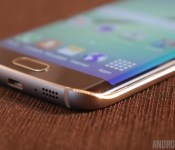

As was expected, the Samsung Galaxy S6 is another industry leading flagship smartphone, packing in some of the latest and greatest pieces of mobile tech. This time though, Samsung has opted to exclusively use its in-house Exynos 7420 SoC, rather than a Qualcomm processor as it has done in previous years. So, let’s delve into the specifics to see why Samsung has so much confidence in its latest SoC.
One of the Exynos 7420’s big talking points has been the move down to a 14nm FinFET manufacturing process, which puts Samsung ahead of Qualcomm’s 20nm Snapdragon 810. When it comes to manufacturing size, smaller numbers are better, as shorter transistor distances consume less energy and boost processing speeds. However, smaller, closely packed transistors can lead to current leakage between parts of the chip, an issue that FinFET manufacturing addresses by enclosing the conducting channel in a thin silicon “fin”.

For the same processor design, lower power consumption means more heat headroom for increasing clock speeds or additional battery savings, which will help explain some of the capabilities of Samsung’s chip as we dive down deeper.
The bulk of the Exynos 7420’s processing components are rather familiar. It is built from ARM’s reference Cortex-A57 and A53 CPU cores and its Mali-T760 GPU technology. At a quick glance, the design is very similar to the Galaxy Note 4’s Exynos 5433 chip.
| Exynos 7420 (Galaxy S6) | Exynos 5433 (Galaxy Note 4) | |
|---|---|---|
| Architecture | ARMv8-A (32 & 64 bit) | ARMv8-A (AArch32 only) |
| CPU cores | 4x ARM Cortex-A57 + 4x Cortex-A53 (big.LITTLE with GTS) |
4x ARM Cortex-A57 + 4x Cortex-A53 (big.LITTLE with GTS) |
| CPU clock | A57 – 2.1GHz A53 – 1.5GHz |
A57 – 1.9GHz A53 – 1.3GHz |
| GPU | ARM Mali-T760 MP8 | ARM Mali-T760 MP6 |
| GPU clock | 772 MHz | 700 MHz |
| RAM support | 1552MHz LPDDR4 | 825MHz LPDDR3 |
| Process | 14nm FinFET | 20nm |
Samsung is using ARM’s high-end octa-core Cortex-A57 and A53 big.LITTLE configuration for an efficient balance between peak performance, using the Cortex-A57s, and energy efficiency, by delegating background tasks to the low power Cortex-A53s. Samsung has again implemented Global Task Scheduling with this chip, which enables the use of eight cores at the same time, as well as dynamic core voltage and frequency switching.


The Exynos 7420 also implements ARM’s AArch64 64-bit execution state, while the Exynos 5433 will likely only ever use AArch32 (32-bit mode), even though it uses ARMv8-A CPU components.
While 64-bit app support is slowly gaining momentum, Android Lollipop’s ART runtime is optimized for 64-bit processors and so should result in a few performance benefits for the 7420 too, depending on the situation. For example, all pure Java apps receive instant benefits from ART’s 64-bit optimizations.
Thanks to the smaller manufacturing process, Samsung has been able to up its clock speeds by 200MHz on the CPU side and by 72MHz on the GPU side, working out to around a very rough 10 percent increase over the Exynos 5433. While this will inevitably lead to some performance gains, the biggest changes have been made to the SoC’s memory and GPU specifications.
The Exynos 7420 is Samsung’s first SoC with LPDDR4 memory, which runs in a 32-bit dual-channel configuration with a clock speed of 1552MHz. Peak bandwidth reaches 25.6 GB/s.
The GPU is where Samsung has implemented the largest performance gains-over the Exynos 5 series.
This already adds up to tangible improvements so far, but the GPU is where Samsung has implemented the largest performance gains-over the Exynos 5 series. As well as the clock speed increase, Samsung has scaled up the number of GPU cores from six in the Note 4 to eight in the Galaxy S6. This extra graphics grunt will come in handy when gaming on the Galaxy S6’s QHD display, and the smaller 14nm manufacturing size has also allowed Samsung to drop the GPU voltage by between 200 and 300 mV at 700MHz. Samsung states that the move to 14nm reduces power consumption by 35 percent and much of that saving looks to have been pumped back into the two additional GPU cores.


Comparing our Galaxy S6 AnTuTu test against the Galaxy Note 4 (SM-N910C), we see a rather substantial increase when it comes to 3D graphics performance at 2560×1440. Benchmarks don’t indicate real world performance differentials, but it certainly confirm the areas in which Samsung has managed to make improvements. RAM speed also sees a decent performance gain from the move to LPDDR4 and AnTuTu also registers a favorable boost to the CPU’s capabilities too, due to the smaller die size and higher clock speeds.
http://embed.chartblocks.com/1.0/?c=54f5abf7c9a61d493d69df80&t=6bf207018f1a3ee
With performance up and energy consumption down, Samsung’s push for 14nm has clearly paid off and it is clear why the company chose to drop Qualcomm’s Snapdragon series this generation. Although CPU performance is only marginally better than some existing flagships, additional GPU performance and battery savings are precious improvements for Samsung’s QHD Galaxy S6.
The Exynos 7420 will likely remain a top performer throughout 2015, as Qualcomm is not looking to reach sub-20nm until end of the 2015.


When searching Google, through voice or otherwise, it’s handy to know that city capitals, basic math calculations, song lyrics and even diseases are among the things that Google’s Knowledge Graph helps you find details on quickly through the use of special information cards. The Knowledge Graph is already, well, quite knowledgable, but now it is learning one more trick: how to make your favorite cocktails.
The cards break down the cocktails into the main alcohol, followed by ingredients. Preparation steps, how it is served (on rocks, etc), the garnish used and the drinkware it is placed in. While not every drink I could think of came up with a card, generally all common drinks did. The latest addition to Knowledge Graph might not be handy for everyone, but it is still a welcome addition for those of us amateur mixologists looking for a few tips on how to serve up some booze more creativitely than just handing everyone shot glasses.
Google continues to rapidly expand the Knowledge Graph’s database with new info, and so we can’t only wonder what they’ll add next. What else would you like to see from the Knowledge Graph that isn’t offered already?
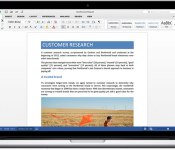

While Microsoft is hard at work on the final version of Office 2016 for Mac that’ll arrive later this year, it’s offering folks who are too eager to wait an early look. The preview version of Redmond’s productivity suite is now available for download, serving up Word, Excel, PowerPoint, OneNote and Outlook to machines running Apple’s desktop OS. There’s sure to be a truckload of updates in the months to come, but if you’re still using Office for Mac 2011, the changes that are already in place will certainly give you something to look forward to.
Filed under: Software, Microsoft
Source: Microsoft

Apple has started decorating the Yerba Buena Center in San Francisco ahead of their March special event next Monday.

Our own Simon Sage was able to grab a shot of the banners going up. The colorful display matches the event invitations. Apple was also building a new structure outside the Yerba Buena Center earlier this week.
Apple’s “Spring Foward” event is expected to focus on the Apple Watch. The event kicks off on Monday, March 9 at 10 a.m. PDT/1 a.m. EDT. iMore’s Rene Ritchie and Serenity Caldwell will be there, bringing you the latest on Apple’s first foray into wearables.
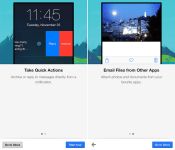
Google on Thursday updated Gmail for iOS with a trio of notable new features: quick actions, the ability to email files from other apps and a new attachment viewer. Gmail users on iPhone and iPad can now attach photos and documents to Gmail from other apps such as Instagram using the updated in-app share sheet, and open attachments from Gmail into any app.

Taking advantage of Apple’s addition of interactive notifications in iOS 8, quick actions enable Gmail users to archive or reply to emails directly from a notification without leaving the app. The functionality also works for notifications in Notification Center and on the Lock screen. The latest release of Gmail for iOS pushes the app to version 4.0 on the App Store.
What’s New in Version 4.0
• Take quick actions – Archive or reply to messages directly from a notification
• Email files from other apps – Attach photos and documents to Gmail right from your favorite apps
• New attachment viewer – Open attachments from Gmail into any app
Gmail for iOS [Direct Link] is free on the App Store for iPhone and iPad.
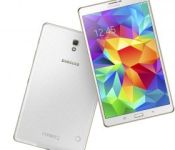
Feeling jealousy when your friends whip out their fancy new tablets at get-togethers? Smiling through the pain as they swipe through photos of their recent trip to the Carribean while you try to push down the burning desire to throw your laggy old iPad into oncoming traffic? Okay, so maybe that’s just me but surely anyone who wouldn’t want a shiny new Galaxy Tab S 8.4 must be out of their minds — especially when the price is FREE. That’s right, we’re giving away a brand-spanking-new tablet to one lucky AndroidGuys reader! There’s no purchase necessary and entry is quick and easy so make haste and enter now… but let’s just keep all of the Carribean stuff between us, okay?
See more at deals.androidguys.com
Feeling jealousy when your friends whip out their fancy new tablets at get-togethers? Smiling through the pain as they swipe through photos of their recent trip to the Carribean while you try to …

Learning to hack, ethically, is a necessity in today’s age of ever-growing digital threats. Whether your goal is to build your business or simply stop your secure data from being breached, …

It seems, at times, that there’s a disparity between the technological power that we harness in our handsets and the lack of sophistication of some of our appliances at home. With my …

When my parents were young, they’d collect photographs in shoeboxes, albums, and scrapbooks. Now, all of my photos and videos are on a small MicroSD card tucked into the back of my phone. …
The post Samsung Galaxy Tab S 8.4 Giveaway appeared first on AndroidGuys.


In late January, developer Zeptolab revealed King of Thieves with an unspecified release date. The game explores a new genre for Zeptolab, who made stayed close to the puzzle genre of Cut the Rope, by bringing together a few different ones. King of Thieves merges tower defense, platformer, and multiplayer elements. Now, the game is available for Android devices around the world.
Players evade traps and attacks while stealing gold from others. There are eighty levels to play go through alone and then players can compete with each other for superior placement on leaderboards. The game maintains the cartoon elements seen in Cut the Rope, but King of Thieves definitely has its own identity.
The game is free to download (with in-app purchases) and compatible with Android TV devices.
Hit the break for the trailer, gallery, and download links.
Click here to view the embedded video.


Come comment on this article: Zeptolab’s King of Thieves available for free in the Play Store
 AIVAnet