



Udacity opens enrollment for first iOS developer Nanodegree, focusing on Swift
Udacity, the online “university by industry” born out of a Stanford project, has rolled out their first “Nanodegree” program for learning iOS development — and it’s focused on Swift. Why Swift? From the Udacity blog:
Apple explains it succinctly: “Swift makes it easier than ever for developers to create incredible apps.” Furthermore, anything you can do in Objective-C, you can do in Swift. The future of iPhone, iPad, and even Apple Watch app development is clear: Swift. Udacity is hard at work creating an iOS Developer Nanodegree, and Swift will be taught and used extensively throughout.
Here’s what it covers:
In this Nanodegree program, you’ll build five portfolio-worthy iOS apps that demonstrate your expertise as an iOS Developer. You’ll write all of these apps in Swift, Apple’s custom programming language developed specifically for building iOS and OS X apps.
There’s an info sessions video, embedded below, and an online FAQ if you want more information.
All courses are expected to be available by the end of April, but the first two lessons of the first two courses, Swift and iOS Core Data and Persistence, are ready to go.
The cost is $200 and there’s a free one week trial. Enrollment is open now and closes March 10.

FTC offers a $25,000 prize if you can trap robocallers

Yep, the Federal Trade Commission still hates robocalls as much as you do. The agency has launched a contest where you’ll get a $25,000 top prize if you develop technology that sends illegal automated telemarketing to a honeypot system, which makes it easier to study calls and catch perpetrators. You have up until the evening of June 15th to qualify your bot trap, and the winner will be decided at a Def Con showdown on August 9th. The payout certainly isn’t large, but think of this as doing the country a favor — you may save millions from listening to Rachel from card services over and over again.
[Image credit: SarahNW, Flickr]
Filed under: Cellphones, Wireless, Mobile
Via: Motherboard
Source: FTC

Rumor pins the price of Huawei’s Android Wear Watch at $1,000
 A new rumor has surfaced regarding the price of Huawei’s upcoming smartwatch, and it’s pretty ridiculous. If these rumors end up being true, Huawei could price the watch at $1,000, which is significantly higher than any other conventional Android Wear watch we’ve seen. Apple likely wouldn’t even attempt to pull off that price tag with their products.
There’s a pretty good chance this price tag could be for a special edition of the watch, or just a completely false rumor. Take it with a grain of salt and wait for an actual announcement from the company.
source: BGR
Come comment on this article: Rumor pins the price of Huawei’s Android Wear Watch at $1,000

Rumor pins the price of Huawei’s Android Wear Watch at $1,000
A new rumor has surfaced regarding the price of Huawei’s upcoming smartwatch, and it’s pretty ridiculous. If these rumors end up being true, Huawei could price the watch at $1,000, which is significantly higher than any other conventional Android Wear watch we’ve seen. Apple likely wouldn’t even attempt to pull off that price tag with their products.
There’s a pretty good chance this price tag could be for a special edition of the watch, or just a completely false rumor. Take it with a grain of salt and wait for an actual announcement from the company.
source: BGR
Come comment on this article: Rumor pins the price of Huawei’s Android Wear Watch at $1,000

Samsung Galaxy S6 Themes and Fingerprint Scanner quick look
brightcove.createExperiences();
Samsung made a splash with its latest flagship, the Galaxy S6, not only in terms of the design and build quality, with its metal and glass unibody construction, but also with the lack of previously staple features like a removable battery and microSD expansion, caused by this shift in design. The changes aren’t limited to just its physical appearance either, with the software experience being more refined, and as a result snappier, albeit with a few new features in tow. We’ll be taking a look at two of these software and hardware features now, in this feature focus of the Samsung Galaxy S6 themes and fingerprint scanner!

It is definitely worth mentioning, and very noticeable, how fluid this version of the TouchWiz UI is. The general aesthetic mostly remains the same though, with a few elements of Android 5.0 Lollipop, such as the overhauled Recent Apps screen, making their way over. The transitions while opening, closing, and switching between applications are as smooth as ever, and scrolling through the various apps in the Overview screen is stutter-free. In fact, there have been very few, if any, noticeable instances of lag, which is certainly an improvement over previous iterations, and we can’t wait to put it through its paces in a full review.

One new addition on the software side of things is the Theme store, that allows you to change the look and feel of the user interface while keeping the general features of TouchWiz available. There are already a few themes pre-installed which can be accessed via the “My Themes” area, while more can be purchased from the store. Applying the theme, as you will see in the video above, is a quick and simple process, and once done, you’ll see that all of the different UI elements, such as the colors, icons, folders, and more, are now changed to reflect the theme you’ve selected. Theming hasn’t been a very big aspect of previous versions of TouchWiz, and it is a very pleasant surprise to see it included and featured this time around.

Another feature available with the Galaxy S6 isn’t necessarily new, but comes in a far better implementation this time, and that is the fingerprint scanner. The finger scanner is integrated into the tactile home button up front once again, but the type has been changed from the swipe version found with the Galaxy S5, to a much better touch iteration with the Galaxy S6. Currently, uses of the fingerprint scanner are limited to verifying your Samsung account, easy web sign-ins for sites that allow it, as well as to make payments via Paypal, with a future update allowing for use with the upcoming Samsung Pay as well.

To set up the scanner, all you have to do is place your finger on top of the button, lift it up, and place it on the button once again, repeatedly until the setup process is complete. The advantage with the touch type scanner, as opposed to the previous implementation, is that you can set it up with your finger placed at any angle, and depending on how you handle the device, there might a particular angle that is best suited for you to reach the scanner comfortably. This is marked improvement over the swipe type scanner of the Galaxy S5, which basically required you to use two hands every time you needed to unlock the device.

Now to unlock the device, all you have to do is press and hold the power button to get into the user interface. We’ve seen this touch type fingerprint scanner with a few other smartphones, and definitely prefer this version over the previous implementation that Samsung used.
So that’s it for a quick look at the Themes feature and the fingerprint scanner of the Samsung Galaxy S6, which we’ll be exploring in more detail in an upcoming comprehensive review. Until then, stay tuned with Android Authority as we continue to bring you more great coverage from MWC 2015!
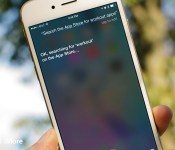
How to search the App Store, iTunes Store, and iBooks Store faster with Siri

While it’s fun to browse the App Store, iTunes Store, and iBooks Store, sometimes you just want to find what you’re looking for.
For those occasions, for when you know exactly what you’re looking for and you don’t want to so much as tap or type, there’s Siri. Simply hold down the Home button, call up Apple’s personal digital assistant, and have Siri do the searching for you. Here’s how!
How to instantly search the App Store, iTunes Store, and iBooks Store with Siri
- Press and hold your Home button to activate Siri.
- Say “Search the App Store for workout apps” or “Find music in the iTunes Store by Maroon 5.” or “Search for travel in iBooks.” You can even say the name of a specific app or book if you know it.
Siri will automatically launch the App Store app or iTunes Store app and show you the results of its search.

Judge tentatively approves settlement in anti-poaching suit against Apple, others
The judge presiding over a class action suit levied against Apple and other tech giants over their anti-poaching agreements has tentatively approved a $415 million settlement that was proposed last month.
From the Associated Press:
Koh said she was satisfied this week after the companies increased their earlier offer of $324.5 million. She invited final comments on the deal before she grants final approval at a hearing on June 9.
The class action suit was filed against a number of tech giants including Apple, Google, Intel, and Adobe, alleging they made agreements to not hire eachother’s employees, potentially driving down wages for Silicon Valley workers.
This tentative approval comes after Judge Koh rejected a $324 million settlement last year after one plaintiff objected to the proposed amount.
Source: Associated Press
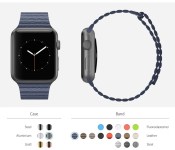
Apple Watch Site Lets Users Explore Different Band and Casing Combinations [iOS Blog]
Ahead of Apple’s upcoming “Spring Forward” event that is expected to see the company unveiling more information about the Apple Watch, a new website has been launched that allows users to explore all of the different casing and band combinations for the device.
Using images taken from Apple’s Apple Watch website, MixYourWatch lets users pair each of the six different Apple Watch casings (stainless steel, space gray stainless steel, aluminum, space gray aluminum, gold, and rose gold) with the 16 different bands made of fluoroelastomer, leather, and steel.

Rumors have suggested that Apple plans to allow users to purchase extra bands to wear with their Apple Watch devices, but the band options for the various models will be limited. For example, on Apple’s website, the Leather Loop band is only listed as being available for the 42mm Apple Watch, while the Modern Buckle is only available for the 38mm Apple Watch.
Some of the combinations are not particularly attractive, like the space gray aluminum Apple Watch paired the green fluoroelastomer band, and the site gives an excellent overview of how different Apple Watch combinations will look before the device’s launch.

Another site, launched yesterday, is also worth checking out. Watch Aware‘s Apple Watch apps site offers an interactive Apple Watch app experience, giving us a look at what apps will look like on the Apple Watch.

HBO’s streaming service will be called HBO Now, priced at $15 per month
 Some new details have popped up regarding HBO’s stand-alone streaming service that’s slated for launch later this year. The service is HBO’s first foray into offering current content without the help of cable and satellite providers and will be a huge deal for cord-cutters.
The service is reportedly going to be called HBO Now, and it will go live in April, roughly a month from now. Pricing is pegged at $15 per month, which is a bit higher than the likes of Netflix and Hulu. Of course, if HBO plans on offering all of their own high quality content, it might be worth the premium over similar services.
There still isn’t any concrete information about how you’ll be able to use HBO Now, but the Apple TV is rumored to be one of the launch partners for the service. Hopefully Android devices including tablets, smartphones, and streaming boxes will be a part of that launch, but we’ll know more as we get closer to the launch.
Are you willing to pay $15 for an HBO streaming service?
source: The Verge
Come comment on this article: HBO’s streaming service will be called HBO Now, priced at $15 per month

T-Mobile’s Galaxy Note 3 receiving Android Lollipop update
 T-Mobile has started pushing out the Android Lollipop update to their version of the Samsung Galaxy Note 3. The upgrade includes all of the normal features and enhancements that Google introduced with 5.0, plus a few carrier specific fixes just for T-Mobile including enhancements to WiFi calling.
If you have a Note 3 on T-Mobile’s network, start checking for the update.
source: Samsung
Come comment on this article: T-Mobile’s Galaxy Note 3 receiving Android Lollipop update
 AIVAnet