



AMBER alerts get integrated into Waze

The use of Waze varies between turn-by-turn navigation and other location-related services. Now, the app will extend its capabilities to child safety with the integration of AMBER alerts. Those with Waze installed on their devices will see notifications from the AMBER alerts program appear with information regarding the missing child. The notifications only appear when the driver is at a complete stop and disappear upon moving again. If the Waze notification does not provide enough information, users can tap it and find out more information in their browser.
Here is how Waze will approach AMBER alerts:
- We will scan the U.S. for AMBER alerts every 10 minutes.
- If there is a live AMBER alert, we will display it to Wazers in the relevant geographic area.
- Alerts will only be displayed when Wazers’ vehicles have been completely stopped for 10 seconds and will only appear once per week per individual alert.
- Alerts will disappear when Wazers tap the map or once the vehicle starts moving again.
Waze believes that this will allow for safer communities with its drivers providing extra eyes on missing children.
Source: Waze
Come comment on this article: AMBER alerts get integrated into Waze

Google Play app updated to version 5.3.5

The Google Play app, which was previously standing at version 5.2.13, has been updated. The new version, 5.3.5, is relatively minor as there are not any noticeable changes. It seems like everything is on the back end where everyday users would not see a thing.
You can hit the link below to download and install the latest version of the Google Play app. Otherwise, just wait for it to happen in the coming days or weeks.
Come comment on this article: Google Play app updated to version 5.3.5
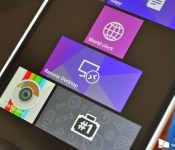
Microsoft Remote Desktop for Windows Phone comes out of preview

Microsoft has updated its Remote Desktop app for Windows Phone 8.1 today and in so doing has removed the “preview” label from the app for the first time since it was launched in April 2014.
18 more banks add Apple Pay support, total now exceeds 100
Several new banks are now offering Apple Pay support for credit and debit cards. We’re looking at 18 new banks and credit unions adding support for the payment service.
The most recent group of additions include the Bank of Hawaii and American Airlines Credit Union. With these latest additions, Apple Pay now has more than 100 institutions behind it, with millions of customers able to make payments using only their iPhone 6 or iPhone 6 Plus.
Here are the latest banks to support Apple Pay:
- Affinity Plus Federal Credit Union
- American Airlines Credit Union
- Bank of Hawaii
- Baxter Credit Union
- CFE Federal Credit Union
- Commonwealth Credit Union
- Foothill Credit Union
- Founders Federal Credit Union
- IBM Southest Employees Federal Credit Union
- Lister Hill Credit Union
- PenFed Credit Union
- North Shore Bank
- Royal Credit Union
- Schools First Federal Credit Union
- Spokane Teachers Federal Credit Union
- Telhio Credit Union
- University First Federal Credit Union
- West Community Credit Union
In addition the iPhone 6 and 6 Plus, Apple Pay will be supported by the Apple Watch following its expected release in April 2015.

GDC 15: Preview of classic RPG Aralon: Forge and Flame
At GDC 2015, got our hands on an upcoming sequel to the well-loved Aralon role-playing game, and it’s looking quite slick. The only other series that comes this close to The Elder Scrolls on your iPad are the Ravensword games which, coincidentally, are also published by Crescent Moon games.


Forge and Flame is the sequel to Aralon: Sword and Shadow, which made a big splash back in 2010. The update promises new continents, new items, new characters, and thanks to the Unity 5 engine, we’ve got fancy graphical improvements like cloth physics, real-time shadows, and lots more.
Expect Aralon: Forge and Flame to hit the App Store sometime this spring, and will likely be a premium title around $6.99 (though that has yet to be nailed down).

GDC 2015: Hands-on with Anarcute, one of the newest additions of ID@Xbox coming to Xbox One
At GDC Microsoft released a huge list of all of its ID@Xbox games in the works. Anarcute is one of them from the list and we’re pretty excited about it. We go hands on with it to see what could make these cute little rioters so deadly.

Have a 12-14 year old girl interested in iOS development? Send her to App Camp this summer!

If there’s a tween girl in your life who hankers to write her own iOS apps, maybe an App Camp will put her on the right path.
App Camp for Girls is a non-profit group that helps teenaged girls interested in learning how to program for iOS. The organization already holds camps in Portland and Seattle; this year it’s expanding to Martinsville, NJ and Vancouver, BC, Canada.
At App Camp For Girls, campers receive a broad introduction to the process of iOS app development, from brainstorming and designing ideas to building and pitching their apps. The girls use Mac computers and Xcode, Apple’s suite of developer tools, to build their apps and run them on iPod touch devices. By building an app in one week, campers get a sense of accomplishment that can spark their enthusiasm to pursue further tech education.
The focus of App Camp for Girls is to tip “the scales of gender imbalance in software by providing girls with engaging, accessible educational programs in iOS development.”
Camps take place during a week in July, with a second camp taking place in Portland in August. Specific dates vary by location.
Eligible campers must be local to the camp location and must be entering 8th or 9th grade in Fall 2015. The deadline to enter is March 17, 2015. More details are available at the App Camp for Girls web site.
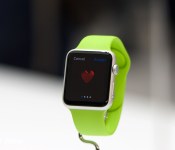
Apple Watch: Should you get one?

If you have an iPhone 5, iPhone 5c, iPhone 5s, iPhone 6, or iPhone 6 Plus, you can use the Apple Watch. But should you get one?
As we come closer to the Apple Watch’s sale date, it’s the big-ticket question. Most people need a phone. Many people need a computer. Like an iPad, however, the Watch feels like an extra accessory, and that can make it harder to figure out if you need it or not. So, let’s break down the decision process and make it a little bit easier.
Whether you should get an Apple Watch or not comes down to how compelling any of the main features are for your lifestyle, either by themselves or when combined together. Those features include not only timekeeping, but health and fitness tracking, notifications and informational widgets, Apple Pay, remote control, and communications.
Put simply: The Apple Watch is the shuttlecraft to the iPhone’s starship. Most of these activities can already be done on your iPhone, but can be done more conveniently with an Apple Watch. And a select few can only be done with the Apple Watch.
Timekeeping
It’s not an uncommon story: You stopped wearing a watch because your iPhone had a big clock right on the Lock screen, only a pocket- or purse-pull away. It’s the old single- vs. multi-tasker debate, and why convergent devices like the iPhone proved so popular to begin with.
The Apple Watch is also a convergent device, and that convergence can be seen in every aspect, including how it takes time. When you want to see the time on your Apple Watch, you don’t have to dig into your pocket or purse, or reach for your bag or table, you just turn your wrist. The screen lights up, and you can view the time and date. It can be just that simple or, in the grand tradition of timekeeping, you can add “complications”.
The Watch’s faces range from minimal to chronometer to utilitarian to motion graphics to astronomy to, well, Mickey Mouse. Each face also includes a number of complications which offer even more data, if you want to enable it.
Complications can include features as subtle as a monogram for personalization, but also world clocks, alarms, a stopwatch, the weather, sunrise and sunset, activity levels, phases of the moon, upcoming appointments, and stock quotes.
If that level of efficiency is intriguing to you, the Apple Watch might be just intriguing enough.
Notifications and information

Any iPhone running iOS 8 has interactive notifications. With the Apple Watch, however, those notifications can appear on your wrist, sending you a subtle tap that doesn’t even light up the display unless you turn the Watch to signal your interest. Even then, you only get a short summary of the information, providing the app name along with a brief bit of context. From there, you get to decide if you want to stop what you’re doing and view more.
When you’re interacting with the Watch, you can pull up Glances, which act much like widgets in the Today view of the iPhone’s Notification Center. Rather than appearing and disappearing like notifications do, a Glance’s information persists, just a swipe or few taps away.
Watch apps take it a step further, providing an even greater level of interaction; they also allow you to hand off activities to your iPhone if and when they’d benefit from a bigger screen.
Facebook messages, turn-by-turn directions, airplane boarding passes, coffee cards, and other app interactions can benefit from being more easily accessible. If that appeals to you? The Apple Watch might appeal to you.
Health and Fitness
If you have an iPhone 5s, the Apple Watch can add vertical movement (staircase) tracking to your step-counting in the Health app. If you have an iPhone 5 or iPhone 5c — both of which lack the M7 movement co-processor — the Apple Watch adds both step-counting and staircase-tracking. If you have an iPhone 6 and iPhone 6 Plus, you already have step and staircase-tracking built in; with the Apple Watch, however, you can leave your iPhone behind and go walking or jogging without it weighing you down.
What’s more, the Apple Watch offers unique personal training options. There’s a heart rate monitor, which isn’t available on any iPhone. There’s also an Activity app that will show you how much you’ve moved, exercised, and even stood up during the day.
There’s also a Workout app for when you’re doing cardio, and a Fitness app that keeps track of your goals and rewards your accomplishments.
If any of those features could help you live a healthier, fitter life, the Apple Watch might be all the help you need.
Apple Pay
Apple Pay — wherein you use Touch ID to authorize a transaction at a NFC-enabled checkout counter — is currently only available on the iPhone 6 and the iPhone 6 Plus. That’s because only the iPhone 6 and iPhone 6 Plus include a near-field communications (NFC) chip with built-in secure element, which handles the storage and transmission of credit and debit card information.
The Apple Watch, however, has its own NFC chip built in, and it can pair with an iPhone 5 or later. That means that even though you may not be ready to upgrade your iPhone, you can still enjoy the convenience of Apple Pay with the Apple Watch.
Moreover, if you want to got out for a walk or run but don’t want your iPhone weighing you down, you can just take your Apple Watch. As long as you’ve authorized it before leaving and it doesn’t breaks skin contact, you can use your Apple Watch to buy a drink (or anything else) while you’re out.
If adding or extending Apple Pay sounds enticing to you, you might well be enticed by the Apple Watch.
Connecting

Like the iPhone, the Apple Watch has Siri built in. Just raise your arm, say “Hey Siri,” and tell Apple’s personal digital assistant exactly what you want done or what you want to find out.
If someone calls, you can answer and converse right on your wrist, and hand the call off to your iPhone if you think it’s going to take awhile. You can also dictate or select a quick response to any Messages that might come in, all without ever reaching for your phone.
The Apple Watch additionally has three forms of communication all its own: Sketches, Taps, and Heartbeats. With Sketches, you can quickly send doodles to convey an idea, express an emotion, tease, troll, or simply earn a smile. Taps does pretty much what it says on the tin: It lets you send a pattern of taps that plays out on the other person’s wrist. And with Heartbeat, well, you can let that special someone know you’re thinking of them in the most personal way possible.
If keeping in touch matters to you, the Apple Watch just might be the right touch for your wrist.
Remote control
The Apple Watch will let you control your Apple TV. It’ll also let you remotely access your iPhone’s camera, and thanks to Siri and HomeKit integration, it may even let you program any compatible home-automation gear you have in your house.
The possibilities for the Apple Watch are boundless here: It could lock or unlock your doors, switch on or off your lights, put your living room into home theater or gaming mode, turn on a fan or adjust a thermometer, right on your wrist.
If easy access to all your connected accessories sounds good to you, the Apple Watch might be the easy choice.
Who shouldn’t get an Apple Watch
If you have an iPhone 4 or iPhone 4s; if you’re content with the functionality of your iPhone 5, iPhone 5c, iPhone 5s, iPhone 6, or iPhone 6 Plus and don’t find the Watch’s extra features compelling; if you can’t stand things on your wrist or you simply prefer to wait and see — then you probably don’t want or need an Apple Watch.
Who should get an Apple watch
If you like the features your iPhone has to offer but need gaps filled — like Apple Pay on older iPhone models — or you want new options, like the Watch’s heart-rate monitor, or you simply want everything made easier and more convenient, then you should definitely check out the Apple Watch.
If health and fitness is important to you, if you’re into home automation, or you simply want a better way to stay notified and informed, you should also absolutely check out the Apple Watch.
<!–*/
<!–*/
<!–*/
.devicebox
background-color: #5CB8DB;
border: 1px solid #E2E9EB;
float: right;
display: block;
margin: 0 0px 10px 10px;
max-width: 350px;
overflow: hidden;
width: 50%;
.devicebox h3
background: #8D98BD;
color: #fff;
font-family: “camptonmedium”,sans-serif;
font-size: 20px;
margin-bottom: 0;
margin-top: 0;
padding: 0;
text-align: center;
.devicebox h3 a
display: block;
line-height: 30px;
padding: 0 10px;
.devicebox h3 a:hover
background: #7e88aa;
text-decoration: none;
.devicebox .video
margin: auto;
border: 0px;
.devicebox p,
.entry-content .devicebox p > img,
.devicebox img
margin: 0px;
padding: 0px;
.devicebox,
.devicebox a,
.devicebox a:active,
.devicebox a:hover,
.devicebox a:link,
.devicebox a:visited,
.devicebox p,
.devicebox ul,
.devicebox ul li,
.devicebox li
color: #fff;
.devicebox a:hover
text-decoration: underline;
.devicebox p,
.devicebox ul,
.devicebox ul li,
.devicebox li
border-width: 0px;
font-family: “camptonlight”,sans-serif;
font-size: 16px;
padding: initial;
.devicebox ul
margin: 0;
padding: 0.5em 1em 1em 30px;
.devicebox ul li
display: list-item;
.devicebox ul,
.devicebox ul li,
.devicebox li
line-height: 24px;
list-style: disc outside none;
.devicebox ul li:before
display: none;
.devicebox ul + p
padding: 0px 15px 15px;
line-height: 1.25;
.field-items p:last-of-type + .devicebox,
.slide p:last-of-type + .devicebox,
.article-body-wrap p:last-of-type + .devicebox
float: none;
margin: 0 auto 30px;
max-width: 700px;
min-height: 225px;
position: relative;
width: 100%;
.field-items p:last-of-type + .devicebox .video,
.slide p:last-of-type + .devicebox .video,
.article-body-wrap p:last-of-type + .devicebox .video
bottom: 0px;
left: 50%;
position: absolute;
right: 0px;
top: 30px;
.field-items p:last-of-type + .devicebox .video_iframe,
.slide p:last-of-type + .devicebox .video_iframe,
.article-body-wrap p:last-of-type + .devicebox .video_iframe
height: 100%;
padding: 0px;
.field-items p:last-of-type + .devicebox ul,
.slide p:last-of-type + .devicebox ul,
.article-body-wrap p:last-of-type + .devicebox ul
width: 43%;
.field-items p:last-of-type + .devicebox h3 + p,
.slide p:last-of-type + .devicebox h3 + p,
.article-body-wrap p:last-of-type + .devicebox h3 + p
bottom: 0;
left: 50%;
position: absolute;
right: 0;
top: 30px;
.field-items p:last-of-type + .devicebox h3 + p img,
.slide p:last-of-type + .devicebox h3 + p img,
.article-body-wrap p:last-of-type + .devicebox h3 + p img
height: auto;
min-height: 100%;
min-width: 100%;
@media all and (max-width: 500px)
.devicebox
float: none;
margin: 0;
max-width: 100%;
width: 100%;
.field-items p:last-of-type + .devicebox .video,
.slide p:last-of-type + .devicebox .video,
.article-body-wrap p:last-of-type + .devicebox .video
left: 0;
position: relative;
top: 0;
.field-items p:last-of-type + .devicebox .video_iframe,
.slide p:last-of-type + .devicebox .video_iframe,
.article-body-wrap p:last-of-type + .devicebox .video_iframe
padding-bottom: 56.25%;
.field-items p:last-of-type + .devicebox h3 + p,
.slide p:last-of-type + .devicebox h3 + p,
.article-body-wrap p:last-of-type + .devicebox h3 + p
left: 0;
position: relative;
top: 0;
.field-items p:last-of-type + .devicebox ul,
.slide p:last-of-type + .devicebox ul,
.article-body-wrap p:last-of-type + .devicebox ul
width: auto;
/*–>*/
/*–>*/
/*–>*/

OnePlus One will soon make its way to all European countries

While the OnePlus One has already been available in multiple European countries for some time now, the company is finally expanding its reach to the rest of Europe. OnePlus has just announced that the One will soon be available in 16 additional countries, including:
- Bulgaria
- Croatia
- Cyprus
- Czech Republic
- Estonia
- Greece
- Hungary
- Ireland
- Latvia
- Lithuania
- Luxembourg
- Malta
- Poland
- Romania
- Slovakia
- Slovenia
Alongside the launch of the handset in these countries, OnePlus is holding special promotional events to make more users aware that they can now buy the device. Events will be held in Warsaw on March 9th, Prague on March 10th and in Budapest on March 12th. Specific launch dates and prices have yet to be announced, but OnePlus assures us that they’ll provide that information shortly.
Even a year after the device has been available, the One still offers up some great specifications for the price (that is, if you can buy one). The device has a 5.5-inch 1080p display, a 2.5GHz Snapdragon 801 processor, 3GB of RAM, either 16 or 64GB of on-board storage, and a big 3100mAh battery. If you’d like some more information on the OnePlus One, take a look at our full review here.

Facebook’s Slingshot app update makes it easier to find people to follow
The new 2.1 update for Facebook’s Snapchat rival allows users to explore and follow other people that are using the app.

 AIVAnet


