


Revamped Google Contacts gains visual refresh and gets rid of duplicate entries

Google has released a preview to Google Contacts in Gmail that brings a much-needed visual refresh and a number of new features to make our lives easier. The service will now pool together all of your contacts, circles, and most frequently-contacted users in Gmail to make it easier to find certain people. A few other notable features are also included in the update, so let’s dive right in.
The enhancement that will be most welcomed by users is the revamped “Find duplicates” feature. Now, when you go to the new Google Contacts page, the service will detect duplicate contacts and ask you if you’d like to merge them together. So far, this is working out quite well. I didn’t even know I had any duplicates, and Contacts told me I had 18 that could be merged.
Next, Google will now keep your contacts up to date by pulling in info from users’ Google+ profiles. This will make it easy to stay up to date on users who change cities, jobs or even names. Last but not least, clicking on a contact will now show you your recent conversations with that user, including emails and meetings.
The update to Google Contacts will begin rolling out in the coming weeks, but Google has provided a preview of the update. If you’d like to check out the new Google Contacts preview, head here to do so. And unfortunately, just like Inbox, Google Apps users aren’t invited to the new experience quite yet. However, Google says they’re working on it.

Rumor Suggests 12-Inch Retina MacBook Air Could Launch During March 9 Apple Watch Event
Apple could be planning to introduce the much-rumored 12-inch Retina MacBook Air during its March 9 Apple Watch event, according to one site that claims to have sources within Apple. The Michael Report believes Apple will use the event to debut the ultrathin MacBook, which is rumored to have a Retina display and a redesigned chassis.
Many are expecting Apple talk more about the Apple Watch. However, sources familiar with the matter within Apple have exclusively told The Michael Report that Apple plans to unveil the long-awaited Retina MacBook Air at the same event. The Michael Report has independently verified this information to be highly credible.
While there have been no concrete rumors from major sites linking the Retina MacBook Air to Apple’s March 9 event, previous rumors have indicated that Apple is planning for a spring release. Apple supplier Quanta is said to have begun mass production of the notebook in January, and KGI Securities analyst Ming-Chi Kuo predicted a March launch for the MacBook.
 Rendering of the 12-inch Retina MacBook Air created by Martin Hajek
When taking these rumors into account, along with the fact that the MacBook Air is due for an update, the introduction of the Retina MacBook Air at Apple’s March 9 event does seem like a possibility. It’s also possible Apple will introduce new models of the existing 11 and 13-inch MacBook Air at the event — the last update was in April and there was a rumor suggesting an update in February was imminent. Core M Broadwell chips believed to be appropriate for the 12-inch Retina MacBook have been available since November, and chips appropriate for the standard MacBook Air began shipping in January.
Along with a Retina display, the 12-inch MacBook Air is rumored to come without a fan assembly for silent operation, made possible by the aforementioned Core M chips, and it may also include a revamped trackpad that does not incorporate a mechanical button. It is said to feature smaller bezels in a Retina MacBook Pro-style black, a keyboard that stretches right to the edges of the machine, and speakers that are located above the keyboard.
The Michael Report has a mixed track record when it comes to rumors. The site accurately predicted some design elements of the iPad Air 2, but its predictions may have been based on dummy models that were circulating around the Internet at the time. The site also shared details on the iPhone 6 and 6 Plus ahead of their launch, inaccurately calling the iPhone 6 Plus the “iPhone 6L” and suggesting the iPhones would come with quad-core processors and sapphire displays.
More details about what Apple plans to unveil at its Monday, March 9 event may come out through the week. Thus far, many sites have agreed that the focal point of the event will be the Apple Watch, with Apple unveiling new details about the device like its price and its official launch date.

Sony’s PlayStation 4 VR headset launching in the ‘first half of 2016’

Sony’s PlayStation 4-powered virtual reality headset, Project Morpheus, has new specs and a slightly different look (seen above). Okay, it doesn’t look that different. What’s new? For one, the screen resolution is improved: it’s now 1920 x RGB x 1080. The refresh rate is doubled from last year at 120 Hz, and the new 5.7-inch screen also has a higher field of view (nearly 100-degrees). Oh right! It’s got a new, bigger screen at 5.7-inches! But you already guessed that. Further upping the specs is lower latency, now under 18 milliseconds.
Most importantly, the unit will launch at retail in “the first half of 2016.” That’s…kinda soon? Almost?
Price? No, no price yet. A new name? Nope, this thing is still called Project Morpheus. Sony’s announcements today were all about a new model of Morpheus. Let’s dig in on the news then. How about a review of those specs for starters?

First things first, there’s a new screen and it’s 5.7-inches. It’s an OLED, and the specs specifically are 1920 x RGB x 1080. Wait, what? The long and short is that the screen has a higher resolution than last year’s model. It will help reduce the “screen door” effect that many VR headsets suffer from, in so many words.
The screen is afforded “super low latency” (sub-18 ms) by way of improvements Sony’s made to the software across the past year, and the field of view has been expanded to “nearly” 100-degrees. And the design has changed a bit as well: it’s now got nine LED sensors on the outside, making it way more glowey blue than before, but also offering more points of articulation to be measured by the corresponding PlayStation 4 camera.
Sony also showed off a handful of new demos, which we’re going to go and try right now. Stay tuned!
Don’t miss out on all the latest from GDC 2015! Follow along at our events page right here.
Will you buy Sony’s Morpheus PlayStation 4 VR headset when it goes on sale next year?

Waze poised to join the list of pre-installed apps on Android phones

At MWC 2015, Waze announced they have been added to the list of apps that phone manufacturers and carriers can include as a pre-installed app on new Android devices. Waze says the list of apps are part of the Google Mobile Service. The move makes sense since Waze was purchased by Google last year and the people-provided traffic information can show up in the Google Maps platform on mobile devices. As part of their announcement, Waze shared that they are up to 50 million users.
Waze spokesperson Julie Mossler thinks the inclusion of Waze as a pre-installed app will grow the user base even more as users who may have been unfamiliar with it give it a try. Waze relies on human reports of road conditions and has been described as a “social traffic app.” Mossler thinks availability to Waze means
“a meaningful part of the population would immediately have access to blocked roads, dangerous intersections traffic and more in real time.”
If a new Android phone is not in your immediate future and you want to check Waze out, hit one of the download links below.
source: PC World
Come comment on this article: Waze poised to join the list of pre-installed apps on Android phones
When is fixing your Mac just throwing good money after bad?

Does it make sense to fix my old Mac when it breaks, or am I better off buying a new one?
This scenario replays almost every time I go to work at the local Apple retailer: A customer walks in with an older Mac that isn’t working right. It happens sooner or later with just about any reasonably complicated device you own, whether it’s your car, your washing machine, TV set, or even your Mac. So what’s the answer?
It ultimately depends on a few factors — and price isn’t the only thing to consider. How much faster will a new machine be? How have your needs changed since you first bought the Mac you’re bringing in for repair? How much longer do you plan on keeping it anyway?
Labor
If your Mac is out of warranty, the first thing to know is that most places are going to charge you just to look at it. Our standard fee is $125.95 — it’s a flat labor rate we charge regardless of how many hours the tech actually works on your device. That price will vary from business to business.
Parts
There’s also the question of what needs to get fixed. If you’ve spilled a soda on the keyboard of your Mac laptop, for example, it can vary depending on the model and the severity of the damage. For some Macs it might mean replacing the entire “top case,” which integrates the keyboard, trackpad and battery. The main logic board might have to be replaced, which is big money. Or perhaps just the MagSafe board needs to get pulled.
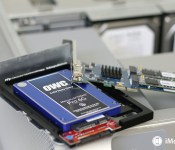
I see a lot of older Macs — five years, maybe older — come in with problems with their hard drives. Hard drives spin continuously when they’re powered, and eventually those spindle motors and the read/write heads wear out. The good news is that hard drives are cheap to replace, and putting an SSD in place of a regular hard disk can often lead to dramatic performance improvements. The bad news is that if you don’t have a backup, you may be facing lost data or a lengthy and expensive process of file recovery.
One common repair we have in the store is a screen replacement for a laptop. It’s usually a younger user — college-aged or younger — and there’s usually an accident or mishap to explain the damage: Leaving a heavy object on the computer, dropping it off a desk, falling asleep with it on the bed and having it crash to the floor. Screens are ridiculously costly for MacBooks — often almost half the price of the device. One way to cut that cost is to ship your laptop out to a mail-order repair service like iResQ. That’s what I did when I needed to replace the screen on an ’09 white MacBook. I saved hundreds and have been satisfied with the replacement screen.
Usability
There’s a point of diminishing return when you fix a computer, as well, where you’re simply not going to see any more performance or usability enhancements. Where fixing it may let you limp along for a while longer, but ultimately won’t improve things. In those cases, it’s almost always a good idea to retire your device.
My general rule of thumb is that if the repair costs are going to equal or be greater than half the cost of buying a new computer, I’ll try to talk the customer into replacing the computer instead. At that point you get a brand new computer that works fast and efficiently, and you get the added benefit of a full warranty.
Just remember that neither Apple’s standard warranty nor AppleCare cover accidental damage, so think twice before you decide to take a nap with your MacBook Pro beside you, as one of my recent customers did.
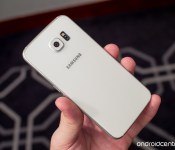
This week’s sidebar poll: Does the lack of microSD card slot in the S6 matter to you?

Is removable storage still a dealbreaker?
Among the numerous changes to the Galaxy S6 and Galaxy S6 Edge announced at Mobile World Congress Barcelona this week, many attentive Android fans noted that the microSD slot was removed.
While Samsung touted the improvements to the overall build and promised versions with internal storage up to 128GB, many of us are still crying foul over the loss of removable storage.
But is it really that much of a loss?
Huawei MediaPad X2 hands-on and first impressions
brightcove.createExperiences();
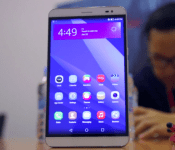
Huawei has been stepping up their game recently, especially with regards to design and build quality, as well as providing an overall great experience. Huawei may not have brought any flagship devices to MWC 2015, but that doesn’t mean that they are empty-handed. Apart from the beautifully-designed Huawei Watch, also launched the successor to their 7-inch phablet that debuted at last year’s MWC, the MediaPad X1. We go to spend some time with this device, and here’s a quick look at the Huawei Mediapad X2!

The Mediapad X2 maintains the form factor of the original, with its 7-inch display, but in a more compact iteration. Borrowing from the design cues of the Ascend Mate 7, the Mediapad X2 also comes with an 80% screen to body ratio, making it a lot smaller than you would expect. The aluminum design gives this device an elegant, premium look and great feel in the hand. It is also surprisingly thin for a device of this size, at just 7.3 mm thick, contributing to the handling experience. Going around the device, the power button and volume rocker are placed on the right, below the dual SIM card and MicroSD card slots, with the headphone jack and microUSB port found at the top and bottom respectively.

Huawei describes the Mediapad X2 as a phablet, courtesy of its voice calling capabilities, but it is definitely too large to fall even into that category. You can hold on to the device with one hand though, but its not going to be very comfortable, or possibly even fit, in your jean pocket. That said, Huawei’s focus on great design and build quality shines through once again with the Mediapad X2, and it is a wonderful device, regardless of whether you choose to use this as a phone or tablet, or both.

The Mediapad X2 comes with a laminated IPS LCD display with a resolution of 1920 x 1200, resulting in a pixel density of 323 ppi, which promises fantastic viewing angles up to 178 degrees. In the short time we got to spend with it, the color reproduction looks accurate and brightness isn’t an issue, helped by CABC technology (content adaptive LCD brightness control) that automatically adjusts the brightness for a better viewing experience, as well as more efficient battery management.

Huawei is certainly not skimping out on the hardware side of things, with the Mediapad X2 packing a A 64-Bit, 2.0GHz Kirin 930 Octa-Core CPU, backed by a 64-bit GPU Mali-T628, as well as 2 GB or 3 GB of RAM depending on which version you choose. Internal storage of 16 GB or 32 GB is available, that also determines how much RAM you get, which is further expandable up to 128 GB via microSD card.
The Kirin 930 chipset supports LTE Cat6 connectivity with a theoretical download speed of up to 300Mbps, aside from the full suite of general connectivity options that are available. The X2 also comes with Dual-SIM support. On the audio front, there is just a single speaker at the bottom right, but it comes with DTS surround sound technology for an immersive sound experience.

And finally, we come to another highlight of any Huawei device in recent times, and that is the battery. The large size of the X2 allowed Huawei to pack the device with a 5,000 mAh battery, which should provide great longevity in any circumstance, but there are built-in power saving features available as well to get a little extra battery life.

The MediaPad X2 comes with a 13 MP rear camera that Huawei claims to be very good in low-light shooting. The camera features a post-shooting focus adjustment metering mode, focus and exposure metering, and off-screen snapping functionality as well. The 5 MP front-facing camera has an aperture of f 2.4 and a wide angle of 22 mm, which is ideal for selfie lovers. Standard features like beauty and panorama can be found, but more unique features like timelapse will allow for an even more enjoyable smartphone camera experience.

The software has been updated to Android 5.0 Lollipop, with Huawei’s Emotion UI on top. The interface is largely identical to what was found on the Ascend Mate 7, and there isn’t a lot of Lollipop influence in this particular software package. What you will find though is a very bright and colorful interface that provides just enough features and customizations to keep it interesting.
So there you have it – a quick look at the Huawei Mediapad X2! This is shaping up to be another solid device offering from Huawei, and while its large size may be a turn off for some, it is ideal for those in the market for a single device solution to address both their smartphone and tablet needs.
Stay tuned with Android Authority as we continue to bring you more from Huawei, along with all the other great coverage from MWC 2015!

International data rates continue to be costly for no apparent reason

Recently, Bloomberg did an excellent story detailing the absurdity of international roaming rates in today’s marketplace. Even with wireless carriers offering unlimited calling and text messages at semi-reasonable rates within the United States borders, the carriers continue charging customers “by the minute for calls, fees for each text, and outrageous prices per megabyte.”
Americans visiting Europe can spend at least $150 for a 1-gigabyte bundle of international data. That’s enough to cover some app downloads, a few hours of music on Pandora, a YouTube video or two, and a week’s worth of e-mail. Those who forget to plan ahead would pay about $20,000 for the same amount of data, according to the carriers’ published roaming rates. Back home, a gig costs about $10. – Bloomberg
These ridiculously high prices are the reason that sites like this have written in the past about wireless customers running up a $750 international data roaming bill in one minute or receiving a $200,000 bill after spending two weeks in Canada. In fact, as one report notes, Americans who go to Europe or Asia and use strictly hotel/cafe Wi-Fi will still get hit with almost $200 in data roaming charges.

So, why are these prices so high? Hasn’t 4G technology essentially removed major roaming issues around the world? Of course. But why would carriers change something that is netting them millions with little to no competition?
But without an incentive, don’t expect carriers to voluntarily blow up an insanely profitable side business. …international fees are a consistent driver of profit that expands as more people become addicted to data-hungry smartphones. – Bloomberg
Considering we continue to see story after story after story of consumers being hit with high bills (sometimes ranging in the thousands of dollars), carriers will continue this pattern until they are forced to make changes legally.
Anyone remember how much wireless carriers HEAVILY resisted sending customers data or billing alert through text message even though other carriers around the world had been doing such basic consumer moves for years? Say, why did carriers agree to these text alerts?
After the FCC threatened to pass regulations on the matter, carriers agreed to cooperate with these voluntary guidelines. The guidelines are not quite as tough as rules passed in the European Union, which allow users to automatically set a maximum monthly expenditure on data that it is impossible for them to move past without express authorization. – DSLReports
That damn FCC strikes again with their heavy-handed government interference!

HowToGeek Tips for people to avoid receiving a wireless bill that costs as much as a new car.
So, let’s review:
- Customer in America who is staying in America and uses about 6GB’s per month = $70 plans available
- Customer in America who is traveling outside the country and uses 6GB’s in a month = $120,000 ($20 per megabyte).
Not to worry though as Verizon has a perfectly good explanation for this insanity.
“It’s a complex system; there’s lots of different layers that determine rates, like regulatory and tax issues in different countries,” says Debra Lewis, a Verizon spokeswoman. “Our goal, as always, is to provide the best value.” – Bloomberg
Which Verizon is doing by jacking up the price by 171,000%.
As is often the case, most carriers around the world seem to have figured out how to not screw consumers with insanely high costs. In Japan, the country’s largest wireless carrier caps the cost that customers will pay at $25 a day to avoid gouging. In Europe, subscribers to Vodafone pay a flat fee of $8 per day and can use as much voice and data within Europe.
Instead, we are left with customers dealing with issues such as this:
John Ellis, an adjunct professor of anesthesiology and critical care at the University of Pennsylvania, returned home from a trip to China to a $2,367 phone bill for downloaded data, even though he carefully tracked his usage. And one Texas A&M University employee got an even bigger welcome home gift after a trip abroad: a $10,000 cellular data bill. – Wall Street Journal
Although T-Mobile was the first national carrier to announce that they were not charging for roaming around the world, this only applies to 2G data, which will not allow for anything other than basic e-mail and web-browsing.

Here’s the trailer for season six of ‘Community’ on Yahoo Screen

Community will get its 13-episode sixth season (and eventually, maybe a movie?) on Yahoo Screen October 19th March 17th, and now we have the first trailer. It looks like the gang are up to their usual Dan Harmon-written schemes, but it’s still missing something without Troy, Shirley and Pierce. Fortunately the rest of the cast is in their usual places, and the trailer even makes light of some of the missing members. Overall, Greendale doesn’t seem any worse for wear after jumping to the internet, er, Age of Yahoo, so we guess that $2 million per episode budget is holding up. Our only question now: will we see Yahoo Screen apps for a few more connected TV devices by the time the show debuts?
http://screen.yahoo.com/community-season-six-trailer-premiere-175500821.html?format=embed
Filed under: Home Entertainment, HD
Source: Yahoo (Tumblr)
New Site Offers Interactive Look at Upcoming Apple Watch Apps [iOS Blog]
AppAdvice recently launched a new site dedicated to the Apple Watch called WatchAware, and today a new feature was introduced that showcases upcoming Apple Watch apps in an interesting, interactive way.
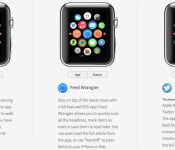
The site’s Apple Watch Apps section offers a selection of apps that are displayed on an Apple Watch interface, with different views for “Apps,” “Glances,” and “Notifications.” For example, for the upcoming Twitter app, which was shown off at WWDC, WatchAware allows users to click to see both what the app itself will look like and what an incoming notification will look like.
Many of the apps on the page use imagery from the apps that Apple showcased when the Apple Watch was first announced, so there may be some significant interface changes, but overall, the site gives a good look at what one might expect to see from the different types of Apple Watch experiences developers can create.

As outlined in the WatchKit API provided to developers in November, developers can build Glances, actionable notifications, and Apple Watch apps that are powered by the iPhone. Actionable notifications are notifications that allow users to taken an action or respond directly on their wrists with the Apple Watch, while Glances are somewhat simpler, giving users quick information at a glance like news, weather, and more.
Apple Watch apps are even more in-depth than notifications and Glances, letting users perform tasks like reading tweets and sending messages. Apps, which are built-into and installed via the iPhone, run entirely on the iPhone, with an interface that’s beamed to the Apple Watch. By running apps on the iPhone, Apple is able to conserve battery and provide a seamless experience transitioning from watch to phone. Apple has promised apps that run entirely on the Apple Watch will come later in the year.
WatchAware currently features popular apps like Twitter, Facebook, Maps, American Airlines, Pinterest, and CityMapper, which were featured by Apple at WWDC, but there are also several other apps that have been showcased by developers like Deliveries, Run 5k, and Todoist. The site plans to add additional Apple Watch apps as they become available.
 AIVAnet