



This stylish iPhone 6 flip case doubles as your new wallet and is only $9.95 today!

This synthetic leather iPhone 6 wallet case adds style and convenience to your device without putting on extra bulk with multiple layers. It protects from front to back and is secured by a strong snap-closure. The interior features three slots which can be used for storing credit cards, cash, business cards and receipts.

Comic: If you talk to me while I’m using my iPhone, who’s the rude one?

Ed: Welcome to this week’s edition of The Pixel Project: a weekly comic from Diesel Sweeties‘ Rich Stevens on Apple, technology, and everything in-between. Today: Who’s more rude– the person on their phone or the person trying to start a conversation?


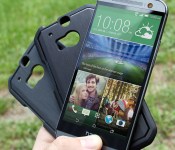
Give your HTC One M8 a skin case that means business and save 40%

The Satin Case from Body Glove brings case innovation alive again with its brushed aluminum texture and trimmed high gloss accents for an all-around reliable solution against damage. Designed to custom fit your HTC One M8, the case’s flexibility makes it easy to install and remove when necessary. Yours today for only $14.95!

Kyocera prototype puts Windows Phone onto its rough and tough Torque

Prior to the start of Mobile World Congress we got word that Kyocera was bringing a prototype device to Barcelona that would be running Windows Phone. So we dropped by to take a look at it, and prototype is definitely the key word here.
That’s because this is literally a version of the Android powered Torque smartphone with Windows Phone as the OS. The hardware is 100% identical, right down to the Android physical buttons at the bottom of the device. But, two interesting things in particular stand out.
How the iPhone is helping Federico Viticci live a healthier life after cancer
The iPhone as personal digital lifestyle assistant.
In 2011 Federico Viticci was diagnosed with Hodgkin Lymphoma (Stage IV). He beat the cancer, all the while continuing to edit and write for his phenomenal website, MacStories.net, but it took a profound toll on his life and his health. Now Ticci wants to live not only well but better, and he’s using his iPhone to help him do it. From MacStories:
Tracking my life with my iPhone makes my commitment real and the effects directly measurable. Being able to open an app and be coached through workout sessions or use my phone to track steps and runs is empowering. iPhone software has enriched my lifestyle and it has allowed me to be more conscious in my daily choices.
[…] It’s strange to think that three years ago I was stuck in a hospital bed and now part of my plan is to track the food I eat with an app. But such is life and I immensely appreciate the fact that I’m having fun getting back in shape and doing what I haven’t done in a long time. I find it profound that we can improve our lives using technology, and, no matter how much time I’ll end up having, I’ll try to make my journey about enjoying life.
I’m only part of the way through it — I paused to link it here — but it’s already beyond insightful and inspirational. It’s incredibly personal. And it’s not just the story of a life, but a story about making the most of life.
Go read it, bookmark it, or save it to InstaPocketList now.

CarPlay is at the center of the insane new Koenigsegg Regera
This week at the Geneva motor show, Koenigsegg has revealed their new Regera supercar. The car has some amazing specs all around, including a CarPlay unit at the center of the action.

We’ve seen some automakers like Volkswagen and Chevrolet gear up for CarPlay support already, but seeing it inside an awesome supercar like the 1782bhp Koenigsegg Regera is a pretty sight. There is certainly much to admire in the cockpit, but the CarPlay unit seems to fit right in. That means plenty of Apple goodies like maps, music, iMessage, and of course phone calls will be just a quick touch away. Then again, most of us won’t get the chance to try it in the Regera first-hand, as there will only be 80 models made and it will sell for $1.89 million.
If you’re looking for a CarPlay solution in your next vehicle, you may want to tone things down a bit from this beauty, but if you happen to pick one up be sure to let us know so we can take it for a spin!
Source: 9to5Mac

Why the Apple Watch Edition exists

The Apple Watch Edition has dominated conversations about the company’s upcoming wearable. And that might just be the point.
The Apple Watch Edition has been surprisingly controversial. “Not Apple-like” has been a repeated charge, as has “betrayal of the ideals of affordable luxury.” Typically, Apple makes a standard iPhone or Mac, and leaves the bedazzling to the aftermarket. Not so with the Apple Watch Edition: From the start, Apple senior vice president of design Jony Ive and newly official collaborator (and long-time watch designer) Marc Newson have set at least part of their Apple Watch sights on the high-end. But why?
The watch market isn’t the computer nor phone nor tablet market. The watch isn’t something smart that needs to be made mainstream. The watch is something mainstream that needs to be made smart.
Because the market for watches is already broad, and segments like sport watches and high-end watches are already well-established, Apple doesn’t have to make one product variation and then slowly add others over time. Apple can address the highest-value areas right from the start. They can skate to where their customers are going to be.
That includes customers who want an Apple Watch — or at least want to try an Apple Watch — who are used to owning and wearing expensive gold watches. The Apple Watch is not a health band: It can’t tastefully be worn alongside a Rolex or Omega. And even for those few willing to wear a watch on each wrist, they may not be willing to wear gold on one and aluminum on the other.
For these customers — call them Vertu people if you really must — having an Apple Watch Edition is a must. The cost will no more be a factor for them than the cost of gas is for a Lamborghini. Relatively, it’s the same cost for them as an Apple Watch Sport would be for most people.
What’s more: Catering to the ultra-high end of the market is something Apple knows how to do — and do well. Take the Mac Pro. The difference between the up-to-$10,000 workstation and the several hundred of a starter Mac mini is pure silicone speed. For Apple Watch Edition, it’s materials. It’s gold.
Unlike mobile phones, wristwatches aren’t new. They aren’t the products of a couple decades. They’re old. They are the products that go back over a century. Gold watches are an inextricable part of that history and culture. They’re how a segment of that market thinks about wearables. And if Apple can serve those people, doing something the company knows how to do, and at margins that exceed even its typical range, it would be almost negligent not to.
Serving that market brings with it another huge benefit as well — marketing. When the Apple Watch graced the cover of Vogue China, it was the Apple Watch Edition that did the gracing. When Apple Watch again showed up in Vogue Paris, it was again the Apple Watch Edition that was front and center. There have been occasions where Apple has shown off the entire collection, like at Paris Fashion Week, but the Apple Watch Edition is undoubtably the company’s signature piece.
Apple may not need to sell very many Edition-brand watches. They may not even intend to. Like the aforementioned Mac Pro, the Edition’s focus is far more specific. But that it exists not only adds to the addressable market, it adds to the Watch’s aura, and it gets Apple even further into conversations about high-end fashion.
We need look no further than the relentless perseverations about Apple Watch Edition pricing. The rest of the industry is literally throwing product against the wall this week and it’s all but drowned out by how many thousands of dollars the Apple Watch Edition will cost at launch.
Come Apple’s Spring Forward event on March 9, Apple will almost certainly put a price on the Apple Watch Edition. To really see its value to the company, however, you have to look beyond the dollar signs.
<!–*/
<!–*/
<!–*/
.devicebox
background-color: #5CB8DB;
border: 1px solid #E2E9EB;
float: right;
display: block;
margin: 0 0px 10px 10px;
max-width: 350px;
overflow: hidden;
width: 50%;
.devicebox h3
background: #8D98BD;
color: #fff;
font-family: “camptonmedium”,sans-serif;
font-size: 20px;
margin-bottom: 0;
margin-top: 0;
padding: 0;
text-align: center;
.devicebox h3 a
display: block;
line-height: 30px;
padding: 0 10px;
.devicebox h3 a:hover
background: #7e88aa;
text-decoration: none;
.devicebox .video
margin: auto;
border: 0px;
.devicebox p,
.entry-content .devicebox p > img,
.devicebox img
margin: 0px;
padding: 0px;
.devicebox,
.devicebox a,
.devicebox a:active,
.devicebox a:hover,
.devicebox a:link,
.devicebox a:visited,
.devicebox p,
.devicebox ul,
.devicebox ul li,
.devicebox li
color: #fff;
.devicebox a:hover
text-decoration: underline;
.devicebox p,
.devicebox ul,
.devicebox ul li,
.devicebox li
border-width: 0px;
font-family: “camptonlight”,sans-serif;
font-size: 16px;
padding: initial;
.devicebox ul
margin: 0;
padding: 0.5em 1em 1em 30px;
.devicebox ul li
display: list-item;
.devicebox ul,
.devicebox ul li,
.devicebox li
line-height: 24px;
list-style: disc outside none;
.devicebox ul li:before
display: none;
.devicebox ul + p
padding: 0px 15px 15px;
line-height: 1.25;
.field-items p:last-of-type + .devicebox,
.slide p:last-of-type + .devicebox,
.article-body-wrap p:last-of-type + .devicebox
float: none;
margin: 0 auto 30px;
max-width: 700px;
min-height: 225px;
position: relative;
width: 100%;
.field-items p:last-of-type + .devicebox .video,
.slide p:last-of-type + .devicebox .video,
.article-body-wrap p:last-of-type + .devicebox .video
bottom: 0px;
left: 50%;
position: absolute;
right: 0px;
top: 30px;
.field-items p:last-of-type + .devicebox .video_iframe,
.slide p:last-of-type + .devicebox .video_iframe,
.article-body-wrap p:last-of-type + .devicebox .video_iframe
height: 100%;
padding: 0px;
.field-items p:last-of-type + .devicebox ul,
.slide p:last-of-type + .devicebox ul,
.article-body-wrap p:last-of-type + .devicebox ul
width: 43%;
.field-items p:last-of-type + .devicebox h3 + p,
.slide p:last-of-type + .devicebox h3 + p,
.article-body-wrap p:last-of-type + .devicebox h3 + p
bottom: 0;
left: 50%;
position: absolute;
right: 0;
top: 30px;
.field-items p:last-of-type + .devicebox h3 + p img,
.slide p:last-of-type + .devicebox h3 + p img,
.article-body-wrap p:last-of-type + .devicebox h3 + p img
height: auto;
min-height: 100%;
min-width: 100%;
@media all and (max-width: 500px)
.devicebox
float: none;
margin: 0;
max-width: 100%;
width: 100%;
.field-items p:last-of-type + .devicebox .video,
.slide p:last-of-type + .devicebox .video,
.article-body-wrap p:last-of-type + .devicebox .video
left: 0;
position: relative;
top: 0;
.field-items p:last-of-type + .devicebox .video_iframe,
.slide p:last-of-type + .devicebox .video_iframe,
.article-body-wrap p:last-of-type + .devicebox .video_iframe
padding-bottom: 56.25%;
.field-items p:last-of-type + .devicebox h3 + p,
.slide p:last-of-type + .devicebox h3 + p,
.article-body-wrap p:last-of-type + .devicebox h3 + p
left: 0;
position: relative;
top: 0;
.field-items p:last-of-type + .devicebox ul,
.slide p:last-of-type + .devicebox ul,
.article-body-wrap p:last-of-type + .devicebox ul
width: auto;
/*–>*/
/*–>*/
/*–>*/
Get The Hobbit: Battle of The Five Armies from iTunes today
Fans of Peter Jackson’s Hobbit film series can now purchase the final installment, The Hobbit: The Battle of The Five Armies, from the iTunes Store. The digital release comes a full three weeks before the movie’s March 24 release on DVD and Blu-ray.
The Battle of The Five Armies is the final installment in Peter Jackson’s film trilogy based on J.R.R. Tolkien’s The Hobbit. It follows hobbit Bilbo Baggins and a company of dwarves as they try to reclaim the dwarves’ home of Erebor, the Lonely Mountain.
Anyone who pre-ordered the movie should find it available to watch in their library on the Mac, iOS device, or Apple TV. There are a number of iTunes Extras included in the HD release of The Battle of The Five Armies, including behind the scenes documentaries and an exploration of the connections between The Hobbit and The Lord of the Rings.
- $19.99 – Download Now

How to shoot great sports photography on your iPhone

You may not have a telephoto lens, but you can still take great sports photography with your iPhone — it’s all about knowing the right tricks.
In addition to skating with Boston, I coach a couple of roller derby teams. One of the most important tools for me, as a coach, has become my iPhone: Taking video of practices and drills; breaking down skater stance in photographs; making notes for future strategy adjustments.
As a result, I’ve spent a lot of time using my iPhone as a sports camera, and I’m repeatedly surprised at just how well it does. Here are some of the tips I use to make sure I get good photos and videos of practices and games; whether you’re shooting roller skating or another sport, hopefully they can help you out, too.
Lighting, lighting, lighting
By and large, most sports move at a fast pace; in camera terms, fast movement requires lots of light so that your camera can use a fast shutter speed to snap a focused frame. If you have too little light, your image will be all blur and no action. The Camera app automatically sets your shutter speed, but you can also cheat a bit by using an app like Manual to boost your shutter speed up to 1/2000 and your ISO (which boosts light at the expense of picture noise and grain) up to 1500.

The best solution, however, is to make sure whatever you’re shooting offers you enough light to properly capture the scene you want.
Follow the action with your camera
By panning your camera along with the action, you not only have a better chance of framing your subject properly — you can often get spectacular pictures highlighting your subject with the rest of the scene in blur.

This type of shot is called pan-motion photography: In traditional DSLR shooting, you’d want to manually slow your shutter speed anywhere from 1/60 – 1/200, but your iPhone actually has software built-in to try and grab the best clear shot during a pan, especially if you’re shooting in a burst.
Use burst mode for fast action
Speaking of bursts, I use them almost exclusively when shooting iPhone sports photography: It allows you to take a lot of photos in quick succession and get a better shot when attempting pan-motion. The behind-the-scenes software also intentionally puts together the best, clearest shots, so you have a higher likelihood of getting a crisp, well-lit photograph.

Bursts also give you more freedom to frame your photo. After all, do you really want to stress over taking one perfect shot and accidentally crop off the player’s head in the process?
Use equipment to frame your scene
If you’re trying to take an overview photograph to properly represent your sport, dimensionality is key — if there’s a lot of motion on the track or field or rink, and it’s all in the background, it’s hard to draw focus properly to what you want represented.

In contrast, try using a foreground object to frame the background action. For example, in the shot above, I used a stationary roller skate to frame the drill going on in the background; you can also use things like balls, nets, gear bags, equipment, and the like to give overall context and dimensionality to your scene.
Close-ups are rare, but possible
The iPhone’s real weakness when compared to a DSLR is its fixed lens: Most fantastic sports photos are taken from hundreds of feet away and crop the scene to a specific action. Similar close-ups with an iPhone are much more difficult, even with an external lens kit, so you have to get creative if you want to get in the action.

When shooting derby, I’ll try and get closeups by skating along the inside track or skating in front of a pack during a drill; similarly, to shoot other games, try snapping photos courtside, or getting pictures of athletes before they go on their playing surface or after they’ve just come off. You can also, of course, mount your iPhone to a player (with their permission) and shoot from the sidelines with a Bluetooth remote.
Use slo-mo to heighten movement
If it’s video you want to capture, the iPhone has a leg up on all but the fancier DSLR video cameras: its slo-mo mode, easy portability, and auto-stabilization give you a lot of great tools for taking good sports video. The same caveats with photo-taking apply — you’ll want to follow the scene with your camera, and the lack of a zoom lens means that you have to be closer to the action than a traditional DSLR photographer — but shoot well, and you’ll get something worth bragging about.
Some tips for slow-motion videography: If you’re shooting in lower light, you can drop the framerate to 120FPS from 240FPS on an iPhone 6 or 6 Plus; this will brighten up your image without too much of a slow-motion sacrifice.

Once you shoot the video, too, you’ll want to adjust the slow-motion area to highlight movement appropriately; when you open the Photos app and tap on a slow-motion clip, there’s a draggable timeline that lets you adjust both the length of the video (the black and white handlebars) and the speed of the video (the blue hash marks and black lines). If you tap and hold on one of the black speed bars, your clip’s timeline will zoom inward, allowing you to have more precise control over when the slow-motion movement starts and stops.
Your tips?
Have you shot any iPhone sports photography before? Have any tips that worked really well or suggestions for things to avoid? Let us know in the comments. (And feel free to share your best iPhone sports photo!)

TELUS now rolling out BlackBerry 10.3.1 update for the BlackBerry Passport

Have a BlackBerry Passport on TELUS? If so, you’re waiting for BlackBerry 10.3.1 is now over. According to several folks in the CrackBerry Forums (and confirmed via Sachesi) the Canadian carrier has now started their roll out of BlackBerry 10.3.1 to BlackBerry Passport owners.
 AIVAnet