


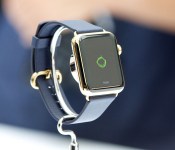
Touch ID, Apple Watch, and the future of projected authentication

With Touch ID and the Apple Watch, Apple is poised to once again revolutionize personal security.
Back in September, before the original Apple Watch introduction, one of the potential features I was most interested in was the ability to project authentication. We got at least one aspect of it with the watch’s implementation of Apple Pay. Hopefully, though, that’s only the beginning.
Trusted Bluetooth devices have been a thing for a while. They’re “something you have.” They can be used instead of “something you know” (password) or “something you are” (fingerprint) for authentication, or they can be used in conjunction with one or both of the others for multi-factor authentication.
To date, however, trusted Bluetooth devices have been too dumb to interest me. What I mean by dumb is that most current devices have no knowledge of their owner. If I take your dongle or smartwatch, I am you, and have access to everything you have access to. That’s a deal-breaker for me.
Neither the iPhone nor the Apple Watch are dumb, though. They’re smart.
It’s part of the contextual awakening:The iPhone has Touch ID, which means that it can require my fingerprint before authenticating anything from unlocking the phone to buying from iTunes to paying with Apple Pay. The Apple Watch has the ability to take Apple Pay authentication from the iPhone and maintain it for as long as skin contact is maintained.
That means both the iPhone and the Apple Watch don’t just know that we have them, but who has them — no fingerprint, no skin contact, no authentication. And that makes them very, very interesting.
Soon, HomeKit will let us unlock our homes with our iPhones. Apple’s CEO, Tim Cook, has already said you might one day be able to unlock your car with your Apple Watch.
Why not your Mac? iPhone-based proximity unlocks have been explored by third-party apps for a while, but Apple could implement a Touch ID-based system that could allow for fingerprint authentication prior to an unlock built in at the system level. If an Apple Watch has been authenticated and has remained in skin contact, it could allow for an even more effortless unlock if and when you’re in extreme proximity.
With an API, why not apps? I use 1Password for password management. Up until last year it was easier to use on my Mac than my iPhone, since typing master passwords was a pain and cutting and pasting them was arduous. Now, with iOS 8, the action extension, and the Touch ID API, it’s nearly effortless. It’s so good, it makes the Mac feel tedious.
With trust projection, however, Touch ID on the iPhone — or better yet, skin-contact with the watch — could make 1Password just as effortless. When I’m within a few feet, it’s open. When I’m not, it’s not.
Bank apps, communication apps, secure photo or document apps, the list goes on and on.
For those who want even more security, Apple or apps could require Touch ID or Apple Watch proximity and a password. Combine Touch ID and an Apple Watch and a password, and you have three-factor nirvana.
Security and convenience have been at war for much of the information age. Apple has done a lot, however, to make security more convenient. Based on where they’re going, it seems like just the beginning.
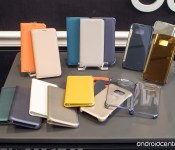
These are Samsung’s first Galaxy S6 and S6 edge accessories

The Galaxy S6 and S6 edge are thin and covered in glass — that may make you want a case.

Samsung’s no stranger to offering a variety of first-party cases for its devices while also partnering with known brands for more “fashionable” choices, and that’s the case here with the Galaxy S6 and S6 edge. Though Samsung hasn’t yet listed all of its accessories for sale considering we’re a month out from the phone’s release, we’ve had a chance to see and use a few of the initial offerings.

Lenovo’s Pocket Projector is an affordable way to pump videos to your wall (or ceiling)
Whether it’s in the kids’ play room or the boss’ boardroom, the Lenovo Pocket Projector is a quick, easy and affordable way to up-size videos for group viewing.

It used to be the only folks who carried around those little pocket projectors were those who got paid to do it — road warriors who have to be able to give presentations whenever, wherever. And they were either big and clunky, or smallish and expensive. Lenovo’s got the best of both worlds in its Pocket Projector, making its debut at Mobile World Congress in Barcelona.

Leaked Spartan browser demoed in new video, shows off Cortana integration
Microsoft’s next web browser, and successor to Internet Explorer, is Project Spartan. The modern browser has been demoed in a video published by WinBeta. They were able to take the leaked app for a spin to see how some of the features worked, including Cortana integration.
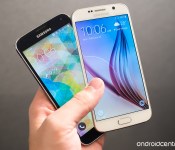
In pictures: Galaxy S6 TouchWiz versus the previous generation

Samsung hasn’t just overhauled its smartphone hardware in the new Galaxy S6. The company’s TouchWiz UI has also received some much-needed attention. It’s much faster than before, with slicker animations and a clear Material Design influence. We’ve already seen some movement in this direction through the Galaxy S5’s Lollipop update, but the differences between the two generations of Samsung UI are pretty striking, even when compared with a fully updated GS5.
We’ve been playing with the Galaxy S5 here at Mobile World Congress, and we’ve had a chance to see all the little changes Samsung’s made to TouchWiz. Some are major, some are minor; you’ll find the more notable ones in our photo essay after the break.
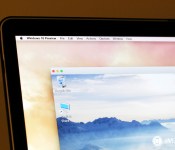
How to install Parallels Desktop and Windows 10 on your Mac

Now that Parallels Desktop supports Windows 10 Technical Preview, you can safely run Microsoft’s new OS on your Mac.
Apple’s Boot Camp software lets Macs runs Windows by restarting in Windows instead of OS X. Boot Camp, however, doesn’t officially support Windows 10 yet. In the interim, there are other ways to get Windows 10 to work on the Mac. One of the best ways is using Parallels Desktop 10. Here’s how!
Apple’s decision to switch Macs to Intel chips in 2006 had a transformative effect on the way software runs on the Mac. Among other things, the architectural similarity to Windows computers makes it possible for the Mac to run Windows software, which is why Apple offers Boot Camp — software that enables Macs to run Windows by restarting and actually operating as a Windows PC.
Boot Camp isn’t the only to do that, however. You can also run Windows inside a “virtual machine” host app like VMware Fusion or Parallels Desktop 10. These apps enable Windows to run at the same time as OS X. So if you’d prefer to use your Mac software to do some things, but you still rely on Windows, you can have both running at the same time.
Windows 10 won’t be out until later this year, but you can download a preview version of it right now from Microsoft’s web site. You simply need to create an account to register as a “Windows Insider” and download an ISO file, a virtual image of a software installer DVD-ROM.
Parallels recently announced an update to Desktop to version 10.1.4, a free update for registered Parallels Desktop 10 users which now supports Windows 10 Technical Preview. Parallels Desktop 10 costs $79.99, but nothing is stopping you from download a two-week trial version from the Parallels web site.
If you don’t want to deal with trial software or shell out the money for Parallels Desktop 10, there are free alternatives, like VirtualBox.
To run Windows 10 Technical Preview with Parallels Desktop
- Download and install Parallels Desktop 10 trial version from the Parallels web site.
- Register to become a Windows Insider and download the ISO file containing Windows 10 Technical Preview. Go for the one labeled “x64.”
- Launch Parallels Desktop. Select New from the File menu. This will start the Parallels Wizard.
- Click on “Install Windows or another OS from a DVD or image file,” then click Continue.
- Parallels should automatically find your downloaded Windows 10 Technical Preview ISO file. If it doesn’t, click the Locate Manually button. Once you’ve selected it, click Continue.
- Copy and paste the Windows Product Key Microsoft lists on the Windows 10 Technical Preview download page.
- Click the icon that describes how you plan to use Windows: For productivity, games, design, or software development (this helps the software configure resources to run optimally depending on your needs). Click Continue.
- Give your virtual machine a descriptive name. Read carefully, and note how much space you need for the installation. Make sure your hard drive has plenty of space, then click Continue.
- Parallels Desktop then goes through the process of installing Windows 10 Technical Preview. This next part may take a while depending on the speed of your Mac.
- Once Windows is installed, Parallels Desktop also installs its own software to integrate Windows better with the Mac. So don’t be surprised to see Parallels Tools install themselves, and watch the virtual Windows environment restart and reset its video settings as it happens.


Have any trouble? Questions? Let me know.
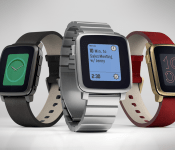
Pebble Time Steel hits Kickstarter today for $250, starts shipping in July
The $299 Pebble Time Steel starts shipping in July and will be available in silver, black, and gold. Early birds can pre-order via Kickstarter today for $250.

Just a week ago, Pebble Time launched on Kickstarter and became the fastest growing crowd-funding project in history. Raising well over their $500,000 goal, massive interest has already been shown in the next-generation device from Pebble. Today at Mobile World Congress, Pebble CEO Eric Migicovsky unveiled a second version of the device, the $299 Pebble Time Steel.
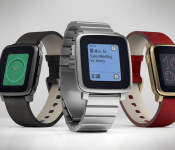
Pebble Time Steel hits Kickstarter today for $250, starts shipping in July
The $299 Pebble Time Steel starts shipping in July and will be available in silver, black, and gold. Early birds can pre-order via Kickstarter today for $250.

Just a week ago, Pebble Time launched on Kickstarter and became the fastest growing crowd-funding project in history. Raising well over their $500,000 goal, massive interest has already been shown in the next-generation device from Pebble. Today at Mobile World Congress, Pebble CEO Eric Migicovsky unveiled a second version of the device, the $299 Pebble Time Steel.

Pebble Time Steel will be available starting in July in black, silver, and gold finishes. While it will retail for $299, early birds can pre-order through Kickstarter for $250. Anyone who has already backed Pebble Time will be able to change their pledge to the Pebble Time Steel without a hitch.
Just like Pebble Time, the Steel version will feature an all-new design along with a new version of Pebble OS. The refined Pebble Time Steel is just 1mm thicker than Pebble Time and is “made from premium materials, and designed for busy professionals who need to accomplish more during their day.”
The color e-paper display will feature the new timeline interface, as well as a built-in microphone for voice commands. The battery is also rated at up to 10 days — even more than that of Pebble Time. Both a leather and stainless steel band will be included as well, and the Pebble Time Steel will support smartstraps, which allow developers to add sensors directly into bands for things like GPS and heart-rate tracking.

Pebble Time Steel hits Kickstarter today, so head over to the Pebble Time page for more info or to get your piece of the action.
Read more on Pebble Time Steel at Kickstater
Press Release
Pebble Announces Pebble Time Steel at Mobile World Congress
Beautiful New Design, Revolutionary 10-Day Battery Life and
an Open Platform for Smartstraps
Barcelona, Spain (March 3, 2015) — On stage at Mobile World Congress, Eric Migicovsky, Pebble CEO, today unveiled Pebble Time Steel, a beautifully-designed watch for iPhone and Android, with a ground-breaking battery life of up to 10 days. The announcement comes on the heels of Pebble Time, which launched on Kickstarter on February 24, 2015, and quickly became the fastest growing crowd-funding project in history. All Kickstarter backers have the opportunity to easily upgrade to the new Pebble Time Steel, while maintaining their spot in line.
Premium Materials and Incredible Battery Life
Launched last summer, the original Pebble Steel brought sophistication and design to smartwatches. Pebble Time Steel follows in these footsteps, combining beautiful, premium design with the powerful new technology of Pebble Time. Similar to Pebble Time, Pebble Time Steel runs the new timeline interface, has a color e-paper display, built-in microphone for quick voice replies and notes, and is water resistant. Where Pebble Time has a sporty look and feel, Pebble Time Steel is refined, made from premium materials, and designed for busy professionals who need to accomplish more during their day. Pebble Time Steel comes in three styles: silver, black, and gold finish.
Everything from the ergonomic, curved watch case, to the bezel and machined buttons is made from stainless steel. The watch is the same dimensions at the Pebble Time, just 1mm thicker; the lens is crafted from scratch-resistant Gorilla Glass; it includes both a fine leather band and a stainless steel strap; and, most notably, has an increased battery life of up to 10 days — longer than any smartwatch on the market.
“We want users to be able to choose the watch they want for any situation,” said Migicovsky. “That’s why we’re so excited to introduce Pebble Time Steel today. It unites modern technology and world-class design — everything that is great about Pebble Time and Pebble Steel in one beautiful watch.”
Creating an Open Platform With Smartstraps
Have you ever wanted to go for a run without your phone and still be able to track your speed and stats on Pebble? Want a Pebble watch with a battery life of more than four weeks? Today, we’re introducing an open hardware accessory platform for Pebble Time that will open a future for these and more.
Both Pebble Time and Pebble Time Steel include a quick release band mechanism and a smart accessory port on the back of the watch that enable hardware developers to build electronics and sensors that interface directly with apps running on Pebble Time. Straps can be changed in a matter of seconds, so you can utilize different sensors if you’re at the gym or at the office. With an open platform for smartstraps, Pebble is bringing ultimate customization to your wrist.
“In order to add a heart rate monitor or GPS directly into a smartwatch, you have to make serious compromises on design and battery life. And it’s likely that if you buy a watch with a certain sensor today, it will be out of date within 12 months,” said Migicovsky. “We are creating an open platform that will enable anyone to build smartstraps for Pebble watches. For example, imagine a smartstrap with a GPS chip or a heart rate monitor, that transforms Pebble Time into a high-performance fitness watch; or a strap with a pollution sensor inside, that keeps track of the environment around you; or a strap with an extra battery that extends the battery life of Pebble Time past 7 days. We can’t wait to see what people develop; the opportunities are endless.”
Pebble has partnered and is working closely with accessory makers and designers on smartstraps. Initial shipments of smartstraps will begin later in the year, and full details can be found on our developer blog (http://developer.getpebble.com/blog). Hardware hackers and interested accessory partners can contact partnership@getpebble.com.
Overwhelming Support from the Pebble Community
Pebble Time and Pebble Time Steel would not exist without the herculean support and feedback from Pebblers around the world. “We continue to be humbled and grateful for the incredible support of the Pebble community,” said Migicovsky. “Our goal is to continue making our supporters happy with amazing smartwatches that simplify your daily life and help you accomplish more.”
Pebble Time Steel starts shipping in July and includes two straps (leather and stainless steel) for just $250, which is exclusive to Kickstarter. The regular retail price will be $299. Anyone can back Pebble Time and Pebble Time Steel on Kickstarter until Friday, March 27, 2015, and all existing Kickstarter backers have the opportunity to upgrade to the new Pebble Time Steel, while maintaining their spot in line.
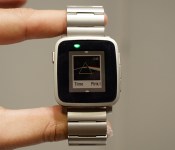
Pebble introduces a premium Steel version of its color smartwatch

It’s only been a week since Pebble introduced Pebble Time, its second-generation color smartwatch, and there’s already a new version of it up for grabs. Today at Mobile World Congress, the company has just announced Pebble Time Steel, a premium all-metal iteration of the Time. Indeed, the entirety of the Time Steel — from the bezel to the buttons — is made out of stainless steel and is available in silver, black and gold finishes. It has exactly the same dimensions as the Time but is about 1mm thicker. That isn’t so bad, especially since the Time Steel apparently has a longer battery life of up to 10 days instead of 7. As if that wasn’t luxurious enough, when you buy a Pebble Time Steel, you’ll get two straps instead of one: a stainless steel band plus a leather one.
Oh, and that’s not all. Remember that smart accessory port that’s on the Pebble Time? Well, today Pebble is also announcing a new open hardware accessory platform that developers can use to create “smartstraps” for the watch, using that smart accessory port to further extend the watch’s functionality. Simply use the quick release trigger on the Time (and of course, the Time Steel) to swap out the straps and the smartstrap would have an additional flap that attaches to the smart accessory port.

As for what kind of new functions will the straps bring? Well, CEO Eric Migicovsky suggested perhaps a GPS strap, or one with a heart monitor, or even a battery strap that extends the watch’s battery life to three or four weeks. He says that instead of integrating these sensors — which are often obsolete in a few years anyway — into the watch, it’s more efficient to have them be modular. Pebble is already working on partnerships to come up with some of these smartstraps, but it also wants to hear from its community about additional ideas.
“It’s one of the reasons why we wanted to launch the Time on Kickstarter,” says Migicovsky. “Our plans involve more than just people buying the watch. We want to involve the community, to come up with the different straps.” He says that we’ll likely see some of the early smartstraps by the end of the year.
As for the Pebble Time Steel, if you’ve already backed the Pebble Time but now you’d rather have the Steel instead, don’t worry. Migicovsky says you can always upgrade the amount of money you’re kicking in without losing your spot in line. The special Kickstarter price for the Time Steel is $250 (and yes, you get both the leather and steel bands for that price), while the final retail cost is $299. The Pebble Time Steel will, however, ship in July rather than May.
Photos by Carlos Martinez
Filed under: Wearables
Google Play is celebrating its third birthday with apps, music, and move sale

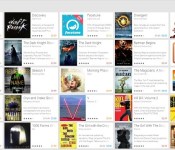
Google’s third birthday is nearly upon us, and in celebration the storefront is giving us great deals on a host of movies, books, music, and even some apps. While last year’s birthday sale saw mostly free games with reduced costs for in-app purchases, this time around Google is slashing the prices on some of its premium apps as well.
It looks like three premium apps on are on offer for just $.10: Runstastic Situps Pro Trainer, Runtastic Running Pro, and Facetime. A few free apps with in-app purchase discounts are present here too, such as Racing Rival’s offer for 80% off on its in-game BMW M3 GT2 and Wunderlist’s reduced pricing for an in-app upgrade to the pro version of the app. Outside of the apps front, you’ll find a bunch of movies and television shows including Breaking Bad’s first season for $9.99 in HD, the Dark Knight for $2.99 and many more. You’ll also find tunes from Beyonce, Daft Punk and others, as well as a bunch of bestselling books.
For the complete list, you’ll want to head on over to Google Play. Keep in mind that this list is for those of us in the United States. Last year’s birthday sale saw quite a bit of variance from region to region, so it’s possible that some (or all) of these deals could be unavailable or replaced with other deals in your area.

