


Tim Cook talks privacy, Apple Watch, and Steve Jobs in new interview
Apple CEO Tim Cook recently gave an interview with German newspaper BILD, speaking on topics ranging from the Apple Watch to data privacy, and Steve Jobs.
The interview with Cook hit on many topics, including the importance of privacy. He talked about the security and privacy of Apple Pay, which has yet to launch in Germany. He also spoke about the need to keep communications private, according to BILD (translated from German):
“I feel very close to the Germans because they share my views on privacy. We do not read your e-mails, we do not read your text messages – and we find it unacceptable if someone does that.”
Cook also spoke about the Apple Watch, giving examples as to how he uses it in his daily life:
“I wear the stainless steel watch and that’s the white sports armband,” he says, and pulls the sleeve of his shirt up. “I wear the watch all day when I’m at the gym, at work and at home.” He takes them only at night from the office.
He even touched briefly on the rumors of an Apple Car, saying that he has seen the reports, and is unable to comment.
Finally, Cook spoke about things that he’d learned from the late Steve Jobs:
You’ll probably never read in any book, because people focus on other parts of his personality. He taught me that the journey is the destination. That the target is not a single presentation, the delivery of a product or an award. It is the path itself. “
Source: BILD (paywall)

Windows Phone 8.1 Update 2 will add support for Bluetooth keyboards
Microsoft has confirmed, via a product page on its newly revealed Universal Foldable Keyboard, that Windows Phone 8.1 Update 2 will add support for Bluetooth keyboards.

Out This Week on Xbox One: ScreamRIde, OlliOlli, Zombie Army Trilogy and more!

March is here and with it comes some top-notch indie games. This week, ScreamRide will finally hit Xbox One as well as the highly anticipated game OlliOlli. If those don’t sound like they’re up your alley, we have a couple of other indies heading our way this week as well. So head down below to see for more info.
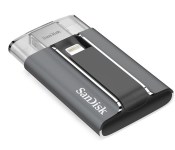
SanDisk launches 128GB version of its iXpand Flash Drive for the iPhone and iPad
SanDisk is now selling a 128GB version of its iXpand Flash Drive that’s been made for the iPhone and iPad.


SanDisk previously launched versions of the iXpand Flash Drive with 16GB, 32GB and 64GB of storage. The company said:
In response to customer demand, SanDisk is now offering a new 128GB iXpand Flash Drive. When used with the new iPhone 6, iPhone 6 Plus, iPad Air 2 or iPad mini 3 128GB models, the new iXpand Flash Drive instantly doubles the available storage for photos and videos, music, and other multimedia files. The well-rated and full-featured iXpand Sync app, available on the App Store for iPhone and iPad allows users to automatically sync, backup and transfer photos and videos. It launches when the iXpand Flash Drive is plugged into an iPhone or iPad.
SanDisk also said the iXpand Sync app has added support for Apple’s Touch ID sensor for iOS 8 that will allow owners of the iPhone 6, iPhone 6 Plus, iPhone 5s, iPad Air 2 and iPad mini 3 to open, encrypt and decrypt apps and files on the iXpand Flash Drive with just their fingerprint. The 128GB version of the iXpand Flash Drive is on sale now for $149.99.
Source: SanDisk

OneShot for iPhone makes it easy to highlight and share your screenshots
OneShot is a new app for iPhone that lets you highlight and share your screenshots. Meant to help you share articles, OneShot lets you highlight your favorite passages, customizing how your selections will look when you share them.

OneShot auto-detects screenshots taken on your iPhone. Select the screenshot you want, then get to editing. You can crop the image down to your favorite section, and highlight particular passages. You can choose your background color by sliding your finger over the color pad.
Finally, you can select the source that should be detected from your image. Then you can share your final image on Twitter or save it to your Camera Roll. OneShot is available on the App Store right now.
- Free – Download Now

IRCTC Windows Phone app updated with a few new features

The Indian Railway Catering and Tourism Corporation (IRCTC) app for Windows Phone has been updated today, with a few minor but interesting features added for users of India’s railroad system. The update allows users to login to the app using their IRCTC password or TPIN, which can be generated from the website. Also new is the ability to serve toast notifications, allowing users to get notified about upcoming travels even when they’re not in the app.

Epic Games ditches monthly fee for developers who use Unreal Engine 4

Epic Games has announced that it is getting rid of its $19 monthly fee for developers who want to make games using Unreal Engine 4. Epic will still take 5% of any gross revenue generated by an Unreal Engine 4-based app or game every quarter after it reaches $3,000 in revenue.

BBM for BlackBerry 10, iOS and Android updates now available

As expected, thanks to the earlier announcement, BBM has now been updated for BlackBerry 10, iOS and Android. The feature list for this update is rather large and includes custom BBM PINs, Android Wear support, Password protection and landscape mode for iOS users plus, you can now share photos in group chats and have multiple BBM channel contributors. You can have a look at the full rundown below or just head on into your respective app store and grab the update right now.
nvAlt: A Mac note taking text editor

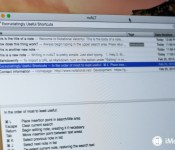
nvALT lays somewhere between text editor and note-taking app; it’s a free-to-use Mac app for web-heads.
The app is a fork of the open-source app Notational Velocity, an application designed to let you write notes on your computer. The idea is to let nvALT be the receptacle of whatever fragments of information you want to write down so that you can easily find them later.
Notational Velocity already sports a long laundry list of features like multi-line preview, links to other notes using double brackets, Spotlight-searchable metadata tagging, and more. nvALT builds on that successful foundation by adding support for MultiMarkdown 3, an HTML source code tab, customizable HTML and CSS files for the preview window, URL conversion to Markdown, and more. This makes nvALT a great alternative note-taking app for the many of us who work and live on the web.
Composing new notes on nvALT is as simple as beginning to type in the upper search area. nvALT tries to match what you’re typing with the contents of your existing notes; at any time, you can hit the return key to create a new note with that search word as the title.
This makes it easy to organize your files by name, as long as you come up with a note naming system that makes sense. nvALT also supports tagging, allowing you to tag your notes with keywords for search purposes later on.
nvALT is thoroughly optimized to keep your fingers on the keyboard. There are keyboard shortcuts for just about every feature and function in nvALT, so you never have to resort to mouse or trackpad-clicking to get what you need.

There’s no book/folder metaphor in nvALT, as there is within many of the other note apps I’ve tried. nvALT focuses on maintaining a flat database of everything you’re working on. In fact, all the files are kept by default in a single database that you can secure with encryption, if you choose. You can store files as plain text, RTF, or HTML-formatted files, though nvALT warns you that you’ll waste disk space with the latter two options. If you work a lot in Markdown, as I do, nvALT works exceedingly well there.
nvALT saves continuously as you write; there’s no separate or distinct save function. I had absolutely no trouble quitting the app and picking up right where I left off at any time when I was using it. nvALT also makes it possible to quickly shunt your notes to other apps; I can send a nvALT note to BBEdit, for example, for thorough syntax checking and other functions that may be more suitable within a full-blown text editor.

Where nvALT comes up short compared to other note taking apps I’ve looked at recently is in multimedia support: It’s more a note-optimized text editor; for example, clicking and dragging artwork into it will embed the file location, but won’t embed the image.
As an open source project, nvALT is free to use, though the authors encourage donations if you find it useful.
- Free – Download now

T-Mobile shows its version of the Lumia 640 in new video
T-Mobile has already announced it will begin selling Microsoft’s upcoming Lumia 640 smartphone sometime later this spring. Today, the wireless carrier released a video showing their version of the smartphone, which was filmed with another Lumia 640 with its 8MP rear camera.

