


Microsoft’s Spartan browser set to arrive in the next Windows 10 preview

The next version of Microsoft’s web browser, Project Spartan is expected to hit the next Windows 10 preview release. Microsoft’s Kevin Gallo, the technical lead for Windows universal apps, confirmed the news today at Mobile World Congress, though an accurate date of release has yet to be provided.
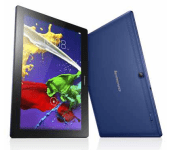
Lenovo launches two new Android tablets for under $200

Lenovo has just launched the Tab 2 A10 and the Tab 2 A8 during its event before the MWC officially kicks off. The devices are budget oriented and carry a price tag of under $200.
As the name aptly suggests, the Tab 2 A10 is a 10 inch tablet while the Tab 2 A8 is an 8 inch model, catering to the large and medium sized tablet segment respectively. Both tablets pack speakers with Dolby Atmos technology on board, so they’re quite capable as far as multimedia options are concerned.
The Tab 2 A10 comes with a HD IPS display, so don’t expect pixel density to be very high here. It’s packing a thickness of 8.9mm while weighing 509 grams. There’s an unnamed MediaTek chipset on board here, an 8-megapixel camera on the back, Android 4.4 KitKat (Android 5.0 update soon) and a 7,200 mAh battery which according to the company will last 10 hours. The American markets will also get an LTE model of the tablet. The device will be available for purchase starting next month in pearl white and midnight blue for a sticker price of $199.
The Tab 2 A8 is essentially a smaller variant of the Tab 2 A10 carrying most of the same internals. The display resolution is the same here, which should mean improved pixel density. There’s a 5-megapixel camera on the back, a MediaTek made quad core chipset and an expandable storage card slot.

Unlike the Tab 2 A10, the 8 inch model comes with Android 5.0 Lollipop by default, which could boost performance to a great extent. The tablet will be LTE capable much like its bigger sibling, but will also be capable of making voice calls. The Tab 2 A8 has been priced at $129. The tablet will be sold in pearl white, ebony, midnight blue and neon pink for $129. Availability of the tablet is slated for June.
Lenovo also launched a budget Windows 8.1 tablet called the Miix 300 which has a price tag of $149. This tablet will be available for purchase from July this year.
Come comment on this article: Lenovo launches two new Android tablets for under $200

The Big Picture: HTC’s Vive VR headset up close and personal
 This is what HTC’s Vive VR headset looks like in real life. It’s not a dummy model, those sensors are fully functional. It’s on my actual head. The first thing you may notice (if you don’t, check the gallery below), is that it’s looks a little bigger than the Oculus Rift. Or at least, thanks to the height of the sensor-housing faceplate, it feels that way. Those sensors are also exposed, a bit like they were on Oculus’ Crystal Cove prototype at CES 2014. Take a look around the headset from different angles, and you’ll see that HTC may not have deviated from the current virtual reality design script too far, but at the same time it doesn’t feel entirely derivative. Can this thing blow are minds like we hope it will? Is the VR race now officially on (given, you know who’s newest headset has just debuted too)? We’ll let you know once HTC officially pours its Valve-powered VR into our eyes later in the week.
Google’s new mobile payment platform is called Android Pay

It’s shaping up to be a big year for mobile payments, what with Apple Pay enjoying rapid adoption and Samsung finally getting in the game too. Google also has a presence, but it’s only very recently decided to ramp up its efforts in this space. Last week, we saw the company team up with AT&T, Verizon and T-Mobile to preload its Wallet mobile payment app on new Android phones, and now it’s creating a new framework to power payments across its OS.
Speaking at Mobile World Congress in Barcelona, Google SVP Sundar Pinchai confirmed the existence of Android Pay, a platform that will allow developers to build payments into their apps. Don’t think of it as a separate app like Wallet (especially as Wallet will utilize the Android Pay platform), but as an OS-level service that makes it easy for app makers or retailers to let you to buy things using your Android device.
While Apple Pay lets iPhone users purchase goods in physical stores using NFC, it also provides tools to let retailers offer online checkout tools using its platform. Pinchai didn’t go into too much detail as to how Android Pay will work, but did confirm that it will offer similar features to its rival. One is the use of tokenized card numbers, which reduce fraud by generating a one-time credit card number for each transaction. It’s also a standard that Visa, Mastercard and American Express all support.
Filed under: Cellphones, Software, Mobile, Google

How to choose the right app for you
For those of us that own a smartphone, whether it be an Apple or Android, using apps is part of our daily lives. Can you imagine, 10-15 years ago, not being able to check your Facebook status or having to rely on a traditional camera to capture memories? Remember the hassle of visiting a local pharmacy and pay extra to have your film developed in an hour and in color?
I am reminded of the Apple commercial that would show various tasks that a person does and it ends with, “There’s an app for that.” Now, there’s quite literally an app for almost everything and anything.
Every day a new app is being uploaded into Google Play and iTunes hoping to attract users. While some developers do it strictly for fun, many rely on it as a stream of revenue.
Seasoned smartphone users will recognize that some of these new apps happen to be existing titles but maybe with different style, graphics, or fonts.
Take, for instance task lists. There are a lot of them. Examples that immediately come to mind include Evernote, Google Keep, Todoist, and MarkO. Why should I pick one over the other? Or, which is the right one?
Other example of many of the same type of apps include calendars, photo filter apps, keyboards, finance apps, email apps, virus and malware apps, launchers, etc. The list just goes on and on.
Let’s look at the steps you can take to help you find the right apps. As you’ll find, it’s not unlike buying a car or new tech gadget.
Things to look for when choosing an app from a pool of candidates:

Platform support
Is the app available on both iOS and Android? You might want to make sure that at the very least, the app is available in both stores. This way, if you were ever to decide to change platforms (switch from iOS to Android or vice versa), you will still be able to access your information or account details without having to start from scratch.
Online experience
Is there a website for the app? Most of the time, for my task lists, I like to type everything on the website and just let the app sync to my phone. Also, having a website can also give you a little more detailed information about the app and who the developers are.
A full web experience can be helpful should you lose your phone or change to a different platform. Additionally, you can sometimes chat or interact with developers, read FAQs, and generally learn more about the app or game.
Do your homework
Have you read any reviews or seen how many times the app has been downloaded? My rule of thumb is that if at least 51% of all those that reviewed the apps gave it at least 3 stars or higher then I am more likely to at least download it and give the app a try. This is regardless of who the developer is and or how many times it has been downloaded. You may have your own rules, of course.
In dealing with task and note apps, remember that Evernote has been around longer than many of its competitors. It’s perhaps the very reason it could outnumber other similar clients by a 3:1 ratio. In other words, don’t rely too much on overall download counts.
No matter what has been said about the app, I tend to download the app anyway and give it an honest try. Think about when someone told you they didn’t like a particular restaurant. Perhaps you tried it and now it ‘s your favorite spot.
If I can’t get the app to function the way I need it to in the first few tries or days I simply delete it. No use having all these unused apps hogging up all the precious space on my phone right? If it was an app that you liked but could not get it to work at first, keep tabs on it. Sooner or later, it may work for you. It’s possible that your newer phone acts a little wonky and a simple bug fix could alleviate the issue.
Finer details
Let’s talk, for a moment, about cloud storage options. How much storage space are you allotted for photos and files before having to cough up precious money? Sure, most players give you a certain amount for free, but nearly all of them have some sort of limitations.
Indeed, this is something that most people don’t really think about too much because most of the time, we’re downloading games and cameras that allot you only so much space. I am talking about apps such as Dropbox, Box.com, Google, OneDrive, and even iCloud.
Personally, I take a lot of photos, and most of the time, they get uploaded to Dropbox and Google for safe keeping. However, I am at the point though with Dropbox that I am reaching my maximum. If I want to continue to upload any more files with Dropbox, I will have to pay an extra $37.50/month.
Sure, I can go in and delete duplicates or blurry photos but that will only probably give me a small amount back. More importantly, it will take up valuable time. Compare my needs to what Google offers at $1.99/month (100GB) and it makes sense.
Brand affinity
Are you loyal only to certain developers? When it comes to specific apps like word games, I like to stick with Zynga. As I see it most of the clones out there really don’t cut it. Perhaps you’ve got a brand or developer who plays nicely with others in the space. If you’re choosing between multiple companies on an app, look deeper and see if they are tied up with someone you’re fond of… or maybe not so fond of.
Up-front and long-term costs
Is free really free? Keep in mind that even though there are many apps that are free, full functionality may be limited unless you are willing to spend the full $4.99. Some apps may charge you a one time upgrade fee, but others (Evernote, Spotify, etc) might require a minimum monthly plan.
Developers want to give you a taste of what their app can offer. The app can offer anything from more better protection of your Android phone, bonus bombs for your games, or more space on their servers to store your files. Depending on what’s most important to you it may be easy to justify these costs.
Many developers create apps on a daily basis mainly to give you as a user, easier ways to manage time and tasks. While you don’t have to try every single app that comes out, do take the time to see if a new app will help make life a little more simple for you. It is important to make sure that the app does what it says and that it will in fact help you accomplish your goals.
The post How to choose the right app for you appeared first on AndroidGuys.

Apple Watch Featured in Hong Kong Fashion Magazine ‘East Touch’
Apple Watch continues to make its international debut in magazines worldwide with a new cover appearance and multi-page spread in Hong Kong fashion magazine East Touch this month. The latest March issue of the magazine features the Apple Watch and Apple Watch Sport being worn by several models in various lifestyle shots.

In the past few months, the Apple Watch has made magazine debut in a range of other publications such as Vogue and Style as part of a marketing campaign leading up to the wrist-worn device’s launch in April. Apple is expected to provide more details about the Apple Watch at its highly-anticipated “Spring Forward” media event on March 9th at the Yerba Buena Center for the Arts in San Francisco.

Google’s Titan drones to take maiden flight this year

Speaking at the Mobile World Congress this morning, Google’s Sundar Pichai said that its Titan drones would be conducting their maiden test flight later in the year. Google is using the project to asses viability of providing internet access from above, similar to Project Loon.
Google purchased Titan Aerospace back in April of 2014 after showing an interest in the company’s drones, which can maintain high altitude for prolonged periods of time with little energy input. The Titan team is currently developing a new ultra-lightweight solar-powered drone that is capable of hovering in the stratosphere for prolonged periods of time.
The solar-powered drones would then be used to beam internet services down to the surface below, boosting bandwidth in a local area, providing access to locations previously without internet services, or assisting in areas where the internet has been taken offline, such as during a natural disaster.
Pichar suggests that Project Loon and the Titan drones could be run side by side, providing wide coverage from a balloon and zeroing in on target areas with Titan aircraft. Google eventually intends to partner up with network carriers to provide services from both the ground and air, giving total coverage to customers.

Google is launching their own payments framework: Android Pay


Android Pay is real, and it’s going to power mobile payments across Android. But it’s not so much an app or even user-facing feature, as a service that developers will be able to leverage as an API framework to build payments into their own apps.
Cyanogen Inc rebrands again, announces new deal with Qualcomm
It’s barely been 11 months, but Cyanogen Inc has decided to rebrand itself again, ditching its hexagonal logo for a new logo, as seen above. While the old logo represented three tenets of their mission statement, we’re not quite sure what this logo stands for, but its arrival is made all the more important by its […]
The post Cyanogen Inc rebrands again, announces new deal with Qualcomm appeared first on AndroidSPIN.
Which do you prefer: HTC One M9 or Samsung Galaxy S6?
MWC 2015 has kicked off in typical style with bucketloads of new tech being thrown at us from all directions. But above it all is the narrative that defines every MWC in recent memory, the battle between Samsung and HTC. Both manufacturers released their flagship devices today, the Samsung Galaxy S6 and HTC One M9, […]
The post Which do you prefer: HTC One M9 or Samsung Galaxy S6? appeared first on AndroidSPIN.
 AIVAnet