


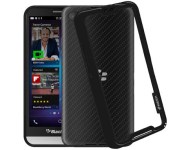
Grab this protective bumper case for BlackBerry Z30 today for only $4.95

Made from a glossy and matte double molded polycarbonate, this durable frame conforms perfectly around the BlackBerry Z30 to provide casual protection against minor drops. The bumper even slightly elevates the phone from flat surfaces, keeping it safe from unwanted scratches and scuffs.
Apple Watch reportedly has time-only ‘Power Reserve’ mode
An ultra-low-energy ‘Power Reserve’ mode could help Apple Watch time keep ticking.
Apple has repeatedly said the Apple Watch will last about a day, which means you’re going to want to charge it every night so you don’t have to take it off when it actually runs out — be it the middle of the night when you’re sleeping or early the next day when you’d rather be using it. If something happens and you can’t get to a charger in time, however, there might be a time-only “Power Reserve” mode to give you an extra buffer. That’s according to Brian X Chen at the New York Times
Apple has said the watch battery is estimated to last a full day, requiring a user to charge it at night, similar to a smartphone. The company also developed a yet-to-be-announced feature called Power Reserve, a mode that will run the watch on low energy but display only the time, according to one employee.
Chen claims the Apple Watch project was codenamed Gizmo, and that Apple also experimented with solar charging before settling on the inductive charging it showed off last September at the watch’s introduction.
Battery life remains what you use to pay for every other feature. Want a full color Retina display? Want Bluetooth and Wi-Fi? All of it has to be paid for in battery life, and every feature that lights up the screen or radios is part of the cost. The trick is balancing battery life so that we get the features we want and can use them for an acceptable amount of time.
Apple is holding a Spring Forward event on March 9 where more information on the Apple Watch will be made available.
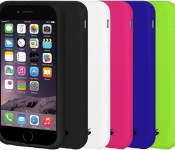
For only $4.95 today you can pick your favorite color skin for iPhone 6!

The Amzer skin case is made out of 100% premium silicone and is a great, lightweight option for protecting your iPhone 6. The smooth silicone gives you a sure and lasting grip on your device and minimizes slides on flat surfaces.
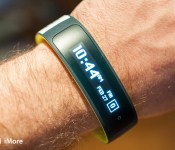
HTC and Under Armour announce iOS-compatible Grip fitness tracker

We’ve patiently been awaiting the first wearable from smartphone (and tablet) manufacturer HTC. Today, we’ve got it — and it supports the iPhone.
The HTC Grip is a GPS-capable fitness tracker that’s in the same sort of category as the Microsoft Band and entries from Fitbit or Jawbone. (A watch, folks, will have to wait, apparently, though it’s not like we didn’t see this one coming.) It connects to phones running Android 4.3 and up, and iOS 7 and up, and syncs with Under Armour’s UA Record application, which just gained millions of more users after UA purchased My Fitness Pal and Endomondo.
The Grip is about 0.89 inches wide on the wrist and done up in that sort of fitness-band tracker rubber you’d expect. It’s got a 1.8-inch PMOLED display that presents text as a relatively low-resolution black-and-white message, with some basic symbols to help guide you through the touchscreen. It doesn’t sport a heart-rate sensor but can connect to other Bluetooth-enabled fitness accessories.
Grip will come to North America this spring in lime green or deep teal.
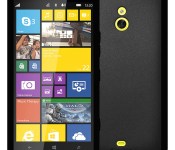
Save 50% today on this skin case for Nokia Lumia 1320

Made from multiple thermoacrylics, this Lumia 1320 skin case is highly elastic and resistant to oils. Say goodbye to annoying fingerprints! The back features a matte finish with a glossy edging that enhances the grip around your device. Available in black or white today for only $4.95!

iPhone slow? Here’s how to speed up iOS 8!

No matter which generation iPhone you have, there are ways to help keep scrolling smooth, apps launching fast, and the system snappy.
Whether you’re still worried about updating to iOS 8 on your iPhone 4s, or you simply want to make sure your brand-new iPhone 6 or iPhone 6 Plus stays as quick as the day you bought it, here’s how to both reverse slow down and maintain speed.
Note: We’re staging these from easier to most involved. Go through the list, try each one in turn, and do as many as you feel comfortable with. The older your iPhone, the more you’ll likely have to do.
Update your software

Every iOS update contains performance improvements, including improvements specifically for older hardware. To make sure you’re getting all the optimizations possible, go to Settings > General > Software Update and make sure you’re running the latest, greatest version. If you’re low on storage, or want to clean out “Other” storage, try doing the update using iTunes.
Hard reboot

Make all the Windows jokes you like, but sometimes a hard reboot really does set things right. If it’s been a while since you last reset everything, processes might have gone rogue, temporary data might have failed to purge, and some level of overhead might have built up. To clean out the bits, hold down sleep/wake and Home until the screen goes black and the Apple logo shows up.
Clear caches and data

If the Safari web browser is sluggish, you can clear the cache by going to Settings > Safari > Clear History and Website Data. You can even do it on a site-by-site basis by tapping Advanced > Website Data, and then choosing the sites you want to remove.
- How to clear Safari history and cookies on iPhone
- How to clear stored website data in Safari for iPhone
Delete apps you’re not using

Just because you’re no longer using an app doesn’t mean it’s no longer using your iPhone’s resources. Depending on the app, it might have background processes, background refresh, background notifications, and other tasks running. If you don’t need it, delete it. You can always re-download it again later.
Turn off features you’re not using

Anything that runs on your iPhone will use processing cycles. That means anything you turn off will free up those cycles. If you don’t want to, or can’t, delete an app, you can still turn off its push notifications, background refresh, and other processes. Not surprisingly, it’s the same steps you go through to preserve battery life.
Restore as new

This is the nuclear option. Instead of updating in place, or restoring from an age-old backup, you start fresh and clean. You can re-sync accounts and content, including apps, from iCloud and iTunes, Google, Dropbox, and other online services, but you’ll otherwise be starting over from scratch.
Your performance tips?
An iPhone 4s will never be as fast as an iPhone 6 — the hardware has simply evolved at an amazing rate over the years. When you next upgrade your iPhone, you’ll get the benefits of all those advances. For now, however, if you want all the new iOS features, Apple will continue to fine-tune them every release, and there tips will help you get the most from those releases.
If any particular performance tip has served you best, or if we missed your favorite, let me know in the comments!
- Secret Siri commands
- Secret Safari shortcuts
- Secret Mail shortcuts
- Secret keyboard shortcuts
- Secret power-saving shortcuts
<!–*/
.imageleft
float: left;
margin: 0 25px 0 0;
.imageright
float: right
margin: 0 0 0 25px;
.screenshot-16×9
height: auto;
width: 88.97%;
.screenshot-16×9.imageleft,
.screenshot-16×9.imageright
width: 50%;
.screenshot-4×3
height: auto;
width: 66.66%;
.screenshot-4×3.imageleft,
.screenshot-4×3.imageright
width: 50%;
/*–>*/
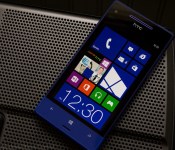

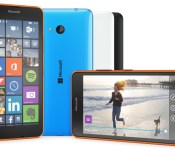
Microsoft’s Lumia 640 and 640 XL are its new budget phone stars

After mistakenly letting the cat out of the bag yesterday, Microsoft has officially unveiled its latest Lumia phones at Mobile World Congress — and they’re pretty tempting if you’re looking for a good deal. The new Lumia 640 and 640 XL (can you guess the difference?) are the company’s latest budget phones, effectively replacing last year’s Lumia 630 and 635. They both include a quad-core Snapdragon processor running at 1.2 gigahertz, a gigabyte of RAM, and 720p display resolutions, but they differ in screen size and camera prowess. The Lumia 640 has a 5-inch screen and an 8 megapixel shooter, while the XL — Microsoft’s first budget phablet — packs in a 5.7-inch screen and a 13MP Zeiss-lens camera. That’s a significant bump from the weak 5MP option in last year’s phones, but without a big price increase: The 640, expected in May, will start unlocked at around $155 for its 3G version and $177 for the LTE model. And if you want to get your hands on the XL soon, you’re in luck. It’s coming later this month for around $211 (3G) and $244 (LTE). As usual, final pricing is up to the retailers.
Just as we saw with the new Moto E, both new budget Lumias include some compelling upgrades that were previously relegated to higher-end phones. In addition to the camera improvements — which also includes new front-facing cameras — they sport significantly bigger batteries than the 630 (2500 mAh for the 640 and 3000 mAh for the XL). Both phones can also be upgraded to Windows 10 down the line, and they come with a year’s worth of Office 365 (which includes a terabyte of OneDrive cloud storage).

The Lumia 640 XL
In my brief hands-on time with the phones, I was surprised to find that they both felt pretty comfortable in my hand. Yes, even the giant 640 XL. Microsoft’s head of mobile device marketing, Ifi Majid (a Nokia transplant), tells me the company learned a lot from the massive 6-inch Lumia 1520, a gorgeous phone that was a beast to hold. Microsoft’s designers ended up settling on a 5.7-inch screen as the upper limit for how big they could make a phone without sacrificing comfort. The 640 XL’s rounded edges are also far more forgiving in your pocket than the 1520’s sharper angles.
If you’re hoping for a new Microsoft flagship phone though, expect to wait a while. According to Majid it “doesn’t make sense” to release a new flagship until Windows 10 comes out later this year (there’s no firm release date yet). A killer flagship will be a huge draw for Windows 10, there’s no doubt about that. But such a long wait leaves Microsoft with nothing to show as every other phone maker trots out their latest wares. We might even end up seeing the next iPhone before it’s revealed. At this point, the six-month old Lumia 930 is the best phone Microsoft’s got (we may eventually see a minor upgrade in the form of a Lumia 940, though).
While they’re not as flashy as the latest high-end phones being announced this week, Microsoft’s new Lumias prove one thing: It’s going to be a pretty damn interesting year for budget phones.
TinyPlanet lets you turn your landscape photos into a sphere – 1000 free copies available
There are plenty of photo editors around to let you add effects to your photos. There’s a native photo editor on BlackBerry 10, while there are lots of apps to be found in BlackBerry World. Usually, they let you add filter effects, stickers and text, amongst other things. However, this app, TinyPlanet, offers to turn your landscape or panoramic shots into spheres that look like tiny planets. Hence the name for the app.

BlackBerry outlines its cross-platform strategy with BlackBerry Experience Suite
BlackBerry today, unveiled its software and services vision to infuse BlackBerry’s unmatched power of productivity, communication, collaboration and security across all smartphone and tablets running iOS, Android, and Windows operating systems, giving users the unprecedented ability to work seamlessly and securely across any device.

“BlackBerry’s core values of security and productivity are more in demand than ever – as we demonstrated with the successful expansion of BES12 and BBM to other platforms,” said BlackBerry CEO and Executive Chairman John Chen.
“Flexibility without compromise is what current and former BlackBerry users tell us time and again they want from their mobile device. They want BlackBerry’s legendary security and core productivity and collaboration capabilities while still being able to choose a device that matches their lifestyle and personality.”
Chen added: “We will continue to look for opportunities to broaden our software footprint in the market. Our goal is to be wherever our users need and want us, with our software suites, whether that’s on an iPhone or a BlackBerry Classic.”
As noted in the press release, this is ‘a major company-wide initiative in BlackBerry’s commitment to build out its robust software portfolio’ that will ultimately tailor BlackBerry’s unique security and collaboration features to any mobile device.
 AIVAnet