



Xiaomi’s Mi5 gets another leak with fingerprint scanner in tow
 With CES just around the corner and Xiaomi set to show off the Mi5, and as we wind down the days to that fateful announcement we’re going to be seeing a lot more of the device in the form of leaks and rumors. Today is no different as we’re seeing a rumor that the new Mi5 in white, along with a fancy feature in tow.
From what we see by the leaked photo (above), the phone looks almost Galaxy-esque in design and like both the iPhone and Galaxy series, will sport a fingerprint scanner on the home button. The scanner will function much like TouchID and Samsung’s fingerprint scanner. One thing we should always do with rumors, is take them with a grain or two of salt. Considering this image looks different than the black device we saw earlier, who knows which one will be debuted at CES.
Given that Xiaomi is said to be worth $45 billion, it’ll be interesting to see what the company has in store with the new device. Rumored to be 5.5-5.7 inches in terms of screen size, a phablet with decent specs could do well. Especially if it’s decently priced. Of course, it being available in the US is another thing entirely.
source: Gizchina (Italian)
via: Phone Arena
Come comment on this article: Xiaomi’s Mi5 gets another leak with fingerprint scanner in tow

Best Cricket phones

We’ve already covered the best smartphones you can buy from Verizon, AT&T and Sprint, but what if you don’t want to sign a contract? If you’d like to go the prepaid route, Cricket Wireless is a great option. The prepaid carrier has a wide selection of phones and decent coverage all around the United States. It also offers some of the most aggressive rates around, especially if you’re willing to sign up for auto-pay (smartphone plans as cheap as $35 a month, all fees included).
So, what are the best Android phones you can buy on Cricket? While we’ll admit there aren’t tons of phones sold directly through Cricket, there are a few gems. Most of Cricket’s offerings are relatively low cost, so this is a list of all the best smartphones available on the carrier. If none of these devices are your cup of tea, check out our best cheap Android phones or best Android phones list — as any unlocked GSM phone compatible with AT&T’s network will play nicely with Cricket.
Editors note – we will be updating this list as more devices hit the market.
#1 – Motorola Moto G 4G


Topping out our list is the Motorola Moto G, Moto’s first real attempt at a budget-friendly smartphone. The original Moto G was one of our favorite smartphones of 2013. It offered an insanely low price without sacrificing too much when it came to software or hardware. It boasts a 4.5-inch 720p display, great battery life and a stock Android experience. It fits great in the hand and doesn’t feel like a budget phone by any means. So, when Motorola announced the 4G variant of the device with MicroSD card expansion, it made the deal even sweeter.
You can purchase the Moto G 4G for $99.99 on Cricket Wireless, and after a mail-in rebate, you’ll only end up paying $24.99. For one of 2013’s best smartphones, you’ll be hard-pressed to find a better deal than this.
Note: The review below is the Moto G 3G variant, so disregard the “no 4G LTE connectivity” portion of our review in this case.
Specs
- 4.5-inch IPS LCD with 720 x 1280 resolution
- 1.2GHz Qualcomm Snapdragon 400 CPU
- 1GB of RAM
- 8GB of on-board storage, microSD expansion up to 32GB
- 5MP rear cam, 1.3MP front cam
- Non-removable 2070mAh battery
- 129.9 x 65.9 x 11.6 mm, 143g
- Black, White
- Android 4.4.2 KitKat (Lollipop update rolling out now)
Read more
- Motorola announces Moto G LTE variant with MicroSD card slot
- Best Moto G cases
- 5 problems with the Moto G and how to fix them
#2 – HTC Desire 510

HTC has long been successful in the mid-range market, and the Desire 510 is no exception. With this device you’ll get a solid build quality, smooth-running HTC Sense 6.0 software, and loud and clear front-firing speakers. The Desire 510 is very similar in build to the HTC One M8, which we praised for its build quality. The 510 is made of a premium-feeling plastic and though its rear camera is only 5MP, it can still take some great shots.
THe HTC Desire 510 is available on Cricket for $74.99. After the mail-in rebate, you can snag this device up for free. Probably our only major qualm with the device is its low resolution display, but if you can look past this, it’s a pretty solid phone for the price.
Specs
- 4.7-inch display with 480 x 854 resolution
- 1.2GHz Qualcomm Snapdragon 400 CPU
- 1GB of RAM
- 8GB of on-board storage, microSD expansion up to 128GB
- 5MP rear cam, .3MP VGA front cam
- Non-removable 2100mAh Li-Po battery
- 139.9 x 69.8 x 10 mm, 158g
- Dark Gray
- Android 4.4.2 KitKat (Lollipop update coming down the pipeline)
Read more
- 64-bit capable HTC Desire 510 coming to Sprint, Boost, Virgin Mobile and Cricket
- HTC Desire 510, a solid budget mid-range entry to the Desire family
#3 – ZTE Grand X Max

If you’re looking for a device on Cricket Wireless that has a big display, look no further. The ZTE Grand X Max boasts a big 6-inch 720p display, perfect for consuming all types of media. The 3200mAh battery should keep you going all day, not to mention the included 8MP rear camera for taking high quality pictures wherever you go. The Carbon Black edition feels smooth to the touch, and really does feel premium.
The ZTE Grand X Max is available on Cricket for $199.99. It may seem a little pricey give the CPU is just a Snapdragon 200, but we think you’ll like ZTE’s Grand X Max phablet as long as your needs aren’t too demanding.
Specs
- 6-inch TFT display with 720 x 1280 resolution
- 1.2GHz Qualcomm Snapdragon 200 CPU
- 1GB of RAM
- 8GB of on-board storage, microSD expansion up to 32GB
- 8MP rear cam, 1MP front cam
- Non-removable 3200mAh battery
- 162.1 x 83.1 x 7.9 mm, 171.8g
- Carbon Black
- Android 4.4.2 KitKat
Read more
#4 – ZTE Grand X

If you’re looking for something not quite as large as a 6-inch device, maybe you should check out the ZTE Grand X. It’s 5-inch display is the perfect size for those that want a pocketable device with a screen that’s still solid for media consumption. Now, the ZTE Grand X may not boast the most impressive specifications on the market, but it’s a quality 4G LTE-capable device for a low price tag.
You can buy the ZTE Grand X from Cricket Wireless for $149.99, but with the mail-in rebate, you’ll end up spending $99.99 in all. That’s not a bad deal for a phone with a nice 5-inch display.
Specs
- 5-inch LCD display with 540 x 960 resolution
- 1.2 GHz Qualcomm Snapdragon 200 CPU
- 1GB of RAM
- 4GB of on-board storage, microSD expansion up to 32GB
- 5MP rear cam, 1MP front cam
- Removable 2300mAh battery
- 145 x 73 x 9.4 mm, 172g
- Black
- Android 4.3 Jelly Bean
Read more
#5 – LG L70

For those who aren’t looking for the sheer power and performance of LG’s G series, the L70 will do just fine for you. The build quality and design is based off of the LG G3, though it comes in a much more affordable package. It brings a 4.5-inch LCD display and a decent 2040mAh battery that should have no problems lasting throughout the day. Now, this device is moving towards the lower end of the spectrum in terms of specifications, but that means you’ll get to save some money in the process.
The LG L70 is available at Cricket Wireless for $59.99. Honestly, this is a steal for a device that’s based off of one of LG’s best phones.
Specs
- 4.5-inch LCD display with 480 x 800 resolution
- 1.2 GHz Qualcomm MSM8210 CPU
- 1GB of RAM
- 4GB of on-board storage, microSD expansion up to 32GB
- 5MP rear cam, VGA front cam
- Removable 2040mAh battery
- 127 x 67 x 9.7 mm, 128g
- Black
- Android 4.4 KitKat (Lollipop update coming down the pipeline)
Read more
How do like our list? Is there any device you’d add or remove? Let us know your opinions in the comments!
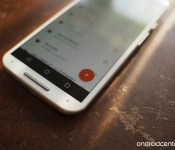
The colorful floating circles that have danced into our digital lives

Material Design in 2014 was just the beginning — now the good stuff really begins
2014 has been a year filled with fantastic things for the mobile world. Samsung is exploring aluminum casing, Motorola’s crazy custom backplates got even more creative, and two different phones running Cyanogen OS have been launched as legitimate commercial products. Android as a platform has continued to grow dramatically, and this time next year a handful of us will wonder how we even managed to use infotainment systems in vehicles before Android Auto was a thing. It’s been exciting to see the hardware grow and change at such an incredible pace, but in my opinion the coolest thing about Android in 2014, the thing worth getting truly excited about, has been the dramatic shift in software.

The top 16 portable audio devices you can buy right now

Looking to buy a fresh new set of headphones? Maybe you’re in the market for some killer desktop speakers instead. Either way, you’ve come to the right place. Check out the gallery below for all the best gadgets from our portable audio Buyer’s Guide.
Filed under: Misc, Handhelds, Peripherals, Wearables, Wireless
Users Reporting with Apple Pay Problems After Changes in iPhone Security Status
Several iPhone 6 owners on Apple support forums and in MacRumors forums are reporting an issue with Apple Pay after making changes to the their phones that automatically reset the Apple Pay service (via 9to5Mac). These activities include restoring a phone, logging out of iCloud and possibly removing a passcode from the device.

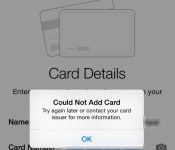
Following such changes, Apple automatically removes the associated credit cards from Apple Pay as a security measure to protect a user’s sensitive financial information in case of loss or theft of the phone. Users are then required to repeat the setup process and re-add their credit cards to the mobile payment service. It is during this restoration step, however, that the process fails for some users.
Upon failure, users are greeted with an alert advising them to contact their card issuers. Subsequent calls to banks confirmed the cards not associated with the Apple Pay service, but the phone still fails to accept the card information. Apple support is typically unable to fix the issue and, in many cases, Genius Bar technicians have replace the phones with new or refurbished units in order to restore Apple Pay functionality.
The issue likely involves the secure enclave on the iPhone that stores the Apple Pay information. It is possible that the automatic removal of Apple Pay information does not clear the enclave properly, leaving behind details that block the addition of credit card information. This apparent glitch in the service appears to only affect users who made changes that disabled Apple Pay and removed cards automatically. Users who manually remove their cards are able to add new and previously used cards back to Apple Pay without an issue.
It is not clear how many iPhone 6 owners are affected by this issue. It could be a system-wide glitch affecting all Apple Pay users or an issue with only a small number of iPhone 6 and 6 Plus handsets. Not surprisingly, Apple has yet to comment officially on the matter.

GoZoneWiFi to bring free Wi-Fi to NFL cities next year

Getting free WiFi in major cities is no easy task. Even when there is a service offered, most of the time the signal comes from outside polls, which doesn’t work to well indoors. A new player, GoZoneWiFi, is looking to change that with an inside-out strategy.
They partner with bars and restaurants, referred to as “hosts,” that install the equipment for free. When users log in, ads will show up via splash pages. It’s a win-win for everyone. The advertisers can geo-target their customers, the establishments can tout free Wi-Fi, and the consumer gets good quality access to the internet. The host establishment can also send coupon codes to all users on the network.
GoZoneWiFi already has offerings in Miami, but they are targeting 25 NFL cities next year.
The dream of free Wi-Fi everywhere might be a long way off, but with new strategies such as this, we are only that much closer.
source: Fierce Wireless
Come comment on this article: GoZoneWiFi to bring free Wi-Fi to NFL cities next year

30 best Android apps of 2014
<!–
By use of this code snippet, I agree to the Brightcove Publisher T and C
found at https://accounts.brightcove.com/en/terms-and-conditions/.
–>
<!–
This script tag will cause the Brightcove Players defined above it to be created as soon
as the line is read by the browser. If you wish to have the player instantiated only after
the rest of the HTML is processed and the page load is complete, remove the line.
–>
brightcove.createExperiences();
The year 2014 was full of fun and amazing apps. There were old apps redefining themselves and new apps that stormed into the Play Store with something to say. In this roundup, we’ll take a look at the best Android apps released in 2014.
 Action Launcher 3
[Price: Free / $4.99 (donate option for $9.99)]
Action Launcher 3 was a complete step forward from Action Launcher 2. It was completely rewritten from scratch and included so many redesigns and fixes that it was released as a brand new app as opposed to an update. It features some unique functionality like the quickdrawer and shutters and we have it on good authority that some old favorites from Action Launcher 2 will resurface. It’s free to try and $4.99 to unlock the full version.

 AllCast
[Price: $4.99]
AllCast is an app that lets your Android device communicate with a number of things like the Chromecast, Apple TV, Amazon Fire TV, Roku, Xbox, and many others. It lets you stream your personal content like photos and videos to those devices. There is a free version to try it out but the paid version removes the restrictions and gives you the full experience. It made its mark when it was the only Chromecast app that was capable of doing what it does and remains one of the only apps that can do what it does to so many different devices.
 Camera51
[Price: Free]
Camera51 is one of the more interesting camera apps to be released in 2014. What it does is analyze faces and surroundings to help you determine the best spot to take a photo. This works for things like selfies and portrait shots of other people but it can also help scenery and other sorts of camera shots. It doesn’t have the advanced features that wannabe-DSLR apps have but if you’re terrible at taking photos (and have a high end device), this is a great option.
 Commandr for Google Now
[Price: Free with in app purchases]
Commandr is an application that aims to make Google Now more useful from a practical standpoint. It works offline and allows you to do some more basic things like turn on/off things like Bluetooth, WiFi, flashlight, and others as well as setting volume, access Google Play Music playlists, and others. If you have root access you can even reboot into recovery and clear notifications. It’s a unique app and if you ever plan on getting more into Google Now, this should be an app you’re using.
 djay 2
[Price: $0.99]
One of the many iOS apps that Android users long pined for was djay 2. This is an app that emulates a DJ turntable and allows you to mix and mess around with music. It comes with Spotify integration as well as your personal library integration, automix, looping and cue points, mixer, tempo, pitch-bending, audio FX, and many, many more features. Whether or not it is good enough for a professional setting is up for personal interpretation but there is no better app on Android that does what this does.
 Disney Movies Anywhere
[Price: Free]
Disney Movies Anywhere was released earlier this year and it brought with it a unique concept. With this app, you can buy and stream pretty much any Disney movie as well as Pixar movies. There is also access to exclusive Disney content. The app is cross platform so you can download it on other devices like your computer and tablet. It’s true that most of their titles are available on Netflix and services like Google Play and iTunes, but it shows that it’s possible for a movie studio to go out and do it on their own and do it in a desirable way.
 Google Camera
[Price: Free]
Google Camera came out over the summer and a lot of people loved it. It gave many people access to Google-only features like Photosphere for the first time and it has fun new things like Lens Blur mode. It’s meant to be the official camera app of Nexus devices so some things like HDR only work on those, but it was really cool of Google to give access to these other previously exclusive features to the public.
 Google Docs, Sheets, Slides
[Price: Free]
Google decided to break their Google Drive office suite up into multiple apps with the intent of adding more features and functionality to each piece. Thus, Google Docs, Google Slides, and Google Sheets were born and Google Drive fell back into being only for cloud storage. As it turns out, this was a good move because it allowed Google to add new features to each on a fairly regular basis and the three apps combined create one very competent office suite.

 Google Fit
[Price: Free]
One of the big announcements at Google I/O 2014 was Google Fit. Its biggest selling point is that it’s integrated natively with Android Wear and it’s slowly but steadily gaining more and more features and integration with other fitness hardware. You can use it to track and analyze your fitness and help you reach those all important fitness goals. It’s a tad basic right now compared to other heavy hitters in the fitness market but Google is behind it so it’ll get to where it needs to be.

 Google Now Launcher
[Price: Free]
Google Now Launcher was released earlier this year and has become the way people can get a stock Android feel on their devices without all the root and ROM stuff that many don’t feel comfortable doing. It comes with built-in Google Now support, a solid set of features, and it’s much lighter than OEM skin launchers and most third party launchers. It is very Google-centric but people who use this know that and use it for that reason. It’s also totally free which a lot of launcher aren’t.
 Ghostery Browser
[Price: Free]
Most browsers focus on things like speed or features but Ghostery focused on something else entirely: privacy. The app allows you to visually see what trackers are looking at you and give you the options to turn those trackers off. You can also do things like change the search engine and enter into the Ghostrank feature which helps Ghostery find new trackers. It’s a great and polished browser for the security minded and fans of the browser extension should have it.
 HERE Maps: Offline Maps
[Price: Free]
Nokia had a big year since they distanced themselves from hardware and started focusing on software. One of the more recent additions to their software line up is HERE Maps. It contains a great design, offline mode, and many of the same features as Google Maps such as the ability to explore things nearby, turn by turn directions, and maps available in more than 100 countries. Despite being in beta, HERE Maps already has more than half a million downloads and rocks a 4.5 out of 5 rating in the Play Store. It’s a phenomenal start and that was a pleasant surprise.
 Horizon Camera
[Price: Free with in app purchases]
Horizon is another camera app that aimed to do things from a different perspective. Horizon allows you to shoot video as a full horizon shot no matter how you hold your phone. That means you can hold it portrait, landscape, or anything between and the video/picture comes out as though you were holding it landscape. Given the general distaste for portrait videos and images, Horizon corrects a problem that many people don’t know they have and does so in a unique and inoffensive way.
 IFTTT
IFTTT
[Price: Free]
IFTTT stands for “If This Then That” and what it does is create connections between apps so that when you do something in one, it makes the other app do something. A popular example is the ability to save a picture from Instagram and upload it to Google Drive automatically. The options are virtually limitless and it can save you a lot of time and effort. You can even find lists of recipes (the term used for a connection created in IFTTT) to get you started.

 Inbox by Gmail
[Price: Free]
Despite the often frustrating invite system to get into this app, Inbox by Gmail is an innovative app that helps further integrate Google services into Google Now. It allows you to hyper-organize your emails so you can keep track of what’s what and there is built in integration with Google Now’s reminder system. It’s a little messy when you’re first getting started and that’s turned some people off to it but if you put in the effort to make the migration, this is a great email app.
 Link Bubble
[Price: Free/$3.99]
Link Bubble is a unique browser that works amazingly well for fans of social media. The entire browser is housed in a floating notification and opens links in the background. This means you can continue to browse social media or whatever you’re reading and open as many links as you need to. Then you can come back and open those links and see what they’re all about. There are some customization features and the app has gotten progressively better throughout the year. It’s definitely worth checking out.
 Maps.Me Offline Maps
[Price: Free]
Maps.Me made their mark on the navigation world by offering offline maps for a number of regions around the world. You can do things like plan routes, and bookmark places that you like but the big draw are the highly detailed maps and the fact that it works totally offline once you download the maps to your device. This makes navigation easier in areas where there is no data connection and fans of having offline maps should definitely check this one out.

 Muzei Live Wallpaper
[Price: Free]
Muzei Live Wallpaper was one of the most unique live wallpaper releases of the year. Its claim to fame is its seemingly never ending supply of classic art pieces from legendary artists from times past. It also has a few other features like the ability to use your own gallery along with the classic art. Perhaps its biggest feature is the API it provides developers. That allows other devs to integrate Muzei into their app. It’s unique and popular, especially if you love old art.
 MyStocks
[Price: Free with in app purchases]
MyStocks is a Holo-inspired stocks app that came out earlier this year without a lot of fanfare. It allows you to track your portfolio, see news regarding the stock market and your stocks, set alerts for stocks, and deep analysis of stocks complete with charts and graphics. It is capable of housing a lot of information and does so gracefully with a solid design. It may not match every stock app feature for feature, but anyone who is busy in the stock market on a consumer level should give it a try.
 Nokia Z Launcher
[Price: Free]
Nokia Z Launcher is the other huge release out of Nokia this year and it was a good one. It simplifies the Android experience into one home screen, one app drawer, and a scrollable clock/weather widget. Its claim to fame is the ability to search for apps, contacts, and Google by drawing letters on the screen. There are some small things as well like apps that show up on the home screen based on the time of day and your GPS location. It’s still in beta but it’s free to use and it’s something a little different.
 Peek
Peek
[Price: Free/$1.77]
When the Moto X came out, one of its most sought after features what the active display. Peek allows non Moto phones to emulate the active display feature by allowing you to see your notifications on your lock screens automatically without you pressing any buttons. It’s a unique experience and you can even interact with the notifications and open the needed apps to deal with them. It’s inexpensive but beware because it can drain your battery based on your settings.
 Stack Exchange
[Price: Free]
Stack Exchange has helped an untold number of people in an untold number of ways across many, many topics. Their official Android apps takes the positive force that is Stack Exchange and makes it mobile. If you’re curious about pretty much anything then this is an app you should have on your Android device. It’s a great community that is run by the community and they do a pretty good job of it.

 TapPath Browser Helper
[Price: $0.99]
TapPath is another unique app that helps you deal with links that you find on social media or websites. Here’s how it works. You can configure what a single tap, double tap, and triple tap on links do. That means you can single click to open in a browser, but a double click will drop it in Pocket, and a triple click will send it to your computer using Pushbullet. This is an app designed for people who browser pretty heavily which means it’s not for everyone but it can be very helpful if you engage with links a lot.
 Themer Launcher
[Price: Free with in app purchases]
Themer Launcher was in beta for a good long time but this year saw the first official, stable release. Themer is unique because it is a launcher like Nova and Action but the themes you can choose for your home screens are highly varied and quite enjoyable. All the themes are fully customizable, the themes are done by a talented community, and has integration with Zooper Widget. If you want something truly different for a launcher, give this a try.
 Udemy
Udemy
[Price: Free with in app purchases]
Udemy is a video-driven educational app that allows you to purchase and take courses in various skills that you may need. You can find stuff from cooking tips to dancing, Java programming to speaking different languages. The classes can be quite expensive but there are cheaper ones and free ones you can grab to check out the platform. The app itself is free and lets you view the courses on your smartphone so you can use it for study.
 Unclouded
[Price: Free with in app purchases]
Thanks to the small storage sizes on smartphones, many people have taken to cloud storage to keep the majority of their content. Unclouded is an app that allows you to manage your cloud storage across multiple sites to help organize all that stuff that just gets randomly uploaded. One of the best reasons to get this is to find duplicates of items you may have uploaded twice such as your camera roll which may have been uploaded to multiple cloud storage sites automatically. Cloud storage users should definitely try this out.
 VLC
VLC
[Price: Free]
After a long road of fixing bugs and adding features, VLC for Android has finally exited beta with version 1.0 released early in December. The beta version was already popular but it should be even more so now that it’s not in beta. It plays video and audio files along with a number of more unique features that you’ll find with VLC. Those in the market for a new media player should check it out.
 Wally
Wally
[Price: Free]
Wally made headlines back when Material Design was brand new and not many apps showed off the new Android design guidelines. On top of being a highly functional wallpaper app, the app successfully showed how Material Design can take a usually boring app and make it look and act much better. It went down for a short time in late 2014 when the site that hosted the wallpapers went down but it was revived and functions as it always has.

 WeMail
[Price: Free]
WeMail, like Inbox, has been working to change how people use email on mobile. Unlike Inbox, WeMail took a more mainstream approach that most people will be familiar with. They turned emails into threaded discussions that are organized by sender rather than chronologically. There are some other nifty features like voice emails and improved search and organization of attachments. IT’s also totally free.
 Yahoo Aviate Launcher
[Price: Free]
Last up is the curious case of Yahoo’s Aviate Launcher. It was originally done by an app development start up and was purchased by Yahoo for quite a bit of money. It features a redesigned home screen set up with categories to better find apps, contextual features based on what time it is and your location, and a unique look and feel. Purists didn’t like it but people looking for something different have enjoyed it quite a bit and it’s free to use.
Wrap up
If we missed any amazing Android apps from 2014, let us know in the comments below!

Privacy policy on the Moto X

Privacy and smartphones is something of a popular — and important! — topic, especially after the last few years of spying scandals and security breaches. It’s often not clear how much data from your device is being collected, not just by your apps and by Google, but by the manufacturers. It’s also often unclear just how to turn that off on your phone should you wish to not have your data being shared with them.
Well, Motorola wants to respect your wishes, and so the company has made it easy not only to disable device feedback but also for Moto X users to see exactly what the privacy policy for its phone is.
It’s transparency done right, and it’s worth highlighting here.

The hackers who hit Sony Pictures also threatened CNN

The Guardians of Peace didn’t just threaten Sony Pictures and theaters that planned to show The Interview; it also shook its fist at the press, too. The Intercept has obtained an FBI alert noting that the group implied threats against a “news media organization” on December 20th. While the bulletin doesn’t name the company, The Desk‘s Matthew Keys has copies of the Pastebin-based messages (since removed) showing that CNN was the target. The GOP sarcastically complimented CNN on its “investigation” of the hacking group and linked a video calling the TV network an idiot, but didn’t warn of any specific consequences.
The news suggests that the GOP won’t rule out attacks against other companies if they support Sony’s cause, but don’t read too much into the group’s words — so far, this appears to be little more than saber-rattling. Nothing has happened to CNN in the 11 days since the messages went up, and both the FBI and the Department of Homeland Security note in their bulletin that many hacking outfits make “exaggerated threat statements” that never pan out. And, as we all know, Sony eventually showed The Interview both in theaters and online without incident. At this point, hacking CNN would accomplish little.
[Image credit: AP Photo/Ric Feld]
Source: The Intercept, The Desk
[Deal] Amazon has 33 apps worth $110 for Free today as part of the Free App Of The Day bundle

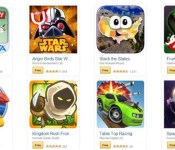
It’s New Year’s Eve so it’s time for an app sale, and Amazon is game. As you know, Amazon always offers a Free App Of The Day, but today they are bundling 33 apps for Free. If you were to purchase every app on any other day of the year, it would cost you $110. Now it’s unlikely that you can use all of them, but there just might be a handful that interests you, assuming you don’t mind installing the Amazon App Store on your device. Just remember, these apps will only be updated through the Amazon App Store, so you need to keep that app installed on your device. A little bit of a pain, but it won’t cost you a penny.
Full list of apps, along with the link to all of them, after the break.
- Alarm Clock Extreme
- Alice Trapped in Wonderland
- Angry Birds Star Wars
- AVG AntiVirus Android Security
- Azkend 2: The World Beneath
- Bills Reminder
- BuildCalc
- Buttons & Scissors (Pro)
- Calculator Plus
- Clockwork Tales: Of Glass & Ink
- Deep Sleep with Andrew Johnson
- Distant Suns: Unleash Your Inner Astronaut
- Food Diary and Calorie Tracker PRO
- Fruit Ninja
- Garfield’s Escape
- JEFIT Pro
- Kingdom Rush Frontiers
- LYNE
- Might and Magic Clash of Heroes
- Mini Piano
- Monopoly
- Orrery
- Patchworkz (Full)
- Pho.to Lab PRO
- Republique
- Riptide GP2
- Sparkle 2 Evo
- Stack the States
- Table Top Racing
- Thomas Was Alone
- Townsmen Premium
- Uncanny X-Men: Days of Future Past
- Xtralogic Remote Desktop Client
source: Amazon
Come comment on this article: [Deal] Amazon has 33 apps worth $110 for Free today as part of the Free App Of The Day bundle
 AIVAnet