


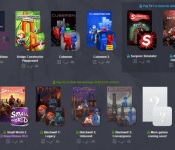
Humble Bundle PC and Android 11 offers debut games and much more
 Humble Bundles, for those who don’t know, are a fantastic way to get a heap of great games for not much money at all. The new Humble Bundle PC and Android 11 is no different. Featuring an assortment of games playable both on PC and Android, this Bundle has three payment tiers to entice your gaming addictions.
As always with Humble Bundles, you can pay whatever you want and get a minimum number of games, this time which include debut game Thomas Was Alone, as well as Bridge Constructor, Cubemen and Cubemen 2. Pay more than the average Bundle donation, which at the time of writing is $5.63 USD, and you will also unlock 4 more games – 3 Blackwell games as well as Smallworld 2 with DLC (See our Smallworld 2 review here). And the last and probably most intriguine bracket of games are the ones you get for paying over $11 USD. With your $11 donation, you get access to viral hit game, Surgeon Simulator, as well as 11 bit studios’ latest game, Anomaly Defenders, which sees the developer adopt the tower defence genre that it spent so many years subverting in its other Anomaly games. Check out this trailer of all the games to get a better idea of what they’re like:
If you need added incentive to buy games, as with all Humble Bundles, your monetary pledge can be split up between the developers involved in the Bundle as well as the charities that Humble Bundle support, Electronic Frontier Foundation and Child’s Play Charity, or a tip to Humble themselves.
So what are you still waiting for? Click here to jump straight to the Humble Bundle PC and Android 11 page.
Source: Humble Bundle
//<![CDATA[
ord = window.ord || Math.floor(Math.random()*1E16);
document.write('‘);
//]]>
The post Humble Bundle PC and Android 11 offers debut games and much more appeared first on AndroidSPIN.
.CPlase_panel display:none;

iPhone 6 Plus Bending Limits Tested in New Video [iOS Blog]
Earlier today, we shared several photos and videos from iPhone 6 Plus users who had accidentally bent their phones after carrying the device in their pockets, mere days after the phone’s initial launch.
YouTube video maker Lewis Hilsenteger of Unbox Therapy has created a new video exploring just how much an iPhone 6 Plus will bend when subjected to force. Using his hands, Lewis bends the iPhone 6 Plus, with significant warping showing up near the device’s volume buttons.
The force placed on the iPhone 6 Plus in the video is unlikely to be replicated in a pocket, but as several photos have demonstrated from our earlier post, it does not take much force to cause a slight curvature in the device.
Bending is not limited to the iPhone 6 Plus. Previous generations of the iPhone, including the iPhone 5 and the iPhone 5s have also seen complaints of bending after being subjected to a pocket.
Apple has not yet commented on the iPhone 6 Plus bending incidents, but iPhone 6 Plus owners can likely prevent bending by removing the phone from their pockets before sitting or bending, or by placing the device in a rigid case.
.CPlase_panel display:none;
Samsung plans to stop selling laptops in Europe

Is the PC dead? Well, that depends on who you ask. Still, no one can deny that people’s habits have changed drastically over the past few years, namely due to the rise of smartphones and tablets. Samsung, for example, has found huge success selling mobile devices worldwide, but it doesn’t look like the company is having the same luck with laptops, at least not in Europe. PC Advisor first broke the news earlier that Samsung was planning to exit the laptop market (Chromebooks included) in The Old Continent, and the South Korean electronics giant has since corroborated this report. “We quickly adapt to market needs and demands,” Samsung said in a statement. The Galaxy brand maker did say “this is specific to the region,” adding that it isn’t “necessarily reflective” of the state of its distribution strategy elsewhere. You can read Samsung’s official comment in full after the break.
We quickly adapt to market needs and demands. In Europe, we will be discontinuing sales of laptops including Chromebooks for now. This is specific to the region – and is not necessarily reflective of conditions in other markets. We will continue to thoroughly evaluate market conditions and will make further adjustments to maintain our competitiveness in emerging PC categories.
Via: Engadget (Spanish), Gigaom
Source: PC Advisor
.CPlase_panel display:none;
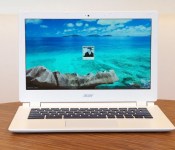
Acer Chromebook 13 review: long battery life, but performance falls short

After years of getting little respect, Chromebooks are finally on the rise (at least in schools), which means every major PC maker is trying to get in on the action. That includes chip makers too, like NVIDIA. Though the company previously shied away from Chrome OS devices, it’s now pledging to power a whole range of different Chromebooks with its Tegra K1 chip, each of them promising long battery life and more graphics muscle. The Acer Chromebook 13 is the first of the bunch, and while some of you might be Chromebook’d out, we were actually excited. Here was a $300 laptop boasting at least 11 hours of battery life, a 1080p display option and enough horsepower to clobber Intel at things like gaming and rich websites. As it turns out, it was all just a little too good to be true.
Hardware

Looking at the Chromebook 13’s spec sheet, you’d assume design was the main place where Acer cut corners. And you wouldn’t exactly be wrong. The machine is fashioned entirely out of plastic, with certain parts, like the bezels and bottom side, actually feeling a bit rough to the touch. Next to the Samsung Chromebook 2, which sports a fake-leather lid, this is clearly the cheaper of the two. Acer’s model is also about a quarter-pound heavier, at 3.31 pounds and 0.71 inch thick, versus 3.06 pounds/0.65 inch for the Chromebook 2. If you want something as light as a 13-inch Ultrabook, you better be prepared to pay an extra $100 for the Samsung.
Still, compared to Acer’s older Chromebook, the C720, this is a marked improvement. Whereas the 11-inch C720 is small and cramped, like a netbook, this 13-incher is broader, with a more spacious keyboard and a wide touchpad to match. The design is simpler, too. Yes, it’s plastic, but the all-white look is at least clean and modern-looking. Also, not that the lid and palm rest pick up scratches easily, but if they did, they’d be all but invisible thanks to the white paint job.
Even if Acer’s design here is on the plain side, it’s all worth it when you see the display. For all the scaling-back Acer did with the rest of the chassis, the screen here is quite nice for a Chromebook, especially one this size. What we have here is a bright, 1,920 x 1,080 display with a matte finish that allows for some relatively wide viewing angles, especially from the sides. Even so, there’s only so much you can dip the lid forward before the panel starts to wash out. This, I’m afraid, is a problem across all Chromebooks — even on models with sharper, 1080p screens, I’ve yet to see one with truly good viewing angles. Chalk it up to PC makers trying to keep hardware costs down, I guess.

As I hinted earlier, the keyboard here is nice and big — a perk of choosing a 13-inch Chromebook over an 11-inch one. That means all of the major keys (Shift, etc.) are amply sized and easy to strike without looking. That said, the keys don’t seem to have much more travel than they did on the C720, which means I once again found myself having to re-type things after my key presses didn’t register the first time. Even so, I found it usable, and I think you will too. On a brighter note, the touchpad is nice and big, and responds well to both single-finger tracking as well as multi-touch gestures like pinch-to-zoom.
Around the edges, the Chromebook 13 has all the same ports as competing devices, which is to say it sports two USB ports, an HDMI socket, a full-sized SD card slot and a headphone jack. You might not know it at first glance, though: Whereas most machines stack all the ports along the right and left sides, the Chromebook 13 has a USB and HDMI port tucked around on the back, out of sight. So, it might seem at first like Acer was stingy — that it could only be bothered to include one USB port, a memory card slot and an audio port. But that’s just the extent of what you can see when the machine is in front of you.
Performance and battery life
| SunSpider v.1.0.2* | Google Octane | Mozilla Kraken* | |
|---|---|---|---|
| Acer Chromebook 13 (NVIDIA Tegra K1, 2GB RAM) | 609ms |
7,051 |
4,816ms |
| Lenovo N20p (Celeron N2830, 2GB RAM) | 567ms |
7,288 |
4,287ms |
| ASUS C200 Chromebook (Celeron N2830, 2GB RAM) | 483ms |
7,198 |
4,291ms |
| Acer C720 Chromebook (Core i3-4005U, 4GB RAM) | 289ms |
14,530 |
2,113ms |
| Acer C720 Chromebook (Celeron 2955U, 2GB RAM) | 342ms |
11,502 |
2,614ms |
| Dell Chromebook 11 (Celeron 2955U, 4GB RAM) | 340ms |
11,533 |
2,622ms |
| Toshiba Chromebook (Celeron 2955U, 2GB RAM) | 324ms |
11,307 |
2,626ms |
|
*SunSpider and Kraken: Lower scores are better. |
|||
To recap what I said in the very first paragraph of this review, the Acer Chromebook 13 is the first Chrome OS device to make use of an NVIDIA Tegra chip — specifically, the quad-core K1 processor already used in some tablets. To hear NVIDIA tell it, the chip is better than Intel’s Bay Trail processors (the ones inside most Chromebooks) in every way possible. That’s not quite true. In single-thread JavaScript tests like SunSpider, Mozilla Kraken and Google Octane, the Chromebook 13 performs in line, if not slightly worse than, Bay Trail Chromebooks like the Lenovo N20p. In daily use, it cold-boots in nine seconds and can sign off in about four — not bad for a Chromebook, but not exceptional, either.
NVIDIA, for its part, doesn’t deny the less-than-impressive JavaScript results, though it’s quick to suggest some WebGL tests instead that are more likely to showcase Tegra’s graphics muscle. Indeed, in an animated Gangnam Style video (don’t ask), Acer Chromebook 13 runs between 50 and 60 fps, while the Lenovo N20p’s Bay Trail processor could barely crack 24 fps. (I used Google Chrome’s built-in frame-rate counter.) In the benchmark Oort Online, the Chromebook 13 scored an average of 4,007, compared with 1,300 for the N20p. In this 3D Earth model, Acer peaked in the high 50s, with frame rates mostly hovering in the 30s and 40s; with the N20p, frame rates stayed in the 20s and 30s, depending on how fast I spun the globe around. Finally, in NVIDIA’s own multitasking test, which involves running a Google Sheets macro with music streaming in a different tab, I saw a 21 percent improvement in speed on the Acer Chromebook 13: 46 seconds, down from 58 on the Lenovo N20p.
This would be a good time for me to back up and put all that in plain English. What it comes down to is this: The Acer Chromebook 13 does well on some tests, particularly the ones that NVIDIA itself recommends. Otherwise, its performance falls in line with the very Bay Trail-powered machines that NVIDIA claims to beat. Either way, the Chromebook 13 doesn’t feel faster than other Chrome OS devices in real-world use. It doesn’t feel slower either, but that’s not saying much, given that Chromebooks generally aren’t known for their stellar performance. On the plus side, the machine stays nice and quiet, and it runs cool. Ultimately, if you buy the Chromebook 13, it should be because of the price, the 1080p screen, the long battery life — not because you’re expecting superior computing power.
|
Battery life |
|
|---|---|
| Acer Chromebook 13 | 10:07 |
| ASUS C200 | 11:19 |
| Dell Chromebook 11 | 8:37 |
| Samsung Chromebook 2 (13-inch) | 8:22 |
| Toshiba Chromebook | 8:15 |
| Acer C720 Chromebook (Intel Core i3) | 7:53 |
| Acer C720 Chromebook (Intel Celeron) | 7:49 |
| Samsung Chromebook (2012) | 6:33 |
| HP Chromebook 11 | 5:08 |
| Chromebook Pixel | 4:08 (WiFi)/3:34 (LTE) |
| HP Pavilion 14 Chromebook | 3:35 |
| Samsung Chromebook Series 5 550 | 3:23 |
| Acer C7 Chromebook | 3:16 |
NVIDIA’s performance claims may have fallen short, but the battery life here is just about as long as promised. On the 1080p model, which is rated for up to 11 hours, we got 10 hours and seven minutes of continuous video playback. That’s admittedly a grueling test, too, so I have no doubt that with a lighter workload and more conservative brightness settings, the machine could’ve made it to the 11-hour mark and then some. If you go with the lower-end Chromebook 13, which has a 1,366 x 768 display, you can expect up to 13 hours of runtime, according to Acer. I unfortunately didn’t get to benchmark one of those, so I can’t vouch for that particular performance claim. If it’s true, though, that would make it the longest-lasting Chromebook on the market.
Software
Though we’ve been reviewing quite a few Chromebooks over the past few months, the software experience hasn’t changed much in that time. If you’re just tuning in, though, here’s a quick primer on what to expect. Chrome OS has slowly gotten better at letting you do things offline — users have long been able to use Gmail and Google Drive without an internet connection. Recently, too, Google made it so that you can watch Google Play movies and TV shows offline — a useful feature if ever you find yourself on a long plane ride. Other recent improvements include pinch-to-zoom, better file management and the ability to upload photos to Google+ in the background. Speaking of G+, the Acer Chromebook 13 comes with 100GB of free Google Drive storage — a standard perk for Chromebook users.
Configuration options and the competition

The Chromebook 13 starts at $280 and is available in four configurations. The lowest-end edition has a 1,366 x 768 display, 2GB of RAM and a 13-hour battery. Step up to the $300 mark, and you actually have two options at that price: a 1080p screen with 2GB of RAM, or a 1,366 x 768 display with 4GB of RAM. If you want it all — a full HD screen with four gigs of memory — you can have it, for $380. Oh, and by the way, in case you’re wondering, almost all of these configurations have 16GB of built-in storage (the high-end one has 32GB).
As for everything else on the market, well, I’m not really helping you if I list off every single option. But I can recommend a few notables. First of all, if you’re looking for something on par with the Chromebook 13, its most obvious competitor would be the 13-inch Samsung Chromebook 2, which also has an ARM-based chip and a 1080p display. With its sharp screen, comfortable keyboard and relatively premium-looking design, it still ranks as one of my favorites.
The problem is that it costs $400, which is getting into “cheap Windows laptop” territory. And at that price, the performance isn’t quite as robust as some competing models. If, like me, you think even an ARM chip is good enough for basic tasks, you might actually like the Acer Chromebook 13 I’ve been reviewing here: It offers similar performance, with an equally sharp screen, except it costs $100 less. It’s not quite as polished-looking, but again, it’s not ugly, either.

Soon enough, though, Samsung and Acer won’t be the only ones selling full HD Chromebooks. Toshiba, for one, is about to ship its own Chromebook 2, which will start at $250 ($330 if you want the 1080p resolution). That will include an Intel Bay Trail chip, which means performance is likely to be slightly better than Acer’s or Samsung’s offerings, but battery life could be shorter (or not — we’ll see). It looks promising, but I haven’t tested this one, so I unfortunately can’t confirm how well it performs.
If performance is a concern — meaning, you’re worried an ARM chip won’t cut it — all roads lead back to Acer. The company’s C720 Chromebook is one of our favorites. For one thing, it’s among the only ones offered with a Core i3 chip, which delivers noticeable (albeit fairly modest) performance gains. At the same time, it’s one of the best-value machines we’ve seen: For $199, you can get it with an Intel Haswell-series Celeron CPU that still delivers decent performance. The only thing to keep in mind with either model is that the battery life will be several hours shorter than on the Chromebook 13. So, it depends a lot on what your priorities are: maximum performance or top-notch battery life? Acer earns both of those honors — just not with the same machine, unfortunately.
What about Windows machines?
Finally, you might be wondering what kind of Windows PCs you’ll find at this price — $300 is technically “cheap Windows laptop” territory, too. By and large, the machines you’ll find at this price will have larger, 15-inch screens with either an Intel Celeron processor or an AMD E-series chip. In other words, the performance should be on par with many similarly priced Chromebooks. That said, there are a few systems at this price that are just as small and portable as the Acer Chromebook 13, if not more so. These include the 11-inch Lenovo S215 ($349), the 11-inch Acer Aspire ES1 ($250-plus) and the HP Pavilion 10z Touch ($250). For the money, you get a 1,366 x 768 screen and around 500GB of built-in storage.
In a similar vein, HP is about to start shipping the first laptop from its “Stream” series, which aims to take on Chromebooks in the form of a cheap notebook that runs Windows, but has very little local storage. The first model is a 14-incher priced at $300. This, too, has a 1,366 x 768 display and makes use of an AMD chip. I’m not saying I recommend it, especially for three hundred bucks, but it could be tempting for someone who wants a budget machine that can still run desktop Windows apps.
Wrap-up

The Chromebook 13 isn’t everything Acer and NVIDIA promised it would be, but somehow, it’s still a worthwhile product. Though its performance isn’t much better than the Intel Bay Trail machines it claims to beat, the battery life is nearly best in class, reaching 10 hours even with a full HD screen. Speaking of the sort, this remains one of the few Chromebooks out there with screen resolution greater than 1,366 x 768. Yes, the viewing angles could be better, but then again, that’s true of every Chrome OS laptop, so it’s hard to really fault Acer for that. Most importantly, though, with a price starting at $280 (or $300 for the full HD version), it’s easy to forgive many of the machine’s flaws. Even with merely average performance, this feels like a fair price for what it is: a Chromebook with a sharp screen, long battery life and a spacious, comfortable keyboard.
Filed under: Laptops, Acer, NVIDIA
.CPlase_panel display:none;

PayPal’s new deals let you pay with Bitcoin at more online stores

PayPal has been coy about embracing virtual currencies so far, but it just took a big step toward welcoming them with open arms. As of today, the company’s deals with processing firms BitPay, Coinbase and GoCoin let you pay with Bitcoin at North American online stores that both use PayPal’s Payments Hub and accept digital cash. This doesn’t mean your PayPal wallet can suddenly hold Bitcoin; the service says it’s only moving “gradually” toward full support, and wants to see how things shake out. However, it should now be easier for many outlets (primarily smaller ones) to accept Bitcoin. Don’t be shocked if some of your favorite internet shops flick the switch and give you an alternative to paying with old-school money.
Filed under: Internet
Source: PayPal Forward
.CPlase_panel display:none;

WhoSampled music discovery app makes its way to Android
Android has another music discovery app for music lovers to check out. WhoSampled, by WhoSampled.com Limited, has apparently been a pretty big hit on iOS for the last couple of years.


 WhoSampled offers you a gateway into the music world that goes deeper than helping you find music similar to your tastes. Instead of tossing out like-minded artists for you to listen too, WhoSampled has pieced together a database collection of 270,000 tracks and 95,000 artists. The database drives the results, not by genre or style, but by the music itself. Pointing you to where your favorite Eminem song might have been sampled from before Eminem used it. You also get to dive into where samples from your favorite artists have ended up along with remixes and covers that have been done too. Once you dig in to your artists you can listen to the song or sample via YouTube. WhoSampled even offers up the specific time stamp for where the sample occurs.
Key features of WhoSampled include:
– The ability to go on a journey of musical discovery built around a user’s own music collection. Scan a music library and discover amazing connections for the tracks in it
– Compare tracks side-by-side and listen to full‐length tracks, streamed through YouTube (where available)
– Highly detailed information on any sample (sample timing, sample type, part sampled) lets users pinpoint where the sample was used and compare it with the original
– A “share” feature allowing users to share their amazing finds with their Facebook friends and Twitter followers
– Deep and unique music charts that show trending and top-rated content as well as the all-time most influential artists and tracks
– Engage with the WhoSampled community from within the app; comment on and rate any entry in the WhoSampled database
– A host of other features and functionality including links to buy tracks, personal favorites list plus intelligent contextual recommendations from every sample, cover and remix
WhoSampled dives more into music DNA and inspiration than just simple music discovery.You can search all on your own and peruse much of what the app has to offer without spending a dime or signing up or signing in. , sign-in with Facebook, or create a WhoSampled account. If you do choose to sign-in/sign-up you can then have the app scan your devices music and display your current artists and tracks so you can dig into where it came from and where it might have gone.
Additionally, you are also able to purchase your findings. Either through 7Digital or through the Play Store. Which ever you prefer. The WhoSampled app is free to install and does offer up a small banner ad at the bottom along with the occasional full screen ad. Give it a download and and see where your tunes might have come from and where they have gone off to.
//<![CDATA[
ord = window.ord || Math.floor(Math.random()*1E16);
document.write('‘);
//]]>
The post WhoSampled music discovery app makes its way to Android appeared first on AndroidSPIN.
.CPlase_panel display:none;

Ron Johnson Launching Gadget Delivery Service, Poaching Apple Employees
 Apple’s former retail chief Ron Johnson is planning to launch a “high-end, on-demand delivery service for gadgets, reports The Information‘s Jessica Lessin. The startup has reportedly been described as “Best Buy’s Geek Squad meets Apple’s Genius Bar.”
MacRumors has heard similar rumors about Johnson’s startup plans, with a source suggesting he’s been attempting to recruit former and current Apple employees, including Jerry McDougal, who once served as Apple’s vice president of retail under Johnson.
Before leaving Apple, Johnson worked at the company for more than 10 years. He’s largely credited with transforming the Apple retail experience and setting the company on a path towards rapid retail growth. In 2011, Johnson left the company to take over as CEO of J.C. Penney, a position that he held for just two years.
Following Johnson’s departure, Apple’s retail division was left in flux, with no successor named. John Browett, formerly CEO of Dixons Retail, took over as head of retail at Apple in 2012, but he was ousted later that same year. Apple remained without a retail chief until the hiring of Angela Ahrendts, former Burberry CEO, who officially joined the company in May 2014.
.CPlase_panel display:none;

Apple May Have Acquired iPad Publishing Platform Prss
Apple may have acquired Prss, a Dutch-based company that created a web app aimed to help people design magazines for Apple’s Newsstand and other magazine platforms, reports iCulture [Google Translation]. While there is no solid proof of the acquisition at this point, iCulture suggests that an inside source has revealed the purchase and Prss co-founder Michel Elings recently moved to the bay area.
The Dutch magazine platform Prss was acquired by Apple for an undisclosed amount. This discovery iCulture thanks to a knowledgeable source. This source confirms that several employees of Prss now employed by Apple.

Several other former Prss employees are also now located in the bay area according to their LinkedIn profiles, suggesting an acquisition might have taken place in the summer months. Prss has also shut down its Twitter account and its website.
Prss was known for creating a browser-based collaborative tool that could be used to design magazines for Apple’s Newsstand. The tool included a simple drag-and-drop interface and let up to 30 people collaborate on a project, with the team charging 5 cents per magazine download for published content.
iCulture is unsure what role the Prss team will take on at Apple, but suggests the acquisition might have been about talent rather than product.
.CPlase_panel display:none;

HTC Desire 510 now available through Boost, Virgin Mobile to follow soon
Boost Mobile has released a new device for consumers to pick up today, the HTC Desire 510. The Desire 510 displays Android 4.4 KitKat and HTC Sense on a 4.7-inch screen. Under the hood it packs in a quad-core 1.2GHz Qualcomm Snapdragon 400 processor, 1GB of RAM and 4GB of internal storage. As for photos the device carries a 5MP rear camera and a 1.3MP front shooter for your selfies.

Customers can pick up the HTC Desire 510 from Boost Mobile retail stores, select independent dealer locations and at boostmobile.com. Price wise you are looking at $99.99 out of pocket. While the HTC Desire 510 is available on Boost Mobile starting today, it isn’t out for Virgin Mobile just yet. It will be launching soon and judging from the press release, it should be coming in blue to Virgin.
//<![CDATA[
ord = window.ord || Math.floor(Math.random()*1E16);
document.write('‘);
//]]>
The post HTC Desire 510 now available through Boost, Virgin Mobile to follow soon appeared first on AndroidSPIN.
.CPlase_panel display:none;
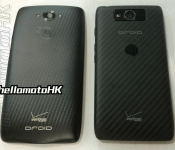
Droid Turbo details and images surface

Last week, we reported that Verizon might release a new Droid in October, dubbed the “Droid Turbo.” This phone is supposedly going to have some new or better fast charging technology to help continue the battle in a phone that lasts throughout your day, if not longer. Now it looks like some details of this phone have leaked.
A Google+ profile, hellomotoHK, has leaked some photos and details of the Droid Turbo:
“Droid Turbo XT1254
– 5.2″ 屏幕 / 5.2″ Screen
– 實體 Android 三大天皇鍵 / Entity android navigation bar
– 雙 LED 補光燈 / Dual LED Flash
– 前置揚聲喇叭 / Front-ported Speaker”
If true, we have some interesting specs here. Moto is continuing the trend of 5.2-in screen like the new Moto X (2014) as well as the Dual LED Flash, and what we presume to be front-facing stereo speakers. What I find interesting is the “Entity android navigation bar.” This may just be translation issues here, but is there a reason they brought special attention to it? We’ll have to wait until October to see.
via Google+
Deals, Discounts, Freebies, and More! Click here to save today!
The post Droid Turbo details and images surface appeared first on AndroidGuys.
.CPlase_panel display:none;
 AIVAnet