


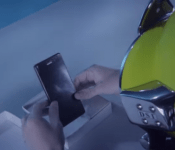
Definitely waterproof: Sony Xperia Z3 unboxing underwater is as impressive as it sounds
 The Sony Xperia line of devices is probably best known for their long history of waterproofing their devices and Sony‘s latest smartphone is no different, as this Sony Xperia Z3 unboxing irrevocably shows. As the title of the article suggests, the unboxing in question unboxes the Xperia Z3 and the contents of its box all while completely underwater. Don’t believe me? Check out Carphone Warehouse’s video for yourself:
As you can see, it’s not like the phone is just taken out of the box for nothing – it’s actually turned on for the first time underwater and is used to take a few happy snaps too. As far as unboxings go, the very first underwater unboxing is going to be a very hard act to follow. Of course, this is all made possible by the waterproofing of the Xperia Z3 (IP65 and IP68), which was announced earlier this month at IFA 2014. Truthfully told, the Xperia Z3 is only a minor update from the Xperia Z2, but the cosmetic changes and the return of great features like the 20.7MP rear camera keep it relevant in the fast moving smartphone market.
I feel as though everything needs to be unboxed underwater now. What did you think of the Sony Xperia Z3 unboxing underwater? Let us know your thoughts in the comments below.
Source: YouTube
//<![CDATA[
ord = window.ord || Math.floor(Math.random()*1E16);
document.write('‘);
//]]>
The post Definitely waterproof: Sony Xperia Z3 unboxing underwater is as impressive as it sounds appeared first on AndroidSPIN.
.CPlase_panel display:none;

Facebook’s Atlas ad platform will track you around the internet

Facebook’s sufficiently chummy with advertisers that some people have gone and built their own social networks to escape Mark Zuckerberg’s clutches. For those who remain, however, it’s now going to be even harder to avoid people using your personal profile information to sell you things. The company has re-built and re-launched (former Microsoft ad platform) Atlas as a way of monitoring people’s online activity across every device that they own. In a blog post, Atlas chief Erik Johnson talks about “people-based marketing” that leaves behind cookies and instead knows what you’re doing on desktops, smartphones and tablets. That data, coupled with Facebook’s knowledge of your age, gender and preferences, will then be used to sell specific products — with the firm that handles Intel and Pepsi’s promotional work the first to sign on.
Filed under: Internet, Facebook
Via: Re/code
Source: Atlas Solutions, (2)
.CPlase_panel display:none;

Interesting theory: Did Google out the name of its next build, Android Lollipop, in its birthday celebration?
 Fun fact: Google turned 16 years old yesterday. Other fun fact: A gif that Google posted on social media shows lollipops as the decoration on a birthday cake. Now, this next bit is going to be a bit of a stretch, but this is by no means beyond the subtle marketing of Google – could the lollipops on the top of the cake signify the name of the next build of Android, Android Lollipop? This was one of our earliest guesses for the name of Android L, even before we knew it as Android L, and it is at the very least plausible. Of course, it could equally be called layer cake, but we’d like to think there’s going to be a lollipop themed Android figurine on Google’s lawn in a month’s time. And yes, we know that’s a pretty indefensible reason.
As with every build of Android before it, everybody has been trying to guess the name of the next build of Android for the longest time, the most compelling theories of which have recently been Lemon Meringue Pie and Lion, the last courtesy of Google’s previous relationship with Nestle. Really, it’s anybody’s guess, so unless you’re into the whole business of speculation, you can probably afford to wait until an official announcement is made – Google is expected to announce a new tablet, the Nexus 9, and also a new phablet, the Nexus 6, come mid-October.
What do you think about this latest theory? Is it reading too deep into it, or is this totally something Google would do? Let us know your opinion.
Source: Phandroid
//<![CDATA[
ord = window.ord || Math.floor(Math.random()*1E16);
document.write('‘);
//]]>
The post Interesting theory: Did Google out the name of its next build, Android Lollipop, in its birthday celebration? appeared first on AndroidSPIN.
.CPlase_panel display:none;
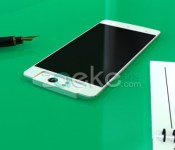
Impressive Oppo N3 specs leak out as well as some interesting looking images
 Oppo is supposedly unveiling the Oppo N3 in just a few weeks, the follow-up to its intriguing smartphone device from last year, the Oppo N1. Oppo has teased an event in Singapore to take place some time in October and we’ve also seen Oppo tease that the device is going to somehow incorporate aerospace grade metal in its design. Today, some Oppo N3 specs have leaked out, further adding to the intrigue. It appears Oppo will again go for size with the Oppo N3, allegedly opting for a 5.9-inch display that will carry a 1080p resolution – decidedly unimpressive in this day and age of 2K displays. Under the bonnet, the Oppo N3 will apparently have a Snapdragon 805, 3GB RAM and from the images that accompanied this leak, also incorporate a 13MP swivelling camera, much like its predecessor.
 While the leaked specs should be carefully considered, the images themselves, which look like computer generated renders, should definitely be taken with a grain of salt. While it does definitely look the part with the swivelling camera, it again looks quite different to other devices that have allegedly been the Oppo N3. Either way, there isn’t long to wait till Oppo officially announces the device so we’ll be finding out what it looks like sooner rather than later.
What do you think about this latest leak? And what are your thoughts on the Oppo N3 specs? Let us know your opinion.
Source: Zaeke via TalkAndroid
//<![CDATA[
ord = window.ord || Math.floor(Math.random()*1E16);
document.write('‘);
//]]>
The post Impressive Oppo N3 specs leak out as well as some interesting looking images appeared first on AndroidSPIN.
.CPlase_panel display:none;

Property Mogul Recalls Apple Store Fifth Avenue Planning, Says Steve Jobs Wanted 40-Foot Cube [Mac Blog]
Since it opened in 2006, Apple’s iconic glass cube retail store Fifth Avenue retail store in New York has been praised for its design and its ability to attract a large amount of customers daily. Now, author Vicky Ward (via ifoAppleStore) has shared new details about the store’s beginnings on the plaza of the General Motors Building in her book The Liar’s Ball: The Extraordinary Saga of How One Building Broke the World’s Toughest Tycoons.

Ideas for a store on Fifth Avenue originally began in November 2003 when former Apple CEO Steve Jobs met with property mogul Harry Macklowe after being connected through Apple’s former Vice President of Real Estate George Blankenship. Jobs initially wanted a store that “would be open 24/7″, and worked with architects from architectural firm Bohlin Cywinski Jackson who designed Apple’s store in SoHo, Manhattan.
It was at that point where Jobs, Macklowe, and the designers thought of placing a square glass cube in an unused basement within the GM Building’s Plaza:
What happened next has long been the subject of speculation and some dispute: Who came up the idea of placing a 30‐foot square glass cube — the world’s “smallest skyscraper” — in the middle of the GM Building plaza? In that lightbulb moment, an unused basement that had caused headaches for its owners for more than 40 years morphed into what is arguably the most famous retail space in the world.
Said Macklowe: “[Jobs] presented to me and I presented to him. He had this cube, which was quite different from what you see there today, and I had a cube that was quite different from what we see today as well. It took us half an hour to make a deal.”
Jobs initially wanted a 40-foot cube, leading the designers to set up a scaffolding mockup of the building. However, once Jobs and other Apple executives went to go see the mockup, all agreed that it was too big and obscured the vision for the store. However, Macklowe also showed off a 30-foot cube built secretly underneath, which caused Jobs and the Apple executives to agree to the size.
From there, Macklowe convinced retailers and a CBS studio residing in the area to move, as construction began while Jobs waited. The store eventually opened on May 19, 2006 to much public attention, and went on to become one of Apple’s most iconic and busiest stores.
Macklowe’s real estate attorney also later regretted not negotiating a higher “percentage rent” with Apple, which saw his client receiving a portion of the store’s profits. Macklowe called the negotiations “horrendously low,” and claims that Apple had no idea just how well the store was going to do in business per year.
.CPlase_panel display:none;
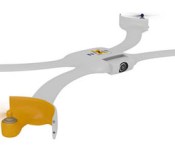
Nixie is a wearable drone that captures your activities on the fly

Remember the dronie? If not, it’s a self-taken photograph (sigh, selfie) from a UAV like the Parrot AR Drone 2.0 that provides a bit more creativity than your arm reach allows. Imagine that you can attach that drone to your wrist and launch it instantly, and you have some idea about how the Nixie works. Once aloft, it’s designed to detect your presence and fly around you, pointing its camera to film your exploits — ranging from tourism to mountain climbing, as the video below shows. The project is part of Intel’s Make it Wearable contest, and uses an Edison chip to track you and avoid obstacles. For now, it’s just a delicate prototype that can fly off your wrist and not do much else. But it’s scored a $50,000 finalist prize from Intel, meaning our dream of having aerial footage of all our hum-drum activities could finally come true — yes, we are that vain.
Via: Hot Hardware
Source: Nixie
.CPlase_panel display:none;

Jawbone Launches HealthKit-Enabled ‘Up’ App Featuring Personalized Fitness Advice [iOS Blog]
Jawbone has launched its new Up app for the iPhone, which utilizes Apple’s Health app and HealthKit to track and deliver advice based on a user’s diet and physical activity. Not to be confused with Jawbone’s other Up app, this newest app does not require the company’s fitness tracker and works with over a hundred apps and devices, including MyFitnessPal, Strava Running and Cycling, IFTTT, and more.

Information from meals logged throughout the day can be used to help generate nutritional advice, while data from workouts can be used to help set goals for the future. The Up app also allows users to log their sleep, which can be analyzed and used to provide advice on future sleep adjustments. All of the advice generated is powered by Jawbone’s Insight Engine, which works with both recorded data and data from the Internet to deliver information on a variety of fitness-related subjects.
The app also includes a number of social functions, including the ability to add friends to a “team” to compare and track fitness scores and goals. Users can also set their own goals within a team and receive notifications when progress is being made. Insights generated by the Up app can also be shared through email, message, Facebook, and Twitter.
Up by Jawbone is a free app for the iPhone and can be downloaded in the App Store. [Direct Link]
.CPlase_panel display:none;

Scientists make an invisibility cloak using off-the-shelf optical lenses

Most invisibility cloaks require fairly exotic technology to work, such as fiber optics or light-altering metamaterials. That’s not very practical, especially since the illusion still tends to break when you move. The University of Rochester may have a far more realistic solution, however — it has developed a cloak that only needs run of the mill optical lenses to hide objects from view. The system really boils down to clever math. By positioning two pairs of lenses in the right order, researchers can bend light in a way that hides almost everything you put in the middle of this arrangement. The approach scales up with the size of the glass, and it works at angles of 15 degrees or more; you don’t need to look head-on to see the effect.
There is a big catch to this visual trickery. You can’t hide whatever is directly on-axis, so this is more of an invisibility “doughnut” than a perfect disguise. It doesn’t have to be used as camouflage, though. The lens-based system could eliminate blind spots in vehicles, or let surgeons see through their hands during delicate operations. Those uses are a long ways off at this early stage, but the relative simplicity of the technique makes them very plausible.
Filed under: Science
Via: Phys.org
Source: University of Rochester, arXiv
.CPlase_panel display:none;

iOS 8 Safari Supports Animated PNG Images [iOS Blog]
 With the release of iOS 8, Safari has gained the ability to display Animated PNGs (APNGs). Originally proposed in 2004 as a replacement to animated GIF images, APNGs offers more color and transparency support over GIFs.
The Animated Portable Network Graphics (APNG) file format is a non-standard extension to the Portable Network Graphics (PNG) specification. It allows for animated PNG files that work similarly to animated GIF files, while supporting 24-bit images and 8-bit transparency not available for GIFs. It also retains backward compatibility with non-animated PNG files.
The APNG specification, however, was rejected by the PNG group in 2007, so support for the format has been rather limited. In fact, the format has been declared dead due to the lack of official adoption. Firefox was the only major browser that provided standard support for APNG, until iOS 8.
The beach ball image in this article is animated when viewed in iOS 8 or Firefox.
Thanks Parasprite
.CPlase_panel display:none;

How would you change Huawei’s Ascend Mate?

Can a 6.1-inch smartphone ever be accepted in the mainstream? That was what Jonathan Fingas asked while reviewing Huawei’s Ascend Mate, and found the answer to be a resounding “no.” The handset offered a lot of things that did impress him, including a staggering battery life, big display and the company’s Emotion UI. On the downside, the old(er) internals, 3G-only modem and modest storage meant that the device had “niche proposition” stamped all over it. But, what about you, out there? Did you buy one? If so, what did you like, what did you hate and what, if anything, would you change? Head to the forum and spill your brains.
Filed under: Cellphones, Mobile
Source: Engadget Product Forums
.CPlase_panel display:none;
 AIVAnet