


Google picks up Lift Labs, makers of a fantastic high-tech Spoon
Google has reportedly pickup another company that will be integrating its self into the Google Life Sciences department at Google headquarters in Mountain View. The company is called Lift Labs and is a San Francisco based company that completed an IndieGoGo campaign back in April for their high-tech spoon, the Liftware. You might have seen it make its rounds on the various tech sites back in March.

The Liftware device is basically a spoon that actively stabilizes hand tremors commonly suffered by individuals with Parkinson disease. It really is a pretty fantastic little gadget that can certainly help offer a better quality of life for people who suffer from the disease, or any other condition, that would otherwise make something that we take for granted so difficult. Take a quick look at the promo video they used during the campaign.
Lift Labs is working on other attachments for Lift Ware since the main unit is its own device. They have a fork, keyholder and other things on the way. Being picked up by Google will only help them to advance their technology and ideas to further help people in need. If you, or someone you know, could benefit from the Liftware device, be sure to take a closer look at it over at the liftlabsdesign website.
Source: NYT
//<![CDATA[
ord = window.ord || Math.floor(Math.random()*1E16);
document.write('‘);
//]]>
The post Google picks up Lift Labs, makers of a fantastic high-tech Spoon appeared first on AndroidSPIN.
.CPlase_panel display:none;

Checking Upgrade Eligibility Ahead of Friday’s iPhone 6 and 6 Plus Pre-Orders
With pre-orders for the iPhone 6 and the iPhone 6 Plus happening this Friday, many people who hope to get their hands on one of the new devices are going to be scrambling to find out their upgrade options. TUAW has assembled a helpful guide on to help users check their upgrade eligibility and purchasing options.
Users on all four major networks in the United States can type a quick code into their phones to get an immediate report on their upgrade status via text message. The codes are as follows:
– AT&T: *639#
– Sprint: 1311
– T-Mobile: #874
– Verizon: #874
These codes are a good way to get a quick look at upgrade eligibility, but some of them don’t exactly tell the whole story. For example, AT&T’s text message is pointing users towards a Next plan, even if they may have other upgrade options available. A second option for getting a clear picture of upgrade eligibility on the four major networks is going through Apple’s own site.

Visiting the iPhone 6 pre-order page and choosing a model, carrier, and color will give an option to “Check your upgrade eligibility” with AT&T, Sprint, and Verizon. T-Mobile works somewhat differently as Apple only gives T-Mobile customers the option to buy outright.
Checking upgrade options requires a user to enter a wireless number, billing zip code, and the last four digits of the social security number on the account, after which it displays all of the upgrade options available, including when an account might become eligible for an early or full upgrade.
For example, an AT&T user who purchased an iPhone 5 on release day on a two-year contract would be able to purchase an iPhone 6 for $649 on pre-order day, but would also be eligible for an early upgrade on September 21, which provides a $200 discount. This option also displays what Next monthly fees would be.

Many times, new purchasing fees can be cut by trading a device into an Apple Store, a carrier, or a third party service, all of which offer payouts for old Apple devices.
For those planning to upgrade, it’s important to look into options immediately as there are only two days left until the iPhone 6 and iPhone 6 Plus will be available for pre-order. Though Apple has not yet confirmed what time the two devices will go on sale, AT&T says that its pre-order sales will begin on September 12 at 12:01 AM Pacific Time, and it’s likely Apple’s own sales will start at the same time.
.CPlase_panel display:none;

Viacom brings 22 channels to Sony’s upcoming internet TV service

Sony’s future cloud-based TV service shouldn’t be hurting for content. Viacom has forged a deal that will bring 22 of its networks (including Comedy Central and Nickelodeon) to the streaming platform when it launches late this year — the first time Viacom has provided its channels to any live internet TV service. The media giant thinks its “young, tech-savvy” audiences are a good match. That’s a slightly ironic statement given its years-long battle with YouTube, but it makes sense. Not that the company is leaping into the internet era with both feet as it is; you’ll have access to on-demand content, but only through authenticated access to the same material you’d find in TV Everywhere apps. It’s still not clear when Sony’s video portal will be ready for action, but you may now have a good reason to give it a close look.
[Image credit: AP Photo/Carolyn Kaster]
Filed under: Home Entertainment, Internet, HD, Sony
Source: Viacom
.CPlase_panel display:none;

Philips, not Beats, announces first Lightning-equipped headphones

Back at WWDC, Apple announced a new spec for its Made For iPhone program: the ability to use a Lightning cable to connect headphones with iOS devices. With that in mind, and Apple’s recent purchase of Beats, many (myself included) assumed that Dr. Dre and Co. would be the first to unveil a set of cans featuring the newfangled feature. Nope. Today, Philips announced that its Fidelio M2L set that will digitally connect with the diminutive jack rather than the 3.5mm port, with a built-in 24-bit digital to analog converter (DAC) to boost sound quality. In addition to the higher resolution audio, using the Lightning connector will also cut down on crosstalk and noise. Unfortunately, the increased quality appears to be the only spot Philips leveraged the port’s abilities as there’s no mention of controls and the like. If these look familiar, you might remember the Fidelio M1BT that debuted last year carrying similar stylings. Ready to take the leap? Well, you’ll have to wait until December, but when the M2L headphones arrive, they’ll set you back €250 (around $323 converted).
Filed under: Portable Audio/Video, Apple
Via: The Verge, Pocket-lint
Source: Philips (Dutch)
.CPlase_panel display:none;

5 million Gmail passwords published, but don’t panic

You might need to change your email password in the very near future. A member at a Russian Bitcoin forum has posted almost 5 million Gmail passwords, around 60 percent of which are reportedly still working. It’s not clear how the poster managed to scoop up all this account info, but Google tells Cnews that it comes from a long stretch of hacking and phishing attempts that stole data from individual users. Gmail’s servers weren’t breached, the search giant says, and much of what’s there is old. That’s somewhat comforting, but you may want to visit Isleaked.com to see if your account is one of the unfortunate targets — you don’t want to give thieves easy access to your most sensitive info.
Via: Engadget Spanish (translated), Daily Dot, Cnews (translated)
Source: Btcsec, Isleaked.com
.CPlase_panel display:none;
Hangouts Dialer lands in the Play Store to allow you make voice calls via Hangouts
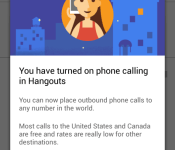
Last night the talk of the town centered around an update that started filtering out for our beloved Google Hangouts app. The update moved it to version 2.3 and gave it a bit of an overhaul in the looks department. More importantly though, it added in the long, and maybe way overdue, Google Voice integration that was rumored to be on its way. With the new Hangouts update and GV integration comes a new app as well, Hangouts Dialer.

 Once the app is installed you will see a third pane appear in your Hangouts app for the dialer. In all truthfulness, the app is just a shortcut to the dialer, but without it installed, you don’t have access in Hangouts to the dialer. Annoying, but a necessary evil if you want to use your Google Voice number for voice calls via your device. Calls to all Hangout friends are free, as are almost all calls in the US and Canada. Other International rates do apply, but are relatively low.
You will need the new Hangouts v2.3 update to get it to all work. Luckily for you, we have that APK waiting for your downloading pleasure as well over at Gappsearly.com.
//<![CDATA[
ord = window.ord || Math.floor(Math.random()*1E16);
document.write('‘);
//]]>
The post Hangouts Dialer lands in the Play Store to allow you make voice calls via Hangouts appeared first on AndroidSPIN.
.CPlase_panel display:none;
New Hangouts v2.3 update brings tabs and Google Voice Integration [APK Download]
As we are sure many of you Googlers are aware, there is an update rolling out for Hangouts. The update moves to v2.3, which is a pretty large version change from the previous 2.1 that was available. With a large number change we expect large changes. Google certainly delivered quite a bit in this update, all while bringing the file size down.
The biggest news about the updated Hangouts was the Google Voice integration that so many have been longing for. We knew Google was working on it and now it is a reality. Pairing the newest update with the new Hangouts Dialer gives you the ability call out to friends and family in the US and Canada for free. Along with giving you some super cheap international rates. The calling aspect isn’t initially available unless you install the Hangouts Dialer app. I would assume Google took this route so people who need it and want it can have it, and those that don’t, don’t have to deal with the extra tab. A simple install adds the third tab to your Hangouts app along with a slightly annoying additional icon that opens up Hangouts in the dialer for you.
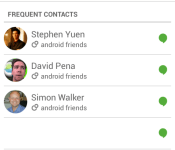
Google Voice integration is probably the biggest aspect of the update, but we can’t overlook the complete look change that comes with the update app. Offering up a very green toolbar at the top. You will also notice that you have two tabs, one for your friends list/contacts and one for your ongoing conversations. If you install the Hangouts Dialer you will have a third tab added for the dialer.
 In your settings menu you will see your confirmed phone numbers along with a check box to turn on incoming calls from your Google Voice number to ring through to your Hangouts.
 The best way to really see it though is to grab the update. You can wait for it to land via the Play Store if you would like, but that could take a few hours or a few days. The alternative is to grab the APK and just install it now. If you are as impatient as we are, then you will want the APK. So hit the link below to go grab it and see for yourself what the new Hangouts is all about.
Hangouts v2.3 Download Link . You can also find the Hangouts Dialer over there as well, or you can hit the Play Store for that one.
//<![CDATA[
ord = window.ord || Math.floor(Math.random()*1E16);
document.write('‘);
//]]>
The post New Hangouts v2.3 update brings tabs and Google Voice Integration [APK Download] appeared first on AndroidSPIN.
.CPlase_panel display:none;

Apple Watch Battery Life Currently ‘About a Day’, but May Improve for 2015 Launch
Apple on Tuesday unveiled its new Apple Watch, providing a number of details on the highly anticipated device but declining to address one critical issue: battery life. According to information obtained by Re/code, Apple’s new Watch will require daily charging, keeping the device in line with similar smart watches from Samsung and Motorola.

“There’s a lot of new technology packed into Apple Watch and we think people will love using it throughout the day,” Kerris said. “We anticipate that people will charge nightly which is why we designed an innovative charging solution that combines our MagSafe technology and inductive charging.”
Sources tell Re/code that Apple is working to improve battery life before the product’s 2015 debut, but the company still expects people will charge the device once a day.
The Apple Watch will go on sale in early 2015 with a starting price of $349. The smart watch will be available in two sizes with a variety of colors, materials and watch bands for personal customization.
.CPlase_panel display:none;

iPhone 6 and iPhone 6 Plus
Apple launched the iPhone 6 and iPhone 6 Plus yesterday. Here’s what’s new with iPhone 6 and iPhone 6 Plus, some hands on impressions, as well as how to buy them when they go on sale on September 12th.
.CPlase_panel display:none;

Get This Look: Parallax Icon Pack

We’re huge fans of changing the home screen around a bit and creating a new user experience for our Android. So much so that we present our ongoing series of Get This Look posts. In a nutshell we show you a new layout, app, widget, or icon set for your Android handset and tell you which apps you’ll need to mimic the feel.
Some of these are a little easier to create than others and many of them can be tweaked to no end. The following details are but the ingredients to which you can create your own delicious Android dish; your results will vary. Which is awesome! If nothing else, this is a great way to discover new apps, widgets, icons, and more!

Parralax by mowmo & sainz
Why we love this look:
Given that we like to bounce around with icon packs, and our love of flat designs, we’re fell fast in love with Parallax. And, really, what’s not to appreciate here? Not only do you get 1,700+ HD icons (and growing), but you’ll also pick up seven docks, four icon folder types, a clock widget, and 18 wallpapers. Toss in Muzei and BLink Behang support and it’s a pack that looks fantastic and plays nice with others.
What you’ll need:
- Just about any custom launcher you’d like:
- Parallax Icon Pack – $1.99
The post Get This Look: Parallax Icon Pack appeared first on AndroidGuys.
.CPlase_panel display:none;
 AIVAnet