



Ready Contact List: A new, beautiful contact list replacement app, plus a contest
<img src="https://i2.wp.com/www.androidguys.com/wp-content/uploads/2014/09/Ready-Contact-List-Featured-Image.png?resize=640%2C320" class="attachment-medium wp-post-image" alt="Ready Contact List Featured Image" style="display: block; margin-bottom: 5px; clear:both;" data-attachment-id="71321" data-orig-file="https://i2.wp.com/www.androidguys.com/wp-content/uploads/2014/09/Ready-Contact-List-Featured-Image.png?resize=640%2C320" data-orig-size="958,479" data-comments-opened="1" data-image-meta=""aperture":"0","credit":"","camera":"","caption":"","created_timestamp":"0","copyright":"","focal_length":"0","iso":"0","shutter_speed":"0","title":""" data-image-title="Ready Contact List Featured Image" data-image-description="<p>Ready Contact List Featured Image</p>
” data-medium-file=”http://www.androidguys.com/wp-content/uploads/2014/09/Ready-Contact-List-Featured-Image.png” data-large-file=”http://www.androidguys.com/wp-content/uploads/2014/09/Ready-Contact-List-Featured-Image.png” />
Want to get rid of your boring, default, not so pretty address book, bringing it up to speed with the rest of the awesome features on your phone? Or maybe you want to know when you last spoke to someone, via a phone call,an email, or even via a text message? Want to do it in style and make the “phone” part of your phone much more beautiful and useful than it is out of the box? If so, then the Ready Contact List app is exactly what you are looking for.

Since smartphones exist to help us stay connected to friends and family, it’s a wonder that more effort hasn’t been put into making the contact list more beautiful, and the contact cards more informative. Some manufacturers have their own spin on these, adding a few little perks here and there, but for the most part, this part of your mobile device isn’t something to write home about. The Ready Contact List app changes that in every way possible.
Beta Testing
For about 3 months now I’ve been beta testing this app via their Google+ community which currently has nearly 26,000 users. Even more interesting for me personally is that one of the developers/PR Manager, Andras Kindler, and myself have been talking via hangouts quite often.
Andras first came to me a couple of months back asking for personal feedback because I had a certain device and I was one of the first people to join the community. I offered the feedback he was looking for, and it just continued from there.
Every couple of weeks or so he’d approach me, provide me with a new beta APK before it was pushed to the beta community and ask me to check out and give my own opinion, if there were any issues, things I’d change or whatever. It’s something I really enjoy doing and was honored to always be in the loop of what was going on with the app in a lot of ways.
What The App Does And How It Works
The app is designed to communicate with your contacts not only easier and faster, but in a much better looking way. The appearance of Ready Contact List is amazing in my opinion. Most of these types of apps are boring and ugly, just like the way it’s made in Android originally.
Ready Contact List gives you several options after you end a phone call with someone. Options such as sending an email to that contact, sending a text message or even calling that person back. This is all done via a screen that pops up after the call is disconnected and the options are all right there, presented to you in a beautiful manner.
The good thing about this is that there are settings for this screen that I mention as well so that you can have it disabled completely from ever showing. Or, you can have it set to stay on the screen for 10 seconds or 5 seconds, then it take you back to the screen you were viewing prior to ending the phone call. My only complaint here, and it’s very minor, is that the timer settings could be set in 1 second increments. Meaning, I’d like for the Ready Contact List screen to go away after 3 seconds instead of waiting for 5 seconds. Certainly not that big of a deal, but at least there are 3 options to choose from.
Not only does it give you those options, but it even shows you a little card near the bottom that tells you how much communication you’ve had with the contact. For example, if you’ve been texting the person you just hung up with, it will show you how many text messages you’ve sent back and forth in a little card. Plus you can scroll upwards and go through all of those text messages, right there on the Ready Contact List screen, without having to switch over to your SMS app or anything.
Highlights And Features
Not only do you get everything mentioned above, but you can also unlock a few other things along the way, relatively easy. Features such as themes for the Ready Contact List, ringtone packs and an ad-free mode. You can unlock those by sharing the code the app provides you and is unique to only you. Each time you share the code and someone uses it, you can get credits within the app. You can unlock the ringtones pack, custom themes and the ad-free mode. Or, once you get 20 credits, then you can gain yourself a premium account, which gives you all of the above.
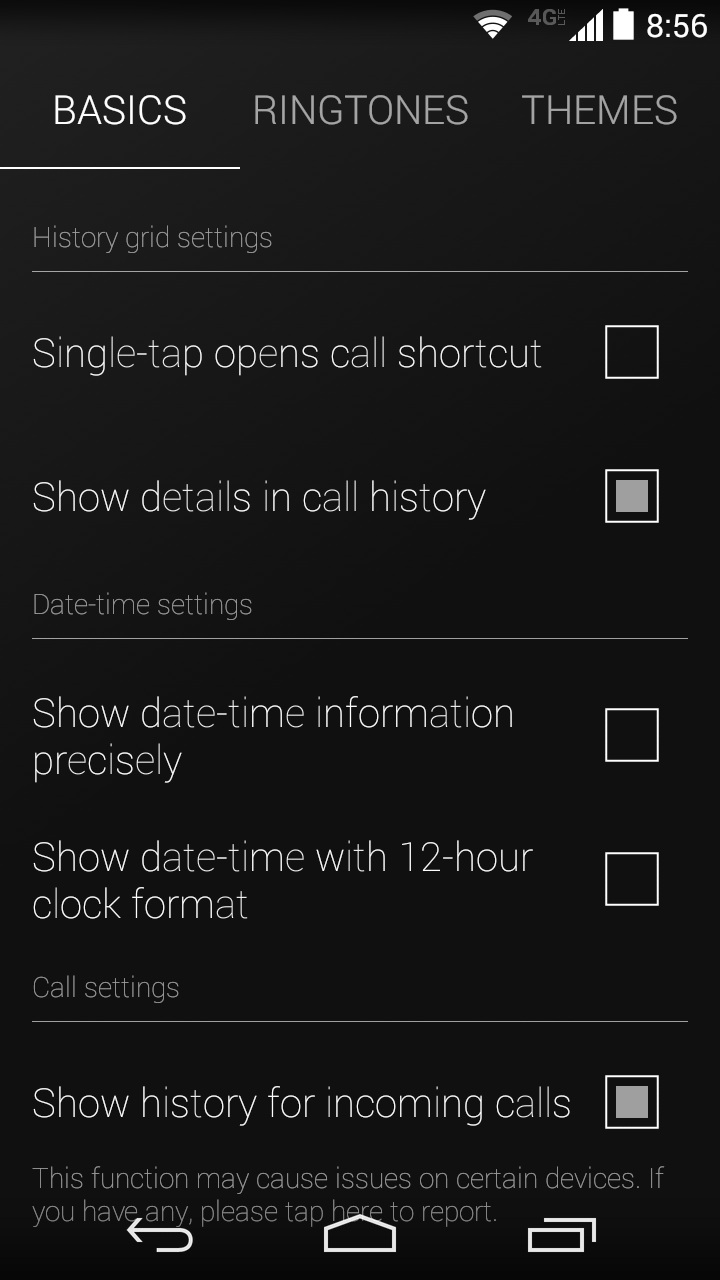
To see exactly how the codes work, you can check out the Ready FAQ page here: Ready FAQ’s, and it will explain what happens when you share your code, what happens if/when someone uses it and what rewards you will get. It will also tell you how many points each feature you wish to unlock costs and all that useful information.
Let’s not forget to mention that you get a bit of Android Material love with this app, and that alone makes it that much more worth it. As we all know, Google is going to be making this Material look the new standard, at least for a while, so it’s nice to see this part of your phone already spiced up with it via the Ready Contact List app.
Final Thoughts
Most of these types of apps do absolutely nothing for me at all in just about every way possible. However, Ready Contact List does everything right and does it in a beautiful way. If you’re looking for an alternative contact list/dialer app, and you want to make the phone part of your phone awesome again, then by all means grab the Ready Contact List app today.
Now that all of that is out of the way, let’s have a little contest if we shall. As mentioned above, you can unlock various things within the app by spending money or by sharing your personal code with others and have them enter it or install the app via the URL you provide. But how about if we give fifteen(15) of you kick ass and awesome readers of ours a chance to win a code that will unlock EVERYTHING for you?
Contest Time: Win A Premium Code
Here’s how it’s going to work boys and girls. You have to leave a comment in the comment section below and you have to tell me what your favorite movie character of all time is. I don’t care if you say it’s Luke Skywalker, Optimus Prime, E.T. or whatever. As long as you tell me your favorite movie character of all time, you’re automatically eligible to win. This contest is open to anyone in the world, and will run from now until Friday at 11:59pm EST. That means you don’t have long, so comment quickly. Only one comment per person will count and we ask that you use a valid email address when you leave your comment, as that’s how we will get in touch with you to provide you with your code for the Ready Contact List.
Website: Ready Contact List App
Deals, Discounts, Freebies, and More! Click here to save today!
The post Ready Contact List: A new, beautiful contact list replacement app, plus a contest appeared first on AndroidGuys.
.CPlase_panel display:none;
Always know the weather with the Beautiful Weather Watch Face app [‘Watch’ This App]
If you’re like me then you may be constantly checking the weather. Even if it has no bearing on you’re day you still need to know it, just for the sake of knowing it. If this is something you do, then it may be time to check out the Beautiful Weather Watch Face app. Beautiful… Read more »
The post Always know the weather with the Beautiful Weather Watch Face app [‘Watch’ This App] appeared first on SmarterWatching.
Deals, Discounts, Freebies, and More! Click here to save today!
Read the rest at SmarterWatching.com!
The post Always know the weather with the Beautiful Weather Watch Face app ['Watch' This App] appeared first on AndroidGuys.
.CPlase_panel display:none;
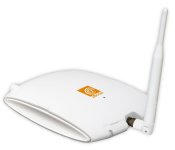
Accessory of the Day: zBoost home/office cell phone signal booster $207.04

If you’re suffering from poor coverage or dropped calls in your home or office, the zBoost Signal Booster may be the answer to all of your problems. Installation is easy, immediately pulling signal from multiple towers thanks to its omni-directional antenna. The booster works with 800 and 1900 MHz frequencies from AT&T, T-Mobile, Verizon, Sprint, and all major carriers. Covering up to 2500 square feet for $207.04 (Prime eligible) with great wireless signal, this little box will be a gift from the heavens for many of our readers with coverage issues.
Deals, Discounts, Freebies, and More! Click here to save today!
The post Accessory of the Day: zBoost home/office cell phone signal booster $207.04 appeared first on AndroidGuys.
.CPlase_panel display:none;

Jawbone’s trackerless Up app syncs with Apple Health and other fitness services

As it promised mere weeks ago, Jawbone has launched a new version of Up for iOS that syncs data from numerous health services and doesn’t require its own tracker. Confusingly, the Jawbone app which does require an Up or Up24 tracker is also called ‘Up’ and is still available. However, the new version is more of a fitness catchall app that works with Apple’s Health and over a hundred other apps (and their trackers), like RunKeeper and IFTTT. Interestingly, it even works with Nest’s thermostat to “create an ideal sleep environment.” In fact, the new Up wants to manage all aspects of your health by tracking your sleep, nutrition and workouts. Once it learns your habits, the “Insight Engine” will then give you personalized health tips and other info. There are also social functions, including team tracking and the ability to boast about fitness milestones. Apple had pulled HealthKit apps a few days ago due to bugs, but after some scrambling they’re now back — you can grab Jawbone’s UP for iOS here.
Filed under: Wearables, Software
Via: MacRumors
Source: Jawbone
.CPlase_panel display:none;

Tesco is closing its Clubcard TV streaming service

When Tesco launched Clubcard TV early last year, everything we saw suggested that the ad-supported streaming service would be nothing more than an experiment. That hunch has proved accurate, because the company has said it will shutter the free service on October 28th. According to a Clubcard TV support page, Tesco didn’t get “the level of repeat usage [it] had hoped for,” so it’ll close the service in order to concentrate on its more established resource, Blinkbox. The supermarket giant will still offer Clubcard points alongside Blinkbox movie purchases, though, which will suit those who intend to watch films on the new (and supposedly bigger) Hudl 2 when it’s unveiled later this week.
Filed under: Home Entertainment, Internet, HD
Via: The Next Web
Source: Clubcard TV Support
.CPlase_panel display:none;

GoPro’s Hero4 cameras offer 30 fps 4K shooting or touchscreen controls

GoPro started life as a home-brew wrist-mounted 35mm camera, but it’s come a long way since. Today we’re getting a look at the next instalment of that story: The Hero4. The latest cameras from the action sports behemoth bring some anticipated features, along with a few surprises. Most notably, while the Hero4 still comes in three tiers/editions, there are greater differences between them. Black is still the top-specification model (more details of which after the fold), but Silver has a few neat tricks of its own. Finally, the White edition is out, in place is a new camera simply called “Hero”. The new family structure is essentially: Professionals, prosumer/consumers, and entry level — which isn’t that different from before, just this time around it’s more pronounced. “Enough already, tell me about the features” I hear you say. Glad you asked, follow on below for details.
The daddy of the family, Hero4 Black, has two key features that fans of GoPro have been waiting for since the Hero3: 4K video recording at 30 fps, and 1080p now at 120 fps (you can also grab 2.7K at 50 fps!). The Hero3 did 4K, but only at 15fps, making the feature less useful for professional projects. The Hero3+ didn’t improve on that (and perhaps suggests why that wasn’t branded the Hero4). But, it looks like GoPro figured out how to deliver full 30 fps 4K without ravaging the battery (more on that battery later). Other new features include a “highlight tag” which allows you to mark a key moment in your video via the WiFi button on the side. If you’re shooting hours of video at a time, this will make finding those sweet airs/best waves much easier once you import the video into GoPro’s Studio software.
GoPro’s Protune feature (that allows deeper control over settings) also got a facelift. Now you can control the ISO limit, color and exposure settings. That’s especially good news if you’re into low light shooting. Which brings us conveniently onto two other new modes called Night Lapse, and Night Photo. As the names suggest, these are aimed at getting better low-light stills/time lapses. Essentially, you can force a longer exposure for some trippy light effects. The Black edition also features a new audio system which promise twice the dynamic range of previous cameras — something we’re looking forward to testing in the near future.

Two hardware changes that are worth noting, are the addition of Bluetooth, as well as WiFi for additional connectivity options (to the remote, or app), and a much improved battery housing. The cells are different to those found in the Hero 3/3+, which is a bummer if you’ve built up a collection of spares, but the fiddly back door has gone; the batteries now slide in via a (much easier to open) spring-loaded trapdoor. Battery life is claimed to be the same — which won’t please those that already think it’s too short, but it does at least mean you shouldn’t be taking a major hit just because of all that 4K you’re (now) shooting.
If you’re thinking, well the Hero4 Black is the one I want then, because the Silver will just be the same, but with fewer shooting options, you’d be partly right. But also very wrong. Silver does top out at 4K/15 fps like the Hero3/3+. But, it has most of the other new tricks (highlights, the Protune tools, night photo modes and so on), along with one big dealio feature that Black doesn’t have: a built-in touchscreen display. Finally, there’s a GoPro that lets you see what you’re recording in real time, and playback photos and videos after the fact.
You can also use the touchscreen to set up the camera, instead of using the physical buttons (and tiny monochrome LCD). This is a bid deal. Especially as the Silver remains the same size (i.e. it’s no fatter like when you add on the BacPac). Considering most of the pro features make their way over to the Silver edition also, it’s really going to make choosing which you want all the more difficult. We got to play with both the Black and the Silver, and are really struggling to choose between them ourselves. Pros will probably still want the Black edition, but there’s a great many folk that might consider the Silver the top choice, simply for that screen. It really is a delight.
For those looking for less bells and whistles (and, in turn, a lower price point). The new “Hero” replaced the White edition. It’s very similar on paper. It still shoots up to 1080p at 30fps, and takes 5-megapixel stills (the Silver and Black go at 12-megapixels). This time around though, the camera and waterproof case are integrated — meaning the battery is built-in too. This makes it a much simpler proposition for those just looking to charge something up, stick it on a mount and go. The best feature with the Hero though, is how much it costs. At just $130/£100, it really is going to challenge all those no-brand cameras that only really compete on price. As for the Silver and Black? They will run you $500/£370 and $400/£290 respectively when they launch on October 5th.
Filed under: Cameras, Wearables
.CPlase_panel display:none;
Definitely waterproof: Sony Xperia Z3 unboxing underwater is as impressive as it sounds
 The Sony Xperia line of devices is probably best known for their long history of waterproofing their devices and Sony‘s latest smartphone is no different, as this Sony Xperia Z3 unboxing irrevocably shows. As the title of the article suggests, the unboxing in question unboxes the Xperia Z3 and the contents of its box all while completely underwater. Don’t believe me? Check out Carphone Warehouse’s video for yourself:
As you can see, it’s not like the phone is just taken out of the box for nothing – it’s actually turned on for the first time underwater and is used to take a few happy snaps too. As far as unboxings go, the very first underwater unboxing is going to be a very hard act to follow. Of course, this is all made possible by the waterproofing of the Xperia Z3 (IP65 and IP68), which was announced earlier this month at IFA 2014. Truthfully told, the Xperia Z3 is only a minor update from the Xperia Z2, but the cosmetic changes and the return of great features like the 20.7MP rear camera keep it relevant in the fast moving smartphone market.
I feel as though everything needs to be unboxed underwater now. What did you think of the Sony Xperia Z3 unboxing underwater? Let us know your thoughts in the comments below.
Source: YouTube
//<![CDATA[
ord = window.ord || Math.floor(Math.random()*1E16);
document.write('‘);
//]]>
The post Definitely waterproof: Sony Xperia Z3 unboxing underwater is as impressive as it sounds appeared first on AndroidSPIN.
.CPlase_panel display:none;

Facebook’s Atlas ad platform will track you around the internet

Facebook’s sufficiently chummy with advertisers that some people have gone and built their own social networks to escape Mark Zuckerberg’s clutches. For those who remain, however, it’s now going to be even harder to avoid people using your personal profile information to sell you things. The company has re-built and re-launched (former Microsoft ad platform) Atlas as a way of monitoring people’s online activity across every device that they own. In a blog post, Atlas chief Erik Johnson talks about “people-based marketing” that leaves behind cookies and instead knows what you’re doing on desktops, smartphones and tablets. That data, coupled with Facebook’s knowledge of your age, gender and preferences, will then be used to sell specific products — with the firm that handles Intel and Pepsi’s promotional work the first to sign on.
Filed under: Internet, Facebook
Via: Re/code
Source: Atlas Solutions, (2)
.CPlase_panel display:none;

Interesting theory: Did Google out the name of its next build, Android Lollipop, in its birthday celebration?
 Fun fact: Google turned 16 years old yesterday. Other fun fact: A gif that Google posted on social media shows lollipops as the decoration on a birthday cake. Now, this next bit is going to be a bit of a stretch, but this is by no means beyond the subtle marketing of Google – could the lollipops on the top of the cake signify the name of the next build of Android, Android Lollipop? This was one of our earliest guesses for the name of Android L, even before we knew it as Android L, and it is at the very least plausible. Of course, it could equally be called layer cake, but we’d like to think there’s going to be a lollipop themed Android figurine on Google’s lawn in a month’s time. And yes, we know that’s a pretty indefensible reason.
As with every build of Android before it, everybody has been trying to guess the name of the next build of Android for the longest time, the most compelling theories of which have recently been Lemon Meringue Pie and Lion, the last courtesy of Google’s previous relationship with Nestle. Really, it’s anybody’s guess, so unless you’re into the whole business of speculation, you can probably afford to wait until an official announcement is made – Google is expected to announce a new tablet, the Nexus 9, and also a new phablet, the Nexus 6, come mid-October.
What do you think about this latest theory? Is it reading too deep into it, or is this totally something Google would do? Let us know your opinion.
Source: Phandroid
//<![CDATA[
ord = window.ord || Math.floor(Math.random()*1E16);
document.write('‘);
//]]>
The post Interesting theory: Did Google out the name of its next build, Android Lollipop, in its birthday celebration? appeared first on AndroidSPIN.
.CPlase_panel display:none;

Impressive Oppo N3 specs leak out as well as some interesting looking images
 Oppo is supposedly unveiling the Oppo N3 in just a few weeks, the follow-up to its intriguing smartphone device from last year, the Oppo N1. Oppo has teased an event in Singapore to take place some time in October and we’ve also seen Oppo tease that the device is going to somehow incorporate aerospace grade metal in its design. Today, some Oppo N3 specs have leaked out, further adding to the intrigue. It appears Oppo will again go for size with the Oppo N3, allegedly opting for a 5.9-inch display that will carry a 1080p resolution – decidedly unimpressive in this day and age of 2K displays. Under the bonnet, the Oppo N3 will apparently have a Snapdragon 805, 3GB RAM and from the images that accompanied this leak, also incorporate a 13MP swivelling camera, much like its predecessor.
 While the leaked specs should be carefully considered, the images themselves, which look like computer generated renders, should definitely be taken with a grain of salt. While it does definitely look the part with the swivelling camera, it again looks quite different to other devices that have allegedly been the Oppo N3. Either way, there isn’t long to wait till Oppo officially announces the device so we’ll be finding out what it looks like sooner rather than later.
What do you think about this latest leak? And what are your thoughts on the Oppo N3 specs? Let us know your opinion.
Source: Zaeke via TalkAndroid
//<![CDATA[
ord = window.ord || Math.floor(Math.random()*1E16);
document.write('‘);
//]]>
The post Impressive Oppo N3 specs leak out as well as some interesting looking images appeared first on AndroidSPIN.
.CPlase_panel display:none;
 AIVAnet

