


The UAE’s eco-friendly, robotic city looks more like a ghost town

The United Arab Emirates’ pre-planned Masdar City is supposed to be a shining beacon of technology between its clean energy and automated cars. However, it has hit a few roadblocks, including the financial crisis from the last decade — and the result is less of a Utopia and more of a ghost town. If you need proof, Quartier Libre has posted an eerie video tour (below) of Masdar as it stood this summer. With just a few thousand residents, many of the buildings and high-tech facilities sit unused; it’s as if everyone suddenly went on vacation. The city should be more welcoming once it’s completed sometime after 2020, but for now it’s not exactly a tourist’s dream. Not unless you really enjoy haunted houses, that is.
[Image credit: Jan Seifert, Flickr]
Filed under: Misc, Transportation
Via: The Verge
Source: Quartier Libre (Vimeo)
.CPlase_panel display:none;

Apple Apparently Working to Add Photos to iCloud.com Suite of Apps
Apple is phasing out Aperture and iPhoto on the Mac, replacing the pair with a new Photos app that is slated to debut early next year. Mac owners who want to access their iCloud photos before this new OS X app is released may soon be able to do so via an iCloud.com version of Photos that is currently under development, reports 9to5Mac.

Screenshots from an Apple iCloud support document clearly show an icon for Photos, suggesting Apple is working on an iCloud version of its Photos app. Error messages obtained when trying to open the presumed URL for the app on the beta iCloud site also reference a “Photos” application that is unable to be opened.
This alert does not appear for any other URL string, so it is not simply a generic message shown for any non-existent URL. It clearly indicates that some form of ‘Photos’ app is in development for the website. The fact it shows only on the beta site is interesting, as iCloud Photo Library is also currently denoted as ‘beta’ in developer builds of iOS 8.
Details on the web app are not available, but it presumably will allow users to view and possibly manage pictures uploaded to Apple’s iCloud service from an iPhone, iPad, or iPod touch. The launch date of this iCloud Photos app is, however, unknown.
Apple already offers online versions of its iWork suite including Pages, Numbers,and Keynote, with its new iCloud Drive storage feature rolling out fully when OS X Yosemite debuts later this year.
.CPlase_panel display:none;
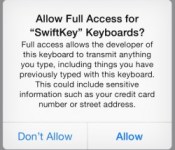
iOS 8 Keyboards, ‘Full Access’, and User Privacy
 Third-party systemwide keyboards have been one of the biggest hits of iOS 8 since its launch last week, with some of the big names in the business leaping straight to the top of the App Store charts. But with that success has come questions about privacy and the security of these keyboards, considering the personal information users are sometimes entering through them.
Concern over these keyboards has been sparked in part by a standard warning displayed by iOS 8 when the keyboards are granted “full access” to enable their entire sets of features. Different keyboard apps break down their feature sets between standard install and “full access” differently, so we set out to find out what is driving those differences.
Full access allows the developer of this keyboard to transmit anything you type, including things you previously typed with this keyboard. This could include sensitive information such as your credit card number or street address.
The early leader among free keyboard apps in the United States and many other countries was SwiftKey Keyboard [Direct Link] which topped one million downloads in less than 24 hours of availability. While the basic keyboard works with a standard installation, several of its key features, including word predictions and the SwiftKey Flow finger-tracing typing method, require that full access be granted to SwiftKey Keyboard. This naturally has caused some concern among users worried that their sensitive information typed on the keyboard is being sent back to SwiftKey for unknown purposes.
Read more 

Apple Employees Rewarded for Record Month With Thanksgiving Holiday
 Apple CEO Tim Cook sent a company-wide memo out to all employees this morning, thanking them for their hard work during the month of September, which saw the release of the iPhone 6, iPhone 6 Plus, iOS 8 and the announcement of the Apple Watch. Cook also announced that Apple employees will be receiving additional vacation time during the Thanksgiving holiday in the United States, as they have in past years.
“Each of these introductions represents years of innovation and hard work by teams all across Apple,” wrote Cook in the letter, which was first shared by 9to5Mac. “Many of you have put the best work of your lives into these amazing new products, which bring together world-class hardware, software, and services in the way only Apple can.”
Without you, none of these accomplishments would have been possible. Our people are the soul of our company, and we all need time to refresh and renew. To provide that time, and to recognize all of these achievements — as well as your boundless talent and dedication — I’m happy to announce that we’re extending the Thanksgiving holiday this year. We will shut down with pay on November 24, 25 and 26 so our teams can enjoy the whole week off.
Apple will be shutting down during the week of Thanksgiving, giving employees November 24, 25, and 26 off in addition to the actual holiday on November 27 and 28. While stores will remain open, retail employees will be given the same amount of time off, but at varying dates. International teams will also receive extra vacation.
Apple routinely closes up shop for multiple days around Thanksgiving and Christmas, giving employees time off to spend the holidays with family. While iTunes Connect shuts down during the Christmas holidays, it has, in the past, remained functional over Thanksgiving leading to little end impact on customers.
.CPlase_panel display:none;

iPhone 6 Touch ID Still Vulnerable to Specialized Fake Fingerprint Hack [iOS Blog]
Apple has done little to improve security in the Touch ID technology used in its current iPhone 6 handset, claims security researcher Marc Rogers of Lookout Security (via CNET). As shown by Rogers, the latest iPhone models are vulnerable to hacking using the same fake fingerprint technique first demonstrated with the iPhone 5s.

The technique requires a hacker to lift a suitable fingerprint from a solid surface and create a copy using forensic techniques that require specialized equipment. If done properly, these replica fingerprints can activate the Touch ID sensors on both the iPhone 6 and the iPhone 5s.
Sadly there has been little in the way of measurable improvement in the sensor between these two devices. Fake fingerprints created using my previous technique were able to readily fool both devices.
Rogers adds that the only changes in Touch ID appear to be in the sensitivity of the iPhone 6 fingerprint sensor, with the iPhone 6 possibly supporting a higher resolution scan. This improved scanner makes it harder for a fingerprint to be cloned by an unskilled criminal, but it does not add any additional security precautions, such as a time-based passcode requirement, to the Touch ID authentication system.
Touch ID may offer adequate security for unlocking phones, but Rogers questions its effectiveness as a deterrent to the much more lucrative credit card and mobile payment theft. With Apple opening up its iPhone 6 to mobile payments with Apple Pay, the potential for this form of theft becomes more likely as criminals begin targeting iPhone users in order to exploit these mobile transactions. Still, the complexity of creating a fake fingerprint means users are much more likely to be affected by a stolen plastic credit card than a spoofed Touch ID fingerprint linked to Apple Pay.
[T]he sky isnt falling. The attack requires skill, patience, and a really good copy of someone’s fingerprint — any old smudge won’t work. Furthermore, the process to turn that print into a useable copy is sufficiently complex that it’s highly unlikely to be a threat for anything other than a targeted attack by a sophisticated individual.
Apple Pay is Apple’s new mobile payment initiative that will debut with an iOS software update next month. The system uses NFC to process payments wirelessly with a one-time token and Touch ID authorization for security. Apple is partnering with credit card companies and US retailers including Walgreens, Macy’s, and Nike to roll out the service.
.CPlase_panel display:none;
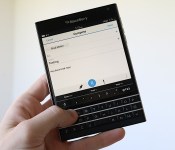
BlackBerry’s Passport is a square in looks but not personality

For the first time in ages, I’m intrigued by a BlackBerry device.
That’s rather unusual these days, but it wasn’t always this way. I remember when I first saw the Pearl eight years ago; it was one of the most beautiful devices I’d ever seen. The Curve and Bold series didn’t disappoint either. But the magic has been missing from the Canadian phone maker for a long time, evidenced by its struggling sales. Only one in a hundred smartphone owners use a BlackBerry, and the company’s older-generation hardware is still outselling current BlackBerry 10 handsets. Now it’s putting much of its hope in a unique-looking squarish device called the Passport, which launches today in five countries (with 30 total by the end of the year). The $599 off-contract/$249 on-contract device ($699 in Canada and £529 in the UK, off-contract) is designed to appeal to fans of physical keyboards and large displays. It may not restore the magic BlackBerry’s lost in recent years, but my initial experience with the Passport has been more positive than I expected. At least that’s a start, right?
Calling the Passport a square device isn’t quite accurate, but it’s pretty close: It features a 4.5-inch square LCD panel with a resolution of 1440 x 1440 pixels (for a pixel density of 453 ppi), with a squished keyboard underneath that doubles as a touch-sensitive trackpad. (More on this soon.) Instead of the phone prompting a love-at-first-sight reaction from the people I showed it to, most folks had a bewildered look on their face as if to say, “what is the point of this thing?”
It’s not hard to understand why. The smartphone is named after the booklet that allows international travelers to enter and exit countries, presumably because its dimensions are nearly identical; place a real passport on top of the Passport and you’ll only see the outline of the device. It’s 128mm tall and 9.3mm thick, and it’s on the hefty side at 6.86 ounces (194g), but the 90.3mm width is the most striking part of the phone’s hardware. To put it in perspective, it’s wider than the 5.5-inch iPhone 6 Plus, the Galaxy Note 4 and the 6-inch Nokia Lumia 1520, and is only 1.9mm narrower than the 6.4-inch Sony Xperia Z Ultra. It’s also just a tenth of a millimeter skinnier than the LG Optimus Vu, which sports a nearly identical shape but without the keyboard.

The crazy width on the Passport is no accident — the designers made it this way on purpose. In fact, BlackBerry boasts that it’s 30 percent wider than an average 5-inch device, and as a result you’ll see 60 characters on a single line. In other words, the manufacturer expects you to do a lot of reading on the phone, whether it be emails, messages, websites or e-books.
Naturally, the first thing I asked BlackBerry reps when shown the phone was how anyone will possibly be able to use the device one-handed. To the company’s credit, the Passport feels very comfortable to hold with two hands, so anyone who misses the tactile feel of a physical keyboard will be right at home in this position. It was everything else — the stuff that doesn’t involve typing — that I was concerned about. How am I supposed to use it in the subway? BlackBerry responded by rotating the phone into landscape mode.

Landscape mode would normally seem silly on a square device with a physical keyboard, but the phone’s engineers added a neat trick. As briefly mentioned earlier, the three-row keyboard doubles as a trackpad, and this comes in handy in several ways. In landscape, it lets you scroll through websites, feeds and other content without having to reach onto the screen. (Sure, it doesn’t feel quite as awkward to hold this way, as long as you prop the bottom of the phone up with your pinky finger.) It also adds gestures to your typing experience; three word predictions will pop up on a virtual bar at the bottom of the screen, and you can swipe up from below that word to choose it, which eliminates the need to stop what you’re doing to tap on the screen. You can also swipe left to delete a full word and use the pad to move the cursor around.
The phone is also missing a physical number row, which ends up being the weirdest part of the experience. Instead, BlackBerry offers a virtual row at the bottom of the screen that dynamically changes based on the context of what you’re typing. When composing an email, for instance, the “to” field will pull up different keys than the “subject” field. Some apps or fields will pull up a dedicated number row, but most just hide it so you have to tap on the symbol button to access them. (Another alternative is to swipe down on the right side of the board; this pulls up a virtual three-row keyboard that acts as a hotmap, so you can press X to type 7 or E to type 2.)
After a little bit of use, the keyboard actually feels more comfortable to use than I expected, but it definitely will require an adjustment period. I get thrown off anytime I have to switch from the tactile keyboard to tapping on the hard screen, and it’s difficult to get used to the small space bar and lack of physical symbol or number keys. Still, it didn’t take long before I found myself getting into a groove.

The Passport is the first BlackBerry device to come with OS 10.3. Among its list of features is Assistant, the platform’s first attempt at a digital assistant like Siri, Cortana or Google Now. Long-press the middle button on the right side to activate the feature, which uses Nuance technology to process what you’re trying to say. As you might expect, you can use Assistant to tackle tasks like calling and texting friends, sending emails, creating and editing appointments, check in on Foursquare, play music, get navigation routes and send social media updates.
Additionally, the Passport comes with support for the Amazon Appstore, so users will have more app options (though still not as many as its competitors). Just as before, you’ll still be able to sideload Android apps, as long as they are compatible with Android 4.3 or earlier; KitKat apps still aren’t supported on BlackBerry’s runtime.
The company’s also launching a service today called BlackBerry Blend, which is akin to the Continuity feature on iOS — through an app on your computer or tablet, you can manage your phone’s content, transfer files back and forth, send and receive texts/BBM messages and handle both your personal and secure work stuff. The service will be available as a free download on Mac OS X 10.7 and better, iOS 7 and higher, Windows 7+ and Android 4.4 KitKat, but BlackBerry plans to launch extra enterprise features through subscription in the coming weeks.

Once I got past its awkward facade, I noticed that it’s actually very solidly built. Nothing on it feels cheap; it comes with a stainless steel frame along the sides, with a black soft-touch plastic on the back that, along with the fret racing across the top half of the phone, gives it an elegant look and feel. The unlocked model retains the company’s signature logo on the back, but nothing else.
Surprisingly, the Passport packs a respectable spec sheet. It’s powered by a 2.2GHz quad-core Snapdragon 800 chip and comes with 3GB RAM, 32GB of internal storage (with microSDXC allowing up to 64GB external space), a 13MP rear-facing camera with LED flash and optical image stabilization, dual-band WiFi with 802.11ac support, a four-microphone setup, NFC, Miracast and 10 LTE bands. And let’s not forget the 3,450 mAh battery, which is one of the top benefits of the phone’s size. Unfortunately, it’s not removable; the only part of the back you can take off is the top section, above the top fret. This section contains the nano-SIM and microSD slots.

Overall, my first impressions of the Passport are better than I expected. The device is built well and the keyboard is comfortable, but be prepared for a few odd stares from those around you. That said, I have plenty of reservations: I’m not sold on BlackBerry’s solution to the phone’s one-handed dilemma, and although the app situation is better than it was a year ago, it’s still not great. I have a unit that I’ll be testing over the next week and will offer my thoughts in a full review.
Filed under: Cellphones, Wireless, Mobile, Blackberry
.CPlase_panel display:none;

India put a satellite in orbit around Mars for a fraction of what it costs NASA

India can rightly feel proud of itself today as its Mangalyaan “MOM” satellite mission successfully entered orbit around Mars. In the process, the country has broken at least three records, including being the first Asian nation to reach the red planet and being the first country to get to Mars on the first attempt. Third on that list of achievements is that the project is one of the cheapest exploration projects in recent history, costing just $72 million – pocket change compared to NASA’s $670 million MAVEN probe and the $2 billion Curiosity Rover. India’s Prime Minister, Narendra Modi, has even quipped that it cost less to launch the satellite than it cost to make the movie Gravity.
A detailed Wall Street Journal report breaks down how India was able to reach Mars so cheaply, including keeping the payload under 15 kilograms and sling-shotting the craft around the Earth to save on rocket fuel. Deputy Director of India’s Space Research Organization told the Washington Post that scientists scoured the records of previous failed Mars missions in order to avoid making the same mistakes. Still, now that Mangalyaan (Hindi for “Mar’s Craft”) has reached orbit, it’ll spend the next few months searching the atmosphere for methane in an attempt to disprove the Curiosity Rover wrong and claim that there is life on Mars.
[Image Credit: Indian Space Research Organization]
Filed under: Transportation, Science
Via: Washington Post
Source: ISRO, MOM Briefing
.CPlase_panel display:none;

Samsung shifts 500 engineers from mobile to other areas

Samsung may be focused on smartphones, but it apparently doesn’t want to become a one-trick pony. The Korean tech giant has just moved 500 engineers from its mobile division to a host of other groups, including its home electronics, networking and software sections. The company says it’s shuffling people around to both boost its “competitive edge” in the internet of things and “increase synergies” for the Tizen platform it primarily uses on its wearable devices. We’ve reached out for more details, but it’s safe to say that Samsung’s software priorities are changing — it’s less concerned about its problematic Tizen phone efforts and more about adding smarts to a wide range of gadgets, whether they’re TVs or printers.
Filed under: Cellphones, Home Entertainment, Household, Wearables, Software, HD, Mobile, Samsung
Source: Wall Street Journal
.CPlase_panel display:none;

Now TV Adds New Entertainment and Sky Movies Passes to Apple TV in UK [Mac Blog]
 UK home entertainment and communications provider Sky expanded its Apple TV offerings with its expanded NOW TV channel supporting the broadcaster’s Entertainment Month Pass and Sky Movies Month Pass, reports Engadget. These two passes join the existing Sky Sports day pass that debuted on NOW TV last year.
The Entertainment Month Pass for NOW TV brings the latest television programming from 13 pay TV channels, including Boardwalk Empire and The Leftovers, for £4.99 (US$8.19) monthly. The Movies Month Pass is for movie buffs, offering streaming access to more than 800 blockbuster Hollywood films for £9.99 (US$16.39) a month after a 30-day free trial. UK customers also will be able to access the £9.99 (US$16.39) Sky Sports Day Pass for one-day access to six different Sky Sports channels.
Apple recently has been expanding the content and capabilities of its Apple TV. In the past few weeks, the company has rolled out a new channels for Beats Music and FX NOW, tweaked the user interface with an iOS 7-inspired design, and added support for iOS 8 features like Family Sharing and iCloud Photo Support.
.CPlase_panel display:none;
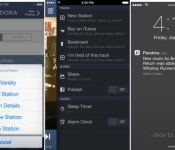
Pandora, Spotify, and Apple Climb App Revenue Charts as Customers Sign Up Via In-App Subscriptions
In a first for streaming music, Pandora, Spotify and Apple’s Beats Music are among the leaders in App Store revenue as customers increasingly subscribe to the services using in-app purchases. According to data provided by App Annie and published by Billboard, the music services were among the top ten revenue generators for all non-game applications in the iOS App Store during the month of August.

Internet radio service Pandora lead the trio, maintaining its number 2 spot in iOS App Store revenue. Spotify climbed seven spots from number 14 in July to number 7 in August, while Apple’s Beats Music moved up two spots to slide into the top ten at the number 9 slot.
All three services offer free apps that allow customers to purchase a subscription using an in-app subscription option. Pandora offers access to its paid Pandora One plan ($4.99 monthly), while Spotify allows users to pay $12.99 a month for its ad-free, offline premium subscription. Beats Music provides two options, allowing users to choose between $9.99 monthly access or a yearly subscription for $99.
Apple introduced in-app subscriptions a few years ago to iOS 6. As part of the App Store payment process, the company takes a 30 percent share of all in-app subscription revenue.
.CPlase_panel display:none;
 AIVAnet