



Watch out: eBay vulnerability leads to phishing log-in page

Thinking about picking up a used iPhone on eBay? Shop carefully, friends: it’s apparently phishing season. The BBC is reporting some auction listings are redirecting to counterfeit eBay login pages — fronts for phishing scams designed to steal customer usernames and credit card information. The good news is that eBay isn’t technically hacked. The online marketplace allows sellers to use scripting to gussy up item listings. Cross-site scripting is generally not allowed, but these scammers are doing it anyway.
“Cross site scripting is not allowed on eBay and we have a range of security features designed to detect and then remove listings containing malicious code,” eBay told Engadget. Even so, the BBC says it was able to identify 64 malicious listings from the last 15 days. All those auctions have been removed, of course, and eBay says it is actively seeking out and removing these kinds of listings. Still, better safe than sorry: if eBay is asking you to log in at an erroneous time, double check your address bar to make sure you haven’t been mysteriously redirected.
Filed under: Internet
Source: BBC
.CPlase_panel display:none;

We’re taking over Los Angeles on October 3rd

Austin, Seattle and Boston welcomed our Engadget Live tour this year with open arms and before we gear up for Engadget Expand, we’re heading to one more city: Los Angeles. Grab your free tickets and join us at the Belasco Theater on October 3rd at 7PM.
L.A.’s tech scene is “having a moment,” which was well illustrated through Re/Code’s recent spotlight on “Silicon Beach.” We’re not talking about the Snapchat or Tinder dudes; established companies and new innovators like Oculus VR, Maker Studios, Beats by Dre all claim SoCal as home.
What tech innovators will rub elbows with gadget lovers at arguably the hottest party in the City of Angels that night? Flip through the gallery below to find out and then get your free tickets.
Filed under: Meta
.CPlase_panel display:none;

Alibaba IPO makes it worth $231 billion, more than Amazon and eBay combined

We’d heard that the US IPO for Chinese company Alibaba could be among the biggest ever, and it did not disappoint. Closing at a stock price of $93.89, it raised $21.8 billion for the company and is the biggest IPO in US history. According to Bloomberg, it could become the biggest ever (topping Agricultural Bank of China’s $22 billion IPO in 2010) if underwriters make use of an option to buy more shares, which market observers expect they will. Now that Alibaba has joined the club of recent tech IPOs like Facebook and Twitter and it has cash to throw around, many wonder if it will start acquiring smaller companies the way its Silicon Valley rivals have lately. Despite being mostly unknown in the US Alibaba is massive in China, operating sales platforms described as similar to Amazon, eBay and Paypal, and Reuters says it controls more than 80 percent of online sales there. Jack Ma (pictured above) founded the company in his apartment in 1999 and is now China’s richest man, personally worth some $18 billion as of market close, according to the Wall Street Journal.
[Image credit: PETER PARKS/AFP/Getty Images]
Filed under: Internet
Source: Reuters, Wall Street Journal, New York Times, Bloomberg, Politico
.CPlase_panel display:none;

Ex-NBAer Rex Chapman allegedly stole from Apple Stores by faking EasyPay

Remember when Apple introduced its EasyPay self-checkout feature in 2011, and everyone wondered “how can they really tell if a customer is buying something or just shoplifting?” According to the Scottsdale, AZ police, former college and professional basketball player Rex Chapman had the same thought and acted on it. They arrested the 12-year NBA veteran at 1:45 PM local time, after employees recognized him as a former player for the Phoenix Suns and tied him to a string of thefts. Chapman accused of committing seven instances of theft over a few months, snagging gear worth more than $14,000 and selling it at a local pawnshop for cash. All of this was allegedly done by picking up the items, pretending to use the self-checkout feature in the iPhone’s Apple Store app and then just walking out. Now Chapman is facing nine counts of Organized Retail Theft and five counts of Trafficking in Stolen Property — all of which are felonies — and we’re wondering if Tim Cook has another security issue that could use some attention.
[Image credit: ASSOCIATED PRESS]
Source: Scottsdale PD, KTAR News
.CPlase_panel display:none;

Organize your life with Centrallo

Introduction
I have had the great fortune to be a beta tester for a service new to Android, Centrallo. Centrallo is a cross platform organization app focused on productivity. You are given a space in which you can create lists within lists within lists. You can have an unlimited number of lists within lists to organize what matters to you.
I have used Centrallo for the past few weeks to organize what I am expected to do for various organizations. It has helped me keep my projects separate and made sure that I completed them on time.
Centrallo is a great solution for a number of different problems. It can help you take those quick notes about things that you are likely to forget, you can organize projects, and you can organize your life. Now let’s look into where Centrallo shines and where it falls short. Here is a look into why Centrallo will remain installed on all of my devices after this review is finished.
Positives
I am as scatterbrained as they come. I can forget things two seconds after they occur. With Centrallo, I can quickly type up notes about things that need to be remembered. It works great as a note taking app.
While it takes a while to get it set up, after you have a few entries under your belt, note taking becomes quick and simple. The quick add feature is perfect for this type of usage. It allows you to make a text entry, set a reminder, save a photo, make a voice note and more! Great for the forgetful types such as myself.
The app is also great for project management. I have multiple different obligations that fall under multiple different organizations. The lists in lists feature allows me to keep everything separate in an orderly fashion.
Probably the best feature a developer can provide for their app is support. In the time that I first reviewed their beta to their initial public release, a lot of additional features have been added and a lot of my gripes have been fixed. You will notice update tags after a lot of the points that I make in this post. Those are all things that the development team at Centrallo added or fixed after the initial review after they were brought to their attention.
Upcoming Features
The dark theme can be a bit much. It is dark and I personally feel it slightly depressing. At the time of this review, there is an option in the settings to change the background color, but you can’t actually change the color just yet. Centrallo has assured me that there will be additional themes added into the app, so that is something to look forward to.
Update: A lighter theme has been added in the settings. It looks just as clean as the dark theme, but with a white background base.
While the app is running great on my Moto X, I could not install it on my Nexus 7. The reason for this is that I am running the Android L developer preview. The current beta that I am using does not support Android L currently, but I was told that Android L support will be coming shortly and will definitely be ready when Android L hits full release.
Update: Android L is now supported, however, my untrained eye did not see any material design elements just yet. Hopefully those are still to come!
Negatives
There are many good things to look forward to in the Centrallo app release, but there are also some things that could be improved. It is a long list, but they are very minor inconveniences that are quickly remedied.
Tips are too bloated. While it is great for starting off, there is just too much to go through. It shows off the lists in lists feature quite nicely, but it takes too much time to go through them all. It would be better if they were to just create a tutorial that pops up in the first running of the app along with an option to run through the tutorial again in the settings if it is required. This would make learning how to use the app less of a pain and get users off to a quicker start.
This leads into my next quarrel. Storage restrictions. The initial restriction makes sense. 100MB for a lightweight user free with an option to purchase more storage space for about $5 a month. However, the premium subscription only gets you 1GB of storage. There is no option for unlimited storage. Even though that I have not used even 1MB of my 100, this still doesn’t make sense to me. There will always be that heavy user that uses way more space then one would ever think possible. The premium subscription should get you unlimited storage. If I can’t touch my 100MB, then it is doubtful Centrallo will lose much by letting people have unlimited storage verses the 1GB limit.
My last bone to pick is with the user interface. The ui is clean and works well after you have played with it for a good amount of time. It takes a bit of fiddling to figure out how everything works and during that learning process, I lost a good number of my lists. Again, this is where a tutorial in the first boot up of the app would come in handy.
Lacking Features
The app has its faults, but I believe that it can be made perfect (for my usage) with a few additional features. In my opinion, these features should be already implemented. Keep in mind that I am using a beta release, so that these features might actually be in development and could be present in the final release.
Hyperlinks. Centrallo has added a very helpful feature where you can share links from your web browser to Centrallo to save the link as a listing in the app. A quick note to remember a site that will be useful later on, but not enough to bookmark it. The only thing missing is hyperlinks. You can’t just tap the link to open up your web browser. You have to manually copy the link and paste it into your browser of choice. This is an unneeded annoyance and time waster.
Update: Hyperlinks are now supported!
Another issue is the sharing feature. While you can share individual items, the recipient has to have a Centrallo account or will have to create one to receive the shared item. There should be a function where you can share whatever is saved in that particular note through text, email or social networking. An additional feature that would be great is if you could send an entire list of lists instead of the individual item through the same manner.
Update: Lists can now be shared
Conclusion
Centrallo is a great concept and a great app. It is important to remember that I am using a beta release, so it is not a completed product just yet. The app and service has great potential and will be a great benefit to users who need something to organize their lives. The world is a busy place and I plan on using Centrallo to help me manage my workings in this busy world.


Deals, Discounts, Freebies, and More! Click here to save today!
The post Organize your life with Centrallo appeared first on AndroidGuys.
.CPlase_panel display:none;

Is a Gold Moto 360 on the cards in the future? Motorola removes suspect watchface on website
 The Motorola Moto 360 has been hitting people’s wrists for a few weeks now and the general consensus is that it is the best Android Wear smartwatch out there now, but by no means does that mean it is perfect. Battery life appears to be the biggest sticking point, but with careful management, it looks like users can probably live with what they’ve got. With black and silver Moto 360‘s flying off the shelves, people have been happy with the available colours offered so far, but what if there was also a gold Moto 360? If the above image is anything to go by, it might be a possibility. If you look at the middle watchface on the top row, you will see that the watchface has a definite gold sheen to it. While that alone probably isn’t enough evidence, the hypothesis got a definite boost after Motorola hurriedly removed the watchface from the website. If you visit it now, it will look like this:
 Gone is the gold Moto 360 watch face with just the other four remaining. Again, that still probably isn’t enough evidence to say that there will be a gold Moto 360 – it may have just been a concept, or just an innocent mistake – but if there is, it could potentially come at a bit of a premium in price. We’ll keep an eye on this one and see if anything pops up over the next few days.
What do you think about a gold Moto 360? Let us know your opinion.
Source: Reddit via Android Police
//<![CDATA[
ord = window.ord || Math.floor(Math.random()*1E16);
document.write('‘);
//]]>
The post Is a Gold Moto 360 on the cards in the future? Motorola removes suspect watchface on website appeared first on AndroidSPIN.
.CPlase_panel display:none;

[VIDEO] Watch as an iPhone 6 Plus gets dunked in liquid nitrogen and shattered by a sledgehammer
 Continuing our coverage of iPhone misadventure after its global release yesterday (we promise we’ll stop soon), today we have YouTuber RatedRR doing some particularly nasty things to the new iPhone 6 Plus. Normally, RatedRR just shoots various devices (iPhones and Androids alike) with large guns, but they’ve decided to get a little more scientific with their torture test and dipping the iPhone 6 Plus into liquid nitrogen, before having a go at it with a sledgehammer. Classy.
Check out the results of the “test” below:
As many of you might have expected, the frozen iPhone 6 Plus literally shatters once it comes under the hammer – should’ve gone with sapphire displays after all, hey Apple?
We should point out that we never like seeing technology destroyed (yes, even iPhones) simply because it’s a bit of a waste of money, resources, etc. But, you have to admit that it does look pretty spectacular filmed in slow motion. And I do get a bit of a warm feeling imagining the face of someone who’s waiting to get an iPhone 6 Plus watching this video. Sadist? Probably.
What do you think about the iPhone 6 Plus? Think it has anything on Android phablets? Let us know your thoughts below.
Source: YouTube
//<![CDATA[
ord = window.ord || Math.floor(Math.random()*1E16);
document.write('‘);
//]]>
The post [VIDEO] Watch as an iPhone 6 Plus gets dunked in liquid nitrogen and shattered by a sledgehammer appeared first on AndroidSPIN.
.CPlase_panel display:none;
Simultaneous Voice/Data, HD Voice Now Available to Verizon iPhone 6 and 6 Plus Users
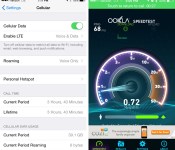
Verizon began rolling out its Advanced Calling service earlier this week, enabling voice over LTE (VoLTE) capabilities for select devices that support the service, which includes the iPhone 6 and the iPhone 6 Plus.
Numerous iPhone 6 and 6 Plus users are reporting that the VoLTE service is now functional, allowing Verizon iPhone 6 and 6 Plus users to use simultaneous voice and data capabilities for the first time when connected to a 4G LTE or Wi-Fi network. MacRumors has confirmed that VoLTE is indeed working, enabling users to browse the web or access apps while on a voice call.

In addition to enabling simultaneous voice and data, Verizon’s Advanced Calling features also allow for High-Definition voice calls, which are said to be more “natural-sounding” and Verizon-branded video calls.
Advanced Calling 1.0, a first-generation service suite enabled by Voice over LTE, or VoLTE, technology, is now available on America’s largest and most reliable 4G LTE network with XLTE. With Advanced Calling 1.0, there is a clear difference. You will be able to enjoy natural-sounding High-Definition (HD) Voice and a Video Calling experience that’s as simple as making a traditional voice call.
Users can enabled Advanced Calling features by visiting the Verizon website and adding the feature to their accounts. Users also need to make sure both Voice and Data are turned on in the iPhone’s Settings app. Go to Settings –> Cellular –> Enable LTE –> Tap Voice & Data.

Verizon’s Advanced Calling features are limited to the iPhone 6, the iPhone 6 Plus, the LG G2, and the Samsung Galaxy S5.
(Thanks, Will!)
.CPlase_panel display:none;
iPhone 6 and 6 Plus Out-Of-Warranty Repairs Cost Up to $299/$329 [iOS Blog]
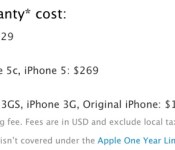
With the iPhone 6 and the iPhone 6 Plus now available to customers, Apple has updated its support information to include U.S. repair pricing for the two devices. While all new devices include a standard one year warranty that can be extended with AppleCare+, the standard warranty does not cover accidental damage.
Repairs for screen damage, which includes cracked or shattered displays, will cost $109 for the iPhone 6 and $129 for the iPhone 6 Plus, along with a $6.95 shipping fee.
Accidental damage (water damage, for example) or out-of-warranty damage to an iPhone will require users to pay a fee of $299 for the iPhone 6 or $329 for the iPhone 6 Plus, along with the $6.95 shipping fee. That’s far more affordable than the cost of a new device, but it is still more expensive than iPhone 5s repairs, which are priced at $269.

Apple also quotes a $79 flat fee for a battery replacement, but devices that have a defective battery will be eligible for free repairs for the entirety of the one year warranty that comes standard with iOS devices.
Apple does offers AppleCare+, which covers two incidents of accidental damage for a $79 service fee each time, cutting down on the cost of a replacement device. AppleCare+ is available directly from Apple for $99 in the United States.
.CPlase_panel display:none;
Need two screens on your smartwatch? Try the Oru Watch
If you have been looking for a smartwatch and thought the current watches with only one screen weren’t for you, take a look at the Oru Watch. The Oru features a low power, always on e-paper screen on one side and a high resolution, touch screen, TFT screen on the other. If that’s not enough,… Read more »
The post Need two screens on your smartwatch? Try the Oru Watch appeared first on SmarterWatching.
Deals, Discounts, Freebies, and More! Click here to save today!
Read the rest at SmarterWatching.com!
The post Need two screens on your smartwatch? Try the Oru Watch appeared first on AndroidGuys.
.CPlase_panel display:none;
 AIVAnet