



HP Slate 7 Beats Special Edition tablet now available for $250
HP has released a new slate recently with one of the longest device names I can recall, the HP Slate 7 Beats Special Edition. The name says it all. It is a 7-inch tablet by HP with Beats audio integrated, and prominently displayed on the front.

The special edition tablet is a clear refresh of their Slate 7 Extreme. The tablet is sporting a 1280 x 800 resolution 7-inch screen with a pair of front facing Beats audio tuned speakers. The tablet is running Android 4.4.2 with a NVIDIA Tegra 4 quad-core processor, 1GB of RAM, 16GB internal storage (with an SD card slot). For photos you have a 5MP rear camera and a 2MP front shooter. Powering the device is a 4,100 mAh battery that is rated at 9 hours. The Slate also offers an amplified headphone jack, HDMI out and a Stylus. Yes, there is a stylus too.
http://c.brightcove.com/services/viewer/federated_f9?isVid=1&isUI=1As for extra software and perks, HP worked out a deal for 25GB of Box storage for the rest of your life. There are also a number of HP specific apps like HP ePrint, Stylus Lab Write and HP Connected Photo powered by Snapfish. Don’t forget the pre-installed Tegra Zone for all those specially tuned Tegra optimized games and such.
The Slate 7 Beats edition comes in the vibrant red you see above as well as a traditional black. Cost wise you are looking at $250. Feel free to dig in a little deeper if you are interested over at HP’s site.
Source: HP Via Liliputing
//<![CDATA[
ord = window.ord || Math.floor(Math.random()*1E16);
document.write('‘);
//]]>
The post HP Slate 7 Beats Special Edition tablet now available for $250 appeared first on AndroidSPIN.
.CPlase_panel display:none;

What the ‘Bleep’; Private and secure voice and text app goes to public Alpha from BitTorrent
Privacy concerns are probably at an all time high as of late. While it was probably always in the back of your mind that someone, somewhere, was somehow watching, listening and stealing all your stuff, it doesn’t always seem real until it makes the news. The efforts of a number of companies have lead to some great apps and software that keeps your stuff safe, and most importantly, private. BitTorrent is one that is doing its part to help keep you, and your communications, a little further off the radar.

Today BitTorrent has opened up the public release of the alpha version of a new communications, voice and SMS, app called Bleep. The alpha app is available for Windows, Mac and Android in its current state with iOS on the horizon. BitTorrent is utilizing the same principals of BitTorrent technology to connect people directly without any form of centralized connection to a server or a cloud.

Here are the latest options and features in the Bleep Alpha:
- Sign-up with email, mobile number or incognito (no Personally Identifiable Information needed)
- Make voice calls or send text to online contacts only
- The option to import your Google address book contacts
- Invite friends using their email address, SMS, or their public key
- Move an existing desktop account to a mobile device (new)
- Receive inbound messages on all devices (new)
- Messages are sent fully encrypted and stored locally (on your device)
- Easily delete your encrypted message history
- Deleting contacts is now possible on Android and Windows (new)
As with any alpha, you can expect some hiccups, glitches and potential problems. It could still be worth checking out if privacy is a huge concern of yours. If you are an extremely technical person you may want to check out the BitTorrent Engineering blog about how it all works. If you are more interested in getting in on the alpha and trying it out for yourself, then head to the alpha download page. You can grab Bleep for Windows and Mac there. They link to Android as well, but it just directs you to the Play Store to download it.
//<![CDATA[
ord = window.ord || Math.floor(Math.random()*1E16);
document.write('‘);
//]]>
The post What the ‘Bleep’; Private and secure voice and text app goes to public Alpha from BitTorrent appeared first on AndroidSPIN.
.CPlase_panel display:none;

Motorola Releases Behind the Scenes Video for their New Moto X Commercials

You have no doubt seen the New Moto X and Moto 360 commercials Motorola released not too long ago, and we can all agree the marketing team knew how to show off the new features. Being that I am the YouTuber of the bunch, I love seeing behind the scenes footage that shows the process and intricacies of making a fantastic looking commercial. So I’m glad to show you guys the behind the scenes video of those new Motorola commercials. It’s brief, but a great video, so give a look and let us know what you think about it.
//<![CDATA[
ord = window.ord || Math.floor(Math.random()*1E16);
document.write('‘);
//]]>
The post Motorola Releases Behind the Scenes Video for their New Moto X Commercials appeared first on AndroidSPIN.
.CPlase_panel display:none;
Apple TV gets Beats Music streaming and a flatter look

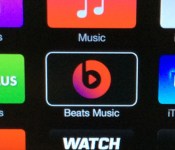
Your iPad or iPhone isn’t the only device getting a big iOS upgrade today. Apple is now rolling out an Apple TV update that brings not just iOS 8-savvy features like iCloud Photo and Family Sharing, but a flatter-looking interface on third-generation devices — yes, that previous super-glossy look has gone the way of the dodo. If you’re using that newer hardware in the US, you’ll also see a Beats Music app that lets you stream on-demand tunes during a living room party. The refresh isn’t going to get you any closer to that long-rumored TV set, especially if you’re still stuck on a second-gen Apple TV box, but it’s welcome all the same.
[Image credit: AppleInsider]
Filed under: Home Entertainment, HD, Apple
Source: AppleInsider
.CPlase_panel display:none;

SlingPlayer support for Chromecast brings an obvious combination together

Watching Netflix or Plex streams on your Chromecast is great, but what about when the game is on? Sling has enabled its apps on iPhone, iPad and Android phones (Android tablets coming soon) to help with just that situation. Just tap the Cast button in the apps, and you can send video to Google’s $35 dongle. Similar to Sling’s integration with Apple TV and Roku, once the video is playing, you can use the app as a remote control, or close it and do something else while the video keeps playing. The only bad news? Chromecast support requires one of the company’s newer boxes: 350, SlingTV/500 or M1. Still, both devices already make sense for frequent travelers, and now they’re better together. The SlingTV is also getting a tweak, as the Android phone and iPhone apps can now control its living room UI directly, without the included remote.
Filed under: Home Entertainment, HD, Mobile, Google
Source: Sling Blog
.CPlase_panel display:none;
Comprehensive List of iOS 8 Apps with Notification Center Widgets
iOS 8 was released today, which means hundreds of app developers are releasing newly updated apps that take advantage of all the APIs introduced with the operating system upgrade. Those include third-party keyboards, which we covered earlier today, and app extensions, a set of APIs that allows apps to interact in new and innovative ways.
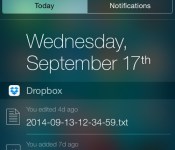
One of the neatest app extension features lets developers create widgets that show up in the Today view of the Notification Center. These widgets let users interact with apps and get information at a glance. Several apps have been updated to take advantage of Notification Center widgets, and we’ve rounded up a comprehensive list below. Many of these app updates are already available, but some will be coming later today and tomorrow.
Dropbox (Free) [Direct Link] – Dropbox‘s new Notification Center widget displays all of the files that have been recently uploaded. Tapping on one of the files opens the file in the Dropbox app.

Duolingo (Free) [Direct Link] – Duolingo displays how close a user is to reaching their daily language learning goals. Tapping on the widget in the Notification Center opens the Duolingo app and lets users continue with their current language lesson.

Evernote (Free) [Direct Link] – Evernote‘s Notification Center widget is especially useful, including five different icons that let users create a document, reminder, or list, as well as snap a photo or access photos stored in the app. Tapping one of the icons opens the Evernote app and begins the task immediately.

Clear ($2.99) [Direct Link] – Clear‘s Notification Center widget includes a handy list of upcoming reminders. Tapping on one of the reminders will open the Clear app for direct access.
iTranslate (Free) [Direct Link] – iTranslate‘s Notification Center widget is a nifty tool that will let users one-tap translate whatever happens to be copied to the clipboard to the selected language.


First look at Material Design for Google Play Store leaks online

During the summer Google released an update to the Play Store that featured a dramatic redesign and brought several elements of Material Design into the app. Some of these changes included large banner-style pictures spanning the top of individual app, music, and movie pages along with a new organization of app information. However, it was obvious that the design was not final as many pages had not been updated to include Material Design. The main pages for Apps, Music, Books, Games, and Movies still retained the same look from the previous version.


Now, thanks to an article from Android Police, we have a look at the next big redesign for the Play Store, and Material Design is front and center. Play Store 5.0 brings Google’s design elements to all its pages. The colorful banners at the top of different sections have been made taller and flatter with much more vibrant colors.
I must say, the preview of the Antenna Sampler page looks gorgeous to me! Plus, these visual changes are accompanied by the beautiful and fluid animations that are touted by Material Design and Android L. With this major Material redesign to the Play Store, it is obvious that Google is preparing its apps for the release of Android L; an announcement we are all waiting eagerly to hear.
Images from: Android Police
Deals, Discounts, Freebies, and More! Click here to save today!
The post First look at Material Design for Google Play Store leaks online appeared first on AndroidGuys.
.CPlase_panel display:none;

Republic Wireless to carry $99 Moto E in October

Republic Wireless has a special connection with Motorola – They officially released the Moto X in March and then the Moto G in April, and now they have decided to add the Moto E as well.
 Republic Wireless is planning to offer the Moto E for $99, and you can choose any plan the carrier is offering. Check out all the plans below:
$5 WiFi Only
This plan is for WiFi lovers and penny savers. Take a load off your wallet and enjoy unlimited data, talk and text on all the WiFi networks you know and love at the same time. No need for cellular when you’re around WiFi as much as you are!
$10 WiFi + Cell Talk & Text
Our members are around WiFi about 90% of the time. During the other 10%, when you’re away from WiFi, this plan gives you cellular backup for communicating via text and talk when you need to. This plan combines both cutting costs and accommodates what’s quickly becoming the norm: a day filled with WiFi.$25 WiFi + Cell (3G) Talk, Text & Data
If you’re more of an outdoors kind of person and you like to surf the internet, check email in the car (as a passenger!) or use GPS navigation, this plan lets you enjoy all the benefits of WiFi with the additional luxury of 3G cellular data. And if you only need this plan for part of the month—no problem! You can always switch to the $5 or $10 plan right from your phone (up to two switches per monthly billing cycle period).
Republic Wireless said that the phone is not an iPhone killer, instead it’s a flip phone killer (people still use that?). Moto E comes with a dual-core, 1.2Ghz Snapdragon 200 processor, 4.3-inch 960×540 LCD screen with Corning Gorilla Glass, 1GB of RAM, 5MP rear camera, 4GB of storage plus a MicroSD card slot. The phone will be available next month.
Are you looking forward to grab it? Let us know in the comment box below.
Source: Republic Wireless
Deals, Discounts, Freebies, and More! Click here to save today!
The post Republic Wireless to carry $99 Moto E in October appeared first on AndroidGuys.
.CPlase_panel display:none;

Samsung Galaxy Note 4 hitting South Korea this month

Samsung Galaxy Note 4 is the current ‘Note’ flagship smartphone, and definitely Samsung’s most successful phablet yet. Right now, Samsung Note 4′s biggest competition is the new iPhone 6 Plus, but Samsung is not missing a chance to make fun of Apple, as they believe that Apple is now following their footsteps. Also to give Apple a run for their money, Samsung is planning to release the Samsung Galaxy Note 4 in South Korea before the release of iPhone 6 Plus. SK Telecom, LG U+ and KT will be carrying it later this month.

Samsung Galaxy Note 4
Starting September 18, Note 4 will be available for pre-order from SK Telecom. Right now, September 26th is the expected release date of the smartphone.
Do you think Samsung would be able to beat Apple in their hometown? Let us know in the comment box below
Source: ZDNet
Deals, Discounts, Freebies, and More! Click here to save today!
The post Samsung Galaxy Note 4 hitting South Korea this month appeared first on AndroidGuys.
.CPlase_panel display:none;

Apple Confirms HealthKit Bug, Promises Fix by End of September
 Just before the public launch of iOS 8 earlier today, we noted that Apple had begun pulling HealthKit-related apps from the App Store, apparently due to a last-minute issue that cropped up in the new operating system. The issue has put a significant dent in the usefulness of the Health app that was to be a key feature of iOS 8, while also subjecting a number of third-party developers to uncertainty about the fate of their apps.
While details on the issue are still unknown, Apple has confirmed to Tim Bradshaw of Financial Times that it has discovered a “bug” in HealthKit that will require a software update to fix. Unfortunately, Apple is not necessarily promising an immediate turnaround on the fix, saying only that the company is aiming to “have HealthKit apps available by the end of the month”.
iOS 8 is available now to owners of recent-generation iOS devices, and will be included on the iPhone 6 and 6 Plus when they officially launch on Friday. Aside from Health, iOS 8 includes a number of other features such as a new QuickType keyboard with word suggestions, support for systemwide third-party keyboards and Touch ID integration, Photos and Messages improvements, and Continuity features to make iOS device and Macs work more smoothly with each other.
.CPlase_panel display:none;
 AIVAnet