



StickR TrackR 2 Pack: Coin-sized attachment to GPS track anything $29.95 [Deal of the Day]

Never lose your stuff again by attaching these small coin-sized devices to your valuables. Bluetooth Low Energy allows the StickR to communicate with the TrackR app and locate your belongings. There’s no recharging necessary; the StickR lasts for over a year with a replaceable coin cell battery. Throw one of these on your keys, backpack, or anything you don’t want to lose or misplace. For just $29.95, AndroidGuys readers will receive (2) Black StickR TrackR devices, (2) batteries, adhesive, and lanyards. It’s a smart and reasonably priced investment to keep your gear safe and sound.
Check this deal out, and many others at deals.androidguys.com!
Deals, Discounts, Freebies, and More! Click here to save today!
The post StickR TrackR 2 Pack: Coin-sized attachment to GPS track anything $29.95 [Deal of the Day] appeared first on AndroidGuys.
.CPlase_panel display:none;
We can’t get enough of wallpaper apps

I’m someone who loves changing wallpapers. What I love even more than changing wallpapers, is searching, more like scouring, the interwebs looking for the next wallpaper to grace my various home screens. What’s great about Android, is that there are a plethora of various wallpaper applications that help me change my wallpapers on an almost daily basis. Plus, if there is integration with Muzei, it gets even better, since the wallpaper will just change automatically. Sure, there are those times where I’ll look at my home screen and be surprised, but Muzei almost makes it feel like a new experience all the time. Well today, we are taking a look at a couple of wallpaper applications that I’ve been using for awhile now.
Zyden
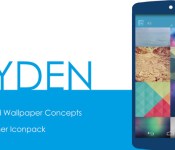
Zyden was created by a few folks, one that you may have heard of, OffCorner, and Triple Triangle Design. Zyden offers more than just a few different wallpapers, and was one of the first applications to take advantage of the gorgeous Android L design. The developers for Zyden, surely didn’t disappoint in trying to make Zyden one of the most beautiful overall applications available in the Play Store today.

As with most icon packs, and other wallpaper applications, Zyden is Cloud based, meaning that all of the wallpapers are stored in the cloud, and all it takes is a couple taps, and the wallpaper is applied to your device. The benefit of having a cloud based dashboard is to save storage on your various devices, and you only have your favorite wallpapers readily available.

Zyden also offers 29 different categories of wallpapers, so there is more than plenty to choose from. If you’re looking to use Zyden for your tablet? No worries. OffCorner, and Triple Triangle Design also optimized Zyden to be compatible with your tables so that you can get your favorite wallpapers no matter what device you are using.

There are two versions of Zyden available. The paid version, at $1.50, offers users integrated Behang Blink support, as well as the ability to use Zyden in unison with Muzei. In terms of if there are any differences in the wallpapers available between the paid and free versions, again there’s no need to worry, as all the selections are available regardless of what version you have.
OYM Alpha
OYM Alpha is next on our list today, and comes from Neffstarr and Jhey. OYM is THE place to go in regards to having the biggest choice in wallpapers for your devices. Neffstarr is constantly, and I mean CONSTANTLY updating the servers for this application to include as many wallpapers as your mind can contemplate. The Play Store description lists OYM as having 4048 custom walls and still adding”, but I know for a fact there are WAY more than 4048 available.

If you follow Neffstarr, you can start to get an idea of what kind of wallpapers are being added to the list, and how quickly they will be available for your devices. OYM Alpha has 25 different categories to choose from, and as you are scrolling and discovering where OYM takes you, the dashboard has the ability to favorite wallpapers so you can choose them later.

OYM Alpha also offers tablet optimization, the ability to crop images, and there are no issues with worrying about whether any wallpaper you choose will fit your device, as it detects the resolution and sets it accordingly. If you’re looking for a TON of wallpapers, look no further than OYM Alpha.

OYM Alpha is available via the Play Store widget below for $1.50, and is a welcome site to see on any device.
wlpapR
Okay, I know there hasn’t been any type of MAJOR redesign to wlpapR since it was released by Jacek Malinowski, otherwise known as yackovsky. However, wlpapR was one of the first wallpaper dedicated applications that I purchased for my Android devices. With an accompanying website, wlpapR offers loads of various wallpapers that, like every other application mentioned today, are stored remotely, so that the wallpapers don’t take up unnecessary storage on your devices.

wlpapR offers 19 different categories to choose from, and with yackovsky being able to upload new ones at his discretion, there are countless wallpapers available with this application. In addition to OYM Alpha and Zyden, wlpapR also offers the ability to use as a Blink extension with Behang, as well as support for Muzei.

If you want to get an idea of what kind of wallpapers are offered by wlpapR, you can head on over to yackovsky’s dedicated website, here, and take a look. You may even find a wallpaper that you would love to use for your desktop, and be able to do so with ease.

wlpapR is available on the Play Store for $1.38, and is well worth the purchase, considering the type of dedication and hard work Jacek puts into everything he does.
This is just a few of the wallpaper applications that are becoming more and more available on the Play Store, and these are my top 3 favorite ones. What wallpaper applications do you use? Do you use any in unsion with Behang or Muzei? If so let us know in the comment section below.
Keep Customizing.
Deals, Discounts, Freebies, and More! Click here to save today!
The post We can’t get enough of wallpaper apps appeared first on AndroidGuys.
.CPlase_panel display:none;
iOS 8 Downloads Cause Spike in Web Traffic as Adoption Rate Climbs Slowly
Apple yesterday released iOS 8 to the public, opening the doors for iPhone, iPad and iPod touch owners to download and install Apple’s latest version of iOS on their devices. According to The Guardian, this release caused internet traffic to surge in the UK by as much as 60 percent compared to the same time the previous day as millions of iOS users rushed to update their devices.

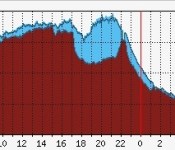
Data from LONAP shows that web traffic surged just as iOS 8 was released at 6:00 PM UK time. Traffic remained strong for several hours, with a peak at 8:00 PM in the UK as more than 70 gigabits per second were being transferred through LONAP’s exchange.
 iOS 8 adoption from Mixpanel
iOS 8 may have caused web traffic to briefly increase, but the first-day adoption rate of the mobile operating system is relatively low when compared to previous iOS rollouts. According to analytics firm Mixpanel, only 14 percent of the iOS devices that it tracks are currently running iOS 8. Data from mobile marketing company Fiksu shows a similar slow uptake in iOS 8 with the adoption of Apple’s latest iOS version trailing the last that of the last several iOS launches.
 Fiksu iOS 8 Tracker
The slower update rate may be due to a record number of iPhone owners purchasing new devices. Apple sold more than four million iPhone 6 and iPhone 6 Plus units in the first 24 hours that pre-orders were available last week. Customers who are receiving a new phone in the coming weeks may delay upgrading their current device, opting instead to prepare the handset for sale.
Another factor may be the large storage size required for the over-the-air updates. Though the iOS 8 update was just over 1 GB in size, it required 4.6 GB of free storage space on an iPhone and almost 7 GB of free storage on an iPad for installation. That’s almost half the free space available on a 16 GB device, forcing many owners to decide whether to delete content from their devices or install the update.
.CPlase_panel display:none;
iOS 8 Keyboards Climb to Top of App Store Charts
With yesterday’s launch of iOS 8, devices running the new operating system are now able to install third-party keyboards that work on a systemwide basis. Most of the major keyboard makers were ready for the launch, introducing iOS 8 versions of their keyboards into the iOS App Store. One day after launch, three of these keyboards, including Fleksy, SwiftKey and Swype, are now at the top of the top iOS paid and free charts in the U.S. and other countries.
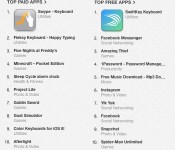
Within 24 hours of their debut, paid keyboards Swype and Fleksy climbed to the top two spots in the U.S. paid iOS app chart, displacing popular games such as Minecraft Pocket Edition and Five Nights at Freddy’s. On the free app chart, Swiftkey jumped to the number one spot, beating out the now freemium and very popular 1Password password manager and the newly launched Amazing Thief game. Perhaps most impressively, SwiftKey has even displaced longtime number one Facebook Messenger from its spot atop the rankings.

The new keyboards are of course benefiting from launch-day momentum of the iOS 8 debut, and it remains to be seen where they will settle in the charts following the initial surge of interest. Still, it is clear that many users are interested in at least trying out alternatives to Apple’s default keyboard, even with its new QuickType suggestions implemented in iOS 8.
These three keyboards and more are available to all iPhone, iPad and iPod touch owners running iOS 8. SwiftKey [Direct Link] is available for free from the iOS App Store, while Fleksy [Direct Link] costs $1.99 and Swype [Direct Link] is 99 cents.
.CPlase_panel display:none;
Find your perfect CM11 theme: Part II

It’s been quite awhile since I’ve taken a look at any CM11 themes, but the gentlemen here at AndroidGuys, sure haven’t stopped. Today, I’m going to take a look at a few of the CM 11 themes that I’ve been using on my HTC One M8, running the CM 11 nightlies.
FLATRED CM11/PA by Sparkyman
Sparkyman, Sparkyman, Sparkyman. No, saying his name three times won’t summon him like Beetlejuice, but Sparkyman really rocked FLATRED for CM 11/PA out of the park. I can’t say enough about how soft, yet awesome this theme looks. As you will be able to see in the next section for Mono, I have an addiction for the red and black CM 11 themes, and FLATRED is just that.

While other themes are a “hard” black and red, FLATRED has more of a soft feel to it, and is extremely pleasant on the eyes. From the Play Store, to the Settings application, and the way that the drop down notifications are themed, FLATRED is beautiful across the board. Sparkyman even snuck the Android L navigation buttons in there, and it really helps the theme.  I know that I love just about any theme that has either extremely minimal navigation buttons, or the Android L navigation buttons, so FLATRED fell perfectly into my checklist for themes. Sparkyman has themed just about everything you can think of, and in his description states that “This is A FULL SYSTEM AND FRAMEWORK THEME INCLUDING APPS.”
  The status bar, the battery symbol, the Settings application, all of the toggles and icons, the Play Store, Google Play Music, all of these apps/features of Android are themed with FLATRED. If you are looking for a CM 11 theme that is easy on the eyes, and looks beautiful at the same time, FLATRED may be the theme for you. FLATRED by Sparkyman is available on the Play Store for $0.99 via the widget below.
MONO by Yackovsky
Mono by yackovsky is a set of absolutely stunning CM 11 themes for your devices. Comprised of six, yes six, different CM 11 themes, packed into one masterpiece, Mono is sure to never leave your device feeling naked. In the most recent update, Yackovsky added Red Velvet as one of the color options, as well as themed Hangouts, Twitter, and part of the Facebook applications. Yackovsky has been on a roll with these, and promises to bring more updates in the future. Currently the six different color options for Mono are:
- Pinkalicious
- Sky Blue
- Limelight
- Tangly Orange
- Ultraviolet
- Red Velvet
- Charcoal Gray
 Now, much like wlpapR and the various wallpaper options, Mono doesn’t keep all of these different themes stored on your device locally. Instead, Mono uses a dashboard application where you can preview the themes, and then select and download whatever color scheme you’d like to use.
  My personal favorite at the moment is Red Velvet, and it may or may not have something to do with MKBHD, but nonetheless, I was ecstatic when I saw Red Velvet added to the lineup. Before that, I was using Sky Blue, and it’s absolutely gorgeous just like all of the other themes in the Mono Collection.
  From the navigation bar, to the status bar, and including the Settings panel, Yackovsky thought of everything when it came to designing Mono. The color scheme even reaches to the redesigned keyboard, and some of the stock applications, as well as some third-party applications, such as Instagram. Yackovsky’s Mono Collection for CM 11 is available on the Play Store for $4.00, and is actually on sale until Friday for 33% off. So hurry now, hit the widget below and pick this awesome set of themes up for an amazing price.
Tang CM 11 by DrumDestroyer
In our last iteration of CM 11 themes, we took a look at Empire for CM 11 by DrumDestroyer. At the time, it was one of my favorites, and then a little while back, DrumDestroyer decided to create a CM 11 theme based off of his Tang icons. Boy oh boy, he didn’t disappoint.  After perfecting everything within Empire, DrumDestroyer did it again with Tang, and created one amazing CM 11 theme that covers your device from head to toe. Included in Tang, are the Tang icons, which can also be purchased separately, but I highly recommend, just jumping for the CM 11 theme, that way you can get the whole shabang, in one go.
  With 53 various packages/applications themed, and over 1850 high-resolution icons, the Tang CM 11 theme, is really the complete package. DrumDestroyer also states that since he could not get Hangouts themed via the theme engine, in the way that he wanted, he is including a flashable zip file for those that want “Tangouts”.
  Last but certainly not least, is my favorite part about Tang. No, it’s not the amazing icons, or the how awesome everything looks once Tang is set as the main theme, but it’s the Boot Animation. With Empire, DrumDestroyer gave me a heads up to take a look at the boot animation, and I was floored. It looked so smooth and so fresh, and I was just so excited that I had to tell him how awesome I thought it was. So be sure to look for it, once you pick up Tang. Tang for CM 11 is available on the Play Store via the widget below for $1.99.
Kaagaz by Idea Designs
Kaagaz by Idea Designs is wrapping up today’s edition of trying to find the “Perfect” CM 11 theme. Kaagaz offers a different take on CM 11 themes that surround the color Blue. The shade that Idea Designs uses in this theme is a little bit darker, but mesmerizing at the same time. It’s definitely a pleasure to look at, while using it on your various devices.  You may have heard of Idea Designs with their various beautiful icon packs, such as Twint, Curve, and Zade. Well the developer over at Idea Designs is back at it again with an awesome CM 11 theme called Kaagaz.
  Kaagaz also includes a different style of the Android L navigation buttons, and these fit really well with the rest of the theme. Everything you can think of is themed within Kaagaz. From the Framework, and System UI, to the Boot Animation, Quick Tiles, and even the Loading Spinner.
  All in all, there are 23 different packages that are themed, and Idea Designs includes over 40 different custom icons that are designed to match the Quick Tiles, and tie in the rest of the theme for your home screen/app drawer. The background for Kaagaz, around the board, has a paper feel to it, so it almost looks like you are using a virtual notebook, with worn pages. It’s a very unique idea, but an awesome execution for this CM 11 theme. Kaagaz is available on the Play Store for $1.65 via the widget below.
These are a few more of the latest CM 11 themes that have graced my home screens over the last few months. Keep an eye out for the next edition, while we try to find the Perfect CM 11 theme for our devices. What CM 11 themes have you been using? Let us know down in the comments below, and it’s possible that the theme will be featured in the next rendition.
If you have tried out, or decide to purchase any of the themes that you’ve seen here today, be sure to leave a rating on the Play Store, and let the developers know what you think.
Deals, Discounts, Freebies, and More! Click here to save today!
The post Find your perfect CM11 theme: Part II appeared first on AndroidGuys.
.CPlase_panel display:none;

AT&T outlines pricing options for Galaxy Note 4

AT&T has officially announced the pricing and availability options for its version of the Samsung Galaxy Note 4. Pre-orders for the device begin Friday, September 19 with shipments to commence on October 14. The full retail details are expected to come at a later date.
AT&T will offer the Samsung Galaxy Note 4 in both color options: Charcoal Black and Frost White. Pricing is listed at $299 with a two-year service agreement; total retail cost is pegged at $825.99. Qualified customers can opt for a Next plan and spread payments out over 20-month or 24-month windows. The AT&T Next 18 plan is 24 equal payments of $34.42 while the AT&T Next 12 is 20 equal payments of $41.30.
New customers and existing AT&T customers who activate a smartphone line of service on AT&T Next can receive a $100 bill credit.
Deals, Discounts, Freebies, and More! Click here to save today!
The post AT&T outlines pricing options for Galaxy Note 4 appeared first on AndroidGuys.
.CPlase_panel display:none;
The reMind app reminds you to be mindful [‘Watch’ This App]
Stress is a factor in almost all of our day to day lives, and it makes it hard to be focused on what is really important. If you think you could benefit from being reminded throughout the day to focus more on the important things things then you may want to check out reMind. This app gives… Read more »
The post The reMind app reminds you to be mindful [‘Watch’ This App] appeared first on SmarterWatching.
Deals, Discounts, Freebies, and More! Click here to save today!
Read the rest at SmarterWatching.com!
The post The reMind app reminds you to be mindful ['Watch' This App] appeared first on AndroidGuys.
.CPlase_panel display:none;
The reMind app reminds you to be mindful [‘Watch’ This App]
Stress is a factor in almost all of our day to day lives, and it makes it hard to be focused on what is really important. If you think you could benefit from being reminded throughout the day to focus more on the important things things then you may want to check out reMind. This app gives… Read more »
The post The reMind app reminds you to be mindful [‘Watch’ This App] appeared first on SmarterWatching.
Deals, Discounts, Freebies, and More! Click here to save today!
Read the rest at SmarterWatching.com!
The post The reMind app reminds you to be mindful ['Watch' This App] appeared first on AndroidGuys.
.CPlase_panel display:none;
The reMind app reminds you to be mindful [‘Watch’ This App]
Stress is a factor in almost all of our day to day lives, and it makes it hard to be focused on what is really important. If you think you could benefit from being reminded throughout the day to focus more on the important things things then you may want to check out reMind. This app gives… Read more »
The post The reMind app reminds you to be mindful [‘Watch’ This App] appeared first on SmarterWatching.
Deals, Discounts, Freebies, and More! Click here to save today!
Read the rest at SmarterWatching.com!
The post The reMind app reminds you to be mindful ['Watch' This App] appeared first on AndroidGuys.
.CPlase_panel display:none;
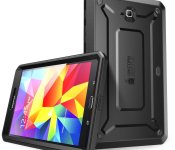
Accessory of the Day: Galaxy Tab 4 protective case $9.99

I came across this offering for Samsung Galaxy Tab owners and couldn’t believe the price at first. This case for the Galaxy Tab 4 features easy installation with its snap-on design. The dual layer polycarbonate hardshell protects from drops and dings while the port covers keep out dust and dirt. Plus, the screen protector promises to keep your touch-functions silky smooth. The Unicorn Beetle line from SUPCASE has been very popular with our readers and this looks like another home run. With multiple color options, 5 star ratings, and priced at only $9.99 (Prime eligible) this is an absolute BUY.
Deals, Discounts, Freebies, and More! Click here to save today!
The post Accessory of the Day: Galaxy Tab 4 protective case $9.99 appeared first on AndroidGuys.
.CPlase_panel display:none;
 AIVAnet