



Meet the Leica X-E, an almost-affordable APS-C compact
 Leica just released an update to its X2 point-and-shoot camera here at Photokina. The X-E has a look and feel that’s very similar to its predecessor, with comparable specs as well. There’s a 16.5-megapixel APS-C sensor that, like the X model also announced today, can capture images with a level of quality that rivals that of many DSLRs. What you can’t do, unfortunately, is swap in a different lens — there’s a 24mm f/2.8 optic permanently attached, which is what you’d expect given the light weight and compact size, but if you need to get closer to your subject, you’ll need to walk forward rather than zoom in.
As with all APS-C sensors, the X-E’s has a crop factor of 1.5x, making that 24mm lens equivalent to a 35mm optic on a full-frame camera. There’s a 230k-dot (low-res) 2.7-inch LCD, a 5 fps continuous shooting mode and a top sensitivity of ISO 12,500. The X-E does not, however, shoot video, which is quite disappointing given the price. At €1,490 in Europe or $1,795 in the US, you might be better off spending an extra grand for Sony’s full-frame RX1, but if a Leica’s what you’re after, this is a decent choice. The X-E is available now through select retailers.
Photos by Edgar Alvarez.
Filed under: Cameras
.CPlase_panel display:none;
Engadget giveaway: win a Scorpion EX Pro Kit courtesy of Cam Caddie!

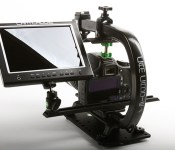
Unless you’re aiming to film the next Cloverfield-style cinematic masterpiece, you may want to consider some tools to smooth out those shots. Cam Caddie has just the thing, with kits like its Scorpion EX Pro. It includes a USA-made composite thermoplastic grip for stabilization and a series of add-ons for mounting it to shoulder supports, tripods and dollies. It’s built to work with DSLR cameras, GoPros and smartphones (up to 5.1-inch screens) and can be expanded with options like Cam Caddie’s 7-inch 1080p HD display to help track the action. And you know what? They’ve given us one of these fully fleshed out set ups for one lucky Engadget reader this week. Whether your doing music videos, Kafka-esque art films or just recording ollies down that double set of stairs, this kit will help you improve your game and mitigate that nausea inducing jitter. All you need to do is head down to the Rafflecopter widget below for your shot at the big time.
- Entries are handled through the Rafflecopter widget above. Comments are no longer accepted as valid methods of entry. You may enter without any obligation to social media accounts, though we may offer them as opportunities for extra entries. Your email address is required so we can get in touch with you if you win, but it will not be given to third parties.
- Contest is open to all residents of the 50 States, the District of Columbia, and Canada (excluding Quebec), 18 or older! Sorry, we don’t make this rule (we hate excluding anyone), so direct your anger at our lawyers and contest laws if you have to be mad.
- Winners will be chosen randomly. One (1) winner will receive one (1) Cam Caddie Scorpion EX Pro Kit, one (1) Cam Caddie Shoulder Hands Free Support Rig, one (1) Smartphone Clip and one (1) Cam Caddie 7-inch IPS Monitor (1080P HD).
- If you are chosen, you will be notified by email. Winners must respond within three days of being contacted. If you do not respond within that period, another winner will be chosen. Make sure that the account you use to enter the contest includes your real name and a contact email or Facebook login. We do not track any of this information for marketing or third-party purposes.
- This unit is purely for promotional giveaway. Cam Caddie and Engadget / AOL are not held liable to honor warranties, exchanges or customer service.
- The full list of rules, in all its legalese glory, can be found here.
- Entries can be submitted until September 17th at 11:59PM ET. Good luck!
Filed under: Announcements, Cameras
.CPlase_panel display:none;

Microsoft’s new accessories include a wired Xbox One controller for PC gaming

If yesterday was Microsoft’s day for announcing big news (read: a $2.5 billion acquisition), today is the day it moves on to less pressing topics. The company’s hardware team just unveiled a few new accessories, including a wired Xbox One controller for PC gaming, and a portable Bluetooth keyboard that can pair with three different devices at once. Starting with the controller, this is basically the same one that already ships with the Xbox. In fact, because it comes with a battery pack in the box, you could use it wirelessly with the Xbone, in case you need a second controller. Heck, even the price is the same, at $60. The only difference? It includes a USB cable, allowing you to use it with a Windows PC. Unfortunately, for now, at least, the controller can’t be used wirelessly with a PC. Then again, the last-gen Xbox 360 controller started as wired-only, but later got a dongle, allowing you to use it wirelessly. So maybe Microsoft will follow a similar timetable with the Xbone controller.
Moving on, the Universal Mobile Keyboard ($70) uses Bluetooth to pair with up to three devices. It’ll work with any operating system — not just Windows — but you can only pair with one gadget per OS at a time. Of note: The keyboard portion is detachable, meaning you could leave the tablet propped up in the built-in stand and put the keyboard on your lap. In my hands-on, I found the small buttons surprisingly easy to type on, save for the tiny Delete key. All told, too, the stand is sturdy enough to support some fairly big devices, including the 12-inch Samsung Galaxy Note Pro. Basically, you can use it with any tablet so long as it’s not too thick. That means an iPad with no Smart Cover is OK, but an older-gen Surface Pro probably won’t fit. Finally, Microsoft is also re-releasing its foldable Arc Touch Mouse, except this time it’ll come in gray and won’t have any Surface branding on it. It will still cost $70.
All of the above go on sale this fall, in time for the holiday shopping season, with the keyboard and mouse arriving in October and the controller landing sometime in November. Because no: It is not too early to start thinking about stocking stuffers.
Filed under: Gaming, Peripherals, Microsoft
.CPlase_panel display:none;

Apple Approving iOS 8-Optimized Apps, but Extensions Not Working Properly Yet
 Following last week’s iPhone and Apple Watch media event, Apple officially invited developers to begin submitting their iOS 8 apps for App Store review ahead of tomorrow’s public release of the new operating system. While a number of developers have been tweaking their apps to work better with iOS 8 over the past few months, the major step forward comes as apps begin to support the new functionalities supported in iOS 8.
Apple has already begun approving some of these iOS 8-optimized apps, but a few high-profile developers are finding that some of their highly anticipated extensions are not working properly in the updated apps being distributed through the App Store. While only a small subset of iOS users are affected due to limited distribution of the iOS 8 golden master released to developers last week, the issue has been a concerning one for developers trying to diagnose it.
One example is OmniFocus 2 for iPhone [Direct Link], which will include an extension to add an OmniFocus list of tasks to the “Today” view in Notification Center. In the iOS 8-optimized version of OmniFocus 2 released over the weekend and a bug fix released yesterday, the Today view is currently not being properly populated with data from OmniFocus itself.
A similar issue is occurring with popular calculator app PCalc [Direct Link], and both issues appear to be related to code signing on Apple’s end. PCalc developer James Thomson has been in touch with Apple and received word that the company is indeed working on the problem.
All indications are that this is a problem Apple will thankfully be able to fix without requiring developers to submit new versions of their apps, and presumably the company will have it fixed in time for the public release of iOS 8 tomorrow.
.CPlase_panel display:none;

iPhone 6 and 6 Plus Launches in China May Be Delayed Until 2015 [iOS Blog]
Apple may be forced to wait until 2105 to launch the iPhone 6 and iPhone 6 Plus in China, according to a report in 21st Century Business Herald [Google Translate]. If true, the delay could have consequences for the company both in terms of customer momentum in the critical Chinese market and overall earnings projections.

Sources with knowledge of the situation told 21st Century Business Herald that Apple’s latest iPhone models have failed to receive the necessary approval from the Ministry of Industry and Information Technology (MIIT). This certification is required for Apple to begin selling the iPhone in the Asian country. A re-application date for approval has not been determined, leaving Apple’s Chinese iPhone 6 debut uncertain.
Apple unveiled the iPhone last week, announcing launch dates of September 19 for its first wave of markets and September 26 for a second wave of countries. Noticeably absent from either list was China, which is a region of significant growth for Apple. For the past year, Apple consistently has reported increased revenue growth from China, with plans to double its retail footprint and build out its channels in the coming years. Apple last year touted its progress in China, with the company having worked hard to ensure the iPhone 5s and 5c launched in the first group of countries.
Initially, this year’s China delay may impact Apple’s important holiday quarter and affect its stock price over the coming months as the iPhone 6 and 6 Plus expand to other countries except China. Demand for the iPhone 6 in China is high, with carriers having prematurely accepted pre-orders of the phone ahead of Apple’s announcement.
Due to such demand, Apple will have to battle the gray market in which resellers purchase iPhone 6 units in other countries, import them into mainland China and then sell the phones to wealthy Chinese consumers at exorbitant prices. iPhone 6 models already have started to appear in China ahead of this week’s global launch.

Over the long term, the delay may have a beneficial effect on subsequent quarters, which usually show a decline in iPhone sales and company revenue. If Apple were to launch the iPhone 6 and 6 Plus in January 2015, the company may forestall this slump due to a spike in sales from Chinese consumers.
This delay also may help Apple balance supply and demand of the iPhone, which is selling out quickly in the regions that are currently accepting pre-orders. A 2015 launch would help Apple meet the current demand and ensure it has ample supply for a major Chinese launch at the beginning of next year.
Apple’s iPhone 6 and 6 Plus go on sale this week starting Friday, September 19 in the US, Australia, Canada, France, Germany, Hong Kong, Japan, Puerto Rico, Singapore and the UK. A second round of sales will begin September 26 in 20 additional markets, including Austria, Belgium, Denmark, Finland, Ireland, and more. Contract pricing starts at $199 for the 16 GB iPhone 6 and $299 for the larger 16 GB iPhone 6 Plus.
.CPlase_panel display:none;

In The Event You Buy Buy Office Supplies Over?
There’s a lot of equipment utilized in offices. It includes both big and small products. Among small products, the generally used situations are paper clips, staples, pen, ink-pot, covers, small pages, different small products for example punchers, staplers, laminators, scanning devices and much more. Office supplies online, also called equipment for your office, would be the materials which are needed at work area with regards to proper operation of companies. It comprises all of the equipment that’s required to do an office. In the following paragraphs, I will discuss about the value of office supplies online.
The big products range from the supplies for example ink jet printers, desktop and laptops, fax machines and copiers, photocopy machines, money counters, various desks much like steel desks, wood desks, cup desks, chairs, shelves, shelves and much more. All of the pointed out products, whether big or small, are extremely required for a multitude of reasons.It’s the responsibility of the company to provide different equipment for your office to the employees for making certain better efficiency. Office supplies online consist of all of the necessary stuff that are helpful for various reasons in offices.

Both of these situations are very significant equipment found in modern information system. Companies frequently want to use scanning devices and fax machines and copiers for performing urgent Distribuciones Internet Palma tasks. Nowadays, computer systems and it is peripheral devices would be the most significant supplies. To help keep pace with today’s technology, computer and web connection are most important items within an organization.
Different os’s, anti-infections, typing software, PDF readers, internet browser, and various video and audio gamers are extremely helpful computer related programs needed for office. Despite the fact that we are able to use computer systems for printing reasons, we still the fundamental supplies for example pen, pencil, and erasers. Software applications can also be considered as part of office supplies online.
One advantage of doing this, is the fact that with many sites, it can save you your grocery list, to ensure that whenever you go back to the website, you can just create a repeat order, instead of needing to add every individual item for your shopping basket. This is not merely easier, but additionally saves vital time, and you will know the products you order would be the best ones. Most online office stationery and supplies sites will allow you to buy your workplace supplies rapidly and simply, and also have them shipped for your premises totally free.
Rather than work supplies being moved towards the store and so the consumer going to the place to get the products, purchasing online implies that work stationery and supplies are shipped from the warehouse for your door, which isn’t only easier, but additionally removes the necessity to unnecessary transportation. This is reflected within the costs of numerous online office supplies online, as the organization can spread these transport costs for you, the customer. For that eco-friendly, purchasing online reduces your carbon footprint, assisting to save unnecessary journeys.
This really is because of the truth that most online office merchants can provide heavily reduced prices because of the truth that they’ve more compact expenses, without resorting to an actual location and also the connected costs this brings. Purchasing office stationery and supplies online may also be, oftentimes, less expensive than purchasing from the physical store.
.CPlase_panel display:none;

Ecobee’s new smart thermostat knows conditions throughout your home

As clever as smart thermostats can be, they usually have only a limited sense of what’s going on in your home. They may know that it’s cool in the hallway, but not that it’s roasting in the living room. Ecobee may have a better, more holistic approach with its third-generation climate controller, the Ecobee 3. Rather than gradually learn what conditions work best over time, it uses remote sensors to determine which rooms are occupied and whether or not they’re at the right temperature. The more detectors you add, the more cozy you’re likely to be — you can have up to 32, if you’re determined to warm up your mansion.
Whether or not you need that kind of detailed monitoring, the 3 is a welcome upgrade between its slicker design and a 3.5-inch touchscreen interface built to work like the smartphone in your pocket. Get ready to shell out extra cash if you want the most comfortable home possible, though. The $249 core kit will get you both the hub and one sensor when it ships on September 29th, but you’ll have to spend $79 for every extra pair of additional sensors.
Filed under: Household
Source: Ecobee
.CPlase_panel display:none;

Polaroid’s real-life Instagram logo camera can also print your photos

When we first saw Polaroid’s Socialmatic camera, the obvious conclusion to make was that the company had simply decided to turn the Instagram logo into a device. Of course, given that the social network’s logo was based on Polaroid’s device designs, it’s a surreal case of pop culture eating itself. Polaroid’s jumping on the bandwagon of connected cameras – devices that straddle the line between point-and-shoot snapper and smartphone, but there’s one small tweak that’ll see this hardware stand out against the Lumix CM1 and Lumia 1020: this one’s also got an old-school photo printer tucked inside.
The first thing to say is that I’m in disbelief, purely that a product like this got past the legions of designers, managers and sense-checkers who must have been skeptical that this camera would even be made. That’s not a criticism, either, because it’s great to see companies experimenting with new form-factors and wacky ideas that the industry seemed to have turned its back upon. Pedants amongst you may rile up when I say the Socialmatic is square, but since there’s only 0.1-inch of a difference (5.19 x 5.18-inches), I’m just gonna go ahead and say it’s square. It’s also thick, like a paperback book where someone’s hacked off the top third.
Camera-wise, there’s a 14-megapixel forward facing lens up front, straddled next to a speaker. In the top right-corner, where the viewfinder would have sat in an analog age, you’ll now find a small LCD. The company describes this as a “Frontal LCD with mood assistant AI,” but all it really does is show you a smiley face. The face gets happier the more photos of your dinner you take and share with Instagram, and turns all frowny if you’ve not used it for a while.
Flip it over, however, and you’ll see a smartphone awkwardly baked into the center of this bulky plastic frame. The 4.5-inch touchscreen (no word on resolution yet) looks small by comparison, and has a slightly weaker backlight then you’d appreciate on a camera. Nestled above it is a 2-megapixel forward-facing lens, although on the prototype we got to use, it wasn’t able to be accessed with the software. In all other respects, then, the Socialmatic is a smartphone without the calling module, relying instead on Bluetooth and WiFi for connectivity and GPS for photo tagging.
The biggest twist on the social camera trend, however, is the fact that the Socialmatic also includes an old-school photo printer inside the body. Lift open the hinge on the side and the whole device opens, enabling you to cram in 10 sheets of 2 x 3-inch ZINK instant photo paper. These little snaps will then shoot out of the side when developed, and while there’s no price yet, will retail in packs of 50. If you’d rather not waste paper, however, then images can be saved to the 4GB of internal storage, while a microSD card slot will enable you to boost that further.
Admittedly, it’s an early prototype, but it’s hard not to be sad that the company hasn’t done more with the software. The stock version of Android may be practical for app support, but it breaks the quirky left-field design of the rest of the gear. Of course, there’s still a question as to if anyone would actually want to buy a device like this. I assume that it’d be a more expensive version of those Native Union phones you see hipsters toting around in their jeans – a statement purchase for those who deliberately eschew convenience for cool.
Unfortunately, Polaroid was originally targeting a fall launch for the Socialmatic, the current release has been pushed back to early 2015. It’s priced at €300, which roughly translates to $388, but that’s a small price to pay for a walking, talking Instagram logo, right?
Steve Dent contributed to this report.
Filed under: Cameras
.CPlase_panel display:none;

How to start making contactless card and NFC payments on the Tube

Using contactless cards instead of an Oyster to pay your travel fare has been possible on London buses for almost two years. From today, contactless card and NFC payments will also work on the capital’s Tube, Overground, DLR and Tramlink networks, as well as on some rail services. For many commuters and regular visitors to The Smoke, using the iconic Oyster card has likely become a habit, and one you’re not too bothered about breaking. While the Oyster will continue to be an easy way to get around, there are now several other options to consider. Join us as we explore the new ways to pay — you never know, you might find one of them that little bit more convenient.
Contactless cards
No doubt you’ve used your credit or debit card to pay for the odd small transaction without entering a PIN code. That’s thanks to the RFID chip hidden inside, and just like tapping on the petrol station card reader, you can now do exactly the same at station barriers. It’s as simple as that: the gate reads the card just like it would an Oyster. The same daily fare caps are in place (this varies on the number of zones you’ve passed through) and for the new methods of contactless payment, there’s also a weekly cap that calculates the best fare based on your activity from Monday to Sunday. People have been eager to give it a go, as Transport for London (TfL) reported more than 1,605 contactless cards were used at barriers before 8am on launch day.
One of the best things about using a bank card is that you never have to top up, but as MayorWatch explains, there are other benefits to using this method. Oyster charges are calculated at the gate level, and if you forget to tap in and out of a station (particularly where there are no obvious barriers), you can be billed for a maximum fare of up to £8.60 that doesn’t factor into the daily cap. Contactless cards are treated a little differently, however, as they’re charged only once at the end of the day, and the best fare is calculated by a back-end system, not by the barriers. If you haven’t tapped in and out correctly, then TfL will attempt to fill in the gaps using your previous travel history and a bit of a guesswork based on where you could’ve gone wrong. Hopefully this’ll mean less maximum fares for you and less refund processing for TfL.

While you can now keep track of how much travel is costing you from your bank statements, you can also register your card to a TfL account, or add one to an account you already use to manage your Oyster. It’ll keep a record of your journeys from the past 12 months, and let you request a refund directly if you think you’ve been wrongly overcharged.
“Card clash” may well be the reason for a higher-than-expected fare, and TfL has been careful to highlight the danger. If you have a wallet full of debit and credit cards (and possibly even an Oyster), then it’s best not to try and tap in with it. Not only does this avoid the potential embarrassment of walking straight into the barriers because the gate doesn’t know which card to charge, but the worst-case scenario is that it picks up different cards each time. If you’d rather not pay a maximum fare on three different cards during the day, then be sure to always use the same card and not gamble with a wallet full of them.
NFC Payments

Alongside contactless cards, NFC payments are also now supported on the Tube et al after its recent introduction on London buses. Right now, though, there’s only one mobile wallet in the UK that currently works with the NFC chip inside phones. That’s EE’s Cash on Tap app, but you have to be one of the network’s customers use of it, and have a compatible handset, of which there are only a handful currently. Cash on Tap is more of an Oyster replacement, as you still need to top-up your account when you’ve depleted the available funds. Still, you won’t need to queue up at a station as that’s done from within the app, and you can also set it to add money from saved cards automatically when your virtual wallet’s running low.
NFC payments are also covered by the new weekly fare cap, not that many of you will be using the smartphone option right away, given it’s only available to EE customers with a supported device. We expect that others might be able to get in on the action eventually, but that requires the launch of more mobile wallet options. There’s a chance other networks could follow suit, though carrier-agnostic solutions like Google Wallet would be preferable (not that we’re sure the search specialist will ever release its app in the UK). Apple Pay has the potential to the resolve the issue for iPhone 6 and 6 Plus owners, but we’ve no idea when that will be available over here. Any mobile wallet is also at the whim of companies drafted in to process the transactions, so it’s not as simple as just building an app.

There are a couple of other ways to pay for travel by NFC sans smartphone, however, as Barclays has been enthusiastic about the technology for some time. The bank’s PayTag NFC sticker, which you can attach to your phone (or anywhere else that takes your fancy), behaves much like a contactless card. It’s only available to Barclaycard customers, mind, as it’s tied directly to their account. That means you don’t have top it up like you do with Cash on Tap, making it a pretty convenient option if you’re still rocking old cards with no contactless support.

Barclays has also announced it’s releasing a fresh batch of bPay bands that can get you through Tube barriers or onto the top deck of the bus. The wrist-worn wearable includes an NFC chip, and works like a mobile wallet, in that you replenish funds using an online account. Any Visa or Mastercard can be used to top it up, too, so it’s not exclusive to Barclays customers. It’s been trialled at numerous events and festivals before now, and the bank is giving away another 10,000 on a first-come, first-served basis to celebrate its compatibility with much of London’s transport network. You can register your interest here, and if successful, you’ll receive a free bPay band sometime during September. Barclays told us the plan is for a wider launch of the wearable early next year, but there’s no word on how much it might cost those who didn’t get in on the promotional roll-out.
[Lead image credit: TfL/Flickr]
Filed under: Transportation, Wearables
Source: Transport for London (1), (2), EE Cash on Tap (Play store), MayorWatch
.CPlase_panel display:none;

Nexus 9 keyboard cover leaked

With the Nexus 9 looking set for the third quarter of 2014, a recent leak claims to show off the rumoured keyboard accessory which is said to come with the Nexus 9 in a Microsoft Surface-like addon.
The seemingly large space above the keys is actually where the Nexus 9 will fold out and stand, covering up the seemingly unused space.
The inclusion of a keyboard accessory with the Nexus 9 would certainly boost the productivity of the device, but are you excited about it?
Deals, Discounts, Freebies, and More! Click here to save today!
The post Nexus 9 keyboard cover leaked appeared first on AndroidGuys.
.CPlase_panel display:none;
 AIVAnet