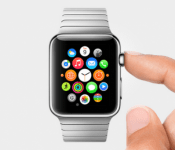
[VIDEO] Apple Watch Parody Ad: “You didn’t really ask for it, so here you go”
 Apparently something happened in Apple land yesterday – something about new devices – but naturally we didn’t pay much attention to it as it was business as usual from the tech giant. As an Android fan though, I love the parody ads that spring up on YouTube around this time when Apple announces new products. Apple’s new smartwatch, the Apple Watch, is no different, and a new Apple Watch parody ad courtesy of Jack Douglass of jacksfilms has been doing the rounds today. Check it out:
It definitely gave me a few laughs, particularly the part were he keeps accidentally saying “iWatch” instead of “Apple Watch”. I also didn’t know that “Apple Watch” stood for “A Pleasantly Plump Little Electronic Watch Android’s Terrible Come Here” but you learn something new everyday. I don’t think I’ll elaborate more about the Apple Watch here, suffice to say that it doesn’t really offer anything to the smartwatch industry that we haven’t seen before, nor does anything better, unless you count sending your heartbeat to somebody else as innovative – I just find it slightly creepy. Plus, it just looks like a LG G Watch with a shinier wristband.
What do you think about jacksfilms’ Apple Watch parody ad? Let us know your thoughts in the comments below.
Source: YouTube via TalkAndroid
//<![CDATA[
ord = window.ord || Math.floor(Math.random()*1E16);
document.write('‘);
//]]>
The post [VIDEO] Apple Watch Parody Ad: “You didn’t really ask for it, so here you go” appeared first on AndroidSPIN.
.CPlase_panel display:none;
Apple’s New iCloud Storage Plans Go Live, Monthly Prices at $0.99 for 20GB, $19.99 for 1TB
After yesterday’s media event, Apple updated its website to provide additional information on its iCloud pricing ahead of the launch of both iOS 8 and OS X Yosemite.
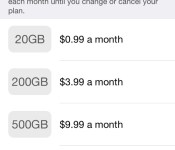
As of today, the company’s updated storage plans are live, allowing users to purchase iCloud storage upgrades using the new pricing scheme. While customers will continue to get 5GB of cloud storage for free, Apple has dropped the pricing on the rest of its storage lineup across the board.

Users can now get 20GB of storage for $0.99 per month, 200GB of storage for $3.99 per month, 500GB of storage for $9.99 per month, and 1TB of storage for $19.99 per month. The iCloud upgrade options can be accessed in the Settings app under iCloud —> Storage & Backup —> Change Storage Plan.
The launch of iOS 8 and OS X Yosemite will see the official debut of iCloud Drive, Apple’s new cloud storage initiative. With iCloud Drive, users can store any type of document, including presentations, spreadsheets, PDFs, images, and more, and then access them from any iOS device, Mac, or PC.
.CPlase_panel display:none;
Apple Launches New iTunes 12 Beta for OS X Yosemite [Mac Blog]
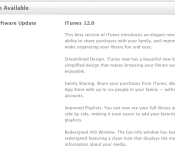
Apple today released a new version of the iTunes 12 beta for both developers and OS X Yosemite beta testers, following yesterday’s iOS 8 Golden Master release. Yesterday, users reported having difficulties installing the iOS 8 GM from Yosemite with the iTunes 12 beta, and this update may fix the issue.

First introduced in July, iTunes 12 includes an “elegant new design” that also includes support for several iOS 8/Yosemite features including Family Sharing.
iTunes 12 also includes improved playlists, a redesigned Info Window, and a new icon. iTunes 12 and OS X Yosemite remain in a beta testing phase, with a public release for the software expected this fall, possibly in October.
.CPlase_panel display:none;

Apple Watch Will Use Skin Contact for Apple Pay Security
When Apple announced that the Apple Watch would be able to use Apple Pay, the company’s new mobile payment initiative, many wondered how secure the payments would be if the device lacked the security of Touch ID, which is used in the iPhone 6’s implementation. Now, several members of the press have confirmed how the system works.

Both Rene Ritchie of iMore and Cult of Mac report that when a user first puts on the Watch they must type in a PIN code to authorize Apple Pay. Once it’s on, the Watch uses constant skin contact, which it can sense using the four sapphire-covered lenses on the underside of the device, to authorize payments. However, once the device is removed from a user’s wrist, they must re-enter their PIN when putting the device back on their wrist.
Thanks to sensors on the Apple Watch’s back, the device can tell when it’s being worn and when it has been taken off. When you first put the watch on, you must enter a code. When the watch is removed from your wrist, the watch locks itself and can’t be used for payments unless the code is entered again.
MasterCard’s mobile payment executive Ed McLaughlin also told Re/code that the Watch would use the four sensors on the back of the device as a security measure, while Visa CEO Charlie Scharf said that Apple understood the risks of contactless payments and has a solution.
The Apple Watch is due to arrive in early 2015 and will start at $350.
.CPlase_panel display:none;

A watch expert’s take on the Apple Watch: the benefits and failures of digital

Despite Benjamin Clymer’s many accolades across the past several years — the New York Times calls him the “High Priest of Horology” — it’s possible you’ve never heard of his website Hodinkee. The name might not bring watches to mind, but it’s actually a Czech word for “wristwatch” (technically it’s “hodinky” in Czech). The site’s established itself as a go-to source for wristwatch obsessives, and Clymer’s its executive editor, which is exactly why we were so interested to read his thorough dissection and impressions of Apple’s first ever watch: Apple Watch.
In a lengthy piece (that we suggest you read in full), Clymer begins by setting expectations: “I’m not even sure we can call it a watch.” That isn’t to say he doesn’t like Apple’s effort, but comparing it directly to a traditional, mechanical wristwatch is near impossible.
Compared with similarly priced ($350) watches, Clymer says, “the Apple Watch simply blows away anything — digital or analog.” He also notes that Apple Watch pays special tribute to the history of human time-telling. “The Apple Watch, in its own way, really pays great homage to traditional watchmaking and the environment in which horology was developed,” Clymer writes.
In terms of major faults, he cites two thoroughly watch-centric issues: not being able to fit easily underneath a cuff (“I was surprised by how bulky this is”) and lack of timelessness (“It is still not as cool as a mechanical watch, to real people.”). That latter bit is especially interesting. In the video seen below, Clymer speaks to how he got into watches: his grandfather and him were great friends, and on his 16th birthday, his grandfather gifted him a watch. As he puts it, “My watches will last for generations, this Apple Watch will last for five years, if we’re lucky.”
Again, take the time to read the whole enchilada from Clymer himself on Hodinkee. It’s a thoroughly interesting perspective on Apple’s newest product category.
Filed under: Wearables, Software, Mobile, Apple
Source: Hodinkee
.CPlase_panel display:none;

Net neutrality topples ‘Nipplegate’ as the FCC’s hottest issue of all time

Apparently, the only thing that gets Americans incensed more than kinda-sorta nudity is the danger of slow lanes on the internet. The FCC has confirmed that its most recent net neutrality rules have received more comments (1,477,301, to be exact) than any other issue in the agency’s history, beating even the 1.4 million that followed Janet Jackson’s “Nipplegate” exposure at the 2004 Super Bowl. And that’s before comments close next Monday, so the figure is only likely to get higher.
The record-breaking number isn’t totally surprising. John Oliver’s call for comments on Last Week Tonight gave the issue far broader exposure than it might have had otherwise (if not as much as first thought); mix that with the internet’s usual passion and the topic was bound to get lots of attention. It’s tough to know if the deluge of feedback will make the FCC rethink its stance on paid data prioritization, but it’s pretty clear that a good chunk of the US wants an equal-opportunity internet.
Filed under: Internet
Via: The Guardian
Source: Gigi Sohn (Twitter)
.CPlase_panel display:none;
Sound off! What apps help you get things done?

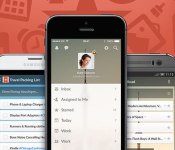
For the procrastinators among us, I share your philosophy: Why do today what you can put off until tomorrow? Sadly, the people who sign our paychecks don’t really agree; they strongly encourage us to get things done today. Right now! There’s a ton of different apps that help manage our to-do lists and claim to make us more productive people. With so many options, how do you choose something that gets you down with GTD? Share your favorite productivity apps in the Engadget forums!
.CPlase_panel display:none;

Stroll through Egypt’s pyramids on Google Street View

If you’re leery about taking a trip to Egypt just now, Google can at least give you part of the experience with new Pyramids of Giza Street View imagery. That includes the Great Pyramid, the only remaining ancient wonder of the ancient world that’s still standing, along with the Great Sphinx and Imhotep’s Pyramid of Djoser. As befitting the addition of such a famous landmark, Google also included a raft of extras: imagery from the Abu Mena Christian site, the medieval Cairo Citadel fortification and other iconic spots. From there, you can head to the Google Cultural Institute‘s Egyption Pyramid gallery and see archival photos and drawings. As we found, you’ll be able to while away a few enjoyable hours, and (we think) a digital tour carries a minimal risk of any curses.
Filed under: Internet, Software, Google
Source: Google
.CPlase_panel display:none;
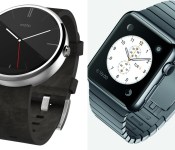
Early impressions on the Moto 360 vs. Apple Watch

In case you’ve been living under a rock, the wearable space has grown drastically for major companies throughout the world over a few months’ time. With Google’s quicker-than-ever rollout of Android Wear and Apple’s first iteration of Apple Watch, things are bound to get heated over who can make the best device. So many companies already have smartwatches, but who stands out? Who will create the device that will revolutionize the space? Though we need to wait awhile to use one of the contender’s devices, we can help answer a few questions so far: Who is pushing the boundaries of the wearable technology space, and which device is best suited for you?
Preface: There is more that one Android Wear watch available to the public, I know. I chose the Moto 360 for this comparison because of the seemingly superior build quality over the rest of the competition (though fans of the LG G Watch R might disagree).
And I know… the Apple Watch was just announced yesterday. We know much less about this device than we’d like to, but nonetheless, these are my thoughts regarding the future of wearables and how each company is approaching the space.
The Moto 360 and Android Wear
The Moto 360 is the first Android Wear device from Motorola, and is available for purchase today. It offers a circular design, Qi wireless charging, and comes with a Horween Leather strap (or a brushed metal strap if you don’t mind waiting).

Source: talkandroid.com
The watch itself has a brushed metallic outer edge, and offers a 1.56-inch 320×290 round LCD display. One thing that has been getting on peoples’ nerves is the black strip that cuts off the bottom of the display, where the ambient light sensor sits. Like it or hate it, the Moto 360 is the closest thing we have to a fully circular display.
Some other specifications include a TI OMAP 3 processor, 512MB RAM, 4GB of internal storage, pedometer and hear rate sensor, and a 320mAh battery. It measures 46mm in diameter and 11.5mm in width, and weighs 49 grams.
Apple Watch
Apple Watch is Apple’s first attempt at a smartwatch, available for purchase in early 2015. It has a square display, inductive wireless charging, and comes in two sizes and three different iterations: Apple Watch Collection, Watch Edition Collection, and Watch Sport Collection. Each one is different, so let’s break it down a little bit.

Apple Watch Collection: The body is stainless steel or Space Black finish, complete with six different types of straps that buckle into the top and bottom of the watch. This collection is the standard collection, more geared towards the general user.
Watch Edition Collection: This will be essentially the same as the Apple Watch Collection, but will be offered in an 18-karat rose or yellow gold finish and will have design enhancements added to the digital crown.
Watch Sport Collection: The body has an aluminum finish, and comes with only synthetic rubber straps.
Each collection will offer two different sizes: 38mm and 42mm, appropriately made keeping everyone in mind. All collections offer sapphire glass finishes, a custom S1 SiP chip, and a “digital crown” home button (more on that later). Apple’s also offering a new Force Touch technology that can tell whether a touch is normal or forceful. There is no word on battery quite yet, which has some concerned about how long it will last from day-to-day.
Square vs. Circle
The main difference you’ll notice right away is the difference in form factor. The reason the Moto 360 got so many people amped right away was because of it’s circular display. A circular display had never been done on a mainstream device before this, so it really looked like an attractive option for many of us. It looks like a more traditional watch, and absolutely strays away from having a small computer on your wrist. It is a bit bulky compared to the thickness of the watch strap, but that’s about the only design flaw we’ve heard thus far.
On the other hand, the Apple Watch really surprised many of us because of its seemingly underwhelming design. It’s a bit bulky for the overall design, not to mention the square shape of the device. It’s not ugly, but it’s also not anything special. Apple has long had a reputation for creating premium hardware, and I just don’t see that here.
Interface: Voice dictation vs. traditional (touch) navigation
Now this is what really matters. How will you interact with the device? The reason to buy a smartwatch is because of the functionality… and if you don’t like the way it works, why buy it? We’re seeing two very different ways of navigating through the watch, so let’s see which one better fits you.
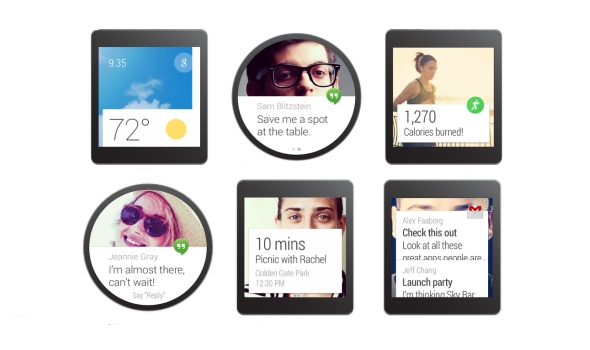
Android Wear’s approach to navigating the device is to use your hands as little as possible. The main screen is a clock (obviously), with a Google Now card on towards the bottom of the screen. It will give you the most recent one that’s available, including texts, emails, weather, or basically anything else.
The easiest way of navigating through the available actions is to use your voice. Android Wear needs some improvements in this area, especially if you need to use your finger to swipe through different menus. It’s basically a never-ending list to scroll through, which is not user friendly in the slightest. However, Google Now has long had a reputation of getting you information before you need it, so it absolutely helps to see navigation, weather, and other relevant information the moment you need it.

Source: Digital Trends
Apple is taking a different approach when it comes to interaction with your watch. The main screen of the watch is a bulk of circular icons, sporadically laid out throughout the screen. Want to open an app? It’s right there, waiting for you, similar to how the iPhone’s home screen is laid out. Swipe up from the bottom to access Glances: useful information, right when you need it. The Glance feature is basically like Google Now cards that you can swipe through and get as much relevant information as you need.
One other unique feature Apple is using is the new “digital crown” scroll wheel. Not only does it turn the screen on and off, but you can use it to scroll through lists, zoom in to maps, and much more. It’s definitely an interesting concept, but it doesn’t seem like it’s necessarily the most intuitive. Setting a traditional watch’s time is already an awkward hand movement, scrolling a tiny dial with your fingers. Going back to using a dial, even though it isn’t in the traditional sense, just seems backwards. Besides, isn’t this why touch screens were invented?
Both ways of navigating through the respective interfaces aren’t great quite yet, but they aren’t necessarily horrible. They’re both innovative, but we’re going to have to use the Apple Watch before we make any more comparisons.
Price & availability
The pricing information we have so far is as follows: the Moto 360 is on sale now for $249.99 through Motorola.com, Google Play, or BestBuy.com. Motorola’s site and Google Play both have the watch on backorder, and Best Buy only currently has the device available in-store.

All three collections of the Apple Watch will be available at the beginning of 2015. We’re assuming that means sometime in Q1. Unfortunately, that is right after the holiday season is over, and Motorola should already be working on getting the next version of their watch out to the general pubic. We don’t know specifics on the prices, but the Apple Watch’s base price will be $349.99. We don’t know what collection will start at this price, but the other collections will likely start at 50-100 dollars more than that.
So, what’s the draw?
I would, by no means, call myself a fanboy for Motorola. In fact, the Moto 360 is the only piece of Motorola hardware I’ve ever purchased in my life. So why did I pull the trigger and order right away? From the moment I laid eyes on it, it felt different. It felt like the future. A circular (albeit not a perfect one) display paired with the Android Wear interface looks like something out of a crazy concept video that could only be executed in the future.
The Apple Watch doesn’t do that for me.
The Apple Watch reminds me of an LG G Watch/Samsung Gear Live hybrid with a more confusing, cluttered interface, and I can’t just get around that. I can’t pay $100 more for a watch that does the exact same thing as the competition in an uglier package. The software seems too much like a traditional smartphone’s, and that just won’t work on on a screen smaller than 2 inches.

When Apple was showing off the full gallery view of all of their pre-loaded pictures, I laughed at the sheer ridiculousness of the concept. When they were showing off the zooming feature with the digital crown in Apple Maps, I thought that it was a completely pointless feature, yet they were still showing it off to millions of people. Two-inch wide screens aren’t the same as 5-inch screens, and I think Apple needs to understand that. The software seems rushed, and I just can’t get behind it.
Though this is a battle of smartwatches, what it comes down to is this: which complete package offers the best features for you? The competition isn’t just about the best smartphone anymore… it’s about the ecosystem. Both smartwatches, though brand new and partially unreleased, offer incredible leaps in technology that gets me excited, no matter which one I like more. By the looks of it, though, Android Wear and the Moto 360 looks like a more complete, well-thought out package compared to the competition.
But you know what? There are people out there that think Apple just invented the smartwatch. And I would know… just look at my Facebook News Feed. People will still buy the Apple Watch no matter how much catching up it needs to do to other technology out there, no matter how much it costs, simply because it’s Apple we’re talking about. Apple creates great products 99% of the time… I just think they could have done so much better with an entirely new product category.
What are your opinions of the Apple Watch? Am I completely wrong in my thoughts? Let me know in the comments… I’d love to hear from you!
The post Early impressions on the Moto 360 vs. Apple Watch appeared first on AndroidGuys.
.CPlase_panel display:none;

The Environmental Benefits of the Digital Revolution

As pollution from manufacturing and toxic contamination continues to exacerbate global warming, people are increasingly looking for alternative solutions for their daily needs. Rapid development in the tech sector has allowed us to transition some of our more wasteful practices toward more efficient, digital solutions that can eventually make a significant beneficial impact on the environment.
With the digitalization of cameras, reading devices like the Samsung Nook tablet, and thermometers, innovations in technology are driving quantifiable change toward resolving pollution and carbon emissions. Here are some of the environmental benefits of the digital revolution.
Digital Cameras
Digital cameras have grown in popularity due to the significantly easier process of saving and sharing photos. Traditional means of processing film still has a certain romanticized allure but the practical reality for many people is that the process is painstakingly slow and far from cost-effective. With digital cameras integrated to every smartphone and mobile device, traditional photography seems to be going the way of the dinosaur. Aside from the financial and convenience elements of digital photography, you might not have realized it has a significant environmental benefit as well.
Analog cameras of the past required the use of negatives and hazardous processing chemicals to develop the final product. After a photographer was done with the process, unused negatives were often disposed of and the chemicals poured out. According to Earth Times, “Most film is made of plastic coated with silver halide salts. This stuff doesn’t biodegrade and the silver salts aren’t good for the environment. Plus, the additional packaging materials like the film canisters, and cardboard packaging also end up in the dump. Then, there are the chemicals associated with processing film.
Developing film requires the use of several highly toxic chemicals that can harm humans and the environment including; acids, metol, and Hydroquinone. Laws are in place requiring film processing centers to properly dispose of the chemicals.” Thankfully, the majority of photographers have already embraced the digital revolution and such waste is rapidly becoming a thing of the past. Just as photographers have advanced their craft beyond its original form, readers have moved beyond the paper book to Nook tablets
Samsung Galaxy Tab 4 Nook Digital Readers
As we all learned from The Lorax, cutting down trees in excess is environmentally damaging and ultimately harming us. While reading books, magazines, and newspapers is an essential way to maintain one’s cognitive health and stay up to date on the events of the world, the traditional methods of print publishing are untenable if we have any concern for the environment.
 According to the Ecology Global Network, “world consumption of paper has grown 400 percent in the last 40 years. Now nearly 4 billion trees or 35 percent of the total trees cut around the world are used in paper industries on every continent.” Technology has given us an alternative with the advent of digital readers like the Samsung Galaxy Tab 4 Nook. By reading on a digital platform, we conserve all of the paper and related materials needed to print each book. Instead, readers can readily download eBooks with a single click and easily transport hundreds of titles wherever they go.
The estimates vary according to source, but according to The Telegraph, it only requires around 23-40 eBooks to recover the amount of materials used to build the average reading tablet device. So after only a year or so of use, the reader can significantly reduce the waste of print publication. As growing numbers of readers start to adopt eReaders as their primary medium to receive written information, the switch can make a huge impact in the world’s environment.
Digital Thermometer
By now, we’ve probably all heard about the dangers of over indulging in sushi and putting oneself at risk of contracting mercury poisoning. However, you might not have considered the environmental impact of your simple thermometer.
If you have an older mercury thermometer in your home, you could be putting yourself and the environment at risk. To safely dispose of the thermometer, contact your local EPA and find out how. The Environmental Protection Agency encourages everyone to transition to digital thermometers in an effort to eliminate the risk of mercury contamination, stating, “Mercury use in products can lead to releases to the environment through the manufacturing of the products; via spills and breakage; and during the recycling, collection and disposal of mercury-containing products.
As part of a broader initiative to reduce the use of mercury in products, EPA is working with stakeholders to reduce the use of mercury-containing non-fever thermometers in industrial and commercial settings.” Digital alternatives are significantly safer for both yourself and the environment, and are relatively similar in pricing to traditional mercury-based thermometers.
For an extra measure of environmental consciousness, choose a solar powered digital thermometer from your local pharmacy and eliminate the need for batteries. From digital cameras and digital thermometers to digital readers like the Samsung Galaxy Tab 4 Nook, digitalization is helping reduce environmental damage one device at a time.
Image source: Wikimedia
The post The Environmental Benefits of the Digital Revolution appeared first on AndroidGuys.
.CPlase_panel display:none;
 AIVAnet