


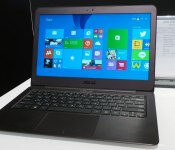
ASUS’ slim metallic Zenbook gets a super sharp 13.3-inch screen

ASUS’ Zenbook UX301 was already rather impressive with its glass-covered body and 2,560 x 1,440 touchscreen, but its record has just been broken by yet another ZenBook. Announced at IFA today, the new UX305 is a gorgeous all-aluminum Ultrabook that packs an insanely sharp 13.3-inch 3,200 x 1,800 (276 ppi) display (as used by the bulkier UX303LN), and at just 12.3mm thick, it’s certainly the world’s slimmest laptop to carry this class of screen resolution. The trade-off here is that this isn’t a touchscreen, but the 1.2kg weight does beat the 1.35kg 13-inch MacBook Air. Much like the rest of the ZenBook series, the UX305 is also quite the looker with its diamond cut highlights plus signature spun-metal finish in either “Obsidian Stone” or “Ceramic Alloy” color option. Little else about this laptop has been mentioned so far: All we know is that it’ll pack an Intel Core M processor, 10 hours of battery life and a choice of 128GB / 256GB SSDs. We’ll get back to you guys when we hear more later this year.
.CPlase_panel display:none;
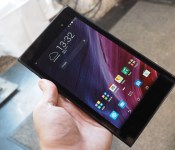
ASUS’ MeMO Pad 7 gets a new chic look, lighter body and sharper screen

It’s IFA, so of course ASUS is going to launch a new tablet. This time it’s a new MeMO Pad 7 (ME572C) that not only sports a different Intel Atom chip (the 64-bit quad-core Z3560 that clocks up to 1.83GHz), but it also has a new chic look that’s “inspired by clutch bags and wallets,” as well as a screen upgrade to a whopping 1,920 x 1,200 resolution (323 ppi) — a nice jump from the predecessor’s 1,280 x 800 panel. The new Android 4.4 tablet is also thinner at 8.3mm and slimmer at 269 grams, thanks to its fiberglass body, duralumin frame and slim screen bezels. Other features include 2GB of RAM, 16 or 32GB of internal storage, up to 64GB of microSD expansion, up to 16GB of free cloud storage, dual speakers and 5MP/2MP cameras.
Come late Q3 or early Q4, the new MeMO Pad 7 will be available starting from €199 (about $260) with red, gold and black color options; and there will also be an LTE version (ME572CL) if you don’t mind paying a bit more.
.CPlase_panel display:none;
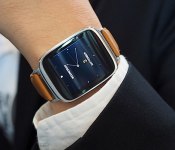
ASUS’ stylish ZenWatch is all about security, remote control and wellness

After its routine pre-show teasers, ASUS’ first smartwatch has finally been unveiled at IFA in Berlin. It’s no secret that this Android Wear-powered ZenWatch isn’t joining the party of circular watchfaces, but it’s certainly done a nice job at packaging the 1.63-inch, 320 x 320 AMOLED touchscreen (as featured on Samsung’s Gear Live). The body consists of a curved stainless-steel case surrounded by a rose-gold-colored band inset, and the top is dominated by a piece of 2.5D curved Gorilla Glass 3. You also get a genuine stitched-leather strap with a quick-release clasp out of the box, but you can swap it with your own 22mm band to suit your mood.
In terms of specs, the ZenWatch uses the same 1.2GHz Snapdragon 400 SoC as the Samsung Gear Live, the LG G Watch and its circular cousin, the G Watch R. You also get 512MB of RAM, 4GB of internal storage, a 1.4Wh battery, Bluetooth 4.0 (duh), a microphone and a bio sensor that can monitor your heart rate plus activity. With its IP55 rating, you can take the ZenWatch into the shower to give it a good scrub. (Hey, smartwatches need love, too.) When you’re low on battery, simply pop the ZenWatch on its charging cradle — it’s much prettier than the G Watch’s — to juice it up.
For the sake of consistency, ASUS has gone ahead and ported some of its ZenUI elements — including the elegant design and apps — from its recent portable devices over to the ZenWatch. Naturally, you’re given a selection of watch faces to play with, so the real novelty lies within the ZenWatch’s pre-loaded functions. These include “Watch Unlock” which lets you unlock your phone or tablet by simply touching the ZenWatch’s watch face, “Tap Tap” which lets you toggle a pre-assigned function by double-tapping the watch, plus the self-explanatory “Cover to Mute,” “Find My Phone,” “Remote Camera” and “Presentation Control.” The ZenWatch also has a wellness manager that tracks your heart rate, step counts and relaxation levels, plus it provides tips to help you reach your goals.
The prerequisite for using these features is that you need to install the ZenWatch Manager phone app, which also lets you set your watch face and locate the watch, as well as syncing the “What’s Next” schedule manager plus “Do It Later” to-do list between your ZenUI phone and the watch. You’ll also need to install the Remote Camera app and the ASUS Remote Link app on your phone — the latter for using “Presentation Control” on the ZenWatch.
Alas, at €199 (about $260), the ZenWatch costs more than its Android Wear competitors, so hopefully there will be a bundle discount in select markets. Expect it to hit the stores some time between late Q3 and early Q4 this year.
Daniel Cooper and Brad Molen contributed to this report.
.CPlase_panel display:none;

You can ride to work on this backpack

So you think regular skateboards are boring, eh? If those electric skateboards we’ve featured before don’t do it for you, then here’s another alternative: an electric skateboard that’s also a backpack. It’s called the Movpack, and you don’t even need to know how to ride a skateboard to use it, so long as you can keep your balance. You simply navigate it with a remote control, and it’ll move on its own at speeds that reach up to 15mph. Since Movpack’s creators have a wide target audience, from working professionals to students, they designed the board part to fold behind the backpack for convenience. You can roll it behind you or carry it like a regular backpack, but since it contains both the board and its battery, it weighs a rather heavy 17 pounds without anything else in it.
That battery can take you anywhere within 9 miles, provided you haven’t used it to charge your gadgets (which you totally can, by the way!), after which you need to plug it in for a couple hours. Movpack’s makers are currently trying to raise $100,000 via Kickstarter to finalize the product and start production. But before you decide to get one, you may want to make sure you’re into investing quite a bit of cash on a backpack-and-skateboard-in-one, as you’ll have to pledge a minimum of $1,190 for a single unit.
Filed under: Misc
Via: TechCrunch
Source: Kickstarter
.CPlase_panel display:none;
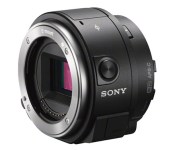
Sony’s new snap-on camera will take E-mount lenses, cost $399

Remember Sony’s newly leaked smartphone-mountable camera? The one that’ll let mobile photographers snap their existing E-mount lenses onto it so they can really mix up their shots? Sony’s reportedly gearing up to unveil the thing — also known as the QX1 — at its press conference at IFA on Wednesday, but it’s already made another appearance on the company’s online store. That means it’s time to dig into some of the juicier details, like what it packs inside the barrel (a 20.1-megapixel APS-C sensor and when you can nab one (it should start shipping on October 9). The QX1′s product page mentions that the curious camera will cost $399, but the thing to remember is that the price tag only covers the camera itself — there’s still no sign of the bundle that’s expected to include a 16-50mm lens. As always, you may want to take some of these tidbits with a grain of salt. After all, it’s not too likely that technical particulars will change too much, but the page clearly hasn’t been completely fleshed and we wouldn’t be surprised if there was a little leeway with that ship date.
[Thanks, tipster!]
Source: Sony Store
.CPlase_panel display:none;
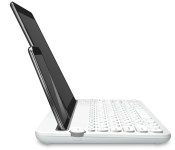
Logitech’s new keyboard can dock your smartphone and tablet

Wireless keyboards are a dime a dozen nowadays, but every now and then we come across one that manages to stand out from the rest of the pack. And that’s the case with the new K480 from Logitech, a Bluetooth keyboard that’s capable of doubling as a dock for your smartphone and tablet. It even has space to hold two devices simultaneously, as pictured above, so long as the size of each is appropriate — something like a 5-inch handset with 8-inch tablet combo, for example, should work just fine. As you might expect, Logitech’s K480 can also pair with your laptop or desktop, making it rather handy for a number of different scenarios. You’ll be able to get one, in black or white, when it becomes available in the US and Europe later this month for $50.
Filed under: Misc, Peripherals, Mobile
.CPlase_panel display:none;
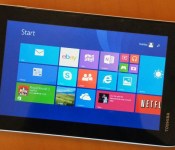
Toshiba gets aggressive with a $120, 7-inch Windows tablet

Over the years, Windows tablets have been getting smaller and smaller — and cheaper and cheaper. Well, surprise! They’re getting tinier, and we’ve just about hit bargain-basement pricing. Toshiba just announced the Encore Mini, a 7-inch slate that will sell for just $120 — an aggressive move, considering 8-inch models hover around the $200 mark. Technically speaking, the Encore Mini is not the cheapest Windows tablet out there, but it’s definitely the lowest price we’ve seen from a tier-one brand. For the money, you get full Windows 8.1, though the specs are, as you’d expect, pretty low-end. These include a 1,024 x 600 display, a quad-core Intel Atom Z3735G processor with 1GB of RAM, 16GB of built-in storage and dual 2MP/0.3MP cameras. At 0.78 pound, it’s heavier than, say, the 7-inch Galaxy Tab 4 Nook, which we just reviewed, but either way, you shouldn’t have a problem toting it around.
On a bright note, Toshiba is throwing in 1TB of One Drive storage, free for one year, and there’s also a microSDXC slot that takes cards up to 128GB. One year of Office 365 service is included too. Additionally, Toshiba worked with Microsoft to optimize the scaling, so that even when you’re in desktop mode, on-screen objects should still be big enough to hit with your fingers. This worked well in my hands-on, but then again, I have slender fingers, so maybe take that with a grain of salt. In any case, if you’re tempted, it’s available now.
Filed under: Tablets
.CPlase_panel display:none;

Toshiba intros a slimmer Chromebook, budget Windows convertible

Toshiba isn’t showing off a whole lot here at IFA, Europe’s biggest trade show. That said, the stuff it has announced at least manages to run the gamut. Today, for instance, the company unveiled both a slimmed-down Chromebook 2 and the Satellite Radius 11, a small-screened Windows convertible. Starting with the former, the Chromebook 2 has the same 13-inch screen size as its predecessor, along with the same textured plastic design. This time, though, it’s thinner and lighter, at 2.95 pounds, with the sort of compact dimensions you’d expect to find on a 12-inch system. Toshiba bumped up the resolution too, so that you can now get it with a 340-nit, 1,920 x 1080 IPS panel (the base model still has a 1,366 x 768 display). Depending on the resolution, you can expect either 11.5 hours of battery life on the lower-res version, or nine hours with full HD. In addition, Toshiba added Skullcandy audio. The firm seems proud of it, but after a few minutes of hands-on time, I actually found the sound to be rather tinny (it is loud, though).
Other changes include faster 802.11ac WiFi and dual array mics, though the port selection is otherwise the same (USB 3.0 and 2.0, HDMI and a full-sized SD slot). All told, it seems like an improvement, except for one thing: Toshiba downgraded the processor from a Haswell-series Celeron CPU to a Bay Trail one (the N2840, to be exact). If our review of the ASUS C200 Chromebook is any indication, using a chip like this would seem to be a step down in speed, but who knows? Maybe Toshiba found a way to better optimize performance, especially on the 1080p edition, which has four gigs of RAM instead of two. Really, though, it seems like the company had to cut corners to squeeze in a full HD display and still keep the price down. This would seem to be the place where Toshiba chose to make some sacrifices.

The Satellite Radius 11, meanwhile, is a follow-on to the 15.6-inch Satellite Radius, which came out earlier this year. Both have a Lenovo Yoga-like design, with a 360-degree hinge allowing the screen to fold back into tablet mode, tabletop mode (with the screen flat), stand mode (with the screen facing away from the keyboard) and tent mode (with the laptop balanced upside down). Similar to the Yoga, too, the keyboard locks up when you’re not in clamshell mode, to avoid accidental button presses.
But while the Radius 11 mimics the design of some full-fledged laptops, it has the guts of a netbook: Bay Trail-series Celeron and Pentium CPUs, and either a spinning HDD or a small flash drive, similar to what you’d find in a Chromebook. Aside from what’s sure to be a low price, the benefit to having a low-powered processor like this is long battery life. The chassis has a smooth, fanless look too, if that matters to you. No word yet on how much this will cost, but if Toshiba is smart, it’ll price this against other 11-inch convertibles like the Dell Inspiron 11 3000 and HP Pavilion 360, both of which start at $400. (Just sayin’, Toshiba!)
The Chromebook 2 will go on sale in the US on October 5th starting at $250 for the base model and $330 for the full HD version. It’ll be available in Europe as well, but later on in Q4. You’ll also be able to buy optional two-piece plastic cases in a variety of colors, as you can see in the shot above. The Radius 11, meanwhile, will arrive in late October or early November. Again, no word on price just yet. In the meantime, we’ve got hands-on shots aplenty. Check ‘em out.
Filed under: Laptops
.CPlase_panel display:none;
VMware Fusion 7 Launches with Virtualization Support for OS X Yosemite and Windows 8.1
Following the launch of Parallels Desktop 10 last month, VMware has launched its new VMWare Fusion 7 virtualization software, bringing support OS X Yosemite and improving compatibility with Windows 8.1. The release also adds a number of new features, including a new look, improved performance, enhanced connectivity, and optimization for Macs with Retina displays.
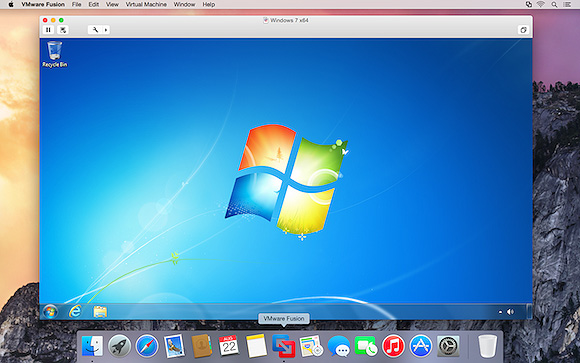
– Designed for OS X Yosemite
Get a more Mac-like experience when running Windows applications on a Mac. The Fusion 7 updated Yosemite look and feel makes working with your Windows applications feel cleaner and more refined.– Conquer Yosemite
Discover OS X Yosemite by running it in a virtual machine with Fusion 7. Get more from your Mac by running OS X Yosemite and OS X Yosemite Server in virtual machines. Leveraging decades of innovation in leading the virtualization revolution, Fusion 7 is the most reliable way to develop and test new applications for the Mac and iOS.– Ready for Windows 8.1
Get the most out of Windows 8.1 new features directly on your Mac and run Windows Store apps side-by-side with your Mac applications. With Fusion 7, view Windows Store applications in Launchpad and the Applications folder or put Windows Store Apps in the dock in Unity mode.– Near-Native Performance
With a highly optimized 64-bit engine and multicore processing power that makes the most effective use of the latest Intel Haswell processors, Fusion 7 runs Windows and Mac applications side-by-side faster than ever.– Retina Display Optimization
Windows never looked so good with Retina Display optimization for a crisp and detailed experience of your Windows applications. If your Mac has a native Retina display or is connected to one, Fusion 7 ensures you get a seamless experience when running Windows across Retina and non-Retina displays.
The more advanced VMware Fusion 7 Pro has also been launched, bringing the same features along with dual GPU optimization, virtual network management, enhanced support for cloned virtual machines, and more.
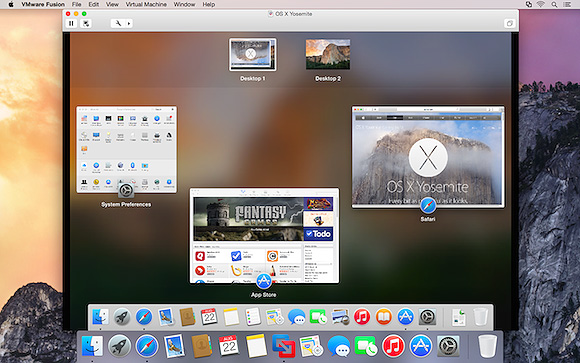
VMware Fusion 7 is available now for $69.99 while VMware Fusion 7 Pro is priced at $149.99. Those upgrading from VMWare Fusion 5 or 6 are also eligible for discounted pricing of $49.99 for VMWare Fusion 7 or $79.99 for VMWare Fusion 7 Pro.
.CPlase_panel display:none;
Apple Suppliers Said to Be Ramping Up Component Production for Thinner, Faster iPad Air 2
Apple’s supply chain partners have ramped up production for components to be used the company’s upcoming second-generation iPad Air, reports Digitimes. Citing sources close to production, the report claims that the device will remained unchanged in terms of size and resolution, but will feature a thinner profile, faster processor, and an improved Touch ID fingerprint sensor.
 iPad Air 2 mockup with Touch ID home button
Apple has also called on touch panel suppliers TPK and GIS to manufacture full-lamination units for the device ahead of its launch this fall. The source also notes that Sharp, Japan Display, and LG Display have also seen their orders increase for the iPhone, likely indicating that Apple is now mass producing screens for the iPhone 6.
Previous leaks have also pointed to a thinner profile for the iPad Air 2, along with reports claiming that the device will feature anti-reflective coating, and an improved Touch ID sensor. It is also most certain that Apple will include a faster processor in the iPad Air 2, as the company will likely integrate its new A8 chip in the device.
Apple will likely launch the iPad Air 2 alongside the next-generation iPad mini with Retina display this fall. The company is also said to be preparing to launch a 12.9-inch iPad in early 2015.
.CPlase_panel display:none;
 AIVAnet