


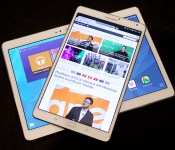
Up close and personal with Samsung’s vibrant Galaxy Tab S

When Samsung first made what it considered to be the definitive Android smartphone, they called it the Galaxy S and stuck with that naming convention for every other flagship phone it’s made since. That tiny little badge of distinction has never wound up on one of the company’s many, many tablets… until now. As if you still had any lingering doubts, Samsung firmly believes that the new Galaxy Tab S family are the best tablets it’s ever crafted… and it’s mostly because of those tremendous Super AMOLED screens. We got a chance to take those new beauties for a spin — read on to see what we thought.
By now you know Samsung crafted two different flavors of the Galaxy Tab S — an 8.4-inch model and a 10.5 model — and aside from the one obvious difference, they’re just about identical. Both look like stretched out Galaxy S5s, sport the same Exynos 5 Octa chipset (a mashup of a 1.9GHz quad-core chip, a 1.3GHz quad-core chip and 3GB of RAM), run Android 4.4 KitKat hidden under TouchWiz’s familiar tablet trappings and pack fingerprint scanners in their home buttons. Let’s put all that stuff aside for a moment, though. The screens are the real stars of the show here, and they are something to behold.
People have been singing the praises of Super AMOLED for what feels like ages now. Stop me if this sounds familiar: colors appear richer and more vivid, blacks are deeper and more sumptuous, and whites come through very crisply. All those of observations still hold true for the Galaxy Tab Ss, but they seem so much more pronounced and impactful on those bigger, 2560 x 1600 screens. Remember: the last time Samsung experimented with a Super AMOLED screen in a tablet, it was in this weird little guy from years ago. If we’re picking nits the 8.4-inch model is technically more pixel dense, but my eyes couldn’t discern individual pixels on either tab).
The richness of those displays are made even more apparent when you stick one of Samsung’s Galaxy Tab Pros next to them — the Pro is less than a year old, but the screen looks lifeless and washed out sitting alongside the 10.5-inch S. And if the Tab Pro didn’t have it bad enough, the difference was only magnified more in a test that simulated performance in direct sunlight. The Tab S’s AMOLED panel maintained a level of clarity and vividness that couldn’t be touched. Part of what makes the screen so impressive are the smarts that help it adapt to new situations. There’s a tiny RGB sensor embedded in the bezels of both tablets that let it gauge your current lighting situation and fiddles with white balance to compensate. If you happen to find yourself in a room bathed with purple light (poor you), the screen takes on a magenta cast so as not to strain your eyes, a process that repeats wherever you go.

Despite what Samsung might think, a killer tablet requires more than just a killer screen. Getting a sense of a device’s power while elbowing other journalists for room is a tricky process, but in our limited time together, both Tab Ss seemed more than happy handling minor tasks we threw at them. Swiping through pages was quite snappy, as was firing up apps and thumbing through digital magazines. Oh, and as you’d expect, there was nary a hiccup in sight when we fired up a few test videos.
Both versions are good for gripping too, if only because they’re so slim. Sony’s Xperia Tablet Z2 still wins that fight by a few fractions of a millimeter, but the Tab Ss are only as thick as 5 credit cards stacked atop each other so you shouldn’t have trouble whipping it around. What’s more, they both feel awfully nice too. Don’t get me wrong – the Galaxy S5 is fine and all, but it’s just light enough to lack a certain sense of rigidity and robustness. That’s thankfully not the case with the Tab Ss: sure, they’re light, but the increased weight of those displays makes each respective package feel just a little more premium.

It’s not just the hardware that seems a little familiar this time. Samsung didn’t go overboard with the new software additions – instead, they just thoughtfully updated a few key components. Easily the most impressive is Samsung’s refreshed SideSync app – it allows a Tab S to communicate with a nearby Galaxy S5 over Wi-FI Direct. Why does that matter? Because now you’re treated to a realtime replica of your phone on the Tab S screen, so you can swipe away on Tinder or transfer files by dragging and dropping. The usual slew of security-focused apps and Galaxy giveaways are still present and accounted for, so you’ll find plenty of familiar bits if you’re coming from another Galaxy gadget.
We can’t pass final judgment on Samsung’s newest pair of tabs yet, but we definitely like what we see so far. A mix of thoughtful updates, familiar design and some seriously impressive screens makes the Galaxy Tab S family one to consider when units start hitting shelves this July.

Visual encyclopedia builds itself by scouring the internet

Crowdsourced knowledge bases like Wikipedia encompass a lot of knowledge, but humans can only add to them so quickly. Wouldn’t it be better if computers did all the hard work? The University of Washington certainly believes so. Its LEVAN (Learn EVerything about ANything) program is building a visual encyclopedia by automatically searching the Google Books library for descriptive language, and using that to find pictures illustrating the associated concepts. Once LEVAN has seen enough, it can associate images with ideas simply by looking at pixel arrangements. Unlike earlier learning systems, such as Carnegie Mellon’s NEIL, it’s smart enough to tell the difference between two similar objects (such as a Trojan horse and a racing horse) while lumping them under one broader category.
Right now, the folks at the Wikimedia Foundation have little to worry about. LEVAN has only explored about 175 concepts as of this writing, and it can take as much as 12 hours to add another to the mix. It’s open to suggestions from the public, though, and the university has open-sourced its code so that anyone can build on the formula. You won’t want to depend on this self-assembling information hub for vital knowledge in the near future, but it should eventually be very useful for both schools teaching basic ideas as well as computer vision software that needs a helping hand.
Filed under: Internet, Software
Via: Phys.org
Source: LEVAN, University of Washington
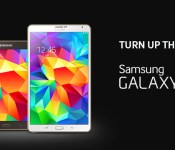
Samsung debuts 8.4-inch, 10.5-inch Galaxy Tab S tablets

As we’ve all come to expect over the last few weeks, Samsung has announced its new Galaxy Tab S line of tablets. Available for pre-order as soon as tomorrow, Friday, June 13, the premium grade tablets will be offered in 8.4-inch and 10.5-inch variants.
Hardware Monsters
The two tablets are powered by Android 4.4 KitKat and share a number of specifications. Common hardware between the two include Exynos 5 Octa (1.9 GHz QuadCore + 1.3 GHz QuadCore) processors, 3GB RAM, 16GB internal storage, and microSD expansion. Both models also boast WQXGA (2560×1600) Super AMOLED displays however the smaller one gets the higher pixel-per-inch count, natch. Rounding things out are an 8-megapixel rear camera, front-facing 2.1-megapixel camera, dual-band Wi-Fi, GPS, Bluetooth 4.0, and USB 2.0.
Software
In terms of software, the standard suite of Samsung apps are present. Familiar titles such as WatchON, S Health, and Multi Window join other such as Milk Music and new app called Samsung Papergarden. Designed with the Tab S in mind, this one delivers access to newspapers and magazines such as Comso, Vogue, GQ, and Rolling Stone.
Extra Perks
Samsung is giving away all sorts of wonderful content with their new tablets through Galaxy Gifts. Pick up one of these guys and you’ll also be treated to one-year free of Gogo In-flight Wi-Fi access, a 12-month subscription to Bloomberg BusinessWeek, 6-month trial subscription to The Wall Street Journal and The Washington Post, 3-month subscription to The New York Times, 3 months free Sirius XM Radio, and 3 months free subscription to Audible.
Availability
The Galaxy Tab S 8.4 will be available for $399.99, while the Tab S 10.5 will be $499.99. The tablets will be sold in July through Samsung.com, Amazon, Best Buy, Fry’s, Office Depot, Office Max, PC Richard & Son, Sears, Tiger Direct and Walmart.com.
![Book Cover[3]](https://i0.wp.com/www.androidguys.com/wp-content/uploads/2014/06/Book-Cover3.jpg)
As often is the case with new devices, there will be a number of accessories available for the new tablets: Bluetooth keyboard book covers, standalone Bluetooth keyboard, flip covers, book covers, S Action Mouse, USB LAN Hub, power saving cable and portable battery packs
The Road Ahead
Looking ahead, a 4G LTE version of the Samsung Galaxy Tab S line will be offered across multiple carriers. According to the press release, all four major players are in line to provide connected variants.
The post Samsung debuts 8.4-inch, 10.5-inch Galaxy Tab S tablets appeared first on AndroidGuys.
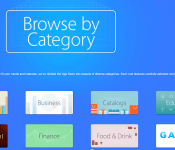
Apple Introduces New ‘Browse by Category’ Collection in App Store [iOS Blog]
Apple has introduced a new “Browse by Category” section in the featured section of both the desktop and iOS App Store, allowing users to easily browse the store via categories in a more visually appealing way than before. Previously, users had to click on “Categories” in the upper-left corner of the App Store and choose from a drop-down list.

The new collection is yet another move by Apple to increase the discoverability of apps in the App Store. For instance, searches in the App Store were altered to compensate for misspellings, making it easier for users to find what they could be looking for. At WWDC, the company also announced that the App Store would be getting a new “Explore” tab, trending searches and related searches in iOS 8.
Samsung Announces Galaxy Tab S With Super AMOLED Display, Multi-User Fingerprint Sensor
Samsung today introduced a new version of its Galaxy Tab, the Galaxy Tab S, at an event in New York entitled “Tab Into Color.” Available in both 8.4 and 10.5-inch sizes, the Galaxy Tab S includes a high-resolution (2560 x 1600) Super AMOLED display. According to Samsung, the Tab S’s display has a more accurate color range, better contrast, and higher outdoor visibility than an LCD display.
Billed as the company’s new flagship tablet, the Galaxy Tab S is Samsung’s “best tablet yet,” according to the company, and also its thinnest and lightest at 6.6mm. “Tab S is guaranteed to turn heads wherever you go, and to give it a more premium look, we trimmed it in gold to give it an aura of luxury,” said Michael Abary, senior VP of marketing for Samsung Electronics America.
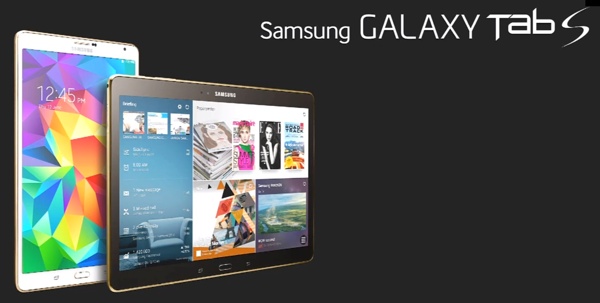
Along with a built-in fingerprint sensor, the Galaxy Tab S includes a “Sidesync” feature that mirrors one of the Handoff features that Apple announced with iOS 8. Sidesync allows the Galaxy Tab S to answer phone calls routed through a Samsung Galaxy S5 smartphone if both devices are on the same WiFi network. The Tab S is also able to remotely access a PC and multiple Tab S tablets in the same room can connect with one another.
Samsung’s fingerprint sensor allows multiple users to share a tablet, accommodating up to eight different users. A fingerprint scan loads different users based on fingerprint, and also integrates with a new Kids Mode, allowing children unable to enter a password to unlock the Galaxy Tab S using a finger.
Samsung’s Galaxy Tab S will run Android 4.4 (KitKat) and with its efficient display, it offers 11 hours of battery life. It will come pre-loaded with a slew of apps like Papergarden, an interactive magazine viewer, and the Galaxy Gifts widget, which will provide various offers like 90 days of free Google Music. Accessories for the Tab S include a Book Cover with multiple viewing angles and a bluetooth keyboard.
Available in brown and white, the WiFi versions of the tablets will be available in the U.S. in July, with LTE versions following shortly thereafter. The 10.5-inch version will retail for $499, while the 8.4-inch version will retail for $399, pricing on par with Apple’s iPad lineup.
Apple is said to be working new versions of the iPad Air and the Retina iPad mini, but those are not expected to launch until the fall. The tablets are expected to include an A8 processor, an upgraded camera, and a Touch ID fingerprint sensor.

Watch a paraplegic in an exoskeleton open the World Cup — with a kick

As promised, a paralyzed man did indeed kick off today’s World Cup festivities by wearing a mind-controlled robotic exoskeleton. Juliana Pinto, a 29-year-old paraplegic, was one of eight patients chosen for the opening ceremony after extensive training in a lab in Sao Paulo. Dr. Miguel Nicolelis, a neuroscientist from Duke University who’s the leader of the Walk Again Project, was ecstatic, proclaiming on Twitter “We did it!!!” Though the kick, as you can see above, was just a simple nudge to the ball, it’s actually extremely complicated. Nicolelis told the AFP news agency that it’s “the first time an exoskeleton has been controlled by brain activity and offered feedback to the patients,” and that “doing a demonstration in a stadium” has never been done before. Unfortunately, it seems this momentous occasion wasn’t captured on as many television networks as the rest of the opening ceremony, which strikes us as a crying shame. Hit the source links for more information on this miraculous innovation and have a peek at a fan-captured video of the event after the break.
We did it!!!!
– Miguel Nicolelis (@MiguelNicolelis) June 12, 2014
Source: BBC
Samsung sticks more colorful screens in its new Galaxy Tab S family

Thanks to the internet, we’ve already seen leaked images of Samsung’s flagship Galaxy Tab S. So when the company announced a press event for June 12th, we had a pretty good idea of what was in store. Sure enough, the company just unveiled the Tab S family, which includes models with 8.4- and 10.5-inch screens.
The rumors were true, folks. After what seemed like ages of keeping them solely in smartphones, Samsung has made more tablets that use Super AMOLED screens. They’re only 6.6mm thick too, which is pretty staggering… if not quite as thin as Sony’s Xperia Z2 Tablet. We’re live at Samsung’s event in New York, and right now the topic of conversation is software — a new app called Photogarden delivers digital versions of magazines to your Tab S, and Netflix just got a shout-out for bringing full hi-definition content to the 2560 x 1600 screens on both Tab S models.
These things are lookers, too. Both Tab S size models are available in white and a very subdued bronze, but the real draw here are those displays — Samsung thinks they deliver the “ultimate viewing experience.” The benefits of a Super AMOLED screen have been thrown around for years: you get richer colors and deeper blacks, and a boost in detail thanks to that heightened contrast.
Developing…

Ex-Microsoft employee who leaked company secrets sentenced to three months in prison
 Remember that time Microsoft rifled through someone’s Hotmail account and then claimed it was totally OK? The incident — and Microsoft’s response — was disturbing enough that it was easy to forget why the company accessed someone’s account in the first place. The reason: That inbox belonged to a French blogger who had posted Windows 8 screenshots. As a result of that email probe, Microsoft was able to identify the leaker he had been corresponding with, a former employee named Alex Kibkalo who was then arrested for stealing trade secrets. Kibkalo plead guilty and now, three months later, he’s been sentenced: he will spend three months in prison (full ruling embedded below) Since the incident, Microsoft has vowed to follow stricter policies during investigations, though it stands by its actions in this particular case.
Filed under: Internet, Microsoft
Via: GeekWire

Grumpy Cat’s upcoming Christmas special could be the death of cinema

Scene: a theater full of people, laughing at images of butts with farting noises played as a soundtrack. It’s satire from the world of Idiocracy, but we may not be that far off — Lifetime has decided to make a actual motion picture out of a cat-meme. Grumpy Cat’s Worst Christmas Ever, due out this holiday, is ushering us into an era of cinema where image-macros and animals with comical bone structure are considered legitimate foundations for motion pictures. It’s bound to be a terrible age, but we shouldn’t be surprised: we live in a world where crypto-currencies and media empires are born from similar beginnings. Lifetime president Arturo Interian expects the film to bring a “fun and irreverence” to the channel that its heartfelt programming typically lacks, explaining the film will a mash up between “Home Alone” and “Die Hard.” Oh, and the script is being penned by one of the names behind Spongebob Squarepants: the Movie. Joy.
Via: The Telegraph, NY Times

How I got stabbed in the chest at E3 2014 (an Oculus Rift tale)

There I was, impaled by an alien. I was carefully walking around a space station, with nothing more than my (admittedly dim) wits and a motion tracker, watching a large, terrifying alien stamp about. My only direction was to survive. “You had one job!” I failed at it.
The tech demos are over: Oculus Rift’s second development kit at E3 2014 isn’t running any dalliances aimed at proving the tech. It’s running real-ass games. Alien: Isolation was the third game I played, and it was by far the most terrifying. You’re not a space marine, and you’re not named Ripley. You’re just some unwitting sheep running from assured death at the hands/tentacles/teeth of an H.R. Giger-designed alien. Delightful.
ALIEN: ISOLATION
Alien: Isolation is being made by Sega’s recently acquired game studio The Creative Assembly. Hell, it’s coming out this year on game consoles and PC. Again, the demos are over — there are entire game dev teams dedicating time to virtual reality at this point. Isolation is proof of that, and it’s a great first example. It’s not even clear how people will be able to play Isolation‘s VR mode at this point; the game’s headed to PC, but there’s no VR headset to buy just yet enabling said functionality. Sure, you could buy a dev kit and stuff, but that’s pretty far from ideal.
Anyway, Alien: Isolation is meant to terrify you. You’re stuck in a confined area of a space station while the aforementioned alien stomps about. If it sees you, you’re done. Not, “Oh, I’ll turn and run.” Not, “Shoot her! Shoooooooot herrrrr!”, Jurassic Park-style. It comes right at you and the motion sensor in your hand doesn’t offer any defense. So while I snuck from room to room looking for an out, I was able to avoid interacting with the hulking beast a few times. About three minutes in, though, he spotted me dead on. I turned to run. He caught up quickly and stuck me through with a vicious-looking appendage. I looked down and saw said appendage sticking out of my chest, blood dripping from it. The future of gaming is pretty messed up, y’all.
LUCKY’S TALE

Do you like Super Mario 64? How about Super Mario 3D World? Or Ratchet & Clank? Well you should be super pumped about Lucky’s Tale, the second game being published directly by Oculus VR. It’s being made by the folks behind Words with Friends and, before that, they were Ensemble Studios alums (Age of Empires, Halo Wars, etc.). It’s a colorful, cutesy third-person platformer. You feel a bit like god, looking down on a cartoony world filled with stars to grab and platforms to bounce on. “So what, it’s a platformer!” you say. Okay, okay — cool it.
What makes Lucky’s Tale especially cool is the gameplay implications of wearing a head-tracking VR headset. Lucky has to throw bombs occasionally; simply look at your target and push a button. Boom! How about hidden secrets? Just look around the level; having a VR headset on means the 3D platforming world of Lucky’s Tale is a physical platform just a few feet away from your gaze, able to be explored more deeply than ever before. What’s that next to the ledge? Just bend your head around the corner and take a look, why don’tcha? While the game at first feels like little more than a pretty 3D platformer, it quickly becomes a whole new experience in VR.
SUPERHOT

First and foremost, you can play Superhot right now. And you absolutely should, because it’s super boss. Check it out right here.
That aside, playing Superhot in VR is bananas. The conceit of the game is that time moves forward as your character moves. So it’s a first-person shooter, but the bullets only move toward you as you move your character. It’s kind of like living in The Matrix‘s bullet-time sequences; you can literally watch a bullet as it whizzes past your head, slowly moving forward as the bullet slowly creeps past you. It makes the whole shooting experience far more personal. One bullet takes you down, and there are many bullets. Playing Superhot feels like a game of virtual reality Twister. I found myself moving in short bursts, advancing time and carefully moving my head as to avoid the bullets flying my way.
Forget Team Fortress 2‘s VR support — Superhot is where it’s at for first-person shooting in virtual reality.
 AIVAnet