


Apple Retail Announces 2014 Summer Filmmaking, iBooks Author Camps for Kids
As it has done in prior years, Apple will once again be offering free summer camps for kids 8 to 12 at its retail stores, with this year’s sessions focusing on filmmaking with iMovie and interactive storytelling with iBooks Author. The classes will run for three days with each class going for 90 minutes.

The iMovie workshops will provide lessons on filmmaking with iMovie on the Mac and creating an original soundtrack in GarageBand for iPad. Meanwhile, the iBooks classes will teach kids how to draw illustrations using an iPad and how to add sound effects as well as Multi-Touch features using iBooks Author for Mac. The third day of each camp will also end with an Apple Camp Showcase so campers can share their finished projects.
The first sessions begin in mid-July and go through early August. While some stores have already filled their slots for both workshops, others have many spots remaining.
Interested parents can register for sessions on Apple’s U.S. and Canadian retail websites, while parents in China, France, Hong Kong, Italy, Japan, the Netherlands, Spain, Switzerland, and the United Kingdom can register to be notified when registration opens in their countries. Apple Camp sessions for Australia’s Apple Retail Stores will return in 2015.

US government lifts restrictions on high-detail satellite imaging

The US government will now allow the likes of Google and Microsoft’s Bing to use satellite images containing far more detail. Previous restrictions stopped anything smaller than 50 cm (1.64 feet) being shown on satellite photos. Imaging company Digital Globe was behind the request, and reckons it could well take shots from space that capture things as small as 31 cm. Lawyer Marc Daultich told the BBC that this could raise security concerns, although this restriction didn’t really encompass the blurring or otherwise obscuring of sensitive locations. Digital Globe plans to launch new satellites following the decision and says it’ll be able to take thrilling photos of “key features such as manholes and mailboxes”. And hopefully something a little more interesting, too.
Filed under: GPS
Source: BBC

‘Nest Protect’ Smoke Detectors Back On Sale After Safety Recall, Now Starting at $99 [iOS Blog]
Nearly three months after it was pulled from shelves over safety concerns, Nest has restarted sales of its Nest Protect app-enabled smoke detector with a lower price tag of $99, reports The New York Times.
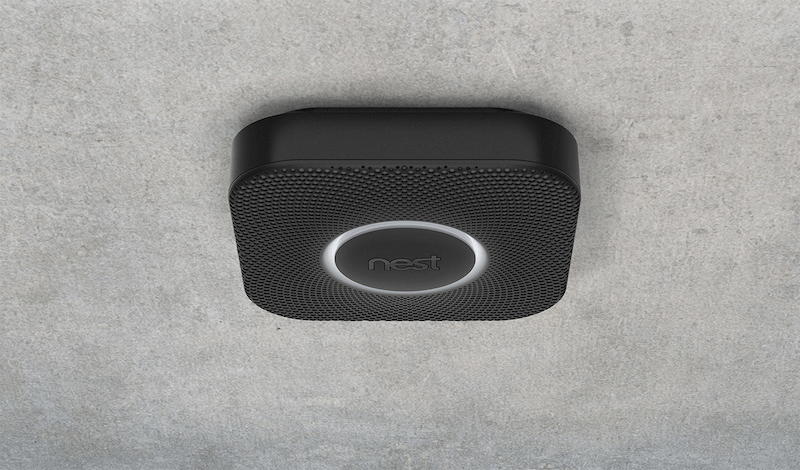
The company, which was acquired by Google in January for $3.2 billion, stopped selling its smoke detector after testing revealed that the Nest Wave feature could be disabled unintentionally. The Nest Wave allows users to silence alarms by waving at the detector as opposed to pressing a physical button. While the glitch hasn’t been fixed, the company noted that it will issue a software update to do so in the near future.
The Nest Protect is available to purchase from Nest’s official website for $99, and comes in colors of black or white.

Jelly catches up with the rest of the internet by adding comments

Jelly tries to get answers to the questions that keep you awake at night. A question we’ve had since its launch, however, was why it lacked any kind of comment or thread system. Fortunately, that’s Jelly’s new feature. Once you’ve got an answer, but you’d really like to hear some more detail, you (or whoever answered) can continue the dialogue below. These replies are also public, so they could help everyone. Biz Stone’s new project just got a lot more viable — provided you can find someone to answer your question in the first place.
Filed under: Internet, Software, Mobile
Source: Jelly, iTunes, Google Play
New emojis let you throw shade with a single symbol
 http://www.engadget.com/2014/06/17/250-new-emoji/
Someone once said that a picture is worth a thousand words, so a smiling, yellow face is probably worth at least 160 characters. If you ever found the current run of emoji a little too stifling, some 250 new ones could be en route to help recreate the rest of your favorite album covers. But don’t check your Android or iOS device for shiny turds and other icons just yet, because, as The Verge points out, it’s up to those platforms to implement the Unicode Consortium’s new symbols on their own. Given Apple’s push for more diversity in emoji, that could happen sooner than you think. Just what new glyphs are there, though? Alongside some slightly more aggressive icons, a printer, trackball and “old personal computer” are among the lengthy list over on Emojipedia. You know, technology that teenagers know all about. Once you start seeing the likes of those (and the Vulcan split-finger greeting) popping up in Snapchat and elsewhere on your phone, you’ll know who to thank.
Filed under: Cellphones, Mobile
Via: The Verge
Source: Unicode, Emojipedia
‘Parallels Access’ Gets Updated with iPhone Support, New File Browser [iOS Blog]
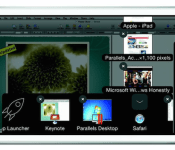
Parallels has updated its Parallels Access app, which allows iPad users access their Mac or Windows desktops on their tablets, with iPhone support, allowing iPhone users to also access their desktops on the go.
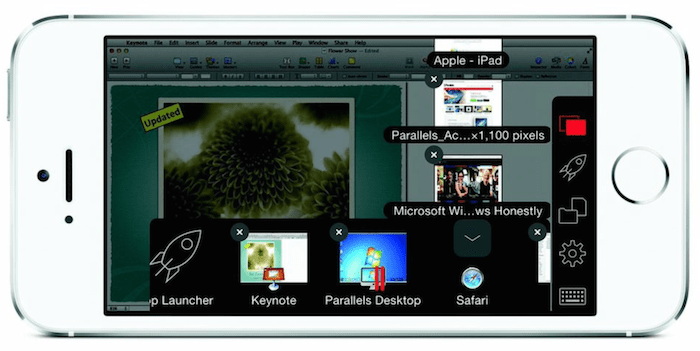
“Parallels Access received a tremendously positive reception from iPad users, and now we are extending our solution to millions of Android and iPhone users. While traditional remote desktop products are trying to show a large desktop on a small mobile device, we worked hard to make remote access from mobile devices a truly simple and effective experience,” said Jack Zubarev, president of Parallels.
The update also includes the ability to use an iPhone or iPad’s microphone remotely for desktop apps that may require them, the ability to change the screen resolution, the ability to wake a sleeping remote computer, Facebook login integration and a new file browser. The browser allows users to browse and open files on their iPad or iPhone.
Users must download the free Parallels Access app on both their desktop of choice and iPad or iPhone. They can then launch their desktop apps in “full-screen mode” via a SpringBoard-like App Launcher. While the apps are free, users must subscribe to the service, which costs $19.99 a year for up to five remote desktops. Parallels also offers a two-week free trial.
Parallels Access is a universal app that’s available for free in the App Store. [Direct Link]
Jawbone UP24 Review on Android: Does it strike the right balance between style and Functionality?
 The fitness wearable space is on fire at the moment with new options being released with each passing week with slightly different features and slightly different focuses. One of the more popular wearables come from Jawbone, who are also well known for their audio products. Their original, wired Jawbone UP was an interesting prospect and definitely good looking, however Jawbone have made the right changes to make it even more attractive, cutting all the physical connections to give us the wireless Jawbone UP24. The real question is whether it’s more than just a pretty face, particularly when the asking price is $149 USD.
What’s in the box

There aren’t too many parts to the Jawbone UP24; apart from the fitness band itself and its associated charging cable, the only other notable part of the UP24 system is the app that can be downloaded from the Google Play store. While the “UP” app is free to download, it’s essentially useless without either a wired Jawbone Up, or the wireless UP24 to pair with. More on the app later.
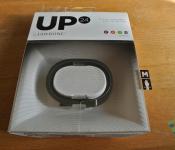
 The UP24 looks essentially the same as the UP did except for a slight change in the pattern adorning the band. It’s a very sleek, simple device with only one button, found at the end of the band, with the other end of the band featuring the 2.5mm jack that allows the band to charge. Typically, you can expect the UP24 to last about 6-7 days which is pretty impressive seeing how thin the device is and that it is syncing essentially every 20 minutes or so. That is probably helped by the fact that the device doesn’t actually have a graphical interface to speak of, with only 2 LEDs in the band to help you differentiate which mode your band is currently in (awake or sleep).
 The UP24 is constructed from plastic, however it remains very pliable, making it extremely easy to remove and replace when required. Before I had the UP24 in my hands to try, I was under the impression that the ends of the band were held together with magnets, however the reality is that it’s just a plastic ring with a predefined shape.
How does it perform
I’ve been very impressed with the Jawbone UP24. On the technical side of counting steps, it appeared to be accurate (with the usual missteps like shaking and what not) and although I’ve yet to be sold on the ability of fitness bands to truly map trends in sleeping, it was definitely a decent indicator of how good a sleep you got the night before.
 Seeing as the device does not really have an interface to give you meaningful feedback, you will be mainly dealing with the UP app to see how your daily activities are going. The app has a simple enough interface, with the main page being a news feed-type affair, letting you know how your current and past activities have gone, as well as the activities of any friends you have added through the UP app.
 The graphs that the UP app outputs are great to navigate, and while it’s not terrible impressive to simply create column graphs and put them next to each other, the UP app does a great job of presenting the data in a concise and elegant manner. It’s very easy to scroll through previous data and see if any trends have started to develop. While its primary function is to log your steps and sleep, there are also added features in the app that allow you to also log your meals and other physical activities (i.e. swimming or sports). While these don’t add to your steps or sleep per se, for those who are big on health and nutrition logging, these features are a nice plus (although it can get slightly frustrating to use).
 Syncing the UP24 is pretty simple, with prompts to correct your syncing process if you aren’t quite doing it right along with troubleshooting tips. Sometimes it can take more than one try to get it synced out, but it’s nothing more than a minor nuisance. Once connected, the band wireless syncs with your smartphone in the background, or at the very least, every time you open the UP app.
What I like about the Jawbone UP24
 I’m a big fan of the design. While many reviews of the UP24 have decried it for lacking a graphical interface, I actually think this works in the band’s favour. The best thing about this to me is the fact that the UP24 is so unassuming; it’s so light that I can go an entire day without realizing that it’s on my arm and come home to see exactly how active I’ve been. Likewise, while I’m sleeping, it’s not really all that noticeable which let’s you sleep without really knowing it is there. Sure, there are fitness buffs who will want a graphical display to show them how far they’ve run, or how many calories they’ve burned at regular intervals, but for what the UP24 offers, it does it very inconspicuously.
 I also really like the logging in the UP app. While it’s a relatively simple affair, it’s nice that the data is so easily scrollable, which gives you a really easy way of checking out on a hourly, daily or weekly basis how active you really are.
What I don’t like about the Jawbone UP24
 While the logging part of the Up app I really like, there are parts of the app I am not a fan of. Chief among these is the nutrition and additional exercise menus, and while I can understand that this isn’t the primary function of the app, it feels like these features aren’t quite as functional as they could be. While they are polished in the presentation sense, the menus are hard to navigate and difficult to use, with multiple windows needed to just input one part of a meal. I was personally so turned off by these features that I neglected to use them for most of the time I spent reviewing the UP24.
 I generally don’t like making price a sticking point, but it’s very difficult not to with the UP24. With a price tag of $149 USD or $179.99 AUD, you’d expect some pretty nifty gizmos for your money, but the reality is that you’re really only getting a very basic fitness band and its free companion app. While I did mention that the design of the band is by far one of its best features, it’s difficult to recommend the band just based on that for the price point, however you may be swayed if you’re looking for something particularly stylish and unassuming that doesn’t need to have killer fitness features.
Final Thoughts
 The Jawbone UP24 is definitely a fitness wearable for the fashionable, casual exerciser. It’s a great mix of design, style and basic features, which makes it perfect for people who want something to help supplement their fitness life with something that doesn’t look too bulky or unwieldy. It’s a bit pricey, and the lack of features probably won’t appeal to the fitness-literate who want more from their fitness bands, however the UP24 is great in its own respect and if you’re in the market for something a bit like that, you won’t be disappointed.
The Jawbone UP24 is now available globally, and if you want to take a closer look at the product, be sure to visit the product page here on Jawbone’s website.
Gallery of Photos


//<![CDATA[
ord = window.ord || Math.floor(Math.random()*1E16);
document.write('’);
//]]>
Nest Protect smoke alarm returns with a lower price following safety recall

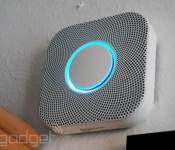
Earlier this year, Nest recalled the Protect smoke detector after it realized the product’s standout feature (the ability to silence it with a hand gesture) made it potentially unsafe to use. In response, Nest halted sales, and disabled “Wave” control on existing devices using the product’s built-in WiFi connection. Now Protect is back: The company resumed sales tonight, with the Wave feature still disabled. And hey, the price is lower too — $99, down from $129. For now, you’ll have to silence the device the old-fashioned way — by pushing a button. That said, a Nest spokesperson told us the company is working on an easier way to silence the alarm, even if hand gestures aren’t the way to go (people might silence the device when they didn’t mean to). If you wanna buy it now, be our guest; just remember that you’re no longer paying for gesture control, but other features, like a built-in nightlight, sleek design, spoken warnings and the ability to control the device remotely using an app. Still a good feature set if you ask us, though it was probably wise of Nest to cut the price.
Filed under: Household
250 New Emoji Coming Our Way in Unicode 7.0

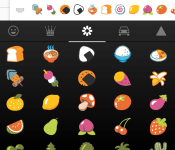
Feel like you don’t have enough emoji in your device? Well in comes Unicode 7.0, that will bring in 250 more emoji for you to spam your with. That isn’t all that Unicode 7.0 will be bringing to the tech world; over 2,800 characters have been added that Google, Apple, and Microsoft, will be able to utilize in their keyboards and fonts.
One highly requested emoji that they have added to the update, is the explicit middle finger. I feel a lot of you out there will be using that more often than you think you will, and it will be funny kind of a day once that is integrated into our keyboards. Let us know your thoughts about the tons of new emoji you’ll be getting, and how excited you are about that middle finger.
//<![CDATA[
ord = window.ord || Math.floor(Math.random()*1E16);
document.write('’);
//]]>

One year in, and Google’s crazy internet-by-balloon project is doing just fine

Even we laughed a little when Google X announced Project Loon — an ambitious experiment built to give rural areas balloon-powered Internet access — but one year later, the company may have proven its point: this could work. Since the project was announced last June, the company has made huge strides in balloon flight time and connectivity. Wired reports that Google’s latest floating hotspots have been given LTE capabilities, freeing them from the range limitations the original WiFi-based designed burdened them with. These new radios offer better transfer speeds, too — as high as 22 MB/s to an antenna or 5 MB/s to a phone. More importantly, the balloons are staying aloft for much longer: earlier this year, one test circled the globe three times before dropping to the ground, and another has been floating for over 100 days – and it’s still up there.
Google explained to Wired a few of the methods it employed to improve balloon performance, some of which were deceptively simple. Many of the balloons, for instance, are manufactured at -40 degree Celsius, matching the conditions they would eventually face at 60,000 feet. The team also found ways to handle the airbags more carefully, ensuring there were less pinhole leaks to sabotage the balloon’s eventual flight. Of course, these more durable and longer flying craft gave the group more problems to solve — the balloons navigate by riding favorable wind currents, but when the airships started to stay aloft for weeks at a time, Google could no longer use standard wind forecasts to plan flights. In the end, the company had to devise its own system of prediction using historical databases of weather data.
Early tests in Brazil have shown huge promise, and the team plans to spend the next year delivering on that promise. Over the next twelve months, Google hopes to run multiple flights that last for more than 100 days, eventually launching a ring of 300 to 400 balloons that can circle the clone and provide continued service to specific areas. That’s an incredibly ambitious goal, but Google X’s Astro Teller is confident his team can pull it off. “On Loon’s two-year birthday, I would hope, instead of running experiments, we’ll have a more or less permanent set of balloons,” he told Wired. “Yes, Loon will be offering service.” Read up on Project Loon’s full story at the source link below.
Filed under: Misc, Internet, Google
Source: Wired
 AIVAnet