


BlackBerry turns to Amazon for apps

BlackBerry on Wednesday announced a new licensing agreement with Amazon which sees the hardware maker employing the Appstore for its handsets. Once realized, smartphones which run the forthcoming BBOS 10.3 will be able to tap into the Amazon Appstore and its more than 200,000 applications. Yes, this means the same Android apps available to Kindle Fire, Fire TV, and Android devices already running the Appstore. Due in September, the software update will give BlackBerry smartphones access to apps outside of the World store.
The post BlackBerry turns to Amazon for apps appeared first on AndroidGuys.

Living with Google: Google Music

In short, Google Music is one app I have found I simply can’t live without. Google Music is free for your own uploaded music (up to 20,000 songs) but to really utilize the service you want to sign up for All Access.
All Access allows you to listen to everything available on Google Music – millions of songs. Google has a vast library of music you can listen to on Android devices, iOS, and through the web page Music.Google.com. Initially there is not much going on in your library; it’s when you start to explore Google Music All Access that the app starts to become an everyday music experience.
Google Music allows you to create playlist and radio stations of what you want to listen to. Just about any type of music is available at all times as long as you have a good connection. If you know you are going to be in an area with no connection you have the option of pinning your music on your device. Users can pin anything from single songs to entire albums and playlists.
 Need a bit of inspiration? Google also has a recommend listening feature that comes in handy if you don’t know what to listen to. Suffice it to say, there’s a smart algorithm at work here and it’s able to recommend new releases, suggest music you’ll enjoy, or just play a random selection of stuff that you’re likely to love.
To get Google Music you have to download the app on the device your using as well as any computer you use. Most new Android phones come native with the music app. The application on the computer will ask to search for music to add to you library automatically. When you have downloaded the app there will be an option to turn on All Access for a monthly fee which is well worth it. You can’t keep the music and share it for obvious reasons but you can store it on device so if you have no service or internet connection you can still listen to it uninterrupted.
There are options available like listen now which takes you to music that’s on device or music that you regularly listen to. My library which is whats only on device sorted by genres, artist, albums, and songs. Playlist which are your playlist you have created. Radio which is a list or radio stations you have created and Explore which gives you a top songs list and suggested songs and artist bases on what you listen to. There is only one strong suggestion for this app if you can organize your library on a computer do it, the app has fewer capabilities than the web application.
LIVING WITH GOOGLE is an ongoing series of articles dedicated to highlighting the many ways in which Google can help better our lives. With innumerable apps and services to choose from, our aim is to educate readers on the ways in which we use them.
See Also Living With Google: Google Now , Living With Google: Gmail
The post Living with Google: Google Music appeared first on AndroidGuys.

Atari to bring RollerCoaster Tycoon 4 Mobile to Android this Winter
Atari is a name that many of you will be familiar with. The younger generation might not be very familiar with the company that pioneered the gaming industry so many years ago. In a recent press release that just hit our inbox Atari announced a few things that they will be doing to make a corporate comeback.
“Atari is more than a game publishing company; it’s an iconic brand that has established a passionate and timeless culture,” said Fred Chesnais, Chief Executive Officer, Atari, Inc. “Known across multiple generations around the world, Atari will continue to embrace all audiences. What the company has accomplished over the years is no small feat, but there is more to come. We’re looking forward to delivering on our new strategy and engaging with our audience in new ways across multiple channels as the next era of Atari unfolds. We are leading a rebuilding exercise in a highly volatile industry, so at the same time we are also aware of the challenges that lay ahead.”
 A few bullet points from the release shed light on plans for social casinos, real-money gambling and YouTube with exclusive video content. We are a bit more interested in their mobile endeavors though. The current Atari offerings in the Play Store are slim with a greatest hits title and a stand alone Centipedes: Origins and Circus Atari. A small mention near the end of the release is what caught our attention though. Later in the winter of this year, Atari will be bringing RollerCoaster Tycoon 4 Mobile to Android.
Unfortunately that means the iOS users have a big jump on the game as it has been available for a number of months already. Such is the way of mobile games though. I remember spending countless hours building parks and creating roller coasters from the ground up. Atari also mentions there will be a multiplayer PC version coming around the same time. So that should be cool, as long as they don’t make it some silly Facebook game.
Will RollerCoaster Tycoon 4 Mobile be on your wishlist until it is launched? I know I will be setting reminders to check back in the next few months.
//<![CDATA[
ord = window.ord || Math.floor(Math.random()*1E16);
document.write('’);
//]]>

Surfing with GTO, the very promising future of Gogo in-flight WiFi

Let’s face it: with few exceptions, in-flight WiFi still sucks. ViaSat’s solution available on a few United and JetBlue planes is a step in the right direction, but even that product is inconsistent at times, if you’re even lucky enough to end up on an equipped flight. The vast majority of in-flight internet is supplied by Gogo, utilizing an air-to-ground infrastructure that’s similar to the cell phone networks that we all love to hate. But the company’s next-generation solution, called GTO (Ground to Orbit), represents a tremendous improvement across the board.
GTO is unlike any other service on the market. A satellite receiver mounted atop each plane carries content to the aircraft, while Gogo’s existing ATG-4 (air-to-ground) technology is used exclusively for sending data from the plane to the ground just a few miles below. Because the satellite is only used to receive information, Gogo is able to boost bandwidth tremendously. The system uses Ku-band satellites orbiting 22,000 miles above North America, which provide less throughput than ViaSat-1, a Ka-band sat that’s used to get select United and JetBlue planes online. Still, because the antenna is only used to receive data, speeds are on par with Ka.
In fact, you may end up having an even better experience than you’ll get with a ViaSat-equipped plane. With an aircraft-mounted satellite that’s used to both send and receive, you’re looking at 800ms (nearly a second) of latency. But because data is only making one roundtrip to space en-route to your laptop, smartphone or tablet, rather than two, there’s less lag with Gogo’s hybrid GTO. You should expect web pages, photos and YouTube videos to begin loading about 400 milliseconds after you make the request, and while that delay is noticeable, nearly the entire page will appear at once — with buffering enabled, streaming videos will play just as well as they do on the ground.

Gogo announced GTO last September, and while it’s not clear when the service will start popping up on commercial jets, we may see the first aircraft roll out within the next year. Installing a satellite on top of a plane is much more labor- (and cost-) intensive than mounting a single antenna on the bottom, however, so it’ll be quite a long time before GTO becomes as prolific as ATG is today. We had an opportunity to get a very early look at Ground to Orbit in action at Gogo’s Chicago-area headquarters, though, using a roof-mounted satellite antenna and a simulated air-to-ground uplink.
The service performed as promised, with very speedy (40 Mbps) downloads and paltry upload speeds of less than 1 Mbps (you’ll be best off delaying those photo and video uploads until you’re back on the ground). Video downloads worked very well, and since there’s plenty of bandwidth to go around, you should be able to stream HD video from GTO-equipped flights. The boosted performance could have a positive effect on Gogo’s pricing, too — supply will most likely exceed demand, even on cross-country flights, where you can currently expect to pay more than $20 per leg. Gogo and airlines opt to price certain ATG-4 routes higher than others in order to reserve bandwidth for deep-pocketed business travelers, but there will be more than enough to go around with GTO.
With ViaSat’s super-fast Ka-band WiFi, Gogo’s GTO and AT&T’s upcoming solution, there’s no question that in-flight internet is on track to improve significantly over the next few years. Regional jets and other aircraft that are too small to accommodate a satellite antenna and protective radome may never receive GTO, but larger planes tasked with ferrying passengers on hops across the country should begin to offer a much better in-flight experience soon. International aircraft will also benefit from the new technology — Gogo’s 2Ku system, which utilizes dual satellite antennas, will offer similar performance well out of range of ground towers, enabling GTO-like speeds on flights around the world.

Filed under: Transportation, Wireless

‘No Man’s Sky’: the game that ‘won’ E3 2014

Ever heard of Joe Danger? That’s okay, you’re not alone — most folks haven’t heard of the motocross-based platformer, despite it receiving glowing praise from critics and earning healthy sales from gamers. That said, if you followed last week’s annual game industry trade show, E3, you’ve likely heard of No Man’s Sky. The same small team of scrappy Brits that created the cartoony Danger series, Hello Games, is applying its years of game industry experience to a much more ambitious project in No Man’s Sky. This is how Hello Games lead Sean Murray described the game at Sony’s E3 2014 press conference:
“We’ve created a procedural universe. It’s infinite, and it’s one that everyone can share. We’re gonna start every player on a different planet so no two people will have the same experience. This universe we’ve created…it’s so vast, it’s so boundless, it’s actually infinite, and we don’t even know what’s out there.”
So, how in the world did a team of four game developers transition from indie hit makers to triple-A rogues? We asked Hello Games just that, late last week in an evening demo session for No Man’s Sky.
” I couldn’t picture myself turning around and working on a game that’s the same scale of Joe Danger.”
The last time I saw Sean Murray and David Ream, they weren’t quite so serious. The previous games from their 10-person studio, Hello Games, are great in their own way, but not anywhere near the scope or scale of No Man’s Sky. Not by a long shot. Let’s run a quick comparison, just so you’re clear. Here’s Joe Danger for PlayStation 3:
Here’s No Man’s Sky for PlayStation 4:
Pretty major difference, no? Murray says it was an intentional move to go bigger, but not their only intention. “We were really pleased with the success and stuff, but our ambitions were much bigger, I think. I couldn’t picture myself turning around and working on a game that’s the same scale of Joe Danger,” Murray says.
Beyond that, Murray and co. wanted to break out of the game-development formula. They were tired of beginning development by asking, “What type of game are we making?” and going from there. “You start to have conversations like, ‘We’ll make a platformer next! We’ll make a point-and-click adventure,’ or something like that. And you’re not pushing yourself as a developer. We wanted to try and do something really landmark,” Murray says.
Sound arrogant? That’s a measure of text not conveying tone. Every time Murray made a statement like that during our half-hour meeting, he’d couch it with a statement like, “But we didn’t talk about it [in] that kind of arrogant way or cocky way,” abashedly looking away. Even in his statements above, he can’t help but add caveats like, “I think,” as he goes (I’ve cut out most, for your sake). This is a man with grand ambitions and, thankfully, a sense of self-awareness.

I begin our piece on No Man’s Sky with this profile of Murray and co. for good reason: There’s pedigree, heart and passion backing up the seemingly too grand plans for the space-exploration game. It’s important to understand not just the background of the team in terms of resume — Criterion, Kuju, Sumo Digital — but also the people that make it up. These are the kind of guys who appear on a podcast late at night after a long day of showing their game on a loud conventional hall show floor. It’s for all these reasons I have tremendous faith in their ability to pull off No Man’s Sky as they describe it.
“Can I see myself doing this on that indie circuit? Going to PAX every year and killing myself on something that long-term isn’t … am I gonna look back on it? Will they all blur into one?”
Hello Games is an indie studio. There are 10 staffers. Four of them went dark internally to concept No Man’s Sky (including Murray and Ream), and even now, the four-person team that initially created the project works closely together. They’re not scaling up for No Man’s Sky, either; the game was built around the concept of a small team creating a massive project. It’s procedurally generated and it’s made of voxels. But what does that mean?
For one, it means that the usual army of artists required to create the artwork of a massive game aren’t required. Murray explains: “Our artist, just like on any normal game, builds something like this: a tree. And he would have to build dozens, or maybe a hundred of these, to create a forest. And then if you had another forest with a different type, then you have to build a different type of tree. Another several dozen.”

All of those trees take time and money! While third-party solutions like SpeedTree exist (which creates a whole bunch of virtual trees), small teams aren’t exactly flush with cash for extra software. So, instead of the standard operating procedure for game development, Hello Games built a system to create all that time-intensive stuff — known as “assets” — for them. Even better, that system creates on the fly, based on a variety of parameters, meaning no two planets/creatures/ships/trees are exactly the same. The system solves two problems at once: producing all the assets of the game (music included) and making the game infinitely explorable.
If no two planets are the same, then the world is infinite — there’s no reason to stop exploring, which is exactly what Murray wants. There aren’t defined goals or conflict in the game just yet, nor a quest log or some form of points/scoring. He’s only vaguely hinted at the gameplay of No Man’s Sky beyond exploration; your ship has a weapon to fire, and the dinosaur-like creatures in the E3 demo could absolutely stamp you out with a single step. There are resources to gather, and Murray sent out a pulse to scan for said resources in the demo we were shown. What you’ll do with those resources is another question; there are many, many questions about the game of No Man’s Sky, though we’ve got a pretty clear picture of what its world will be.
“If you play it, I want you to play it not because you’re interested in indie games. I want you to play it because you prefer it to Call of Duty, not because it’s more ‘legitimate’ or ‘credible’ or something like that, but because it’s more entertaining.”

No one I spoke to at E3 2014 said, “No Man’s Sky looks pretty great for an indie game.” They all just said, “That game looks crazy!” This is an important distinction, and one that Hello Games says it’s glad to hear. This was also intentional. “That’s really meaningful to me,” Murray says. “I wanted to make games, and have spent a long time being ‘the indie dev.’”
Not that there’s anything wrong with that, of course. Indie devs make great games, and even some of the world’s most popular. Minecraft was created by a single man. Rovio was a small studio when it stumbled on a hit with Angry Birds. Hell, Oculus VR mostly exists from Palmer Luckey tooling around in his spare time.
But there’s still a separation. The three aforementioned indies all broke out of that world into the mainstream, and Murray’s aiming to repeat that success for Hello Games. It’s not the only goal, of course, but it is a concern to Murray personally with No Man’s Sky. “We don’t actually want the story to be, ‘Oh they made it with a handful of people,’ or whatever. We just want it to be good.”
The good news for Murray and co. is that all of us — the folks who play games — also “just want it to be good.” With an unannounced release date and only PC and PlayStation 4 platforms named thus far, Hello has the flexibility with expectations to impress us all. Now all they have to do is do it.

Adobe Ink and Slide review: A software giant tries its hand at hardware

As big as Adobe is in the software space, the company only announced last spring that it planned to dive into hardware, starting with a cloud-connected stylus and a drafting ruler. The Ink and Slide, as they’re called, are accessories that allow the company’s creative-pro customers access to Adobe’s Creative Cloud service on mobile devices. Now, the final versions are available in the US, and as you might expect, Adobe has a smattering of companion apps in tow for making the most out of what could otherwise be a dear $199 purchase. With hoards of more affordable styli to choose from, are Adobe’s efforts really worth the premium? As is often the case, the answer’s a bit more nuanced than a simple “yes” or “no.”
Hardware

When Adobe first pulled the wraps off its stylus and ruler, then code-named Project Mighty and Napoleon, the two devices already had near-final hardware. They’re still wrapped in aluminum with white plastic accents where the tools come in contact with your tablet screen. This means the add-ons match white variants of the iPad Air, iPad mini and fourth-gen iPad well. It also gives the two a premium look, especially compared to other stylii, most of which are fashioned entirely out of plastic. Unfortunately, the metal surfaces here scuff about as easily as Apple’s devices, too. Indeed, something as simple as transporting the Ink and Slide in the same backpack compartment could produce some wear and tear.
Thankfully, there’s a lipstick-style plastic tube for the Ink stylus, an accessory that allows for both recharging and safekeeping. The end snaps magnetically into the cap where there’s a micro-USB port for charging. Ink takes about an hour to fully juice up and is rated for around eight hours, allowing you to get through a full workday before plugging in again. Unfortunately, since the ruler doesn’t need to be charged, it doesn’t get its own storage accessory; you’ll have to find your own way of protecting it from scratches, I’m afraid. Getting back to Ink, though, the same end that plugs into the cap for recharging also sports a multi-color LED, serving as an indicator for when the stylus is on and has been connected to an iPad. When charging, that light becomes a colored ring that indicates the charge status on the case itself. The same indicator can even be customized for a particular user so that in an office full of mobile sketch artists, you aren’t picking up someone else’s device.

Ink’s overall triangular shape twists as you move down from the top to the tip and, to me, this design cue allows for a nicer feel in the hand than a straight, wedge-like design would have offered. Not only does it handle nicely, but it also allows you to comfortably rest an index finger on the topside button while working. That button — a single, circular concave spot — allows quick access to tools inside the companion apps without the need to swipe through a menu mid-doodle (more on that in a bit). All told, the pen is a little larger than a regular Sharpie (read: more like a marker than an ink pen) and, as you can tell, its thick shape actually makes it more comfortable to use.
Ink also features a much smaller tip than other styli I’ve used in the past. You know the ones: rounded, rubber-tip affairs that feel more like a marker than a pencil or fine-point pen. That’s not the case here. Ink’s point is a hair larger than a ballpoint pen’s or graphite pencil’s tip, but it allows for more accurate control thanks to its diminutive stature. Those who need to wrangle fine line work when sketching on an iPad should be quite happy with the hardware here. Sure, most drawing apps allow you to select a thin line from the options menu, but fine strokes with a stubby rubber stylus never felt comfortable to me, and it’s the main reason I haven’t really dove into tablet sketching. Additionally, Ink packs Adonit’s Pixelpoint tech that allows for a skinnier tip with “thousands” of levels of pressure sensitivity. It also does a better job recreating the feel of a pen on paper as you’re gliding across your tablet screen, but you’ll still notice how slick the glass is.

When Adobe offered the first look at Slide, the short ruler had a collection of buttons on its top for each bank of shapes for straight-line drawing. Those controls have been reduced to a single concave button like on the Ink, only a bit larger to fit the extra space comfortably. You can select several libraries of shapes from within Adobe’s mobile apps, and you can use the surface toggle to sort through the options before placing the desired shape or drawing those clean lines manually. Those collections include Herman Miller furniture, gadgets, UI elements and more, which should come in handy for tasks ranging from interior design to mobile-app planning. Though I thought the Slide’s glossy feet would slide around, making it difficult to hold steady while sketching, I was pleasantly surprised to find that’s not the case. Slide can be moved around with ease, yet it doesn’t budge when you apply pressure. It’s also just a bit longer than a USB thumb drive, so it’ll be easy to pack away in the pocket of your backpack.
Setup and use

Once you turn Bluetooth on, you can pair Ink with the iPad from Adobe’s own Sketch and Line apps (more on those in the software section). It’s here that you can also choose from three palm-rejection settings, toggle Slide detection and configure the LED color. Connect your Ink device by pressing down on an on-screen circle for about five to seven seconds. Once the unit has been paired, you can use it in any of the supported apps, and it will remain active until you connect another Adobe pen. The whole process is quick and I never encountered any snags when trying to get the stylus and tablet ready for work. What’s more, because they stay connected, I was able to pick up both devices in the morning and immediately resume where I had left off the night before.
While you can certainly use Ink and Slide without a Creative Cloud account, signing into one brings stored color palettes, Cloud Clipboard, access to saved files and the ability to share via Behance from your tablet. I found this particularly handy when working on projects that already had established color schemes. I was able to keep things color-coordinated from the start, and could grab existing assets for more accurate previews. Ink’s onboard button offers access to Kuler swatches, drawing tools, Cloud Clipboard, palm rejection and sharing with a single click right on the pen. It handles copy/paste functions too, and that clipboard can be accessed across devices. For example, you can copy a sketch on your iPad mini, then connect Ink to a pal’s iPad Air and drop the scribble inside Sketch there. As with any new hardware/software tandem, there’s a slight learning curve, but Adobe has kept the controls simple and straightforward, so that even novice illustrators should be able to pick them up quickly.
Software

By now, you’ve surely noticed that we mentioned the iPad in the headline of this review. No, that’s not an indication of our bias for all things Cupertino; it’s a heads-up that these devices and their apps are iPad-only… for now, anyway. Adobe has always favored Apple with its mobile apps, on account of the fact that a large portion of its customers prefer Macs and iDevices. However, I was told that depending on consumer demand once Ink and Slide launch, companion apps for other platforms could eventually follow. There’s no indication that these bits of software are already in the works, so once the decision is made, it could take some time before you get to use these tools on an Android or Windows slate. Actually, if we’re getting technical, the Ink stylus will work with other OSes now, but just as a regular ol’ capacitive stylus.
In any case, enough with that — let’s dive into the apps, shall we? Alongside these two devices, Adobe is introducing three new iPad apps that are “Ink and Slide aware”: Photoshop Mix, Sketch and Line. First, Adobe Sketch will be the option for free-form drawing with Ink and Slide. The app pipes in access to color palettes via Kuler, stored images, copy/paste clipboard (labeled Cloud Clipboard) and the ability to both browse for inspiration and publish to Behance — all with the help of Creative Cloud. The drawing toolkit here includes graphite pencil, pen, markers and an eraser. If you’re not into splurging for the Ink and Slide, a feature labeled Touch Slide is built in for getting those straight lines without the hardware. You could use your finger, for example, or benefit from neater marks when you’re only toting Ink along on your commute.
Adobe Line, meanwhile, enables precise drafting-style drawing for those looking to keep things tidy. There’s also a grid view for creating sketches with accurate perspective — something perhaps a package designer would fancy. Another useful example would be interior designers using the app to plan a space by applying the built-in Herman Miller furniture packs. In that scenario, you could also trace the inside of a room on top of an existing photo for a more accurate representation. Once again, Creative Cloud is baked in here for Kuler themes, file access and sharing work as you go.
Lastly, Photoshop Mix packs in key features from the full-on desktop version into an iPad app for the first time. Here, tools like Content Aware Fill and Camera Shake Reduction should make compositing and masking images on a slate a breeze. What’s more, you’ll be able to open and save PSD files from a tablet for later use in Photoshop CC when you’re back in the office. Unfortunately, we weren’t able to test that app, so we can’t offer any initial impressions on it. The software maker is also opening up its mobile SDK that allows access to CC settings, so we should see the app selection grow before year’s end.

Adobe’s Sketch and Line make it much easier to get tablet sketches into desktop apps like Photoshop and Illustrator quickly. Once there, though, you’ll have to contend with a PNG file — at least for now. This means that you’ll still have to convert drawings vector artwork manually just like you have scanned in a sketch on paper. It’s an even bigger bummer when you get your clean lines just right in Line only to have to retrace them again to make a workable vector graphic. If my work in that app could be beamed straight to Illustrator as vector art, Ink and Slide would instantly have a place in my mobile workflow, especially for things like branding projects with loads of iterations. However, it’s really nice to be able to send a file from my iPad to my desktop in a matter of seconds with two taps of my finger, no matter how much I’ll have to clean it up once it arrives.
My qualms with file handling aside, both Sketch and Line perform quite well for tablet drawing apps. If you’ve encountered similar software in the past, you can expect a comparable UI arrangement here. Menus are tucked away up top or down below giving you the maximum amount of real estate in the middle to work with. Heck, you can even go full-screen and hide nearly all of the tools if you really need to get at the edges. To make the most of the iPad’s touchscreen, both apps also feature handy gestures for things like undo, a history scrubber and both pan and zoom. This handful of touch gestures allows you to pick up the pace when drawing, without the need to switch to an eraser to correct a misplaced mark or navigate the canvas with a separate side-rail control.
The competition

Aside from the Ink, there’s a plethora of Bluetooth styli on the market, and at a wide range of prices. For creative professionals, specifically, only a few stick out as true competitors. Wacom’s Intuos Creative Stylus is another iOS-only tablet pen that touts palm rejection and 2,048 levels of pressure sensitivity (the Ink recognizes “thousands”). It also has clickable buttons, similar to what Wacom builds into its separate Pro Pen product. The Pro Pen, by the way, is meant to pair with Wacom’s pricey, professional-grade pen displays, pen tablets and hybrid devices from the outfit, but here, the precise nib tip is replaced with a larger rubber end that I’m not too fond of. The larger contact area makes the Creative Stylus feel like just that, a stylus, instead of a more realistic pen-to-paper experience when sketching inside the Bamboo Paper app. However, it only costs $100 — half the price of Adobe’s new Ink and Slide.
Thanks to its partnership with Adobe, Adonit has a Creative Cloud-connected stylus of its own, the Jot Touch with Pixelpoint. As the name suggests, it packs the same tech and skinny tip as Ink in the first third-party stylus to access CC settings. While it’s also iOS-exclusive, it will only hit your wallet for $120 and could be useful for those who don’t also need the Slide ruler.
Lastly, FiftyThree’s Pencil ($60 and up) has become a popular choice for those looking to create on the go. This, too, offers palm rejection, an eraser tip and fingertip blending. It also works only with iPads and is fine-tuned for the company’s Paper (no, not that Paper) app that was recently retooled for iOS 7. This particular piece of software, along with Wacom’s Bamboo Paper (both free), are the closest options to Adobe’s Sketch, but the accompanying styli pack a much beefier tip, so you’ll need to take that into account in addition to the monetary savings.
If you aren’t looking to futz with replacing batteries, FiftyThree’s Pencil, Adonit’s new Jot Touch and Adobe’s Ink are the internally rechargeable options here, while Wacom’s device relies on AAA batteries for power. Another detail that may factor into your decision is availability. Adobe’s Ink and Slide are only available in the US for now, though Adobe says they’ll ship globally later this year.
Wrap-up

I’ll admit I had to keep my excitement in check when Adobe outed Mighty and Napoleon last year. I knew that the company could crank out stellar software, but I wasn’t sure how compelling the hardware portion would be — especially compared to other styli. In terms of functionality and ease of use, the company has created the first set of tools that allows me to start a project on a mobile device and finish it when I get back to the office, now that I have access to assets while in transit. The mobile software plays nice with the Creative Cloud apps that I need to finalize my work, and I can make the transition from slate sketch to full-blown apps on my MacBook Air quickly and easily.
There are two cons that ultimately hamper the experience: durability and price. I can’t justify spending the $200 on Ink and Slide until I can create and send vector graphics from my iPad for use in Illustrator on the desktop. Some creative types may get a lot of use out of the duo in their current state, but I’ll have to wait for those other apps and expanded file support to arrive. For double the price of competing devices (more in some cases), I expect my accessories not to get scuffed so easily when they’re resting in the same pocket of my bag. Don’t get me wrong; I prefer the metal to a plastic shell, but if these are devices I’ll carry with me nearly everywhere, I should be able to haul them around without producing wear so easily. In the end, though, Adobe has built a somewhat tempting window into Creative Cloud for those eager to start projects on an iPad. The only question is whether the company has priced itself out of attracting the curious.
Filed under: Peripherals, Mobile
Adobe overhauls Creative Cloud with new touch features and cheaper pricing

Adobe updates don’t get the same amount of attention that they used to. No doubt, this is largely due to the company’s Creative Cloud platform, which pushes gradual improvements to more than 1 million subscribers automatically. But the company reckons there’s still room for major overhauls every once in a while, and it claims today’s is the “biggest software release since CS6.” The update brings new features to pretty much all of Adobe’s desktop applications, as well as four new mobile apps (which we’ll get to in a minute), plus a permanent $10-per-month subscription deal for access to Photoshop CC and Lightroom CC (which has already been widely available through time-limited offers.)
There’s no room here to go through all the new features — Adobe’s website can take care of that — but there are a couple of Photoshop additions that stand out to us as especially useful. These include pinch-to-zoom and enhanced brush strokes on Windows 8 touch devices, as advertised during the launch of Microsoft’s Surface Pro 3, plus a Focus Mask for quickly selecting and editing areas of an image that are in or out of focus — something that sounds very handy for portrait shots.
Finally, a quick look at the new mobile apps: Two of these, Sketch and Line, are designed to accompany Adobe’s latest digital pen and ruler peripherals for the iPad, which Billy Steele has just written about in a separate article. Photoshop Mix is a third app that lets you work with PSD files stored in your Adobe cloud drive, and it was built using an SDK that will soon allow third-party developers to integrate PSD workflows and Creative Cloud access into their own apps. Lastly, Lightroom mobile has arrived on the iPhone as well as the iPad, allowing quick access to organization and editing tools right from your handset — check out our full review of the iPad version for more.
Filed under: Software

4SRS: the FBI built a list of Twitter slang to keep up with the kids

Forget passwords: the FBI wants to crack your internet slang. Thanks to a FOI (freedom of information) request published over at Muckrock, we now know that the Bureau is TCOB (taking care of business) when monitoring the nation’s social media use. Bypassing UrbanDictionary or the odd Wikipedia definition, the FBI compiled its own 83-page list of over 2,800 acronyms that range from the well-known, like LMAO, TMI, YOLO and SMH, to the outright ridiculous, including EOTWAWKI (end of the world as we know it) and IITYWTMWYBMAD (if I tell you what this means will you buy me a drink?) The agency says the list will help agents “keep up with your children and/or grandchildren,” and also invites them to add their own. Perhaps that’s why AMOG (alpha male of group) and DTP (disturbing the peace) have made it in, but we secretly hope it was an Engadget reader who added KIRF (keeping it real fake).
[Image credit: neolao, Flickr]
Filed under: Internet
Via: Vice
Source: Muckrock

Adobe Announces Creative Cloud Updates, Expanded Creative Profile [Mac Blog]
Adobe today announced that all of its Creative Cloud desktop apps, including Photoshop, Illustrator, InDesign, Dreamweaver, Lightroom, Premiere Pro, and more, will receive updates that improve the efficiency of work flows and boost performance.
Photoshop CC, for example, will gain new Blur Gallery motion effects for creating a sense of motion, a Focus Mask for selecting focus areas and highlighting portrait shots with a shallow depth of field, new Content Aware capabilities, and a new Perspective Warp for adjusting the perspective of a specific part of an image.
The update also includes enhanced Mercury Graphics Engine performance, the ability to link Smart Objects to be shared across multiple documents, and improved Layer Comps.

Illustrator CC gains Live Shapes to transform rectangles into complex shapes and back, while in Indesign CC, it’s now possible to select table rows and columns and use the EPUB fixed Layout to create digital books

Adobe’s video apps now include Live Text Templates and Masking and Tracking, with Premiere Pro CC gaining enhanced graphics performance. After Effects now includes new keying effects, while SpeedGrade CC has a more flexible Direct Link color pipeline and Audition has enhanced multi-track tools.

Along with updates to all of its Creative Cloud apps, Adobe is expanding Creative Cloud profiles to improve the connectivity between mobile and desktop apps. Profiles will include stored files, photos, fonts, and preferences, which can be accessed on both desktop and mobile apps, allowing files to be seamlessly shared between apps.
The new CC desktop apps, mobile apps, and hardware are tightly integrated through Creative Cloud services. This integration helps liberate the creative process by enabling users to access and manage everything that makes up their creative profile – their files, photos, fonts, colors, community and more – from wherever they work.
Adobe today also introduced both a new suite of mobile apps designed with its new SDK and two new tools, the Adobe Ink and the Adobe Slide, detailed in a separate post.
Adobe’s new Creative Cloud updates are available to Creative Cloud subscribers for free. Adobe offers individual Creative Cloud memberships starting at $49.99 per month for new customers, $29.99 per month for existing CS customers, and $19.99 for students. Adobe has also announced plans to make its $9.99/month Photography bundle, with access to Photoshop CC and Lightroom 5, permanent and available to all users, and the company is debuting expanded offerings for education and enterprise.
Adobe Announces ‘Ink’ Stylus and ‘Slide’ Ruler Duo, New Mobile Apps
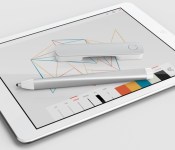
Adobe today announced the launch of a new suite of mobile apps and accompanying hardware that includes its Adobe Ink digital pen and its Adobe Slide digital ruler. Previously known as the “Mighty” stylus and the “Napoleon” digital ruler while in development, Adobe’s new tools were created in partnership with Adonit, the company behind a line of popular styluses.
Adobe’s three-sided aluminum Ink stylus is pressure sensitive and connects to Creative Cloud, allowing users to access photos, color palettes, drawings, and more, while drawing within Adobe’s mobile apps. Adobe Slide, the ruler that accompanies the stylus, is designed to enable precision sketching, including straight lines, perfect circles, and balanced shapes on Apple’s iPad.

The Ink and Slide are complemented by two new iPad apps, Adobe Sketch and Adobe Line. Sketch is a social sketching app for free-form drawing, with a set of simple tools (pencil, ink pen, blending markers, and eraser) and Behance integration to share sketches with the creative community. Line allows iPad users to create precision drafts and drawings, with a reimagining of traditional tools like rulers, T-squares, and shape templates.
Along with Line and Sketch Adobe is introducing Photoshop Mix, an iPad app that interfaces with Photoshop on the desktop and makes it easy for users to do masking and compositing of images. It’s a simple way to create masks on a touch screen, which can then be transferred to the desktop version of Photoshop. It is able to open PSD files and it includes features like Content Aware Fill and Camera Shake Reduction.

There are also new Creative Cloud apps for the iPhone and the iPad, which allow Creative Cloud members to access and manage their files and assets from their mobile devices. Finally, the mobile version of Adobe Lightroom, initially available only for the iPad is now expanding to the iPhone.
Adobe’s new apps have been built using the Creative SDK, which is currently undergoing private beta testing but will be released to developers in the future, allowing for additional apps that will be able to take advantage of Adobe’s new hardware and Creative Cloud connectivity.
Adobe has also updated all of its Creative Cloud apps for the desktop and introduced expanded Creative Cloud profiles to improve connectivity between mobile devices and apps.
Ink and Slide, Adobe’s new hardware tools, are sold in a set and are available immediately from Adobe.com for $100. Ink and Slide are currently limited to U.S. customers only, but Adobe has plans to expand availability in the future. Adobe’s new apps, Sketch, Line and Photoshop Mix will all be from the App Store today for free, as will the new Creative Cloud app and Lightroom for iPhone.
 AIVAnet