



Google releases Android Wear intro video ahead of Google I/O

With Google I/O next week and Android Wear expected to make up a very significant amount of the conference, Google has released an introduction video of the smartwatch platform previewing some of its features. It seems Android Wear is focused on reducing the time it takes to interact with the information contained on the platform,… Read more »
The post Google releases Android Wear intro video ahead of Google I/O appeared first on SmarterWatching.
Read the rest at the source, SmarterWatching.com
The post Google releases Android Wear intro video ahead of Google I/O appeared first on AndroidGuys.

Harley-Davidson’s first electric motorcycle is Project LiveWire and you can ride it

Legendary motorcycle builder Harley-Davidson teased an electric motorcycle with a video yesterday and now here it is. Project LiveWire is a part of Harley’s attempt to expand its relevance beyond current riders and show off its new tech, with a not-in-production bike that it says is much more than just a trade-show prototype. Project LiveWire packs its electric motor into a polished case underneath the bike, and clearly the manufacturer is concerned about how customers may feel about losing signature touches like the V-twin engines and chrome pipes. The press release and video trailer promise “an unmistakeable new sound” like a jet on an aircraft carrier and tire shredding acceleration but don’t have any specs to offer (according to Wired, it has 74hp, 92mph top speed, 53 miles of range and charges in 3.5 hours). Built on a one-piece frame with dual-sided rear swing arm suspension, it has LED lighting all over and even a colorful touchscreen display for its rider. Of course, the best way to figure out if its customers want an electric motorcycle is to put them on one, and the company is doing just that with a demo tour this year.
Innovation, meet Heritage. Tell us what you think. #ProjectLiveWire http://t.co/oE3ik1383m
– Harley-Davidson (@harleydavidson) June 19, 2014
Fans will actually be able to ride the thing this year at any of 30 stops for “The Experience Tour” at Harley-Davidson dealerships along Route 66, or next year at other locations in the US, Canada and Europe. Even if you’re not ready (or licensed) to take a motorcycle out on the road, it will have simulators for people to try out safely. The three stops announced so far include: New York June 24th- 25th, Boston 27th-29th and Philadelphia from July 17th – 19th. A few have already climbed on and report impressions that sound similar to our experiences with electric bikes like those from Zero Motorcycles and even Tesla’s cars, with “amazing” torque and acceleration.
Filed under: Transportation
Source: Project Livewire, Harley-Davidson (1), (2)

The Passport is BlackBerry’s newest, oddest-looking smartphone

Turns out BlackBerry’s stronger-than-expected financial performance wasn’t the only surprise the company had for us today. CEO John Chen took a few moments during this morning’s earnings call to mention its newest phone: it’s called the BlackBerry Passport and it’s, well… just look at it. Bizarre.
BlackBerry teased the existence of a new device with a square, high-resolution screen before, but the Passport’s design isn’t exactly what we were expecting. Unlike other BlackBerrys with squared-off displays, the folks in Waterloo didn’t feel the need to craft a more traditional (some would say more hand-friendly) chassis. Nope, the Passport seems to bask in its angular tendencies, and that 4.5-inch display running at 1,440 x 1,440 — which works out to a pixel density of 452 pixels per inch — is clearly the star of the show. If reports hold true, you’ll also be able to trace out gestures directly on the (now cramped) keyboard, though why you’d do that instead of paw at a touchscreen is still unclear.
The company implored us all to “be bold” a few years back, and it’s definitely taking its own advice this time. Then again, squarish phones don’t have a particularly stellar track record. Remember the Pantech Pocket? The Motorola Flipout? LG’s Optimus Vu? We didn’t think so. The Passport is expected to make its official debut at a September launch event in London, so we’ll soon see if there’s something special lurking in within the Passport’s kooky frame.
Filed under: Mobile
Via: MobileSyrup

iOS Interface Depicted on a Hypothetical 2.5″ iWatch Screen
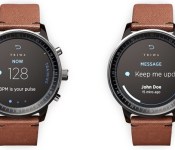
Since news of Apple’s iWatch development first surfaced in 2012, supply chain rumors and analyst speculation have all pegged its display size at a modest 1.3 to 1.7 inches. Earlier today, Reuters released a report suggesting the display will be much larger than anyone expected, coming in at 2.5-inches diagonally.
MacRumors forum member Lewis Dorigo has previously speculated that the iWatch would have a 2.45-inch display with a 480×640 display, and has even created a crude mockup depicting what an iWatch of that size would look like on a wrist.

On his blog, Dorigo goes deeper into his predictions for the iWatch, explaining that a 2.45-inch iWatch with a Retina display of 480×640 would have same pixel density (326 ppi) as the iPhone 5s, the iPhone 5c, and the Retina iPad mini. He’s speculates on what a 2.45-inch iWatch’s UI might look like, with the creation of several mockups with an iOS 7-style design.
While several rumors have suggested the iWatch will indeed run iOS, it is still possible that Apple could go in an entirely different direction with the device, creating a standalone interface or an iOS-based interface that deviates from the iPhone’s interface.
Dorigo suggests that 80 pixels of the screen might be reserved for a CarPlay-style digital home button, leaving a 240 pixel space for apps, but that’s pure speculation — Apple could also choose to place a physical home button on the side of the device.
Along with a home button built into the screen, Dorigo imagines a largely touch-based interface, where Siri is activated via a press on the screen and individual apps have large, easy-to-press buttons. He also speculates on what the interface might look like when connected to an iPhone, as the iWatch is rumored to be heavily integrated with existing iOS devices.

The status bar shows the current connectivity of the device that the watch is connected to. If it’s connected to an iPhone, it shows the iPhone’s cellular and wifi signal strengths. If it’s not connected to a device, it just says “iWatch”, much like iPods (and iPads without cellular) do.
While Dorigo’s speculation gives a look at what a larger iWatch might look like, the device’s screen resolution and prospective user interface remain a mystery at this time.
According to rumors, the iWatch is expected to include a range of health sensors, such as a pulse monitor, along with wireless charging capabilities. The iWatch is expected to make its debut in the fall, possibly at an October event.
More of Dorigo’s predictions on Apple’s iWatch can be found on his blog.

Watch Conan O’Brien make E3 2014 into an even bigger spectacle than it already was

As if the game industry’s annual trade show weren’t enough of a spectacle on its own, massively tall comedian/talk show host Conan O’Brien took to E3 2014‘s lavish booths and talked with swaths of attendees for a hilarious recap video. He makes the rounds: luging at Sony’s Project Morpheus, high-speed driving in Forza, and making childhood fantasies a reality with Nintendo’s gang of ladies (not quite “booth babes,” but not quite not either). Sadly, we can’t get away with asking crowds of people to applaud our rock-solid run through Hyrule Warriors, but Conan does it and makes it funny. Head below for the full video, but be prepared to set aside about 10 minutes. He’s thorough!
Filed under: Gaming, Wearables, Software, HD, Sony, Microsoft, Nintendo
Via: Joystiq
Source: Team Coco

Supreme Court unanimously rules that software patents can’t cover abstract ideas

From now on companies will have to be a little more specific when filing software patents. The United States Supreme Court today ruled in favor of CLS Bank, a company that was accused by Alice Corporation of violating several of its patents relating to computer-based trading systems. Twice lower courts have found that Alice’s patents were invalid and now the highest court in the land has settled the dispute once and for all. In one of the two group opinions supporting the unanimous decision, Justice Clarence Thomas wrote that “merely requiring generic computer implementation fails to transform that abstract idea into a patent-eligible invention.”
This doesn’t magically invalidate all software patents, however. The opinions, especially that drafted by Justice Thomas, were careful to avoid ruling too broadly. Some filings involving abstract ideas may still be unique enough to deserve a patent. But as a general rule inventors will have to do better than simply recreating basic and abstract ideas with the aide of a computer — in this case the exchange of financial obligations.
This does set a precedent for invalidating vague software patents that come before courts in the future. And, when paired with the court’s recent decision to grant more power to judges to punish patent trolls, it appears that the Supreme Court has taken steps towards effecting the patent reform that Congress has so far failed to pass.
Filed under: Misc

ASUS Padfone X review: A phone to replace your tablet? Not quite.

I doubt ASUS knew it was carving out a place in Android history when it revealed the first Padfone back in 2011. That’s not just because it starred in an amazing product unveiling, either — the resulting Padfone line might be the last surviving example of the “phone-as-brain” movement that fell out of vogue a few years back. In all that time, though, there’s one thing US fans could never do: walk into a store and actually buy one. That changes now.
After three years and three Padfones, ASUS has finally brought its curious phone/tablet hybrid to the US in the form of the $200 Padfone X. You’d think years of iterating and refining would result in the finest, kookiest model yet, and on paper that certainly seems to be the case. But what is it like to actually use? Has ASUS managed to put its best foot forward for the Padfone’s American debut?
Hardware
The sad truth of the Padfone is that the phone itself — quite literally the brains of the operation — is the most attractive thing about it. Why’s that sad? Because its design is dull to the point of inducing ennui. That’s a shame too, especially considering this newer, faster version of the Padfone doesn’t look nearly as handsome as last year’s model, the Padfone Infinity. Your taste may differ, but the Infinity featured cleaner lines and a handsome brushed-metal finish that stands in stark contrast to all the bland, dark, chintzy-feeling plastic featured on the X.
So yes, the Padfone X isn’t what you’d call a looker. The sole standout here is the 5-inch 1080p display. As you’d expect, the speaker and front-facing, 2-megapixel camera sit just above that satisfying screen, while a shiny ASUS logo greets you from below. Taking a little tour around the rest of the phone yields precious few surprises: You’ve got the sleep/wake button and volume rocker nestled on the phone’s right edge. In fact, the only real hints that the Padfone aspires to something bigger (literally) are two holes on the phone’s bottom, on either side of the micro-USB port. They’re meant to anchor the phone firmly into the Padfone Station, the beefy exoskeleton that converts ‘fone to pad.

That’s not to say the Padfone X is completely bland, though. Peer a little closer and you’ll see its removable backplate is flecked with tiny silver specks. It’s perhaps the most minute concession to style I’ve ever seen on a phone, if only because the effect is so subtle you’ll outright miss it most of the time. The rest of the X’s rear isn’t nearly as subdued — a 13-megapixel rear camera lives just left of center, with the LED flash and speaker grille sitting to the east and south of it, respectively. Once those are out of the picture, all that’s left to capture your eye are AT&T and Padfone logos emblazoned prominently on the back. Assuming you manage to pry off that rear plate, you’ll find the microSD reader (which was notably absent in last year’s model) and microSIM card slot parked next to a 2,300mAh battery.
Thankfully, that old cliché holds true here: It’s what’s inside that counts. In this case, “what’s inside” is one of Qualcomm’s 2.3GHz quad-core Snapdragon 800 chips along with 2GB of RAM — a combination that runs the show admirably. Alas, things get considerably less charming when you dock the device into the Padfone Station. The frame the phone slides into is an unwieldy, chunky thing that creaks and groans even when you apply light pressure to it. And those bezels? Oh my. There’s close to a full inch of black nothingness bounding that 9-inch display on all sides, which only serves to make the tablet look like a cheap digital picture frame from holidays long past. In fairness, the bezels aren’t all bad — they provide plenty of room for meaty thumbs to rest, and they house a pair of (sadly lacking) front-facing speakers.

The back of the tablet dock is swathed in the same silver-flecked plastic as the phone, but there’s no way you’ll notice that before you spot that gaping maw where the Padfone is meant to slot in. It’s impossible to screw up the process: The Padfone slides in with its screen facing inward, and once in place, it’ll start sipping on a larger 4,990mAh reserve battery. You’re also left with a tablet that has a very conspicuous hump on its rear, but at least the edges of that hump provide a place for your fingers to sit when you’re grasping the tablet with both hands. This does make holding the Padfone vertically just a little awkward, though it’s hardly a dealbreaker.
Oh, and if you’re really into the idea of the Padfone as a true all-in-one machine, you can pick up a specially designed Bluetooth keyboard to go with it. It makes the combined device much heavier thanks to a sizable built-in battery (which can’t be used to charge the tablet, unfortunately), and the dearth of space ASUS had to work with made for some frustrating design decisions. Consider the layout: It’s about as cramped as you’d expect a keyboard this size to be, and certain critical keys like the apostrophe are only accessible by way of the Function key. That’s not to say it’s all bad, though. The trackpad? An absolute joy to click. You’ll also get days of use out of the thing, though whether or not you’ll want to is another story entirely. Trust us: Pass on this unless you’re absolutely desperate.
Display and sound

ASUS’ designers may have been half-asleep when they crafted the Padfone X, but someone along the line made sure it at least got a solid pair of screens. Ironically enough, it’s the smaller display that shines the brightest here — the 5-inch 1080p panel is the crisper of the two since it packs nearly twice as many pixels per inch as the tablet’s screen does (449 ppi versus 214, if you’re curious). Colors on both the big and small displays are vibrant and have just the right amount of pop — no seared retinas here, thanks very much. A preloaded app called “Splendid” lets you muck around with color hue, saturation and balance in case you’ve got some especially persnickety eyes. Viewing angles are more than respectable, too, with hardly any color distortion even when you peer in from the most awkward angles. My only real niggle is that maximum brightness for both screens is lacking once you take the Padfone outdoors.

Considering the whole point of buying a Padfone X is to have a hot-swappable duo of displays, ASUS gets kudos for not skimping on those Super IPS+ LCD panels. That said, it’s earned itself a few demerits for some depressing speaker quality. The phone itself has just the one largely wimpy speaker on its back, and the lackluster sound it puts out is right in line with my low expectations. You’d think that with a pair of front-facing speakers, the Padfone X’s tablet form would be able to pump out jams with at least a little more panache. Not so, sadly. My usual suite of test tracks sounded airy and insubstantial through those drivers; the mids and highs of Sutton Foster’s jaunty crooning were well-rendered, but there was a distinct lack of support in the low end that left me wanting much more. Trust me: You’ll want to run your collection of drum n’ bass tracks through a pair of headphones instead.
Or maybe you shouldn’t, since the review unit ASUS provided me occasionally did something a little ridiculous. You see, when you’re playing music or watching a movie with the Padfone docked in tablet mode, the audio gets routed through the Station’s two front-facing speakers. Makes sense, no? One time, though, when I plugged headphones into the proper jack, I heard audio through the headphones… and through the phone’s rear speaker. So much for privacy. To be fair, it hasn’t happened since, but I’ve reached out to AT&T anyway for comment. I’ll update this review if I learn more. For now, it’s possible the issue had something to do with the fact that I was testing a pre-production (read: not-final) unit.
Software

With the Padfone being as downright kooky as it is, it’s a bit surprising to see how little ASUS fiddled with Android 4.4.2. There are splashes of paint here and there — a rejiggered launcher that lets you sort and hide apps, a circle-heavy notification shade that looks like it came from the Galaxy S5, a slightly cramped default keyboard — but they never completely obscure the rich flavor of KitKat that lurks below the surface.
Seems like AT&T was more than happy to pick up where ASUS left off. You guessed it: The Padfone X is just packed to the gills with AT&T bloatware, from account-management apps to game portals like WildTangent to Beats Music. If you’re anything like me, your blood pressure starts to rise at the first sign of carrier intrusion — thankfully that cruft can be easily uninstalled from the device’s settings. In fact, you don’t even need to go that far if all you want is to remove the offending apps from your sight.
The Padfone X has two distinct personalities, but its software sometimes seems ill-equipped to handle both of them. A handful of the applications that come preloaded on the Padfone just don’t work the way you’d expect once you slot the phone into its tablet dock. You see, everything hinges on ASUS’ Dynamic Display mode, which essentially helps you manage the apps that should and shouldn’t switch into tablet mode when you dock the phone.
Unless you’re running one of a small number of supported apps when you dock, you’ll be prompted to make a decision: Should you restart the app in Pad mode? Or add it to the Dynamic Display list, where it will run with a blown-up version of its usual, phone-centric interface? Some apps (like YouTube, for one) don’t give you that option at all, so you’re forced to restart it each time you dock or undock the Padfone. The whole thing is a lot less odious than it sounds — it’ll take an extra tap or two to jump back into things — but we can’t help but yearn for something more seamless.
Camera

We’ve already established that the Padfone X doesn’t stand out much — did you really think the camera would help matters? Surprise: It’s much better than you’d think, if not quite on par with other flagships. Images captured at full resolution during the day with that 13-megapixel camera were sufficiently vivid (if a tad noisy), and were detailed enough to reassure me that I wasn’t missing anything crucial.
But crafting a camera that works well in the day is a relative cakewalk. What about when the sun goes down and things really start to get interesting? As it turns out, the Padfone X is a surprisingly capable shooter in dim conditions, too. ASUS likes to talk up its PixelMaster imaging mode, which lets that rear camera capture up to 400 percent more light than a less sophisticated sensor. The results are cut-and-dry: In spite of more noise to contend with, you’ll wind up with an image that’s much brighter than you’d see otherwise. Are they print-worthy? Maybe not, but they’ll make for some nifty Instagram shots.
Those sentiments get tempered a little when it comes to shooting video. Footage recorded at 1080p was perfectly adequate, though colors didn’t pop as much as I would’ve hoped for, and there was still a bit of noise creeping in where it shouldn’t have. Oh, the Padfone X records video in 4K too, though it’s not like the screen will actually show you your footage in all its glory. As you might expect, audio quality left much to be desired too — things were hushed and none too impressive (though the speaker situation doesn’t help). For the majority of people, smartphone photo and video quality is perfectly adequate unless it falls below a certain lousiness threshold. The Padfone X’s shooters are far from the best I’ve ever met, but they manage to clear that low bar with plenty of room to spare.
Performance and battery life

If cellphone stores were casinos, flagships like the HTC One M8 and Samsung Galaxy S5 would be those big, elaborate slot machines that lure you in with a sense of spectacle and big promises. The Padfone itself (sans tablet dock), would be that rinky-dink machine next to the cheap buffet line — your chances of coming away satisfied might not be that different, but you’d never know it from sight alone.
Pardon the metaphor — long story short, the X has power in spades thanks to the 2.3GHz quad-core Snapdragon 800 ticking away in that woefully unimaginative shell. It’s not Qualcomm’s newest bit of silicon magic, but make no mistake: The Padfone X runs like a champ. Part of that has to do with ASUS’ mercifully light touch with software, letting KitKat’s natural snappiness shine through as you flick past home screens and dive into menus. All that horsepower really makes itself known when you’re taking corners in Need For Speed: Most Wanted — there’s nary a visual stutter or dropped frame to be seen.
| ASUS Padfone X | HTC One (M8) | Samsung Galaxy Note 3 | ||
|---|---|---|---|---|
| Quadrant 2.0 | 22,032 | 25,548 | 23,278 | |
| Vellamo 2.0 | 2,308 | 1,804 | 2,501 | |
| 3DMark IS Unlimited | 19,523 | 20,612 | 18,828 | |
| SunSpider 1.2 (ms) | 906 | 782 | 537 | |
| GFXBench 3.0 Manhattan Offscreen (fps) | 12 | 11.2 | 9.3 | |
| CF-Bench | 32,937 | 40,223 | 33,785 | |
| SunSpider: Lower scores are better, compiled on Chrome. | ||||
The tale of the tape only confirmed what I already knew: the Padfone will easily tackle whatever you throw at it during your day-to-day grind. If only things were as peachy after you plop the phone into that tablet dock. What once was snappy and responsive becomes very slightly less so — it’s a little jarring to feel that shift when it happens, but I seriously doubt most people would pay it much mind.
Since there are two different screens and two different batteries to work with, I’ve had to rejigger our standard video rundown test a bit. Normally we’d fire up a 720p video file, set it to loop indefinitely at 50 percent screen brightness and let ‘er rip. Under those circumstances, the Padfone hung in for eight hours and 24 minutes before finally giving up the ghost. From there, I popped the thing into the fully charged Padfone Station and cued up the video on that bigger screen, a gauntlet that lasted another six hours. Purely as a phone, the Padfone X falls short of the battery bar set by devices like HTC’s One M8 and Samsung’s Galaxy S5, but that’s a forgivable sin. Video stress testing aside, it still consistently ran for more than 12 hours as I emailed, snapped photos and snarkily tweeted my way through the work day, and quick battery top-ups from the Padfone Station only helped stretch my productive hours even further.
The competition

No other device tries to bridge the smartphone/tablet divide the way the Padfone does. Its closest evolutionary cousin would probably be the phablet, and there’s no shortage of those taking up space on store shelves. The Samsung Galaxy Note 3 sports a 5.7-inch screen, so it doesn’t always feel like a tablet, but its slew of S Pen features makes sure it feels fresh compared to less ambitious competitors. The silicon inside is awfully similar to what’s ticking away in the Padfone X, too — there’s a quad-core Snapdragon 800 running the show, though it’ll generally cost you about $100 more with a contract than the Padfone will.
Sony’s Xperia Z Ultra might fit the bill too, since it doesn’t try to hide its tablet ambitions. It’s got a hefty 6.4-inch display, making it one of the biggest phablets you could try and squeeze into your skinny jeans. It too packs a Snapdragon 800, but the biggest thing to remember is that the only way you’re going to get one in the States is unlocked from the Google Play Store. That means you’ll be shelling out $449 since there are no contracts involved. On the off-chance that something slightly smaller might fit your bill, the HTC One M8 could work well with its top-tier spec sheet and impeccable design. At $199 with a contract though, it’ll cost you just as much as a Padfone without the promise of extra flexibility. Choose wisely.
Wrap-up

If I’ve seemed unduly harsh on the Padfone X, it’s because I still think there’s a place in the world for a hybrid like this. Sadly, despite years of tinkering with the same formula, ASUS couldn’t completely stick the landing this time around. For all the gripes I’ve leveled at this thing, though, I’ve had to mentally repeat one sentence like a mantra throughout my weeks of testing: all of this is just $200 with a contract. For the same price as a single, shiny top-tier handset, you could nab yourself a very respectable smartphone and a tablet that (while flawed) still works. I’d wager there’s a decent number of people out there who’d embrace that math wholeheartedly.
But are you one of them? If you’ve got the means, you’ll almost definitely be better served by buying separate phones and tablets. The promise of seamless syncing is a tempting one, and one worth getting right. ASUS hasn’t done that here. To be honest, I hope it gets another chance at cracking the brutal US market — the right sort of design and software tweaks could turn the next-generation Padfone into a gadget worthy of our collective drool. For now, though, ponder the arithmetic and see if you can do better.
Filed under: Cellphones, Mobile, ASUS, AT&T

Apple’s Spaceship Campus Shown Off in Rendered Fly-Through
Construction at Apple’s “Spaceship” campus in Cupertino is progressing at a rapid pace, and while the circular structure is still far from finished, the old buildings on the 176-acre site have been fully demolished, roadwork is underway, and the outer walls of the campus are taking shape, outlining where foundation will be poured.
Apple isn’t slated to finish its the first construction phase of its second campus until 2016, but a video rendering from Technology Integration Services, a company that focuses on 3D design, shows what Apple Campus 2 might look like when it is completed.
Created from public plans of the structure’s design, the video shows the multi-story circular building surrounded by greenery, as well as all of the additional buildings and parking structures that Apple plans to add to the area. There are hiking paths snaking around the property, in addition to a performance stage in the middle and a massive fountain area where employees can gather.
 Current progress on Apple Campus 2 as of June 12, image courtesy of Ron Cervi
The first phase of construction on the property includes a 2.8 million square foot ring-shaped main building, an underground parking facility capable of holding 2,400 cars, a 100,000 square foot fitness center, and a 120,000 square foot auditorium for events. Apple has plans to add more than 4,500 trees to the area, creating a lush working environment for employees.
Phase 2 of construction, to take place after 2016, will add research and development buildings and additional parking.
2.5-Inch iWatch with Wireless Charging and Pulse Sensor to Enter Mass Production in July
Apple’s upcoming iWatch may measure in at 2.5 inches diagonally with a slightly rectangular face, reports Reuters, citing sources familiar with the product. The watch face is also expected to protrude slightly from the band to create an arch shape, and it will reportedly include a touch interface and wireless charging, in line with previous rumors.
Reuters also suggests the iWatch has a sensor that monitors a user’s pulse, which is just one of many sensors that may be included in the device. Rumors have indicated that the iWatch will be able to measure several different health metrics in addition to heart rate, like steps taken, sleep quality, and more.

Taiwan’s Quanta Computer is currently producing a trial run of the smartwatch and mass production is expected to begin in July, in preparation for a possible fall launch. LG Display is said to be the exclusive supplier of the screen.
While the watch is widely expected, the start date of its mass production and the extent of Quanta’s involvement were not known until now. Mass production will start in July and the commercial launch will come as early as October, according to the source and another person familiar with the matter.
Along with providing an array of health-related information via sensors, Apple’s iWatch is also expected to interface closely with the iPhone and iOS 8, providing users with at-a-glance notifications and information.

Twitter’s latest acquisition could bring more video clips to your feed

Another day, another startup acquisition by a tech giant. Earlier this morning the social gurus at Twitter announced that it snapped a San Francisco-based outfit called SnappyTV in a move that could mean even more video clips from live events finding their way into your tweet stream. Haven’t heard of SnappyTV before? We can’t really blame you: it’s a tool for media producers and broadcasters to snip and edit short bits of video from a live feed so they can be cast to the social winds. Doesn’t sound like the most exciting mashup at first blush, but think about it — the proliferation of short-form video like Vines and Instagram clips are signs that thrilling, visceral moments don’t need ages of build-up and gobs of context to really hit home. That’s been Snappy’s M.O. too, except it’s been used to clip and share moments straight from live basketball games to newsy interviews to absurd award show nonsense. Don’t expect those sort of buzzy highlights to become a Twitter-only phenomenon though: the company doesn’t plan on making it any harder for those clips to wind up on Facebook or Google+.
Source: Twitter
 AIVAnet