


Get the Amazon Fire TV and Kindle Fire HDX 7″ 16GB bundle for just $249

If you are looking for a great deal on a Fire TV and a Kindle Fire HDX, a nice bundle may have just fallen onto your lap (well, onto your laptop). For a limited time, Amazon is offering the Amazon Fire TV and the Kindle Fire HDX 7″ 16GB as a bundle with a savings of 79 bucks!
Alone, these devices can hold their own in their respective markets. Being purchased together gives you 2 products that Amazon created to work seamlessly together.
Features that make this bundle a no-brainer include:
- Fling media like TV shows, photos or movies from the Kindle Fire HDX to the Fire TV so that you can view them in all their glory on your HDTV. Use the Kindle Fire as a remote to control playback or do something else like view a document or play a game.
- Use the Fire TV as a way to mirror your Kindle Fire onto your TV
- With the X-Ray feature, research characters in the movie you’re watching or view trivia about the actors or movie.
- The Fire TV is the only device in it’s category to feature console quality gameplay (controller sold separately).
All in all, this is the best deal I’ve seen for a bundle such as this. Like I said, this is a limited time offer so act now and be enjoying yourself as soon as Tuesday.
Get the deal here – Amazon Fire TV and Kindle Fire HDX 7″ 16GB bundle
The post Get the Amazon Fire TV and Kindle Fire HDX 7″ 16GB bundle for just $249 appeared first on AndroidGuys.

Microsoft and ESPN make vital World Cup info pretty to look at

With the 2014 FIFA World Cup just around the corner, Microsoft is now the latest brand to show how it plans to get in on the tournament’s hype. Through a partnership between its Internet Explorer team and ESPN, both parties have teamed up to launch ESPN FC World Cup Essentials. By combining 3D graphics and detailed information pages, this new site aims to do more than just keep you well informed — it wants to do so in a beautiful and very interactive way. World Cup Essentials, which is part of the recent redesign to ESPN FC, will let you easily browse news and scores coming out of Brazil, and narrow them down by team or specific match. To complement this, there are visuals that make the experience a little more enjoyable; swiping from country to country under “Teams” instantly brings up artwork for key players, among other things.
What’s more, you can peruse notable headlines and other interesting details from past World Cups, going all the way back to the very first one in Uruguay (1930). While Microsoft says the website is “perfect for touch on Internet Explorer 11,” ESPN FC World Cup Essentials works with pretty much any browser, both on desktop and mobile devices.
Filed under: Home Entertainment, Internet, Software, HD, Microsoft
Source: ESPN FC
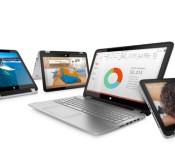
HP’s back-to-school lineup includes lots of convertibles (and Beats products, too)

This week is Computex, a huge computer show happening in Taiwan, which means lots of PC makers will be unveiling their back-to-school lineups, if they haven’t already. HP, for instance, just unveiled a boatload of PCs, including budget and mid-range laptops, a handful of convertibles, and even some Beats products — the first we’ve seen from HP since the Apple deal was announced. Rather than inundate you with specs, we’ve got a neat summary laid out below. We promise to make sense of it all — even if HP does have a penchant for similar-sounding product names.
- Pavilion x360. Confusing product names? May we present Exhibit A: HP just announced a laptop called the Pavilion x360, even though it already sells something with the same name. The original x360 is a cheap, 11-inch machine with a screen that folds all the way back into tablet mode, à la Lenovo’s Yoga line. This new model has a similar design, except it rocks a larger 13.3-inch screen and is more powerful. Whereas the 11-inch version makes do with an Intel Bay Trail processor, the 13-incher starts with AMD A6/A8/A10 chips, going all the way up to Intel Core i3 and i5 CPUs. It also has up to 1TB of storage, not 500GB, with battery life rated between 6.25 and 8.25 hours, depending on whether you go with AMD or Intel (the 11-inch x360 tops out at 4.5 hours). Look for it in July, starting at $600.
- Envy x360. It’s a similar story with the Envy x360, except it has a bigger 15.6-inch screen, and also belongs to HP’s mid-range Envy line, which means the design will be nicer than what you find in the Pavilion range. As a higher-end machine, it also offers higher-end specs, including a range of Core i3 to Core i7 processors and up to 1TB of storage, with the option of a hybrid hard drive for faster boot-ups. This one starts at $680.
- Split x2. Also known as the Pavilion x2 outside the US, the Split x2 is a refresh of an earlier HP Split x2, which came out last year. Like the original, this is a 13.3-inch Windows tablet with a keyboard dock that packs a spare battery. Whereas the original was only offered with Core i3 and i5 processors, though, this new one will also be available with Bay Trail CPUs, allowing HP to sell it at a lower price ($600 and up). Another tradeoff: the new edition has a 500GB spinning hard drive in the tablet, whereas the old one had SSDs inside the slate and an optional HDD inside the dock. In that case, we don’t performance to be quite as fast.
- HP All-in-One PC Beats. You’re going to have to pry the Beats-branded PCs out of HP’s cold, dead hands. The company has said it plans to release products with Beats through the end of 2015, presumably even after the Apple acquisition closes, and indeed, it appears the company is wasting no time. The Envy All-in-One Beats is, uh, exactly what it sounds like: a 23-inch all-in-one desktop whose very being centers around the Beats brand. (Which is to say, it’s very red, and comes armed with both four speakers and four subwoofers.) Design and audio quality aside, the system also has a hinge allowing it to tilt to a 60-degree angle. On the spec front, you’re looking at Core i3, i5 and i7 processors, with up to 16GB of RAM and up to 1TB of storage. Expect it to start at $999.
- Envy notebooks. HP’s mid-range “Envy” laptops come in three sizes (14, 15.6 and 17.3 inches), each with a metal-accented design and an extra-wide trackpad with “touch zones” on the end to help with Windows 8 gestures. (N.B.: Most modern touchpads handle Windows 8 swipes just fine.) Across the board, these come with touch or non-touch screens, Core i5 and i7 processors, up to 16GB of RAM and up to 1TB of storage, with hybrid hard drives offered on the 14- and 17-inch models. Expect the 14, 15- and 17-inch versions to start at $599, $749 and $699, respectively.
- Pavilion notebooks. It’s all about the color, folks. HP’s budget notebooks (available in 14-, 15- and 17-inch sizes) have a polycarbonate shell with colors like silver, red, blue, white and purple. They also have Beats Audio, which isn’t exactly surprising to us, though HP is making a big deal out of the fact that it’s included even on lower-end notebooks. Speaking of, though this is technically HP’s lower-tier range, you’ll still have lots of flexibility when it comes to configurations; each starts with an AMD E2 chip, moving up to AMD’s A4/A6/A8/A10 APUs and culminating with Intel’s Core i3, i5 and i7 series. Other specs include up to 12GB of RAM and up to 1TB of storage — again, not bad for a so-called low-end machine. Look for the 14- and 15-inch models to start at $429, while the 17-incher is slated to sell for $449.

HP hedges its bets, unveils a 14-inch laptop running Android

If you thought this year’s Computex show would be dominated entirely by Windows machines, you’re in for a little twist. HP has just revealed the SlateBook, that 14-inch Android laptop we saw in a leaked video earlier this year. In addition, HP refreshed its 11-inch Chromebook with a slightly better batter, and dropped the price from $279 to $249. And that’s not even counting all the Windows systems the company just launched. Some might call this strategy “throwing spaghetti at the wall and seeing what sticks”; HP would probably just say it’s hedging its bets. Either way, we’ve got the skinny — but we’ll leave it to you to decide which operating system makes the most sense.
The SlateBook isn’t the first Android clamshell we’ve seen. Normally, though, once we get this far up in screen size, we expect a machine to be running Windows or OS X. You know, a “real” desktop OS. Heck, we’ve even seen Android running on various all-in-ones. But Android on a laptop? Especially one this large? That’s a horse of a different color.
What’s interesting is that with these specs (an NVIDIA Tegra 4 processor, a 1080p touchscreen and a nine-hour battery), the 3.7-pound SlateBook is poised to compete against Chrome OS devices, including HP’s own Chromebook 14, which costs a hundred dollars less. In particular, it matches up well against Samsung’s new Chromebook 2, which also has a full HD screen and long battery life, and which costs the same as the SlateBook.
The difference, of course, comes down to which operating system functions better on a laptop. At first blush, it would seem Chrome OS is more mouse-and-keyboard friendly, but that Android has a much wider selection of apps, meaning you might be able to do more with it. The SlateBook will be available August 6th, starting at $399, at which point we’d love to get one in to review so that we can live with an Android laptop and see what it’s like. Until, then, though, it would appear this is your shopping dilemma, if you choose to go with either OS at all.

Download booster and Kids mode reach T-Mobile Galaxy Note 3

Samsung Galaxy Note 3 on T-Mobile USA’s got its Android KitKat update back in March. This time around it’s getting an additional update carrying some of Samsung Galaxy S5′s features.
N900TUVUDNE6 is the software version of this update. Download booster and Kids mode are the features that are coming with this update. Download booster will allow you to use wi-fi and 3G/4G at the same time in order to give you higher internet speeds, it only works for large (30+MB) files and native apps though. Kids mode on the other hand will come in handy if you have small children messing around with the device, this mode completely changes the UI look when it’s on and of course limits certain functions to make the device kid-friendly.

The update is available as we speak. Did you wait for this update to go live?
SOURCE: PhoneArena
The post Download booster and Kids mode reach T-Mobile Galaxy Note 3 appeared first on AndroidGuys.

Inhabitat’s Week In Green: Google’s new car, ice walls and the future of bamboo
Each week our friends at Inhabitat recap the week’s most interesting green developments and clean tech news for us — it’s the Week in Green.

It’s 2014 and even though we can 3D print entire buildings and create jewelry from Beijing’s smog, we’re still struggling to fix our transportation system and transition away from polluting fossil fuels. It’ll be a while before flying electric cars take to the skies, but there are concepts in the works that suggest we may not be crawling through toxic traffic forever. In a major breakthrough for its self-driving car project, Google recently unveiled a pod-like vehicle it built from scratch. Creating its own car instead of modifying an existing one enabled Google to pursue some interesting design choices such as, well, the lack of a steering wheel — for a start! In an effort to make current automobiles more efficient, some experts have suggested that bamboo could soon upstage carbon fiber as the material of the future. But as we all know, the greenest car is no car at all. Worried that it might not meet its pollution reduction targets in 2015, the Chinese government announced plans to take at least 5 million old cars off the road. For those that prefer their transportation with two wheels, IKEA is branching out into the transportation arena with a brand-new electric bicycle that will feature six different driving modes and a pedal-assisted range of up to 45 miles.
If you’re living off-grid (or perhaps just camping for the weekend), keeping food and beverages at the right temperature can be a complicated task. The eCool underground cooler uses the lower temperatures of subterranean soil to make cold beer emerge from the ground like magic. This kind of gadget could save the average person a ton on refrigeration costs, but that’s just a drop in the bucket compared to the energy Google uses. This infographic tallies up the search giant’s energy consumption — and shows how the company’s investment in renewable energy and offsets has given it a carbon footprint of zero. Those interested in generating their own energy at home will love LIAM, a mini windmill that can be installed on any roof and produce between 300 and 2,500 kilowatts of clean electricity per year.
Of course, rooftop turbines aren’t the only way to reduce consumption of fossil fuels. Students from the Rhode Island School of Design are developing a solar-powered house that uses a futuristic Sheerfill membrane to reduce energy consumption by 90 percent. But theirs isn’t the only building using a unique exterior to operate more efficiently. Delft-based design studio DP6 drew up plans for an energy-generating building with a skin that looks like water drops. Running a little low on sunlight? Italian physicist Paolo Di Trapani recently debuted a brilliant invention that uses efficient LEDs to bring artificial daylight into windowless rooms. Sometimes innovative architecture has nothing to do with the urban fabric. Antwerp’s Badboot boat uses a transparent, inflatable cabin to shelter a rooftop bar, and Japan is moving forward with plans to build a massive ice wall to stop radiation leaks from the Fukushima nuclear plant.
In green technology news, a startup called New Matter has developed a charming desktop 3D printer that costs as little as $149, and it’s surprisingly elegant too. Tiny mushroom mycelium are the foundation of this adorable lamp that can be tossed in the garden compost pile when you’re done with it. This Little Architect’s Toolset inspires the designers of tomorrow (with a portion of proceeds donated to Architecture for Humanity). On the wearable technology front, this expandable dress is the perfect way to keep creeps from crowding into your personal space on the subway. And some say that even things as tiny as fingernails will someday be embedded with sensors to track activity or health, modify behavior and even put on a light show.
Filed under: Misc

Gadget Rewind 2007: ASUS Eee PC 4G

The ASUS Eee PC was launched in 2007 and while it had all the characteristics of a “netbook,” it arrived before the term had wormed its way into popular vocabulary. This species of compact computer — essentially miniaturized, internet-focused laptops — took the market by storm in the late 2000′s, but failed to have much staying power and ultimately faded from view. At the time, these stripped-down portables from Taiwan-based ASUS, filled a growing niche for people on the go. They offered just the essentials, while still managing to provide a surprisingly good bang-for-buck ratio. The Eee PC was aimed at users who rarely stepped beyond the bounds of basic web surfing and email, so it was easy for ASUS to trim the fat and offer a small, lightweight device. In fact, that undemanding demographic was the inspiration for its titular triple E’s: “Easy to learn, Easy to work and Easy to play.”
Beyond simplicity, the Eee PC’s portability and price were the keys to making it desirable. The 7-inch, 800 x 480 screen and two-pound weight made it far easier to cram in a bag or oversized pocket than its hefty, full-sized notebook counterparts. However, the cramped keyboard was definitely not built with large-pawed users in mind. Three models arrived in the first wave of Eee PCs, covering a variety of price points. The Eee PC 4G (701) landed squarely in the middle of the group, all of which ranged in price from $300 to $500 — sadly the rumored $200 model never surfaced. And before you get confused, the 4G stood for its 4GB SSD rather than mobile connectivity (2GB and 8GB versions were also in the lineup). To help offset the relatively skimpy drive sizes, ASUS bundled in 10GB of free cloud-based Eee Storage for the first year and a half.
As tablets, lightweight Ultrabooks and high-functioning smartphones arrived on the market, the Eee PC and other netbooks eventually faded from view, but ASUS still had weight and portability on the menu. Between its keyboard-packing Transformer Pad tablet series and the super-slim Zenbook line, the company managed to tackle two divergent formats, yet still provide quality specs in light, portable packages. Today, for those who still want that laptop experience, but don’t need all the expensive extras, the growing selection of Chromebooks definitely fits the bill and even manages to deliver on that $200 promise.
Did you own an ASUS Eee PC 4G? Add it to your Engadget profile as a device you had (or still have) and join the discussion to reminisce or share photos of your device with other like-minded gadget fans.

Oppo N1 Mini gets announced, available June 11

Oppo N1 Mini leaked through FCC recently and now the “Mini” version of Oppo’s N1 gets officially announced almost half a year after the N1.
Oppo N1 Mini definitely looks like a smaller version of the N1. Navigation buttons, rounded corners that weird-looking rotating camera, it’s all there. We might as well put that “Mini” branding under quotation marks because there’s nothing mini regarding this phone. Sure, it may be lots smaller than the N1, but what kind of world do we live in where we consider a 5″ phone a mini phone. that’s a discussion for some other time though.
Talking about hardware, Oppo N1 Mini is sporting a 5″ screen, the rest of screen details are still unknown though, as most of its hardware details. It’s weird not having more details regarding specifications considering the phone is announced, but we do know what it will sport a 13MP camera with a Super Zoom mode (which was introduced in Oppo Find 7), but in N1 Mini it works at 24MP, not 50.
We’ll definitely know more on June 11 when the device will be available for sale according to Oppo. We still don’t know the details regarding the phone’s availability either.


VIA: AndroidAndMe
SOURCE: Oppo
The post Oppo N1 Mini gets announced, available June 11 appeared first on AndroidGuys.

Leaked image shows gigantic 7-inch Samsung Galaxy Mega 2

Huge phones aren’t foreign territory for Samsung, far from it. They basically started the phablet game with the Note line and a year ago they released their Galaxy Mega devices. One fo them sporting a 5.8″ screen and other 6.3″, which is almost tablet territory.
Many thought that Samsung has reached the line and won’t step over it, but those people were wrong. Earlier this month a mysterious Galaxy W (Mega successor) device leaked sporting a 7″ screen and that device was not dubbed a tablet. Sure, that seemed rather odd, but if someone was going to do it it’s Samsung.
That huge device (Mega 2 from now on) was cleared by USA’s FCC yesterday and today it leaks in some images. There aren’t any additional leaked specifications at this time, but if an earlier leak is to be believed the device will sport a 720p screen, a 1.2GHz quad-core chip, 1.5GB of RAM, 8GB of storage (+microSD card) and a 8MP camera. All that should be operated by an Android 4.3 JellyBean OS.
There aren’t any release date information at this time, but Samsung is going to hold a press even on June 12. Galaxy Tab S lineup will probably get announced there but that doesn’t mean Galaxy Mega 2 will not make an appearance.
Would you ever buy a phone with a 7″ display?
The post Leaked image shows gigantic 7-inch Samsung Galaxy Mega 2 appeared first on AndroidGuys.

Google’s hacking game trades exploits for cake

Everyone knows the best way to teach children is to make the learning process fun and engaging; and if we’re honest, that methodology works just as well on us big kids, too. Now, even hunting through code for cross-site scripting (XSS) bugs can be entertaining, thanks to a game developed by a playful group of security experts at Google. The browser-based game is intended to test the skills of web developers, with levels challenging you to find and exploit XSS vulnerabilities — which can be an open door for hackers — in realistic scenarios. Of course, it’s not intended to train up a new generation of hackers, but to make devs aware of bugs so they can avoid them. It’s no casual Chrome experiment, so as an extra incentive to complete all six levels, you’re promised “cake at the end of the test.” Now, where have we heard that before?
[Image credit: 9to5Google]
Filed under: Gaming, Internet, Google
Via: 9to5Google, Florian Kiersch (G+)
Source: Google XSS game
 AIVAnet