


Apple Announces ‘iCloud Drive’ and ‘Mail Drop’ Features for OS X Yosemite [Mac Blog]
At today’s WWDC keynote event, Apple announced iCloud Drive and Mail Drop, two new cloud-based services that are a part of the new OS X Yosemite.

iCloud Drive allows users to store all of their individual files from OS X and iOS in addition to data from applications on Apple’s cloud storage service, with the feature syncing all files across every Mac. The files stored on iCloud Drive are even available on a user’s iOS devices, as the feature also contains support for Windows through the iCloud client. Apple will also be announcing cloud drive pricing and storage amounts for the service at a later time.
 (Image Credit: The Verge)
Meanwhile, Apple’s new Mail Drop feature allows users to send attachments up to 5GB through iCloud, as files sent can be encrypted or seamlessly sent on a Mac.
iCloud Drive and Mail Drop will ship as a part of OS X 10.10 Yosemite, which will be available this fall for free.

Apple Announces OS X Yosemite with Improved iOS and Mac Connectivity and New UI [Mac Blog]
Apple today announced the latest version of OS X, Yosemite, at its Worldwide Developers Conference in San Francisco, CA with a brand new user interface designed for clarity and utility, iCloud Drive and improved continuity between iOS devices and Mac.

Continuinity is the biggest new feature of OS X Yosemite, improving the connection between Macs and iOS devices. AirDrop now allows users to share items between iOS devices and Macs. Handoff is a new feature that allows devices near you to recognize when you’re using a Mac. For instance, it allows users to answer phone calls to their iPhone on their Mac, instantly start a Hotspot from your iPhone and allows users to see “green dot” conversations on their Mac.
The new UI is very similar to the flat look of iOS 7 with translucent windows, a new dock and app icons and an all-new notification center with a Today pane and both first- and third-party widgets like Weather and SportsCenter. There’s also a new dark mode, which lets users turn the overall interface into the more darkened tone of Notification Center.
Also new to the UI is a brand new interface for Spotlight, which looks like third-party Mac apps like Bartender and Quicksilver and pops up in the center of the desktop. The new Spotlight allows users to not only search through their computer, but online through sources like Wikipedia, Yelp and movie times. In addition, Spotlight can do certain conversions, like converting miles to kilometers.
The second big improvement is iCloud Drive, a Dropbox-like addition that syncs all your documents across Macs, iOS devices and Windows. It allows users to browse documents and photos on devices even if they’re not stored on that device.
Mail’s improvements include Mail Drop and Markup. Mail Drop’s intention is to solve the problem of sending attachments that are far too large and result in failed sendings. iCloud now encrypts the attachments and sends the recipient a link to the attachment if it’s too large. Attachments, however, are limited to 5 GB. Markup, on the other hand, allows users to sketch and doodle on emails.
Safari has also seen improvements with a new tab view, increased privacy, and new HTML 5 video, which allows for 2 hours more battery life when streaming Netflix. The new tab view allows users to see a bird’s eye view of all open tabs and allowing users to bunch tabs together. In addition, Safari includes 6.5x faster on Javascript and includes WebGL, SPDY, IndexedDB, Javascript Promises, CSS Shapes and more.

Apple Announces iOS 8 with Interactive Notifications, QuickType, More [iOS Blog]
Apple announced iOS 8 at the keynote event of its annual Worldwide Developers Conference today. iOS 8 gets revamped notification features, an upgrade to the keyboard’s auto-correct functionality, and the rumored health tracking feature and companion app, called HealthKit.
Interactive notification lets users pull down notifications and interact with them to respond to text messages or other actions without leaving the current open app, or complete actions from notifications shown on the lock screen.
A new feature in the iOS keyboard, called QuickType, adds predictive typing suggestions that adapt to the current context. QuickType learns each users habits and language while protecting privacy.
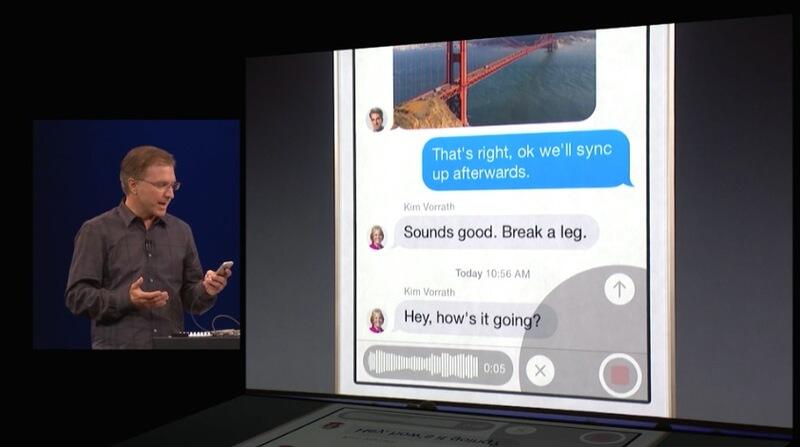
Messages gets the ability to name conversation threads, add and remove people from group conversations, allow users to leave group conversations. Users can also share their location right within Messages and quickly send audio messages and add them to images, and create video messages without using the Camera app.
HealthKit is a new feature that will gather and consolidate users’ health information from multiple sources and apps, such as those from Nike and Fitbit.


Apple Updates iMessage with Improved Group Messaging and Video and Audio Messages [iOS Blog]
While introducing iOS 8 at its Worldwide Developers Conference today, Apple announced a host of improvements for its popular iMessage messaging platform, including in-line audio and video messages and new group features like Do Not Disturb and more.

The in-line video and audio messages are accessed from a small radial menu on the right of the text-entry field, allowing users to quickly choose whether they want to send a video or audio message. Like Snapchat, the audio and video messages “self-destruct” after a certain amount of time to save space. However, users can also choose to keep them if they really want to.
Users can play the media from within the message thread by pressing the “play” button or simply raising the phone to their ear, which also works straight from the lock screen.
In addition, group messages have received numerous improvements, including Do Not Disturb, the ability to name conversations and add or remove people from the group chat. Locations can also be shared, and can be chosen to be shared for a certain amount of time a day.

‘QuickType’ Keyboard for iOS 8 Offers Context-Aware Predicitive Typing Suggestions [iOS Blog]
As a part of today’s unveiling for iOS 8 at its Worldwide Developers Conference, Apple announced a new “QuickType” feature for the onboard keyboard which offers context sensitive predictive typing suggestions among other features.
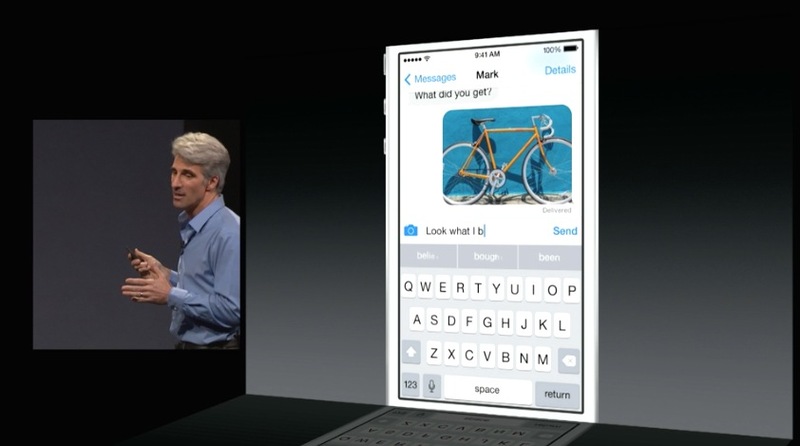
For instance, an example message asking a user about “dinner or a movie” displayed button suggestions like “dinner”, “a movie”, and “not sure”, while the feature will also learn how a user types and suggest specific slang used over time. Apple also promised that QuickType will protect a user’s privacy when learning conversations throughout iOS, as the feature will also work in over 10 different languages.
QuickType will ship as as a part of iOS 8, which will be available later this year.

Live Coverage of Apple’s WWDC 2014 Keynote: OS X 10.10, iOS 8, and More
Apple’s annual Worldwide Developers Conference (WWDC) kicks off today at the Moscone West convention center in San Francisco, with the event headlined by the traditional keynote address beginning at 10:00 AM Pacific Time / 1:00 PM Eastern Time. At the keynote, Apple is expected to provide the first official look at OS X 10.10 and iOS 8, discuss initiatives in home automation, health, and iBeacon technology, and perhaps make additional announcements.
 Line outside Moscone Center (Source: Shara Tibken)
Apple will be providing a live video stream on its website and via Apple TV.
Live Video Stream of Apple’s WWDC 2014 Keynote
In addition to Apple’s video stream, we will be updating this article with live blog coverage and issuing Twitter updates through our @MacRumorsLive account as the keynote unfolds. Separate news stories regarding the event announcements will go out through our @MacRumors account.
Live Updates – No need to refresh 


WWDC 2014 Spoiler Free Video Stream [iOS Blog]

With Apple’s WWDC Keynote kicking off on today, some users are interested in avoiding all of the announcements and waiting until Apple posts the recorded video of the event so as to experience it without already knowing the outcome.
For those individuals, we’ve posted this news story, which will be updated with the link to the presentation once it becomes available from Apple. No other news stories or announcements will be displayed alongside this story.
Users waiting for the video to be posted are welcome to gather in the thread associated with this news story, and we ask that those who follow the events refrain from making any posts in the thread about the announcements.

Mortal Kombat X heads to Xbox One, PlayStation 4 and PC in 2015

An official teaser for Mortal Kombat X landed on YouTube this morning, which raised as many questions as it answered. Yes, a new installment in the ultra-violent series from Netherrealm Studios is on track for release sometime in 2015. Yes, it’s headed to the PlayStation 4, PS3, Xbox One, 360 and PC. And yes, that’s Wiz Khalifa bringing his quick-witted lyrics to the original sound track. But what can we say about the game itself? Some of the teaser video almost has an in-game feel to it, with plausible graphics, fantastical moves (including the use of weapons from the environment) and hints of gruesome Sniper Elite-style forensic sequences — but it’s probably all just conceptual at this point. In any case, have a gander for yourself, and be advised that the video isn’t for youngsters. But hey, after nine MK titles, you probably guessed that already.

Apple’s WWDC 2014 keynote will be streamed live on Safari and Apple TV

A liveblog of an Apple keynote is great, but sometimes you just want to see the real thing for yourself (while reading our commentary at the same time, of course). We totally understand. And apparently, so does Apple, since the company is once again streaming the WWDC keynote live. The usual caveats apply: You’ll need to use an Apple product or service to view the event — specifically, Safari browser on OS X (version 4+ on Snow Leopard or later), Safari on iOS 4.2+ or a second-gen Apple TV or newer. Don’t have any of those but still curious about what groundbreaking products will be announced? No worries, our liveblog will come with all of the news, quotes, specs and photos as they come out, so be sure to go here and bookmark it.
Livestream of Apple’s WWDC 2014 keynote
Filed under: Announcements, HD, Mobile, Apple

Pirate Bay co-founder Peter Sunde caught after two years on the run

A Swedish court convicted Pirate Bay co-founder Peter Sunde for copyright infringement back in 2012, but he never served his eight-month jail sentence — despite an Interpol warrant, the piracy advocate has been living in Germany for years. His freedom has come to an abrupt halt, though, as police arrested him this weekend at a farm in Sweden’s Skane region. It’s not clear why Sunde was in the country that wanted him behind bars, but TorrentFreak suggests that he might have been visiting family.
The Swedish National Police Board hasn’t indicated that Sunde will face any additional jail time for avoiding the long arm of the law. Whether or not he does, the arrest is more symbolic than practical. The Pirate Bay is still running (albeit under different management), and even has software to get around national censorship. While the capture may discourage Sunde from launching any services that directly encourage digital bootlegging, it likely won’t do much to deter others.
[Image credit: SHARE Conference, Flickr]
Filed under: Internet
Source: Reuters
 AIVAnet