


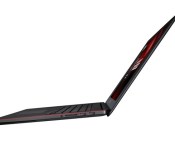
ASUS’ GX500 gaming laptop has a 4K screen and is just 19mm thick

Remember the ASUS NX500, that super-thin, MacBook Pro-inspired laptop we saw yesterday? (Now you do.) Well, then: This right here is its macho, gaming-obsessed cousin, the GX500, which just made its debut here at Computex. Like the NX500, it’s a 15.6-inch notebook coming in at just 19mm (0.75 inch) thick and 2.2kg (4.85 pounds). Spec-wise, too, it packs a Core i7 processor and a 3,840 x 2,160 display that covers 100 percent of the NTSC color gamut. The difference? It purrs along with heavier-duty NVIDIA GeForce GTX 860M graphics. Oh, and the chassis is black with industrial red accents, making it less of a MacBook clone. No word yet on how much it will cost or when it will be available, but it seems to us this should make for a compelling Razer Blade competitor. Hopefully we can review one soon enough and decide for ourselves.

ASUS has two Steam Machines and one is incredibly compact

Computex has a heavy PC gaming flavor to it in places. Between the likes of NVIDIA and ASUS’ ROG brand, it acts as a gentle primer to PC-based gaming hardware ahead of E3 – which is next week, if you forgot. Alongside a frankly ridiculous 4K gaming laptop, ROG’s announced two new Steam Machines with varying footprints and specifications. The GR8 takes up just 2.5 liters of space, and ASUS ROG is talking up the size:power ratio as the best it’s ever made, with a Core i7 processor and NVIDIA GeForce GTX 750Ti inside. Meanwhile, 4K output and Miracast support could well make this a plausible, portable ‘console’ PC – you’ll just need a screen.

Slightly more powerful (and bigger), the G20 gaming desktop still packs high-end 4th generation Core i7 processors, but upgrades the GFX to the GeForce GTX 780. Interestingly for a gaming rig, there’s no visible exhaust events, with a hidden airflow tunnel apparently offering heat management and (really?) near-silent operation. ASUS has it pegged at 25dB at idle. Even without the ports, If you still like your gaming PCs at least a little garish, there’s still built-in lighting, that will cycle through millions of color shades. Millions!
Both units will launch as Steam Machines, bundled with Steam controllers, although in traditional Computex style, ASUS hasn’t got prices to share just yet — expect them to appear alongside Valve’s next announcement about Steam Machines.

New Android 4.4.3 Google Dialer Gives Us a Fresh Color Scheme

Android 4.4.3 is finally out in the wild, or at least for some of you out there. We got word that T-Mobile Nexus 5 users were suppose to receive the Android 4.4.3 update starting today, and sadly I am a Tmo Nexus 5 user, and I haven’t seen the update yet. Yes, I have yet to root my N5, so I can’t be cool and just load it up on my phone.
A new Google Dialer screenshot then started to floating around the community today, and it of course has a new color scheme which we heard about. We then thought we had an apk download for anyone on KitKat to use, but sadly it doesn’t seem to be working correctly. I downloaded it onto my N5 and it completely took away my dialer app, so I recommend NOT INSTALLING THE NEW GOOGLE DIALER quite yet, until we figure out if it is legit working on devices out there. If you have installed the new Dialer and you are not seeing your dialer icon anymore, just head into your app settings and remove all updates for the Google Dialer. Meanwhile, let us know if you like the new dialer look, and if you got yourself some Android 4.4.3 yet.
Source: Droid-Life
//<![CDATA[
ord = window.ord || Math.floor(Math.random()*1E16);
document.write('’);
//]]>
Engadget Daily: Apple announces OS X Yosemite, iOS 8 and more!

Today, we watched Apple unveil OS X Yosemite, iOS8 and its own smart home platform, went hands-on with ASUS’ new Zenbook NX500, learned about Samsung’s Tizen-based smartphone and more! Read on for Engadget’s news highlights from the last 24 hours.

Apple reveals iOS 8 at WWDC, available for free this fall
Today at its 25th annual developers conference, Apple unveiled iOS 8, the newest version of its mobile operating system. Design-wise, it looks a lot like iOS 7, but there’s a bunch of brand new features under the hood, including a health app, widgets, and yes, third-party keyboard support!

OS X Yosemite: Apple’s latest desktop operating system is free this fall
Apple’s next desktop operating system is called Yosemite, and will arrive as a free upgrade this fall. Besides getting a few slight UI adjustments, the OS gained a pumped-up version of Spotlight and Safari, as well as a new AirDrop feature that let’s you seamlessly transfer work between all of your Apple devices.

ASUS Transformer Book V is a Windows hybrid laptop with a detachable Android phone
Today, ASUS released the Windows-powered Transformer Book V and it’s, well, an interesting combination of a 2-in-1 laptop and dockable Android smartphone. Between both devices, the Book V packs five different combinations of software and hardware. Crazy, right?

What you need to know about the ‘right to be forgotten’ on Google
Thanks to a recent case between Google and Europe’s biggest court, European users have the “right to be forgotten.” Read on as our own Matt Brian breaks down the ruling and what it means for you.
You also might like:

Nanotechnology can turn your jacket into a battery

There are certainly clothes and wires that can transmit electricity, but wouldn’t it make sense if they could hold on to it as well? Researchers at the University of Central Florida certainly think so, since they’ve just developed technology that lets wires and threads store energy. Their approach sheathes the wire in nano-sized whiskers that, when treated, become electrodes; the sheath effectively becomes a supercapacitor that preserves energy without hurting electrical transmissions.
Although the process is currently handy for gadgets which need some kind of cabling, such as appliances and computers, it could also apply to fabric and other materials; your jacket could turn into a battery that keeps your phone charged without any significant bulk. Any commercial uses are still distant prospects, but there could be a time where you don’t need external power packs to make it through a long day.
[Image credit: Joel Ryan/Invision/AP]
Filed under: Science
Via: Phys.org
Source: Nature, University of Central Florida

New Apple CFO Luca Maestri Appears on Apple Leadership Page [Mac Blog]
 New Apple CFO Luca Maestri’s profile has appeared on the company’s executive page just a couple days after officially being named CFO, succeeding longtime CFO Peter Oppenheimer.
Luca Maestri is Apple’s senior vice president and Chief Financial Officer reporting to CEO Tim Cook. As CFO, Luca oversees the accounting, business support, financial planning and analysis, treasury, M&A, investor relations, internal audit and tax functions at Apple. Luca joined Apple in 2013 as vice president of Finance and corporate controller, and has worked closely with Apple’s senior leadership since his arrival.
Apple announced the transition in early March. Oppenheimer will stay on through the summer, transitioning the balance of his responsibilities to Maestri until he officially retires in September.
Before joining Apple in 2013, Maestri was CFO at both Xerox and Nokia Siemens Networks. His 25 year career saw him with leadership roles at General Motors at multiple locations throughout the world, including South America, Europe and Asia Pacific.

iOS 8 lets your iPhone make WiFi calls on T-Mobile

[Image credit: John Moore/Getty Images]
Filed under: Cellphones, Wireless, Mobile, Apple, T-Mobile
Source: T-Mobile
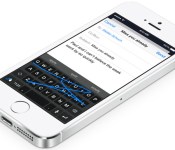
SwiftKey, Swype and Fleksy are already making iOS 8 keyboards

When Apple revealed that iOS 8 would allow third-party keyboards, one big question came to many people’s minds: would some of the better-known Android keyboards make the leap? In short, yes. SwiftKey says it has “already started” porting its heavily customizable software to iOS; Swype tells Engadget that it “can’t wait” to support Apple’s platform. Fleksy, meanwhile, is going so far as to take sign-ups for a beta program and vows to be “one of the first” with a solution. The odds aren’t high that you’ll get something like Google Keyboard on your iPhone (we’ve asked to be sure), but you won’t be hurting for input methods when iOS 8 is ready this fall.
Filed under: Cellphones, Tablets, Mobile, Apple
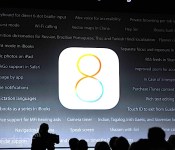
Here are a few lesser-known new features in iOS 8

Widgets! Quicktype keyboard! Hey, Siri! Interactive notifications! Like most new versions of Apple’s mobile OS, iOS 8 comes with its fair share of features that, in theory, will help improve the experience from the previous version. Our list of new features covers nearly every highlight from Apple SVP Craig Federighi’s presentation, but every year there’s always one slide filled with additional enhancements they don’t have enough time to call out individually on stage, and every year that slide disappears within a few seconds. So, what else will iOS 8 offer that wasn’t specifically called out by Hair Force One?
Admittedly, there’s a reason why the majority of these features only get a few seconds of precious keynote time: A lot of them simply aren’t that interesting to the average end user. New languages and refined dictionaries, for instance. There are, however, quite a few gems that are worth paying a little more attention to, and even a few that may not be fully explained until consumers get their hands on the OS for themselves.
First, we already wrote about support for WiFi calling, a feature T-Mobile currently touts on most of the Android devices and Windows Phones it carries. This service, which gives you the ability to use WiFi networks to make calls, is extremely handy when you’re in an area with spotty cellular coverage but more than capable WiFi signal.
If you’ve used an iPhone in the past, you likely have found yourself frustrated by unexplained battery drain. Is a rogue app sucking your battery dry? Who knows! Fortunately, Apple appears to have heard your cries of annoyance, as it’s introduced battery usage by app; now you can go into the settings menu and find out which apps are utilizing significant portions of your storage space.
Privacy fans will like this one: iOS 8 will list DuckDuckGo as a default search option in Safari, in addition to Google, Bing and Yahoo. We won’t blame you if you haven’t heard of the search engine before — essentially, its whole reason for being is to not track your searches. You won’t have to worry about your interests or other information getting sent to advertisers, for instance.
iOS 8 will also offer a few new enhancements to the camera app: Separate focus and exposure controls, as well as instant burst mode and a camera timer. Apple’s preferred to keep its camera app as simple as possible, so this is certainly adding a layer of complexity that wasn’t there before.
And here’s one for the iPad users: Panoramic mode. Its absence in iOS 7 was a bit of a head-scratcher, but Apple has finally determined that there are plenty of people out there who actually do use their tablets to take photos. Why not make the best of the experience by adding in the ability to take panoramic shots?
Also on the list of iOS 8 features is FaceTime call waiting. It’s a nice enhancement if you use the video chat service on a regular basis, since there’s always a possibility that someone else wants to set up a FaceTime call with you at the same time.
Finally, given the huge push Apple’s making in China — it landed a deal with China Mobile, the largest carrier in the country, earlier this year — it makes sense to offer more local support. Namely, iOS 8 adds lunar calendar, navigation and vector map support for Chinese users.
Naturally, this isn’t the full list: iOS 8 users will also enjoy things like multi-device support for made-for-iPhone hearing aids, the ability to purchase iTunes content using Siri, travel time notifications, rich text editing in the Notes app, flyover city tours, built-in iBooks support and Braille keyboard for direct six-dot input. Of course, there may be other stuff added in between now and the final public release, but we’ll have to wait for the Fall to know what else will make the cut.
Filed under: Cellphones, Software, Mobile, Apple
Google brings Chromebooks to more countries around the world

We’re sure folks from New Zealand, the Philippines, Denmark, Norway, Mexico and Chile can find ways to buy a Chromebook if they want to. But now that Google’s officially bringing the minimalist laptop to their countries, it’ll be easier to get one from Google Play or from partner retailers if their Play Stores (frustratingly) don’t sell hardware. Google’s also extending its European tour to bring Chromebooks to even more countries in the coming weeks, particularly Belgium, Italy and Spain. Sadly, the company’s poem announcement didn’t mention which models are coming, so we can’t say if any of the countries are getting Samsung’s new Chromebook 2 or Google’s own pricey Pixel. That’s probably because Google has yet to iron things out with manufacturers… or the author ran out of steam to rhyme after 11 stanzas.
Source: Google Chrome
 AIVAnet