


Automatic launches on Android, dismisses your friends when you drive

If you’re a car fan making do with a slightly older ride, Automatic’s $99 Link dongle is a neat thing to have around: it tracks your trips, monitors your fuel consumption, and lets you know when you’re being a leadfoot. It used to be that only Apple acolytes could get their Automatic dongles syncing with their phones, but the company says that’s the case no longer: it has just released its Android app to bring the word of realtime driving feedback to all. As a reward for their patience (or, you know, because Android lets devs can get down and dirty with low-level access to hardware), Android users get an extra feature, too. The app can silence your phone while driving, and tell your chums to buzz off (via text message, anyway) if they contact you at the wheel. Combine that with the ability to store and transmit information about a crash, and you’ve got yourself a pretty nifty car companion — just don’t try testing that latter feature on your own.
Source: Automatic
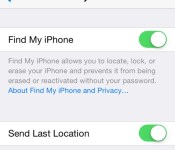
New ‘Send Last Location to Apple’ Feature Added to Find My iPhone in iOS 8 [iOS Blog]
iOS 8 introduces a new feature to the Find my iPhone and Find my iPad functionality on iOS devices, allowing users to select a “Send Last Location” option that will notify Apple of a device’s last known location when the battery drains to a critical level.
Currently, if a device is lost with Find My iPhone on and the battery drains and it cannot be located, iCloud will display the last known location for up to 24 hours, but after that, there is no way for end users to determine the last location of a device.

It appears this new Find My iPhone feature will authorize Apple to store the last known location of an iOS device after 24 hours have passed, potentially allowing customers to contact the company for location information after it is no longer available on iCloud.
The new option can be found in the iCloud section of the Settings app, listed under a new entry for Find My iPhone (or iPad). Tapping on Find My iPhone gives an option to enable the feature and to enable Send Last Location. With iOS 7, Find My iPhone was bundled into the rest of the iCloud settings, with a simple toggle to turn the feature on and off.
(Thanks, John!)

GOgroove Pal Bot Android Speaker review

If you’re an Android fan, which you probably are if you’re reading this, you should take a look at this speaker. It’s called the GOgroove Pal Bot Android Speaker, here to add a bit of character to your nightstand or desktop. It’s portable, loud, and pretty darn cute!
The folks that sell these are offering a price cut solely for the readers of AndroidGuys, so head to Amazon to take advantage of the deal. And while you’re at it, check out our review of the Pal Bot below.
Build

The Pal Bot is made to mimic the design of the Bugdroid, and is composed entirely of plastic. It only stands about 5″ tall and weighs a little less than 13 ounces. Around back, there is a volume knob, awake/sleep switch, 3.5mm audio cable (2-foot long), and a Micro USB port for charging. The bottom features four rubbery legs to ensure that the speaker stays in place. There are two speakers on the left and right sides of the back, and a subwoofer in the bottom-center of the device.
The speaker can play any type of audio, as long as it’s connected to a device with a 3.5mm audio jack. We haven’t had any issues connecting the speaker to phones, tablets, or laptops, but the 2-foot long audio cable can feel a bit short sometimes.
Oh, and when the speaker is off, the eyes are black. If its in “awake” mode, the eyes are blue, and turn purple when it needs a charge. This is a nice touch and adds some character to your speaker.
The battery in the Pal Bot is 850mAh, which GOgroove is quoting about 24 hours worth of audio before needing a charge. We’d say that’s pretty accurate, especially if the volume is down low. We should probably quote it at 18-20 hours, just to be safe.
In all, the build is great. It adds a bit of fun to your desktop or wherever you may keep it.
Sound
 The performance of this speaker may surprise you. For such a small device, the sound blew us away. While playing music, bass notes are always present (something we wouldn’t usually see from a speaker this size). The treble is balanced, and offers an overall great sound.
Seriously… when you turn this thing on, it will blow you away.
Should I buy?

The short answer: YES. This speaker is usually $29.99 on Amazon, but for today only (6/3/2014), it will be offered for only $19.99 BECAUSE YOU GUYS ARE SO AWESOME. No really, the deal is going on for the awesome readers of AndroidGuys. That’s one heck of a deal, if you ask me.
To be honest, I’d recommend this if it was at it’s normal price, but now that it’s $10 cheaper, it’s really a no-brainer. Head over to Amazon to pick one up before this awesome deal goes away!

The post GOgroove Pal Bot Android Speaker review appeared first on AndroidGuys.

New smartphone chip will beam high-definition holograms as early as 2015

Just imagine: a smartphone that projects 3D holograms into thin-air. If you can wait until the end of next year, and if you can believe the claims being made by a well-funded company called Ostendo, then your next handset could be capable of just that. Thanks to breakthroughs by the Californian display startup, 5,000ppi projectors the size of Tic Tacs are now powerful enough to control the color, brightness and angle of individual beams of light across one million pixels. Just one chip is said to deliver a usable image, but adding additional chips provides scope for even more complex and detailed images. The Wall Street Journal was treated to a demo involving six chips which beamed green dice spinning in the air and noted how “consistent” the motion appeared, irrespective of where it was viewed from.
Development of the technology is still in the early stages, meaning the first chip will be limited to only 2D video when it begins shipping in summer 2015, capable of being projected onto nearby surfaces at sizes of up to 48 inches. However, Ostendo founder Hussein S. El-Ghoroury says that its second chip, which is capable of creating 3D images that float in the air and appear almost like a solid object, will enter manufacturing just months after the first. If you’ve dreamed of seeing your friends projected in Star Wars-like holographics while you chat, Ostendo hopes it can make such a thing a reality. It’s already got some major handset manufacturers on board, but the next step will see the company make the pixels smaller to boost the resolution of its holograms. After that, it’ll try and embed its chips in anything with a 3D display, including TVs, smartwatches and even holographic tables.
[Image credit: Sam Hodgson, Wall Street Journal]
Filed under: Cellphones, Mobile
Source: Wall Street Journal

The Secret Service’s proposed Twitter sarcasm detector is totally going to work

Governments are often eager to watch out for online threats, but it’s sometimes tough to spot the real dangers when the internet is rife with sarcasm; just witness the confusion when someone jokingly threatens to blow up an airport. For the US Secret Service, spotting humor is important enough that it has posted a request for automated Twitter monitoring software that, among other things, detects “sarcasm and false positives.” In theory, officials wouldn’t have to read every poor attempt at comedy just to find the few tweets from those who mean real harm.
The proposed technology wouldn’t just be for identifying sarcastic posts. A spokesman tells the Washington Post that the tool will help the Secret Service gauge its online influence, and even address complaints. If such code had been available during the President’s 2009 inauguration, for instance, the agency could have resolved a security bottleneck preventing people from getting in. We’re a long way from seeing a finished tracking system in action, so it’s tough to know how well it’ll work — it’s difficult for computers to interpret literal meanings, let alone subtexts. If agents don’t knock on your door after you make an off-color remark, though, you’ll know the software is doing its job.
[Image credit: Saul Loeb/AFP/Getty Images]
Filed under: Internet
Via: Nextgov, Washington Post
Source: FedBizOpps.gov

Move aside graphene, there’s a new wonder-material on its way

Everyone talks about graphene as if it’ll solve all of the world’s problems, forgetting that it’s got a few of its own, too. The biggest issue is that the substance only works in two dimensions, making it hard to use to build complex pieces of hardware. That’s why researchers from Oxford, Stanford and the Lawrence Berkeley National Laboratory are turning their attentions to Cadmium Arsenide. Like its more famous frenemy, the substance can transmit electricity at tremendous speeds, but will also work in three dimensions, which is far more useful when building transistors and sensors. Researcher Yulin Chen goes so far as to say that this “family of materials could be a good candidate for everyday use.” It’s easy to make bold claims before the locked doors of a university lab, but still, if smartphones are ever going to make use of graphene in the real, three-dimensional world, then this could be the missing piece in the puzzle.
[Image Credit: Greg Stewart / SLAC]
Filed under: Science
Via: SLAC
Source: Nature

Join the Engadget HD Podcast live on Ustream at 9:30PM ET

It’s Tuesday, which is time for the Engadget HD Podcast and we hope you’ll join us for the live recording at 9:30PM. Although it’s the week of Apple’s WWDC, the big news for the HD world is what wasn’t announced. So we’ll go over life with a home theater without apps on the Apple TV as well as a few small bones Cupertino did throw our way. The Chromecast continues to fill in its list of sources with the likes of ESPN and Simple.TV, the FCC never stops meddling and there’s some new content headed our way we’ll talk about before discussing what we’re watching this week . If you’ll be joining us, take a peek at the topics after the break and then get ready to participate in the live chat.
AirPlay on iOS 8 doesn’t need a network to stream your media
Apple’s smart home initiative is called HomeKit
Google brings WatchESPN, MLS and more to Chromecast
Simple.TV’s streaming DVR now sends shows to your Chromecast
Head of Intel’s former internet TV project abandons ship
FCC considers improving its definition of broadband to a video-friendly 10Mbps
Microsoft is getting the Xbox One ready for World Cup action
Netflix has a new original series for kids, courtesy of DreamWorks
What’s on your HDTV this week: NBA & NHL Finals, Orange is the New Black
Filed under: Home Entertainment, HD

A Closer Look at ‘Handoff’ and Other New iOS 8/Yosemite ‘Continuity’ Features
During yesterday’s WWDC keynote, Apple launched several new “Continuity” features to improve the cross-platform integration of iOS 8 and OS X Yosemite. One of the new abilities designed to allow better transitions from iOS devices to Macs is Handoff, which allows users to start a task on one device and swap to another nearby device.
As described by Apple, Handoff can be used for several different activities, including email and web browsing. Users can begin writing an email on an iPhone, for example, and then switch to a Mac to finish. Websites work similarly, allowing users to browse the web on one device, and then continue looking at the same website on another device. While this is already possible via iCloud Tabs, Handoff makes the entire process easier and extends the functionality to other apps.

We believe you should be able to use the right device for the moment. We want the transitions between these moments to be as absolutely natural and seamless as possible.
When you’re working on your Mac, your devices around you in proximity are aware of each other and are aware of what you’re up to.
As demoed during the keynote, iOS devices and Macs are “aware” of each other, and can pick up a task when nearby. When composing an email on a Mac, for example, users will see an icon on the screen of their iPad or iPhone that can be tapped to allow them to continue writing on the iOS device. Similarly, an iPhone near a Mac will cause the activity to automatically pop up on the Mac’s dock, allowing for a seamless transition between devices.
Handoff currently works with the following Apple apps: Mail, Safari, Pages, Numbers, Keynote, Maps, Messages, Reminders, Calendar, and Contacts. There’s also a Handoff API for developers, which will likely see Handoff capabilities added to a range of different apps.
The enhanced Continuity between OS X and iOS also allows Mac devices in close proximity to an iPhone to both place and receive calls, leveraging Bluetooth and WiFi with the iPhone serving as a relay. Users can answer a call made to their iPhone on their Mac, a useful feature when an iPhone is across the room charging or otherwise inaccessible.
During the keynote, Apple’s software chief Craig Federighi used the calling feature to contact new Apple employee Dr. Dre on his Mac, demoing its ability to place calls.
Similarly, iPads and Macs are now able to receive SMS messages from non-Apple devices, a function previously limited to the iPhone. iPads and Macs are also able to utilize an “Instant Hotspot” feature that allows them to connect to an iPhone hotspot with just a click, and AirDrop is also cross-platform.
Currently, Handoff and the other Continuity enhancements are features limited to developers who are using both iOS 8 and OS X Yosemite, but it will be available to the general public in the fall after the official release of the new operating systems.

iOS 8 Introduces Peer-to-Peer AirPlay Playback, Easy iOS to Mac Screen Capture [iOS Blog]
iOS 8 introduces a new peer-to-peer AirPlay feature that will allow iOS devices to stream content to the Apple TV without the need for a shared network connection. Currently, an iOS device must be on the same WiFi network as an Apple TV, which can make it a hassle to use AirPlay when away from home.

The new feature is described on Apple’s iOS 8 enterprise preview page, as delinking AirPlay from WiFi will make it far easier for people to use AirPlay in classrooms and businesses that may have complicated networks.
With iOS 8, you can wirelessly connect iPad, iPhone, or iPod touch to Apple TV without first connecting to the organization’s network. Which means you can present or share your work even if you’re offline or the organization has a complex network.
With iOS 8, Apple will also make it easier to capture video from an iOS device directly on a Mac. As described by our sister site TouchArcade, an iOS 8 device plugged in to a Mac will show up as a camera, which can have its screen recorded in QuickTime. This feature is designed for developers to create app previews, but end users will also be able to use the function to record their device screens with iOS 8 and Yosemite.
Apple’s new peer-to-peer AirPlay feature and the iOS 8/Yosemite video capturing capabilities will be available to the public this fall, following the official launch of iOS 8 and OS X Yosemite.

Razer’s Junglecat looks like an Xperia Play gamepad for the iPhone

Apple’s iOS gamepad protocols have spawned some solid mobile button solutions, but they all have the same fundamental problem: portability. The appeal of mobile games is mobility — it’s not fun to lug around a spare controller on the off chance you might pick up a quick game on your phone. Razer’s first mobile game controller embraces this problem by aping one of the strangest smartphones of the last decade: the Xperia Play.
Like the Xperia Play, the Razer Junglecat gamepad hides underneath your smartphone, sliding in and out like a QWERTY keyboard. Unfortunately, it’s not quite as robust — the Play’s touch-sensitive dual thumb pads aren’t represented here, just the standard four-way d-pad, two bumpers and A, X, B and Y buttons. At least it features Razer’s flair for customization: a companion app will allow users to fully remap all of the controller’s functions, and also serves as a portal for compatible games. It’s also an iPhone exclusive controller. Interested in trading 20mm of pocket space and $99 for a portable gamepad? Check out the source link below.
 AIVAnet