


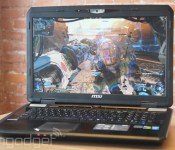
MSI GT70 Dominator review: everything it’s supposed to be, not much else

Thin and light gaming notebooks may be a new trend, but they’re by and large the exception. Traditional gaming rigs look more like MSI’s GT70 Dominator: large, heavy and questionably portable. It’s an old-school gaming laptop, one that truly fits the term “desktop replacement.” It’s also the complete antithesis to the sleek gaming notebooks that have swept the market in recent years. Is bigger still better? Let’s find out.
Look and feel

Some things never change: war, the protagonist of Lynyrd Skynyrd’s “Freebird” and the chassis of MSI’s GT70 Dominator. If you’ve seen last year’s GT70, you’ve seen this year’s model too. Weighing in at 8.6 pounds and measuring 16.85 inches long x 11.34 inches wide and 2.17 inches thick, it’s undeniably huge. And it’s supposed to be — the Dominator is built for power (more on that soon), not portability. That said, the rig’s enormous frame feels a little less forgivable every time I see it.
It’s true that the most powerful gaming machines need to be larger than life to support their high-performance internals, but matters of fact don’t make these devices feel any less unwieldy. Pitted against the Razer Blade or MSI’s own GS60 Ghost, the GT70′s size is a little off-putting. Those slimmer notebooks can’t rival the GT70 in performance, of course, but I can’t help wonder if Moore’s Law could have helped slim the beast down just a little. On the other hand, there’s an old adage at play that’s hard to argue with: If it ain’t broke, don’t fix it.
The extra room afforded by the GT70′s oversized chassis is the very thing that grants it a luxurious, full-sized keyboard, two stellar stereo speakers (with a subwoofer!), a six-action media bar and a generous assortment of ports, plugs and connectivity options. Specifically, it has three USB 3.0 ports, four audio jacks and a multi-format card reader running down the left side; two USB 2.0 plugs and an optical drive on the right; and Ethernet, VGA, HDMI and Mini DisplayPort connectors on the back edge. Like I said, it’s practically identical to last year’s model.
Keyboard and trackpad

The GT70′s keyboard and mouse inputs haven’t changed much either, but that doesn’t mean they haven’t improved. The laptop’s island-style keys are the same well-spaced, slightly concave squares featured on the last two incarnations of the Dominator, except now they’re backed by a more advanced software suite: the SteelSeries Engine. It’s the same software that made the GS60 Ghost’s keyboard more versatile than your average typewriter, and it’s no less impressive here: It can assign complex macros, remap any key function to any other key function and even analyze what keys you use the most. It controls the keyboard’s backlight, too, which can be color-coordinated to identify custom profiles. Overall, it’s a minor change, but big enough to make the new GT70′s keyboard slightly better than the technically identical input we found on last year’s model. That’s not a bad thing, either: The GT70′s SteelSeries keyboard still feels great.
No surprises hide under the Dominator’s mouser, though: It’s the same trackpad MSI’s GT70 has had for years — not that there’s anything wrong with that. It’s still a well-sized, lightly textured touch surface with large buttons that respond with a satisfying “pop.” It’s not a unique or spectacular mousepad, but it’s a good one nonetheless. There isn’t much else to say.
Display and audio

MSI’s GT70 is huge, it’s true, but at least it makes the most of its gargantuan size. The machine’s enormous chassis is topped with a 17-inch, 1,920 x 1,080 LED display panel. This stunningly large display almost justifies the machine’s size, offering a view into your digital world that just can’t be matched by lighter laptops. Games, movies and web content look great on the vibrant display, but it isn’t perfect — colors and contrast tend to fade at sharper viewing angles, particularly those of the vertical persuasion. Still, that’s consistent with last year’s GT70 display: It’s great, as long as you look at it head-on.
There’s nothing to complain about when it comes to the Dominator’s sound: Its Dynaudio-sourced speakers are loud, clear and excellent. The GT70′s audio has always been among the best I’ve heard on a gaming rig, and that hasn’t changed. That said, they do carry the same caveat as they always have: Half of their excellent output comes from the machine’s Sound Blaster Cinema software. Disabling the equalizer gives the drivers a more muted, duller sound — but the software is enabled by default. You have to try to make these speakers sound bad.
Performance and battery life
| PCMark7 | PCMark Vantage | 3DMark06 | 3DMark11 | ATTO (top disk speeds) | |
|---|---|---|---|---|---|
| GT70 Dominator (2.7GHz Core i7-4800MQ CPU, NVIDIA GTX 880M 8GB) | 6,308 | 23,431 | 27,775 |
E11,433 / P8,344 / X2,877 |
1.4 GB/s (reads); 498 MB/s (writes) |
| Razer Blade 14-inch (2.2GHz Core i7-4702HQ, NVIDIA GTX 870M 3GB) | 5,664 | 19,994 | 24,255 |
E9,533 / P6,541 / X2,236 |
542 MB/s (reads); 257 MB/s (writes) |
| MSI GS60 Ghost (2.4GHz Core i7-4700HQ, NVIDIA GTX 860M 2GB) | 5,909 | 22,602 | 22,898 |
E7,908, / P5,152 / X1,519 |
537 MB/s (reads); 495 MB/s (writes) |
| Alienware 14 (2.4GHz Core i7-4700MQ, NVIDIA GTX 765M 2GB) | 5,310 | 21,502 | 20,868 |
E6,529 / P4,211 |
507 MB/s (reads); 418 MB/s (writes) |
| Alienware 17 (2.7GHz Core i7-4800MQ, NVIDIA GeForce GTX 780M 4GB) | 5,647 | 22,114 | 27,137 |
E10,638 / P7,246 |
509 MB/s (reads); 420 MB/s (writes) |
| Digital Storm Veloce (2.7GHz Core i7-4800MQ, GeForce GTX 765M 2GB) | 6,107 | 21,379 | 20,340 |
E6,696 / P4,353 |
506 MB/s (reads); 196 MB/s (writes) |
| 2013 Razer Blade 14-inch (2.2GHz Core i7-4702HQ, GeForce GTX 765M) | 5,837 | 19,505 | 19,815 |
E6,364 / P4,161 |
546 MB/s (reads); 253 MB/s (writes) |
| MSI GT70 Dragon Edition (2013) (2.4GHz Core i7-4700MQ, GeForce GTX 780M) | 6,111 | 20,250 | N/A |
E10,519 / P7,416 |
1.19 GB/s (reads); 806 MB/s (writes) |
| Razer Edge Pro (1.9GHz Core i7-3517U, NVIDIA GT 640M LE 2GB) | 4,949 | 13,536 | 10,260 |
E2,507 / P1,576 |
409 MB/s (reads); 496 MB/s (writes) |
| Samsung Series 7 Gamer (2.30GHz Core i7-3610QM, GeForce GTX 675M) | N/A | 11,515 | 21,131 |
N/A |
N/A |
The GT70′s chassis is bulky, unsightly and absolutely enormous, but inside that frame — oh boy. An Intel Core i7-4800MQ CPU, NVIDIA GeForce GTX 880M graphics and 32GB of RAM lurk under the machine’s thick skin. MSI affectionately calls it “the Dominator,” and it certainly conquered everything I threw at it. The GT70 hardly flinched at high-performance games like Crysis 3 or The Witcher 2, running both at ultra high graphics settings (with ubersampling disabled in the latter title) at 40 and 62 frames per second, respectively. The mechanized warfare of Titanfall pushed 80 fps at maximum fidelity, followed closely by BioShock Infinite’s theocratic skyscape, which shined at 76 fps. Running at 58 fps, the darker streets of Thief took a little more out of the machine, but there wasn’t a single title in my library that the Dominator couldn’t dress to the nines.

Still, looking good isn’t easy: The Dominator grunts under the strain of its performance, and burns with the heat of a taxed graphics processor. Benchmarking games from my couch was an initially painful experience — at least until I remembered MSI’s cooler boost feature. A subtle button on the laptop’s media bar switches its internal fans into overdrive; the feature is horrendously loud, but it’s absolutely necessary. Turn it on if you don’t want to light your pants on fire.
|
Battery life |
|
|---|---|
| MSI GT70 Dominator (2014) | 3:21 |
| Razer Blade 14-inch | 6:24 |
| MSI GT70 Dragon Edition | 4:34 |
| Razer Blade (2014) | 4:27 |
| Razer Edge Pro | 3:40 |
| Razer Blade 2.0 | 3:29 |
| MSI GS60 Ghost | 3:13 |
| Alienware 14 | 3:07 |
| Alienware 17 | 2:55 |
| Digital Storm Veloce | 2:53 |
| MSI GT70 | 2:49 |
| MSI GT683DXR | 2:40 |
| Samsung Series 7 Gamer | 2:11 |
| 2011 Sony VAIO F Series | 2:07 |
| Qosmio X775-3DV78 | 1:26 |
Unfortunately, screaming performance always comes at a price, and that toll is usually paid in longevity. MSI’s latest GT70 lasted a mere three and a half hours in our standard battery test, which involves looping a video at fixed brightness with WiFi on. It’s not the worst runtime I’ve seen on a 17-inch gaming PC, but last year’s model lasted about an hour longer on the same task. I hate to see performance get worse year over year.
Software

Open almost any new gaming laptop, and you’ll find the same thing: Norton Internet Security and NVIDIA’s GeForce Experience software. Naturally, they’re installed on MSI’s GT70 too, but the laptop’s other software bundles are a little less expected. This mostly consists of redundant MSI-branded settings managers and the aforementioned SteelSeries keyboard engine suite, but what really caught me off guard lurked on the Windows 8 Start Screen: Wild Tangent. This brand of packaged games has been around for ages, but it’s not a platform favored by the target market here. Hidden away in the OS’ new UI, it’s inoffensive and easy to ignore, but it’s still weird: Nobody is buying this laptop to play Facebook-quality mini-games. MSI has also included a six-month trial of XSplit Gamecaster too, a boon for gamers who want to join the Twitch streaming revolution.
Configuration options and the competition

The review model MSI lent me isn’t cheap, but it still isn’t the most powerful configuration available. Running a 2.7GHz (3.7GHz with Turbo Boost) Intel Core i7-4800MQ CPU with NVIDIA GeForce GTX 880M graphics, 32GB of RAM, a 1TB HDD and three 128GB SSDs in RAID 0 configuration, the $2,800 machine is no slacker — but gamers who demand the best available specifications have options. For an extra $1,300, MSI will swap out that Core i7-4800MQ for an Intel Core i7-4930MX and… well, that’s it. Every other specification remains the same. It seems like a minor change for the price, but the granular differences are significant: the new processor idles at 3.0GHz, and can reach 3.9GHz with Turbo Boost. If you’re dying to future-proof your next behemoth laptop, you go ahead and pay for it — MSI will reward you with an pair of headphones, a mouse and a backpack for the extra cash.
Seeking out the baseline model will save $800, but it replaces the graphics processor with a less powerful GTX 870M and cuts the machine’s RAM to 16GB. The baseline model only has a single SSD too, cutting back the main drive’s storage space significantly. Trimming the RAM in half again and tossing out that final SSD (leaving you with just the 1TB HDD) will save you an additional $500.
Love the idea of a 17-inch gaming monster with the above specs, but aren’t into MSI? You’ve got a problem: NVIDIA’s GeForce GTX 880M just isn’t in that many large-size gaming notebooks — at least not with matching specs. The Alienware 17 passes over the GPU in all but its most expensive model, pairing it with an Intel Core i7-4940MX processor and 32GB of RAM for $4,049. Digital Storm’s Behemoth laptop features the GPU at all price points (and in dual-GPU configurations in some builds), but falls short of the Dominator’s 32GB RAM capacity by maxing out at 16GB. The 17-inch category just isn’t that diverse — gamers looking for more options will have to settle for a smaller screen.
Wrap-up

MSI’s GT70 Dominator is everything a 17-inch gaming laptop is supposed to be, but it’s nothing more than that. It’s a powerhouse in every sense of the word: a monster in both performance and size. Sure, it shrugged off everything I threw at it, but so did last year’s build. It’s a low-risk machine, a mere spec upgrade on a previous model. There’s nothing wrong with that, but the world of gaming laptops is slowly evolving. In a market where thin, powerful and gorgeous gaming portables exist, MSI’s GT70 is decidedly old-school.

The PhoneStation uses your smartphone as a head-mounted display

You’ll find plenty of knock-off wearables at a trade show like Computex, but there are always a few gems mixed in among the boring copy cats. Exhbit A: View Phone Technology, a little-known Taiwanese company, is showing off a head-mounted 3D display that puts content from your phone directly before your eyes. The aptly named PhoneStation converts video to 3D, letting you use any handset to stream movies and TV shows directly from YouTube.
The PhoneStation’s basically like any other head-mounted display, except that it’s an entirely passive device, using your own smartphone’s display in lieu of its own expensive panels. Any handset will fit into the front end provided you have an appropriately sized case, but the rep chose a Samsung Galaxy Note 3 for the demo. Watching video is only one of the applications here; you could play games with a bluetooth controller through the headset or view photos using a custom app, for example.
I needed to move the two lenses further apart (thankfully, they were adjustable) to see a somewhat clear picture when watching a clip from The Avengers, and the PhoneStation itself was way too heavy on my head to be comfortable (you’re essentially wearing a smartphone on your head). Still, this new approach to HMDs is frankly one of the more interesting wearable concepts at the show, and it’s definitely something that will be refined before it hits the market. View Phone Technology is just starting to shop its device around, so don’t expect to see it on sale any time soon, though considering it’s a bring-your-own-display solution, expect pricing to come in far below $100.
Zach Honig contributed to this report.
Filed under: Cellphones, Displays, Peripherals, Wearables

Create your own ‘Toy Story’ sequel with free tools from Pixar

Renderman is the in-house software that Pixar uses to produce its amazing animated films, oh, and Cars. The studio charges a pretty penny to license it out to its rivals, but doesn’t feel that hobbyists and students should cough up those same fees. That’s why it’s going to give the full version of Renderman v.19 away for free when it launches at SIGGRAPH in August. Unlike other trial versions of high-end software, the company isn’t hobbling the tool, instead, it’s just trusting you to use it for non-commercial purposes only. Who knows, maybe you’ll spend the next year building up a showreel that’ll swing you a job over at Emeryville — wouldn’t that be the dream, eh?
Filed under: Software
Source: Pixar

Wallpaper lets your friends borrow e-books from real-world shelves

As convenient as e-books may be, lending them to friends is a headache; copyright woes notwithstanding, it’s simply hard to show what you have on offer. Vodafone Romania just made things a bit easier, though. Its new Digital Library Wallpaper gives you real-world (if very flat) bookshelves to showcase your digital wares. As the library owner, you order a custom adhesive wallpaper that reflects the free e-books you’ve chosen at Vodafone’s website. Once the print is on display, visitors to your home just have to scan QR codes to borrow titles and start reading.
While the concept is clever, it’s easy to see the limitations. Besides being restricted only to the content that Vodafone offers, your library’s physical manifestation can’t change. If you add a few items that you just have to put on display, you’ll need to order a new print. Even so, it’s easy to see the appeal of Vodafone’s wallpaper. You can share your love of books without consuming valuable floor space — or worrying that friends will “forget” to return a favorite page-turner.
Source: McCann Romania, Biblioteca Digitala
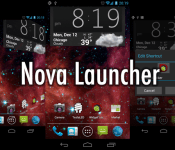
Nova Launcher reached version 3.0, Google’s voice hotword included in the update

Nova Launcher is one of the best launchers on Android, no doubt. It is smooth, feature-rich and beautiful. Nova has been updated and reached a 3.0 version after being in beta version for a while.
Full changelog:
- OK, Google – Use Google’s voice hotword from within Nova Launcher. Requires Jellybean and a device/locale Google supports for hotword.
- Subgrid positioning – More flexible layouts by snapping items halfway through the grid
- Dynamica Calendar Icons – Supports Today Calendar’s Dynamic Calendar Icon, also supported by some icon themes such as Domo or KEX
- Color options – icon labels, tabs, backgrounds
The biggest feature added is “OK, Google” command which should work with JellyBean and KitKat versions of the OS. Try it out for yourself (if you haven’t already) on the link below and tell us what you think.

The post Nova Launcher reached version 3.0, Google’s voice hotword included in the update appeared first on AndroidGuys.

Motorola offering a Moto X (32GB) $100 off as part of their summer promotion

The Moto X is Motorola’s flagship for last year and yet it is still a great phone. Moto X promotions are something Motorola does often and this one might interest you.
As part of “Save Because It’s Summer” promotion Motorola is offering a 32GB Moto X smartphone for $349, which is a $100 lower than its usual price. That is still a great deal if you ask us. You’ve got until Thursday 11:59PM ET to decide if you want to get it or not. They’re not mentioning anything about limited stock, our guess is that they want to clear stock of Moto X in order to prepare for the upcoming refresh of Moto X. Don’t forget Moto X is about to get 4.4.3 update this week.
Anyone going to buy it?
The post Motorola offering a Moto X (32GB) $100 off as part of their summer promotion appeared first on AndroidGuys.

Fleksy Offers Beta Preview as Keyboard Makers Look Forward to iOS 8
Keyboard developer Fleksy today announced that the company has its iOS keyboard alternative running on iOS 8. Apple revealed earlier this week during its WWDC 2014 keynote that iOS 8 will support the system wide implementation of these third-party keyboards.

An alternative to a traditional keyboard, Fleksy boasts improved typing speeds through the use of automated word suggestions and a sophisticated autocorrect engine that corrects errors on the fly. It also incorporates a gesture system that lets users complete common tasks like inserting spaces and punctuation through swipes.
Fleksy tweeted a screenshot of its keyboard on iOS 8, along with an invitation for users to register for a preview of its iOS 8 keyboard app. iPhone and iPad owners running a beta version of iOS 8 on their devices can sign up for a preview on Fleksy’s website. The company will notify customers via email when the public beta program goes live.
Fleksy won’t be the only third-party keyboard available to consumers when iOS 8 launches later this year. Both Swiftkey and popular Android keyboard Swype confirmed they plan to launch iOS 8-compatible versions of their keyboard apps.
“We’re delighted Apple has decided to embrace the importance of opening its platform to third party keyboards.
…
We first brought a taste of our technology to iOS in January this year with the launch of the free note-taking app SwiftKey Note. Are we going to build SwiftKey Keyboard for iOS 8? Of course we are. We’ve already started, writes Swiftkey founders Ben Medlock and Jon Reynolds.”
Both Switfkey and Fleksy already offer versions of their keyboards for iPhone and iPad owners, but their functionality is limited due to iOS constraints that prohibit their system-wide installation. iOS 8 will remove this restriction, making it possible for all keyboard makers, including iOS newcomer Swype, to bring their keyboards to Apple’s mobile platform. The beta version of iOS 8 is available now to developers, with a public release expected this fall.
Icon packs that you must have on your Android device

I’m an icon addict to the point of where I really need some serious intervention. But don’t call anyone quite yet, just let me present to you what I want to show off today, then decide if you want to make that call. That’s right, I’m going to show you some of the newest, hottest, most amazing icon packs in the Google Play Store today that you need to have installed on your mobile device. You can check out some of our older posts on this same subject here: Android Icons You Must Have.
The good thing about the icon packs that I’m going to show you today is that they are so very simple to install and easy to set on your device. And when you do get them set on your device, they will theme your homescreen icons as well as all of your icons in your app drawer. That way everything looks nice, neat and uniform. Now, let’s get started with the first icon pack of several for the day.
NOTE: THIS ARTICLE IS SPREAD ACROSS FOUR PAGES
KooGoo by DJSkarpia

I’m a sucker for round icons and I think Andrea Corvi knows this because he’s been doing a lot of them for some time now. He has become skilled at getting me to spend my hard earned money. KooGoo is a nicely done icon pack that is simple and clean, yet has enough detail that each icon stands out as being quite unique. For $1.89 you get over 1,700 icons, 16 docks for Nova Launcher, 88 wallpapers and the app even has Muzei support which is something I really enjoy. These icons are updated very frequently and will continue to be done so for quite some time.

Neon Glow by Samer Zayer

Neon Glow by Samer Zayer is something a bit different than what we’ve been seeing here as of late. It’s not a long shadow icon set and this is really nice to see Samer go and produce something really different. Neon Glow is just that, an icon that looks like those neon signs you see in your favorite bar or restaurant. Dark backgrounds with very vivid and bright colors.
Priced at only $1.49, Neon Glow gives you 1,100+ icons, all sorts of wallpapers via the cloud, several docks for use within Nova Docks and Muzei support. Well worth much more than the asking price and you also get some amazing icons along the way.

The post Icon packs that you must have on your Android device appeared first on AndroidGuys.

Accessory Makers Ramping Up for 5.5-Inch iPhone 6, Sparking Speculation of September Launch
While rumors have pointed to a late 2014 or early 2015 launch of Apple’s rumored 5.5-inch iPhone 6 model, several months later than a 4.7-inch model, Cantor Fiztgerald analyst Brian White points out in a new research note that companies are already beginning to ramp up their production of accessories for the larger device. Based on this observation, White believes the larger-sized iPhone 6 model may in fact debut this fall alongside the 4.7-inch iPhone 6, and his note follows a recent report that Apple has solved its battery issues with the 5.5-inch iPhone 6 and is planning to manufacture 20 million units by the end of the year.

White bases his prediction on observations he made during his recent tour of Computex, which is being held this week in Taiwan and is Asia’s largest technology show.
Also at Computex, we noticed that a few vendors had already started work on accessories for the 5.5-inch iPhone 6 and the pieces were available at the show. Given the lack of data points in recent months around progress with the 5.5-inch iPhone 6 and growing skepticism in the media around a 2014 launch, we view this as a positive development. Based on today’s research, we believe the timing of the 5.5-inch iPhone 6 launch appears to be in sync with our expectation around the unveiling (i.e., September) of the 4.7-inch iPhone 6.
According to White, manufacturers are also showing a “much broader ramp” of accessories compatible with the rumored 4.7-inch iPhone 6. The 4.7-inch version is widely believed to be launching in September and will headline Apple’s fall product lineup, which Apple executive Eddy Cue claims is the best product pipeline he has seen in his 25 years at Apple.
Based on his previous reports, White does not have a particularly solid track record in predicting Apple’s plans, and thus his speculation of a simultaneous launch of both 4.7-inch and 5.5-inch iPhone 6 models should be taken with a grain of salt considering other rumors of a gap of up to several months between the two releases. White does, however, frequently tour Asian suppliers and trade shows and is in a position to observe momentum shifts in the supply chain and accessory maker activity.
While the expected overall form factors of the two rumored iPhone 6 models have been circulating for several months, leading to physical mockups from accessory makers and others, actual claimed part leaks for the new devices have remained fairly rare. We’ve seen a few parts such as an alleged front panel, a display backlight and just last week a rear shell, but typically a number of internal components have leaked by this point in the year and we have yet to see much in that regard.

Intel Demonstrates Cableless Computing Made Possible by Future Skylake Platfrom
At Computex in Taiwan this week, Intel demonstrated a variety of wireless accessories that will be enabled by the company’s future Skylake processor platform, reports CNET. Reference designs for the Broadwell successor will include the possibility of eliminating all of the cables that currently connect to a personal computer, replacing both data and power cables with wireless options.

The demonstration by Kirk Skaugen, Intel’s senior vice president and general manager of the PC Client Group, showcased a wireless display, as well as a computer with wireless docking and charging capabilities. Intel uses technology from A4WP’s Rezence, which transfers power wirelessly using the principles of magnetic resonance, for its wireless charging solution.
The system can be installed under a table surface, with magnetic resonance capable of charging through 2 inches of wood. It can also charge any number of devices at the same time, unlike inductive charging technologies.
Skaugen demonstrated a table that charged a laptop, phone, headset and tablet all at once.
For docking and display purposes, Intel relies on Wi-Gig to govern the wireless data transfer. First outlined in 2010, Wi-Gig is an established wireless standard that uses unlicensed 60 GHz spectrum to provide data transfer rates up to 7 Gbps.
The technology is still in the early stages, with Intel’s Skylake platform expected to debut in late 2015. Products natively supporting these wireless protocols will be available publicly sometime in 2016. Apple is not currently listed as a member of the extensive A4WP consortium, but the company is undoubtedly pursuing its own potential solutions and its use of Intel’s chips in Macs means that it will be able to take advantage of the technologies packaged into the future Skylake platform.
 AIVAnet