



Samsung Galaxy S5 Google Edition leaks, allegedly

When HTC announced its new One (M8), a Google Play Edition was also released, replacing last year’s model. With the Galaxy S5, we haven’t been so lucky yet, but according to a recent leak, one is on the way.
TK Tech News shared the photo of the device, which appears to be gold, but it could also be available in other colors as well. Besides this photo, no other info is available.
The Galaxy S4 GPE is still for sale at $649, so if and when it releases, it may be around that price point. The HTC One (M8) GPE sells for $699.
Hopefully soon you’ll be able to get your hands on another premium device with stock Android that gets updates just as fast as the Nexus line.
Via PhoneArena

The post Samsung Galaxy S5 Google Edition leaks, allegedly appeared first on AndroidGuys.

Samsung Galaxy F leaked with premium design

From last year, we have been hearing that Samsung will release a premium flagship device this year, known as Samsung Galaxy F. It was rumored to show up with the Galaxy S5, and we heard about its specs several times. Now after all this time, we finally get to have a glimpse of the Samsung Galaxy F or also know as the Samsung Galaxy S5 ‘Prime’. Thanks to @evleaks, below you can see a beautiful render image, which look a lot like the Samsung Galaxy S5, only with brushed metal finish. Have a look:
 @evleaks also shared a blurry image of the Galaxy F, and in the title description, they said that this device will replace the Galaxy S5 and hence there will be no Galaxy S6. However, they said that this statement is unconfirmed and unverified. We already know what will be under the hood, and it’s probably not a good successor to the Galaxy S5, but at least there will be an option for people if they want something more.
Are you looking forward to the Galaxy F? Let us know in the comment box below.
Source: @evleaks
The post Samsung Galaxy F leaked with premium design appeared first on AndroidGuys.
Living With Google: Google Now


It seems not a day goes by that we don’t discover some new way to use our Android device. It’s portable, powerful, and full of amazing software. My smartphone is a daily tool that I could not live without. Google has made this more of a need for me than a “want”. More and more as Google services are updated with new features the smartphone in my pocket becomes a necessary accessory like car keys and clothes.
My daily use of Google consist of key programs like Gmail, Google Photos, Hangouts, YouTube, Maps, Keep, and Google Now. Google Now seems to be the key driver in putting everything I need to know in a one stop shop.
From the moment I wake up Google is already telling me about my drive to work, suggesting articles I should read, and letting me know what the score of that late night game I missed.
Google Now integrated with Search and the other applications seems to get almost eerie knowing what you want to see and or watch of course you only let Google know by choice. Allowing the application to know where you work, live, and what you enjoy gives it the ability to make suggestions based on you the user. It also allows you to have a concierge, of sorts, in your pocket.
Need to know the score of the latest baseball game? Google is there for you. How about how tall that roller coaster is? Maybe you’re arguing about how old Morgan Freeman is. Google has an answer for all of that stuff. Measurements, weights, definitions, times, info on the city your visiting – it’s all there by clicking the mic on the search bar. (OK Google for the Nexus and Motorola users.)

How do you use this service you may ask? First set up a Google account then most new phones with 4.1 or higher already have it native. Find the app called search and say Yes I’m In and your up and running. If the app is not already on your phone you can find it in the Play Store named Google Search. At first there will be little information like weather and some local attraction but the more you use it the more It knows you the user. For more info visit the Google Now page for a list of commands and uses.
Once you are up and running with Google Now you will start to notice Google pop up in your notification bar from time to time. One of the first to show is time to work giving you an estimated drive time to work it even alerts you if there is an accident and suggest a different route. The more you use Google the more it suggest articles and things to do tuned to you.
The biggest feature of Google Now is the Search commands. Ask Google “What time is it in Memphis” and it will respond. Ask you favorite team and Google will show the last score and a list of news relating to the team. The more you ask about you favorite team Google Now will eventually start showing scores in you notification bar no more checking the web for the score from last night.
There are a large list of commands for Google Now and Google ads and or subtracts these commands on a very regular basis. For Nexus and Motorola users all you have to do is say “OK Google” followed by the command. For other users you will have to open the app by touching the microphone key.

A FEW EXAMPLES OF HOW I USE GOOGLE NOW ON A DAILY BASIS
In the morning before I even touch my phone Google Now is showing me an estimated time to work if there is a wreck it gives me alternate routes. On the drive in I tell Google what I want to listen to “OK Google listen to Haste the Day”; this one always wakes me up.
Throughout the day I regularly ask Google random questions like “whats the weather like today?” or “How old is ____?”. During lunch I tell Google to find places to eat for a list that I can choose from. If I have a package en route Google Now shows me a status of shipping. If I need to call a business I say “OK Google call Sprint” and Google will give me a list of Sprint stores near by.
At night, Google Now is a great tool to use for information. Google seems to know exactly what you want to read, what scores you want to see, and what you want to watch on TV. Want to know more information on the movie you watching say “OK Google Fear and Loathing in Las Vegas” and instantly it gives you a list of actors and other information including a Google search of the movie. Click on Johnny Depp and a short list of information and all his movies appear in front. When I want to eat I ask Google for recipes and a list of different choices are presented. All this, and more, is tailored to me; the capabilities are expanding every week, it seems. Google seems to have hit the nail on the head when it comes to a personal assistant that understands what you want.
LIVING WITH GOOGLE is an ongoing series of articles dedicated to highlighting the many ways in which Google can help better our lives. With innumerable apps and services to choose from, our aim is to educate readers on the ways in which we use them.
The post Living With Google: Google Now appeared first on AndroidGuys.

Evidence of Upcoming Retina iMacs Showing Up in OS X Yosemite Beta
 Evidence of upcoming iMac updates is continuing to accumulate, and the latest hint points toward support for models equipped with Retina displays. As noted by Macbidouille [Google Translate], the OS X Yosemite developer preview includes a new file defining display scaling resolution options for a machine identified as an iMac.
The unreleased machine was first spotted last week in the OS X 10.9.4 beta, but today’s discovery includes the observation that Retina-resolution display support is included.
The file includes a series of scaling resolution options for this machine, maxing out at 6400 x 3600 pixels, or 3200 x 1800 as a Retina display. The display itself would carry a somewhat lower native resolution, perhaps 5120 x 2880 to simply pixel double the current 27-inch iMac, but as with the Retina MacBook Pro higher resolutions are specified and generated by the machine before being scaled back down.
The first of these resolutions indicates hexa “00001900 00000e10″ is therefore a resolution scaling of … 6400 x 3600 (probably 3200×1800 HiDPI).
Continues and is 5760×3240 (2880×1620 HiDPI) 4096×2304 (2048×1152 HiDPI), etc..
(There are other resolutions, just make the conversion from hex)With this alone, it is not possible to guess the native resolution of the machine. This is a resolution that does not appear in the file, since it is native and does not have to be “scaled”.
Knowing that there is a gap between the values of 5760 and 4096, one can imagine something between these two (probably 5120×2880, 2560×1440 or in HiDPI), but this is speculation.
As an example of how these higher-than-native resolution options are used, while the 15-inch Retina MacBook Pro has a native resolution of 2880 x 1800 (giving screen real estate of 1440 x 900 as Retina), the system is capable of generating a 3840 x 2400 desktop that is then scaled down to give the real estate of a 1920 x 1200 display.
In the case of this iMac, a similar scenario would see the initial 6400 x 3600 screen scaled to display as 3200 x 1800 on the Retina iMac.
Apple has been rumored to be working on Retina iMacs ever since the debut of the Retina MacBook Pro in 2012, but the company has likely been challenged by the large number of pixels needed for the desktop machine, particularly the 27-inch model. Recent rumors have pointed toward a lower-priced version of the iMac to help address emerging markets, but Retina models are likely also in the works.
As was seen with the MacBook Pro, Apple may initially move to split the iMac lineup with Retina models initially coming in at higher price points alongside existing or slightly cheaper non-Retina model pricing. Over time, the line would be consolidated as prices for the components needed to support Retina displays come down.
Apple’s new Lightning spec allows for smarter, better-sounding headphones

When Apple first unveiled its Lightning connector, there was a debate about whether or not it was needed at all: what can this proprietary tech do that standard micro-USB can’t? Well, it looks like we’re going to find out soon. Sources for 9to5 Mac understand that Apple has published a new specification that lets headphone makers use an iOS device’s Lightning port for audio instead of the normal 3.5mm jack. On a basic level, this allows headsets to launch apps and carry more than just the usual playback controls. However, there’s reportedly an advanced spec that permits a lot more — headphones could include digital-to-analog converters and other processing that overrides what’s in the device. If you’re not happy with the fidelity of the built-in hardware, a new pair of cans could provide an upgrade.
Since Lightning can also supply power in both directions, either new spec could eliminate a number of electricity-related problems. External audio processing wouldn’t always need a separate energy source; you could do active noise cancellation that draws only on the host device for power. You could alternately charge an Apple gadget through batteries that are built into the headphones or attached with a pass-through cable.
Whether or not manufacturers take up the spec is another matter. To support Lightning without abandoning listeners on other platforms, companies would have to either bundle extra cabling or else sell multiple versions of the same gear. Those feats are easy for higher-end brands, but may be tougher for newer or more budget-conscious outfits. Even if others are skittish, though, the tech could come in handy now that Apple owns Beats — future official headphones could both sound better and integrate well with your iPhone.
Filed under: Cellphones, Home Entertainment, Peripherals, HD, Mobile, Apple
Source: 9to5 Mac
Amazon’s likely announcing its new phone on June 18th

What has six cameras, a large screen and tracks your head? Amazon’s new phone, probably. The company’s first handset has been long rumored and occasionally leaked, but now the company seems ready to make it official: Jeff Bezos is hosting a hitherto unannounced “launch event” later this month. The company’s page for the event is little more than a invitation request form, but an attached teaser video meshes well with the purported phone’s rumored head-tracking capabilities. “It moved with me!” exclaims an unnamed tester, staring at an object just out of frame. Sounds neat.
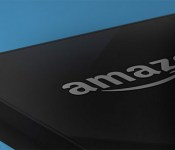
While the video itself doesn’t show anything specific, the reactions it shows are consistent with the prototype BGR uncovered back in April. That handset had a 4.7-inch screen and a staggering five front-facing camera, which were said to be used for tracking the user’s face as they combed their way through an interactive 3D interface. It was also said to be running a Qualcomm Snapdragon CPU and 2GB of RAM, but what Amazon’s going to show on June 18th is still anybody’s guess. Still, the teaser page revealed one more thing: the product will have a sleek black bevel and an Amazon logo (pictured above). Well, we can’t say we’re surprised. We’ll let you know all the details when Bezos makes this thing official later this month.
Filed under: Cellphones, Mobile, Amazon
Source: Amazon
Sony’s $99, life tracking SmartBand lands in the US

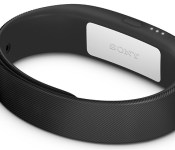
Let’s flash back to the heady days of CES 2014, shall we? Sony embraced the wearable bandwagon (again) with the “tiniest gadget” it’s ever made, and now the Americans reading this can go out and nab one of their own. Here’s what you’ve got to remember: it’s not just an activity tracker. No, Sony fancies it as a “life tracker,” and for once that’s not complete marketing doublespeak. It works in tandem with an Android app to paint a portrait of what did you each day that extends beyond mere movement — the sensor and the app track how you slept, where you went, what content you consumed, and when all of that happened. It’s a neat enough twist on what otherwise could’ve been a dry formula, but there are (as always) some caveats to be aware of. Alas, the SmartBand only syncs with devices running Android 4.4 KitKat, and anyone hoping to use this wrist-worn gadget as a timepiece will be sorely disappointed. Does it stack up well against other players in the field? Did Sony stumble over a winning wearable formula? Our review unit just landed, so stay tuned for more detailed impressions to come.
Source: Sony
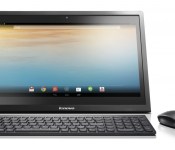
Lenovo N308 Android Powered AIO Table Top PC Review, is it Worth the Money?
I have always had a bit of a love for Lenovo. They successful turned their purchase of IBM into a profitable PC market. Heck, they over took Apple in PC sales in the last few months. On the mobile front they dominate in overseas markets while they still have a struggling point here in the states. That is going to be changing once the Motorola purchase finalizes and they can start moving into the US market a bit easier. Their tablet line is something to keep an eye. I have used the Yoga 8 and Yoga 10 for the last few months and their unique design, exceptional battery and overall performance for the money keeps them in my recommended tablet purchase slot. Lenovo is constantly doing different things with their products and are always bringing new things out that deserve a look. In this review/look, I will be going over the Lenovo N308 AIO (all-in-one) Android based PC.

Whats in the box
- A Lenovo AIO
- A power cable
- A keyboard and mouse
External overview:
Sure, there are instruction manuals all that jazz too, but the hardware is the focus. The N308 is an interesting contraption. The screen comes in at 19.5-inches with a resolution of 1600 x 900. Don’t let the physical numbers throw you off, that is still higher than 720p but just lower than 1080p. The screen is bright at 250-nit and is also multitouch (2 finger only). You don’t have any physical buttons on the front of the N308, rather you have the on screen keys that many current tablet and phone owners are used to using. You will also find a 720p wabcam/front facing camera, a mic and an ambient light sensor.


On the top rear of the device you will find a single power button to turn the screen on or off, as well as long pressing to power the N308 on or off. Just to the left of the power button is where you will find the physical volume up and down key as well.

On the left hand side tucked away in a small cut out you find a series of ports for you added convenience. You will find 3 USB ports, 1 headphone jack, 1 full size SD card slot, a Ethernet port and your power port.
On the rear of the N308 is where you find the stand. Much like the Yoga tablets, but much more heavy duty, the stand rotates down. The N308 can be angled any way you want between 15 to 65 degrees or flat. Of course you can also lay it flat. If you have other plans for the device, you can remove the stand entirely and wall mount it with the Vesa mount holes too.


Internal hardware overview:
Inside the N308 there a view very interesting things. The N308 is powered by a quad-core NVIDIA Tegra 4 processor at 1.8GHz. Not exactly the slouch in the processing department you might have thought. It also offers 2GB of RAM. Here is where it gets a bit interesting though, the AIO has a 320GB 5400 RPM HDD and 8GB eMMC storage. You can where this would be a pretty powerful media device. To make things a little more mobile, mainly suited more for traveling around your house, it houses an internal battery that can give you up to 3 hours of unplugged usage.


The N308 also offers Bluetooth 4.0 connectivity and dual-band Wi-Fi 802.11 b/g/n.
The keyboard and mouse:
To continue along with the interesting aspects of the N308, it comes prepackaged with a Lenovo wireless AccuType keyboard and mouse. Both take batteries, but are included. They connect to the N308 via a USB dongle that you plug into one of the 3 USB ports. You don’t need any special software or installs, simply plug in the dongle and you can start using them immediately. The keyboard keys have, what I will call, a shirt pocket design. Where they are flat on the top and sides with slightly rounded bottoms. They are also slight concave for you fingers to rest comfortably in. The keyboard even has a variety of short cut keys to access the camera, head to the home screen, open up the multitasking window, control the brightness, music playback and more. It is kind of nice to have all that control without having to touch the screen at all.

On the mouse side of things you get a laser mouse that works on plenty of surfaces. The sides are contoured for your thumb and pinky to sit comfortably. The it has the typical left and right clicks along with a center scroll wheel. Of course Android has no use for a left and right click. Either works the same just like a finger touch. One click to open things and hold thee click like you would long press with your finger.

The good:
- The 320GB hard drive offers plenty of storage for movies and photos.
- While one USB port is occupied by the dongle for the Keyboard and Mouse, you still have two additional ports for external thumb drives or hard drives.
- It comes preloaded with all the Google apps and the Play Store, so it is Google certified.
- NVIDIA Tegra 4 processor
- 2GB RAM
- Keyboard and Mouse
- Functional Keyboard shortcuts
- Ethernet port for hardlined internet
The bad:
- 8GB eMMC, limits the number of apps that can be installed and can’t move apps to SD or to the internal HDD
- Certain apps, like G+, can’t be scrolled through with the mouse scroll wheel or arrow keys on the keyboard. (Most likely the apps fault, not Lenovos)
- It is heavy, it weighs just over 10 pounds. Unlike some of their Windows AIO’s, Lenovo didn’t put any sort of handle cut out on the back. It makes carrying it a bit more awkward.
- The BEZEL! It basically has two bezels. The main outer bezel which is where the infrared beams come from to recognize your finger inputs. Then there is the actual bezel on the glass.
- No HDMI or Video out ability
- Android 4.2.2 and no updates as of yet.
- The 2watt speakers are in the rear so having a wall behind it makes it louder. In a quiet environment they are ample to watch a movie and have video calls. Your experience will be better with headphones, a Bluetooth speaker or even a set of good PC speakers thanks to the headphone jack.
How do I actually feel about the AIO?
There are a lot of things to consider on the AIO. For starters does the price tag match the device. If the AIO is priced to high and fails to deliver then we have a monumental problem. The N308 was listed at $350, but is currently out of stock through Lenovos website. Considering the specs above and the goo vs bad, $350 is a pretty good price point, but it is easily targeted to specific sets of users. I found myself using it mostly for streaming movies from Plex at my bedside, idle web browsing and some commander mode on Battlefield 4. Commander mode is pretty slick on a 19.5-inch screen with a mouse on your stomach while the wife is sleeping. My son loved playing Angry birds and other games on the large screen in the living room with it placed on the coffee table. It is so big and heavy that he wouldn’t dare try an pick it up.
I found it particularly useful at my sister in laws wedding. I was able to combine every ones photos from their camera on the spot and put together a slideshow of the event for the reception.

It drew quite the crowd.
I applaud Lenovo for bringing something to market with an affordable price tag that does offer quite a lot of functionality. Had this same AIO had a price tag of $500+ there is no way it would sell. Not unless the Android version was updates, the screen res was pushed up, the eMMC started at 16 or 32GB and it ditched the infrared. All those things would easily put it over the $500 marker. For exactly what it is and exactly what I used it for, it was very useful to have.
I am not sure when they will be coming back in stock, but if you are interested in keeping track of it head over to Lenovo.com.
Gallery


//<![CDATA[
ord = window.ord || Math.floor(Math.random()*1E16);
document.write('’);
//]]>
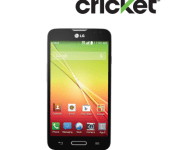
Cricket Wireless dials up $50 LG Optimus L70TM

Cricket Wireless on Wednesday announced the upcoming availability of a low-cost LG smartphone. Due Friday, June 6, the LG Optimus L70TM is an Android 4.4 KitKat experience with a 4.5-inch IPS display. Powered by a dual-core processor, the phone features a 5-megapixel rear camera, 1GB RAM, and 4GB internal storage. Like the bigger, more powerful LG smartphones this one features a number of custom software enhancements.
The Optimus L70TM will cost $49.99 after a $50 mail-in rebate.
The LG Optimus L70TM Arrives at Cricket Wireless this Friday
New 4G smartphone, packed with power, available for a limited time at $49.99 in stores and online after mail-in rebate
Alpharetta, Ga., June 4, 2014 – – Cricket Wireless today announced the LG Optimus L70TM, its latest slim, sleek smartphone powered by 4G. Starting this Friday, June 6, customers will get even more value with their wireless mobile service. For a limited time, the phone will be available both in stores and online at $49.99 after a $50 mail-in-rebate Cricket Visa® Promotion Card*.
The LG Optimus L70TM lets customers look their best at all times with powerful performance and a stunning 4.5” IPS Display—dressed up in a sleek, modern design. Plus, it features Android™ 4.4 KitKat, so users can stay in sync while on the go. Customers looking for a quality brand with a large display and upscale design will find the Optimus L70TM fits the bill. This smart phone comes equipped with a powerful dual-core processor — making difficult work a breeze, a 5-megapixel camera with flash and video, and a removable long-lasting battery to help power throughout a busy day.
Beyond the high-performance specs (display, camera, battery and processor), the Optimus L70 includes four popular features unique to LG:
- KnockCode – Simply and securely wake and unlock your phone at the same time by tapping a personalized 3-8 point passcode pattern anywhere on the screen.
- QuickMemo™ – Allows you to write or draw over any screen capture. Simply use your finger to jot down a note or add a personalized touch to any image to save or share.
- QSlide 2.0™ – Maximize on-screen multitasking with the simultaneous use of multiple apps; conveniently adjust the window size and transparency of up to two QSlide app windows, which float on top of the original screen.
- Informative LED – Lets you know if you have a missed event without waking the phone based on the flashing light pattern on the home button.
“Just a little over two weeks since we debuted the new Cricket Wireless, we’re excited to introduce a new device that will give our customers something to smile about,” said Andy Smoak, Cricket Wireless’ AVP of Product. “As promised, we will continue to deliver customers great offers and devices that won’t break the bank, as well as to provide greater value in their wireless experience. This is just the beginning; customers will see many more devices coming their way soon!”
The new Cricket offers value no-annual contract wireless customers appreciate, like uncomplicated and affordable service plans at industry leading prices starting at $35 a month after a $5 credit for using Auto Pay — including taxes and fees with no U.S. roaming charges. To thank loyal customers on Smart and Pro service plans, Cricket also offers customers, after 12 months of on-time payments, a $50 credit** every year toward any new phone purchase.
More than 3,000 newly redesigned and rebranded Cricket Wireless retail stores are open and ready to greet customers with these and more offers. For device images and other press materials visit our: new Cricket newsroom. To learn more about Cricket or find a store near you, visit http://www.cricketwireless.com and connect with us on Facebook at facebook.com/cricketnation and Twitter at twitter.com/Cricketnation.
The post Cricket Wireless dials up $50 LG Optimus L70TM appeared first on AndroidGuys.
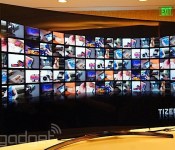
Samsung’s Tizen graduates from phone to television with smart TV prototype

Yesterday, Samsung released a developer kit that shows it’s planning on releasing a version of its open-sourced Tizen platform to run on smart TVs, not just wearables and smartphones. At the Tizen Developer Conference in San Francisco yesterday, the company unveiled its first ever Tizen TV prototype to show off exactly that. Installed on what appears to be a Samsung TV with a curved screen, Tizen’s smart TV interface is still in its early development stages, so it’s entirely possible that the interface on display at the conference might not make it to the final version. Yet, it’s a good indicator of Tizen’s potential, so naturally we had to take a closer look.
On the left of the Tizen’s smart TV home screen is a “Home Bar” navigation menu that lists top-level items such as Live TV, Photo & Video, Music, Apps and Source. To the right is a “Dynamic Bar” that changes depending on what section you’re in. The Music tab will reveal a list of albums, while Live TV would show current TV listings, for example. When asked how media would be loaded onto the television, a Samsung spokesperson said you’d transfer the files over USB. The Tizen OS also theoretically supports media streaming, but there’s not yet an app that can demonstrate that. You could also store those files and apps on the cloud thanks to a new Tizen online storage system called CloudBox.
Navigating through the different menu selections can either be done with a standard remote control or one that’s more like a wand, allowing you to move a cursor around like you would a mouse. What’s unique about the Tizen platform, however, is that you’re also able to use a Web-based remote with your phone without having to really pair the two. All you have to do is head to a particular URL on your phone’s web browser (either by typing it in or scanning a QR code) and you’ll immediately see buttons that correspond to the TV’s channel and volume controls. You’re also able to key in words via a wireless keyboard interface, which is far preferable to entering text with the remote control and an on-screen keyboard.

There wasn’t much in the way of apps, which is understandable considering how new the system is. Still, we did see a web browser as well as a dedicated YouTube application. The browser seemed rather zippy and smooth for the few minutes we saw it demonstrated, but of course it’s hard to really judge its performance in such a short time period. Samsung’s Executive Vice President Jong-Deok Choi said on stage that Tizen’s smart TV platform is designed to be very Web-friendly. Indeed, it’s apparently able to run web apps that are written in standards such as HTML 5 and Javascript, which opens the doors for all sorts of applications and programs to enter the smart TV space.
As Tizen is an open platform, Samsung tells us that other TV manufacturers would be able to adopt it as well. There’s currently no concrete date for a Tizen-based smart TV from the likes of Samsung, though Choi did hint on stage that a Tizen-based smart TV could be coming to the market “very soon.”
Filed under: Home Entertainment, HD, Samsung
 AIVAnet