


FCC Clears NVIDIA P2570, Looks Like the NVIDIA Shield Follow-up
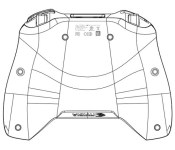
The NVIDIA Shield might not be selling into the millions. Heck, some of you might not have ever even heard of it before now. In the PC gaming world though it is definitely a device worth grabbing if you have a capable gaming rig. Seriously, how can you not want to stream your favorite PC game to a handheld? Anyways, there has been talks that NVIDIA would be bringing a Shield 2, or some name variant of that , to market at some point. NVIDIA kind of does what ever they want and that is fine by us. A recent FCC filing has been cleared that looks to depict a follow-up NVIDIA Shield.
 Sadly the image and the devices numbered name, P2570 (the original Shield was the P2450), is all the information that can be pulled from it. Now it is time to start wondering what the heck NVIDIA plans to do with the new addition. If we had to hedge a bet, we would say that we should expect the new Tegra K1 processor on board much like the new Project Tango Tablet has. We could see them going with 3 to 4 GB of RAM too. One thing we all really want to see is a big bump in screen resolution. The current 5-inch screen is only 1280 x 720 and with 2K dispplays already hitting phones, it would be pretty nice if NVIDIA followed suite and even bumped it to 6-inches. There is plenty of room in that clamshell to enlarge the screen and keep the same form factor.
What do you want to see in the next iteration of the NVIDIA Shield? How about carrier sales with 4G LTE services?
Source: FCC via 9to5Google
//<![CDATA[
ord = window.ord || Math.floor(Math.random()*1E16);
document.write('’);
//]]>

T-Mobile Launches ‘The Underground’; Limited Stock Special Edition Devices and More
T-Mobile has just launched a new program/website called The Underground. Near as the G+ post and the site describe, it would appear that T-Mobile will use it to direct your attention towards special limited addition devices and accessories.
 It will also offer up various news and reviews from the “tech literati”, but we don’t see anything on the page yet nor do we know who this tech literati will consist of. The first limited edition device that they have posted is the Gold Samsung Galaxy S5. We certainly hope they can do better than that and soon.
If you are a happy T-Mobile customer you might want to go ahead and bookmark the page and check back occasionally to see what else this “Underground” brings.
Via T-Mobile G+
//<![CDATA[
ord = window.ord || Math.floor(Math.random()*1E16);
document.write('’);
//]]>
LG G3 review: the company’s best phone yet

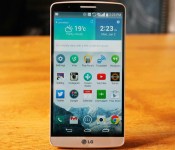
Bigger, higher resolution, simpler to use. That’s how we described LG’s latest flagship, the G3, when we finally got our hands on it last week. The headline feature is, without a doubt, that Quad HD (2,560 x 1,440) screen. I’ve been gazing at it intensely since the review unit landed in my hand. But, the G3′s not just a one-trick pony; there’s a lot going on under that “metallic skin.” Good thing there’s a full Engadget review here to tell you all about it.
Hardware
I already mentioned that display, but LG’s not scrimped on the rest of the spec sheet. In fact, it pretty much reads like an Android fan’s wish list. That means a 2.5GHz Snapdragon 801 processor, 3GB of RAM, 32GB of built-in storage, a 13-megapixel camera and, of course, that QHD screen. There’s also an option with 2GB of RAM and 16GB of storage if you don’t need all that memory (and like having more money). As for the design, the G3 has a sharp, modern look with subtle curves and a brushed-metal finish. Compared to Samsung’s “don’t ever change anything” approach, LG appears positively progressive, especially if we think back to the Optimus G. Last year’s G2 was a decently built, smart-looking phone, and the G3 inherits some of its charm (not to mention the G Pro 2′s). The primary difference between the G2 and its successor is, of course, the size. The G3′s 5.5-inch display makes the handset much larger — we’re well into (excuse the term) “phablet” territory here, despite this being marketed as a mainstream flagship.
In fact, the G3 has a bigger panel than the original Samsung Galaxy Note, which blew some people’s minds when it launched with its then-wrist-bending 5.3-inch display. But times change, and a 5.5-inch screen is no longer out of the ordinary. So, yes, this is a big phone — and while it definitely feels bigger than, say, the G2 or a Nexus 5, it’s worth remembering that other mainstream handsets like the OnePlus One carry a display the same size as the G3′s. In fact, both the Galaxy Note 2 and OnePlus One rock a 5.5-inch screen — the difference being both those phones sport wider frames. Perhaps I’ve adapted to larger phones over the years, but the G3 is easily the most comfortable handset of this size I’ve encountered to date. That said, it’s definitely still going to be a stretch for some people.

For example, as with the G2, all three of the physical buttons are located around the back, just under the camera lens. If you like to hold your phone firmly around the base, your digits need to travel quite a distance to reach them. And once they do, the combination of your grip around the bottom and your extended finger creates a kind of lever. So, when you try and push the button, there’s often not enough resistance and you need to either adjust your grip, or use your other hand. You’ll likely get the one-handed technique down with time, but it won’t suit every hand. A related issue is that the circular main/central button, which locks or unlocks the phone (the other two are primarily for volume control), is much more flush to the back of the handset. This is generally a good thing, as it means the G3 sits flat on a desk, but it also means that you’ll sometimes find yourself prodding at the camera lens situated just above it (which is also flat and round). Symmetry fans will love the G3′s rear, though, as the inclusion of an infrared laser for the camera gives it a nice, balanced design.
The “metallic skin” paint job (another one of LG’s marketing terms) is basically to brushed metal what Samsung’s latest phones are to leather — they look legit, but feel like plastic. It’s pleasing to the eye, and gives it a classy appearance, but if you’re a fan of cold, hard metal, it’s a bit disappointing. Luckily, it’s at least less susceptible to fingerprints than glossier materials — something that couldn’t be said for the G2. By contrast, the front is almost entirely dominated by the display; the bezels are narrow, save for the modest chin at the bottom, so the only splash of that metallic color up front is the thin strip at the bottom.

LG made a fair amount of noise over that floating arc design (i.e., the curved back). The idea being that, to counter the width increase that a bigger display commands, you taper the edges in, thus creating an illusion (in the hand) of holding a thinner, narrower device. I’d say it mostly works. The official specification claims the sides of the G3 measure just 2.7mm (0.1 inch) at their thinnest, growing to a still-reasonable 8.9mm (0.35 inch) at their thickest. The Galaxy Note 3 is only 3.6mm (0.14 inch) wider than the G3, but it’s much flatter, and feels all the broader for it in side-by-side comparisons.
The rest of the hardware is more utilitarian, but for those who want to know, here’s a quick run-through. The radios include 2G (GSM/EDGE), 3G (HSPA+ 42 Mbps/HSPA+ 21 Mbps) and LTE (SVLTE, CSFB, CA, VoLTE RCS, MIMO). There’s Bluetooth 4.0 (with aptX), 802.11a/b/g/n/ac, GPS and GLONASS, a 3,000mAh removable battery, IR blaster, microSD card slot, wireless charging and NFC. There’s also support for SlimPort and USB OTG. The 2-megapixel front camera has, groan-inducingly, been rebranded as the “selfie-camera.” Our handset has a subtle gold hue, but it’ll mostly be available in black and white (plus red and violet, depending on the market).
| LG G3 | |
|---|---|
| Dimensions | 146.3 x 74.6 x 8.9mm (curved) |
| Weight | 5.26 oz. (149g) |
| Screen size | 5.5 inches |
| Screen resolution | 2,560 x 1,440 (534 ppi) |
| Screen type | IPS LCD |
| Battery | 3,000mAh Li-Ion (removable) |
| Internal storage | 32GB |
| External storage | Up to SDXC standard/2TB theoretical |
| Rear camera | 13MP with OIS |
| Front-facing cam | 2.1 |
| Video capture | 3,840 x 2,160 (4K)/30 fps |
| NFC | Yes |
| Radios |
SK Telecom/ Korean Model: LTE (800/1800/2600) |
| Bluetooth | v4.0 |
| SoC | Qualcomm Snapdragon 801 |
| CPU | 2.5GHz quad-core |
| GPU | Adreno 330 |
| RAM | 3GB |
| Multimedia | SlimPort/DLNA |
| WiFi | Dual-band, 802.11a/b/g/n/ac |
| Wireless Charging | Yes |
| Operating system | Android 4.4.2 (near stock) |
Display

Did you hear? It’s Quad HD. That’s 2,560 x 1,440 if you prefer pixels, or 534 pixels per inch if screen density is your metric of choice. That’s not bad if we’re just going by numbers. The G3 isn’t the first phone with a screen of this resolution, but it’s the first of the current wave of flagships from the big names. In fact, I’m surprised Samsung didn’t endow the GS5 with a similar screen. That company loves being the first with such features, and (like LG) it makes panels itself, so it’s certainly capable. But, perhaps this is an indicator of just how far LG has come in the phone game.
Before we delve into how the display actually performs, there’s a bit of background worth mentioning. At the G3′s launch event, LG went out of its way to refute Steve Jobs’ claim that the iPhone’s Retina display surpasses what the human eye could detect in terms of detail. The truth, said LG’s Dr. Ramchan Woo, is more complicated than that. The theory is that the print world has known the resolution tipping point for some time. When it comes to displays, though, the digital ppi doesn’t directly translate from print dpi. In fact, it needs to be roughly double. LG’s calculations led to a magic number of (based on two x 270) 540 ppi, which the G3′s QHD panel just misses, at 534 ppi. Close enough, we guess.

So, how does it look? The short answer is: pretty great. The long answer, though, is more nuanced. High-resolution videos and images look pin-sharp and beautifully recreated — especially, and unsurprisingly, the pre-loaded (and optimized) content included in the Gallery app. Colors look vivid but not oversaturated; blacks are dark; and viewing angles are decent (though not quite as good as we’d expect from an IPS panel). The reality is, for most of your daily/vanilla Android usage — browsing, navigating menus and so on — that high resolution doesn’t make itself obvious. By that, I mean that everything looks more or less the same as, say, a regular HD display on a competing phone. Basically, then, if you were hoping for the OS to suddenly pop out at you with newfound crispness, it doesn’t. Icons do look sharper compared to, say, a Nexus 5. But even then, it’s only when you look at them side by side that you’ll notice.
All told, while it’s a great display, it’s a bit like having an HDTV in 2004. Great if you can get the content for it, otherwise it’s just a good TV. Over time, more and more apps and content will be made for such resolutions, but for now, they’re scarce. In fact, the resolution appears to make some apps incompatible — and unfortunately, the Play Store hides apps that won’t run on your phone. Usually this is to stop older handsets from downloading apps they can’t handle. But, if you try searching for Candy Crush Saga, for example, it won’t come up. So, whether intentional or not, it appears some developers haven’t optimized their apps for 2K/QHD displays yet.
Software

“Simple” was easily the dominant buzzword LG chose when marketing the G3. “Simple is the new smart,” and, “To be simple is to be great,” were some of the slogans of choice. That manifests itself in the G3 in a few software tweaks that (hopefully) improve the Android experience. As with any custom take on Google’s software, though, it can be a risk. Unique features can be as much a hindrance to the seasoned user as they are a help to the beginner (if they’re a help at all). Sometimes, though, you can strike gold and create something useful enough that it gets adopted by everyone, even on stock Android (think: Swype-style keyboards). Has LG cracked any such nuts this time?
Probably the “simplest” part of the software is the camera. Open it; point at your subject; tap the screen; and you’re done — picture taken. That’s the default mode, anyway. You can still access all the options (though there are fewer, in the name of simplicity), and change things up, but for the most part, this setup will serve you well. The main Android interface is flatter than before, and despite being a skinned version of the OS, it’s a relatively light one. It’s pretty much the standard Android home screen, just with LG’s custom weather widget at the top, which you can of course remove if you please.

There are other new touches peppered discreetly around the UI. One interesting addition is what LG calls “Smart Notice.” To use an obvious analogy, it’s like Google Now, just more focused on your usage of the phone. For example, if there’s a number you call often or receive calls from, it’ll suggest you add it to your contacts. Or, perhaps you skipped a call with a message saying you’ll call the person back? If, some time later, you don’t, it’ll prompt you to do so. In my testing, I didn’t get many notifications — just some birthday reminders — but I suspect this is a feature that becomes far more valuable over time. As with Google Now, Smart Notice have the potential to occasionally dazzle you, or even creep you out with its prescience; mostly, though, it’s out of sight.
Another addition is “Smart Tips,” which you can find by swiping right from the home screen. It sits in a window of its own that’s important enough to get a tiny “G” symbol instead of the usual bullet point along the bottom of the screen. It shares this space with LG Health (yep, an S Health rival). Open Smart Tips, and you’ll see a menu of options that by default includes Camera, Knock Code and Smart Notice. Bizarrely, all each menu does is open up a page with short YouTube tutorial videos embedded! I’m not sure what’s smart about that. They’re undoubtedly tips, though, so the name is at least half right. I did go back in later and see that different topics were available, so I guess the smart part might be that it learns what it thinks you need to bone up on. The weird thing is that Smart Tips occupies 50 percent of that special home screen (the one with the aforementioned “G” symbol), yet it isn’t something you’d refer to that often. You can remove the entire home screen if you like, but perhaps the better option would have been to devote that space to something other than LG Health and Smart Tips.
The rest of that screen is less wasteful. This is where you’ll find LG Health, the company’s health-tracking app. It’s also a bit of a dark horse. LG gave it nary a mention in the run-up to the phone’s launch, but it’s a well-implemented, surprisingly competent tool. When HTC launched the One (M8), it made a big deal about the phone’s new sensors and its Fitbit integration, allowing the phone to double as a fitness tracker. The problem was, it wasn’t very good — especially given the dedicated sensors. LG’s understated implementation, on the other hand, is pretty solid. I punched in my vitals (age, sex, weight, etc.) and checked back a little later. Sure enough, it had logged what seemed like an accurate amount of steps (it matched my Garmin tracker’s step count). I’ve also walked with the phone in hand, watching it count up accurately.

LG Health also allows you to log activities such as runs, walks, hikes and even inline skating sessions. This records a GPS-based map route and gets filed into a calendar for later viewing. You can pull up some basic statistics (calories burned, etc.) and even compete with friends. It’s perhaps not as feature-rich as a dedicated platform like RunKeeper or Strava, but for a freebie add-on that requires no extra hardware, it’s pretty good. As a bonus, I didn’t notice any impact on battery life, either.
Two other features LG was keen to make sure everyone knew about were Knock Code and the new keyboard. KnockOn was a new feature with the G2, and a bit of a novelty. Sure, it was kinda cool, but it was a party trick at best. Knock Code is its more powerful successor, and has already replaced KnockOn on the G2 and Flex. It’s here with the G3 right from the start, though, and it’s pretty handy — especially if you’re not a fan of the rear button configuration. Setup is easy; tap in a pattern, choose a fallback PIN and you’re set. Now, you can wake your phone and go straight to the home screen using your chosen tap pattern. This means you can open your phone quickly while keeping some sort of relative security. Of course, if anyone spots/guesses your code, you’re toast. Given that the backup is a PIN, it shares the same level of security as just having a four-digit code. A double-tap will still wake the G3 up, but only as far as the Knock Code entry screen (when enabled).
What of that new keyboard? The biggest news is that you can change its height to your preference. The reality is that most people will likely keep it as is, given that the “about halfway up” default is probably fine for most. Another useful feature: If you hold down the space bar and slide left or right, the cursor moves within the last typed word, which comes in handy for fixing typos quickly. The keyboard is also meant to learn your tap habits, so that if you keep thumbing “U” when you mean “I,” it’ll figure that out and fix those taps for you automatically. It’s hard to see if this is really happening with any consistency. I’m a swipe-input (or “Path” as LG calls it) kinda guy anyway, so this feature won’t be of much use if that’s your preference (or if you prefer another third-party keyboard). Still, it’s nice to know LG is trying to improve the experience.
Camera

I already touched on the camera UI. Basically, what you need to know is that the default UI is extremely minimal. Android’s menu ellipses are in one corner, and a back button can be found diagonally opposite. Give the screen a tap and, boom, you just took a photo. Like that, huh? It’s pretty nice. If simplicity’s not your jam, or you want to get into the options, you can do that too. You can even get the on-screen shutter button back if you wish. The number of camera modes, however, has been cut from 14 to four (dual, panorama, magic focus and auto). LG has also pared back the number of menu options overall, keeping things pretty simple.
There are no manual options for ISO, white balance or any of those types of settings. To make up for it, there’s a voice shutter option, which takes a picture when you say: “Whiskey,” “smile,” “cheese,” “LG” or “kimchi.” Amusingly (unsurprisingly?), the only one we could get to work reliably on our Korean version was “kimchi.” This feature works for both front and rear cameras, so it might be more useful for selfies. That said, there’s that hand-gesture option too. When using the front-facing camera, if you bring a hand into view and wait a moment, blue lines appear around it letting you know it’s been recognized. Then you can just make a fist and the camera counts down from three before taking a snap. It’s pretty cute. If you keep the camera in the most basic/default mode, with no menus to distract you, you’ll mostly be good to go. I was expecting that, as the whole screen has become a shutter button, I’d be taking accidental photos all the time just by holding the phone. But that hasn’t turned out to be the case.
Probably the main talking point, other than that 13-megapixel sensor, is the infrared laser focus system. This is something of a first on any camera, according to LG, and it’s a technology the firm originally developed to keep its robot vacuum cleaners from banging into walls. The conical laser can apparently focus the camera in just 220ms, blowing the competition (the GS5 and HTC One, for example) away. Those handsets take up to 300ms to focus, the company claims. That extra 80ms counts, we guess. In practical terms, while the camera definitely does focus and take pictures quickly, if no one had told us about this new feature, we most likely wouldn’t have noticed too much of a difference. It’s definitely quick, though, and that’s what counts.
As for the pictures themselves? Pretty impressive. There are, however, a few lighting situations that seem to cause it trouble. Sometimes when the sun is in shot, or at dusk, pictures can look a little washed out. Other times, the camera performed quite well, especially in lower light conditions. Taking photos around London as the sun went down, I was impressed by how low the noise was and how well colors were reproduced. Even at night, the G3 can pull off some good shots, provided you have a steady hand. The OIS also seems to help when taking candid shots, where you’ve gone from pocket to photo relatively quickly (and probably shakily), especially when using the screen as a shutter button.
The selfie camera around the front is different story. LG gave it larger pixels to help it under low-light conditions (where most selfies are taken, according to its research) but the result is a soft image that appears cartoonish at times, especially if you jack up the “beauty” filter. There’s a “flash,” too — but in reality it just shrinks the preview and projects a bright screen to light up your face. It’s nice that LG cares about selfies so much, but the flash doesn’t work well. If video’s more your thing, you can shoot up to 4K (if you have something to view it on.) Interestingly, there’s no native/2K option, though, which might have made more sense.
Performance and battery life

Given that LG has kept things light on the software front, there’s not a lot of bloatware going on. The main concern for both performance and battery life is probably that display. The first thing I noticed was the smallest amount of delay when flicking through menus. Everything opens quickly, and the scrolling is plenty smooth, but there’s just the tiniest of moments between moving your finger and the menu following along. It’s hard to tell if this has to do with the power needed to keep that display updated, or if it’s just the result of all the software and hardware elements combined. Either way, it’s the first time I’ve noticed anything like this with a box-fresh phone. To be clear, this is minor, but it’s something I noticed all the same.
There are a few other things we must mention at this point, too. The handset we were given is actually a Korean carrier model. That means there are likely some software tweaks that won’t be present on the official US/European models. It also means I was unable to test the LTE. As such, most of the performance and battery life observations are likely to be very close to, but perhaps not exactly what you can expect once the G3 goes official over here later this month.
| LG G3 | HTC One (2014) | LG G Pro 2 | |
|---|---|---|---|
| Quadrant 2.0 | 25,548 | 25,548 | 18,349 |
| Vellamo 2.0 | 1,405 | 1,804 | 1,672 |
| 3DMark IS Unlimited | 16,662 | 20,612 | 17,241 |
| SunSpider 1.0.2 (ms) | 918 | 782 | 727 |
| GFXBench 3.0 Manhattan Offscreen (fps) | N/A | 11.2 | 8.7 |
| CF-Bench | 24,667 | 40,223 | 36,840 |
| SunSpider: Lower scores are better; results compiled on Chrome. HTC One benchmarked on Android 4.4.2 | |||
With that caveat out of the way (and the benchmarks in), I can confirm it generally performs like a boss. During my usual routine tests of gaming (both casual and a bit of Real Racing), browsing and everyday business use, the G3 held up just as well as the HTC One and Galaxy S5. That is to say, its ample processor and RAM capacity mean it can handle pretty much anything you throw at it.
As for the less tangible aspects of usage (those that can’t be measured in numbers), it’s still good news. While I don’t have a huge dislike of Samsung’s TouchWiz interface, LG’s much cleaner UI reminds you how old-fashioned and dated the interface Galaxy users have to endure can feel. The near-stock experience is appreciated, and if LG ever makes a Nexus/Google Play version of the G3, I’d suggest it’s only really an issue for the Android purist.

Battery life was an area of particular concern. With so many pixels to take care of, the processor has some extra lifting to do. Add to this the fact that the screen is LCD (i.e., backlit) and not OLED (which only lights the required area), and you might think it’s a recipe for disaster. In fact, I was pleasantly surprised to find that the G3 can easily go a whole day (and often a bit more) without needing a top-up. This is without LTE running, but still with the moderate to heavy usage that being an Engadget editor requires. As for the more formal battery test, the 3,000mAh cell managed a reasonable 10 hours. We’ll be sure to repeat this test once we get a model with local LTE support.
LG says that to compensate for the demands of the display, it did some serious thinking about power consumption, making savings wherever it could. Whatever it did, it seems to have worked. If you’re a power user, or just like to be on the safe side, that cell is removable, meaning you can carry a spare if you like. The only downside is how long it takes to charge over USB. To be fair, the phone does tell you as much when you plug it in, so you can’t say you weren’t warned.
The competition
With the paint still wet on both the Galaxy S5 and the HTC One (M8), those two would seem like the likeliest rivals for your affection. Along with the G Pro 2, perhaps. The problem is, LG’s being tight-lipped about the official US price for the G3, which makes comparisons difficult. One UK retailer has pegged it at £500, and the Korean version can be bought right now for about $800 and up if you’re really impatient, but I would’t put much stock in those prices, as things could well change (we’ll update this review if they do). Pricing issues aside, the LG G3 might not have the depth-perceiving camera of the HTC One, or the heart rate monitor of the GS5, but it beats them both on a far more important (and future-proofing) feature — that display. Much of the rest will come down to design and software preference — and of course that price.
Wrap-up

I’ll admit, when I first laid hands on the G3, I wasn’t sure. I wanted it to be metal (as it appeared to be), but it wasn’t. I wanted it to be a bit smaller and more like the Nexus 5, but it wasn’t. I didn’t think I’d like the rear placement of the buttons, and I don’t. But, like two cops with different ideologies forced to work together on a crime, before long, these perceived negatives turned out to be charming qualities. The smooth, curved lines of the G3 make it feel like a much smaller phone. Those rear buttons mostly just need some muscle memory to get used to. And that metallic skin: It might not be metal, but it sure looks better than the G2 (or any Galaxy phone). That just leaves the positives. The display might not be quite as impressive as I’d hoped, but it’s still shines given the right content.
The camera is a great workhorse and will really turn out some good images, even under low light. All told, there’s little to complain about, save for the fact that our test unit was a Korean-specific model (I’d like to test the LTE and see how the battery holds out). So, when we finally do know the price, we can make a better call, but assuming LG doesn’t do something crazy, this should be one of the best Android phones you can buy right now.
Daniel Orren and Edgar Alvarez contributed to this review.
Filed under: Cellphones, Mobile, LG
Xbox One controllers now work with your PC

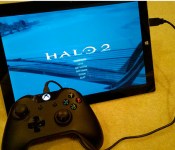
The Xbox One controller is a wonderful piece of gear, so it’s natural that people would want to use it with PC games, too. Right on schedule, but perhaps a year too late, Microsoft is now offering the drivers that’ll let the hardware work on desktops, laptops and suitably-equipped tablets. Such compatibility will be baked into a forthcoming Windows update, but if you can’t wait that long, you can pull down the software from Major Nelson’s website right now. The Xbone controllers will work with any game that supports the Xbox 360′s handset, but if you’d prefer to test it for yourself, you can always call your boss and tell them that you’re ill… or something.
[Image credit: Major Nelson]
Filed under: Gaming, Microsoft
Source: Major Nelson

The Big Picture: Preparing for a solar-powered flight around the world

Filed under: Transportation, Science
Source: Solar Impulse

Iconic album covers reimagined with the help of emoji

Some folks like to pass the time with a playlist or TV show while getting a treadmill workout in, but for musician Wesley Stace, it was the perfect time to recreate highly-recognizable album covers. Using his emoji library, Stace has since created over 50 such works that range from The Beatles’ A Hard Day’s Night to Pink Floyd’s Dark Side of the Moon and Springsteen’s Born in the USA. He tells Fast Company that what started as a way to pass the time turned into a guessing game of sorts, so he decided to beam them to Twitter. If you ask me, the emoji version of Nirvana’s Nevermind is quite stellar.
Classic Emoji album covers #11: Nevermind
Purported Nexus 8 images and specs leaked

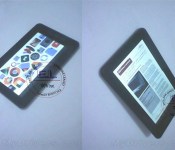
Leaked images claimed to be Google’s new Nexus 8 are making their way around the Internet. Besides showing a 7 to 8-inch device, not much else can be seen from the photos.
The Nexus 8, the follow up to last year’s Nexus 7 and possibly replacing the Nexus 10, is rumored to be unveiled at Google I/O in just a few weeks. Rumors have also suggested it will feature a 64-bit processor and be manufactured by HTC.
The purported images of the Nexus 8 come from MyDrivers.com, who claim that the device is wrapped in a protective shell to hide it from prying eyes. If it doesn’t have a case on it, that’s a pretty large bezel around the display, something that Google and nearly all manufacturers have been moving away from in recent years.
Also according to leaks along with these photos, it will come with a Qualcomm 64-bit processor, 3 GB RAM, and will run Android 4.5.
Nothing is confirmed until it’s official and hopefully we’ll see a new Nexus tablet sometime June 25 or 26.
Via G4Games

The post Purported Nexus 8 images and specs leaked appeared first on AndroidGuys.
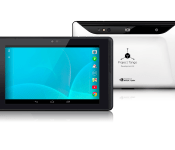
NVIDIA unveils Tegra K1-powered Project Tango tablet

NVIDIA on Thursday unveiled its Project Tango Developers’ Kit, which centers around a 7-inch Tegra K1-powered tablet. Packing 129 programmable GPU cores, it’s easily one of the most powerful devices of its kind and holds the keys to the future of mobile computing.
In addition to that beast of a processor, other hardware details include 4GB RAM and 128GB internal storage. What’s more, this monster runs Android 4.4 KitKat and features cameras and sensors for space, motion, and much more.
Game developers could, for example, use it to paint a 3D virtual battlefield in your living room. Or create large scale virtual and augmented reality experiences. Real estate companies could build interactive, 360-degree “fly-through” tours. Interior designers could scan a client’s home and test design ideas, such as moving walls or inserting furniture. Retailers can guide the user to specific places or products.
The Project Tango Tablet Developer’s Kit will be priced around $1,000 and is expected later this year.
The post NVIDIA unveils Tegra K1-powered Project Tango tablet appeared first on AndroidGuys.
iWatch Component Production Said to Start Gearing Up This Month, September Launch Speculated
Production of components for Apple’s iWatch is reportedly starting later this month, leading to speculation by Cantor Fitzgerald analyst Brian White that the device will see a launch as soon as September alongside the iPhone 6.
With the theme around wearable technology at Computex this year, our research has uncovered more data points as it relates to Apple’s “iWatch.” Our meeting with a tech supply chain company highlighted that initial production of certain “iWatch” components is scheduled to begin later this month and there are plans for a sharp acceleration into fall.
Given the trajectory of this ramp and our experience analyzing other product ramps at Apple, we expect the “iWatch” to be unveiled with the iPhone 6 in September. Since our research suggests the first iteration of the “iWatch” is more of a companion device, and thus requires a connection to an iPhone, we believe unveiling the two new devices at the same time makes sense.
White believes the iWatch will be available at several pricing increments much like the iPhone and the iPad, indicating that prices could start at $199 to $229 to compete with other smart watches currently on the market.
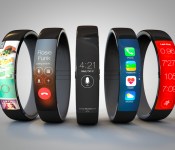
 iWatch concept by Todd Hamilton, based on the Nike FuelBand
Several other rumors have pointed towards a fall launch for the iWatch, with KGI Securities analyst Ming-Chi Kuo predicting a third quarter launch, which has also been echoed by various Asian news sources including the Economic Daily News and Digitimes. Apple is also likely aiming for a fall launch for its 4.7-inch iPhone 6, which could see the two devices unveiled together.
Little physical information has surfaced on the iWatch thus far, but supply chain rumors have suggested the device will come in two separate sizes (1.3 inches and 1.5-1.7 inches) to accommodate different sized wrists. It is also said to include a multitude of biometric sensors to measure various health metrics and it is also expected to interface with the new Health app in iOS 8.
White also believes that the 5.5-inch iPhone, which was rumored to be delayed due to production issues, could launch alongside the 4.7-inch iPhone and the iWatch. He released a report detailing his reasons yesterday and today confirms that research is “uncovering more evidence that the 5.5- inch iPhone 6 will launch this fall.”
Having previously predicted seemingly outlandish products such as the “iRing” able to control an Apple television set, Brian White does not have a particularly solid track record when it comes to predicting Apple’s plans, but with multiple rumors converging on a fall release date for both the iWatch and the two versions of the iPhone, it is possible we will see all three products before the end of the year.
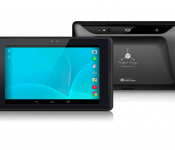
Project Tango Tablet Developers Kit Announced by Google; Packs Tegra K1, 4GB RAM and 3D Mapping Fun
Google has unveiled Project Tango Tablet Developers’ Kit today. It is pretty much the most badass tablet you can dream of owning so far, and that is putting it mildly.
 The Project Tango kit is a 7-inch Android powered tablet. Nothing amazing there. however, inside you find a NVIDIA Tegra K1 processor with a 192 programmable cores, 4GB of RAM and 128GB of internal storage. The front facing camera offers up 120 degree view and the rear camera is 4MP. There is third rear motion tracking camera too , along with a depth sensor. All of that means that the Project Tango Tablet can 3d scan rooms and create intense interactive augmented reality excitement. For instance, turn your living room into a battlefield, or scan a room and move things around for interior design.
What is Project Tango?
As we walk through our daily lives, we use visual cues to navigate and understand the world around us. We observe the size and shape of objects and rooms, and we learn their position and layout almost effortlessly over time. This awareness of space and motion is fundamental to the way we interact with our environment and each other. We are physical beings that live in a 3D world. Yet, our mobile devices assume that physical world ends at the boundaries of the screen.
The goal of Project Tango is to give mobile devices a human-scale understanding of space and motion.
Our team has been working with universities, research labs, and industrial partners spanning nine countries around the world to build on the last decade of research in robotics and computer vision, concentrating that technology into a unique mobile device. We are putting early prototypes into the hands of developers that can imagine the possibilities and help bring those ideas into reality.
We can’t forget to mention that the Project Tango Tablet also has Wi-Fi, Bluetooth LE and 4G LTE connectivity (depending on region and carrier, of course). Check out the cool little video they put out about it.
The Project Tango Tablet is being marketed toward developers and comes with a hefty price tag when it becomes available, $1024. Absolutely worth the money for the talent that exists in the world. We fully expect Google to show it off a bit at Google I/O and hopefully they will be able to give us all a little bit more hands on detail of how it all works. If you want to get on the list to be notified when the Project Tango Developers Kit is ready, pop on over to the sign-up page.
So, who is jumping on the list?
//<![CDATA[
ord = window.ord || Math.floor(Math.random()*1E16);
document.write('’);
//]]>
 AIVAnet