



Angry Birds Space receives a huge update

Rovio keeps on updating its Angry Birds Space game and this time Rovio is at it again in an ever bigger update dubbed “Beak Impact”.
The last big update was in September when it added 35 new levels to the game.
In the recent version 2.0 update, Rovio added 50 new levels to the game, which should be enough for all of you who love springing birds in the air. Levels are split into two parts along with some bonus levels and new mechanics such as gas tanks and asteroid showers.
If you’re interested, you can find out more details about it and download/update Angry Birds Space here, You can find more info regarding other Angry Birds games here.
SOURCE: Google Play

The post Angry Birds Space receives a huge update appeared first on AndroidGuys.

AT&T giving out $50 on Google Play with new lines of service

AT&T cooked up a pretty nice offer for those of you thinking of switching to the AT&T network or opening up a new line of service with the said carrier.
All you have to do is buy an Android device, smartphone or tablet, and you’ll get $50 of Google Play credit that you can spend on whatever you want. We don’t see a catch here, all devices are a go and it works with both “AT&T Next” and two-year agreements.
If you’re interested in the offerm you can find more information on AT&T’s website. The deal runs until July 17th.
SOURCE: AT&T
VIA: AndroidPolice
The post AT&T giving out $50 on Google Play with new lines of service appeared first on AndroidGuys.
New Galaxy Tab S images and details surface

Sammy’s new Galaxy Tab S is expected to be revealed on June 12 and thanks to some new leaks, we now know a little bit more about the device.
The leaks show off a 10.5-inch device that will be just 6.6 mm thin and weigh 465 g, and have the same texture on the back of the device as seen on the Galaxy S5. Along with this info, we get a bit more of a look into the features of the device, which include a fingerprint scanner, Remote PC, Ultra Power Saving Mode, Download Booster and a feature that appears to allow the user to take incoming calls from their smartphone directly from their tablet.
The new Galaxy Tab S 10.5 is also expected to sport a 2560×1600 AMOLED screen, after Samsung had a brief fling with LCD panels in their Galaxy TabPRO and NotePRO tablets. Other than the screen, an 8MP camera is expected as well as Magazine UX UI and Android 4.4 KitKat.
Via SamMobile


The post New Galaxy Tab S images and details surface appeared first on AndroidGuys.

Project Tango Tablets Announced! Amazon Phone Unveiled June 18th! – The ManDroid Show
 Happy Saturday Android friends. Usually the ManDroid Show is up on Friday, but it just didn’t happen this week. Project Tango tablet kits were announced, and the technology that this project is going to introduce will blow our minds hoefully. The Amazon Phone that has been rumored since cell phones came into existence, will finally be unveiled to us on June 18th, in Seattle. Curious to see this 3D UI we have been hearing about. Enjoy the show! News Topics Project Tango Tablet kits Amazon Phone June 18th event Galaxy F rumors
//<![CDATA[
ord = window.ord || Math.floor(Math.random()*1E16);
document.write('’);
//]]>

Weekends with Engadget: Apple’s developer conference, LG G3 review and more!

This week, we watched Apple announce iOS 8 and OS X Yosemite, reviewed the LG G3, gave Cortana a psych eval and investigated the reality of life with autonomous cars. Read on for Engadget’s news highlights from the last seven days. Oh, and be sure to subscribe to our Flipboard magazine!

Apple reveals iOS 8 at WWDC, available for free this fall
This week at its 25th annual developers conference, Apple unveiled iOS 8, the newest version of its mobile operating system. Design-wise, it looks a lot like iOS 7, but there’s a bunch of brand new features under the hood, including a health app, widgets, and yes, third-party keyboard support!

LG G3 review: the company’s best phone yet
The G3 may only look like it’s made of metal, but we’re not holding any grudges. LG’s 5.5-inch handset has 10-hour battery life and top-shelf specs, not to mention the nicest display on the market. Assuming it’s not too pricey, the G3 could be one of the best Android phones available.

OS X Yosemite: Apple’s latest desktop operating system is free this fall
Apple’s next desktop operating system is called Yosemite, and will arrive as a free upgrade this fall. Besides getting a few slight UI adjustments, the OS gained a pumped-up version of Spotlight and Safari, as well as a new AirDrop feature that let’s you seamlessly transfer work between all of your Apple devices.

What you need to know about the ‘right to be forgotten’ on Google
Thanks to a recent case between Google and Europe’s biggest court, European users have the “right to be forgotten.” Read on as our own Matt Brian breaks down the ruling and what it means for you.

Here are a few lesser-known new features in iOS 8
This week, Apple unveiled a bunch of new features coming to iOS 8, but many of them didn’t make it to the spotlight. Read on as our own Brad Molen uncovers a few of the lesser-known but awesome additions to the mobile OS.

Apple attempts to conquer the connected home
Many companies have tried their hands at home automation and failed to stir things up. Android @ Home ring any bells? With its new HomeKit platform, Apple might have the market power to pull it off, but can it succeed?

Her name is Cortana. Her attitude is almost human.
Confident, caring, competent: these are just a few of the terms Microsoft’s Susan Hendrich uses to describe Cortana, the personal assistant with attitude. Read on as our own Brad Molen investigates the lovable AI’s development and the real-life personal assistants behind her demeanor.

An up close look at the giant gaming PC that’s also a desk
What you’re looking at is Lian Li’s DX-01: a sleek, glass-faced office desk that happens to have a high-powered PC stuffed inside. What’s more, you can buy it right now, starting at $990. That’s just for the empty case, though — you’ll have to get all the computer bits yourself.

What you need to know about self-driving cars
Self-driving cars have the potential to make our roadways safer and more efficient, but what does a world full of AI-controlled vehicles really look like? Read on as our own Sean Cooper explains the reality of life with autonomous cars.

Intel: Where we’re going, we don’t need cables
What do devices of the future look like? Intel believes they’ll be cordless, portless and won’t need any passwords. Read on as our own Dana Wollman investigates the company’s vision for 2015 and beyond.
Filed under: Misc

IN BRIEF: 5 Android related things you might have missed (June 7)

Welcome back my Android friends it’s time for another “IN Brief”. Today we’re going to take a look at some news that you may have missed during the week.
There was a new version of fitness app Runtastic introduced this week. The update includes some great new features such as
- Google Street View: This mode allows users to view a recap of their recently completed run in Google Street View along with panoramas of the places that they have passed.
- “Challenge a Run”: This mode allows runners to compete with their past run times.
- 2 New Story Runs: Alcatraz 2 and Weight Loss. These are interval based training modes that help your run to be a little more fun.
- New feature presentation element: This helps users get familiar with the new functionalities in a more detailed, engaging way.
These new features are available now
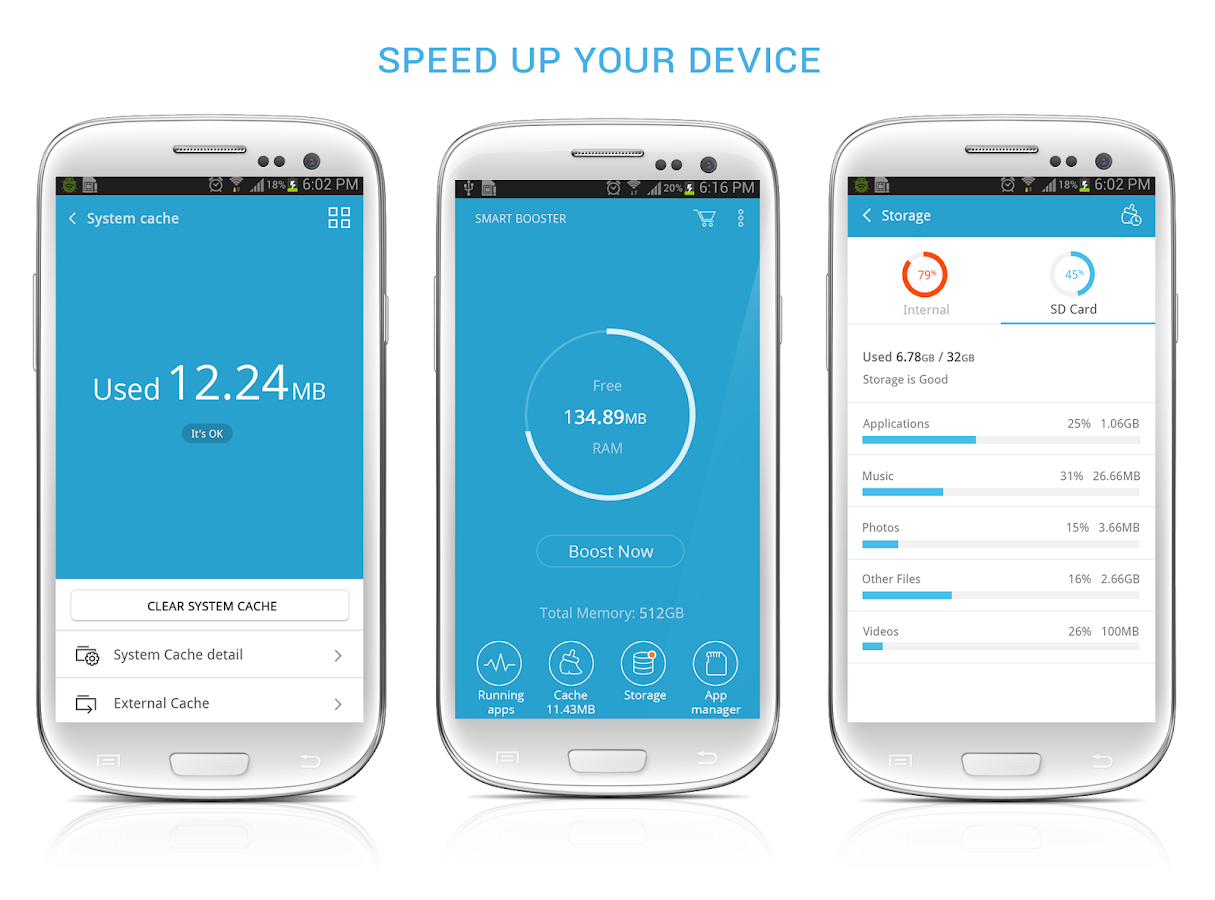
Android optimization app Smart Booster has just received an updated look. Devoloped by ANTEK MOBILE this app allows you power users to do some rather cool tweaks to your device such as..
- Smart RAM Booster
- Fast Cache Cleaner
- Quick SD Card Cleaner
- Advanced Application Manager
SMART BOOSTER just recently reached the 5,000,000 installs milestone and in celebration the premium version of the app is on discount 30% off for one week.
The very popular game The Sandbox will be coming to the Android powered console OUYA this summer for free with in-game purchases. THE SANDBOX gives players the powere to create their own world pixel by pixel and offers features such as…
- Total freedom to create your world, your way—freely place, erase, and replace elements to shape the environment as you see fit.
- 150 dynamic elements to experiment with—combining elements creates new, and sometimes unexpected, results.
- Hundreds of campaign levels to direct your world building—from making mud from water and soil to creating complex electrical circuits, campaign levels provide a smooth introduction to The Sandbox’s mechanics and an intense challenge once players get up to speed.
- Play, rate, modify and upload your own created world in the Online Gallery, already featuring more than 750,000 players creations.
- OUYA optimized controls—the touch control scheme has been carefully rebuilt for OUYA, bringing the world-building experience to life on the big screen.
Just when you thought you would never hear anymore about the classic Angry Birds franchise, developer ROVIO has announced that they will be spinning off the series with new addition “Angry Birds Stella”. This new addition to the Angry Birds franchise will have its own games, animation, books, consumer products & more. ROVIO will be releasing more information about the series at a later date but until then check out a few screens of the upcoming spin-off
 .
. 

Lastly we have some statistics on Android 4.4 KitKat’s market share. KitKat is now installed on 13.6 percent of all Android devices now. That’s a huge jump considering that only about 2.5 percent of Android devices were running KitKat as early as March of this year. While 13.6 percent is a big jump here’s hoping that more devices are moved to the latest version of Android as quick as possible.
The post IN BRIEF: 5 Android related things you might have missed (June 7) appeared first on AndroidGuys.

IRL: Choosing the Nexus 5 over the Moto X (and the Galaxy Note, too)

I enjoyed using the Nexus 4 during my time with it last summer, but its short battery life, glass back and quirky camera behavior made it tough to truly love. The Nexus 5 is theoretically a different beast: it addresses all those flaws while introducing huge leaps in performance and display resolution. I was tempted enough by those upgrades to buy the new phone and give it a spin on Rogers’ network here in Canada. Would it be the Nexus phone I’d always wanted, and make me forget about other Android flagships that launched at the same time, like the G2 and Galaxy Note 3?
For the most part, yes. I’d prefer something closer in size to the compact Moto X, but the Nexus 5 is easier to hold than the Nexus 4, let alone the Note 3 (which, as good as it may be, isn’t exactly built for one-handed use). The battery isn’t as long-lasting as the G2′s, but it’s better than the Nexus 4′s — enough to comfortably last through one of my nights out. That’s impressive given both the eye-pleasing 1080p screen and the upgrade to LTE, both of which I abuse all too often through Instagram and Twitter. While its photography won’t challenge that of a Lumia 1020 or iPhone 5s, this is the first Nexus whose camera seems truly usable in less-than-ideal conditions. It’s undoubtedly a better camera phone than the Note 3, both of which struggles in low light; the Galaxy S5 is far better, but it also came out several months later.
The real delight has been Google’s implementation of Android 4.4 KitKat. It’s not a revolutionary OS upgrade, but I appreciate both hands-free voice search from the home screen as well as quicker access to Google Now. The very nearly stock interface is also extremely responsive on the phone’s Snapdragon 800 processor. Frankly, it’s hard to go back to a phone with a heavily customized take on Android. While a phone like the G2 is still very quick, lasts longer on battery and has features I’d like — such as double-tapping to wake the screen — there’s something refreshing about Google’s unintrusive interface.
No phone is perfect, of course, and the Nexus 5 still leaves plenty of room for improvement. I don’t mind the lack of storage expansion or the non-removable battery, but I can see why that would irk some potential users. Although firmware updates and the Google Camera app have gone a long, long way toward improving the Nexus 5′s photographic experience, it’s still not the fastest or most feature-packed camera phone available. I miss the always-on voice search of the Moto X, for that matter. Still, the Nexus 5 makes it hard to go back to other Android phones. Although different devices may have larger batteries or useful software, the Nexus 5 is very well balanced overall — especially for something that costs so little off-contract.
Filed under: Cellphones, Mobile, Google, LG

Format Wars: Blu-ray vs. HD DVD

The format war. Over the last few decades it has played out across various forms of tech — AC vs DC, VHS vs. Beta — usually with fierce battle lines drawn and millions or even billions of dollars at stake. Recently, none have burned so brightly as the battle of HD DVD vs. Blu-ray (read our blow-by-blow retrospective here). And it brought all the classic elements: Sides were divided between titans of the industry, led by Sony pressing the Blu-ray side and Toshiba backing HD DVD, with the PS3 and Xbox 360 ready to serve with as trojan horses. As if the the stakes weren’t high enough already, the specter of an oncoming internet streaming winter loomed like Game of Throne’s army of White Walkers. So what really happened, and who won in the end?

Looking back to 2005, HDTVs were finally available everywhere, but not everyone had one yet. A study by Leichtman Research Group would put the adoption rate at about 12 percent by the end of the year, and Nintendo even declined to make an HD-ready version of its new game system, the Wii. It was nearly impossible to buy movies in high definition, with cable or satellite broadcasts left as the only easy option. DVD player-based upscaling promised to make movies look better on HDTVs, but couldn’t quite compare with the resolution of the real thing. There was a light on the horizon, however: Sony and Microsoft were both ready to place calculated bets on the “HD Era” of gaming, and the PS3 would even arrive with a Blu-ray player built-in. Microsoft stuck with plain DVDs, but promised an HD DVD add-on for the future.

The consoles’ arrival turned out to to be particularly welcome too. The first dedicated players to ship were crudely designed, made from left-over laptop parts, slow, glitchy and retailed for around $500 (HD DVD) or $1,000 (Blu-ray). At the time, concerns over DRM like the “Image Constraint Token” that could block HD playback on TVs without copyright protected HDMI jacks ruled the day and we weren’t sure 50GB Blu-ray discs would actually appear — neither issue amounted to much. In time, the players got better and cheaper, and after a while, it was actually normal to see new movies released on HD formats alongside DVDs. In the end, Sony’s Blu-ray format eventually prevailed and is still going strong as we speak. But the path to that victory was a costly one for Sony.
The Competitors: Sony vs. Toshiba
On one side, Sony promised its Blu-ray format could handle capacity (50GB) and even interactivity (BD-J) that we’d never seen before. While Toshiba claimed HD DVD could make up the gap in capacity (30GB max) and technology by being cheaper and easier to manufacture with plants that were already making DVDs. As for content, major studio support weighed heavily in Blu-ray’s favor, whereas only Universal stood in favor of HD DVD. I hedged my bets by purchasing both the HD DVD add-on for the Xbox 360 (it was bundled with Heroes season one — a decision I stand by), and a PS3. Considering the content advantage, it’s really no surprise that HD DVD failed as the only viable alternative was some sort of hybrid push that incorporated Blu-ray. That was a gap both LG and Samsung tried and failed to close with hybrid players. Warner Bros. considered making a play for the space with expensive dual-sided discs, but never actually put them on sale.
And the winner is…

Once Warner Bros. dropped support for HD DVD on the eve of CES 2008, the war was over. Sony had successfully pushed Blu-ray into millions of homes with its PS3 trojan horse; this, despite trailing Xbox 360 and Wii in sales during the early days of the console war. Effectively, it was Sony’s decision to make HD discs standard for the PS3, as opposed to an optional add-on, that led to a hardware gap HD DVD could never surmount. Add in the overwhelming studio support on the Blu-ray side, and it’s clear in retrospect that only stubbornness (and a few contractual obligations) kept things going as long as they did. Toshiba threw in the towel just over a month after Warner Bros.’ CES announcement, and the fledgling HD DVD library was rendered obsolete; now mere collector’s items for a scant few.
The price of success

So to the victor goes the spoils, right? Not quite. While Sony’s Blu-ray format prevailed, it never quite turned into the cash cow its backers originally predicted. Blu-ray still hasn’t unseated DVD as the primary physical movie delivery format, and it’s being squeezed out of relevance on the other end by the rise of video on-demand and streaming. This year Sony took a $240 million hit because of “demand for physical media contracting faster than expected,” something that’s not helping its ongoing attempts to dig out of a massive financial hole. It could be worse though, as Toshiba is suffering the indignity of selling Blu-ray players of its own and facing the same declining PC and TV sales that have hit and crippled Sony.
LG and Samsung took a different approach to the format war with (token) attempts to support both sides, and by shifting focus to mobile, have seen significant growth. Microsoft failed to see the HDi interactive tech it contributed to HD DVD catch on, but its Xbox 360 led the video game console sales charts for years — and never once, despite many rumors, appeared with an internal HD DVD drive. Microsoft also jumped on the Netflix streaming fad early in 2008 before even the PS3 and Wii scored access. Now, the Xbox One plays games and movies alike from Blu-ray discs, to go along with cable TV hooks and streaming apps, and it’s almost not weird.
Despite years of rumors it would jump into the format war, Apple never did, and never has. It ran the other way, largely ditching support for optical discs on its machines and to this day, it still doesn’t make a Blu-ray drive for Macs. Its iTunes video on-demand store is a leader in digital movie sales, and the Apple TV hockey puck has ridden a rising tide for streaming boxes to sales of over $1 billion last year. Internet movie services and connected devices are rising rapidly in popularity, with Netflix topping 40 million subscribers and Google’s Chromecast dongle selling “millions” of units.

Sony’s win has its benefits though, and company has definitely turned things around with the PlayStation 4. The console hasn’t ushered in a new format, but it’s enjoying a sales lead that continues to grow. The PS4′s also built with an eye to the future: Sony’s hosting a beta program (PlayStation Now) for streaming games and promising an internet-delivered TV service later this year adding to its Blu-ray movie playback and healthy suite of streaming video apps.
Blu-ray isn’t ready to be written off either, as disc sales continue to grow slowly, and studios pack in digital copies to increase their appeal. The advent of Ultra HD could also be a bonus, as execs have told us a spec bump is being discussed.
So what did we — the consumers who actually buy all this stuff — get?
Unfortunately, the format war separated content for exclusives and caused studios to stagger movie rollouts. Partially as a result even now, some classics (or cult classics) are either still unavailable in HD or are just hitting shelves. Also, copy protection is both as tight as ever, and as ineffective. Movies are consistently available as rips at or before their disc release. And even the PS4 requires a workaround just to enable video capture for games, among other DRM headaches. While schemes like digital copies and Ultraviolet have provided some portability, promised features (managed copy) have never arrived and moving content beyond the disc is still far more complicated than it should be.

On the other hand, we were promised a movie experience at home that finally truly rivaled what’s available in theaters, and I think that bar has been met. The streaming push is bringing set-top boxes that support more than one service, but that doesn’t mean the days of the video format war are over, they’ve just changed battlegrounds. Every delivery service (i.e., Netflix, Amazon, Hulu, cable TV) has its own exclusive content, and it’s nearly impossible to get them all in one place — with the amount of money at risk, it seems we’ll never learn a different way to do this.
[Image credit: Gary Gardiner/Bloomberg via Getty Images, ASSOCIATED PRESS, Justin Sullivan/Getty Images, ASSOCIATED PRESS, BUILT Images / Alamy]
Filed under: Home Entertainment, HD, Sony
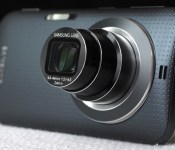
Galaxy K Zoom review: Samsung’s best cameraphone yet

Samsung is on a mission to build the perfect cameraphone. Low-quality fixed lenses and tiny smartphone sensors are clearly insufficient for photography enthusiasts, but while you always bring your phone to parties, sporting events and trips to the zoo, it’s often impractical to haul along a dedicated camera as well. The Galaxy K Zoom is Samsung’s response to this dilemma, marrying a 10x optical zoom lens with an otherwise ordinary Android handset. It’s hardly the best camera, or the best smartphone, but if you’re willing to make some compromises, this may just be the most compelling option yet.
Hardware

Last year’s iteration, the Galaxy S4 Zoom, was significantly underpowered, making for a generally unpleasant experience. The hybrid felt sluggish regardless of whether you were trying to take a picture, surf the web or make a phone call — it was a weak performer through and through. Fortunately, the K Zoom represents a step up from its 2013 predecessor. It’s hardly on par with the Galaxy S5 or flagship phones from other manufacturers, but it’s an improvement nonetheless. So if you’re looking to step up to a faster device with a similar feature set, you’ll get that here.
That said, you could certainly do better than the K Zoom in the sub-$700 price range. Samsung cut corners on specs in order to keep costs in check, and it shows. The device is powered by what the company’s calling a hexa-core processor, pairing a quad-core 1.3GHz Cortex-A7 with a dual-core 1.7GHz Cortex-A15 to make up Samsung’s Exynos 5 Hexa chipset. That sounds really great, doesn’t it? In practice, though, the device still feels sluggish, as I’ll explore further in the performance section below. You also get 2GB of RAM, 8 gigs of internal storage and support for up to 64GB microSD cards, which you’ll definitely need to add in if you plan on taking advantage of the photo functionality.
Also lacking is the 4.8-inch Super AMOLED display. It sports a 720p resolution, which just doesn’t quite cut it in this day and age. The screen size is adequate, and the smaller footprint does help to keep the K Zoom pocketable despite its rear-lens bulge, but Samsung really should have included a 1080p display here. Still, it’s a major step up from the S4 Zoom’s 4.3-inch, 960 x 540 panel, which, quite frankly, was an incredible disappointment. This year, details look sharp and the screen is bright enough for adjusting settings, verifying focus and reading text even in bright light, but there’s definitely still room for improvement.

Design-wise, the K Zoom has a slightly more premium look and feel than its predecessor. It’s clearly a hybrid of the Galaxy S4 and S5, with a front that’s more akin to the former and a removable, plastic back cover that’s nearly identical in appearance to what you get with Samsung’s 2014 flagship. It’s an attractive mash-up, no doubt, but it definitely lacks the high-end appeal of the HTC One M8, for example. Whereas the S4 Zoom looked more like a camera than a smartphone, with a pronounced grip on the rear, the K Zoom more closely resembles a phone. In fact, until you flip it around to reveal the lens, it looks like a slightly thicker Galaxy S4.
As for the hardware layout, there’s a home button below the display; a dedicated shutter button, power toggle and volume rocker on the right side; a headphone jack on the top; a micro-USB connector on the bottom; and a microSD slot on the left side. The microphones are positioned on the left and right of the K Zoom when held horizontally and, just as with the GS4 Zoom, they’re arranged in such a way that they can be easily blocked depending on your grip. The 10x, 24-240mm f/3.1-6.3 lens is positioned on the back, along with a slim, horizontal flash. Finally, there’s a 2,430mAh battery behind the removable cover with a micro-SIM slot underneath.
Software and user interface

The K Zoom ships with Android 4.4.2 (KitKat) and Samsung’s TouchWiz interface. I tested a model that’s being sold unlocked in Taiwan, so there are no carrier apps to speak of. You do get Samsung staples like S Voice and Dropbox pre-installed, and you can download more through Samsung Apps. Navigating the phone portion of the K Zoom was a breeze — the device is clearly powerful enough to handle basic tasks without issue, though I did run into some hiccups when using the camera.
You can launch photo mode by sliding the camera icon from the lock screen, by pressing down on the shutter release for one second or by opening the app directly. The three-tiered lens extends immediately, effectively doubling the K Zoom’s thickness at the widest focal length. You can zoom using the volume rocker (left to zoom in and right to zoom out), by pinching on the touchscreen or by using the on-screen zoom toggle. I found the first option to be most effective for still photos, while tapping the screen minimized shake when capturing video. The pinch-to-zoom option was the least precise of the bunch.

The camera includes a variety of shooting modes, including Auto (the default), Pro Suggest (which recommends a selection of filters depending on the scene), Program, Beauty Face, Shot and More (for burst shooting), Panorama, HDR, Night, Continuous Shot and Selfie Alarm (it automatically snaps a shot when it detects your face in the frame). There’s also an option to add more modes though the “Manage Modes” panel. Here you can choose from Kids Shot, Macro, Light Trace and Sunset, just to name a few.
There’s also a mode called Virtual Tour, which creates a walking photo tour of your surroundings. I could see this being useful for realtors and the like, but with poor in-camera stitching, the results are hardly professional. You even get a “Manual” mode, which lets you select the ISO, shutter speed and aperture, though oddly you’re only able to choose from the largest or smallest aperture available — nothing in between.

A main camera settings page enables more granular options. Here you can select the resolution, aspect ratio, compression quality, white balance, focus, drive mode, timer, flash mode (also accessible from the main shooting screen) and image effects. You can also activate geotagging, which tags each image with your GPS coordinates while also adding the nearest street to the filename, making it easy to identify shots from a specific location on the fly.
Camera and image quality

Let’s assume you’re buying the K Zoom because you like to take pictures. Besides the 20.7-megapixel, 1/2.3-inch sensor, which is on par with many lower-end point-and-shoots, the phone offers one distinguishing feature over similar handsets: a 10x optical zoom lens. You get less than half the range of the Galaxy Camera 2, which includes a 21x lens, but the 24-240mm range is still plenty generous, and far more versatile than what you’ll get on any current mainstream smartphone. That lens will let you zoom in very close to your subject, making for much more interesting Facebook posts and Instagrams.
Speaking of Instagram, you still can’t zoom directly from within the app. When we spoke to Samsung reps following the launch of the first Galaxy Camera, we were told full compatibility was on the way. That was nearly two years ago, so it’s probably safe to assume the tried-and-true method of capturing a photo first and then pulling it up in the Instagram app is going to be your only option for the life of this device. It’s hardly a dealbreaker, but considering instant social sharing is part of the K Zoom’s appeal, it’s disappointing nonetheless.
Getting into photo mode is also quite a hassle. Other cameras are ready to start shooting as soon as you hit the power button, but the K Zoom defaults to the home screen. Of course, you’ll probably be using this primarily as a phone, so that would be our preference too, but it does add a few seconds between when you decide you want to take a picture and when the camera’s ready to capture. If you’re looking to photograph a quick-moving subject, you’ll probably miss the shot. For selfies (there’s also a front-facing camera), shots of your food and the like, that’s not the end of the world, but considering it could take five seconds or longer just to snap an image, you’re bound to find this inconvenient at some point.
That brings me to another annoyance. The K Zoom defaults to a 16:9 aspect ratio, matching the phone’s display. Shots fill the screen entirely, which looks most natural on the device. But when you go to share photos or view them on a computer, you’ll probably be a bit frustrated, as I was after a few hours of shooting in the wrong format (as you’ll see in some samples below). At 15.1 megapixels, 16:9 photos also don’t take full advantage of the 4:3 sensor. You’ll need to switch into that mode to capture at the full 20 megapixels. There are also options to shoot at 3:2 (17.9MP) and 1:1 (8.3MP), if you prefer. For video, you can choose from 1080p at 60 or 30 frames per second, 720p at 60 or 30 fps or VGA.
Not that video is the K Zoom’s strong suit. Video quality is generally rather poor, particularly at longer focal lengths, where the absent image stabilization would have come in handy. You can tap to focus and expose, as you can when capturing stills, but brightness levels were often exaggerated, depending on the scene. Additionally, the camera reduces the microphone volume slightly whenever you zoom in or out, likely to avoid capturing sound from the lens motor. It’s effective in that regard, but the result is noticeably inconsistent audio.
Image quality is also hit or miss. Because of the large maximum aperture range, the lens performs much better at the wide angle than when you’re zoomed all the way in. The result is much sharper images at 24mm than you’ll get at 240mm, particularly when you’re shooting indoors, at night or on a cloudy day, as I did on my trip to the Taipei Zoo. The K Zoom’s biggest asset is its zoom lens, but image quality will definitely suffer if you try to take full advantage.

Assuming you plan to share images on social media straight from the camera, you’ll probably use the K Zoom to capture your food. Generally, the food photos I captured were properly exposed with good color balance (often a challenge in dim restaurants) and reasonable sharpness. Shooting in Auto, the camera opted for an exposure of f/6.0 and 1/32 second with a sensitivity of ISO 400. The image is mostly noise-free at a wider view, so it should be fine for sharing, though noise is clearly visible in the 1:1 inset.

The first few images I captured, including this one, the one above and the one below, were shot at the K Zoom’s default aspect ratio of 16:9. You can switch to a more common ratio very quickly through the settings menu, though, which I’d definitely recommend if you plan on sharing your photos. The image is roughly 1/2 stop underexposed, at f/4.9 and 1/20 second with a sensitivity of ISO 125. Text is legible, though you can see some artifacts in the 1:1 inset.

I switched over to Program mode for this shot, manually adjusting the sensitivity to ISO 3200 in order to capture sharp details in a dim room with a focal length of 240mm — in Auto, this f/6.3, 1/80-second capture would have been a blurry mess. The camera’s noise reduction filter stepped in here, effectively removing some noise, but flattening details in the process.

Typically, the K Zoom will top out at ISO 400 when you’re shooting in Auto mode, regardless of whether or not the situation requires a higher sensitivity. Details are surprisingly sharp in this f/4.4, 1/18-second handheld exposure, though noise is clearly visible in the 1:1 insets.

A 1/40-second exposure (at f/6.3) was clearly insufficient for this handheld shot at the camera’s maximum focal length of 240mm. Additionally, the K Zoom overexposed the scene slightly, washing out details in the trees in the background and the bear in the foreground. At ISO 160, noise is visible in the 1:1 inset, and details are soft due to blur. Image stabilization would have been a huge asset here.

This f/6.3, 1/40-second image is very slightly overexposed, with few washed-out details. Colors are accurate and details are reasonably sharp, with artifacts visible only in the 1:1 inset. The camera opted for a sensitivity of ISO 125 for this capture — noise is only barely visible when viewing the shot at 100 percent.

This is one of the K Zoom’s most successful captures. It’s properly exposed at f/4.7 and 1/90 second, and a sensitivity of ISO 100 helped to minimize noise, even when viewed at a 1:1 ratio. Colors are accurate and details are perfectly sharp for sharing on social media.

This final frame, also at ISO 100, was captured at f/4.6 and 1/54 second, yielding sharp details. Some elements are slightly overexposed, such as the man’s white shirt and the Chinese portion of the Taipei Zoo sign, but the vegetation is spot-on, with accurate colors throughout.
Performance and battery life

The K Zoom is hands-down a better camera and a better smartphone than the Galaxy S4 Zoom. Performance is significantly improved — the K Zoom is definitely in an entirely different class. It’s not, however, anywhere near as capable as flagship smartphones like the Galaxy S5, LG G3 and HTC One M8. Not that it needs to be. The Zoom handles basic tasks and apps with ease, and while it’s sluggish in camera mode at times, the biggest performance-related issue has to do with battery life.
| Galaxy K Zoom | Galaxy S4 Zoom | LG G3 | |
|---|---|---|---|
| Quadrant 2.0 | 14,633 | 4,828 | 25,548 |
| Vellamo 2.0 | 1,696 | 1,712 | 1,405 |
| 3DMark IS Unlimited | 9,359 | N/A | 16,662 |
| SunSpider 1.0.2 (ms) | 1,090 | N/A | 918 |
| GFXBench 3.0 Manhattan Offscreen (fps) | 3.6 | N/A | N/A |
| CF-Bench | 30,421 | 7,952 | 24,667 |
| SunSpider: Lower scores are better; results compiled on Chrome. | |||
On the surface, the K Zoom’s 2,430mAh battery performs very well. In our formal rundown test, the phone lasted for nearly 10 hours of 720p video playback with the display fixed at 50 percent. That’s actually on par with the Galaxy S5, which delivered roughly the same longevity with this particular test. That phone has a 2,800mAh cell on board, but it’s powering a much larger (5.1-inch) 1080p display. So, if you’re planning to use the Zoom for email, web browsing and consuming media, you should be able to make it through an entire day.

Capturing content is an entirely different story. My planned full-day outing was cut short when the battery died at 3:17 in the afternoon, having been chugging along since just before 9 o’clock that morning. During those six and a half hours, I spent about two hours shooting more than 350 photos and 15 minutes of HD video, an hour navigating Taipei using Google Maps, a few minutes uploading pictures to Instagram and Hangouts and the rest of the time idling, with the phone in standby mode in my pocket.
The depletion rate ranged from 10 percent per hour when using the K Zoom for ordinary smartphone activities to 60 percent when capturing 1080p video, so if you’re planning to shoot for more than an hour or so each day, you’ll absolutely need to bring along an extra battery. Assuming you’ll use the K Zoom as you would your current smartphone, capturing only the occasional still photo or video clip each day, you should do alright, but if you expect to snap hundreds of pictures each day on vacation, as many photographers do, the battery’s performance is unacceptable.
Wrap-up

Samsung has yet to announce US pricing and availability for the K Zoom, but it’s now available in Europe and select countries in Asia. In the UK, the phone is priced at £400, while elsewhere in Europe it can be had for €499. Considering both of those prices come in around $680, it wouldn’t be unreasonable to expect the Zoom to run upwards of 600 bucks if it ever hits American shores. That’s a lot of cash for a smartphone that lacks flagship specs.
With image quality on par with a sub-$200 camera (and inferior performance), you’ll probably be better off buying a separate camera and smartphone. There’s clearly appeal to having a two-in-one device like the K Zoom, and while Samsung’s made progress here, the hybrid Galaxy isn’t quite ready for prime time.
Filed under: Cellphones, Cameras, Mobile, Samsung
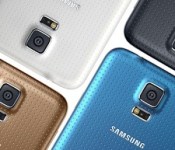
Supply chain orders for the Samsung Galaxy S5 are down 25% in Q3
 The predecessor of the Samsung Galaxy S5, the Galaxy S4, is most famous for smashing all sorts of “fastest sold” records including reaching 10 million units sold in 1 month and subsequently 40 million handsets sold after 6 months. It’s obviously been a hard act to follow for the Galaxy S5, though it has apparently beaten the Galaxy S4 in at least the category for the fastest to 10 million units sold. Unfortunately though, since that news, any sales news on the Galaxy S5 has been suspiciously absent from the public eye and the reason for that may be due to decreased demand. So much so, that Samsung is reportedly having to tell its supply chains to decrease supply by up to 25% in Q3 this year.
According to the report, 21 million units were ordered for this quarter (Q2) and only 15 million have been ordered for the upcoming quarter. Before we go on reading into this information, devices will always taper off in supply and demand as time goes on; that is to be expected. However, the Galaxy S5 has come under intense attack from all sides with generally superior equipped Android devices with overtly obvious innovations likely taking market share away from Samsung’s latest flagship (and that’s not even mentioning the effect Apple has on the smartphone market). This much has been made obvious by news that the LG G3 selling more per week in Korea than the Galaxy S5 was ever able to, probably another sign that Samsung is not quite as invincible as they might have fancied.
One way or another, when Samsung’s financials are eventually announced, we will know what kind of effect this new market has had on Galaxy S5 sales. What do you think about the Samsung Galaxy S5 having its supply decreased for Q3? Let us know your opinion in the comments.
Source: UDN.com via TalkAndroid
//<![CDATA[
ord = window.ord || Math.floor(Math.random()*1E16);
document.write('’);
//]]>
 AIVAnet