


Install the new Material Design keyboard from Android L, root required
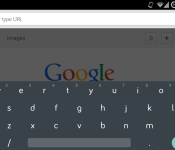

If you have a Nexus 5 or 7 you can install the Android L Developer Preview, but if you don’t have either of those devices or want to stay on a more stable ROM, you can still experience some of the future of Android now.
Bejunk over at XDA ported the keyboard and shared a flashable .zip that will give you the new keyboard with the Material Design theme.
The keyboard is said to work on “probably all ROM’s based on 4.4.x.”
If you have the Google Keyboard installed, you should uninstall it or delete it from /system/app, then download the zip and flash it in either ClockworkMod or TWRP recovery.
Once it’s installed, go to Keyboard Settings, Advanced (Expert) Settings and select “Material” in color scheme.
If you have any issues flashing the .zip, there are also manual instructions at the source link below.
VIA: XDA
The post Install the new Material Design keyboard from Android L, root required appeared first on AndroidGuys.
 AIVAnet