


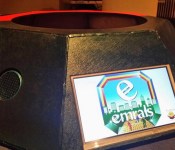
High-tech trash can rewards cleanliness with cryptocurrency coins

If you ask us what our idea of a high-tech trash can is, we’d tell you it’s one with a built-in compactor powered by solar panels. Sean Auriti from Brooklyn, however, had other ideas, which ultimately led to Ecan — a garbage bin that earns you money (in cryptocurrency, that is) whenever you toss anything in. Unlike our rather simplistic vision of a modern trash can, Ecan requires anyone who wants to use it to identify themselves on a Raspberry Pi-powered screen that uses solar energy to run. That’s not all, though: you also need to scan the barcode or anything you want to throw, unless it’s anything without one, like a banana peel or a candy wrapper. In that case, you’ll have to take its picture using the bin’s accompanying app before it starts mining Emrals (what Auriti calls the cryptocurrency he created for this purpose) for you.
If you’re in a hurry, you can also just take pictures of trash littering the ground, assign them corresponding values on the app and let others user throw them into the Ecan for rewards. Clearly, it’ll take a lot of dedication on your part to use it when there are other bins around that’ll let you toss and go. Auriti, however, has faith in his invention and believes there’s a chance for Ecan to go global, giving people access to free WiFi and earning them Emrals at the same time. Should you want to see if Ecan’s really as ridiculous or as innovative (you tell us) as it sounds, you can check it out in person at the ongoing New York City Electronics Week.
We presented our interactive trash can at #WVNYC today. Everyone loved it! pic.twitter.com/iFqlkyAwQt
– Emrals (@EmralsNYC) April 3, 2014
Filed under: Misc
Via: Motherboard
Source: Emrals
Android L and Chrome OS will soon have password and pin free Personal Unlocking Ability
It shouldn’t be much of a surprise that Google I/O produced a ton of information and they only touched on most of it. During two separate parts of the keynote there were two pretty cool features that Android L offers the end user to help simplify their life, while also protecting their data. One simple […]
DODOcase gives Google Cardboard dreamers a $20 ‘Unofficial’ pre-made Option
One of the fun little things Google handed out at the end of the keynote was some cardboard, for Google Cardboard. It was pre-cut and packaged with all the parts need to build a make-shift virtual reality box that your phone slips in and acts as the display. Some say it was gimmicky, I thought it […]
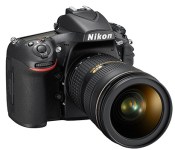
Nikon’s new D810 SLR favors evolution over revolution

It’s been two years since Nikon’s medium-format D800 and D800E SLRs hit the scene, and that’s just about an eternity for gadget nerds. What exactly has Nikon been doing since then? Well, aside from working on top-tier beauties like the D4 and D4S, it’s also been working on a proper successor to the D800 line. Surprise, surprise: it’s called the D810, and it’s about the sort of leap forward you’d expect from a modest model number jump.
Nikon didn’t reinvent the wheel as much as refined a formula that’s already served the company well. Consider the sensor at the heart of the affair: the ’810 sports a 36.3 megapixel sensor, but it’s a far cry from the ones spotted in its forebears despite the similar resolution. Nikon says it’s designed to produce sharper, clearer images, especially since it works in tandem with the company’s EXPEED 4 processing engine (which first debuted on last year’s D5300). Then there’s the fact that Nikon pulled out the optical low pass filter present in the D810′s most recent ancestor — the change means you’ll probably be able to squeeze even more nuance out of your shots, at the risk of possibly introducing moiré effects. Want more? Nikon has pumped up the ISO ceiling to 12,800 (or as high as 51,200 when you dip into Hi-2 mode), though we’ll see what sort of grain gets added to the mix.
Aside from those internal changes, the D810 is going to feel awfully familiar. The control cluster has been changed up a bit, and the 3.2-inch LCD has received a much-needed resolution bump. Alas, we’re halfway through 2014 and Nikon still decided against tricking this thing out with 4K video recording, though it’ll still handle 1080p footage at all the usual framerates. Interested? Who could blame you? Just be prepared to hear your wallet groan just a bit — the D810 will set you back a cool $3,300 sans lens when it hits store shelves some time this July.
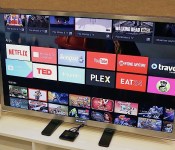
Android TV is Google’s latest shot at entertainment glory (hands-on)

For Android, smartphones and tablets are only the beginning. Google believes that there are so many other categories of hardware that could benefit from its mobile OS, so it announced that it’s building extensions of Android onto the TV, car and smartwatch. Each genre will require special hardware to be truly beneficial, but the former may have the greatest potential in terms of reach — after all, more people are looking for a solid television-watching experience than putting a “computer” on their wrist, and it’s going to be a long time before Android Auto goes mainstream.
Sadly, TV is also an area that Google has struggled with in the past (see Google TV), so it’s hoping that lightning will strike with its latest effort, called Android TV. We had a chance to check out the company’s first official piece of hardware, simply called the ADT-1. Since it’s a developer kit, you won’t be able to buy it — but that won’t be an issue once manufacturers begin selling their consumer-facing devices later this fall. Naturally, the version we checked out is considered pre-production, so a lot of things will likely change between now and its final release, but at least we have a good idea of what to expect from the experience.
The idea behind Android TV is pretty simple: It gives you an internet-powered smart TV with plenty of entertainment and gaming options. Media-streaming apps, Play Movies and TV support, gaming and second-screen/screen-mirroring functionality make the service incredibly tempting. The Android ecosystem is already pretty strong, and the company says it’s easy to adapt existing apps to make them compatible with the platform. With proper hardware and developer support, Android TV may have the legs it needs to stand on.
What can Android TV actually run on? According to Google, the OS will be available for smart TVs (Sony and Sharp have signed on to build televisions with the OS built in), media streamers (like a Roku), set-top boxes, cable boxes and micro consoles. The platform is ideal for any manufacturers that are interested in getting into the smart TV business, but don’t have the resources to develop their own ecosystem; it’s a good opportunity for smaller companies and startups to cook up Android TV hardware.
There are a few hardware requirements to ensure that Android TV doesn’t offer an inconsistent (or miserable) user experience: 2GB of RAM, 8GB of flash storage, WiFi and/or Ethernet, Bluetooth 4, Play-ready DRM and Widevine level one. Companies are also recommended to add mics for voice input, and standardized controller button mapping. These guidelines make a lot of sense because the system needs to be powerful enough to handle graphics-intensive games, entertainment apps and handoffs between the TV and mobile devices via Google Cast — nobody wants a sluggish TV experience, so it’s crucial that Google gets this aspect of its product right. The experience also needs to be as universal as possible so users don’t have to worry about drastically different learning curves.

Sluggishness fortunately doesn’t show up, even on early hardware and firmware. With a Nexus 5 equipped with the Android L Developer Preview, we used a virtual controller to navigate through the TV’s UI, and the system didn’t skip a beat (or a frame, for that matter). We didn’t have to wait for anything that we pulled up, so there were no interruptions to our experience.
The card-based user interface is simple enough. Recently played movies and TV shows, as well as recommended titles, are neatly displayed on the top. Scroll down a level and you’ll see a listing of your apps, including access to Google Play Games and Play Movies. Below that, games. Finally, at the very bottom of the screen you’ll find all of your necessary display and network settings. As you might expect, most apps have setups that are very similar to each other; they use a dual-pane UI with more cards on the right and a large slide-out menu on the left.
As mentioned earlier, Android TV also comes with voice-input options. You can speak to it through your remote controller, and it doesn’t matter what kind of request you have — whether or not it’s related to entertainment, it’ll still answer you the same way it would in Google Now. On one request, you can ask it to pull up movies from 1984, and on the next you can tell it to convert gallons into cups. Mentioning Tom Selleck will not only bring up a queue of the actor’s movies, but it’ll also have an information card about the actor and a list of other people that are somehow connected to him.

The usual entertainment suspects already have apps on Android TV — Netflix, Songza, YouTube, PBS Kids, Showtime and more were featured in our demo — but there should be plenty more options from other third-party developers before the service is ready to go this fall. (As an aside, reps told us that Google TV v4 apps will be compatible with Android TV.) Unsurprisingly, we noticed a slight bias toward Play Store products, but it’s not over the top; we didn’t feel like we were watching a nonstop Google ad, and as more apps become widely available and easily accessible on the platform, those influences will likely be toned down even more.
For the most part, the gaming experience was pretty smooth. We didn’t see as much latency between the game controller and the screen as we expected. There were some games that looked as though they needed a bump in resolution support, as they looked fuzzier than we’d like, but most titles (Need for Speed: Most Wanted, for instance) appeared as sharp on TV as they do on a high-res phone or tablet.
Finally, we’ll briefly touch upon the NVIDIA Tegra 4-powered dev kit, because there isn’t much to it cosmetically. From the top and sides, it’s nothing but a thin set-top box about the same size as two hands, if not slightly smaller. It’s more visually interesting on the bottom because it features four pointy nodules that raise the box up from whatever surface it’s resting on. On the back you’ll find power, HDMI and Ethernet ports.
We can’t make a final judgment on Android TV just yet, and the company’s got a rough path ahead. While the association with the Android ecosystem will be a nice draw for prospective buyers, the platform will be nothing if manufacturers and developers don’t jump on board the bandwagon and produce high-quality hardware at competitive prices. To see how well that works out for all parties involved, we’ll have to wait until this fall to get a verdict.
Filed under: Home Entertainment, Software, Google
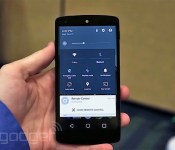
We just played with Android’s L Developer Preview

By releasing a Developer Preview of the next version of Android (only known as “L” for now), Google is walking new ground — and it’s blazing a glorious path that will greatly benefit the platform going forward. Developers and manufacturers will no longer be in the dark for upcoming firmware updates; by making a preview available, Google is giving its valued partners and third-party devs the opportunity to prepare their apps and services for the forthcoming refresh, which is due out sometime this fall.
This may not eliminate fragmentation (in which a vast majority of users are on old — and different — versions of Android) entirely, but it should reduce it significantly. Imagine, if you will, the day when Google officially releases the L update; how nice would it be if your six-month-old phone got it that very same day, rather than months later (if at all)? It seems like such a simple concept, yet this is exactly what Android users have put up with for years.
It’s a solid indicator that Google’s just as tired of the malarky as everyone else is, and the Developer Preview is its solution to that problem. It’s going to be available later today on the company’s developer site, but I found a Nexus 5 running the Preview ahead of time and had the chance to spend a few minutes with it. The company’s calling it a “preview” for a reason: It’s limited in scope and is meant to give developers a quick dose of inspiration. In my time with the unit, I noticed changes to the phone dialer, notifications panel, lock screen, calculator and settings, but Google will pepper more changes into the preview as we get closer to L’s final release.
The L update is not so much of an enhancement to functionality as it is an education in Google’s new design direction. The company is offering a brand new set of guidelines, which it’s calling Material Design. It’s intended to create a sense of vertical space and motion. It comes with 3D UI elements, as well as shadow effects and new 60fps animations that show movement, ripples and quicker touch feedback (the amount of time it takes to tell you that what you just touched is actually producing the expected result). This new design language features hierarchy, it’s responsive colorful and is meant to unify all Android-based platforms.
I don’t want to speak too much on performance because, as an early preview, it’s not exactly the buttery-smooth Android I’ve come to expect from the last few versions. I have no doubt this will improve as it approaches final release, so it’s a moot point for the time being. The preview features Project Volta, which is designed to make phones and tablets more battery efficient. It comes with a special battery saver mode baked in, and it kicked in as soon as my unit dropped to 15 percent. This mode starts turning certain features off, and this included L’s precious animations; bye-bye, 3D ripple effects. No matter — it’s much more important for my device to actually stay on in this situation, so I don’t mind.

The darling of the preview is the notifications. Nearly every aspect of Android’s notifications have been blessed with improvements, and there are even a couple features that are entirely brand-new. Notifications can be viewed on the lock screen now — at least, the ones that you don’t mind others seeing if they happen to peek at your locked phone. You can add privacy settings to certain notifications, however. For instance, you can see that you have a message but need to unlock the device for the details, or if that’s still too public, you can specify that you don’t want to see any notification show up at all.
Quick settings have also been integrated into the notifications panel, instead of being its own separate window. These settings are initially hidden from view when you pull down the notification bar, but they’ll appear if you keep pulling (or if you tap the bar on the top). Settings, WiFi, Bluetooth, Airplane Mode and more are available here, and it even comes with a TouchWiz-style brightness adjustment bar. Finally, you can also have actionable notifications drop down from the top of the screen. We just barely saw a similar feature introduced in iOS 8 — if a message comes in, you can choose to reply or dismiss it right away, instead of having to go into the notifications menu or your default messaging app. (Indeed, there are a few differences between the two platforms’ implementations, but the general idea is very similar.)

The new recent apps menu is a nice touch, although I didn’t get to see it at its full glory just yet. It features a carousel-style setup, and cards have been expanded to include certain instances within apps — Google gave the example of individual Chrome tabs and searches — which theoretically makes it easier and faster to get back to specific parts of an app.
This is just a small part of the L update, which will contain a plethora of features as well as 5,000 APIs for developers to take advantage of. It’ll continue to expand as we get closer to the update’s general release this fall. You can expect other neat features, such as the ability to keep your phone unlocked when your smartwatch is within range; 64-bit support; a faster and smoother ART runtime; an Android extension pack for better graphics; and more support for corporate and personal apps to run on the same device. While you wait for the new update to arrive on your phone, we’ve got a few pictures and a video to tide you over. And certainly, we hope that this is the beginning of a new fragmentless trend for Google — one that doesn’t mean users have to settle for outdated firmware for months on end.
Filed under: Cellphones, Wireless, Mobile, Google
New Roboto Font for Android L and Material Design [Download]
A lot went on this morning at the Google I/O 2014 keynote; Android Wear, Google Fit, Android L and plenty more. One of the things that might have slipped from the limelight is the fact that Matias Duarte, user experience guru at Google, spoke at length about the new Material Design idea that is driving their […]
Only the 5.5-Inch iPhone 6 May Offer 128 GB Models
Earlier today it was reported that the iPhone 6 would launch in 32 GB and 64 GB variants, indicating that Apple may not launch a 16 GB variant of the next iPhone and leaving many wondering whether Apple would introduce a third 128 GB variant. Now Chinese site Wei Feng [Google Translate] is reporting that Apple may introduce a 128 GB variant only for the 5.5-inch iPhone 6.
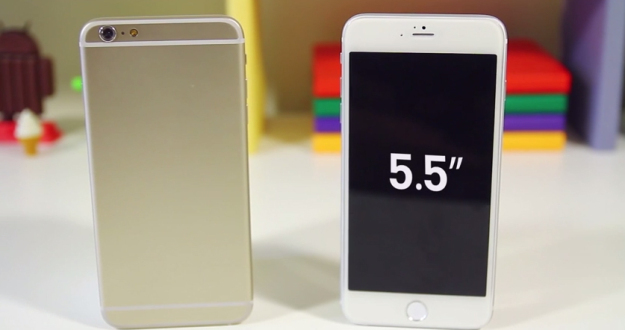
5.5″ iPhone 6 model via TechSmartt
The site says that the storage size difference would act as a major differentiator between the 4.7-inch and 5.5-inch models other than display size, allowing people to get a true “phablet” experience with lots of storage space to save various documents and data. This would partly mirror Apple’s iPad models, which allow for up to 128 GB of storage while iPhones only allow up to 64 GB of storage.
However, if Apple abandons the 16 GB model and introduces a 128 GB variant for the 5.5-inch iPhone 6 only, it would mean the 4.7-inch iPhone 6 only has two storage size variants, going against Apple’s trend of releasing iOS devices with at least three different storage size options.
In addition to a larger display, the iPhone 6 is expected to launch this September with a thinner design, a faster processor, and an improved camera. The larger 5.5-inch iPhone 6 is also rumored to exclusively have optical image stabilization to also differentiate it from the smaller iPhone 6, which will instead have an advanced lens module.
Unreal Engine 4 demo video with Tegra K1 GPU gets shown and Explained
One of the many highlights of Google I/O this year was that Android L. The next iteration of Android that is scheduled for release this fall. Something very notable about Android L goes beyond just the looks of the whole UI and the Material Design elements. What it supports is a pretty big deal. See, […]
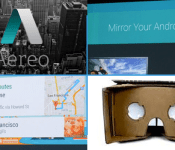
Engadget Daily: Aereo loses, Android is in everything, and more!

Today, we explore the US Supreme Court’s decision to pull the plug on Aereo, take a look at Android Auto, ponder Google’s new cardboard VR headset and happily welcome Android device mirroring on the Chromecast. Read on for Engadget’s news highlights from the last 24 hours.

US Supreme Court rules Aereo’s streaming service is illegal under copyright law
Aereo’s been fighting an uphill battle for a while, but it looks like the final judgement has passed. Today, the US Supreme Court ruled that this live TV-streaming internet service was indeed illegal under copyright law.

‘Cardboard’ is Google’s attempt at an inexpensive VR headset
Nope, what you’re looking at isn’t a corrugated paper View-Master, it’s an origami-style VR headset. Appropriately dubbed Cardboard, Google’s new DIY gadget uses your phone as the brains of an inexpensive virtual experience, which you can build from several household materials.

Chromecast can finally mirror your Android device’s screen
Want to show off some vacation photos without passing your Android handset around the room? Well, thanks to a few upgrades to the Google Chromecast, you can. The $35 HDMI dongle now supports Android device mirroring.

Google boosts in-car connectivity with Android Auto
Today at Google I/O, the Open Automotive Alliance announce Android Auto: a completely voice-enabled, contextually based system that projects your phone’s OS and apps onto your vehicle’s screen. What’s more, its APIs are shared by Google’s Android Wear platform.
You also might like:
Filed under: Misc
 AIVAnet