


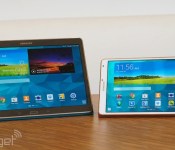
Samsung Galaxy Tab S review: slim design, long battery life, stunning screen

It’d be silly of me to talk about tablets in the past tense — we still write stories about them daily and clearly, we review them, too. But of the ones we’ve seen lately, most have been low-end; mid-range at best. The market for high-end slates, once crowded with companies big and small, now looks more like a fraternity. At this point, the only players left are mostly big names like Apple, Microsoft, Sony. And, of course, Samsung. The outfit just announced the Galaxy Tab S, its flagship tablet for 2014. Available in 8.4- and 10.5-inch sizes, it comes armed with the best possible specs, including a stunning 2,560 x 1,600 Super AMOLED screen, 12-hour battery life and a slim build that measures just 6.6mm thick. In addition, Samsung added a fingerprint reader (still a rarity on tablets) and free goodies like popular magazines, Dropbox storage and a six-month Wall Street Journal subscription. The tablet’s up for pre-order now, starting at $400 for the 8-inch model and $500 for the 10-incher. So, you can’t test-drive it yet, but, as it happens, I’ve been playing with it for almost a week. Suffice to say, I’ve enjoyed myself. Mostly.
Hardware
Let’s call a spade a spade: The Galaxy Tab S is basically a blown-up version of the Galaxy S5. Available in “Dazzling White” and “Titanium Bronze” (brown, really), the Tab S has a plastic rear lid with a grid of dots on the back that look like dimples. Yep, just like the GS5. And the similarities don’t end there. Both devices mix rounded corners with blunt-cut sides that make it easy to hold. Even the home button is the same: an oval-shaped key with a fingerprint reader built in (more on that later).
It so happens I find the design pleasant. Elegant, even. My colleague Brad Molen, who reviewed the GS5, was less impressed, calling the look “inoffensive” (ouch, Brad). But none of that matters, really; it’s irrelevant if either of us likes the design. What I can say — and what I think you’ll find more helpful — is that regardless of whether you dig the aesthetic, this is most certainly a well-made piece of hardware. Part of it’s the build quality: Though the plastic might not be as premium-feeling as metal, it’s basically immune to both scratches and fingerprints, meaning it continues to look pristine much longer than you’d otherwise expect it to. Then there’s ergonomics: The blunt edges, pancake-flat back and soft-touch finish on the rear make it comfortable to hold.
There’s also the size to consider. At 6.6mm thick, the two Galaxy Tab S tablets are skinnier than both the iPad Air and the iPad mini with Retina display. (Sony’s Xperia Z2 Tablet beats them all, at 6.35mm thick.) The Galaxy Tab S is lighter than Apple’s tablets, too: The 10-inch version weighs a pound (the same as the 9.7-inch iPad), while the 8-inch model comes in at 0.63 pound (10 ounces), beating out the Retina display iPad mini. I say all that to illustrate how dang thin this guy is. It’s one thing to parrot Samsung’s marketing material and say it’s as thick as five credit cards. It’s another to tell you that it’s even thinner than two popular tablets that are already known for being skinny.
Ready for a quick tour? Both the 8- and 10-inch models have the same camera setup: a 2-megapixel webcam up front, and an 8-megapixel shooter with LED flash around back. For navigation, you’ve got back and multitasking keys, both built into the lower bezel next to the home button. The selection of ports is the same too, though the layout is going to be different, considering the 10-inch tablet was designed for landscape use, and the 8-inch model was primarily meant to be used in portrait. Starting with the 10-incher, you’ve got the power/lock button up top, along with a volume rocker and an IR blaster, allowing you to use the device as a remote. Stereo speakers line both the left and right sides, with a headphone jack on the left, and a microSD reader on the right capable of supporting 128GB cards. The right edge is also home to a standard micro-USB port for charging. On the smaller model, meanwhile, the power/lock button, volume rocker, microSD slot and IR emitter are all on the right, with the speakers spread across the top and bottom. The headphone jack and micro-USB socket are also on the bottom, exactly where you’d expect to find them on a tablet this size.

That’s about it for the hardware tour. Well, except for one thing. Peek around the back and you’ll see two circles, which depress, like trapdoors. These are called “Simple Clickers” and are there to attach Samsung’s optional cases. These include the Simple Cover ($40), which only covers the screen, as well as the Book Cover ($60-plus), which wraps around the whole device and can also stay propped up at one of several screen angles. Both cases are well-made, with holes for the camera and they come in an assortment of cheerful color options. Most importantly, of course, both have little nubs that stick out, allowing you to press the case into the back of the tablet.
It’s a nice idea in theory: Once those suckers are in, you can hold the tablet by the case if you want to. That thing is staying put. The problem is, it’s a huge pain to use. First, you have to carefully line up the two nubs against their respective holes, and then you need to push them in one by one. Even now, after I’ve had time to practice, I usually don’t get it right on my first try. And in order to be successful, I typically have to use two hands to press the tablet and case into each other. Ripping the case off requires a bit of force — and makes an unpleasant noise, to boot. Thankfully, at least, Samsung says there will be third-party cases as well. Hopefully some of those will be the kind you can just slip on and off.
Display

You’ll notice I gave the display its very own section, even though it is technically “hardware.” That’s partly because I had a lot to say, and partly because the screen is clearly, indisputably the star of the show. What can I say? Samsung killed it. The screen here is a spec lover’s dream, with 2,560 x 1,600 resolution on both the 10-and 8-inch models. On the 10-incher, that resolution translates to a pixel density of 287 ppi; the 8-incher is noticeably crisper, at 360 ppi. Either way, that’s even sharper than both of the current-gen iPads, whose screens come to 264 ppi for the iPad Air and 326 ppi for the Retina display mini.
Alright, now that we’ve got that out of our system, let’s pull up our pants and put the measuring tape away. Even setting aside the raw specs, this is a stunning display. In particular, it’s a Super AMOLED panel, and while that won’t sound revolutionary to anyone who’s used one of Samsung’s recent phones, it’s fairly uncommon for a tablet. In fact, the last time Sammy tried a Super AMOLED panel on one of its slates was with the Galaxy Tab 7.7, which was prohibitively expensive — precisely because of the impressive screen technology. Since then, the price seems to have come down, which means the benefits of Super AMOLED are much easier to sell. In particular, the blacks here are black; the whites are white; and the colors are vibrant, if a little oversaturated. If you’ve handled a phone like the GS5, you know what I’m talking about.
What’s more, there’s an RGB sensor inside that adjusts the color balance depending on your surroundings. So, if you find yourself in a swank lounge with purple mood lighting (in which case you should really get off your tablet and socialize), the display will adjust itself accordingly. I should add, too, that the screen is super bright — bright enough that I could use it in direct sunlight and frame shots like the one below. I’ll talk more about the camera in a bit, but suffice to say, having a tablet this thin, with this bright a screen, makes photography more enjoyable than it would be otherwise.

Software

The Galaxy Tab S arrives on the heels of the Galaxy S5, which ushered in some big changes to Samsung’s TouchWiz skin — namely a flatter, more modern UI. You can bet, then, that Sammy’s new tablet has a similar look and feel. Underneath it all, the Galaxy Tab S is running Android 4.4 KitKat on top of Samsung’s Magazine UX — the same paneled, Windows 8-like layout that had Google a bit upset after Samsung’s last round of tablets were revealed. The companies have since agreed to work together on future products, to bring Samsung’s user experience more in line with stock Android. I can’t say this looked like a stock Android device right out of the box, but after I removed a bunch of those homescreen tiles, I felt a little more at home.
Even so, given that this is a Samsung product, running Samsung’s software, you’ll of course get various other features you wouldn’t find on a stock Android device. These include the usuals, like S Voice; Multi Window Mode, for viewing two apps side by side; and Samsung’s Milk Music service, which until recently has been available for phones only. As on the GS5, you’ll find older Samsung features like Smart stay, Smart rotation and Smart pause, but they’re now tucked out of sight. Don’t worry, though: A new search bar in the settings menu means those features are still easy to find.
There are other similarities to the GS5. Chief among them: that fingerprint reader I mentioned earlier. As on the Galaxy S5, the fingerprint sensor here is built into the home button, and can be used to log into the device, make transactions using your Samsung account and buy stuff on eBay. You’ll find the fingerprint option in the settings menu, at which point you’ll have to go through a setup process that involves swiping your finger across the home button eight times. In all, you can register up to three fingers per user. Mastering the perfect swipe — not too fast, centered on the home button, finger covering the whole button — is difficult. In fact, even now that I’ve been playing with the device for nearly a week, it still routinely takes me two if not three tries to get it right. There have also been multiple occasions when I’ve failed five times in a row, and had to wait 30 seconds to try again. (Note: Samsung will also have you set up an alphanumeric password, which you can enter anytime you get fed up with the fingerprint scanner.)

Also like the GS5, the Galaxy Tab S comes with 50GB of Dropbox storage, free for two years. In fact, it comes with an entire suite of free stuff, a package known as “Galaxy Gifts.” This, too, first debuted on the GS5, and includes things like six free months of Wall Street Journal access and a yearlong subscription to Bloomberg Businessweek. There are other items, including a bunch of magazine “samplers,” but these just include a handful of stories, not the whole issue. That said, if you were curious about, say, that Monica Lewinsky essay in Vanity Fair, but didn’t want to buy the whole issue (ahem), this might nonetheless be your lucky day. And hey, if all this strikes you as fancy bloatware, you can simply choose not to download it.
Speaking of magazines, the Galaxy Tab S also ushers in an app called Papergarden, which offers full-issue magazines you’d otherwise have to pay for. In the US, these titles include biggies like Cosmopolitan, Elle, Vogue, GQ, Rolling Stone and US Weekly. Users in other countries get to enjoy Papergarden too, though the selection will vary. To be clear, this isn’t like Next Issue when it comes to selection: Not all popular titles are there, and you don’t have access to back issues. You also have to submit a credit card just to download a full issue for free. Still, it’s a nice perk for people who enjoy magazines, but don’t like them enough to buy them, much less subscribe for a whole year.
I’m not done yet. For those of you with families, the Galaxy Tab S has a new Kids Mode that lets you create separate user accounts for the little ones, with restricted access if there are apps you don’t want them messing with. (Note: Kids Mode doesn’t come pre-installed, though there’s a shortcut for downloading it.) Additionally, a new Multi User Mode lets you add up to seven user accounts, complete with separate passwords and different sets of fingerprints. Finally, there’s version 3.0 of SideSync, Samsung’s app for transferring files between your tablet and your phone or PC. New in this version: the ability to forward calls from your handset to your slate, using either WiFi or LTE. The bad news: For now, at least, it only works with the GS5. So, uh, we hope you have a Galaxy S5 handy.
Camera

Both Galaxy Tab S’s have an 8-megapixel rear camera and LED flash, along with a lower-res, 2.1-megapixel shooter around front — more or less the same setup used in the Galaxy Note Pro 12.2, Galaxy Tab Pro 8.4, and the Galaxy Note 10.1 2014 Edition. Basically, then, you should expect identical imaging performance between the two Galaxy Tab S models, and also across Sammy’s recent tablet lineup. As we’ve found in the past, color reproduction is good, and the camera is quick to focus as you line up your shot (if for some reason it doesn’t lock on where you want it to, there’s always tap-to-focus). Low-light shots are grainy, but then, what did you expect from a tablet camera, anyway?
As it happens, I took all my sample shots in auto mode, because that’s how I believe most consumers will use the device, but you can also choose from one of several specialty modes, including “Beauty face,” panorama, HDR and dual camera. Additionally, you can adjust the ISO, metering modes, flash and face detection from the settings menu.
It’s a similar story with 1080p video recording. Like other Engadget reviewers who’ve tested recent Samsung tablets, I found my sample footage to be pretty smooth, though the occasional gust of wind put a damper on the audio quality. Even then, the tablet picked up on a wide range of noises — sirens, traffic, people talking nearby — without any of those elements sounding distorted.
Performance and battery life
| Samsung Galaxy Tab S ** | Sony Xperia Z2 Tablet | Galaxy Note 10.1 2014 | iPad Air *** | |
|---|---|---|---|---|
| Quadrant 2.0 | 18,597 | 18,877 | 19,530 | N/A |
| Vellamo 2.0 | 1,672 | 1,622 | 2,735 | N/A |
| SunSpider 1.0.2 (ms) | 1,109 | N/A | 1,069 | 393 |
| 3DMark IS Unlimited | 12,431 | N/A | N/A | 15,328 |
| GFXBench 3.0 Manhattan Offscreen (fps) | 5.5 | N/A | N/A | 12.7 |
| CF-Bench | 31,695 | 37,902 | 31,567 | N/A |
|
*SunSpider: Lower scores are better. **Average scores for the 8.4- and 10.5-inch models. ***Not all of our Android benchmarks are cross-compatible with iOS. |
||||
Whichever screen size you get, the Galaxy Tab S has the same specs: three gigs of RAM, and an eight-core Exynos 5 Octa chip, the same one found inside certain versions of the Galaxy Note Pro 12.2 and Galaxy Note 10.1 2014 Edition. In case you haven’t been keeping up with our Samsung tablet reviews, here’s what you need to know: The Exynos 5 actually includes two quad-core processors, only one of which is active at a given time. These include a 1.9GHz chip for heavier-duty tasks, and a lower-powered 1.3GHz one for the more menial stuff. The idea is to extend battery life by using the more powerful cores only when necessary (but to still have them ready to go when you need the extra horsepower).
To scan the benchmark table above, you’d assume the Galaxy Tab S performs roughly in line with other top-of-the-line tablets, including the Sony Xperia Z2 and, of course, the 2014 Note 10.1, which uses the same chipset. What the numbers don’t capture, though, is how uneven the performance can be. What’s most frustrating is that while the tablets excel at the hard stuff, like rendering graphically detailed games, they stumble over the little things. Though neither of my two test units ever crashed or froze on me, I routinely observed a slight delay when launching apps or tapping a text field and waiting for the onscreen keyboard to come up. Meanwhile, though, Need for Speed: Most Wanted ran smoothly — and looked fantastic on that 2,560 x 1,600 Super AMOLED screen, to boot. I also had no problems with Multi Window Mode; I was able to quickly set up two side-by-side windows, as well as swap in new apps when necessary.
All told, the performance here isn’t bad by any means; it’s just not as brisk as I expected it to be, given the way the chip was designed. I’m inclined to say that Samsung can address some of this low-level sluggishness with a firmware update. That said, Brad described similar performance hiccups when he reviewed the 2014 Note 10.1 last fall, which means Samsung has already had plenty of time to work out some of the kinks with its Exynos 5 chip. I still believe Sammy could improve the performance via a software update. It just doesn’t bode well that the chip’s performance hasn’t changed in the months since it debuted: Has Samsung been listening to us?
If it’s any consolation, the as-yet-unreleased LTE models are supposed to use a Snapdragon 800 chip instead of the Exynos 5, so maybe performance will be snappier there.
| Tablet | Battery Life |
|---|---|
| Samsung Galaxy Tab S (10-inch) | 12:30 |
| Samsung Galaxy Tab S (8-inch) | 12:22 |
| Microsoft Surface 2 | 14:22 |
| iPad Air | 13:45 (LTE) |
| Apple iPad mini | 12:43 (WiFi) |
| Apple iPad mini with Retina display | 11:55 (LTE) |
| Apple iPad (late 2012) | 11:08 (WiFi) |
| Apple iPad 2 | 10:26 |
| Samsung Galaxy Note Pro 12.2 | 10:04 |
| Apple iPad (2012) | 9:52 (HSPA) / 9:37 (LTE) |
| Acer Iconia W4 | 9:50 |
| Nexus 7 (2012) | 9:49 |
| Microsoft Surface RT | 9:36 |
| Toshiba Encore | 8:45 |
| Sony Xperia Tablet Z | 8:40 |
| Sony Xperia Z2 Tablet | 7:57 |
| Nexus 10 | 7:26 |
| Dell Venue 8 Pro | 7:19 |
| Samsung Galaxy Note 8.0 | 7:18 |
| Nexus 7 (2013) | 7:15 |
| Samsung Galaxy Tab Pro 8.4 | 7:13 |
| Samsung Galaxy Tab 3 10.1 | 6:55 |
According to the product pages on Samsung’s website, the 10-inch model’s 7,900mAh battery can last through up to 12 hours of video playback. Ditto for the 8-incher: It, too, is rated for 12 hours, despite having a smaller, 4,900mAh cell. As it turns out, the Galaxy Tab S performs even better than advertised. The 8-inch tablet managed a solid 12 hours and 22 minutes of video playback, while the 10-incher made it to exactly 12.5 hours. Mind you, that was with the screen brightness fixed at 50 percent and WiFi on, but not connected; surely, if we allowed the brightness to dip even lower, we could have squeezed out more runtime. Should you need more juice, by the way, you can enable “Ultra power-saving mode,” which turns the screen to black-and-white and only enables certain key apps. Basically: For emergency use only.
Configuration options and the competition
The Galaxy Tab S is up for pre-order now, with shipments starting sometime in July. In the US, prices start at $400 for the 8-inch version and $500 for the 10-incher. Both start with 16GB of built-in storage, though Samsung will also be selling 32GB models in select countries. Meanwhile, that LTE model I mentioned is coming later this year, and is expected to sell on all the major US carriers: AT&T, Verizon, Sprint and T-Mobile. No word on how long you’ll have to wait for that, though.
All told, as you can see, it’s a solid choice, with hardly any flaws to speak of. That said, we can think of a few other tablets you should be considering. If you’re dead-set on something running Android, the Sony Xperia Z2 ($500-plus) is even thinner and lighter than the Galaxy Tab S, not to mention waterproof. Then again, it suffers from relatively short battery life and a super-glossy, lower-res screen (not that 1,920 x 1,200 resolution is “low,” per se). Meanwhile, you might also consider Samsung’s Galaxy Note Pro 12.2 ($750 for 32GB) and the Note 10.1 2014 Edition ($550-plus). Neither is as thin or light as the Galaxy Tab S, but they have 2,560 x 1,600 screens and support pressure-sensitive pen input — the one thing the GTab S doesn’t offer.
It’s also worth noting that Google’s 2-year-old Nexus 10 is still around for a reasonable $399. Having been out for two years, it’s overdue for a refresh, and a replacement could be coming soon, though its 2,560 x 1,600 screen makes it relevant even today. Across the aisle, there’s Microsoft’s Surface 2, starting at $449. It’s a handsome device, and the built-in kickstand is a convenient feature you won’t find on any of these other tablets. That said, if I had to choose, I’d still pick the Galaxy Tab S, as it’s thinner, lighter and cheaper, with a better screen and a bigger app selection.
Finally, the elephant in the room: the iPad. If you prefer Android, you may as well skip this section — we think you’ll be very happy with the Galaxy Tab S. If you’re OS-agnostic, though, the Galaxy Tab S takes on the iPad Air and Retina display iPad mini nearly spec for spec, with the GTab winning out in thinness, lightness and screen resolution. The prices are basically the same too, with the 8-incher starting at $399 and the bigger model going for $499. The one thing you might want to consider is that tablet-app selection is still better on iOS than on Android. That said, both are excellent products; start by picking the OS you like best and go from there.
Wrap-up

The Samsung Galaxy Tab S is good. Really good. With long battery life, a stunning screen and an especially thin and light design, it’s a near-perfect product. My main hang-up is that the performance doesn’t always feel as brisk as it should (the forthcoming LTE edition uses a different chip, and has the potential to be faster, but it’s unreasonable to ask someone to pay extra for the kind of performance they should have gotten on the WiFi-only models). In addition, the fingerprint scanner, though nice to have, can be temperamental — so much so that I’ve more than once locked myself out of my own tablet. That said, I believe Samsung can address these two minor performance issues via a software update. And even if it doesn’t, this is still an excellent piece of kit. If I may, I’d offer the same advice I would to prospective iPad buyers: Unless you want the extra screen real estate for watching movies, just buy the 8-inch version. It’s cheaper, with a crisper screen, identical camera and just as much horsepower as the bigger model. Either way, you can’t go wrong.

Xplore’s latest Windows tablet promises rugged design without the bulk

Xplore Technologies makes tablets that are so rugged, just picking one up will cause your palms to go all hairy. Up until now, it’s made chunky Windows tablets like the XC6, and slender, less powerful slates that are capable of running Android. The Xplore Bobcat wants to sit between the two ranges, offering the brawn of Windows 8 with the svelte looks of the company’s RangerX tablets. Of course, this isn’t just about shedding weight and size, since the Bobcat will still work in freezing conditions, withstand drops of nearly two meters onto concrete and all of the other tortures most gadget geeks could conceive.

The Bobcat’s biggest selling point is that it’s got a surprising number of inputs for something that appears to be far less capable than its elder sibling. For instance, there’s an Ethernet jack in there, as well as micro-HDMI-out, two USB 3.0 ports, a microSD reader and a micro-SIM card slot, the latter taking advantage of the optional Sierra Wireless 4G modem. If you’re rocking industrial hardware that still uses a serial port, you’ll find one of those lurking beneath a rubberized port that’s screwed down for normal operation. Oh, and there’s a 3.5mm headphone jack in there, obviously. Imaging-wise, there’s the same pairing of a 5-megapixel primary camera and 720p webcam we found on the XC6, neither of which you’d like to use unless you really had to.
Given the greatly reduced hardware, you may expect that performance would take a hit, but we couldn’t see any noticeable stress. Thanks to the quad-core 1.9GHz Bay Trail (E2845) chip and 4GB of RAM, switching between several open apps is smooth, and we certainly found it comfortable enough to hammer out (parts) of this article, so long as we connected a USB keyboard. Display-wise, the slate has a 10.1-inch, 1,366 x 768 IPS display, but there’s no pen-style digitizer like the higher-priced models, so the two attached styli have soft rubber tips and no hover mode. The display only has a 500-nit backlight, so while it’s brighter than some laptops, it struggled a little more in bright, direct sunlight. We also played some audio on the hardware, and found that the single rear-facing speaker can be muffled easily, but provides a decent volume, although it’s too hollow-sounding for any impromptu dance parties.

Naturally, it’s not going to be the go-to tablet for 90 percent of our readership, unless we all decide to become the most extreme of extreme sports fans. But if you’re interested in grabbing one of these, then the Xplore Bobcat goes on sale from today. Price-wise, bereft of build-to-order options like a 256GB SSD and the aforementioned 4G modem, it’ll set you back $2,200. But then, if you’re the sort of rich daredevil who keeps dropping their Galaxy Tabs off cliff edges, then that might be worth a slice of your cash.

LG G3 global rollout starting June 27

LG G3 was announced about a month ago and until now it has been available for purchase in South Korea only. It has exceeded expectations on that market by selling 100,000 units in just 5 days and it even outsold Samsung’s Galaxy S5 in that time frame. LG is ready to launch their flagship globally and see how it fares on other markets.
They will launch G3 in waves. Hong Kong, Indonesia, Singapore, and the Philippines will get it first, starting June 27, exactly one month after it was announced. Other Asian markets will get it soon after. Europe and the Middle East among other regions will get it in July. Expected price for Europe is €615/£500.
LG G3 in its European and Asian variants will come with Qi wireless charging capabilities, you can opt for a proprietary wireless charger if you wish. No word if other regions will get the same treatment.
Will you be getting the G3?
Source: LG Newsroom
The post LG G3 global rollout starting June 27 appeared first on AndroidGuys.

Android “L” update screenshots leak

Google has been extremely active as far as Android updates go. At the beginning of June they released Android 4.4.3, followed by Android 4.4.4 which came not even a month after the 4.4.3 update. Now we have some leaked screenshots which could be taken from Android’s next big update, just a day ahead of Google I/O.
These images were discovered in Google’s Chromium Tracker by Reddit user Doopl. They were removed since then. You may notice the “L” icon in the notifications bar on the left as well as the bell icon on the right. It is said they might symbolize “Limited Notifications” mode which should include pop-up notifications and “Limited Interruptions” which should prevent those from appearing. You can also see a chrome window in the background floating in the middle which might suggest yet another option within the OS or Chrome browser itself which would be a welcomed addition to the experience.

These screenshots were taken in 1280×768 resolution which matches up to Nexus 4′s screen resolution, coincidence? Maybe. What do make of this? It would be sweet if Google implemented features like these and if possible announce all of this at Google I/O this year, although this might be just a rumor, nothing else.
Source: Reddit
Via: AndroidAndMe
The post Android “L” update screenshots leak appeared first on AndroidGuys.

Nintendo wants a future where consoles and handhelds run the same games

Nintendo’s financial struggles are well noted, but a new interview with the gaming giant’s Shigeru Miyamoto reveals that its experiencing some creative hardships too. For example, the differences in architecture between the Wii U and the 3DS handheld have made developing games that are playable on both systems (a la what Sony has been doing with certain PlayStation 3/4 and Vita titles for the past few years) a pain for the company, according to Kotaku. Miyamoto says that moving forward, Nintendo is looking at what it can do to bring the two development environments together — something that could open the door to buying a game once and playing it on either a home console or a handheld.
If you have a more unified development environment and you’re able to make one game that runs on both systems instead of having to make a game for each system, that’s an area of opportunity for us.
Considering how the company has addressed the complaints leveled at it recently, specifically regarding the shortcomings of the Wii U, this bodes well for whatever Nintendo has planned for the future. It’s important to note, however, that when Miyamoto speaks about these new possibilities that he doesn’t specify if they’ll make it to current hardware. Whether that means they’re features that’ll appear on the in-development new console or something else entirely is anyone’s guess.
[Image credit: MIGUEL RIOPA / Getty Images]
Filed under: Gaming, Home Entertainment, HD, Nintendo
Source: Kotaku

University library starts ‘drone loan’ program for students

There’s good news if you’re a broke University of South Florida student who’d like to take an $1,195 DJI Phantom 2 Vision UAV for a spin: you can now sign one out from the library. Before you start preparing some kind of water balloon-dropping scheme, however, there are a few caveats. First off, all use will be supervised by library staff and you’ll have to take a course in drone operation before you can borrow one of the two available. Secondly, you’ll need a good reason to use it — one approved usage cited by a library supervisor was aerial surveying by architecture students to learn about building layouts. Educational projects aside, however, with the Phantom 2 Vision’s stabilized footage we imagine there’ll also be a lot of sweet aerial mixer videos.
Filed under: Robots
Via: The Verge
Source: University of South Florida
Moto G with LTE and expandable storage is now available for £160

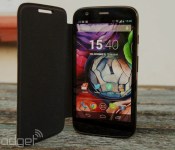
The Moto G is a fantastic smartphone for the price, but Motorola knew it could make the handset even better with just a few small tweaks. Thus, the Moto G with LTE and expandable storage (thanks to a microSD slot) was born, and today it’s become available in the UK after launching in the US last week. Phones 4u has declared first dibs on the device, and is offering the phone free from £19 per month on contracts, for £150 on pay-as-you-go, or £160 unlocked — the retailer is also claiming exclusivity on the new white model until the end of July. A number of other sites are expecting stock sometime this week, at which point we hope to see a repeat of the discounted pricing war that was fought over the Moto G shortly after launch. Hold off a week or two, and we imagine you’ll be throwing £20-£30 less at your screen. Bargain.
Filed under: Cellphones
Apple Rejects Catcher’s 4.7-Inch iPhone 6 Casings Over Defects [iOS Blog]
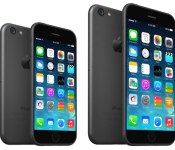
In April, it was reported that Catcher Technology would be supplying Apple with metal casings for the iPhone 6. Now, China’s Economic Daily News (via Digitimes) reports that Apple has rejected Catcher’s iPhone 6 chassis, instead choosing to place short term orders with longtime supply partners Jabil and Foxconn.
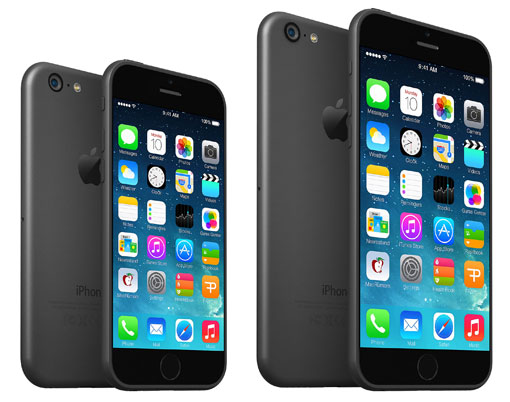
Apple reportedly had issues with defects found in the connecting areas between the plastic and metal parts within the casings, which was caused by Catcher’s anodizing process. The issues with the casings may take 2-3 months to fix, which may require Apple to rely on other supply partners.
Apple’s 4.7-inch iPhone 6 is expected to go into mass production last month for a launch this fall. Reports have also suggested that Apple will also launch a larger, 5.5-inch version of the iPhone 6 at some point, with Bloomberg noting yesterday that Apple may launch both sizes of the device at the same time. In addition to a larger screen, the iPhone 6 is expected to include a thinner design, a faster A8 processor, an improved camera, and more.

Nestle’s working on a kitchen appliance that creates custom vitamin cocktails

If Nestlé’s new “Iron Man” project ends up a success, your morning routine could go like this: 1.) Take a shower. 2.) Eat breakfast. 3.) Brew your very own vitamin supplements. According to Bloomberg, the Nestlé Institute of Health Sciences is developing a device (possibly like its Nespresso coffee-making machines) that can make supplements on the spot based on your body’s needs. Since each dose — which might come in powder or capsule form — is tailored for you, NIHS director Ed Baetge says it’s going to be more effective than anything on the market. Then again, it’s worth remembering that there are many scientists who question the health benefits of vitamin supplements in the first place. Plus, there could be some very high costs involved in Nestlé’s vision: For the vitamin-mixing machine to work properly you’ll have to input your nutrient profile and, according to University of Minnesota researchers, knowing that profile won’t be cheap. It’ll cost at least $50 to analyze the level of each nutrient, and it could cost more than $1,000 for a complete analysis.
We’re in the dark when it comes to how Nestlé plans to analyze user’s bodies since the project’s still in its very early stages, but the company’s just begun talking to a Massachusetts-based scientific equipment manufacturer. As you can imagine, developing a personal supplement maker won’t be as easy as making a coffee maker, so it’ll take Nestlé many years to conjure up a final product. Baetge believes that if he and his colleagues do it right, the machine could be “the next microwave in your kitchen.”
Filed under: Misc
Source: Bloomberg
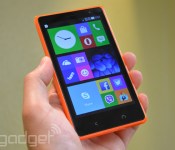
Nokia’s fourth Android phone does dual-SIM for just €99

After the Nokia X, X+ and XL, the Microsoft Devices team is back with its fourth Android-based budget smartphone dubbed the X2 Dual SIM, and the best part about it its €99 (about $135) off-contract price. That’s very attractive given the range’s pretty “inner glow” design, and the specs are also decent for what it is. We’re looking at a 4.3-inch WVGA ClearBlack LCD screen, a dual-core 1.2GHz Snapdragon 200 chip, 1GB of RAM, 4GB of storage, microSD expansion of up to 32GB (plus 15GB of free OneDrive cloud storage), 5MP/VGA cameras and a removable 1,800mAh battery. If this sounds like your kind of phone then look out for it as it goes global in July.
With its 4.3-inch screen, the X2 sits between the X and XL in terms of size, and it feels just right in my hand with a secure grip — the latter courtesy of the straight sides that subtly round off to the curved backside. The unit we got to play with is orange, but you can also get it in green, yellow, dark gray and white. With the exception of the matt dark gray version, these colors come with the series’ signature glossy, translucent plastic casing — which is, by the way, removable to access the Micro SIM slots, the microSD slot and the battery.

As before, Nokia doesn’t emphasize the fact that the X series runs on a heavily skinned Android. The X2 runs on a new version called the “Nokia X Software Platform 2.0,” which looks very similar to its predecessor. Users will find the three similar home screens welcoming you, with the main one featuring a Windows Phone-like tile UI, and you swipe right for the Fastlane for the recent apps, and swipe left for the new apps list that’s basically a carbon copy of the one from Windows Phone. The software felt slick during our brief hands-on, and the 5-megapixel AF camera was similarly responsive. Not a bad package overall.
Filed under: Cellphones, Mobile, Nokia
 AIVAnet