


New Apple TV Beta, iOS 8 Beta 2 Lay Groundwork for Upcoming Family Sharing Feature [Mac Blog]
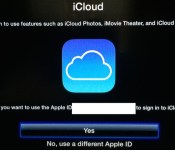
Alongside the second iOS 8 beta released earlier today, Apple also released a new version of the Apple TV software. The two updates appear to have laid the groundwork for Family Sharing, as there’s a new section for “Family Purchases” in the iOS App Store’s Purchased tab and a new iCloud Family setting for the Apple TV.
As noted by 9to5Mac, Family Sharing on the Apple TV (and on the App Store) is not yet functional, but as described by Apple during the Worldwide Developers Conference, it allows users to share purchased content across accounts.
 Image courtesy of 9to5Mac
Families of up to six people with iTunes accounts that use the same credt card can share content like apps, iBooks, music, movies, and more, across all of their devices using iCloud. Family Sharing also lets families share photos, videos, a calendar, reminders, and more, to keep everyone in the family connected.
On the Apple TV, it is likely Family Sharing will let users access TV shows, movies, and music that has been downloaded by family members.
Today’s Apple TV software update was only available for the third-generation Apple TV (and Rev A), so it is unclear if features like Family Sharing will be limited to those devices, excluding second generation Apple TVs.
Though it is not yet available, Family Sharing will be implemented before OS X Yosemite and iOS 8 are released to the public this fall.
Yosemite ‘Hand Off’ Feature Likely Limited to Macs with Bluetooth LE
Over the weekend, we posted a story that Apple’s Handoff feature was limited to Macs that support the Bluetooth 4.0/LE specification. Handoff/Continuity allows OS X and iOS device users to seamlessly transition between the two operating systems. However, there was some debate about the accuracy of that claim at the time, though now it seems almost certain to be true.
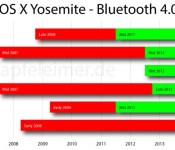
Bluetooth 4.0 was was first introduced in the MacBook Air and Mac mini in Mid 2011. The feature has since made its way into later Mac releases, finally coming to every Mac as of the 2013 Mac Pro.
Apfeleimer put together this nice graph showing which Macs support Bluetooth 4.0/LE.

The full bars represent Macs that can run OS X Yosemite, while only Mac models in the green bar timeframes support the required Bluetooth protocol for Handoff. For iOS users, the iPad 2 is the only device that is capable of running iOS 8 but doesn’t come with hardware support for Bluetooth LE.
There was some uncertainty about this being an absolute requirement, though in the WWDC sessions, Apple clearly states that Handoff runs on Bluetooth LE technology. However, now with the release of Yosemite Developer Preview 2, Apple has added a new field for Continuity Support in the System Information. The new field falls under the Bluetooth category:

Owners of late generation Macs seem to be showing Continuity support in line with the chart above, while older Mac owners are seeing Continuity support set to “No”. It’s not yet clear if adding a 3rd party Bluetooth 4.0 dongle will enable support on older Macs.
OS X Yosemite is in developer beta right now and will be released to customers later this year. Handoff support in the early betas remain spotty, so even those with supported devices may not see the feature working. Apple, of course, could change requirements over time.

Oxford University’s smart glasses help people with partial vision see more detail

When we hear the term “smart glasses” these days, we tend to focus more on the smart and less on the glasses. Researchers at Oxford University see things the other way around: putting the emphasis on glasses suggests a device that helps the visually impaired see the world, not augment it. This is the project Dr. Stephen Hicks of the Nullfield Department of Clinical Neurosciences at the University of Oxford has been working on: a wearable designed to give folks with partial vision a clearer view of their surroundings. It’s not as flashy as Google Glass, but it has the potential to change lives. It’s also being tested in the wild.
Hicks’ early prototypes show a lot of promise. Test users with partial vision are treated to a high contrast view of nearby objects. “The idea of the smart glasses is to give people with poor vision an aid that boosts their awareness of what’s around them,” Hicks says. It’s not a cure for sight loss, but test users say the system helps to add context to their surroundings, and makes the most of their existing vision.
Unfortunately, the University’s current rigs are somewhat bulky — cramming a pocket-sized computer, Epson Moverio-sourced optics and a head-mounted motion camera into a single wearable — but Hicks says the unit will eventually “look like a regular pair of glasses.” The final unit may also have audio feedback as well as face and text recognition features, but the University is waiting for additional funding before tinkering with new features. Right now the goal is simply to make it small and affordable: if everything goes to plan, Oxford’s smart glasses shouldn’t cost any more than a regular smartphone. Check out the smart spectacles in action in the video below.
Filed under: Wearables
Via: BBC
Source: Oxford University

Online ‘nanodegrees’ boost your career without requiring time off

Climbing the career ladder can be daunting. You frequently need new skills to move ahead, but it’s not always practical to take time off just to get some new credentials. However, AT&T and Udacity may have just solved this conundrum by unveiling “nanodegrees:” short online courses that are designed to boost your talents without disrupting your life. The upcoming programs teach subjects like app development and data analysis over the course of six to 12 months, assuming you devote 10 hours per week; you won’t have to use up vacation time just to earn a certificate. You’ll even get career help in the field you’re studying, so you should have a better sense of how any new talents will apply in the real world.
Nanodegrees won’t be cheap when they’re available this fall, with prices hovering around $200 per month. You’ll get to skip ahead if you already have a partial understanding, though. Also, companies and organizations like Autodesk, the Silicon Valley Leadership Group and Technet are backing the initiative — you’ll get real recognition for your efforts. While these micro-courses won’t do as much for your status as a full college degree or work experience, they may give you just enough of an advantage to land that new job or swanky promotion.
Via: VentureBeat
Source: Udacity

Symbian was once held ransom for several million euros, and Nokia paid it

Long before Nokia took up residence at Microsoft and became enamored with Windows Phone, the company had another Mobile OS to care for: Symbian. For awhile, it was the most widely used smartphone OS in the world, and according to a Finnish TV station, being its custodian was no easy task: in 2007 Nokia apparently paid several million euros to keep its encryption key private. MTV News (no, not that MTV) reports that criminals threatened to release the encryption key into the wild, potentially opening the OS to attacks and malware by unsavory programmers.
Naturally, Nokia contacted the police, hoping to catch the crooks when they attempted to collect their ransom in a Tampere parking lot. Sadly, something went wrong: after the criminals collected the untold millions, Police somehow lost track of them. The suspects, their encryption code and Nokia’s bag of money were gone. MTV News and Reuters both indecently verified the blackmail with Finnish police, which is still considered an open case. These days, Symbian is a bit more open source — but remember: once it was a big enough driving force in the mobile market to be held for ransom.
Filed under: Cellphones, Mobile, Nokia

OS X Yosemite’s ‘Dark Mode’ Now Available via Terminal Command [Mac Blog]
OS X Yosemite’s dark mode, which was demoed on stage at Apple’s Worldwide Developers Conference, has yet to make it into the beta as an available setting. It is, however, possible to get a glimpse of dark mode with a Terminal command, as discovered by iOS developer Hamza Sood.
To enable the somewhat functional dark mode:
sudo defaults write /Library/Preferences/.GlobalPreferences AppleInterfaceTheme Dark
— Hamza Sood (@hamzasood) June 17, 2014
The command enables an early version of dark mode, which is clearly not yet complete, likely explaining why it is not yet officially available in the beta. Users should, of course, use caution when deciding whether or not to try this feature for themselves. Dark mode can be undone with a second Terminal command.

The second beta of OS X Yosemite was released to developers earlier today, bringing several new changes like the return of Photo Booth and a new look for Time Machine. The public release of the software will likely come in the fall, after several more beta iterations.
Facebook Launches New ‘Slingshot’ Messaging App [iOS Blog]
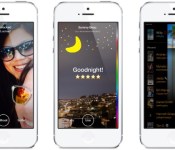
Facebook today launched a new app called Slingshot, which is designed to compete with popular ephemeral messaging app Snapchat. A video and photo messaging app, Slingshot allows users to send media to friends, who are unable to view it until they share something back.
Shots taken with the camera can be edited with captions and doodles, and then sent to multiple friends or a single friend. Slingshot requires a phone number to sign up, but it does not force users to sign up with or use Facebook. When a message is received, it is “locked” until a user sends a shot of their own, a feature Facebook hopes will encourage more active sharing.

Slingshot lets you quickly share moments–little and big–with lots of people at once. Shoot a photo or video of what you’re up to and sling it to a bunch of friends. They won’t be able to see your shot until they sling something back. Tap on a shot to react, or simply swipe it away.
As with Snapchat, pictures and videos are deleted shortly after they are viewed, though the app does allow users to take screenshots of content.
Slingshot is not Facebook’s first attempt at a Snapchat competitor. Back in 2012, while Snapchat was still in its infancy, Facebook company introduced Poke, allowing users to send ephemeral messages. The unsuccessful app was removed from the App Store in May 2014.
Slingshot was initially released and then pulled earlier this month by mistake, but it is now officially available from the App Store for free. [Direct Link]
Facebook’s Snapchat competitor, Slingshot, lands in the Play Store

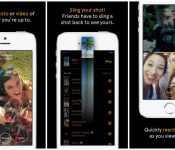
Facebook have developed a Snapchat like app called Slingshot after its failed attempts to purchase the App. Slingshot has now hit the Google Play Store for free allowing users to take photos and record videos to share with friends.
The way Slingshot works is that a friend needs to sling content back to you before they are able to see the original shared media. If you don’t care about what is being sent to you then you can simply swipe it away.
Check it out in Google Play for free.
The post Facebook’s Snapchat competitor, Slingshot, lands in the Play Store appeared first on AndroidGuys.

1Password for Windows now lets you manage accounts from your browser

AgileBits isn’t done sprucing up 1Password just because it released a much-needed Android upgrade; it’s also showing some love to the Windows version of its secure account manager. The just-launched 1Password 4 for Windows catches up on features in a big way, including the browser extension previously seen only on the Mac. You’re now just a shortcut away from fetching credentials or generating an extra-complex password. The revamp also brings WiFi syncing, multiple vaults and a service that warns you when hackers compromise a site.
The reworked software is free if you bought 1Password for Windows in 2013 or later. However, be prepared to pay up if you’re starting relatively fresh: a brand new license is $50 ($70 in a five-pack), while those who don’t qualify for a free update will have to shell out $25. That’s steep if you’re used to paying no more than a few bucks for mobile software. However, it might be worth the expense if you’re tired of memorizing obscure login details.
Filed under: Internet, Software
Source: Agile Blog, AgileBits

Engadget Live heads to Seattle on July 18th!

Seattle, the always caffeinated, drone-building, Super Bowl-winning, beautiful city that coddles the Puget Sound. We had such a great time hanging with the locals last year that we’re making a comeback. Join us at Showbox SODO on Friday, July 18th, 7PM sharp for our second Engadget Live event of the year. (If you happen to be in Austin, TX this coming Friday, join us at our first “Live” event there!).
What’s Engadget Live? Unlike trade shows and press-only events, we bring together gadget lovers with tech brands in an interactive environment. A bunch of great companies (mostly local ones!) will show off their newest products and get feedback directly from fans like you.
What companies will eagerly await your arrival? PicoBrew will show off its Zymatic brewing appliance, which lets you brew top quality craft beers at the push of a button. While you sip on that beer, you can watch a show recorded on TiVo’s superior line of DVRs (which put those cable company-issued units to shame.) Huawei will show off its line of smartphones and let you go hands-on with them (after which you can write your own review on Engadget!).
Into interplanetary exploration? Planetary Resources, the company that is working to look outside Earth to discover natural resources, will bring its space telescope and meteorites for a little show and tell. Finally, castAR will be on hand to talk about the development of its augmented reality glasses (that don’t look like any other AR glasses we’ve seen before).
If all of this sounds just too good to miss, get your tickets right here for just $5 per person. If you’re not going to be anywhere near Seattle on July 18th, you can join us in Boston on August 22nd or Los Angeles on October 3rd. All of our Engadget Live events lead up to our flagship Engadget Expand show, which will take place in New York City on November 7th & 8th (tickets, for which, can be purchased right here!).
Filed under: Announcements, Amazon
Source: Engadget Live (Seattle)
 AIVAnet