



OnLive is giving enterprise cloud services one more try

Stop us if this sounds familiar: after successfully launching and new a video game service, a growing cloud computing firm looks to the business sector to expand its customer base. Oh, you’ve heard this one? That’s because OnLive is retracing its steps, following up its CloudLift gaming service (announced back in March) with an enterprise-focused counterpart. Onlive’s CloudLift Enterprise is built on the same promise as its older OnLive Desktop service: your work on any device at any time — but now it’s offering its customers a bit more than a virtualized desktop.
Specifically, CloudLift enterprise is designed for graphic intensive applications — things like drone piloting setups, military training simulators or applications for architecture and design. OnLive says it can deliver these applications to virtually any smartphone, tablet or laptop on any operating system over fairly slow connections, as low as 2Mbps.
OnLive told us that despite the potential growth the enterprise service represents, it’s not designed to replace any business from its gaming division — in fact, the company says it’s well pleased with much CloudLift gaming has grown over the past few months. “The game service will continue to be a driving force for the company,” Onlive Executive chairman Mark Jung told us, explaining that its enterprise service leverages the same tech that drives its gaming services. “The development work that went into our game platform is the core technology at the center of the Enterprise PaaS solution.”
Filed under: Misc
Source: OnLive

Google Now tests calendar event suggestions based on Gmail convos

Google knows many, many things about you, perhaps even that you can be a bit forgetful sometimes. To help you remember your plans, the company has started testing a feature that takes possible events from Gmail or other Google services and turns them into Google Now cards. For instance, if it infers that you’re planning a day out based on an email thread, the new feature will automatically turn it into a card and will ask if you’d like to add the event to your calendar. It’s really not that much different from Now pulling flight or hotel reservation info from your Gmail account. According to Android Police (who first reported its existence), you can choose whether to continue getting event suggestions on Google Now’s settings page. So, when you do get the feature, you can switch it off if it starts feeling creepy and turn it back on if that calendar’s looking suspiciously empty.

Filed under: Cellphones, Mobile, Google
Source: Android Police

Facebook Updates Messaging App with 15-Second Videos, ‘Big Likes’ [iOS Blog]
 Facebook has updated its popular Facebook Messenger app with 15-second videos and “big likes”, adding more ways for users to interact with their friends.
What’s New
Instant Video Sending: Shoot and play 15-second video messages from the camera right in the appBig Likes: Press and hold to send an even bigger thumbs up when you really, really like something.
Easy video sharing has been a popular new feature for messaging apps, with Snapchat getting updated with live video in May and Facebook-owned WhatsApp planning to add video calling. At WWDC, Apple announced that its Messages app would be receiving in-line video messages in iOS 8. However, Facebook Messenger’s Instant Video feature is more similar to Apple’s implementation of video rather than Snapchat or WhatsApp.
Facebook Messenger is available in the App Store for free. [Direct Link]

Netflix’s website is suddenly sporting a fresh logo and brighter background

Netflix started tagging some of its trailers with a new logo around the start of May, and now it’s part of changes on the streaming movie service’s main website. The redesigned logo has replaced its predecessor at the top left, and the background is brighter than the last big redesign we can recall. A quick scan of apps on our various devices didn’t show any changes there, and company spokesman Joris Evers tells us simply “The updated logo is gradually appearing in more places.” So, are you as much of a fan of the new look as we are of The Magic School Bus?
[Thanks, Colton!]
Filed under: Home Entertainment, Internet, HD
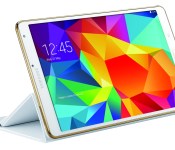
Samsung Galaxy Tab S accessories gallery
![Galaxy Tab S 8.4_inch_Bookcover_2[1]](https://i0.wp.com/www.androidguys.com/wp-content/uploads/2014/06/Galaxy-Tab-S-8.4_inch_Bookcover_21.jpg)
Check out some of the official accessories from Samsung for its upcoming line of Galaxy Tab S tablets.


![Galaxy Tab S 8.4_inch_Bookcover_1[1]](https://i0.wp.com/www.androidguys.com/wp-content/uploads/2014/06/Galaxy-Tab-S-8.4_inch_Bookcover_11.jpg)
![Galaxy Tab S 8.4_inch_Bookcover_3[1]](https://i0.wp.com/www.androidguys.com/wp-content/uploads/2014/06/Galaxy-Tab-S-8.4_inch_Bookcover_31.jpg)
![Galaxy Tab S 8.4_inch_Bookcover_4_viewing mode[1]](https://i0.wp.com/www.androidguys.com/wp-content/uploads/2014/06/Galaxy-Tab-S-8.4_inch_Bookcover_4_viewing-mode1.jpg)
![Galaxy Tab S 8.4_inch_Bookcover_5_touch mode[1]](https://i0.wp.com/www.androidguys.com/wp-content/uploads/2014/06/Galaxy-Tab-S-8.4_inch_Bookcover_5_touch-mode1.jpg)
![Galaxy Tab S 8.4_inch_Bookcover_6_typing mode[1]](https://i0.wp.com/www.androidguys.com/wp-content/uploads/2014/06/Galaxy-Tab-S-8.4_inch_Bookcover_6_typing-mode1.jpg)


![LevelOver_Black_1[1]](https://i0.wp.com/www.androidguys.com/wp-content/uploads/2014/06/LevelOver_Black_11.jpg)
![LevelOver_Black_2[1]](https://i0.wp.com/www.androidguys.com/wp-content/uploads/2014/06/LevelOver_Black_21.jpg)
![LevelOver_Black_3[1]](https://i0.wp.com/www.androidguys.com/wp-content/uploads/2014/06/LevelOver_Black_31.jpg)
![LevelOver_White_1[1]](https://i0.wp.com/www.androidguys.com/wp-content/uploads/2014/06/LevelOver_White_11.jpg)
![LevelOver_White_2[1]](https://i0.wp.com/www.androidguys.com/wp-content/uploads/2014/06/LevelOver_White_21.jpg)
![LevelOver_White_3[1]](https://i0.wp.com/www.androidguys.com/wp-content/uploads/2014/06/LevelOver_White_31.jpg)
![LevelOn_Black_1[1]](https://i0.wp.com/www.androidguys.com/wp-content/uploads/2014/06/LevelOn_Black_11.jpg)
![LevelOn_Black_2[1]](https://i0.wp.com/www.androidguys.com/wp-content/uploads/2014/06/LevelOn_Black_21.jpg)
![LevelOn_Black_3[1]](https://i0.wp.com/www.androidguys.com/wp-content/uploads/2014/06/LevelOn_Black_31.jpg)
![LevelOn_White_1[1]](https://i0.wp.com/www.androidguys.com/wp-content/uploads/2014/06/LevelOn_White_11.jpg)
![LevelOn_White_2[1]](https://i0.wp.com/www.androidguys.com/wp-content/uploads/2014/06/LevelOn_White_21.jpg)
![LevelOn_White_3[1]](https://i0.wp.com/www.androidguys.com/wp-content/uploads/2014/06/LevelOn_White_31.jpg)
![LevelIn_Black_1[1]](https://i0.wp.com/www.androidguys.com/wp-content/uploads/2014/06/LevelIn_Black_11.jpg)
![LevelIn_Black_2[1]](https://i0.wp.com/www.androidguys.com/wp-content/uploads/2014/06/LevelIn_Black_21.jpg)
![LevelIn_White_1[1]](https://i0.wp.com/www.androidguys.com/wp-content/uploads/2014/06/LevelIn_White_11.jpg)
![LevelIn_White_2[1]](https://i0.wp.com/www.androidguys.com/wp-content/uploads/2014/06/LevelIn_White_21.jpg)
The post Samsung Galaxy Tab S accessories gallery appeared first on AndroidGuys.
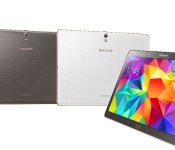
Samsung Galaxy Tab S gallery

Take a look at Samsung’s new tablets from just about every angle imaginable. What’ll it be, an 8.4-inch or the 10.5-inch version? And, which color?


The post Samsung Galaxy Tab S gallery appeared first on AndroidGuys.
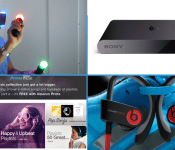
Engadget Daily: Amazon Prime Music, getting sweaty with Sony’s VR headset and more!

Today, we demo Street Luge on Sony’s Project Morpheus VR headset, break down Amazon’s new Prime Music streaming service, go hands-on with Beats’ new Powerbeats2 wireless buds and learn about Sony’s plan for the PlayStation TV. Read on for Engadget’s news highlights from the last 24 hours.

What you need to know about Amazon Prime Music
It looks like the glut of rumors were true: Earlier today, Amazon launched its very own music streaming service. Exclusive to Prime members, Prime Music brings adless access to over a million tunes via the Amazon Music app.

Getting sweaty with the future of Sony’s virtual reality
Sony wants to be the one to take VR mainstream, but according to its senior director of R&D Richard Marks, that push won’t happen in 2014. Read on as our own Joseph Volpe investigates the company’s plans for Project Morpheus and, of course, takes the headset for a spin.

Powerbeats2 are Beats by Dre’s first wireless earbuds
Beats by Dre is now in the wireless headset business. Dubbed the Powerbeats2, these cord-cutting $199 buds feature an adjustable hook-over-the-ear design and boast six hours of battery life. What’s more, you don’t have to worry about getting overly sweaty at the gym thanks to its IPX4 water resistance.

With the PlayStation TV, Sony’s going after families with kids
Between the PS Vita, PS3 and PS4, where exactly does PlayStation TV fit in? Well, according to Sony’s Sharon Kapitula, the $100 media streamer/console hybrid is targeted toward “this new audience of families with kids that can play [PlayStation TV] together.”
You also might like:
Filed under: Misc
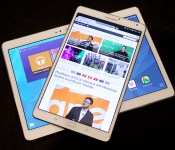
Up close and personal with Samsung’s vibrant Galaxy Tab S

When Samsung first made what it considered to be the definitive Android smartphone, they called it the Galaxy S and stuck with that naming convention for every other flagship phone it’s made since. That tiny little badge of distinction has never wound up on one of the company’s many, many tablets… until now. As if you still had any lingering doubts, Samsung firmly believes that the new Galaxy Tab S family are the best tablets it’s ever crafted… and it’s mostly because of those tremendous Super AMOLED screens. We got a chance to take those new beauties for a spin — read on to see what we thought.
By now you know Samsung crafted two different flavors of the Galaxy Tab S — an 8.4-inch model and a 10.5 model — and aside from the one obvious difference, they’re just about identical. Both look like stretched out Galaxy S5s, sport the same Exynos 5 Octa chipset (a mashup of a 1.9GHz quad-core chip, a 1.3GHz quad-core chip and 3GB of RAM), run Android 4.4 KitKat hidden under TouchWiz’s familiar tablet trappings and pack fingerprint scanners in their home buttons. Let’s put all that stuff aside for a moment, though. The screens are the real stars of the show here, and they are something to behold.
People have been singing the praises of Super AMOLED for what feels like ages now. Stop me if this sounds familiar: colors appear richer and more vivid, blacks are deeper and more sumptuous, and whites come through very crisply. All those of observations still hold true for the Galaxy Tab Ss, but they seem so much more pronounced and impactful on those bigger, 2560 x 1600 screens. Remember: the last time Samsung experimented with a Super AMOLED screen in a tablet, it was in this weird little guy from years ago. If we’re picking nits the 8.4-inch model is technically more pixel dense, but my eyes couldn’t discern individual pixels on either tab).
The richness of those displays are made even more apparent when you stick one of Samsung’s Galaxy Tab Pros next to them — the Pro is less than a year old, but the screen looks lifeless and washed out sitting alongside the 10.5-inch S. And if the Tab Pro didn’t have it bad enough, the difference was only magnified more in a test that simulated performance in direct sunlight. The Tab S’s AMOLED panel maintained a level of clarity and vividness that couldn’t be touched. Part of what makes the screen so impressive are the smarts that help it adapt to new situations. There’s a tiny RGB sensor embedded in the bezels of both tablets that let it gauge your current lighting situation and fiddles with white balance to compensate. If you happen to find yourself in a room bathed with purple light (poor you), the screen takes on a magenta cast so as not to strain your eyes, a process that repeats wherever you go.

Despite what Samsung might think, a killer tablet requires more than just a killer screen. Getting a sense of a device’s power while elbowing other journalists for room is a tricky process, but in our limited time together, both Tab Ss seemed more than happy handling minor tasks we threw at them. Swiping through pages was quite snappy, as was firing up apps and thumbing through digital magazines. Oh, and as you’d expect, there was nary a hiccup in sight when we fired up a few test videos.
Both versions are good for gripping too, if only because they’re so slim. Sony’s Xperia Tablet Z2 still wins that fight by a few fractions of a millimeter, but the Tab Ss are only as thick as 5 credit cards stacked atop each other so you shouldn’t have trouble whipping it around. What’s more, they both feel awfully nice too. Don’t get me wrong – the Galaxy S5 is fine and all, but it’s just light enough to lack a certain sense of rigidity and robustness. That’s thankfully not the case with the Tab Ss: sure, they’re light, but the increased weight of those displays makes each respective package feel just a little more premium.

It’s not just the hardware that seems a little familiar this time. Samsung didn’t go overboard with the new software additions – instead, they just thoughtfully updated a few key components. Easily the most impressive is Samsung’s refreshed SideSync app – it allows a Tab S to communicate with a nearby Galaxy S5 over Wi-FI Direct. Why does that matter? Because now you’re treated to a realtime replica of your phone on the Tab S screen, so you can swipe away on Tinder or transfer files by dragging and dropping. The usual slew of security-focused apps and Galaxy giveaways are still present and accounted for, so you’ll find plenty of familiar bits if you’re coming from another Galaxy gadget.
We can’t pass final judgment on Samsung’s newest pair of tabs yet, but we definitely like what we see so far. A mix of thoughtful updates, familiar design and some seriously impressive screens makes the Galaxy Tab S family one to consider when units start hitting shelves this July.

Visual encyclopedia builds itself by scouring the internet

Crowdsourced knowledge bases like Wikipedia encompass a lot of knowledge, but humans can only add to them so quickly. Wouldn’t it be better if computers did all the hard work? The University of Washington certainly believes so. Its LEVAN (Learn EVerything about ANything) program is building a visual encyclopedia by automatically searching the Google Books library for descriptive language, and using that to find pictures illustrating the associated concepts. Once LEVAN has seen enough, it can associate images with ideas simply by looking at pixel arrangements. Unlike earlier learning systems, such as Carnegie Mellon’s NEIL, it’s smart enough to tell the difference between two similar objects (such as a Trojan horse and a racing horse) while lumping them under one broader category.
Right now, the folks at the Wikimedia Foundation have little to worry about. LEVAN has only explored about 175 concepts as of this writing, and it can take as much as 12 hours to add another to the mix. It’s open to suggestions from the public, though, and the university has open-sourced its code so that anyone can build on the formula. You won’t want to depend on this self-assembling information hub for vital knowledge in the near future, but it should eventually be very useful for both schools teaching basic ideas as well as computer vision software that needs a helping hand.
Filed under: Internet, Software
Via: Phys.org
Source: LEVAN, University of Washington
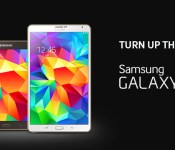
Samsung debuts 8.4-inch, 10.5-inch Galaxy Tab S tablets

As we’ve all come to expect over the last few weeks, Samsung has announced its new Galaxy Tab S line of tablets. Available for pre-order as soon as tomorrow, Friday, June 13, the premium grade tablets will be offered in 8.4-inch and 10.5-inch variants.
Hardware Monsters
The two tablets are powered by Android 4.4 KitKat and share a number of specifications. Common hardware between the two include Exynos 5 Octa (1.9 GHz QuadCore + 1.3 GHz QuadCore) processors, 3GB RAM, 16GB internal storage, and microSD expansion. Both models also boast WQXGA (2560×1600) Super AMOLED displays however the smaller one gets the higher pixel-per-inch count, natch. Rounding things out are an 8-megapixel rear camera, front-facing 2.1-megapixel camera, dual-band Wi-Fi, GPS, Bluetooth 4.0, and USB 2.0.
Software
In terms of software, the standard suite of Samsung apps are present. Familiar titles such as WatchON, S Health, and Multi Window join other such as Milk Music and new app called Samsung Papergarden. Designed with the Tab S in mind, this one delivers access to newspapers and magazines such as Comso, Vogue, GQ, and Rolling Stone.
Extra Perks
Samsung is giving away all sorts of wonderful content with their new tablets through Galaxy Gifts. Pick up one of these guys and you’ll also be treated to one-year free of Gogo In-flight Wi-Fi access, a 12-month subscription to Bloomberg BusinessWeek, 6-month trial subscription to The Wall Street Journal and The Washington Post, 3-month subscription to The New York Times, 3 months free Sirius XM Radio, and 3 months free subscription to Audible.
Availability
The Galaxy Tab S 8.4 will be available for $399.99, while the Tab S 10.5 will be $499.99. The tablets will be sold in July through Samsung.com, Amazon, Best Buy, Fry’s, Office Depot, Office Max, PC Richard & Son, Sears, Tiger Direct and Walmart.com.
![Book Cover[3]](https://i0.wp.com/www.androidguys.com/wp-content/uploads/2014/06/Book-Cover3.jpg)
As often is the case with new devices, there will be a number of accessories available for the new tablets: Bluetooth keyboard book covers, standalone Bluetooth keyboard, flip covers, book covers, S Action Mouse, USB LAN Hub, power saving cable and portable battery packs
The Road Ahead
Looking ahead, a 4G LTE version of the Samsung Galaxy Tab S line will be offered across multiple carriers. According to the press release, all four major players are in line to provide connected variants.
The post Samsung debuts 8.4-inch, 10.5-inch Galaxy Tab S tablets appeared first on AndroidGuys.
 AIVAnet