



A Closer Look at ‘Handoff’ and Other New iOS 8/Yosemite ‘Continuity’ Features
During yesterday’s WWDC keynote, Apple launched several new “Continuity” features to improve the cross-platform integration of iOS 8 and OS X Yosemite. One of the new abilities designed to allow better transitions from iOS devices to Macs is Handoff, which allows users to start a task on one device and swap to another nearby device.
As described by Apple, Handoff can be used for several different activities, including email and web browsing. Users can begin writing an email on an iPhone, for example, and then switch to a Mac to finish. Websites work similarly, allowing users to browse the web on one device, and then continue looking at the same website on another device. While this is already possible via iCloud Tabs, Handoff makes the entire process easier and extends the functionality to other apps.

We believe you should be able to use the right device for the moment. We want the transitions between these moments to be as absolutely natural and seamless as possible.
When you’re working on your Mac, your devices around you in proximity are aware of each other and are aware of what you’re up to.
As demoed during the keynote, iOS devices and Macs are “aware” of each other, and can pick up a task when nearby. When composing an email on a Mac, for example, users will see an icon on the screen of their iPad or iPhone that can be tapped to allow them to continue writing on the iOS device. Similarly, an iPhone near a Mac will cause the activity to automatically pop up on the Mac’s dock, allowing for a seamless transition between devices.
Handoff currently works with the following Apple apps: Mail, Safari, Pages, Numbers, Keynote, Maps, Messages, Reminders, Calendar, and Contacts. There’s also a Handoff API for developers, which will likely see Handoff capabilities added to a range of different apps.
The enhanced Continuity between OS X and iOS also allows Mac devices in close proximity to an iPhone to both place and receive calls, leveraging Bluetooth and WiFi with the iPhone serving as a relay. Users can answer a call made to their iPhone on their Mac, a useful feature when an iPhone is across the room charging or otherwise inaccessible.
During the keynote, Apple’s software chief Craig Federighi used the calling feature to contact new Apple employee Dr. Dre on his Mac, demoing its ability to place calls.
Similarly, iPads and Macs are now able to receive SMS messages from non-Apple devices, a function previously limited to the iPhone. iPads and Macs are also able to utilize an “Instant Hotspot” feature that allows them to connect to an iPhone hotspot with just a click, and AirDrop is also cross-platform.
Currently, Handoff and the other Continuity enhancements are features limited to developers who are using both iOS 8 and OS X Yosemite, but it will be available to the general public in the fall after the official release of the new operating systems.

iOS 8 Introduces Peer-to-Peer AirPlay Playback, Easy iOS to Mac Screen Capture [iOS Blog]
iOS 8 introduces a new peer-to-peer AirPlay feature that will allow iOS devices to stream content to the Apple TV without the need for a shared network connection. Currently, an iOS device must be on the same WiFi network as an Apple TV, which can make it a hassle to use AirPlay when away from home.

The new feature is described on Apple’s iOS 8 enterprise preview page, as delinking AirPlay from WiFi will make it far easier for people to use AirPlay in classrooms and businesses that may have complicated networks.
With iOS 8, you can wirelessly connect iPad, iPhone, or iPod touch to Apple TV without first connecting to the organization’s network. Which means you can present or share your work even if you’re offline or the organization has a complex network.
With iOS 8, Apple will also make it easier to capture video from an iOS device directly on a Mac. As described by our sister site TouchArcade, an iOS 8 device plugged in to a Mac will show up as a camera, which can have its screen recorded in QuickTime. This feature is designed for developers to create app previews, but end users will also be able to use the function to record their device screens with iOS 8 and Yosemite.
Apple’s new peer-to-peer AirPlay feature and the iOS 8/Yosemite video capturing capabilities will be available to the public this fall, following the official launch of iOS 8 and OS X Yosemite.

Razer’s Junglecat looks like an Xperia Play gamepad for the iPhone

Apple’s iOS gamepad protocols have spawned some solid mobile button solutions, but they all have the same fundamental problem: portability. The appeal of mobile games is mobility — it’s not fun to lug around a spare controller on the off chance you might pick up a quick game on your phone. Razer’s first mobile game controller embraces this problem by aping one of the strangest smartphones of the last decade: the Xperia Play.
Like the Xperia Play, the Razer Junglecat gamepad hides underneath your smartphone, sliding in and out like a QWERTY keyboard. Unfortunately, it’s not quite as robust — the Play’s touch-sensitive dual thumb pads aren’t represented here, just the standard four-way d-pad, two bumpers and A, X, B and Y buttons. At least it features Razer’s flair for customization: a companion app will allow users to fully remap all of the controller’s functions, and also serves as a portal for compatible games. It’s also an iPhone exclusive controller. Interested in trading 20mm of pocket space and $99 for a portable gamepad? Check out the source link below.

Congratulations, internet: you collapsed part of the FCC website with comments

Apparently Last Week Tonight host John Oliver’s call to arms was answered, as the United States government’s website for Federal Communications Commission complaints is experiencing some issues. Specifically, the page where you can submit comments regarding proposed internet provider regulation is having issues. The FCC’s Twitter account says the issues are due to, “heavy traffic.” And why might that page be experiencing especially high traffic volume? It could be that, after reading our net neutrality explainer, the entire internet decided to rise up and push back on the handful of major corporations which control the pipes we all use.
But, more likely, it’s a reaction to comedian-turned-host John Oliver’s hilarious and smart piece this past weekend on the subject. See it yourself after the break — and then tell the FCC what you think about keeping the internet open…if you can get to the site, that is. Keep trying!

Google’s new Chrome add-on secures your email every step of the way

Privacy advocates (including Edward Snowden) will tell you that one of the better ways to evade internet snooping is to encrypt data end-to-end, so that people can’t casually peek at what you’re doing. Well, it’s now considerably easier to do just that — if you’re using Chrome, anyway. Google has released an early version of an appropriately named Chrome add-on, End-to-End, that secures your web-based email beyond what providers usually offer. Instead of setting up complicated encryption tools, you just use the extension; after that, messages you send or receive can’t (easily) be read unless the recipient has the necessary key.
Think twice about jumping in with both feet. This is an alpha release that’s bound to have some bugs, and Google only plans an official launch in the Chrome Web Store once everything is “ready for primetime.” However, you may be willing to try it early after you see the new email section Google added to its Transparency Report. It reveals that a third of outbound Gmail isn’t encrypted at all stages of transit, and that half of incoming messages are similarly vulnerable. If you’re worried that this could leave your private conversations in the clear, you’ll want to check out End-to-End right away.
Filed under: Internet, Software, Google
Via: Google Online Security Blog, Google+
Source: Google Code, Google Transparency Report

Cablevision gets better at letting you watch TV away from home

Whether it is on a smartphone, tablet or laptop, being able to watch live television outside your home network is pretty great. Cablevision, through the Optimum App, has been letting its cable customers do this for some time now, but it’s about to get much better. The service provider today announced that it is baking the “TV to Go” feature right into its Optimum App, allowing you to have access to over 100 channels even when you’re away from home. This includes both live and on-demand content, from networks such as beIN Sports, CNN, Disney, ESPN, NBC, NFL and a lot more — naturally, access to these will be determined by which Optimum TV package you pay for. The revamped Optimum App service is available now on the web, iOS, Android and Kindle Fire tablets.
Filed under: Home Entertainment, Internet, HD, Mobile
Source: Cablevision

Various Moto X, Moto G and Moto E Devices to See Android 4.4.3 Updates This Week
 Motorola has announced via their official blog that they will begin rolling out Android 4.4.3 to the Moto X, Moto G and Moto E this week. The breakdown is a bit more interesting though, here is what Motorola had to say in regards to which version of the devices will be getting it.
- Moto X T-Mobile users
- Moto G users who bought online in the U.S. (includes Moto G 4G LTE) and at retail in Brazil
- Moto E users who bought online in the U.S. For Moto E users, you are still up for the next major Android update as well. Consider this the cherry on top.
Not as cut and dry as you would think. The update will include the fancy new dialer that has been talked about to death already in the last 24 hours. Not to mention several stability, framework, security fixes and enhancements to the power profile capabilities. All that means is it should be faster with less issues and stay charged longer.
In addition to the boost to 4.4.3, there are a number of little changes that will be made to each device during the update process as well. The Moto X will see better image quality, more realistic flash coloring and improved photos in low light conditions with the front camera. Both the Moto X and Moto G will gain a “pause/resume” button while taking videos and motorola Alert.
Source: Motorola Blog via Phandroid
//<![CDATA[
ord = window.ord || Math.floor(Math.random()*1E16);
document.write('’);
//]]>

iOS 8 Tidbits: Time-Lapse Mode, Request Desktop Site, and Grayscale Mode, and More
During yesterday’s keynote, Apple packed a ton of information on iOS 8 into a short period of time, showing off a multitude of new features like interactive notifications, QuickType predictive text, enhancements to group messages, new family sharing options, and more.
Given the time constraints, many new iOS 8 changes went under the radar and while we detailed a few of these yesterday, now that iOS 8 has been downloaded on thousands of developer devices, even more minor additions to the operating system have come to light. Our forum members and iOS 8 users on Twitter have detailed a huge number of the new changes, and we’ve catalogued the more interesting improvements below.
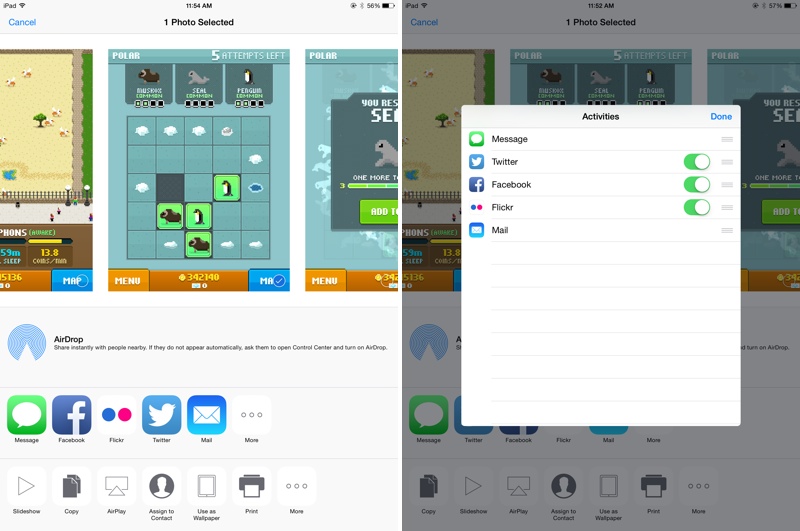
Share sheet customizations – When sharing an image, website, or other type of media, users can now customize their sharing options. The list of apps where content can be shared can be rearranged and disabled, as can the media options like Copy, Print, and AirPlay. Some sheet icons also have a new look that eliminates the black border in iOS 7.
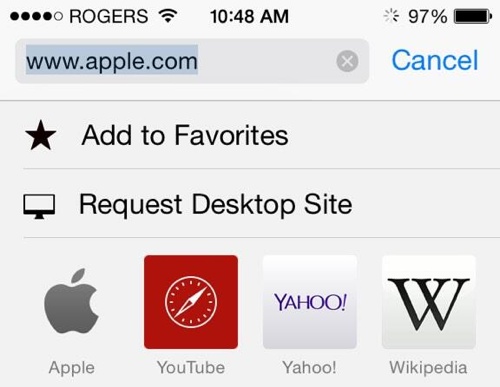
Request desktop site in Safari – As noted by a Twitter user, Safari now includes an option to “Request Desktop Site,” which will load the desktop version of a site rather than the mobile version.
Time-Lapse mode for Camera – The Camera app has gained a new Time-Lapse mode, which captures a series of images and then compiles them into a time-lapse video. There are also new manual exposure controls, which allow exposure to be selected when taking a photo.

DuckDuckGo search – Users can now opt to select DuckDuckGo as their default search option in Safari. DuckDuckGo is known for its anti-tracking stance, opting not to profile its users.
iBooks – iBooks now comes preinstalled on iOS devices with iOS 8. Previously, it was a separate download in the App Store. There’s also a new auto night mode and an organization option to group books from a series together.
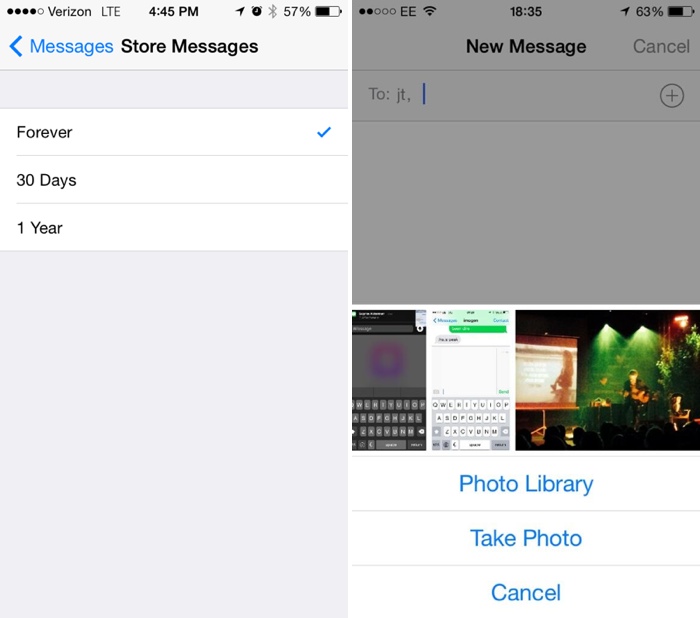
Messages – Along with several improvements to group message management, there are now options to remove stored messages after a set period of time of 30 days or one year, which will allow users who have extensive iMessage threads to free up valuable space. When adding an image to a message, there’s a new feature displaying recent photos for quick insertion.
Photos – The Photos app has received new organizational options, including two albums for “Recently Added” and “Recently Deleted.” The Recently Deleted section temporarily displays images that have been removed from the app in case of accidental deletion. The date and time a photo was taken is also displayed.

WiFi Calling – iOS will include an option for WiFi calling, allowing users to place calls over WiFi instead of cellular when connected to a WiFi network, saving minutes and data. Several carriers, including T-Mobile, have already announced support for the feature.
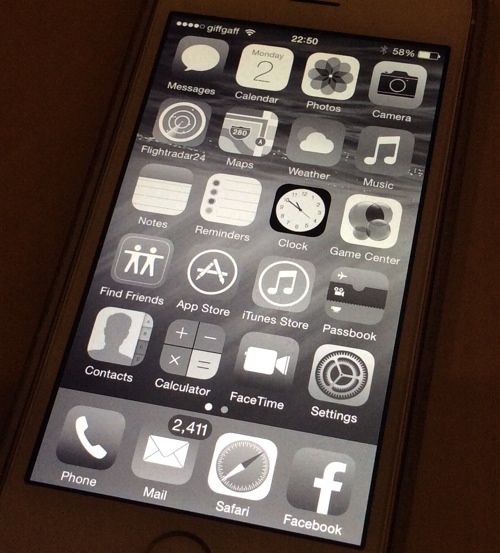
Grayscale mode – There are several new Accessibility options, including a new “Grayscale” mode that shifts the entire operating system into shades of black and white. There’s also Improved Zoom option.
Keep up with all of the new changes introduced with iOS 8 on our forums, where our readers are discussing and sharing a seemingly endless number of feature enhancements and tweaks in the “iOS 8, All The Little Things” thread.

ASUS’ new external Blu-ray drive does 7.1 audio at a fair price

While ASUS continues to impress us with a slew of PCs and mobile devices at Computex, let’s not forget that it still makes some nice peripherals. One thing that surprised us at the ASUS booth was a pretty external Blu-ray drive aimed at audio buffs. Dubbed the Blu-ray Prime, this USB 3.0 device claims to be the “world’s only optical drive with 7.1-channel audio output,” courtesy of the integrated ASUS Xonar sound card, which packs a Cirrus Logic CS4398 DAC and a C-Media CM6631A audio processor, plus optical output. It also features a 600-ohm headphone amplifier and a clean 114dB signal-to-noise ratio. Expect the Blu-ray Prime to hit various markets for about $199 in Q4, after the DVD version is released in Q3 for half the price.
Photos by Zach Honig.
Filed under: Peripherals, ASUS

AirPlay on iOS 8 doesn’t need a network to stream your media

Right now, Apple’s AirPlay media streaming requires an established WiFi network to fly. That’s fine when you’re at home, but do you really want to ask for a friend’s hotspot password just to show vacation photos on their Apple TV? Mercifully, iOS 8 will let you skip that hassle. One of the many under the radar upgrades to the software is peer-to-peer AirPlay support — you can now share content to an AirPlay-capable device as long as you can make a direct connection.
The basic concept is old hat, as you might suspect. DLNA has done this for a while, and third-party apps on various platforms can pull this off. All the same, the improved AirPlay technology should be handy both for media-savvy socialites as well as presenters who aren’t always guaranteed network access in the meeting room.
Filed under: Cellphones, Home Entertainment, Tablets, HD, Mobile, Apple
Via: AppleInsider, Gizmodo
Source: Apple
 AIVAnet