



A metal LG G3 would’ve costed $300 more

With the much anticipated LG G3 announced last week, some people were a bit let down by the fact that the phone isn’t made of metal like rumors suggested. With the teaser videos making it sure seem like it would be, this phone could’ve taken the spotlight off of HTC’s One M8 for good with a truly premium build. The phone instead went with a plastic material like the G2 but with a metallic design finish.
According to LG Vice President of Mobile Design Chul Bae Lee, there were a few reasons behind the choice for plastic. “If you could charge $300 more for a phone, maybe we could make it metal.” He said to TrustedReviews.
He also mentioned the fact that metal would’ve made the phone bulkier and much less thin then what they have achieved with the G3. If I had applied metal to the G3 is would be much bulkier in the bezels and in all four directions. It would be very big and very heavy. It would be really slippery as well.”
He added: “What would be the best material for this phone? I don’t think metal would be the answer for that.”
The G3 is expected to hit markets soon, and is expected to be around $100 cheaper than other flagships, inclding the One M8 and Galaxy S5, despite having its new QHD 1440p display.
SOURCE: TrustedReviews

The post A metal LG G3 would’ve costed $300 more appeared first on AndroidGuys.
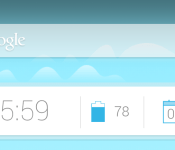
Get This Look: Google Now Homescreen

We’re huge fans of changing the home screen around a bit and creating a new user experience for our Android. So much so that we present our ongoing series of Get This Look posts. In a nutshell we show you a new layout, app, widget, or icon set for your Android handset and tell you which apps you’ll need to mimic the feel.
Some of these are a little easier to create than others and many of them can be tweaked to no end. The following details are but the ingredients to which you can create your own delicious Android dish; your results will vary. Which is awesome! If nothing else, this is a great way to discover new apps, widgets, icons, and more!

Google Now
Why we love this look:
Google Now has become very integrated with the Android operating system since it was introduced in Jelly Bean, and the future is looking like it will play a bigger part in the UI than ever, so why not get a step ahead and change it yourself?
The launcher used in this is the new Inspire Launcher, a contender looking to take the throne from Nova as it embraces KitKat’s updated look to Android with brighter colors and lots of customization. The icon theme used is Moonshine, the icon pack created after the leaked images of Google’s upcoming icon refresh, code named “Moonshine”. The widgets you see are Clock Now widgets, and the wallpaper is Mountains Now Full Wallpaper, a live wallpaper that shares the same art as Google Now’s background and changes weather throughout the times of the day.
What you’ll need:
The post Get This Look: Google Now Homescreen appeared first on AndroidGuys.
Razer Unveils ‘Junglecat’ Gaming Controller with Slide-Out Design, Companion App [iOS Blog]
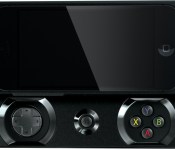
Razer has unveiled its Junglecat iOS gaming controller for the iPhone 5s and iPhone 5, bringing a number of hardware features that attempt to make games easier and more natural to play on a mobile device.

The accessory features a slide-out unibody design that contains a Lightning connected upper enclosure for the iPhone, and boasts console-style controls such as a D-Pad, ABXY face buttons, and shoulder bumpers. The Junglecat includes open access to the iPhone’s hardware features including the sleep/wake button, volume buttons, home button, headphone jack, and front/rear cameras.
Razer is also shipping a companion app with the Junglecat, allowing users to remap face buttons and adjust sensitivity on the controller. The app will also include a list of games optimized for controller play, as the app’s interface displays both purchased apps and featured games.

It is unknown if Razer’s Junglecat is a more final version of the company’s “Kazuyo” controller that was leaked earlier this year, however the latter featured a slim hard-shell case design and was rumored to come with full-sized analog sticks. A previous report also indicated that Razer would be shipping a companion app for the Kazuyo as well, perhaps indicating that the company chose a different design for its first iOS controller.
The Razer Junglecat joins a growing market of iOS game controllers, which includes the SteelSeries Stratus, Logitech PowerShell, MOGA Ace Power and Mad Catz’s C.T.R.L.i controller. While all current controllers have attempted to impress consumers with unique designs and buttons, it has been reported that Apple’s strict guidelines have hampered product quality.
Currently, an increasing number of games are offering iOS 7 controller support, including titles like 2K Drive, Dead Trigger 2, and Grand Theft Auto: San Andreas. The number of iOS games supporting controllers is expected to grow as more accessories become available to consumers.
Razer’s Junglecat controller will be available in white and black for $99 when it ships this summer.
Xbox One June update arrives so you can drop the nickname and add storage

Whether or not we love the update process, we’re quickly getting used to the rapid pace of improvements coming to Microsoft’s Xbox One. After the usual beta period, the promised June update is here, and brings several features we’ve been waiting for since launch. Old school automatic logins are once again an option, so even if your Kinect is unplugged (or nonexistent) all saves and settings will be available right away without any extra clicks. There’s also support for up to two external hard drives, as long as they’re USB 3.0 and at least 256GB. That’s a boon not only for the extra storage space, but for speed too — some beta testers reported faster loading times after adding 7200RPM drives that outpace the standard laptop option Microsoft put inside the XB1. The Xbox One version of Games for Gold and a new VIP section are here too, letting subscribers nab Max: The Curse of Brotherhood and Halo: Spartan Assault without spending another dime or try out Hulu Plus free for three months.
The latest Xbox One system update begins rolling out tonight – external storage, real names & more http://t.co/haJVqLNmDA
– Larry Hryb (@majornelson) June 4, 2014
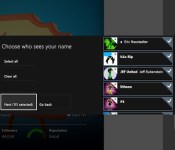
After the update is applied, those external drives can even follow you to a friend’s console, so you don’t have to install Titanfall all over again. Just as promised, the Xbox One will now let you reveal your real name to friends, just in case your Sufjan Stevens tribute screenname is no longer memorable. You can toggle between leaking what’s on your ID to everyone, friends of your friends, just friends, a particular subset of friends, or no one at all if that’s what you prefer. The store “twist” is redesigned, the SmartGlass second screen app can control your DVR or reorder the pins on your dashboard HDMI passthrough TV guide support has gone international to Canada, UK, France, Germany, Spain (which still has an actual king, did anyone know that?) and Italy, and the IR blaster has learned a bunch of new command codes. It’s a hefty list, but you can get the update right now by punching the button conveniently located in your settings menu, or just get a quick recap with this video from the Xbox team.
Filed under: Gaming, HD, Microsoft
Source: Major Nelson, Xbox Support

Life-saving vest shocks wearers’ hearts to keep them alive

Apparently, 20 percent of patients who need to wear defibrillators don’t actually keep them on at all times — even if they mean the difference between life and death. So, a group of biomedical engineering students from the John Hopkins University designed a new type of wearable defibrillator, which is unobtrusive and comfortable unlike traditional harness designs. The undergrads’ version takes on the form of a stretchable, waterproof vest fitted with sensors. Also, instead of using bulky control boxes to monitor the condition of a patient, its sensors are connected to a relatively small smartwatch-like interface.
Doctors typically ask patients to use wearable defibrillators if they’ve recently had a heart attack or a heart surgery, and they’re waiting for a pacemaker implant. The team didn’t exactly change the science behind the device, they just make wearable defibrillators a lot more, well, wearable, so that patients won’t be tempted to take them off. According to team member Melinda Chen:
We just changed the form of the device. We pursued a ‘slip-on and forget’ approach to minimize the user’s need to maintain and interact with the device.
That means the vest, like any harness defibrillator, detects deadly irregular heart rhythms and shock patients with electricity (200 joules, in particular) to return their heartbeat to normal. In case of a false alarm, patients have 30 seconds to disable the system through its interface. While the the device has already passed preliminary testing using manikins that can mimic a patient’s heartbeat, it won’t be replacing current designs anytime soon. The team plans to polish the prototype further, and of course, it needs to undergo even more testing before it can start saving lives.


Filed under: Misc
Source: John Hopkins University

Android 4.4.3 is Finally Here! HTC One E8 Officially Announced! – The ManDroid Show

Android 4.4.3 is finally here my friends. Some of have it. Most of you don’t. In a perfect world, we would all have it. But in the Android eco-system, it takes some time to get the latest Android, but we must be patient friends. HTC announced the HTC One E8, which is pretty much just the plastic version of the HTC One M8. Let us know how much you are loving Android 4.4.3.
News Topics
Android 4.4.3 OTA update for the Nexus 7
HTC One E8 announced
ASUS Padfone S is the Padfone X
Son Xperia Z Ultra 2 teased
//<![CDATA[
ord = window.ord || Math.floor(Math.random()*1E16);
document.write('’);
//]]>

HP’s Pro x2 612 laptop-tablet hybrid brings pen support, a sturdy keyboard

If you read our Surface Pro 3 review, you know we recommend it, but only for a certain kind of person: someone who needs both a laptop and a tablet, preferably one that allows for pen input. Even then, is Microsoft’s approach the smartest one? Can you really call something a laptop replacement if it’s not as comfortable to use in the lap, or if the keyboard isn’t as sturdy? For all of you skeptics out there, there’s an alternative incoming: HP has just announced the Pro x2 612, a laptop-tablet hybrid that offers many of the same features as the Surface Pro 3. Like the Surface, this is a 12-inch tablet that supports pen input and runs on Ultrabook-caliber Intel Core processors. The main difference is that rather than use a flat, click-in keyboard, the Pro x2 612 comes with a backlit, spill-resistant keyboard dock. As a bonus, that dock also includes a spare battery that brings the total runtime to about 14 hours.
As for the tablet itself, it uses a Wacom pen digitizer, which is what the Surface Pro had before Microsoft switched to N-Trig. As a quick refresher, Wacom’s chief benefit has always been its precision, with 1,024 levels of pressure sensitivity. The downside, though, is that Wacom tablets tend to be thicker than N-Trig ones, which is the primary reason Microsoft made the switch. Indeed, that seems to be the biggest drawback here: the tablet and keyboard dock combined weigh around four pounds, compared with two or so for the Surface Pro 3. In exchange, you get a bunch of ports on the dock, including VGA, DisplayPort and Ethernet sockets; an SD slot; and two USB 3.0 ports. The tablet, meanwhile, has a microSD slot, along with a slot to stow the pen — something you won’t find on the Surface. In effect, then, the Pro x2 612 is a laptop first and a tablet sometimes, whereas the Surface Pro 3 tries to be both in equal measure. Again, different approach here.
Given that HP plans on selling this to businesses and government agencies, you can bet it has all sorts of security measures in places. These include TPM and a Smart Card reader, as well as an optional fingerprint scanner. Spec-wise, it’ll start with a Celeron processor, with options for Pentium, Core i3 and Core i5 (the Surface Pro 3 goes up to i7). Storage capacity ranges from 64GB to 512GB; screen resolution starts at 1,366 x 768 but goes up to full HD. A built-in 4G radio will be an option too, as will Windows 7. HP says it will retail ship in September, with the power keyboard included. You can also buy the standalone tablet, in which case it’s just called the Pro Tablet 612 (no “x2″). Oh, and if you’re put off by the weight, there’ll be a lighter-weight “travel” keyboard too. Until then, check out our hands-on photos above — and take our word for it when we say the keyboard is pretty good.

Google Glass test update lets you see notifications by shifting your eyes

If you’ve worn Google Glass, you know that it can be a pain to tilt your head back every time you want to check a missed alert. You might not have to move so awkwardly in the future, though. Google has posted an as yet unannounced Glass update with an experimental “notification glance” feature. As it implies, you only have to point your eyes toward the display to turn it on and see a recent notification. The catch? Right now, the new trick doesn’t apply to general use; Android Police notes that you can’t shift your gaze just to take a picture or get directions. Nonetheless, the glance option should be very helpful for Explorers who’d like to keep their head movements (and funny looks from others) to a minimum.
Filed under: Wearables, Google
Source: Android Police, XDA-Developers

ASUS shows off a 14-inch USB touchscreen monitor

ASUS is demoing quite a few alleged “world firsts” at its Computex booth. In addition to a 32-inch curved LED monitor, there’s a 14-inch USB touch monitor on hand here in Taipei. We’re used to seeing USB monitors here — ASUS had one at this same venue last year, actually — but the addition of touch is definitely the standout feature this time around.
For anyone looking to get some work done, the ability to navigate an external display with 10 fingers is definitely appealing. The demo at ASUS’ booth showed the monitor connected to an ASUS VivoTab, but imagine using the monitor connected to your Surface Pro 3 (or any other device with USB 3.0, really) to focus on a project in Photoshop. In my brief time with the monitor, 10-finger touch works well, and the modest 1,366 x 768 resolution didn’t detract from the product’s usefulness. It’s currently a prototype, so there’s no price or availability info to share for now.
Filed under: Peripherals, ASUS

Engadget Daily: new features in iOS 8, Apple invades the connected home, and more!

Today, we explore Apple’s push into the connected home, uncover a few lesser-known iOS 8 features, take a look a net neutrality and go hands-on with ASUS’ Llama Mountain reference tablet. Read on for Engadget’s news highlights from the last 24 hours.

Here are a few lesser-known new features in iOS 8
Yesterday, Apple unveiled a bunch of new features coming to iOS 8, but many of them didn’t make it to the spotlight. Read on as our own Brad Molen uncovers a few of the lesser-known but awesome additions to the mobile OS.

Apple attempts to conquer the connected home
Many companies have tried their hands at home automation and failed to stir things up. Android @ Home ring any bells? With its new HomeKit platform, Apple might have the market power to pull it off, but can it succeed?

Intel’s Windows 8.1 Pro Broadwell tablet is thinner than the iPad Air
What you’re looking at is Intel’s Llama Mountain reference tablet, or Pro Broadwell for short. It’s a mouthful for sure, but this slate manages a thinner profile than the iPad Air and has an eight-hour battery life.

Congratulations, internet: you collapsed part of the FCC website with comments
How much does net neutrality matter? Enough that the Federal Communications Commission’s website is receiving so many complaint submissions that it’s suffering under heavy traffic. Read on for everything you need to know about the open internet.
You also might like:
Filed under: Misc
 AIVAnet