


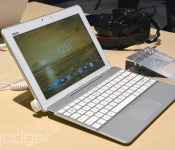
ASUS Transformer Pad refreshed with front speakers, lighter keyboard

It’s been a while since we last heard about ASUS’ Transformer Pad series, so today’s announcement of two new 10.1-inch models was a nice surprise. Starting from the higher end we have the TF303CL, which not only features Intel’s 64-bit, 1.86GHz quad-core Atom chip (Z3745), but it also supports LTE for Europe and Asia-Pacific. Otherwise, the plastic tablet packs the usual set of goodies for a decent Android tablet: a 1,920 x 1,200 IPS display, 2GB of RAM, 16 or 32GB of storage with microSD expansion, 5MP/1.2MP cameras (a downgrade from the old 8MP main imager) and a 25Wh battery. The TF303CL is also enhanced with stereo front-facing speakers, as opposed to the old single-channel speaker (but with two drivers) on the back.
A less obvious change is the removed battery in the new keyboard dock, which is for both reducing its weight — from 546g to 505g, so just 1.1kg when docked — and also for keeping the price competitive; though there’s no pricing info at the launch event. As with most ASUS tablets, this one seems to have a solid build quality, and we dig its textured shell that deters fingerprints. ASUS’ Zen UI is also a nice touch on Android 4.4 — elegant and not too heavy. Expect this device to arrive in Q3 with blue and gold color options.

ASUS also announced the WiFi-only TF103C as the entry-level refresh of the Transformer Pad line. Apart from the processor and the microSD expansion, pretty much everything else have taken the cost-down route: 1,280 x 800 IPS display, 1GB of RAM, 8 or 16GB storage options, 2MP/0.3MP cameras and a 19Wh battery. This will arrive in the coming weeks with white and black options, followed by a 3G version (TF103CG) due July. Again, no prices for now, but they will no doubt be very attractive.
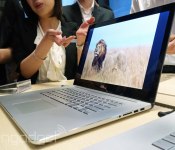
Hands-on with ASUS’ Zenbook NX500: The MacBook Pro meets its match

Before you yell at me for putting the word “MacBook” in the headline, hear me out: the new ASUS Zenbook NX500 really is one of the closest things I’ve seen yet to a Retina display MBP competitor. For all of you who ever wanted something as thin and powerful as the MacBook Pro, something just as high-res, the NX500 is it. Only, you know, it runs Windows! If you’re just catching up (the news broke overnight, while our American readers were asleep), the NX500 is a 15.6-inch Ultrabook with a 3,840 x 2,160 IPS display, and a Core i7 processor, 2GB NVIDIA GTX 850 GPU and up to 16GB of RAM under the hood. Wowza. Oh, and all of this fits inside a package that’s just 19mm thick and weighs 4.85 pounds. That’s technically thin and light enough to be considered an Ultrabook, though ASUS would prefer you not call it that — whatever this is, “Ultrabook” is probably too wimpy a name.
It’s not just specs that remind me of the MacBook Pro, though. This, too, is made of unibody aluminum, similar in color and texture to the ol’ MBP. That said, you’d never, ever mistake the two: The NX500 has the Bang & Olufsen speakers built into the keyboard deck, with the fine grille flowing out from underneath the keys in an circular pattern. I think it’s tasteful and quite lovely, personally, but to each his own; if you prefer more discrete speakers, I totally get that. Speaking of the keyboard, the 15.6-inch form factor allows for a spacious layout, though the buttons are on the shallow side, as is often the case with Ultrabooks (keep in mind that ASUS just barely got the machine down to the Ultrabook spec of 19mm, so I’m not sure it could have afforded to go with thicker keys).

As for the display — the star of the show, really — it covers 100 percent of the NTSC spectrum, along with 108 percent of Adobe RGB. Between the rich colors, sharp resolution and wide viewing angles, ASUS has cooked up one hell of a display. I’ll reserve judgment for a full review, of course, but let’s be real: it’s pretty obviously a nice screen. I don’t expect my opinion to change much, not even after more careful examination.
Mat Smith contributed to this report.
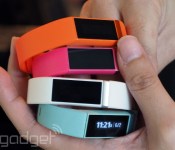
Hands-on with the Liquid Leap: Acer’s first wearable tries to be everything to everyone

Thanks to a quick tease a few weeks back, we already knew Acer was on the verge of revealing its first smartwatch. Until today, though, we had all talk — it’s a smartwatch! It’s a fitness tracker! — but virtually no details. Now, at Computex, we’re getting our first look at the Liquid Leap, due out later this year. The best way to think of this (other than as a “me too” device) is that it’s a wristband trying really hard to be a jack of all trades. In addition to doing typical smartwatch things (call and SMS notifications), it tracks your sleep, steps, distance traveled and calories burned. It can also pause, play and skip music tracks. Like other fitness trackers, it’s waterproof, though it’s far more discrete than your average sports watch. For now, Acer is being coy about the price, except to say it’ll cost less than €99 in Europe. Without a price, then, it’s hard to say how good a value this will be when it goes on sale in Q3. That doesn’t mean we can’t tell you more about how it works, though. So join us, won’t you?
At first glance, the Liquid Leap reminds me a little bit of the Jawbone Up: both are thin (this one is just 17mm wide) and both come in an array of bright colors (white, black, aqua, pink and orange in this case). The main difference, of course, is that the Jawbone Up doesn’t claim to be a smartwatch, so it can get away with having no screen, thus passing for a piece of jewelry. With the Leap, there is indeed a display, though it’s at least slim — as slim as it can be while still being useful. All told, it’s a little like the Samsung Galaxy Gear Fit in that respect, except the screen here basically sits flush with the band, making it less conspicuous. What I’m trying to say is, this looks more like a watch than a bracelet, but it’s at least lightweight and delicate enough that it doesn’t call much attention to itself.
The Leap has an adjustable design, with fasteners that fit into cut-out holes on the wristband. Particularly because of that rectangular display, the watch stays put — that long watch face is designed so that it lies flat on the wrist and can’t go anywhere else, especially if the fit is already snug. Also, you thankfully can’t tell at first glance that this is made of rubber, so while it feels soft and pleasant against the skin, it’s not immediately obvious how sporty it is (because let’s face it, sporty watches don’t usually look good with everyday outfits).

Another reason the design here is so sleek: There aren’t any physical buttons. Rather, to wake up the watch, you do a long-press on the touchscreen. From there, the UI is idiotproof, if a bit tedious. Whatever you want to do — check notifications, control music playback — you need to swipe from left to right. Right now, at least, there’s no way to customize the order of those home screens, so if the feature you want most happens to be four screens in, you’re out of luck; just brace yourself for a lot of repetitive swiping. Eventually, as you’re swiping through, you’ll get to the so-called apps menu — tap that and you’ll find the sleep-tracking feature (Acer will eventually release an SDK allowing for third-party apps, but hasn’t done so yet). What’s odd — and slightly annoying — is that once you’re ready to exit the apps menu, there’s no way to navigate backward, into the main set of home screens. All you can do is wait a few seconds for the apps menu to go away. There has to be a better way.
As a fitness tracker, the Leap does all the basics: it counts steps, calories burned and distance covered. Similarly, too, it uses an energy-efficient Bluetooth 4.0 radio to ensure battery life — five to seven days, to be precise. Unlike, say, the Up, it has no altimeter, so you can’t count flights climbed; just steps taken. There’s also no workout mode, per se, so steps really are the only measure of how active you’ve been. As for sleep tracking, you can monitor your sleep habits, though you will have to manually enter sleep mode, and there isn’t yet any sort of sleep estimate feature, as there is on the Up.
In the beginning, at least, Acer is making some compromises in terms of device compatibility as well. At launch, the Leap will only work with Acer’s new Liquid Jade phone, with other Android devices to be added in due course. Even then, of course, your phone might not make the cut. Acer says an iOS app will follow later on, though who knows? Maybe that unicorn iWatch will be out by then.
Zach Honig contributed to this report.
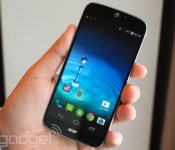
Acer Liquid Jade is the world’s ‘most compact’ 5-inch smartphone

As an American site, we tend to ignore devices that have zero chance of making it to the states. That said, we’re making an exception for Acer’s new Liquid Jade phone. For one thing, it’s going to come bundled with Acer’s new Liquid Leap smartwatch in select markets (Asia, mostly), and will initially be the only phone that’s compatible with it. In addition, though, Acer claims this is the world’s “most compact” 5-inch smartphone. And you know we love us a good superlative.
Whether or not that claim is actually true (and we believe it is), the Jade is indeed very thin and light. All told, the phone measures between 6.8mm and .75mm (0.27-0.03 inch) thick, depending where you hold the tape. Because this hasn’t been released yet, Acer isn’t committing to a final weight spec, but it says the phone will come in under 120g (4.23 ounces). In fact, the device would be even thinner if not for the bulge on the upper back, where the 13-megapixel, f/1.8 camera lives. That module does create sort of an awkward nipple on the back, but with that kind of aperture, it could be worth it, especially for people who are serious about smartphone photography. And hey, even as is, the phone feels surprisingly insubstantial in the hand.
That thin design and high-res camera aside, this is, at its heart, more of a mid-range device. As sleek as the actual build is, the backside is clothed in glossy plastic that picks up fingerprints easily. That was especially true on the black unit I handled, though you might have better luck with the white and aquamarine models, which have been designed to color-coordinate with the Leap smartwatch. Spec-wise, it has a 720p, not 1080p, display, though the IPS panel and “Zero Gap” bonding technique mean viewing angles are quite good. The processor, meanwhile, is a generic quad-core MediaTek chip. (In fairness, the processor was more than capable of handling Android 4.4.2 in my brief hands-on time.) Storage is also fairly limited, with either 8GB or 16GB on board, though you’ll thankfully find a microSD reader in the same slot where the SIM tray lives.
The Jade will arrive in Europe and Asia sometime in the third quarter of this year, with the price expected to be under €300. If you are indeed one of our American readers, you won’t want to hold your breath, then, but feel free to partake of our hands-on photos anyway.
Zach Honig contributed to this report.
Filed under: Cellphones, Mobile, Acer

Apple to Provide Live Video of WWDC 2014 Keynote on Apple TV
Ahead of today’s keynote at Apple’s Worldwide Developers Conference (WWDC), the company has once again made its “Apple Events” channel available on the Apple TV, signaling that it will streaming live video of the event on the device.
 (Image credit: MacStories)
Apple will also be streaming the event live on its website, as users will need Safari on Mac/iOS or QuickTime 7 on Windows in order to watch the stream.
 (Image credit: MacStories)
New products likely to be revealed at the keynote include iOS 8, OS X 10.10, a home automation platform, and potential new hardware. Apple is also said to be unveiling more plans for its iBeacon technology.
Apple’s keynote kicks off at 10:00 AM Pacific Tine, and MacRumors will also be providing a live blog, live tweets via the MacRumorsLive Twitter account, and a spoiler free page for those who want to watch the full keynote at a later time.
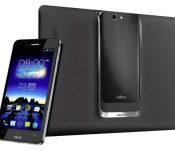
The ASUS PadFone S will be the PadFone X for the rest of the World
 I’ve always had a soft spot for the ASUS PadFone line; it uniquely marries the capabilities of a smartphone with the possibility of being able to use tablet functions too, without any of the cost. When ASUS announced that the PadFone was coming to America, it seemed like only a matter of time before the rest of the world would also see the transformable device. And sure enough, at this year’s Computex, it’s been announced that the ASUS PadFone S will likely be launched globally sometime in Q3.
Essentially the same as the AT&T-bound ASUS PadFone X which is due for launch in a few days, the PadFone S will be a 5-inch smartphone paired with an 8.9-inch tablet dock. Hardware-wise, it will have a Snapdragon 800 processor clocked at 2.3GHz, 2GB RAM, 2GB front and 13MP rear cameras on the phone, and the phone and tablet will have 2,300 mAh and 4,990 mAh batteries respectively. The PadFone S will also benefit from the ability to be wirelessly charged through Qi-wireless technology. Definitely not a bad device at all, however, pricing has not yet been announced yet.
Are you interested in the PadFone devices? Would you consider the ASUS PadFone S? Let us know what you think.
Source: engadget
//<![CDATA[
ord = window.ord || Math.floor(Math.random()*1E16);
document.write('’);
//]]>
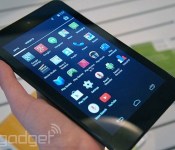
Dell adds two budget Android tablets to Venue lineup, prices start at $160

Dell’s just announced two new Android models in its Venue lineup of tablets, and though the new Venue 7 and Venue 8 cost a bit more than their predecessors, they still top out at just $200. Don’t expect any radical changes from the Venue Android tablets announced late last year; the biggest differences include processor updates and a step up to Android 4.4 KitKat.
Dell’s Venue 7 — a 7-inch slate, as the naming convention suggests — supposedly offers a brighter viewing experience this time around, though its display resolution is still 1,280 x 800. Viewing angles and image quality are perfectly fine, though, especially for a tablet that costs $160. Dell only had a black version on hand when I got to check the product out, but the company will also offer the Venue 7 (and 8) in red. The requisite micro-SD card reader is on hand to supplement 16 gigs of on-board storage, and the whole package is super light, at just 0.64 pound.
The Venue 8, on the other hand, includes an HD (1,920 x 1,200) display and a slightly faster Intel Atom Z3480 processor for $40 more than the Venue 7. The 8-incher weighs a tad more, at 0.74 pound, and it sports a 2-MP front camera rather than the 1-MP unit on the Venue 7. (Both have a 5-MP shooter on the back.) Those differences aside, these devices are largely comparable, and they can be yours starting July 1st at Dell.com.
Filed under: Tablets
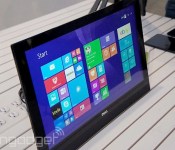
Dell’s new Inspiron 20 is a giant tablet for work and play

Dell’s new all-in-one is a sleek, battery-powered unit that can travel with you from room to room. Starting at $450 (or $350 without touch), the Inspiron 20 (3000 Series) is by no means a high-end product, but its thin design and adjustable stand make it attractive as a family PC for group movie-watching sessions and the like.
Thanks to a 19.5-inch HD display and an integrated subwoofer, the Inspiron 20′s main draw is media, but Dell also envisions the all-in-one as a work PC — since it’s relatively portable, a child can take it upstairs to get some homework done, for example. A Dell rep said you can expect up to six hours of use with the Inspiron 20 unplugged. As far as other specs go, the company’s remained mum.
The design also folds flat, so you can use it as a giant tablet if you so choose — though you might prefer to rest the device on a table as opposed to in your lap (it’s light, but not that light). The Inspiron 20′s will soon be available in select countries, so check Dell’s website for more info.
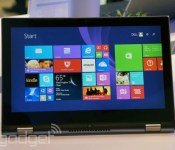
Dell aims for the mainstream with its two new Windows convertibles

Here’s the thing about Computex, the big computer show going on in Taiwan this week: though lots of PC makers are announcing products here, they’re almost all focusing on the low end. It’s almost as if computer companies realize PC sales are on the decline, and have to slash prices! Take Dell, for instance: The company is here in Taipei showing off two Windows convertibles, which run the gamut from budget-friendly to solidly mid-range. Both devices — the Inspiron 11 3000 series and the Inspiron 13 7000 series — have a Lenovo Yoga-like design, with a screen that flips back 360 degrees into tablet mode (and Tent mode, and Stand mode — you know the drill).
The difference between the two (aside from screen size) is that the 7000 series runs on Intel Core i3/i5 processors, with a passive stylus and up to a full HD display; the 3000 series, meanwhile, maxes out with Pentium-series Bay Trail CPUs and a 1,366 x 768 display. Based on our quick hands-on time, though, even the lower-end 3000-series model seems well-built, with a comfortable keyboard. The 3000 series will ship June 19th for $450, going head to head with devices like ASUS’ Transformer Book T100. The more mid-range 7000-series edition won’t come out until September, with the price to be announced sometime closer to the on-sale date. Until then, we’ve got a mix of hands-on and glossy press shots above — check it out.

It begins: Samsung launches the Samsung Z, its first Tizen-based Smartphone
 Many pundits have suggested the end of Android will come when Samsung decides to shift its smartphone focus over to the Tizen OS, and for those that say that, the end could be nigh. Samsung has today announced its first Tizen smartphone, the Samsung Z, and while its specs aren’t quite bleeding edge, they’re nothing to scoff at either. Behind a 4.8-inch 720p display, the Samsung Z houses an unspecified quadcore 2.3GHz processor (most likely a Snapdragon 800), 2GB RAM, 16GB storage (with microSD slot), 8MP camera and a 2,600mAh battery.
 The Samsung Z also benefits from a lot of the gizmos that can be found on the Galaxy S5 including a fingerprint and heart rate sensor as well as more standard inclusions like NFC, IR sensors and LTE-A compatibility. As for the OS itself, you could be forgiven for thinking that the Samsung Z was running a very heavily skinned version of Android, though that may be intentional for the sake of consumers.
 If you’re interested in getting a Samsung Z, the device will be available in Russia starting in Q3, and availability will spread thereafter. Unfortunately, the Samsung Z won’t be coming to the U.S. or Europe any time soon as Samsung has said that those markets aren’t ready for Tizen yet. Still, it’s intriguing to see the OS finally take off after months of speculation; what are your thoughts on the Samsung Z? Is it something you’re interested in trying? Let us know in the comments below.
Source: SamMobile
//<![CDATA[
ord = window.ord || Math.floor(Math.random()*1E16);
document.write('’);
//]]>
 AIVAnet