


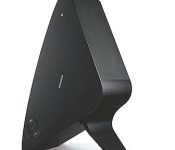
Samsung reveals new wireless streaming speaker, home theater system, portable stereo and two TV soundbars

Clearly Sonos, Samsung’s been peeking at your Play:1 playbook. After introducing the Shape wireless streaming audio system and the M7 speaker mere months ago, the Korean company is now ready to reveal a new, smaller member of the family, the M5, at CES. This new model has only three drivers (down from the five inside the larger M7), but still packs the same wireless audio tech as its elder — meaning it’s controlled by the Shape mobile app, connects to your local network through a Shape hub wired to your router and automagically fits into your existing system, whether it’s a multi-room or multi-channel setup. Additionally, Samsung’s cooked up a connect box that hooks up with old school analog speakers and loops them into the Shape system so they can be wirelessly controlled too.
Plus, Samsung’s crafted a pair of Shape-compatible soundbars, the HW-H750 and the HW-H600. The H750 soundbar pumps out 320W of sound and is built to sit beneath the largest of TV’s (curved or otherwise), while the H600 sound stand is designed so that smaller 32-55 inch TV’s sit directly on top of it while it pumps out multi-directional 4.2 channel audio.

Alongside those offerings, Samsung will be showing off a new HT-H7730WM home entertainment system at CES as well. The system comes with six speakers, one subwoofer, a Blu-ray player capable of upscaling to UHD (4K) resolution and an amplifier packing both analog vacuum tubes and digital amps. Additionally, despite having 6.1 speakers, the system delivers up to 9.1 channels of sound using the new DTS Neo: Fusion II codec.

Lastly, Samsung’s latest GIGA system will make its debut in the Nevada desert, the MX-HS8500. With 2,500W of power and twin 15-inch subs at its disposal, it’s got enough thump to wake the neighbors, but it’s not meant for home use as it’s been built to travel. That’s right, this GIGA’s got wheels and a retractable handle, so you can more easily take it with you to your next tailgate party. Plus, it still has the same visual flair as previous GIGA systems, meaning it has fifteen different lighting effects settings to please partygoers’ eyeballs. And, the HS8500 utilizes Samsung’s Bluetooth Hi-Fi wireless audio streaming tech to stream sound from the company’s compatible TVs. Of course, audio gear must be heard to in order to be fully appreciated, so rest assured we’ll be listening to all of Sammy’s new audio offerings at CES next week. Stay tuned.
Filed under: Home Entertainment, HD, Samsung

Watch an ultrasonic array move objects in 3D space (video)

Ultrasonic levitation has been possible for awhile, but it’s not very practical when objects must typically hover along a single axis. University of Tokyo researchers Yoichi Ochiai, Takayuki Hoshi and Jun Rekimoto have cleared this hurdle with an ultrasonic array that can push items around in 3D space. The machine creates a focal point from a three-dimensional standing wave; users just have to alter the wave’s properties to move whatever is caught inside that point. The technique can manipulate a wide range of materials, and it’s safe to disrupt with your hands. While the array will need to scale up before it lifts objects much larger than matchsticks or screws, it already shows that we don’t need exotic technologies like tractor beams to float things through the air.
Source: Yoichi Ochiai

Plex website relaunches as Plex.tv, one-stop home for all of its media streaming abilities

Plex has grown rapidly over the last few years and its increased focus as a cloud service for your pictures, videos and music has resulted in a relaunching of the main website. Now hosted at Plex.tv, it ropes in the four disparate sections of the previous website, bringing features like Plex Pass subscriptions, myPlex server and account management and Plex/Web content access together. The web app has been redesigned to make access to your media remotely faster and prettier, and even ditched the previous need to sign in three times (site, web app, your server) for full access. Of course, there are some features currently missing and others that need to be tweaked in the new version, but with easy access to toggles like a Chromecast button at the top right, we think most will find it a welcome upgrade.
Filed under: Home Entertainment, HD

You can now get the Moto X for $399.99 Off Contract!
 I was doing the normal trolling of Google+ this morning, and came across an interesting post from Guy Kawasaki. The Moto X is now $399.99 off contract, for everyone! The last time we saw the phone at a price close to this it sold like crazy, and that was during Black Friday. Though this deal is only available in the US (for now?), it’s still a very good deal. There are some devices that launch at $299 on contract, and for an extra $100 (not the $300-400 normally charged), you can get this amazing device off contract.
Motorola says they listened to us, and that’s why the decision was made. See the below quote from their blog.
When we launched Moto X, our goal was to solve real consumer problems and give people refreshing new choices in the sea of smartphone sameness.
We heard from people that they wanted more control in how their phones looked, so we introduced the Moto Maker customization tool and made it available on all major carriers. That enabled our customers to choose from hundreds of color combinations and, for the first time, real bamboo backs. We heard that battery life was a major pain point, so we engineered Moto X to go all day long. And we heard that having the most current software was really important to our owners, so we made sure that Moto X was the first smartphone to upgrade to Android 4.4 KitKat.
But we’re not stopping there.
We’ve been hearing a lot recently from people who want a new premium smartphone at a reasonable price without having to wait for a contract upgrade. That came through especially loud and clear during our holiday flash sales.
So from today forward we’re offering Moto X at an everyday starting price of just $399 on any major US carrier, without a contract. This includes customized devices.
Today several wireless carriers offer good month-to-month or prepaid service plans that cost much less than the contract plans that come with subsidized devices. Combine one of those plans with our new $399 everyday pricing and you could save hundreds of dollars over two years while keeping the freedom to change service providers when you feel like it. We can even help you finance your purchase* so you pay monthly for your contract-free Moto X.
Because you should have the freedom to buy a great device when you want, without chaining yourself down.
Happy new year!
Rick Osterloh
Senior Vice President – Product Management
Does this intrigue you? Will you be swinging by the Moto Maker and picking up a shiny new Moto X to play with for the new year? We want to know! Let us know in the comments!
Source: Google+
Via: Motorola
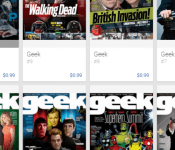
All issues of ‘Geek’ Magazine on sale this Week
 Looking to Geek out a little bit at the start of the new year? Maybe you just need some reading material to help you recover from the holidays.
Behind everything that is life changing, useful or cool is a person with passion and obsession. Today, global brands like Google, Facebook, Twitter, Microsoft and Playstation have redefined everything around us including what it means to be GEEK.
GEEK Magazine will cover the enthusiasm and the lifestyle we have with music, film, video games, anime, comic books and all the gadgets used to entertain us.
Right now in Google’s Newsstand you can pick up any issue you so desire for just $0.99 each. There are a total of 10 available. So don’t wait, go get your GEEK on.


T-Mobile drafts 2014 Resolutions to’Transform’ the Wireless Industry
John Legere certainly did shake up the wireless industry last year. No contracts, easier upgrading options, more 4G coverage and a whole lot of poking AT&T. It was a fun year to watch. Now that 2013 has officially ended, what is 2014 going to bring. No doubt some more insanity from the man that isn’t about to let up on the competition anytime soon.
T-Mobile’s G+ page put up a nifty little image today that checked off the 2013 resolution list. Ya, it was probably drafted just for the photoshoot, but still. The 2014 list looks even better. Aiming to continue removing customer pain points, faster 4G LTE, Unshackling families from ‘those other guys’, make waves at CES 2014 and Give AT&T a break…. or note.
 We know T-Mobile and John have something planned for CES. The 4th big move in the company and in the wireless industry is sure to cause waves as the list states. Rumor has it they will be paying off customers ETF’s to switch to T-Mobile, as long as they turn in their device at the same time.
I am personally a bit more interested in what the 4G LTE line will bring. Go faster makes sense, but what is the go LOUD addition all about?
I am personally really looking forward to seeing what T-Mobile pulls out at CES. I’m sure they will cause some waves and probably irritate the crap out of AT&T and the other carriers.

A first look at Carbon 2.0, a refresh on an awesome Twitter client
 Carbon for twitter has been in the play store for a while, but hasn’t seen any revolutionary changes in a long time. Till yesterday, that is.
When Carbon first made its way into the Play Store, it was trying to do something different. Be a feature packed app, and have one of the most beautiful dark UIs in the store. I, for one, am a huge fan of the dark UI schemes in apps and ROMs. For me, it was like love at first sight. For a while, that is. After a little bit of using Carbon, the “new app smell” wore off, and I went back to other apps, like the Official Twitter app.

Yesterday, Carbon was updated. And I love it. I don’t think I’m going to be switching away from it for a while. They updated it with what they call “#C2PointOh”, or Carbon 2.0. It truly is worthy of the 2.0 tag, as it is a complete overhaul, in a good way. The new Carbon is elegant in every way, but lacking a few things that I think it really needs. Don’t get me wrong, like I said, I love it. But, there are a few simple things that I think the app should do, that it doesn’t. Well, ok, one. If you have a device with a built in menu button, like me, you get used to hitting that button in any app to bring up the menu, no matter where it’s located. Or, you get used to having some sort of indicator of where the menu would be located. Carbon is not that way. It took me a good 3-4 minutes of searching around the app to figure out where in the world the menu was, and where it was, kinda surprised me. You get to the menu by clicking on your profile picture in the bottom, which is also the button used to compose a new tweet. I would have liked to see these two separated a bit more, or at least have it mapped to the hardware menu button on devices that support it.

Besides that, I love the app. It has good notifications, a good UI, very fast, clean, everything I look for in a Twitter app. Some things that this app does that I really do like is the way it handles multi-touch. If you double tap on a tweet, it brings up a dialog for ReTweeting said tweet, which is an ingenious way to make things faster!
The developers, dots & lines, have this to say about the app:
All-new Carbon v2 with a new design and experience.
Carbon experience for Android Smartphones. No Tablet support yet.
Simple, Dark, and a dash of elegance for your Twitter day-to-day pleasure.
Carbon is a Twitter client, but unlike other Twitter clients. All of your Twitter content on one screen. A screen that doesn’t get you drilling down to many other screens to reach to what you want. Timelines, Lists, Favourites, Searches, Trends, Profiles, all there.
– Fresh new Design & Interface
– Brand new Timeline design & aesthetics
– Swipe-able Timeline, @Mentions, and Messages on Home.
– Quick Timeline, one Timeline for Searches, List, Favourites on your Home screen.
– Don’t Disturb Mode
– Oxide Mode for Grayscale Timeline experience
– Power Scroll: Scroll/Swipe up or down using Two fingers to jump to top or bottom of Timelines
– Tweet Quick Actions
– Configuratie Tweet Font Sizes
– Retweets Timeline
– In-App Browser
– In-App YouTube Player
– Vine Previews & Playback
– Rich Timelines with full inline images and videos
– Rich and elegant style for User Profiles
– Rich Conversation View
– Threaded Direct Messages
– Background updates with quick actions for Jelly Bean, per account
– Username Autocomplete
– Mutes/Filters for Hashtags, Users, and Keywords
– People Search
– Obviously Multi-account with simultaneous accounts tweets
– Profile Editor

What do you think of this massive update? Is it enough to sway you from your current go-to Twitter app, as it was for me? Let us know in the comments, and download below!


We’ll be talking CES 2014 with Gary Shapiro tomorrow, catch our Google Hangout here!

With a new year comes a giant trade show just around the corner; CES 2014 is less than a week away! In anticipation of the excitement to come, our very own Marc Perton will be hopping on a Google Hangout with the CEA’s Gary Shapiro to talk about tech trends and what announcements to expect. Head here for the live Hangout — it’s happening tomorrow, January 2nd, at 11:30 AM EST.
Filed under: Announcements
Define icons by Kevin3328 [review]
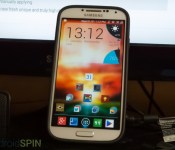
 The Define icon pack is like a lot of other packs out there, it’s unique, in styling. What I mean by that is this, the icon pack developer spent a lot of time on the backgrounds and the way that most icons are styled, instead of taking a completely new approach to the icons theme. This is most noticeable with apps like Google+ and Hangouts, where they’re just the normal icon on a square background with some light shading on top of it.

But, the design in spot on. All the icons are re-created very well, and the 450 icons included in this pack should cover the majority of what you use. And if it doesn’t? Well, the developer includes a nifty request tool inside of the app. The app also includes 7 custom made wallpapers, which I wan’t very keen on, personally. I’m very picky with my wallpaper, and once I have it set the way I like it, I rarely change it. But, they are nice wallpapers, if you like the way they’re designed. The way the app is laid out is very unique though, I completely love it. It’s one of the best app layouts I’ve seen in a long time, for an icon pack. It has the tabs at the top, and inside the tabs it’s very organized. You have the “Define” tab, which allows you to apply the wallpaper to a plethora of launchers, the “Extras” tab, which houses the wallpapers, what icons are included, the request feature, and some neat extras at the bottom! And then there are the standard “Contact” and “About” tabs, which are pretty self explanatory. The developer goes on to say in his description:
HUGE THANKS TO @jaithemes FOR THE NEW TEMPLATE HE MADE CREATING THE BEAUTIFUL EXPERIENCE THIS APP EMBODIES!! LOOK UP HIS WORK YOU WONT BE DISAPPOINTED!!
Define Your Device with Define Icons a set of minimalistic styled icons with a frame to really make them pop on your screen. The set was handcrafted with the idea of creating a stock style look in true HD.. All icons are drawn at 144 x 144 pixels to give each icon a truly high definition look!! Hope you enjoy!!
***Please Note***
This icon theme is for third party launchers including but not limited to Nova, Apex, ADW, Action, etc.
This is a standalone app but will do nothing unless your home launcher supports themesFeatures
-Icon mask is utilized to theme the icons not currently included to some extent
– 475 custom HD icons and growing
-Dashboard utility and icon picker capabilities
-7 custom made HD wallpapers included
-Icon request utility —-> use it let me know what you want included
-See whats included directly from the app
-Misc system icons and app drawers that you can apply
-For Nova Launcher- comprehensive categorized organization of apps when manually applying
Without further ado..Take a look at the screens and Define your device with a new fresh unique and truly high def look

Does this icon pack intrigue you? Well, if you like square HQ icons (I’m more of a circular fan myself), then you should get them! At $0.99 (on sale through today only), they aren’t very expensive, and just about everyone can afford it, so why not just click the button below!

Moto G for Verizon now on sale at Best Buy for $100 contract-free

When Motorola said that a CDMA version of the Moto G would reach the US in January, it was being overly cautious. Best Buy has confirmed that it’s already selling the Verizon edition of the budget smartphone in its retail stores; as soon as a store has inventory, you can pick one up. And it’s cheap, too. At $100 off-contract, Verizon’s Moto G is less expensive than both its GSM equivalent and many slower, smaller devices. You won’t get to pick up the handset until after New Year’s Day, but we have a hunch that it will be worth the wait.
Filed under: Cellphones, Mobile, Google, Verizon
Via: CNET
Source: LA Times

