


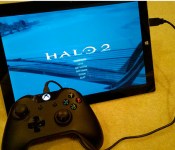
Xbox One controllers now work with your PC

The Xbox One controller is a wonderful piece of gear, so it’s natural that people would want to use it with PC games, too. Right on schedule, but perhaps a year too late, Microsoft is now offering the drivers that’ll let the hardware work on desktops, laptops and suitably-equipped tablets. Such compatibility will be baked into a forthcoming Windows update, but if you can’t wait that long, you can pull down the software from Major Nelson’s website right now. The Xbone controllers will work with any game that supports the Xbox 360′s handset, but if you’d prefer to test it for yourself, you can always call your boss and tell them that you’re ill… or something.
[Image credit: Major Nelson]
Filed under: Gaming, Microsoft
Source: Major Nelson
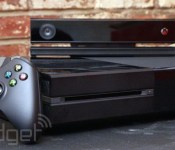
Microsoft admits the Xbox One performs better without Kinect

Prepare to be confused: Despite everything we’ve heard about the Xbox One’s Kinect sensor containing its own onboard processor, so that it doesn’t weigh down the main console with voice- and image-recognition tasks, it’s now clear that the add-on imposes quite a significant burden. Microsoft has admitted to Eurogamer that the new, cheaper Kinectless Xbox One has “up to 10 percent additional GPU performance,” simply by virtue of system resources that no longer have to be reserved for the motion-sensing peripheral. Does this mean that owners of the original Xbox One can get less screen-tearing in Titanfall simply by unplugging Kinect? Actually it probably could, because a future SDK will enable a boost for game developers who are happy to sacrifice access to the “natural interface” in favor of better performance. In any case, Microsoft’s initial justification for regarding Kinect as an “essential and integrated” part of Xbox One is starting to wear pretty thin.
Filed under: Gaming, HD, Microsoft
Via: Polygon
Source: Eurogamer
Xbox One June update arrives so you can drop the nickname and add storage

Whether or not we love the update process, we’re quickly getting used to the rapid pace of improvements coming to Microsoft’s Xbox One. After the usual beta period, the promised June update is here, and brings several features we’ve been waiting for since launch. Old school automatic logins are once again an option, so even if your Kinect is unplugged (or nonexistent) all saves and settings will be available right away without any extra clicks. There’s also support for up to two external hard drives, as long as they’re USB 3.0 and at least 256GB. That’s a boon not only for the extra storage space, but for speed too — some beta testers reported faster loading times after adding 7200RPM drives that outpace the standard laptop option Microsoft put inside the XB1. The Xbox One version of Games for Gold and a new VIP section are here too, letting subscribers nab Max: The Curse of Brotherhood and Halo: Spartan Assault without spending another dime or try out Hulu Plus free for three months.
The latest Xbox One system update begins rolling out tonight – external storage, real names & more http://t.co/haJVqLNmDA
– Larry Hryb (@majornelson) June 4, 2014
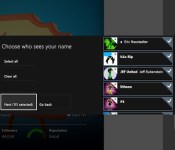
After the update is applied, those external drives can even follow you to a friend’s console, so you don’t have to install Titanfall all over again. Just as promised, the Xbox One will now let you reveal your real name to friends, just in case your Sufjan Stevens tribute screenname is no longer memorable. You can toggle between leaking what’s on your ID to everyone, friends of your friends, just friends, a particular subset of friends, or no one at all if that’s what you prefer. The store “twist” is redesigned, the SmartGlass second screen app can control your DVR or reorder the pins on your dashboard HDMI passthrough TV guide support has gone international to Canada, UK, France, Germany, Spain (which still has an actual king, did anyone know that?) and Italy, and the IR blaster has learned a bunch of new command codes. It’s a hefty list, but you can get the update right now by punching the button conveniently located in your settings menu, or just get a quick recap with this video from the Xbox team.
Filed under: Gaming, HD, Microsoft
Source: Major Nelson, Xbox Support

Microsoft is getting the Xbox One ready for World Cup action

The World Cup 2014 is one of the hottest topics there is at the moment. Whether you’re looking for in-depth coverage or streaming live games, it looks as if everyone has something special planned for the tournament. And, not surprisingly, this includes Microsoft. To go along with the recent announcement of ESPN FC World Cup Essentials, the Redmond-based company has now revealed Destination Brazil, a hub for the Xbox that’s set to feature nothing but World Cup content. There will be, among other things, an app dubbed Brazil Now and an original series titled Every Street United.
Brazil Now can utilize the Xbox One’s TV features to display useful info while you’re watching matches; it’s also able to notify you when a game is about to start and share score updates, right on your screen, similar to the existing NFL app. Every Street United, on the other hand, is a show which follows football legends Thierry Henry and Edgar Davids as they go around the globe trying to find new talents.
When it launches on June 12th, just in time for the start of the World Cup, Destination Brazil is going to be available on both the Xbox One and Xbox 360. That said, some features, like Brazil Now, will only be compatible with Microsoft’s newest console. For now, you can watch the trailer for Every Street United below and, perhaps, get more pumped ahead of the football craze that’s about to take place down in South America.
Filed under: Gaming, Home Entertainment, HD, Microsoft
Source: Xbox
Turtle Beach Ear Force XO Seven Gaming Headset Review: Where Xbox One and mobile audio compatibility Meet
 It’s currently a very lonely place to be a gaming headset for the Xbox One; Microsoft neglected to release any decent audio products with its next gen console, so that responsibility has fallen to third party manufacturers like Turtle Beach to sort out. The Turtle Beach Ear Force XO Seven gaming headset (along with its smaller brother, the XO Four) was one of the first audio devices released for the Xbox One, and as an added bonus, has been made to be compatible with mobile devices. Let’s see if the XO Seven has decent enough mobile credentials to warrant your time and money.
What’s in the box
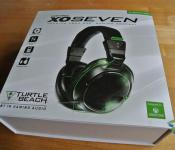
 As always, Turtle Beach again makes the case that opening your boxes should be a pantomine event and the XO Seven box does not disappoint. While the XO Seven has less gear in the box than the i60 (read the full review of the i60 here), there’s still a lot of substance to the contents which include the headset, a Xbox One controller adapter and an assortment of cables to suit your chosen mode of gaming, either Xbox One or mobile (or even just listening to music).
 You’ll find your XO Seven headset nestled in the bosom of the moulded packaging and beneath it, you will find the various included cables and adapters. The XO Seven is a solid over-the-ear headphone affair that follows the design methodology of Turtle Beach’s other Seven series headsets, giving it quite a lot of size. To wear, I found the XO Seven extremely comfortable, probably the most comfortable headset I’ve had the pleasure of reviewing this year so far; more on that later.
 With equal parts of black leather and black plastic, the XO Seven looks like a menacing piece of audio hardware, which is only accentuated by the lime green highlights used throughout the headset. This colour scheme extends to the braided cable, which is also extremely tough and well shielded. There’s a fair amount of memory foam both on the earcups and the headband that all add to the comfort of the XO Seven.
 If the all black decor isn’t exactly to your liking, the XO Seven also allows you to remove the faceplates of the earcups and replace them with other ones supplied by Turtle Beach, and typically feature games that Turtle Beach is the official audio provider for, like Titanfall, or just movie deals, like the Avengers.

As for the accessories that you will get with the XO Seven, you’ll get one cable that you can use to connect to mobile devices, one cable to connect to the Xbox One controller adapter, a headset boom microphone that attaches to the headset, and inexplicably, a micro-USB cable, which I can only assume is for use with mobile devices (though only with Android). I’m a bit torn on Turtle Beach’s decision to include a removable mic; while it’s great that the microphone is removable so that it isn’t in the way when you’re using it with mobile devices, it’s a bit of a bother to be removing it and replacing it if you’re using it regularly.
 While I wasn’t able to give the XO Seven a proper run as a Xbox One headset, in large part due to the fact that I do not yet own a Xbox One, the controller adapter appears to be of solid construction with quite a few buttons mounted on the adapter itself to help make quick changes to both audio and chat volumes during your gaming sessions.
How does it sound
 Apart from the game and chat options available to the Xbox One adapter, the XO Seven doesn’t have much else in the way of electronic audio smarts. What it does have, however, is passive noise cancellation courtesy of its “noise-isolating memory foam ear cushions” which do an amazing job of blocking out about 80% of the noise that is happening around you; the sound coming out of the 50mm audio drivers will easily take care of the remaining 20%. In fact, more than once, I’ve used the XO Seven to specifically block out extraneous sounds, making it a perfect headset for game immersion or just general audio immersion.
 Despite the fact that the XO Seven’s are ‘only’ stereo, I found the sound to be extremely impressive. While not on the same level as the i60, the XO Seven still does an impressive job with the full range of sounds. Mids and highs are sharp and crisp, though as a gaming headset, the bass is of course accentuated, though not overwhelmingly so. Overall, I had no issues using the XO Seven to listen to a range of music genres on my mobile device including rock, pop and the occasional classic symphony. I thoroughly enjoyed the audio experience I got from the XO Seven; while there are definitely better headphones for specifically listening to music, the passive noise cancellation of the XO Seven’s makes sure that any disadvantage that they might have had due to noise leakage is minimized.
What I like about the Ear Force XO Seven
 I mentioned earlier that the XO Seven is one of the most comfortable headphones I’ve tried this year, and that’s mostly thanks to the way the headband is designed. While most headphones are designed so that the headband comes straight out of the earcups, the XO Seven headband has a slight forward tilt relative to the earcup orientation. This means that the headband sits slightly further forward than usual, not on the top of your head but rather the front slope of your skull. I’m a huge fan of this layout and I was happy to use the XO Seven for hours at a time with no complaints whatsoever. The fit may have been on the tight side, but the leather cushioning on the earcups and headband stopped any stress points from eventuating.
 The XO Seven looks like its built to last; every part of the headset looks like it is beefed up so it can take some serious pounding, whether that’s through travelling or angry gamers getting, well, angry. I’m a big fan of chunkier headsets and the XO Seven ticks all the boxes, including a super-wide headband to distribute some of those head stresses.
What I don’t like about the Ear Force XO Seven
 Although it is advertised as mobile compatible, just about the only things additional that make the XO Seven “mobile” is the inclusion of the breakaway mobile cable. The connection that joins the cable to the headset contains two notable features, the answer call button and an in line microphone so you don’t have to lug around the boom mic. While that’s definitely better than some allegedly mobile compatible headsets out there, with such a large breakaway connection, I would have expected a few more gizmos and gadgets, like a volume wheel or something similar.
 As I mentioned earlier, the boom mic isn’t the most convenient thing to have to remove and replace every time you want to use it. Naturally, if you’re using it exclusively for Xbox One play, this won’t be an issue at all. However, for those who want to use it interchangeably between Xbox One and mobile devices, it’s a bit of a hindrance.
Final Thoughts
 I definitely have a soft spot for the Turtle Beach Ear Force XO Seven Gaming Headset; while it might not have the best quality sound of all the headsets available for the Xbox One and it’s not always the most practical headset, it’s incredibly comfortable and is built to survive some serious punishment. Marketed as Turtle Beach’s premium Xbox One option, the XO Seven is priced accordingly at $159.95 USD, compared to the $99.95 XO Four, where all the quality is in the details. If you’re in the market for something for your Xbox One that can be also used for your mobile device, the XO Seven is a hard choice to overlook.
If you’re interested in picking up the Turtle Beach Ear Force XO Seven Gaming Headset, be sure to visit its product page here, or to check out Turtle Beach’s range of other gaming products, you can visit their homepage here.
Gallery of photos


//<![CDATA[
ord = window.ord || Math.floor(Math.random()*1E16);
document.write('’);
//]]>
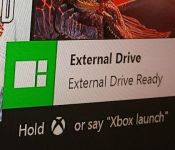
Upcoming Xbox One update might let you use external drives

According to Microsoft product director Albert Penello, external drive support for the Xbox One has always been on the company’s docket to enable in a future update. That refresh looks to be on the horizon after an unnamed Xbox developer took to Reddit to tease an image showing that very feature in action. Members of the Xbox One preview programme are often privy to early features, which have recently included improved Party Chat and manual checks for system updates, but this leak will likely attract the most attention. Although the Xbox One ships with a 500GB internal hard drive, blockbuster games can command 50GB without breaking a sweat. That game storage, of course, adds up over time. Attaching an additional drive will not only stop you from running out of space, it’ll also stop you from voiding your warranty with a do-it-yourself replacement.

Filed under: Gaming, Microsoft
Via: Ubergizmo
Source: Reddit

Titanfall’s second-screen app is neat, if you ever remember to look at it

The companion app for Xbox One’s Titanfall is finally available, free of charge, over at the the App Store and Play store. Ironically, it offers a second-screen gaming experience without any need for Microsoft’s Smartglass app, which was originally meant to be a hub for this sort of thing. Anyway, we’ve just whiled away two hours some time with the Android version and it all seems to work pretty smoothly — although it hasn’t done anything much for our K/D ratios.
We loaded the up the hefty (612MB) app and, for some reason, had to inform it the Xbox One’s IP address (accessed via Settings — Network — Advanced Settings), because it wasn’t automatically detected on the network. Once connected, the main screen on your mobile device offers access to a wiki about the game and to your all-important personal stats. It’s only when you load up the game on your console that the second-screen function kicks in, showing a zoom-able live map of the entire arena, including the names of players on your squad.

EA Mobile reckons the extra info on this map could give second-screen users an advantage, but for this writer it was more of a distraction, and it was quickly forgotten about in the midst of an overriding desire to not get killed in the “real” game playing out on the main screen. If you have any tips on how to actually make use of this thing, do us all a favor and them in the comments, otherwise we’ll just have to hold out for compelling second-screen app for a slower-paced game.
Filed under: Cellphones, Gaming, Tablets, Software, Mobile, Microsoft
Source: Google Play, Apple App Store
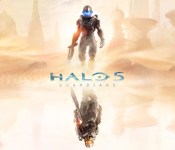
‘Halo 5: Guardians’ and live-action Halo TV show set for fall 2015 launch

We’ve known for a while that there’s new Halo game coming to Xbox One and that it could possibly make its debut this year. Today, Microsoft and 343 Industries provided some additional details on the project, most notably that the next instalment in the franchise will be called Halo 5: Guardians and that it will be pushed back to a fall 2015 launch. So what can we expect? Game specifics are scarce but we know that, like Titanfall, Guardians run on dedicated servers. However, unlike its mech-smashing counterpart, it will run at a glorious 60 frames-per-second.
“Halo 5: Guardians is a bigger effort than Halo 4,” says 343 general manager Bonnie Ross. “That applies to content and scope of the game, as well as the technology in what’s now a brand new and more powerful engine.” Ross also confirmed that the live-action Halo TV series, which sees 343 Industries team up with Steven Spielberg to bring Master Chief to life, may also debut around the same time as Guardians. While you’ll have to wait until next year to enjoy both the game and the TV series in their full form, Ross suggests Microsoft and 343 will have more to reveal in the coming months, starting with the Xbox 2014 Media Briefing at E3 on June 9th.
Filed under: Gaming, Home Entertainment, HD, Microsoft
Source: Xbox Wire
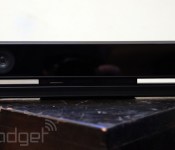
Microsoft wants you to help improve Kinect 2.0’s voice recognition

Using the Xbox One’s Kinect for voice commands is still pretty hit-or-miss for many, and Microsoft knows it. With the console’s next update, Redmond is adding an option for speech data collection as a way to crowdsource the sensor’s improvement. Writing on his blog, Xbox’s Major Nelson says that the more voice samples the company has to add to its algorithms, the more accurate the console can be. If you aren’t keen on the company collecting samples of your voice (which is entirely understandable!), it’s an entirely opt-in process. Should you want to help out, however, all you need to do is dip into the console’s privacy settings and enable it. This isn’t the first time that Microsoft has done such, though — a similar function was in place on the Xbox 360 as well.
The update also brings in a few user-requested features, too. The Xbox One is also getting a sound mixer for snapped apps and volume control for voice chat. The former gives you control over which app on-screen is the louder of the pair — perfect for listening to The Daily Show in the background while trouncing ghosts in Forza 5, we’d imagine — while the latter allows for control of volume levels if you’re using Kinect for voice chat.

What’s more, the on-demand system update button that arrived with the last …update is finally getting some action. This’ll allow you to grab the latest system software as soon as it becomes available — no more waiting for the roll-out fairy.
Filed under: Gaming, Home Entertainment, HD, Microsoft
Source: Major Nelson
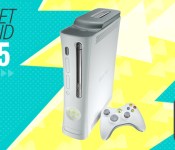
Gadget Rewind 2005: Xbox 360

The current-gen console wars may be tilting in Sony’s favor with its PlayStation 4, but once upon a very recent time (i.e., the previous console generation), Microsoft had a big early lead. When the company released its Xbox 360 back in 2005, the console had a considerable head start on the competition, beating Sony’s PlayStation 3 launch by a full year. There were, however, intrinsic pitfalls in rushing the 360 out to market so fast; hardware problems Microsoft paid for dearly.
The Xbox 360′s November 2005 launch was highly anticipated, with thousands of gamers (several Engadget editors among them) braving late hours and cold weather to snag one. Unfortunately for those eager gamers, Microsoft’s haste to meet holiday deadlines resulted in limited stock levels, leaving many shoppers empty-handed and disappointed. On top of that, a significant portion of this initial run — about 3 percent, according to Microsoft — was afflicted with the “red ring of death,” a dreaded, scarlet indicator that signaled a defunct, or “bricked” console. That production hiccup meant a good deal of early adopters had to spend those first days on the phone with customer support instead of playing their new 360s. Microsoft eventually responded to the crisis and made an effort to smooth out those issues with extended warranties, software updates and revised production runs.
Early hardware issues aside, the Xbox 360 was regarded by many as a beautiful thing, with a slimmer and more streamlined build than that of its hulking predecessor. Its gamepad even went on to become a high-water mark for controller design, setting a standard that’s been emulated by many third-party companies since. And it’s still the go-to for many PC gamers to this day. The 360′s also credited with popularizing online multiplayer for console gaming with Xbox Live. That service, which debuted on the original Xbox, benefitted tremendously from Microsoft’s earlier dalliance with online gaming and, of course, the 360′s robust install base.
Limited onboard storage capacity, however, certainly discouraged wanton spending on digital games. The Premium Edition of the Xbox 360 came with a 20GB hard drive, making it the preferred option for most consumers. The cheaper Core version didn’t have a hard drive at all, although for $100, gamers could purchase a 20GB add-on HDD. Without it, however, they couldn’t download much content or play last-gen Xbox games. As the years went by, Microsoft released new 360 models with larger-capacity drives to accommodate the growing file size of games and gamers’ appetite for downloads.
It didn’t take long for Microsoft to garner gamers’ loyalty with the Xbox 360. In its first three years on the market, the 360 effectively surpassed the original Xbox’s lifetime sales with over 30 million units sold. That number then rose to 80 million units by 2008 and got another boost with the Kinect’s release in 2010. Thanks to that monstrous install base, new games continue to arrive for the console to this day; games that are also seeing simultaneous release on next-gen consoles.
Microsoft may be passing the torch to its shiny and new Xbox One, but regardless, sales numbers for the 360 remain strong. In March of this year, over 100,000 units were sold. In fact, the Xbox 360′s been handily beating Nintendo’s struggling Wii U for 25 months straight. Not bad for a nearly 9-year-old console, eh?
Did you own an Xbox 360? Add it to your Engadget profile as a device you had (or still have) and join the discussion to reminisce or share photos of your device with other like-minded gadget fans.
 AIVAnet