



Biz Stone’s Jelly answers your questions through photos and social networks (video)

Twitter co-founder Biz Stone’s Jelly project has been shrouded in mystery for months. Is it a social network? A distributed computing hivemind? As it turns out, Jelly isn’t anything quite so special — but it’s worth checking out all the same. The newly unveiled service expands on Quora’s basic concept, drawing on the collective wisdom of Facebook, Twitter and Jelly itself to both answer questions and identify objects in photos. If you’re stumped, you can forward questions to just about anyone. Jelly’s Android and iOS apps are available today, so it won’t take much to learn whether or not it’s worth the wait.
Filed under: Cellphones, Internet, Mobile
Source: Jelly, App Store, Google Play
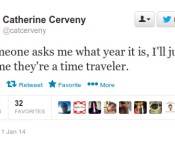
Researchers turn to Twitter in the search for time travelers

Whether or not time travel is even physically possible remains to be seen. But researchers at Michigan Technological University have already started scouring the internet for evidence that we’ve been visited by tourists from the future. The theory is that anyone who has moved backwards through space-time may have left their mark by tweeting, updating Facebook or posting on Google+ (who knows, maybe it’s super popular in the future). The team began looking for mentions of two particular terms, “comet ISON” and “Pope Francis” before they would have entered our lexicon on September 21, 2012 and March 16, 2013, respectively. The ability to backdate Facebook posts and the fact that Google Trends only picks up popular terms limited he effectiveness of those particular tools, but that did not deter the researchers.
They also performed a version of an experiment first conducted by Stephen Hawking in 2012, who sent out an invitation to a party after he’d already thrown it. Not surprisingly, no one traveled back in time to attend after they’d received the invitation. The Michigan Tech team decided to use Twitter hastags instead. They asked people to tweet with #ICanChangeThePast2 and #ICannotChangeThePast2, then searched for messages including those tags that would have been sent before they put out the call to the would be time travelers. Unfortunately, none of their work turned up any evidence that there are currently people from the future in our midst. Of course, we already know they’re here — Nic Cage is the only evidence we need. The full academic paper awaits you at the source link.
Filed under: Science, Internet, Alt
Via: The Daily Dot
Source: Searching the internet for evidence of time travelers

Vine truly comes to the web, with full screen TV mode

Vine certainly is taking its time fleshing out its feature set. Most surprisingly, you couldn’t actually browse the short video sharing service from the comfort of your desktop browser until now. Sure, you could follow a link that would lead you to a specific Vine, but couldn’t skim a feed of clips from people you follow or look through a user’s history. Thankfully that all changes today as the service finally embraces the web, and begins moving away from its entirely app-based existence. Now when you log in you’ll be presented with a scrolling list of six-second updates and you can click through to checkout those all important profiles. And, just so the company can’t be accused of being lazy, it’s bringing something a little special to the desktop — TV Mode. Click the TV icon in the upper right hand corner and you’ll be treated to a full screen presentation of Vines played in sequence. It’s a pretty easy way to catch up on all your friends’ travels, meals and petscapades (you know, pet escapades) without having to touch the scroll bar.
Filed under: Internet
Source: Vine

Carbon for Twitter updated, new type styling added
 You guys asked, and Carbon answered! A few days ago, we took a look at Carbon for Android, v 2.0. Well, today Dots & Lines pushed out a new version, v 2.0.8 to be exact. This version bump doesn’t add much, but it does add something that was missing and we wanted. It adds the ability to change the font styles from condensed, to regular, to light.
Was this feature holding you back from using Carbon? Well, fear not! It’s there, and live in the Play Store! So go, get it now!


A first look at Carbon 2.0, a refresh on an awesome Twitter client
 Carbon for twitter has been in the play store for a while, but hasn’t seen any revolutionary changes in a long time. Till yesterday, that is.
When Carbon first made its way into the Play Store, it was trying to do something different. Be a feature packed app, and have one of the most beautiful dark UIs in the store. I, for one, am a huge fan of the dark UI schemes in apps and ROMs. For me, it was like love at first sight. For a while, that is. After a little bit of using Carbon, the “new app smell” wore off, and I went back to other apps, like the Official Twitter app.

Yesterday, Carbon was updated. And I love it. I don’t think I’m going to be switching away from it for a while. They updated it with what they call “#C2PointOh”, or Carbon 2.0. It truly is worthy of the 2.0 tag, as it is a complete overhaul, in a good way. The new Carbon is elegant in every way, but lacking a few things that I think it really needs. Don’t get me wrong, like I said, I love it. But, there are a few simple things that I think the app should do, that it doesn’t. Well, ok, one. If you have a device with a built in menu button, like me, you get used to hitting that button in any app to bring up the menu, no matter where it’s located. Or, you get used to having some sort of indicator of where the menu would be located. Carbon is not that way. It took me a good 3-4 minutes of searching around the app to figure out where in the world the menu was, and where it was, kinda surprised me. You get to the menu by clicking on your profile picture in the bottom, which is also the button used to compose a new tweet. I would have liked to see these two separated a bit more, or at least have it mapped to the hardware menu button on devices that support it.

Besides that, I love the app. It has good notifications, a good UI, very fast, clean, everything I look for in a Twitter app. Some things that this app does that I really do like is the way it handles multi-touch. If you double tap on a tweet, it brings up a dialog for ReTweeting said tweet, which is an ingenious way to make things faster!
The developers, dots & lines, have this to say about the app:
All-new Carbon v2 with a new design and experience.
Carbon experience for Android Smartphones. No Tablet support yet.
Simple, Dark, and a dash of elegance for your Twitter day-to-day pleasure.
Carbon is a Twitter client, but unlike other Twitter clients. All of your Twitter content on one screen. A screen that doesn’t get you drilling down to many other screens to reach to what you want. Timelines, Lists, Favourites, Searches, Trends, Profiles, all there.
– Fresh new Design & Interface
– Brand new Timeline design & aesthetics
– Swipe-able Timeline, @Mentions, and Messages on Home.
– Quick Timeline, one Timeline for Searches, List, Favourites on your Home screen.
– Don’t Disturb Mode
– Oxide Mode for Grayscale Timeline experience
– Power Scroll: Scroll/Swipe up or down using Two fingers to jump to top or bottom of Timelines
– Tweet Quick Actions
– Configuratie Tweet Font Sizes
– Retweets Timeline
– In-App Browser
– In-App YouTube Player
– Vine Previews & Playback
– Rich Timelines with full inline images and videos
– Rich and elegant style for User Profiles
– Rich Conversation View
– Threaded Direct Messages
– Background updates with quick actions for Jelly Bean, per account
– Username Autocomplete
– Mutes/Filters for Hashtags, Users, and Keywords
– People Search
– Obviously Multi-account with simultaneous accounts tweets
– Profile Editor

What do you think of this massive update? Is it enough to sway you from your current go-to Twitter app, as it was for me? Let us know in the comments, and download below!

Weekly Roundup: 2013 Mac Pro review, judge okays NSA spying and more!

You might say the week is never really done in consumer technology news. Your workweek, however, hopefully draws to a close at some point. This is the Weekly Roundup on Engadget, a quick peek back at the top headlines for the past seven days — all handpicked by the editors here at the site. Click on through the break, and enjoy.

Judge okays NSA spying
A US District judge in Manhattan deemed the NSA’s telephone data collection legal, as he saw no evidence was being used in any way other than attempting to foil terrorist plots. Click through for the ruling.

Apple Mac Pro review (2013)
Apple’s latest workstation is a powerhouse. Armed with up to 7 teraflops of computing power, a super chill cooling system and beautiful new design, the 2013 Mac Pro is more than ready for the modern age. Click through for our review.

Taiwanese FTC fines Apple
Apple awoke to a not-so-merry surprise on Christmas day as Taiwan’s Fair Trade Commission accused the company of unlawfully mandating pricing to iPhone carriers. According to WSJ, Cupertino can appeal the ruling, but could face steep penalties. Click the link for more information.

Jack Dorsey joins Disney
Today, Twitter cofounder Jack Dorsey joined Disney’s board of directors. Click through for a quick look at how the social network’s inaugural user (@jack) wound up working for the mouse.

BlackBerry urges BB10 users to roll-back its glitchy Twitter app

After loads of BB10 user complaints, BlackBerry is pulling the latest Twitter update from its app market. Should you still need your 140-character fix however, the beleaguered smartphone maker has a solution: roll back to the application’s previous version — 10.2.1 — via the simple step-by-step instructions posted on its blog. First, delete Twitter from your device. Then, open BlackBerry World, refresh it and search for the micro-blogging service by name. Voila, a (hopefully) stable app should appear. If anything, this proves that the QWERTY king listens to more than just those in its boardroom. So, the next time that you notice an app go wonky, speak up — it likely won’t be in vain.
Filed under: Mobile, Blackberry
Via: Mobile Syrup
Source: Inside BlackBerry

Daily Roundup: 2013 Mac Pro review, Jack Dorsey joins Disney, Google powered robots and more!

You might say the day is never really done in consumer technology news. Your workday, however, hopefully draws to a close at some point. This is the Daily Roundup on Engadget, a quick peek back at the top headlines for the past 24 hours — all handpicked by the editors here at the site. Click on through the break, and enjoy.
Apple Mac Pro review (2013)
Apple’s latest workstation is a powerhouse. Armed with up to 7 teraflops of computing power, a super chill cooling system and beautiful new design, the 2013 Mac Pro is more than ready for the modern age. Click through for our review.

Canonical previews a dual-booting mobile future
Canonical is set to keep its promise and bring an Ubuntu/Android Dual-booting solution to mobiles sometime in 2014. Click on through for more info about the developer preview.
Jack Dorsey joins Disney board of directors
Today, Twitter cofounder Jack Dorsey joined Disney’s board of directors. Click through for a quick look at how the social network’s inaugural user (@jack) wound up working for the mouse.

Google-powered machines lead DARPA’s Robotics Challenge (video)
SHAFT, the Google bot above, took first place at DARPA’s rescue-oriented competition this past weekend. Click through for more information about the event and Mountain View’s most recent robotic endeavors.
Filed under: Misc

Twitter tweaks iOS app to put photos first when composing tweets

Find yourself tweeting a lot of photos this time of year? Well, the microblogging outfit has just made that task easier for iPhone users. Twitter made a change to it’s iOS app today that automatically brings up a device’s photo repository first, instead of the usual keyboard for composing a 140-character message. Need to type a text-only update? Tapping in the white box will bring up the requisite tool for doing so. It seems the company has taken notice of increased snapshot popularity as it continues to roll out new items like the recent images in Direct Messages and retooled filters. Photo-first composition shows up in the iOS version automatically without the need to update; however, there’s no mention of the feature hitting the Android app.
Sharing photos just got easier on your iPhone – now it takes just one tap to select from your photo gallery. pic.twitter.com/Wj0m2CIrk6
– Twitter Mobile (@twittermobile) December 23, 2013
Via: Mashable
Source: Twitter Mobile

Vine for Android comes to Gingerbread phones, but only for viewing

Android fans running Gingerbread no longer have to sit out the Vine video craze. An updated Vine app now supports playback on the 2010-era Google OS, giving the many people using older Android phones a chance to see all the short clips they’ve been missing. They shouldn’t expect to record clips, though — Vine says that “device limitations” prevent Gingerbread users from creating their own content. That negates much of the app’s reason for being, but the expanded support still represents a kindness toward those who’d otherwise be left out of the (video) loop.
Filed under: Cellphones, Internet, Mobile
Via: Vine Blog
Source: Google Play
 AIVAnet