


Google infuses Play Newsstand, Movies & TV and Keep apps for Android with new features

While Microsoft was busy announcing its updated mobile platform (among other things) today, Google spent its time pushing updates for its Play Newsstand, Movies & TV and Keep apps for Android. Newsstand’s update, in particular, makes it easier to discover more things to read. New tabs on the “Read now” menu provide instant access to sections like business, entertainment and sports, while the My News and My Magazines pages have been combined to form a 2-in-1 destination called My Library.
The Play Movies & TV app, on the other hand, now has a navigation bar that bundles Settings and Help & Feedback within a slide-out window, as well as a Google account switcher on top. Android Central also noticed that you can now slide a finger on the screen to rewind or go forward either continuously (if you don’t lift your finger till you get to the part you want) or in 10-second intervals. Finally, Google’s Keep note-taking app can now return image-only entries when you do a search, since it finally parse text written on photos like Evernote does. It also has a new Trash view that gives you access to deleted entries for up to seven days (after which, they’re gone forever), and it now automatically moves checked entries to the bottom of lists. These updates should hit your Android phones and tablets soon enough, if they haven’t yet.

Filed under: Cellphones, Tablets, Mobile, Google
Via: Android Central (1), (2)
Source: Google Play Newsstand, Google Play Movies & TV, Google+, Google Keep

An afternoon with the Fire TV

We came away relatively impressed with the Fire TV during our brief hands-on. But we all know that units set up specifically for press demonstrations are hardly the best indicator of how a device will function in the real world. So we immediately went back our lair and began putting the newest kid on the streaming block through its paces. Once away from the carefully controlled demonstration area, it became clear that the Fire TV is more of a mixed bag — and still tied to its Android / Google TV roots — than Amazon would like you to believe.
When you first plug in your Fire TV you’re treated to a rather lengthy instructional video hosted by a sketchy (as in crudely drawn, not as in disreputable) man. Most of the functions are pretty straight forward, but it’s a nice touch, especially for the less tech savvy out there. The Fire TV is definitely a streaming set-top box you could give to your grandmother. It certainly helps that the whole UI is intelligently designed and extremely intuitive. Our only major complaint from an interface standpoint is that it can be a little busy at times. All the large images and tile-like collections of apps and movies that populate the Home tab are pretty, but a little distracting. Still, it’s responsive and we didn’t encounter a single stutter over the course of an afternoon spent installing several apps, a game or two and streaming plenty of movies, TV shows, YouTube clips and music.
One feature that we felt let down a little by was ASAP. While it was flawless during the demonstrations both on and off stage at Amazon’s New York event, things weren’t quite as smooth back in the dark recesses of Engadget HQ. The first title we fired up simply failed to play at all, while the Blair Witch Project took a full 36 seconds to start. On the other hand, The Avengers only displayed a loading screen for roughly one second and after that we were able to bounce around the movie seamlessly. And when we backed out to the menu and picked Skyfall from the suggested titles it started up instantly, just like it did during the demo. It seems that maybe we needed to let the Fire TV warm up first.

We are extremely happy to report that multitasking is not only possible, the hardware appears more than capable of handling it. We were able to fire up our favorite Pandora station then drop out to the main menu, install Sev Zero and play through the entire first level without dropping a frame or causing the audio to skip. Obviously playing a song in the background isn’t particularly taxing, but it’s likely to be the only time you make use of the Fire TV’s multitasking ability.
Nothing highlights both the strengths and weaknesses of Amazon’s set-top quite like the app selection. Plenty of major services are represented — though a few of their apps are just ported Google TV products. While that certainly made it easy for companies to get on board with the new platform, the results often leave something to be desired. The YouTube app even preserves the indicators for keyboard shortcuts, despite the fact that you can’t currently use a keyboard with the Fire TV.
Even search left us with some mixed feelings. The voice search functions almost flawlessly — it’s fast, accurate and always just a button press away. But sometimes voice search can be tripped up by foreign or gibberish words. (Just try getting it to recognize Suspiria.) Or, perhaps you’re one of the millions of people out there with a speech disorder or impediment. Then you’ll have to rely on text search, and while Amazon was eager to poke fun at Roku’s on screen keyboard and compared it to entering your high score on an NES, the Fire TV solution is even more onerous. First, you’ll have to move up to the search tab on the left side, then over to the right to search interface, then up again to access the text search (it defaults to voice). Then you’re presented with a carousel of letters that you must scroll through from A-Z, punching in each one manually.
In general it seems like the good outweighs the bad on the Fire TV, but — likely for the sake of expediency — it’s clear there were a few questionable decisions made. We’ll withhold judgement though until our full review.
Filed under: Home Entertainment, HD, Amazon
Amazon Announces the Fire TV Set-Top Box for $99
The rumors and speculation surrounding Amazon and their set-top box are finally coming true today as Amazon announces the Fire TV. I am certainly glad it didn’t turn out to be called the FireTube as a patent file suggested.
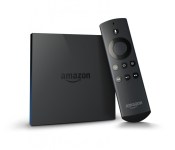
 The $99 black box offers a bang for the buck it sounds like. It measures in at 4.5 x 4.5 x 0.7 inches and weighs 9.9 ounces. On the rear you find a power port, HDMI out, Optical Audio, Ethernet and USB. Internally you get a Qualcomm Krait 300 quad-core processor at 1.7Ghz paired with a Qualcomm Adreno 320 GPU. You also have 2GB of LPDDR2 RAM and 8GB of internal storage.
On the connection side of things it offers up Dual-Band, Dual- Antenna Wi-Fi and supports 802.11a/b/g/n. It also offers up Bluetooth 4.0 connection with HID, HFP 1.6 and SPP profiles.
The homescreen is fairly reminiscent of the Kindle Fire look. The Fire TV comes loaded with a number of apps like Netflix, Hulu and Amazon Instant.
 The included remote is a farily simple looking one with minimal buttons. Something rather interesting about the remote though is there is a ‘Voice Search’ button located right at the top.
“Tiny box, huge specs, tons of content, incredible price—people are going to love Fire TV,” said Jeff Bezos, Amazon.com Founder and CEO. “Voice search that actually works means no more typing on an alphabet grid. Our exclusive new ASAP feature predicts the shows you’ll want to watch and gets them ready to stream instantly. And our open approach gives you not just Amazon Instant Video and Prime Instant Video, but also Netflix, Hulu Plus, and more. On Fire TV you can watch Alpha House and House of Cards.”
To top things off, the Fire TV also plays nicely with your Kindle tablet allowing you mirror/cast content from it to the Fire TV box. Not to mention the added option of a gaming controller. Amazon says there will be over 1,000 free titles to get your hand on to play with the Amazon Fire Game Controller (which is $39.99), but they are also going to give you 1,000 Amazon coins to encourage you to buy some too. All the games have been tweaked specifically to be played with the controller through the Fire TV. I think the biggest struggle that will offer end users is the small 8GB of storage, which I can only assume is smaller due to the OS.
 All-in-all it doesn’t sound half bad. The FireTV box is on sale now for you to purchase for $99. If you pick one up you also get a free 30 day trials to Netflix and Amazon Prime.
click here to order your Amazon Fire TV

Click here to buy the Amazon Fire Game Controller

//<![CDATA[
ord = window.ord || Math.floor(Math.random()*1E16);
document.write('’);
//]]>
Sky’s new ‘Buy & Keep’ movie store ties a DVD to every download

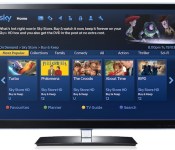
After years serving only movie rentals, Sky is to finally let Sky Store customers download and keep films in its catalog. Following an earlier expansion that saw it open the marketplace to everyone in the UK, the media giant today confirmed the launch of its “Buy & Keep” streaming service, complete with a physical twist. Differentiating itself from Amazon Instant Video, which offers the opposite service the US, the company will let Sky TV subscribers not only retain copies of 200+ digital movies on offer, it’ll also send the original disc through the post too. The DVD (not Blu-ray) will be included in the original price, which will range from £7.99 to £13.99 at launch. Customers with connected Sky+HD boxes will be the first to take advantage of the new service when it goes live in the “coming weeks,” rolling out to smartphones and tablets later in the year. Sky says it will also expand “Buy & Keep” to those without a subscription in the future, launching a multi-pronged attack against its UK rivals when it does.
Filed under: Home Entertainment, HD
Via: Sky Press
Source: Sky Store
The Free Movie and TV App, Crackle, Now Supports Chromecast
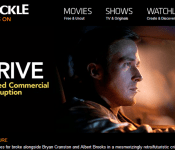
 If you need more reasons other than Plex, Vudu, YouTube, AllCast, Netflix and Hulu to spend $35 on a Chromecast device, how about Crackle. Crackle has been around for quite some time. It is an app that offers movies and tv shows of varying variety for you to stream and watch legally. Legally being the key word. You won’t find the latest and greatest flicks out, but you will find a movie list that is always changing. Often times you will even find flicks that aren’t available through Netflix to stream. For instance, Crackle has the Johnny Depp flick ‘The Rum Diary’ available to stream, where as Netflix only has it available on DVD.
There is a price to pay for free service though. You will have to deal with a couple commercials throughout your viewing experience. There are usually one or two before the movie starts and then a number of them throughout the movie.
 You can see where the breaks are in the bar there at the bottom, looks like 8 commercial breaks on this 1 hour and 36 minute movie. I have been personally using Crackle for a number of years on my Google TV boxes and phones. I am happy to see it updated with Chromecast support.


 If you have never used Crackle, or have a Chromecast and want to give it a looksy, then click down below and head tot he Play Store and pick it up. You can also just go to Crackle.com and watch right from your browser.

//<![CDATA[
ord = window.ord || Math.floor(Math.random()*1E16);
document.write('’);
//]]>

Rdio and Crackle can now send music and free videos to your Chromecast

The Chromecast’s media universe just got a little bit larger today. You can now stream Rdio’s music service through the Google TV adapter using Android, iOS and web apps; you’ll get both album art and track details when you send tunes to the big screen. Meanwhile, Crackle has updated its own Android and iOS apps to let you watch its free movies and short videos through Chromecast. Whether you’re itching to play Chvrches’ album or Comedians in Cars Getting Coffee, you’ll find the relevant app updates at the source links.
Filed under: Home Entertainment, Internet, HD, Google
Via: TechCrunch
Source: Rdio, Crackle (App Store), (Google Play)

Switched On: Amazon’s Puzzling Prime Directive
Each week Ross Rubin contributes Switched On, a column about consumer technology.

More Info
Apple makes its money by selling devices. As such, it’s incentivized to have content — or at least the delivery of it — exclusive to its devices. For years, the company implemented DRM (digital rights management) on music sold through iTunes. It fought such restrictions, but nonetheless benefited from them. Even today it proclaims its leadership position in the number of applications available for its platforms; many of these arrive on the iPhone exclusively, at least for a while.
Netflix, on the other hand, makes its money selling content subscriptions. As such, it’s incentivized to have its content available on all suitable devices that consumers use. Indeed, the streaming company has covered an unmatched number of displays. One can access the service from PCs and Macs; iOS, Android and Windows devices; nearly every connected TV and Blu-ray player; major game consoles; Chrome devices; TiVo; and Apple TV. The Roku broadband video box began as a product that ran only Netflix.
Netflix is even available on the Kindle Fire, the tablet from its closest competitor in the broadband video subscription service in the US. While Netflix is generally believed to be far ahead of the service from the online retailer, Amazon is fighting hard. It’s signing distribution deals, producing original content, adding metadata via X-Ray and even allowing downloads of some titles on its Kindle Fire HDX.
Amazon Prime Video is available on iOS devices in addition to its Kindle Fire tablets, but unlike other Amazon apps like Kindle and its music store, it’s not available on other Android tablets or phones. While one could dismiss Android tablets, noting that Amazon already covers a lot of that ground with the Fire, it’s tough to ignore the penetration of Android phones, particularly such hot-selling devices as Samsung’s Galaxy S series. This is not an installed base like Windows Phone, where an app developer could rationalize abstaining by citing low share. And even if Amazon were to launch its own phone — as it’s rumored to be preparing to do — it would only be able to gain a small part of the addressable market in the next few years even if it was very successful.
So, is Amazon a device company that wants its service available as an advantage to its devices? Or is it a content-distribution company that wants its content broadly available?
So, is Amazon a device company that wants its service available as an advantage to its devices? Or is it a content-distribution company that wants its content broadly available? Judging from Jeff Bezos’ comments, the company doesn’t make much money when someone buys a Kindle device, but does when someone uses it. (“Using” in this case meaning “buying content.”) But there would be even less of a barrier to using that content if Amazon made it available to tens of millions of people who could easily access it if only Amazon would make some user interface tweaks to what is already an existing Android application and make it more broadly available.
There may be one other wild card to Amazon’s reluctance to make Prime Video more broadly available. The company has been rumored to be working on a television add-on. Much as Apple TV fits into Apple’s iTunes store and iOS devices, such a box (or dongle) — which would compete with Apple TV, Roku and Chromecast — would presumably work seamlessly with the Kindle Fire and potential Amazon phones. As Amazon’s hardware ambitions grow, it will have to weigh a unified user experience at the price of choice and flexibility — a quintessential dilemma faced by companies such as Apple, Google and Microsoft.
Ross Rubin is principal analyst at Reticle Research, a technology, media and telecom advisory firm, and founder of Backerjack, which covers crowdfunded product innovation. He blogs at Techspressive.

Amazon’s Apple TV Competitor Expected to Debut at April 2 Media Event
Following rumors of a March launch, it looks like April 2 will be the day Amazon introduces its Apple TV competitor, as Re/code notes that the company has sent out invitations to a “video business” media event for that date. The invitations feature a photo of a couch and popcorn, strongly suggesting that the event will indeed involve the rumored streaming video device, and Re/code‘s sources indicate that this will indeed be the topic for the event.

The e-commerce giant has invited reporters to gather for an “update for our video business” in New York next Wednesday, April 2.
The popcorn and couch in the image give you a pretty good idea of what to expect, as does our previous reporting, which explained that Amazon has been preparing a Web-to-TV gadget for many months.
A recent report from TechCrunch indicated that Amazon’s device is expected to be a dongle similar to Google’s Chromecast, which plugs directly into an HDMI port on the back of the user’s television and then connects to either a USB port or outlet for power.
Amazon’s launch comes as Apple users continue to await the introduction of a revamped Apple TV. Rumblings had suggested Apple was considering a launch late last year, but nothing materialized. Newer rumors have suggested that Apple might make a March or April announcement ahead of a launch later in the year, but there have been no specific signs of an imminent event from Apple.
     |
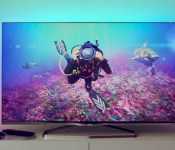
Philips’ 2014 4K TVs include an Android-powered model and smaller sets

Philips’ 4K TVs last year were on the large side, but it’s following up in 2014 with smaller models — including one with a few tricks up its sleeve. The company’s new 55-inch 8809 series set mates the extra-high resolution with Android, giving you both Google Play apps as well as access to your Dropbox content. It’s also a capable set whether or not you like the mobile OS, with a 1GHz refresh rate and Ambilight illumination that plays nicely with both games and Hue lights. There are also 48- and 55-inch 1080p sets running Android (the 8109 and 8209 series), and you can pick up the 7809 series (pictured here) in 42-, 49- and 55-inch flavors if you’re comfortable using a 4K set without Google underpinnings. All of the new 7000 and 8000 series TVs should be available in Europe and Russia in the second quarter of the year, although the Android variants aren’t expected to reach the UK. Pricing isn’t available at this stage, but we’d expect these screens to be more affordable than Philips’ 65- and 84-inch behemoths.
Filed under: Home Entertainment, HD
Source: TP Vision (1), (2)
Millennials are watching video on tablets and computers more than TVs

Apparently kids these days prefer to watch shows and movies on things other than a TV. According to a new study by Deloitte, 56 percent of “training millennials” (people ages 14-24) are tuning in to their favorite shows on computers, smartphones, tablets and gaming devices rather than a television. The majority, 32 percent, are watching on their computers, while just 7 percent are keeping up with the Kardashians on their tablets. That’s a huge contrast from grandma’s “mature” 67+ age group where a whopping 92 percent of viewers are still watching the tube the traditional way, and even a noticeable difference from millennials ages 25-30 where 53 percent of viewers are still cuddling up in their Snuggies in front of a traditional set. If the trend continues, all those 4K TV makers might need to look at focusing their efforts on something a little smaller instead.

Image source: Flickr/Daily Invention
Filed under: Cellphones, Home Entertainment, Tablets, Wireless
Via: Recode
 AIVAnet