


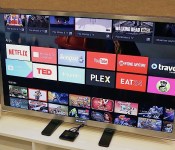
Android TV is Google’s latest shot at entertainment glory (hands-on)

For Android, smartphones and tablets are only the beginning. Google believes that there are so many other categories of hardware that could benefit from its mobile OS, so it announced that it’s building extensions of Android onto the TV, car and smartwatch. Each genre will require special hardware to be truly beneficial, but the former may have the greatest potential in terms of reach — after all, more people are looking for a solid television-watching experience than putting a “computer” on their wrist, and it’s going to be a long time before Android Auto goes mainstream.
Sadly, TV is also an area that Google has struggled with in the past (see Google TV), so it’s hoping that lightning will strike with its latest effort, called Android TV. We had a chance to check out the company’s first official piece of hardware, simply called the ADT-1. Since it’s a developer kit, you won’t be able to buy it — but that won’t be an issue once manufacturers begin selling their consumer-facing devices later this fall. Naturally, the version we checked out is considered pre-production, so a lot of things will likely change between now and its final release, but at least we have a good idea of what to expect from the experience.
The idea behind Android TV is pretty simple: It gives you an internet-powered smart TV with plenty of entertainment and gaming options. Media-streaming apps, Play Movies and TV support, gaming and second-screen/screen-mirroring functionality make the service incredibly tempting. The Android ecosystem is already pretty strong, and the company says it’s easy to adapt existing apps to make them compatible with the platform. With proper hardware and developer support, Android TV may have the legs it needs to stand on.
What can Android TV actually run on? According to Google, the OS will be available for smart TVs (Sony and Sharp have signed on to build televisions with the OS built in), media streamers (like a Roku), set-top boxes, cable boxes and micro consoles. The platform is ideal for any manufacturers that are interested in getting into the smart TV business, but don’t have the resources to develop their own ecosystem; it’s a good opportunity for smaller companies and startups to cook up Android TV hardware.
There are a few hardware requirements to ensure that Android TV doesn’t offer an inconsistent (or miserable) user experience: 2GB of RAM, 8GB of flash storage, WiFi and/or Ethernet, Bluetooth 4, Play-ready DRM and Widevine level one. Companies are also recommended to add mics for voice input, and standardized controller button mapping. These guidelines make a lot of sense because the system needs to be powerful enough to handle graphics-intensive games, entertainment apps and handoffs between the TV and mobile devices via Google Cast — nobody wants a sluggish TV experience, so it’s crucial that Google gets this aspect of its product right. The experience also needs to be as universal as possible so users don’t have to worry about drastically different learning curves.

Sluggishness fortunately doesn’t show up, even on early hardware and firmware. With a Nexus 5 equipped with the Android L Developer Preview, we used a virtual controller to navigate through the TV’s UI, and the system didn’t skip a beat (or a frame, for that matter). We didn’t have to wait for anything that we pulled up, so there were no interruptions to our experience.
The card-based user interface is simple enough. Recently played movies and TV shows, as well as recommended titles, are neatly displayed on the top. Scroll down a level and you’ll see a listing of your apps, including access to Google Play Games and Play Movies. Below that, games. Finally, at the very bottom of the screen you’ll find all of your necessary display and network settings. As you might expect, most apps have setups that are very similar to each other; they use a dual-pane UI with more cards on the right and a large slide-out menu on the left.
As mentioned earlier, Android TV also comes with voice-input options. You can speak to it through your remote controller, and it doesn’t matter what kind of request you have — whether or not it’s related to entertainment, it’ll still answer you the same way it would in Google Now. On one request, you can ask it to pull up movies from 1984, and on the next you can tell it to convert gallons into cups. Mentioning Tom Selleck will not only bring up a queue of the actor’s movies, but it’ll also have an information card about the actor and a list of other people that are somehow connected to him.

The usual entertainment suspects already have apps on Android TV — Netflix, Songza, YouTube, PBS Kids, Showtime and more were featured in our demo — but there should be plenty more options from other third-party developers before the service is ready to go this fall. (As an aside, reps told us that Google TV v4 apps will be compatible with Android TV.) Unsurprisingly, we noticed a slight bias toward Play Store products, but it’s not over the top; we didn’t feel like we were watching a nonstop Google ad, and as more apps become widely available and easily accessible on the platform, those influences will likely be toned down even more.
For the most part, the gaming experience was pretty smooth. We didn’t see as much latency between the game controller and the screen as we expected. There were some games that looked as though they needed a bump in resolution support, as they looked fuzzier than we’d like, but most titles (Need for Speed: Most Wanted, for instance) appeared as sharp on TV as they do on a high-res phone or tablet.
Finally, we’ll briefly touch upon the NVIDIA Tegra 4-powered dev kit, because there isn’t much to it cosmetically. From the top and sides, it’s nothing but a thin set-top box about the same size as two hands, if not slightly smaller. It’s more visually interesting on the bottom because it features four pointy nodules that raise the box up from whatever surface it’s resting on. On the back you’ll find power, HDMI and Ethernet ports.
We can’t make a final judgment on Android TV just yet, and the company’s got a rough path ahead. While the association with the Android ecosystem will be a nice draw for prospective buyers, the platform will be nothing if manufacturers and developers don’t jump on board the bandwagon and produce high-quality hardware at competitive prices. To see how well that works out for all parties involved, we’ll have to wait until this fall to get a verdict.
Filed under: Home Entertainment, Software, Google
Google I/O 2014: Android TV announced, goes public this fall with Android L
An app update hit the Play Store yesterday that listed out Android TV compatibility, so it wasn’t much of a secret that Android TV was going to be announced at Google I/O. During the keynote today they went over the key aspects of what Android TV was all about. First off, you won’t have to […]

US Supreme Court rules against Aereo, deems streamed broadcast TV ‘public performance’

In a precedent-setting decision, the United States Supreme Court ruled today that Aereo is in violation of US copyright law. The decision states that Aereo’s use of tiny antennas hooked up to cloud DVR technology violates the right of companies producing broadcast content. Specifically, the decision says that Aereo’s business violates the 1976 Copyright Act; the act states that individuals or businesses are violating copyright if:
1: perform or display it at a place open to the public or at any place where a substantial number of persons outside of a normal circle of a family and its social acquaintances is gathered; or
2: to transmit or otherwise communicate a performance or display of the work … to the public by means of any device or process, whether the members of the public are capable of receiving the performance or display receive it in the same place or in separate places at the same time or at different times
In the case of Aereo, the Supreme Court says the company’s service is tantamount to “a performance or display of the work.”
Developing …
Source: US Supreme Court (PDF)

PlayStation Now will start streaming PS3 games to Sony TVs next week

Sony has been testing its PlayStation Now cloud streaming game service for months, with a select group of players testing it out on the PS3 and PS4 (all PS4 owners can try it out at the end of next month). On Monday, that group will expand to include owners of some of Sony’s 2014 TVs, including all 4K Ultra HD sets and some of the 1080p models. As a part of the PlayStation Pilot Service, that means that if they live in the continental US, they can play PS3 games with just an internet-connected TV and a DualShock 3 controller plugged in via USB.
Trying games out that way might not save a ton of dough however — prices for renting a title can range between $3 and $20 — but it does mean one fewer box is needed in the entertainment center. Of course, Sony also mentions that its family of funky wedge-shaped Bravias are available in its Best Buy in-store experiences along with its 4K Ultra HD Media Player — necessary if you want to watch Breaking Bad in the highest quality possible. So is this the end of the dedicated console? Not yet, but between this and its (coming soon) streaming TV service Sony is eventually going to make sure that the only cord plugged into its TVs is the one for power.
Sony:
We are supporting nearly all 2014 models of BRAVIA TVs.
- XBR-X950B series
- XBR-X900B series
- XBR-X800B series
- KDL-W950B series
- KDL-W850B series
- KDL-W800B series
- KDL-W700B series
- KDL-W600B series
Filed under: Home Entertainment, HD, Sony
Source: Sony Blog
Apple TV gets ABC News, PBS Kids and a brand new Flickr app

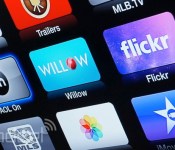
You’d think that the steady stream of new Apple TV content would have slowed to a trickle by now, but nope — far from it. Apple has just delivered a handful of fresh channels that include the free ABC News service (not to be confused with the authentication-based WatchABC), PBS Kids and the cricket-focused Willow TV. Flickr’s app has also received a long, long overdue revamp (shown below) with a densely packed Explore section, an elaborate personal page and improved search. And we’d be remiss if we didn’t mention the new AOL On channel — yes, you can now watch Engadget videos and other clips from our corporate overlords. Whatever content tickles your fancy, you just have to wake up your Apple TV to check it out.

Filed under: Home Entertainment, HD, Apple
Source: 9to5 Mac

This Firefox OS media stick sends video to your TV, much like Chromecast

If you like the idea of streaming media to your TV with a Chromecast but aren’t terribly fond of Google’s content or platform restrictions, you’ll soon have an open alternative. GigaOM has managed to get hands-on time with an unannounced Firefox OS-based media stick that lets you “fling” any content to your TV using any software. It has a hack-friendly open bootloader, and it’ll even mimic a Chromecast in a pinch; while support is inconsistent right now, the adapter can already handle video requests from the YouTube app. Mozilla isn’t naming the manufacturer or commenting on its involvement in the project, but hopefully the gadget ships sooner than later. It may be the key to simple casting from Firefox OS, Windows Phone and other platforms that don’t have many (if any) TV sharing options.
A fully open TV casting prototype device running #FirefoxOS. Open boot loader and all. pic.twitter.com/bZ0Uz8P0Zs
– Christian Heilmann (@codepo8) June 19, 2014
Filed under: Home Entertainment, Peripherals, HD
Source: GigaOM, Christian Heilmann (Twitter)
Vudu makes it a little easier to buy your TV shows by the episode

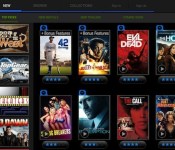
If you’re really dedicated to a la carte TV, then maybe separating by channel isn’t enough and it’s time to buy only the shows or episodes of shows you really want. The only problem with that? On some services, if you buy a few episodes and then decide to grab the entire season later, that means paying twice for the same shows, but Vudu has added a fix, which it’s pitching directly towards cord-cutters. In addition to the Season Pass that lets users buy shows as they’re airing on TV, now there are options for Season Complete and Season Upgrade. Complete means just paying the price for the season, minus the price of the episodes you’ve already purchased, while Upgrade lets you jump from a low-res standard definition copy to HD (720p) or HDX (1080p) by again just paying the difference in price. The iTunes store added a “Complete My Season” option to its TV store back in 2011, but it still isn’t there for stores like Amazon and Google Play. Vudu is available on many more devices than Apple’s digital store, so if you’re building out your TV library episode by episode and season by season, now there’s one more option.


Filed under: Home Entertainment, HD
Source: Vudu Blog

AMC’s plans for an internet TV service leak out, but don’t expect ‘Mad Men’

AMC’s cable TV channel has evolved from the home of old movies to hosting TV series, topped by Mad Men, Breaking Bad and The Walking Dead. Now, the infamous “people with knowledge of the situation” have revealed that it’s working on a new subscription internet service. First reported in The Information, the rumors suggest AMC will launch websites focused on specific categories, like documentaries or horror, possibly with the help of a web video startup it’s invested in called DramaFever. That’s one way to go of course, instead of the “some of everything” route currently dominated by Netflix, Amazon and Hulu. A Bloomberg report says it won’t host licensed shows like Mad Men (already tied up in licenses to the other services) so it’s unclear exactly what content they might have to start. AMC has two video on-demand channels already, and its cable experience should serve it well in the suddenly crowded internet market. If this is as good as it gets for the traditional cable bundle — and AMC can’t increase rates for its channel — trying its hand on the internet could be a way to grow.
[Image credit: Jordin Althaus/AP Photo/AMC]
Filed under: Home Entertainment, HD
Source: The Information, Bloomberg

‘Games of Thrones’ Season 4 hits Google Play and Amazon just days after the TV finale

The fourth series of Game of Thrones came to its conclusion just a few days ago, but HBO isn’t leaving anything to chance. Knowing that single episodes are smashing piracy records on Bittorrent, the company has quickly made the whole season available to download on both Google Play and Amazon. As it stands, Amazon is the best place to get your Lannister fix, pricing the full season at £16.99 for a standard definition copy and £23.99 for an HD download. Google, on the other hand, has it up for £18.49 and £24.49 respectively. If you’re after individual episodes, prices start at £1.89 on both services, letting you witness some of the biggest battles (like the one pictured above) the seven kingdoms have ever seen.
Update: Tesco is hitting the launch hard too, offering Game of Thrones Season 4 for £17.99 in SD and £23.99 in HD. However, it’s also throwing in 1,000 Tesco Clubcard points and a free 10″ Finest pizza with every purchase.
Filed under: Home Entertainment, Internet, Google, Amazon
Via: Pocket-lint
Source: Game of Thrones Season 4 (Google Play), (Amazon), (Blinkbox)

4oD catch-up apps now support mobile streaming

While Channel 4′s catch-up service 4oD has been available on mobile for a number of years, viewers were always limited to streaming their favourite shows over a Wi-Fi connection. That changed at the start of the month when the broadcaster updated its iOS app to deliver streams over 3G and 4G connections. It took a couple of weeks, but it’s now equipped its Android app with the same capability. That means you can now stream full Channel 4, E4 and More4 programmes when you’re on the move and enjoy “4Shorts,” hundreds of clips, extras and trailers from your favourite shows. If you wanted to stream Countdown while on your daily commute, you can now do so on either your iOS or Android device.
Filed under: Internet, Software
Source: 4oD (App Store), (Google Play)
 AIVAnet