



Huawei’s flagship phablet is only $300 in China, and its CMO explains why

Huawei’s recently announced MediaPad X1 has caused quite a stir — it’s the lightest and smallest-ever 7-inch tablet (let alone a phablet), while also packing decent features like a 1,920 x 1,200 display, 5,000mAh battery and 150 Mbps LTE. The retail price quoted at the launch event was €399 or about $550 for the LTE model, but back in China, it appears that Huawei’s slapped an insane discount on the same quad-core tablet, albeit under a slightly different name. Dubbed the Honor X1, the 3G model will retail for just CN¥1,799 or about $290, and the 4G version will go for just CN¥1,999 or $330. That’s a $220 drop for the LTE model! So when we caught up with Huawei Device’s CMO Shao Yang at MWC, we had to ask him: What was he thinking? Well, it’s all about the way consumers perceive this device in different regions.
The exec explained that his company conducted different tests in four countries: China, Germany, Saudi Arabia and Russia. For the China tests, many people identified the X1 as a phone, which isn’t surprising given the increasing popularity of phablets in Asia. Folks from other countries, however, saw the X1 as a tablet that can be used as a phone.
“As Honor is our online brand, we’re saving channel costs and can therefore offer a further deal.”
“Under these circumstances, we priced the device according to the way it’s perceived in each region,” said Yang. “In Europe, the iPad mini with LTE costs about €499 to €599, so our partners are still extremely happy with our €399 price point over there. In China, it’s a special case: the X1 is sold under the Honor brand. As Honor is our online brand, we’re saving channel costs and can therefore offer a further deal.”
Of course, it’s no coincidence that the Honor X1 is priced the same as the Xiaomi Phone 3 — which doesn’t even have LTE, nor storage expansion — and other flagship phones from similar Chinese online brands. It’s apparent that Huawei’s willing to drastically squeeze its margins just to starve its local online competitors, in order to hold or even leap from its number four position in China. But at the same time, you have to also admire Huawei for innovating in the wearable space to reach this goal, and Yang told us to stay tuned for more later this year.
Filed under: Cellphones, Tablets, Mobile

We get touchy-feely with Fujitsu’s haptic sensory tablet (video)

Since Fujitu’s prototype Haptic Sensor Tablet revealed yesterday is all about touch, describing it will be like trying to explain how a steak tastes. But here goes: it works by emitting ultrasonic vibrations below the touchscreen, which can be pulsed with varying force on any region of the screen. Those oscillations actually push your finger off the surface of the tablet and, depending on the force, can give different tactile sensations. For instance, a high pressure layer of air can reduce friction, making the surface of the screen seem slippery. By contrast, rapidly varying the pulses can make the display seem rough or even bumpy.
At least, that’s the theory. After trying it, we found some illusions like the slippery surface to be very convincing, for instance. But the rough texture sensation feels more like the screen is just sticky, and the bumpy experience is even less convincing. When touching the crocodile skin, it just felt like I was moving my finger over slippery and then clingy patches. There’s also a strong buzzing sensation, which is mildly disconcerting. All that said, though, it was still a lot of fun, and it’s hard to see how you could get much more realistic than that with a smooth, 2D surface. There’s a video after the fold showing it in action, but we apologize for the occasionally poor sound quality — as you’ll see, each time the haptics activated, it messed up our camera’s microphone.
Filed under: Tablets

Switched On: Android (tablet) inside
Each week Ross Rubin contributes Switched On, a column about consumer technology.

Inexpensive 7-inch tablets were everywhere in 2013 and became, as Switched On noted in December, a populist platform that fulfilled the promise of the sub-$100 PC. But despite their exceptional portability, aided by light weight and slim profiles, some may find the mere act of dragging them within range of something like their boombox, television or car to be too daunting a chore. Worry not, lazy but intrepid crowdfunders. Kickstarter has recently debuted a trio of products that integrate an Android tablet experience for your enhanced enjoyment, productivity and mobility.
The Boombox

The Auris Wily is a shiny, oblong portable audio device similar to many we’ve seen from Logitech, Jambox and others. It claims some appealing audio specs in a lightweight device. But of course what sets it apart from those products is the front-and-center mounting of a 7-inch Android tablet. Is it a tablet with superior speakers or a boombox with better intelligence and usability?
Regardless, while Switched On has previously questioned the utility of making the whole Android app library available on platforms such as TVs and cameras, there seems to be a stronger case for it on the Wily. Obviously, a wide range of audio applications such as Pandora, Spotify and Audible make sense. The Wily also has an HDMI connector for filling in the gap on that smart TV that may not have all the services you’d like. And it can even serve as a standalone device for internet calls or video chats.
The Wily was close to its $65,000 funding goal, but Auris pulled the project owing to an apparent breach of confidentiality on the part of its contract manufacturer. The next Switched On will delve into how Auris and Kickstarter dealt with the cancellation. Fear not, though. While the Wily will probably return to solicit funds at some point, those who want their Android tablet-enabled portable audio a bit more rectangular can look forward to a series of “smart audio” products announced by Vizio at CES.
The Landline
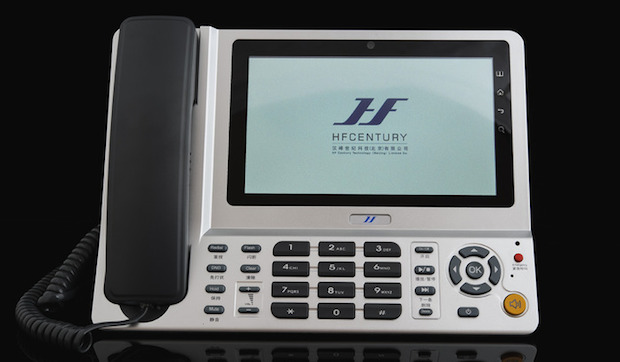
The HFC Canna is one of the most retro-tech ideas seen in a long time. Companies such as Panasonic and Hisense have shown cordless-phone systems with handsets that are essentially low-end Android devices. But the Canna goes for a bigger screen and drops any pretense of a wireless handset by putting a 7- or even 10-inch Android tablet smack-dab in the middle of a landline phone.
Apps such as Skype and WhatsApp make some sense in this context. But the more interesting work is around the core voice calls for which we use a landline. A Contacts app makes dialing from a landline less of a memorization chore. Answering machine messages can be saved as easily transferred MP3 files, and calls can be recorded with the touch of a button (and permission, if one is prudent). Pledge levels to obtain the Canna’s various flavors range from a $199 early bird to $399 for a version that can connect to a cordless (DECT) system. For those chained to their desks and who live off their landline, it may be worth a look. But otherwise, it will be tough to find those who find their landline that valuable.
The Ride

If jamming an Android tablet into your home phone and portable boombox aren’t enough, how about taking it on the road? Despite looking remarkably like a 7-inch tablet, the creatively spelled CarSkreen is merely a display suspended somewhere conspicuous in your center console with a harness. A wee shelf is provided to hold your smartphone, which must handle all input tasks.
By showing navigation and music apps (and hopefully nothing too distracting beyond that) on the slightly bigger display, one combines the enlarged real estate of displays built into car consoles or premium aftermarket car stereos with the flexibility and responsiveness of modern apps. Pledges to obtain the device start at over $300, which would cover a 7-inch tablet and quite a bit of tethering.
Indeed, while the campaign page lists a number of other potential alternatives to the CarSkreen in a favorable (surprise) comparison chart, the most obvious alternative — a cellular-enabled tablet — is unlisted. In addition, emerging standards such as MirrorLink and iOS in the Car promise to make this kind of functionality more widespread in the coming years. Still, if you’re committed to one unshared data plan and don’t mind the front interior of your car looking a bit like a miniature suspended scaffold, you can join the cause for it materializing in May.
Ross Rubin is principal analyst at Reticle Research, a technology, media and telecom advisory firm, and founder of Backerjack, which covers crowdfunded product innovation. He blogs at Techspressive.
[MWC 2014] Sony Xperia Z2 Tablet; Slimmest and Lightest Waterproof Tablet
Mobile World Congress has been in full swing with the various manufacturers pumping out new device news since yesterday. Along with the announced Sony Xperia Z2, Sony has also announced the Sony Xperia Z2 tablet.
 “The Xperia Z2 Tablet represents the pinnacle of tablet innovation and is a true flagship in our premium line. We have evolved our cutting-edge design to create the slimmest lightweight tablet matched with Sony’s latest technologies to deliver a unique user experience.” said Kunimasa Suzuki, President and CEO, Sony Mobile Communications. “And with our new range of dedicated accessories, you can further now enhance your tablet experience whether for work or play, at home or on the go.”
The Xperia Z2 Tablet is being boasted as the world thinnest and lightest waterproof tablet available. Coming in at 6.4mm thin and weighing only 426g for the Wi-Fi version and just 439g for the LTE/3G model.
Spec Overview:
- 10.1 – inch full HD TRILUMINOS Display (1920 x 1200)
- Qualcomm Snapdragon quad-core 801 processor at 2.3 GHz
- Adreno 330 GPU
- Qualcomm Quick Charge Tech to charge 75% quicker
- 3GB RAM
- Up TO 16GB internal storage w/ memory card slot for 64GB
- 6,000 mAh battery powers for 10 hours of multimedia playback
- 8.1 MP rear camera with 16X digital zoom
- 2.2 MP front facing camera
- Android 4.4 KitKat on Board

 A pretty amazing sounding tablet if you ask me. Along with the tablet announcement they also announced a keyboard dock/cover that was designed specifically for it, the BKC50. Gives you a bit more of a notebook feel for productivity and protection. The funny thing, they didn’t make the caver and keyboard waterproof. Seems a bit silly. If you plan to do some blogging from the tub, you will probably want to stick to the virtual keyboard.

 If you are itching to learn more and explore the new Xperia Z2 Tablet, then you will want to head over to SonyMobile.com. I didn’t see any pricing listed in the press release or on their pages, but it is said to be going on sale in the UK and wider in Europe in March. Don;t expect to see it under $700 USD though.
Via Press Release
Fujitsu plans to launch feel-o-vision haptic tablets by 2015

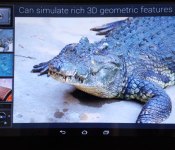
Back in 2012, we were all excited at the idea of haptic technology — touch screens that fool you into thinking that you can feel what’s on display. As quickly as we saw Senseg and NEC’s implementations, however, haptic fell out of the mainstream. Now, however, Fujitsu is working on an ultrasonic system, that varies the friction between your finger and the glass, which could be ready for prime time. In the demonstration, users are apparently able to pluck the strings of a Japanese harp, turn a combination lock and even stroke an Alligator. The company has knocked together a prototype in time for MWC, and Fujitsu has a goal to get the tech into commercial hardware by 2015 — assuming, of course, that realistic lizard stroking is the one feature you’ve been waiting for.

Huawei brings LTE Cat 4 to affordable Ascend G6 smartphone and MediaPad M1 tablet

This year’s all about LTE Cat 4 for Huawei, which is why it’s pushing this faster 4G technology into both the high-end market as well as the lower price points, in order to help drive its network business — LTE Cat 4 only works if your carrier supports it, after all. At MWC, the company announced the launch of two affordable devices that will come with this 150Mbps technology: the Ascend G6 4G and the MediaPad M1.
The Ascend G6 appears to share some design elements with the higher-end Ascend P6, so it looks quite pretty in the above render. It features a lesser 4.5-inch 960 x 540 LCD, a 1.2GHz quad-core processor, NFC and an adequate 2,000mAh battery. The cameras are surprising nice, though: there’s an 8-megapixel f/2.0 imager (with Sony’s IMX134 sensor) on the back, plus a 5-megapixel front-facing counterpart with unknown aperture. This phone will first arrive in its 3G-only, 7.5mm-thick form in Q1 this year, followed by a 7.85mm-thick 4G version in April.
The 8-inch MediaPad M1 tablet (pictured after the break) has a 1,280 x 800 IPS display with stereo front-facing speakers, and with the help of its 4,800mAh battery, users will be entertained by hours of movies (Huawei claims up to eight hours) on one charge. Other specs include a 1.6GHz quad-core chip, a 1-megapixel front camera and a 5-megapixel main camera, all tucked within a 7.9mm-thick body. Like the 3G version of the G6, the M1 will also launch in various countries in Q1 2014.

Filed under: Cellphones, Tablets, Mobile
Huawei MediaPad X1 is the lightest and narrowest 7-inch tablet, plus it’s also a phone (video)

Does the world need bigger smartphones? Huawei answers this question at MWC with the launch of its MediaPad X1, a 7-inch Android tablet that lets you make phone calls. As ridiculous as it sounds, this device is designed in a way that makes it more usable than other colossal phones. At just 239g heavy and 103.9mm wide, the X1 is the lightest and narrowest tablet in its class, beating the likes of the ASUS Fonepad 7, Kindle Fire HDX 7 and the latest Nexus 7. Don’t be deceived by the lightness, though; Huawei has managed to stuff a generous 5,000mAh battery — again beating the other 7-inch tablets — and a high-res 1,920 x 1,200 LTPS display inside this 7.18mm-thick aluminum body.
Let’s get the remaining specs out of the way. First and foremost, you get a pair of cameras: 13-megapixel f/2.4 on the back, and 5-megapixel f/2.2 on the front. There’s 16GB of internal storage, and you can add up to 32GB of external space via microSD. The SoC here is Huawei’s HiSilicon Kirin 910 (as seen on the Ascend P6S), which features a 1.6GHz quad-core Cortex-A9 CPU, along with 2GB of RAM and a Mali-450 MP4 GPU. There’s support for both TD-LTE and FD-LTE, meaning you can enjoy 4G speeds in both China and a large part of the world. Likewise, the same phone also works on both WCDMA and China Mobile’s TD-SCDMA 3G networks. Sadly, the WiFi radio only goes up to 802.11n instead of the more powerful 802.11ac, but the 150Mbps LTE Cat 4 radio should somewhat make up for this — if your carrier supports it, that is. Read on for our hands-on video and thoughts.
To our surprise, the MediaPad X1 feels good in our hands. Compared to the aforementioned 7-inch tablets from other manufacturers, this one is significantly easier to hold with one hand thanks to its narrow bezel, light weight and solid aluminium construction. Of course, you may get some funny looks when you hold the X1 up to your ear. As for pocket-friendliness, your mileage may vary depending on what jacket or trousers you wear; but it slips into my relax-fit Levi’s jeans without much difficulty. If you wear tighter trousers then the X1 will definitely get in the way when walking up stairs. If you want to keep the phone in your bag or pocket more often, you may want to consider picking up Huawei’s new TalkBand B1 smart band and Bluetooth earpiece.
Huawei’s added a few neat software features, with our favorite one being the ability to scroll with one thumb while still gripping onto the touchscreen with the other thumb. We’re also meant to be able to jump straight to the home screen by double-tapping anywhere on the screen at any time (thus skipping the home button entirely), but we haven’t been able to get this feature to work. Other software goodies include motion control (like flip to mute, pick up to reduce ring volume, and automatically make or answer calls when placing the phone next to your ear), hover gesture (to preview photo albums, videos and calendar events) and voice-controlled camera.
We’re still waiting on the pricing info, but what we do know now is that the MediaPad X1 will be available in China, Russia, Western Europe, Middle East, Japan and Latin America starting in March this year. If you reside in any of these regions, do keep an eye out for this 7-inch phablet — not that you’d miss it, of course.
Filed under: Cellphones, Tablets, Mobile

Samsung Galaxy Note Pro 12.2 review: a tablet that proves bigger isn’t always better

How do you fit 12.2 inches of tablet into your life? That’s a question I’m sure Samsung must have pondered at some point before greenlighting its Galaxy Note Pro 12.2, a device that stretches the upper limits of what we can easily call a tablet. It’s also something I’ve wondered myself, given that its size puts it within uncomfortably close competition with 11- and 13-inch laptops. That increase in screen real estate comes at a high price, too: $750 for a 32GB model and $850 for 64GB, both WiFi-only. LTE-capable models are coming soon, but Samsung hasn’t announced pricing yet. As you might imagine, then, the Note Pro 12.2 isn’t intended for your average consumer. No, the Galaxy Note Pro 12.2 is aimed at the prosumer niche of the market — whoever and whatever that actually means.
The Galaxy Note Pro 12.2 isn’t a complete departure for Samsung, though. Cosmetically, it’s near- identical to the Note 10.1 2014 Edition, except larger. There’s that same faux-leather back replete with “stitching,” and 2,560 x 1,600 display. What, then, aside from a massive screen, makes the Note Pro 12.2 different enough to justify the price? On paper, the answer to that would center around the version of Android it ships with (4.4.2 KitKat), its ability to connect remotely to your PC, as well as Samsung’s Flipboard-like Magazine interface. Let’s be real, though. When it comes to the Note Pro 12.2, size clearly matters most. But that begs the question, can you and your prosumptive tendencies handle it?
Hardware
I’ll admit I was initially skeptical of Samsung’s decision to counter complaints about its cheap-feeling, plastic design with — wait for it — cleverly disguised plastic. More specifically, I’m referring to that faux-leather back we first encountered on the Galaxy Note 3, which appears to be the new build standard for Samsung’s flagship mobile products. It’s something that sounds awful in writing, and seeing it in photos doesn’t do it much more justice.
And yet, my misgivings were unfounded. What I assumed would be a tacky design workaround is actually a sly coup on Samsung’s part. Somehow, with that one change, Samsung’s managed to make this 12.2-inch tablet look professional; a device befitting that “Pro” moniker. The black, textured matte back feels comfortable in-hand and looks like something you’d pull out of your attaché case. It elevates the Note Pro 12.2 to a premium perch other Note tablets fell short of — a place where you could almost forgive its exorbitant price tag. Almost.

As I’ve mentioned before, the Note Pro 12.2 could easily be mistaken for a stretched-out Note 10.1 2014 Edition. It bears an uncanny resemblance that extends even to the port layout. The dual speaker setup occupies both edges of the device, high up enough that your hands won’t muffle the sound. A redesigned, more stylish S Pen (denoted by its grooved, faux-metal cap) remains holstered in the upper-right edge of the device. Below that is where we find the only significant change. Whereas this spot used to house just a covered microSD slot, it now also houses a USB 3.0 port for fast data transfer and charging, though you can still connect via micro-USB if you like. Apart from that, you’ve got a 3.5mm headphone jack on the upper left edge, plus power and volume up top alongside an IR blaster.
The Note Pro 12.2′s front face is similarly unchanged. Samsung’s logo appears in the upper portion of the bezel, while the physical home button resides below and is flanked by soft keys for task management and navigating backward. Speaking of bezels, Samsung appears to have found a sweet spot size-wise that leaves just enough space for users’ thumbs to rest without overtaking the rest of the screen. It’s a decision made out of necessity, as well. At 295.6 x 203.9mm (11.6 x 8 inches), the Note Pro 12.2 is big enough that Samsung didn’t have the luxury of adding to its dimensions. That said, at 750g (1.65 pounds) and 7.95mm (0.31 inch) thick, it’s surprisingly light and thin — two buzz words that are practically a must for outsized mobile products.
Different connectivity options mean different processors for the Note Pro 12.2 line and since this particular model is of the WiFi-only variety, it’s imbued with an octa-core Exynos 5 SoC. The LTE model, on the other hand, will ship with a Snapdragon 800 chip inside. Regardless, both are paired with a healthy 3GB of RAM, and include radios for Bluetooth 4.0 and dual band WiFi a/b/g/n/ac MIMO. Additionally, both come with either 32GB or 64GB of built-in storage. It’s worth noting that, out of box, only 25GB of the 32GB of storage on our unit was available for personal use. Thankfully, you can expand that capacity via microSD, so that internal storage constraint shouldn’t cause much concern. There’s also a massive, non-removable 9,500mAh battery to power that equally massive 12.2-inch, 2,560 x 1,600 display.
Display

For the Note Pro 12.2 and the Note 10.1 2014 Edition before it, Samsung used a TFT LCD, abandoning the hyper-saturated Super AMOLED panels that have always been a hallmark of Galaxy products. The trade-off here are relatively muted colors that makes gazing upon the 12.2-inch panel more relaxing on the eyes. That 2,560 x 1,600 resolution also translates to a high pixel density of 247 ppi, which means greater detail in everything from icons to videos. There’s not a visible pixel in sight, nor should there be. Viewing angles are fantastic, as well, but considering the size of the Note Pro 12.2, I don’t expect you’ll have much need to view it on slant with while you’re lying in bed. Oh, and if you take this thing outside, I’d advise you to seek out shade — even at full brightness, it was very difficult to make out the screen in direct sunlight.
Software

There’s a good amount of third-party software pre-installed on the Galaxy Note Pro 12 — about 27 apps, in total — but thanks to some deft organization on Samsung’s part, you don’t really notice it. You need only access the app drawer for evidence of this tidy housekeeping. The first two icons displayed on the grid are dedicated folders for Google and Samsung apps. Although, in the latter case, there’s a mix of non-Samsung associated third-party apps included like Evernote and Flipboard. Because of this streamlining, the Note Pro 12.2′s app layout takes up just over two screens. Even the default homescreen layout seems a bit cleared up: only one row of apps and two widgets occupy the two default homescreens.
The Note Pro 12.2′s bloat may seem like overkill on Samsung’s part, but the vast majority of it is useful and includes common apps most users would have downloaded anyway. Things like Twitter, NYTimes, Evernote, Dropbox and Netflix, to name just a few examples. The same goes for productivity software like Hancom Viewer (for document viewing/editing), e-Meeting (a conference app) and Remote PC which allows users to mirror and remotely control their PC or Mac. Samsung’s Smart Screen eye-tracking features (i.e., Stay, Pause and Rotation) also make an appearance on the Note Pro 12.2, but they’re disabled by default; you’ll need to dive into the settings to turn them on.
Of course, this being a Note, Samsung’s also bundled in its requisite suite of S Pen apps. The usual gang’s all here: Action Memo (a rebranded S Memo) for quick note-taking; Scrapbook, which collects articles, images or videos you highlight from the web; Sketchbook; and finally, S Note, which integrates directly with Evernote or Samsung account. In truth, this collection of apps serves more as a neat demo of what the S Pen can do, than as useful justifications for having the stylus.
The S Pen’s functionality hasn’t changed from when we last saw it on the Note 10.1 2014 Edition. Removing it from its holster immediately triggers the onscreen Air Command display, a palette-like control for quick access to Action Memo, Scrapbooker, Screen write, S Finder and Pen window. You can also enable the Air Command display by depressing the S Pen’s built-in button when hovering over the screen. Of the lot, only Pen window and Scrapbooker require the user to draw onscreen to effect the desired action. For example, after selecting Scrapbooker, users will need to draw a circle around any items of interest to add to a personal collection. The same goes for Pen window, which launches a pop-up application when a square is drawn onscreen.
Swiping left from the bezel, either with the S Pen or your finger, will slide out an app panel for Multi Window shortcuts. To start filling the available four quadrants of the Note Pro 12.2′s screen, you need only drag and drop the app of your choosing. These windows can resized however you like, granting other onscreen apps more or less space, depending on your needs. On top of this, you can even select apps from the slide out panel to appear as pop-up windows over your Multi Window selections. And in a neat UI flourish, Samsung’s made it so that minimized pop-up windows appear as floating circles, not unlike Facebook’s Chat Heads.

Let’s talk about Magazine UX, the Flipboard-like homescreen/news feed that Samsung designed in collaboration with Flipboard for the Note Pro 12.2. It’s nearly identical to Flipboard, but isn’t officially Flipboard. And it’s made all the more confusing by the fact that specific topic feeds (e.g., Science and Technology, Arts and Culture, Sports, etc.) are not only navigated using the same page flip animation, but also offer Flipboard as a curated news source. So, it is Flipboard… kinda.
Whether or not you’ll appreciate this addition to the Note Pro 12.2 depends on how much you use Flipboard to begin with. Don’t despair if it’s not your cup of tea, though. Unlike on the demo model we previewed at CES, Magazine UX is not set as the default homescreen and is also not mapped to the physical home button. So you can effectively ignore it if you like, but be warned there’s no way to completely disable it.
Remote PC

Perhaps the neatest feature Samsung’s debuting here is Remote PC, which, as the name suggests, allows you to remotely access your PC or Mac. The setup process is fairly straightforward, and Samsung’s step-by-step onscreen guide should take all of three minutes to complete. To get started, you’ll need to download and install Samsung’s dedicated remote access software to your computer, launch the corresponding app on the Note Pro 12.2 and enter an authentication key which will appear on your PC’s screen.
After that, mirroring your PC on the Note Pro 12.2 is as easy as selecting your computer icon from within the app. Remote PC does give you full access to your PC, but it’s not without its quirks. Navigation is split up between a mouse-and-pointer setup, accessible from a submenu, or the default gesture controls. While you’d think it’d be more natural to use the touch inputs for control, I found the traditional pointer control scheme to be more precise. There’s also an understandable bit of lag between what’s being mirrored on your Note Pro 12.2 and the computer. Depending on your wireless connection, though, your experience may vary.
While Remote PC does have its advantages, there is one aspect of it users will find frustrating, and that’s text input. As the Note Pro 12.2 is a tablet, its onscreen keyboard will take up a significant portion of the lower half of the screen — the exact place where most dialog boxes for text entry would appear. The unfortunate result is that you can’t actually see what you’re typing, which made for some unintentionally amusing messages on my part. It’s by no means a dealbreaker — remote access to your PC is an incredible boon in and of itself — but you do need to adapt to its quirks.
Performance

When a reviewer forgets to notice a new product’s performance shortcomings, you know it’s a going to be a solid workhorse. And that’s exactly the experience I had during my initial honeymoon phase with the Note Pro 12.2. Apps loaded quickly, screen transitions were smooth and stutter-free. Everything worked as gracefully as I expected it to with an octa-core Exynos 5 chip and 3GB RAM.
That is, until I began pushing the Note Pro 12.2 to its moderate limits. I say “moderate” because I don’t think enabling one instance of Multi Window on this device should cause it to significantly slow down. It’s a performance hiccup that only grew worse with the addition of more windows. Yes, the Note Pro 12.2 is technically capable of displaying four open apps plus floating pop-ups on top of that, but there’s no real benefit for the user. How could there be when the experience is marred by a noticeable lag? In fact, there’s a pervasiveness slowness to the Note Pro 12.2 that ruins any sense of rapid-fire multitasking. It’s the opposite of what the device’s prosumer customer would want.
As a media viewer, however, you can’t really go wrong with the Note Pro’s considerable screen size. That 12.2-inch screen’s an ideal venue for showing off presentations and high-res photos. It’s similarly fantastic for watching Netflix or any other streaming media, so long as you can find a comfortable way to position it. If you can find a suitable way to prop it up, the Note Pro 12.2 can even serve as a solid replacement for viewing media on your laptop. The dual speakers are powerful enough that you should be able to comfortably watch with chatty friends or even in a moderately noisy environment. As a bonus, there’s also no distortion when the volume is pushed to the max.
And now, back to that Exynos 5 chip. As noted earlier, this WiFi-only model comes equipped with 3GB of RAM and Samsung’s octa-core processor inside; that of the big.LITTLE architecture. So you’re not exactly getting all eight cores firing simultaneously, but a setup wherein the best suited set of four cores, be it for light tasks or heavy processing, takes over. It’s likely the reason the Note Pro 12.2 seems to take its time cycling through tasks when activity ramps up.
From the table below, you can see that the Note Pro 12.2 stands up well in benchmark tests compared to its smaller sibling, the Note 10.1 2014 Edition, or the Tegra-4 powered HP SlateBook x2. And really, those are the only fair comparisons we can make as there aren’t many other tablets that push past the 10-inch mark. What’s curious is that, despite both Galaxy Note devices sharing the exact same processor and RAM allotment, the Note Pro 12.2 underperformed in two areas where it should’ve achieved parity. Then again, even the stronger benchmark results don’t truly reflect our real-world experience with the Note Pro 12.2 and its tortoise-like pace.
| Galaxy Note Pro 12.2 | Galaxy Note 10.1 2014 | HP SlateBook x2 | Nexus 10 | |
|---|---|---|---|---|
| Quadrant 2.0 | 16,639 | 19,530 | 13,660 | 5,363 |
| Vellamo 2.0 | 1,786 | 2,735 | 3,237 | 1,854 |
| AnTuTu 4 | 33,967 | 31,859 | N/A | 19,253 |
| SunSpider 0.9.1* (ms) | 1,044 | 1,069 | 654 | 989 |
| GFXBench 2.7 HD Offscreen (fps) | N/A | 22 | N/A | 12 |
| CF-Bench | 33,250 | 31,567 | 32,725 | 10,096 |
| *SunSpider: scores were run on Chrome using v0.9.1 for consistency. Note 10.1 scored 1,063 on v1.0.1. Nexus 10 scores were run on 10/1/13 using Android 4.3. | ||||
The Note Pro 12.2′s 9,500mAh battery is a significant bump over the 8,220mAh one used in the Note 10.1 2014 Edition. Which makes sense, since it needs more juice to power all the pixels on that 2,560 x 1,600 display. If you’ve ever taken a look at your power management tab in Android’s settings, you know that the display is the biggest drain on battery life. Knowing that, you should temper your expectations for longevity. During a normal eight-hour workday, the Note Pro 12.2 lost just under 50 percent of its charge and that was with what I’d consider normal usage — some light browsing, emailing and monitoring of my Twitter feed. I’m sure it’d retain that charge even longer, perhaps for two days, if power-saving were enabled and it was left to mostly idle under light use.
Compared to the Note 10.1 2014 Edition, the Note Pro 12.2′s formal battery result is a little more promising, but nowhere near impressive. With a locally stored video running on a loop, Twitter set to sync at 10 minutes, one push email account active, as well as WiFi and GPS enabled, the Note Pro 12.2 lasted 10 hours and four minutes. That’s about two and a half hours longer than the Note 10.1 2014 Edition. It’s an improvement, for sure, but as with any formalized test, it’s not really reflective of actual consumer usage. Your personal consumption habits and dedication to power management will dictate just how long you can keep the Note Pro 12.2 powered up.
Camera

Never before in my history of product reviews have I felt sillier than when I walked around Brooklyn taking photos and video with a 12.2-inch tablet. People stared. I could feel them judging me, and rightly so. Not only does it feel ridiculous to take photos with the Note Pro 12.2′s 8-megapixel rear camera, it’s also really difficult. As I mentioned earlier, it’s hard to see the screen in bright sunlight, so oftentimes I wasn’t fully aware of how my shot was framed or if it was in focus. Then there’s the simple matter of maneuvering the Note Pro 12.2 so you can access the camera settings menu or scroll through the mode select wheel. It’ll make you feel clumsy and corny, and don’t you have a smartphone for this purpose anyway?
The Note Pro 12.2 snaps photos at a resolution of up to 3,264 x 1,836 in 16:9 ratio or 3,264 x 2,448 for 4:3 shots. Samsung’s included menu options for burst mode and image stabilization — both of which are disabled by default — as well as the ability to customize the volume key function for video, photos or zoom. That mode scroll I mentioned before offers up the same suite of settings we saw debut on the Galaxy S4: Beauty face, Best face, Sound and Shot, Drama, Eraser, et cetera. During my neighborhood walkabout, I stuck to Auto mode as that’s what most consumers will probably resort to, anyway.
I don’t have any real complaints about the Note Pro 12.2′s photo imaging performance, nor do I have any raves. My final batch of shots were above average. Color reproduction was fairly accurate, although shots with a greater depth of field tended to appear less finely detailed. My sample 1080p video, however, is unwatchable, even with image stabilization enabled. As you’ll see below, the Note Pro 12.2 records ambient audio clearly, but utterly fails to maintain a smooth framerate when the camera or objects are in motion.
Configuration options and the competition

First things first: when it comes to the Note Pro 12.2, you need to decide how much internal storage you need. If you do go down the higher-end route, then you’ll be paying a $100 premium for 64GB of storage, totaling $850. Keep in mind, there is a microSD slot, so you can cheaply augment that storage with up to a 64GB card. In comparison, the 64GB Note 10.1 2014 edition, whose screen is 2.1-inches smaller and bears the same S Pen, Exynos 5 processor, screen resolution and functionality, can be had for $600. That a steep discount of $150 for what is essentially an identical tablet made by the same company.
You don’t need to narrow your choices down to just Samsung’s Galaxy Note line for a high-res Android tablet. There are alternatives like Google’s Nexus 10, which gets you stock Android, a 2,560 x 1,600 resolution and 32GB of storage for $500. Or you can explore something like HP’s Tegra-4 powered SlateBook x2, a 10-inch full HD convertible tablet that comes with a keyboard dock for $480. Although, take note, the SlateBook x2 is only offered with 16GB of internal storage.
When it comes to iOS options, the 9.7-inch, WiFi-only iPad Air looks like a relative steal next to the Note Pro 12.2. For $600, you’re getting a marginally lower resolution (2,048 x 1,536), 32GB of non-expandable storage and access to Apple’s ecosystem. A $100 price bump gets you all that and a roomier 64GB of internal storage. Then again, it doesn’t have an active digitizer pen input, so there’s that. All told, the iPad Air is still the more expensive option compared to the kitted-out Note 10.1 2014 Edition, but it offers a reliable user experience. That’s something neither the Note Pro 12.2 or Note 10.1 2014 Edition can guarantee.
Wrap-up

To me, the Galaxy Note Pro 12.2 is quintessential Samsung. It’s emblematic of that spaghetti-to-the-wall approach we’ve seen the company indulge in time and again. I don’t know that the Note Pro 12.2 needs to exist because I don’t know that there’s actually a niche hungry enough for this product. With its same-y internals and feature load, the Note Pro 12.2 seems more like an endorsement of the cheaper and smaller Note 10.1 2014 Edition. Forget the Flipboard-ish Magazine UX and Remote PC functionality — its only two standout features — everything the Note Pro 12.2 can do, the Note 10.1 can do just as well, or even better if we’re taking benchmarks into consideration.
Then there’s that price. An MSRP of $750 or $850 is hard to swallow considering you’re mainly getting two more inches of screen space and a performance that tends toward a more leisurely pace. The Note Pro 12.2 is also too big to hold comfortably. Yes, it’s a great go-to for media consumption, but you either have to prepare for wrist fatigue or MacGyver a rig to prop it up independently. It’s just not worth the trouble. Prosumer or not, there are better, more cost-effective ways to do what the Note Pro 12.2 aspires to do.
Microsoft is cutting Windows prices to compete with Android and Chrome OS

At present, it’s tricky to make Windows PCs that cost as little as basic Android tablets and Chromebooks. While Microsoft charges vendors $50 to use Windows, Google often gives its software away. The crew in Redmond may have found a way to narrow the price gap, though. Bloomberg claims that Microsoft is cutting Windows 8.1′s license fee to $15 for any device that sells for less than $250, letting builders offer very cheap Windows PCs without destroying their profits. The developer isn’t commenting on the reported discount, but this would be a familiar strategy; Microsoft slashed Windows XP’s pricing to wipe out Linux netbooks a few years ago. There’s no guarantee that the company will repeat its earlier success if the lower Windows 8.1 prices take effect. However, it may feel compelled to act when PC shipments are still declining and mobile OS tablets are on the rise — the status quo clearly isn’t working.
Filed under: Laptops, Tablets, Software, Microsoft, Google
Via: The Verge
Source: Bloomberg

Tablet deals of the week: 2.21.14

If you’ve taken a look at our winter 2014 tablet buyer’s guide, you now have a good idea of what slates you should be buying. With many purchases, price can be a sticking point, but thanks to our pricing tools, it doesn’t have to be. We’ve compiled some of the best deals from over the past week — including products from the buyer’s guide, and a few older models you should also take a look at — so you can add a new tablet to your tech arsenal without taking a serious hit to your wallet.
If there are other tablets you have your eye on that we haven’t included here — join us and add them to your “Want” list. Every time there’s a price cut in the future, you’ll get an email alert!
Nexus 7 (2013)

Price: $200
Regular Price: $229
Engadget Score: 90
Buy: Newegg
Though it’s not the most powerful small tablet, the 2013 version of the Nexus 7 still packs in a gorgeous screen, a fast processor, stock Android 4.4 and a rubberized casing that feels good in the hand. While its full retail price is still pretty affordable, today’s deal for a refurbished model takes the 16GB version to a sweet spot of $200, the lowest it’s been since November.

Nexus 7 (2012)

Price: $160
Regular Price: $199
Engadget Score: 88
Buy: Amazon
When we last looked at the original Nexus 7, it could be had for the low price of $170. If you passed on that deal, you’ll be happy to know that the 32GB version can still be had for the even lower price of $160. If that $40 difference between the old and new is making a buying decision hard, take a look at a direct comparison of specs, scores and prices; you can even add other tablets from our database to the mix if you want to see how they stack up.

Kindle Fire HDX 7-inch

Price: $200
Regular Price: $230
Engadget Score: 85
Buy: Best Buy
Another product from our buyer’s guide that’s getting a discount this week is the 7-inch Kindle Fire HDX, with Best Buy offering the 16GB version for $30 less than the folks at Amazon. If you value speed, the Kindle Fire HDX is a good buy (see how it compares to some other 7-inch tablets), but if you love the freedom that Android brings, you might want to look elsewhere — with the HDX you’re limited to Amazon’s content ecosystem and support services.

iPad 2

Price: $299
Regular Price: $399
Engadget Score: 90
Buy: Target
The iPad Air might be the big thing right now, but it’s worth noting that the iPad 2 is a great tablet that’s still available from Apple for $100 less than the Air — and it’s even cheaper at other retailers. It’s not featherweight like the iPad Air, but it does have the standard 10 hours of battery life and it runs iOS 7, so the iPad 2 can still run all the latest apps in the App Store.

 AIVAnet