



Microsoft’s Surface Pro 3 to hit 25 more countries as losses mount

Microsoft’s Surface Pro 3 is set to arrive in 25 more countries including the UK, most of Europe and China on August 28th. It’s been up for pre-order in many of those regions for a while now, but will finally start to ship by month’s end. The 12-inch model has been treated more kindly in reviews than the previous two models, despite some keyboard issues. However, sales figures for the new model haven’t been released, and past versions have fared poorly — in fact, it just had to write off $38 million in unsold devices, including a model it didn’t even launch. And according to Computerworld, the damage goes even deeper.
Based on filings, the site estimates that Microsoft has burned through a total of $1.7 billion since the Surface series arrived in 2012. About $363 million of that red ink came from the most recent quarter, although it’s likely that the company had to spend a lot to ramp up production of the Surface Pro 3 that started shipping at the tail end of that period. It’s bound to recoup at least some of that investment now that the Pro 3 has hit US store shelves and will soon arrive elsewhere.
We’ve reached out to Microsoft to see if it has any commentary on the numbers. Provided they’re accurate, though, they suggest that the crew in Redmond has been willing to endure a lot to get its first in-house PC range off the ground. Such a sacrifice wouldn’t be out of character for the company, mind you. Its cloud services (including its Bing search engine) were money-losers for years; its game console division only really came into its own during the Xbox 360 era. Microsoft may not be so patient with Surface when new CEO Satya Nadella is focused more on services than hardware, but you shouldn’t expect these slates to disappear in the near future.
Steve Dent contributed to this report.
Filed under: Tablets, Microsoft
Source: Computerworld, SEC
.CPlase_panel display:none;

ASUS MeMO Pad 7 and 8 review: small, speedy tablets that cut a few corners

The MeMO Pad HD 7 was arguably the sleeper hit among small tablets in 2013. ASUS’ device didn’t have the speed of the Nexus 7 or the interface tricks of Samsung’s Galaxy Tab 3 line, but it was superbly balanced. It ran smoothly, packed smart software and (most importantly) carried a sub-$200 price. For that reason, this year’s MeMO Pad 7 and 8 are potentially exciting; they stick to that familiar formula while bringing in faster processors and a fresher interface. What’s not to like? As you’ll find out in our review, there are a few aspects that definitely need improvement, or even take steps backward — but it’s also clear that ASUS has budget-tablet design down to a science.
Hardware

The strongest evidence of ASUS’ if-it-ain’t-broken philosophy manifests on the outside. If you’ve used either the MeMO Pad HD 7 or HD 8, the basic layouts of their MeMO Pad 7 and 8 sequels will be very recognizable. And that’s mostly a good thing. They’re easy to hold, with rounded edges and side buttons that you’re unlikely to hit by accident. You’ll find micro-USB and headphone ports on the top, the power and volume controls on the right and a microSDXC storage slot on the left. There’s little on the front besides the company logo and the front-facing camera (0.3 megapixel on the Pad 7, two megapixels on the Pad 8). On the back, you’ll spot a rear camera above (two and five megapixels, respectively), and stereo speakers below.
That’s not to say that ASUS is simply recycling its hardware. Both of the new entries are a tad thinner and lighter than their predecessors. The 7-inch MeMO Pad 7 is the featherweight of the bunch, at 0.65 pound and 0.37 inch thick; its 8-inch counterpart is unsurprisingly heavier, at 0.7 pound, but it’s also slimmer at 0.3 inch. The designs are narrower than last year’s models too (4.4 and 4.9 inches, respectively), so they’re ever so slightly easier to grab with one hand. I was happy to use either for significant stretches of time without propping them up on my lap; these are fine devices for reading on the couch or playing games that demand a two-handed grip.

That conservative design approach does mean the MeMO Pads inherit a few flaws. Those buttons may prevent unintended presses, but they’re also harder to activate on purpose. Since you can’t see them most of the time or quickly identify them by feel, it’s all too easy to accidentally lower the volume when you meant to put the device to sleep, or vice versa. The matte finishes also have their quirks. The 7-inch slate’s smooth backing tends to stay relatively pristine (at least in a red hue), but it’s a bit slippery; the textured 8-inch model is more stable in my hands, but it picks up lint like nobody’s business. The MeMO Pad 8′s new camera layout also doesn’t do anyone any favors. ASUS has moved the camera from near the center to the corner, making it a little too trivial to block the lens when you’re shooting. The Pad 7′s rear shooter is in the same position as on the HD 7, though, so you won’t easily smudge its glass.
Not much has changed on the inside apart from the processor, although that’s not shocking given that the Pad 7 and 8 cost just $150 and $200 respectively. In US models, you’ll still see 16GB of built-in storage (11.1GB free), 802.11n WiFi and Bluetooth 4.0. Sadly, there’s no HDMI output, so you’ll have to lean on Miracast streaming to send video to a TV. ASUS does have an ace in the hole with its built-in GPS and GLONASS positioning, however. You can use any of these devices for navigation so long as you have offline maps; many rivals, including iPads, can’t do that unless you buy their cellular-equipped variants.
Display and sound

Although the MeMO Pad 7 and 8 are separated by an inch in screen size, you get the same basic display technology: a 1,280 x 800, IPS-based LCD. Neither tablet’s screen is especially sharp (the Nexus 7 and Dell’s Venue 8 have much crisper-looking 1,920 x 1,200 panels), but they’re reasonably attractive for the price you’re paying. Both deliver rich colors that aren’t overdone, and you only really lose brightness when you look at them from sharp angles. There are a few practical differences beyond the raw surface area, mind you. The Pad 8′s display is a bit brighter, at a high 400 nits versus 330. Either model is easily visible indoors, but you’ll definitely want the larger slab if you venture outside. I also noticed that the Pad 8 had a warmer, slightly yellowish color cast out of the box, although ASUS’ Splendid screen utility makes it easy to dial that out.
Really, it all comes down to dimensions. Just how much screen real estate do you need? Having held the two MeMO Pads side by side, I can safely say that you’ll want the 8-inch version if you can at all swing the extra cash. It’s much easier on my eyes for long gaming and reading sessions, and it gives me more overall breathing room than I get with the cramped 7-incher. The lower pixel density isn’t a problem at normal viewing distances, in my experience. The tinier hardware will do if you don’t have the money or free space for the bigger hardware, but it’s tougher to justify in an era when many smartphones aren’t that much smaller.
There’s a similar split when it comes to sound quality. While the MeMO Pad 7′s stereo speakers are clear-sounding, they’re a bit quiet and lack even the vaguest hint of bass. The Pad 8 isn’t an audio powerhouse, but it produces louder, fuller output that’s just good enough to make me forego my headphones. With that said, the stereo separation on both tablets is virtually nonexistent. I’d really like to see ASUS put the speakers on opposite ends, like it does with the larger Transformer Pad TF103C.
Software

If you’ve read our review of the new Transformer Pad, you’ll know what to expect software-wise. The two MeMO Pads are running the same ZenUI interface, which spruces up Android 4.4.2 KitKat with a trendy “flat” look and a handful of customizations. ASUS strikes a careful balance between adding its own flourishes and leaving Android’s better features alone. You’ll get quick settings, some well-done media galleries and app drawer sorting, but multitasking and most other Google-made elements remain intact. Yes, that means you’ll miss out on multi-window support and other perks from heavier Android skins, like what you get on Samsung’s Galaxy Tab 4 line. Still, it’s hard to object to ZenUI’s more restrained approach — it’s simple, colorful and responsive.
There isn’t an avalanche of preloaded software, either. ASUS’ own titles are dominated by simple utilities like the previously mentioned Splendid display tool, What’s Next (a simplified calendar view) and Do It Later (a to-do list). The more substantial apps are a mixed bag. SuperNote is great for scribbling and typing notes, but I just couldn’t find a use for Story’s diary-keeping abilities. The third-party app selection, meanwhile, is small, yet smart. Flipboard and Kindle are practically must-haves for reading, and I can see some subscribing to either eMusic’s song-download service or some of Zinio’s magazines.
Performance and battery life
| ASUS MeMO Pad 7 and 8 ** | Nexus 7 (2013) | Samsung Galaxy Tab S *** | Amazon Kindle Fire HDX (7-inch) | |
|---|---|---|---|---|
| Quadrant 2.0 | 19,495 | 6,133 | 18,591 | 19,655 |
| Vellamo 2.0 | 1,933 | 1,597 | 1,672 | N/A |
| SunSpider 1.0.2 (ms)* | 607 | 602 | 1,109 | 554 |
| 3DMark IS Unlimited | 14,171 | N/A | 12,431 | N/A |
| GFXBench 3.0 Manhattan Offscreen (fps) | 7.5 | N/A | 5.5 | N/A |
| CF-Bench | 22,284 | 15,366 | 31,695 | N/A |
|
*SunSpider: Lower scores are better. **Average score for the 7- and 8-inch models. ***Average score for the 8.4- and 10.5-inch models. |
||||
Don’t expect to see a performance gap between the two MeMO Pads… or the TF103C, for that matter. They’re all using the same quad-core, 1.33GHz Atom Z3745 processor with 1GB of RAM, which means the benchmark scores are virtually interchangeable. Not that there’s much room to complain. As you can see above, either of the entry-level tablets can match or beat more expensive challengers. It’s not shocking that they can outpace ASUS’ own Nexus 7, a year-old device using an even older processor. However, they also fare well against Amazon’s speedy Kindle Fire HDX, and even the premium Galaxy Tab S 8.4 — not too shabby when you’re paying up to $250 less.
The numbers translate well to the real world. The Atom chip doesn’t break a sweat while navigating through the interface, and it’s equally adept at both web browsing and intensive 3D games like Real Racing 3. As I touched on with the Transformer Pad, the low resolution goes some way toward easing the workload. You don’t need a rocket to power a paper airplane, after all. However, the offscreen graphics tests suggest that neither MeMO Pad would have much trouble handling 1080p. It’s just a shame that the displays can’t match the might of what’s under the hood.

More memory would be nice, too. Although the devices didn’t get bogged down as I juggled different apps, it’s evident that 1GB of RAM isn’t quite enough for very demanding apps. One benchmark I ran would randomly spit “out of memory” errors, even after rebooting to give it as many resources as possible. You might never encounter these problems yourself, but I’m concerned that the MeMO Pads could choke on software a year or two down the road.
I don’t have similar reservations about the battery life. Where the Transformer Pad TF103C’s runtime was disappointing for its size class, both the MeMO Pad 7 and 8 are at least on par for their price tier, if not a bit above average. ASUS claims that both of them should last for nine hours when looping a 720p video at a low 100-nit brightness, but that’s fairly conservative. In my testing, which upped the brightness to the halfway mark and threw in periodic updates from Facebook and Twitter, both gadgets were still within the ballpark of that official estimate. The 7-inch unit managed a respectable eight hours and 36 minutes before shutting down, or enough to trump the current Nexus 7 and multiple older Samsung tablets. Meanwhile, the 8-inch model lasted for nine hours and 21 minutes, putting it ahead of both the TF103C and Sony’s Xperia Z Tablet series. Neither result holds a candle to the longevity of the Galaxy Tab S, ASUS HD 7 or most iPads, but they’re more than acceptable given the blend of raw power and discount pricing.
| Tablet | Battery Life |
|---|---|
| ASUS MeMO Pad 8 | 9:21 |
| ASUS MeMO Pad 7 | 8:36 |
| Microsoft Surface 2 | 14:22 |
| iPad Air | 13:45 (LTE) |
| Apple iPad mini | 12:43 (WiFi) |
| Samsung Galaxy Tab S (10-inch) | 12:30 |
| Samsung Galaxy Tab S (8-inch) | 12:22 |
| Apple iPad mini with Retina display | 11:55 (LTE) |
| Apple iPad (late 2012) | 11:08 (WiFi) |
| ASUS Transformer Book T100 | 10:40 |
| Apple iPad 2 | 10:26 |
| Samsung Galaxy Note Pro 12.2 | 10:04 |
| ASUS MeMO Pad HD 7 | 9:56 |
| Apple iPad (2012) | 9:52 (HSPA) / 9:37 (LTE) |
| Acer Iconia W4 | 9:50 |
| Nexus 7 (2012) | 9:49 |
| Microsoft Surface RT | 9:36 |
| Toshiba Encore | 8:45 |
| Sony Xperia Tablet Z | 8:40 |
| ASUS Transformer Pad TF103C | 8:26 |
| Sony Xperia Z2 Tablet | 7:57 |
| Nexus 10 | 7:26 |
| Dell Venue 8 Pro | 7:19 |
| Samsung Galaxy Note 8.0 | 7:18 |
| Nexus 7 (2013) | 7:15 |
| Samsung Galaxy Tab Pro 8.4 | 7:13 |
| Samsung Galaxy Tab 3 10.1 | 6:55 |
And in real life, the battery is healthy enough that you likely won’t notice the difference. I can get through a day of moderate browsing, social networking and photography even on the MeMO Pad 7, and I had less to worry about with the Pad 8. Heavy-duty gaming chews up a lot of that precious energy, although you can counter that by invoking a special energy-saving mode that cuts internet access when the tablets aren’t in use. It’s a last-ditch measure, to be sure, but it might save your hide if you need a working device at the end of a daylong trip.
Camera

Here’s where ASUS seemingly backtracks on its earlier successes. I lauded the MeMO Pad HD 7 for having solid cameras, but you’re not guaranteed a similar experience with its 2014 follow-ups; to achieve what I saw in the HD 7, you’ll have to spring for the costlier MeMO Pad 8. Its 5-megapixel autofocusing rear camera is nothing special with noisy low-light shots, blown-out highlights and processing that tends to erase finer details, but it generally produces accurate colors and can take reasonably well-exposed photos in dim indoor environments. The front 2-megapixel sensor is similarly unremarkable, but it’s good enough for an HD-quality video call or selfie. Whichever camera you use, there’s a fairly sophisticated set of filters and manual camera settings, so you can add an effect or tweak the white balance if an image isn’t quite to your liking.
It’s the MeMO Pad 7 that you have to watch out for. ASUS has dropped the HD 7′s 5-megapixel back camera in favor of a 2-megapixel, fixed-focus shooter, much like that in the TF103C. Predictably, the downgraded equipment is terrible — you can’t get close to many subjects without losing focus; colors are slightly off; and shots in anything less than good lighting generate an abundance of noise. Both this and the equally lackluster 0.3-megapixel front camera are serviceable if you only need to capture a chalkboard or join a Hangouts chat, but they’re unfortunate regressions on a tablet that’s otherwise a big leap forward.
The competition

Just what represents competition will depend heavily on whether you’re considering a MeMO Pad 7 or 8. The smaller slab may be the easiest choice. Poor cameras notwithstanding, the Pad 7 outmuscles much of what you’ll find around its $150 sticker. Amazon’s Kindle Fire HD, Barnes & Noble’s Nook HD, LG’s G Pad 7.0 and Samsung’s Galaxy Tab 4 7.0 are slower and carry less storage. The Kindle and Nook don’t even have any cameras to speak of, while LG and Samsung don’t offer much more photographic prowess than ASUS. HP’s Tegra 4-packing, $200 Slate 7 Extreme is no real threat either. The biggest danger may come from Dell’s Venue 7, which offers noticeably higher-resolution cameras (if also a slightly pokier Atom chip) for $10 more. Neither the Kindle Fire HDX nor the Nexus 7 justify their premiums as much as they did roughly a year ago — $80 more gets you an exceptional screen and perks like the Nexus’ wireless charging, but they’re not faster.
Move up to eight inches and it gets trickier. Frankly, the Venue 8 may be a better buy than the MeMO Pad 8 if you’re interested in getting the best hardware possible for $200. It’s using a dual-core Atom, but it has a far nicer 1,920 x 1,200 LCD for a similar hit to your wallet. You will get more for your moolah than other tablets can typically muster, though. The G Pad 8.0 isn’t available in the US yet, and the $270 Galaxy Tab 4 8.0 is both more expensive and comparatively sluggish. If you’re open to trying Windows, keep your eye on the Venue 8 Pro; Amazon affiliates frequently sell it for as little as $200, and it may be worth giving up some battery life in the name of a desktop-class operating system or (optional) pen input.
Wrap-up

Of the two MeMO Pads, I’d choose the 8-inch model without hesitation, as it’s simply a better bargain. Spending $50 more nets you better cameras, longer battery life and that all-important larger display. The 7-inch system offers superb speed for a $150 tablet, but it’s somewhat hobbled by the downgraded cameras. I’d make the sacrifice, as I rarely snap photos with any tablet, but it isn’t as well-rounded as last year’s MeMO Pad HD 7.
It’s a harder call when pitting ASUS against its opponents. While it should be clear by now that the MeMO Pads can take on most any task you’d expect from a mobile tablet, they’re not the best at everything; you can find nicer screens and cameras without much difficulty, especially if you’re willing to go beyond the $200 mark. I don’t think that specs alone tell the whole story, though. ASUS makes a good case for custom Android interfaces. ZenUI is more helpful than the largely stock Android implementation on the Dell Venue 7 or 8, yet it never gets in your way. I can comfortably recommend both the MeMO Pad 7 and 8, but you do have to be aware of what you’re giving up — these aren’t so much sleeper hits as they are wisely calculated trade-offs.
Filed under: Tablets, Mobile, ASUS
.CPlase_panel display:none;
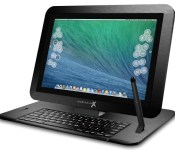
Modbook will let you convert your Retina MacBook Pro to a tablet for $1,999

Modbook, the company behind those aftermarket Apple tablets, just launched a Kickstarter campaign for its latest product, the Modbook Pro X. After paying a pre-order price of $1,999 today, backers will be able to convert their own Retina MacBook Pros into a tablet beginning early next year. The conversion incorporates the laptop’s original hardware, with components shifted from the lower half of the computer to just behind the 15.4-inch 2,880 x 1,800-pixel LCD.
The Modbook Pro X supports pen input with 2,048 pressure levels, along with tilt and rotate functionality. You can also interact with the device using the rear-mounted shortcut keys or the detachable keyboard stand, both of which will be available for an additional cost. And, since your Apple warranty won’t be valid, you can purchase a three-year warranty through Modbook, which provides complete coverage for the first year free of charge. If you’d prefer to avoid supplying your own MacBook, you’ll also be able to pre-order a complete device from $3,999 and up, depending on the model.

Filed under: Laptops, Tablets, Apple
Source: Modbook (Kickstarter)
.CPlase_panel display:none;

FreedomPop’s free data and voice are now available on tablets

Many people can’t really justify buying a cellular-equipped tablet — why pay for more data when your phone probably does the trick? FreedomPop is undoubtedly aware of that thriftiness, as it just started offering its namesake free service on tablets. Whether you buy one of the carrier’s pre-supplied tablets or bring your own, you’ll get the same gratis 500MB of LTE data, 500 messages and 200 voice minutes as a phone customer. That may not make sense at first, but FreedomPop reckons that it’s important for apps that ask for a phone number. It’s much easier to hail an Uber car when you can supply some digits, for example. It could also serve as a backup if your phone’s battery dies, or if you’re nearing your limits on a capped phone plan.
The catch, besides the relatively low 500MB data ceiling, is the device selection. FreedomPop is selling only the aging Galaxy Tab 3 7.0 ($199) and original iPad mini ($319), and any tablet of your own will have to play nicely with the Sprint network that FreedomPop uses for LTE. You’re getting more free data than T-Mobile offers, though, and the phone functionality should be icing on the cake.
Filed under: Tablets, Wireless, Mobile, Sprint
Source: FreedomPop
.CPlase_panel display:none;

Co-op’s trolley-mounted tablets want answers

Tablets are everywhere these days — so much so that bolting one to a shopping trolley isn’t even a novel idea. Sainsbury’s previously used slates to keep shoppers entertained while ambling the aisles, and now a new trial at a handful of Co-operative Food stores wants customers to get more interactive with trolley-mounted tablets. Unfortunately, they don’t sound like they’ll spice up your weekly shopping routine much, given the tablets will ask for your feedback on store layout and product selection, as well as solicit your opinions on “a series of societal issues” like sustainable food. Basically, it fires market research questions at you. Beyond the novelty factor, we doubt many shoppers will be interested in completing a survey while they’re struggling to find a ripe avocado, but at least it’s something to keep the kids distracted.
Filed under: Tablets
Via: Marketing Magazine

Google’s next Nexus device is reportedly a super-sized phablet

Don’t get too excited, but rumors are starting to break regarding Google’s sixth Nexus phone: an oversized handset codenamed “Shamu.” According to Android Police, the device is rumored to be a 5.9-inch handset made by Motorola — leveraging Google’s tradition of naming Nexus devices after sea creatures as a clever way to hint at the phone’s size. Supposedly, this device will surface in November with a fingerprint scanner. Sadly, there isn’t a lot of evidence floating around for this one: just an Google error report and a bit of good faith.
While Android Police says it’s not comfortable with showing its source information in its original form, the rumor get some credit for appearing in Google’s issue tracker: “Shamu” is listed in the build number for a Android L HTTPS bug. It’s probable that this really is the code name for a new Nexus, but the specifics are still unclear. That said, The Information is also reporting a phablet-sized device between Google and Motorola — one that may even include always-on voice control. Neat rumors to mull over — just keep it salty until we hear something official.
[Image credit: Aleksey Butov]
Filed under: Cellphones, Google
Via: Ars Technica
Source: The Information, Android Police

Google’s new, image-rich Play Store for Android is rolling out now

It looks like you won’t have to wait long at all to check out Google’s visually rich Play Store revamp — it’s rolling out now. The refresh doesn’t appear any different on the surface, but a quick dive shows very different product pages that are clearly inspired by the company’s multi-layered Material Design philosophy. Cover art plays a much larger role, and details like rating overviews and genres have been moved into easy-to-read icons. You might not like everything about the new storefront — there’s considerably more scrolling involved, for one thing. On the whole, though, it’s both prettier and easier to understand at a glance. The revamp should reach your device within days, but Android Police has an installer if you just can’t wait to see what’s new.
Our latest update is rolling out right now! We’re excited to share a sneak peek of what you’ll get in the coming days pic.twitter.com/k5BidxR4Vu
– Google Play (@GooglePlay) July 23, 2014
Filed under: Cellphones, Tablets, Internet, Mobile, Google
Via: Droid-Life
Source: Google Play (Twitter)
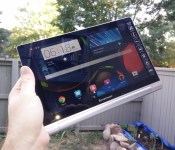
Lenovo Yoga Tablet 10 HD+ Review

Lenovo is back again with another addition to the Yoga tablet line. It’s safe to say that Lenovo’s top-of-the-line Android tablet is better than ever. As we mentioned with our review of the Yoga Tablet 10, Lenovo is pushing the envelope of design, which could be good or bad depending on which way you look at it. The new Yoga Tablet 10 HD+ has some nice upgrades from the previous model, but still falls short in some of the same places.
Hardware
As with the previous 10-inch Yoga tablet, the build quality in the HD+ is excellent. The device features a 10-inch 1920×1080 display, a 1.6 GHz quad-core Qualcomm Snapdragon 400 processor, 2 GB of RAM, 8 MP rear-facing camera and 1.6 MP front-facing camera.  The display is pretty sharp and bright, but one thing that could be annoying to some is its glossiness. I didn’t find it a problem when using it inside or in shaded area. It also has some decent viewing angles, which is always a plus. One of the best features, which also could be considered its worst, is the tablet’s design and like the previous model, it’s extremely thin at its thinnest point and up to about 3/4-inches at its thickest. The thickest part of the device is sort of a cylinder with the power button on one end and the 3.5 mm headphone jack at the other, which it’s also a handle for the device. This is a good idea theoretically in my opinion and great comes in handy when holding the device or transporting it, but it’s a slightly awkward feeling if you’re holding the device and using it in portrait mode. The thick side also houses the built in kickstand that is still a bit hard to engage, as with the previous model. If you are using the device on a table or to have it sit up on your lap, it’s perfect, but if you wanted to have it in a position that you could type on it, it’s a bit too tall in my opinion with the kickstand out. If you were using it the same way but without the kickstand engaged, it’s seems to be too small of an angle. To give you an idea of how these angles differ, think of an iPad with its Smart Cover as a happy medium just about in-between both of these angles which seem either slightly too large or small for completely comfortable typing.
  The tablet comes with 32 GB of built-in storage that is more than enough, plus hidden behind the stand is a compartment where you can add additional storage with up to a 64 GB MicroSD card. I mentioned above that the HD+ has a Snapdragon 400 processor and 2 GB RAM, which is more than enough to satisfy the standard user. Just about any app I used on the device ran with no issues, including games like The Dark Knight Rises. Comparing TDKR running on this with it running on my OnePlus One with a Snapdragon 801 processor, it’s clear which is the winner, so as you can imagine, the graphics on high-end games are reduced and it’s just slightly choppy. Games that aren’t as graphics intense like Leo’s Fortune and even Horn ran beautifully. The cameras on the device are fairly decent for a tablet cameras. I didn’t test them extensively, but the photos I took turned out pretty clear and were decent in lower light. You should have no problems video chatting with the front-facing camera either.
  Two of the last things I want to mention about the device is that the 9,000 mAh battery is fantastic as well as the fact that it has front-facing speakers. In use, the tablet gets about 18 hours of battery life, but I’ve seen the tablet display that it had about 38 hours of battery life when I didn’t use it a lot. There were times when I didn’t use it for a week or more and barely any power was lost, so it works great in standby mode. The speakers on the device are loud and were great for tablet speakers, especially when I tested it out watching Transformers: Dark Side of the Moon.
Software
On the software side of things, the device is running Android 4.4.2. For most of the review, it was running Android 4.3 Jelly Bean then right when I was finishing writing this up, it got updated to Android 4.4.2 KitKat. Lenovo had mentioned that the device would be receiving the KitKat update at the end July, which was about an 866 MB update One nice thing about the software on the tablet, although not the absolute latest version of Android KitKat, is that it’s pretty close to a stock experience, Before the update, it had tablet style menus in Settings but the upgrade brought a Nexus experience to the Settings, only with a slightly different color scheme .The desktop and even on-screen navigation buttons are also Nexus-style as well, so you’ll be right at home. The only downfall with the launcher is that it’s not great if you have a ton of apps or aren’t very good at organizing them since there is no app drawer, much like on the iPad or MIUI. Don’t forget, you can always install a third-party launcher so it’s not the end of the world. The notification drawer and Quick Settings are stock as well, with slightly different icons. Some nice additions that Lenovo added to the software is the Smart Side Bar that can be accessed by swiping from the bezel onto the screen on either side as well as the Dolby app that allows you to adjust sound settings for numerous modes such as for movies, music, games and voice, plus you can make custom configurations as well. The Smart Side Bar gives quick access to your videos, photos and books, recently used apps and sound and visual modes. The KitKat update appears to have made the sidebar work much better than previously as there were times when I couldn’t get it to come out when it was running Jelly Bean. Also, before the update you could double tap while on your homescreen and recent apps would appear, but that appears to have been taken out of the software, unless there is a setting somewhere that I couldn’t find to turn it back on.  Another thing that Lenovo added to the software is the ability to run multiple apps at once by having one open then opening the recent apps and sliding it to the window.pane. I had no trouble watching a movie and surfing a webpage a the same time.
Accessories
Along with the tablet for review, I also received a green and grey sleeve. While it won’t really protect the tablet from huge falls, it will protect it from scratches. The HD+ fits in the sleeve nicely, even with its “unique” design. It also closes magnetically so you don’t have to worry about the flap opening. 
Overall
Looking at both the hardware and software together, it’s not a bad tablet for $369. The Lenovo Yoga Tablet 10 HD+ is a worthy upgrade from the previous model, but still has some of the same shortcomings with the stand and software. As we said with the Yoga Tablet review, if you favor battery life over raw power, then this is worth considering. There also aren’t many tablets with an included stand, front-facing speakers and Android 4.4 KitKat.
The post Lenovo Yoga Tablet 10 HD+ Review appeared first on AndroidGuys.

Gaijin Entertainment announces War Thunder for NVIDIA SHIELD Tablet
 Do you remember that leak we got a few days ago regarding the NVIDIA SHIELD Tablet and SHIELD Controller? Well, it looks like it has been indirectly confirmed as Gaijin Entertainment has announced War Thunder for NVIDIA SHIELD Tablet. This will allow SHIELD Tablet players to play the MMO dogfighting aerial game with other platforms like PC, PS4, Mac and Linux. The release even goes as far as to show a video that is basically the announcement video for the NVIDIA SHIELD Tablet, which you can see below:
As last week’s leak predicted, the SHIELD Tablet is going to have the 192-core Tegra K1 processor that mobile gamers have been obsessing about, and it’s going to be so good that Gaijin claim that War Thunder will run “natively in parity with PC and video game consoles”. Of course, let’s not forget the wireless SHIELD Controller which is naturally going to be optimized for War Thunder on the SHIELD Tablet, particularly if you feel like connecting your SHIELD Tablet via HDMI to your TV for a more theatrical experience.
 There has been no launch date set in stone for the release of War Thunder on NVIDIA SHIELD Tablet, but it will be free-to-play, and the game already contains “400 historically accurate planes and armored vehicles”, which should be exciting for those budding historians among you.
What do you think about War Thunder on NVIDIA SHIELD Tablet? Is the NVIDIA SHIELD Tablet everything you wished for? Let us know your thoughts in the comments.
Press Release
Gaijin Entertainment Announces Their Cross Platform MMO War Thunder is Coming to the NVIDIA SHIELD Tablet
Enabling SHIELD Tablet Users to Play Against PC, PlayStation 4, Mac and Linux Players, Gaijin Entertainment Continues Its Commitment to Supporting New Technologies, Bringing War Thunder to More Players Around the World – On the Go or at Home on the Couch
(MOSCOW, RUSSIAN FEDERATION) – July 22, 2014 – Award-winning developer and publisher Gaijin Entertainment announced today that they will support the NVIDIA SHIELD tablet – the ultimate tablet for gamers – with their mega-hit War Thunder.
“The days of being pious to one platform are dead. We are platform agnostic because we believe that our community demands that they have access to War Thunder on as many platforms as possible. Gamers have many tastes and it is a bad business model to restrict your game to a single platform when your community has ever evolving tastes and preferences and are always on the lookout for the next great gaming adventure,” said Gaijin Entertainment’s Creative Director Kirill Yudintsev. “War Thunder on the SHIELD tablet will be that next great adventure. It provides our growing community of almost eight million players another amazing option to battle with or against friends and foes in cross platform play across the widest variety of home platforms, mobile devices and VR headsets – more than any other game in the industry.”
The SHIELD tablet is the first Android-based device that can run War Thunder natively in parity with PC and video game consoles. The SHIELD tablet includes the world’s most advanced mobile processor, the 192-core NVIDIA Tegra K1. It’s the only device capable of running today’s AAA video games such as War Thunder without hiccup or stutter.
The SHIELD tablet will allow War Thunder fans to take the WWII blastacular experience with them on the go, using a specially created control scheme for the touch screen. When in need of a TV screen experience, players can connect via HDMI and enjoy War Thunder using the high performance, precise SHIELD wireless controller with ultra-low latency Wi-Fi direct.
“Gaijin Entertainment has done an amazing job with War Thunder, creating a cross-platform experience with unbelievable graphics on SHIELD tablet,” said Keita Iida, Senior Director, Global Content Management at NVIDIA. “Tegra K1 really brings the game to life and we’re excited to deliver a game GeForce gamers can play at home – and continue playing anywhere, anytime they want.”
No launch date has been announced for War Thunder on the SHIELD tablet, but Gaijin Entertainment can confirm that War Thunder will remain a free-to-play, cross-platform, massively multiplayer military masterpiece, that allows players to fight their way across air and ground with access to over 400 historically accurate planes and armored vehicles. Fans can expect hundreds more added as Gaijin Entertainment commits to ongoing development via regular updates.
See the trailer here: https://www.youtube.com/watch?v=VohrddwVQqg
For more information visit: http://warthunder.com/
//<![CDATA[
ord = window.ord || Math.floor(Math.random()*1E16);
document.write('’);
//]]>
The post Gaijin Entertainment announces War Thunder for NVIDIA SHIELD Tablet appeared first on AndroidSPIN.

China now has more internet users on mobile devices than PCs

Want to know why traditionally PC-centric companies like Microsoft are pouring so much energy into their mobile efforts? Look no further than China, which now says that more of its residents are getting online with phones and tablets than PCs. Of the 632 million internet users recorded this June, 83 percent (527 million) were using mobile devices at least some of the time; meanwhile, 81 percent (512 million) hopped on using computers. Internet adoption was almost exclusively driven by ultra-portable gadgets, in fact. While overall internet use grew about 2.3 percent in the space of half a year, the number of mobile surfers jumped by 5.4 percent. The growth pattern suggests that many first-timers don’t have a PC at all — whatever’s in their pockets may be the only way they connect to the digital world.
It’s not too hard to see why the Chinese would eagerly embrace mobile data. Phone-friendly internet services like the Tencent Weibo social network and WeChat messaging are already huge despite their absence in other countries; the researchers counted 275 million socialites in their findings. Also, a combination of cheap devices and relatively low average incomes (the gross domestic product is just $7,333 per capita) makes it more practical for some people to forego an expensive computer. While we have yet to see a similar shift in the US and other big countries, it may just be a matter of time. Studies already suggest that you’re using your phone more often than your PC; if so, it may not be long before you question the need for a PC in the first place.
Filed under: Cellphones, Tablets, Mobile
Via: Slashdot
Source: Reuters
 AIVAnet