


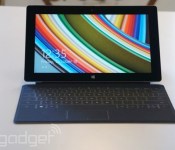
Microsoft cuts prices for its Surface 2 tablet by $100

Have you been holding out for a price cut on the Surface 2 before taking the plunge? You now have your chance. Microsoft has slashed $100 off the price of its second-gen Windows RT tablet, regardless of the model you buy. It now costs as little as $349 for a base 32GB WiFi edition, while splurging on the 64GB LTE slate is slightly more reasonable at $579. Just be aware that the folks in Redmond aren’t doing this out of the kindness of their hearts. The Surface 2 is nearly a year old — Microsoft is very likely clearing inventory, whether it’s ahead of a new model or just to focus more attention on the Surface Pro 3.
Filed under: Tablets, Microsoft
Via: TechCrunch, Ars Technica
Source: Microsoft Store
.CPlase_panel display:none;
HTC’s first tablet in years pops up in a trade group filing

HTC hinted that it would get back into tablets this year, and there have been detailed rumors covering the effort. However, tangible evidence of that hardware has been hard to come by — until now, that is. The Wi-Fi Alliance has certified the “Flounder,” a tablet that would run Google’s upcoming Android L. While the listing doesn’t say much by itself, the model numbers match those in an @upleaks post mentioning that there would be a WiFi-only model as well as LTE variants for both the world at large and American CDMA carriers (think Sprint or Verizon). These tidbits don’t confirm many of the other rumored aspects of the slate, such as the 8.9-inch display, Tegra K1 processor or Nexus badging. However, they at least suggest that HTC is close to releasing its first tablet since 2011′s Flyer — if you’ve spent years hoping for a follow-up device, you may well get your wish.

flounder(T1#F, WiFi-only); 0P82100 flounder_lte_us(T1#WL, CDMA2000/LTE); 0P82200 flounder_lte_world(T1#UL, WCDMA/LTE); 0P82300
– @upleaks (@upleaks) August 23, 2014
Via: Talk Android, Phone Arena
Source: Wi-Fi Alliance (PDF), @upleaks (Twitter)
.CPlase_panel display:none;

Microsoft optimizes OneNote for Android tablets, adds handwriting support

Microsoft’s OneNote has long been available for Android (among many other platforms), but this latest update makes it easier to use specifically on tablets. The note-taking app now comes with handwriting support that takes advantage of the devices’ relatively bigger screens, as well as with better options for formatting your notes. If you’re going back to school soon and have a Windows device, though, OneNote for Windows sounds like the better choice with its new ink highlighter, printing support and ability to insert files and PDFs. Finally, the latest Livescribe+ update lets you set up a OneNote notebook where the Livescribe 3 pen can automatically upload what you’re writing down on paper. All these changes are rolling out right now, so expect to get pinged for an update soon if it hasn’t appeared yet.
Filed under: Tablets, Mobile, Microsoft
Source: Google Play, Office Blogs, Livescribe+
.CPlase_panel display:none;
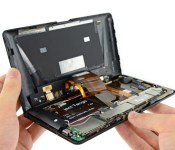
Project Tango tablet teardown reveals its custom 3D mapping gear

If you’ve been wondering just what parts let Google’s Project Tango tablet work its 3D mapping magic, iFixit is more than happy to show you. The DIY repair outlet has torn down the experimental Android slate to reveal a truly unique sensor array. While it resembles a Kinect at first, Google notes that it had Mantis Vision build a custom infrared projector (which bathes the world in a light grid) that works in tandem with the 4-megapixel IR camera; there’s no way you’d replace either with off-the-shelf parts. The big, dual-cell 2,480mAh battery was also made to order, since the ATAP team wanted to let developers draw as much power as necessary for their 3D-savvy apps. The Tango tablet is undoubtedly a very clever design, then, but you’ll have to handle it with kid gloves if you ever try it — you probably won’t get another one if it breaks.
Source: iFixit
.CPlase_panel display:none;

Lenovo now ships more smartphones than PCs

Lenovo has been rapidly expanding beyond its PC-focused roots for some time, and today it crossed another important milestone: it’s now selling more smartphones than computers. The Chinese tech firm’s handset shipments surged 39 percent year-over-year in the fiscal quarter that ended in June, reaching 15.8 million; in contrast, it “only” delivered 14.5 million PCs over the same period. Nearly all the phones (13 million) went to the company’s homeland, where it’s well-known for both its budget devices and high-end flagships like the recently-launched Vibe Z2. Lenovo’s claim that it was the top Chinese phone maker during the quarter is up for dispute, however — estimates suggest that Xiaomi was the top dog by a significant margin.
Other divisions aren’t exactly hurting, either. Lenovo now has close to 20 percent of the worldwide computer market, and its tablet shipments grew a whopping 67 percent over the past year, to 2.3 million. That was enough to make Lenovo the third-largest tablet maker, behind Apple and Samsung. There’s no telling whether or not its forays into wearables and other newer categories will prove as successful, but it’s good to know that Motorola’s future parent company is very healthy.
[Image credit: AP Photo/Andy Wong]
Filed under: Cellphones, Desktops, Laptops, Tablets, Mobile, Lenovo
Via: Reuters
Source: Lenovo
.CPlase_panel display:none;
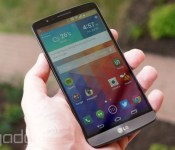
KitKat is now running on more than 20 percent of Android devices

In case there was any doubt that KitKat now has a solid foothold in the Android world, Google just offered some proof. Its usage data for early August shows that KitKat is on more than a fifth of active Android devices, at 20.9 percent. That’s a healthy improvement over July (17.9 percent), and a big leap over the 14.9 percent we saw in June. The folks in Mountain View aren’t explaining the steady growth, but it’s easy to figure out what’s going on — big-name devices like the LG G3 and Samsung Galaxy Tab S are bringing this latest OS flavor to a wider audience, and many older gadgets are still getting upgrades.
To no one’s surprise, that surge is coming at the expense of older releases. Every pre-KitKat version has declined, and Ice Cream Sandwich is only just floating above the 10 percent mark; at its current rate, it’s going to (finally) reach the single digits very soon. Whether or not KitKat ever reaches the majority is another matter. Android L is just a few months away, and it’s a big enough update that its predecessor might not grow quickly for much longer.

Filed under: Cellphones, Tablets, Mobile, Google
Via: Droid-Life
Source: Android Developers
.CPlase_panel display:none;

Manchester United won’t let you take laptops or tablets into its stadium

Don’t plan on taking your iPad or Nexus 7 to Manchester United’s next home match any time soon. The football team (soccer, for you Yanks) has banned laptops, tablets and other big devices from Old Trafford’s grounds. Man U says that the crackdown reflects the “latest security intelligence” used by UK airports — it’s protecting fans from hidden explosives in devices that could do substantial damage. All but the largest smartphones should be fine, however, so you can still capture that van Persie goal without fear of being kicked out.
As you might imagine, there’s a side benefit to this extra security — banning tablets also means that supporters won’t have their view blocked by people trying to record every moment on their slates. In that sense, it’s harkening back to a brief decision by the New York Yankees to ban iPads. The stadium crew makes no mention of these annoyances, but it probably doesn’t mind improving the experience for spectators who are there to watch the game with their own eyes, rather than hide behind a screen.
[Image credit: Paolo Camera, Flickr]
Via: The Verge
Source: Manchester United
.CPlase_panel display:none;
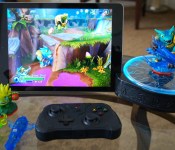
Skylanders takes on Disney Infinity with its new toy-to-tablet starter pack

If you’ve heard of Skylanders, we’re going to guess either you’re a kid, you’re a parent with kids or you know someone with kids. And if you do, we’re going to guess you probably already know about Skylanders Trap Team, the latest game to come out of the Skylanders franchise that’s set to debut later this year. As a brief reminder, the game essentially comes with a device that you can use as a “portal” to transform real-world figurines into in-game characters. The hook with the Trap Team version is that you can use one of eight “Traptanium traps” to “trap” enemies in the game — you do so by inserting a tiny plastic dongle into a slot on the aforementioned portal. You can then play as the trapped enemy if you like, switching between it and your main character as you progress in the game.
Which is all well and good if you’re content with playing with the game on a console. But what if you don’t have one? Or what if your kid’s preferred device for gaming is a tablet? Well, fortunately for you, the team behind Skylanders has just announced that it’ll be producing Skylanders Trap Team for the tablet as well. Activision and Toys for Bob, the studio behind Skylanders, claims that this is the first time in franchise history that it’s bringing the full AAA console experience to the smaller handheld screen. Indeed, Paul Reiche, the head of Toys for Bob, tells us that the tablet version of Skylanders Trap Team is “pixel for pixel” the same as the one for the 360.
Just how is the tablet version different from the normal ol’ Trap Team? For starters, the aforementioned portal comes equipped with Bluetooth low-energy to communicate with your slate of choice. It also has a handy groove along the side that’s designed to fit the tablet, so that you can prop it up for a hands-free experience. And speaking of a hands-free experience, perhaps the best thing about the tablet edition of Trap Team is that when you flip the portal upside down, you can pop out a Bluetooth-enabled mini controller from underneath it. Yep, the game comes with its own controller so that you can get the whole console experience right on the tablet. We tried it out for a few minutes, and though the controller is rather small for our hands (you’ve got to remember it’s meant for kids) it definitely feels a lot like playing on a miniature console. And, just in case you don’t want to use the physical controller for whatever reason, you can bring up on-screen controls too.
Reiche tells us there’s also an additional gameplay mode, for kids who want to keep playing the game while disconnected from the portal, say while they’re traveling in between destinations. In this mode, they’re given a separate “instant” character that’s completely separate from that of the figurine, just to give kids the chance to wander through the level in between sessions. “Skylanders is really intended to be a toy collection and switching characters, and this doesn’t come close to replacing that,” says Reiche. “But we did want to give people this option.”
Now, the game isn’t compatible with all tablets — it’ll need sufficient horsepower to handle the game’s graphics at the very least. For now, Skylanders Trap Team is compatible with all iPads from the 3rd generation onward (that includes the iPad Air and the iPad Mini Retina), the Kindle Fire HDX, the Samsung Galaxy Tab Pro, the Tab S, the Note 10.1 (2014) and the Note Pro 12.2. The Trap Team starter pack comes with the aforementioned Bluetooth portal, the mini controller, two Skylanders characters, two Traps and a handy display tray to see all your traps and villains. It’ll be available for $74.99 and launches on October 5th in North America (10th in Europe and 2nd in the Asia-Pacific region), just like all the other Trap Team starter packs.
Filed under: Gaming
.CPlase_panel display:none;
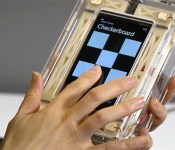
Microsoft wants its smartphone screens to touch you back

While your fingers are in firmly in control of hand-held devices, they’re guided strictly by your eyes — and Microsoft thinks that’s a waste of your sense of touch. Researcher Hong Tan found that using so-called haptics to add tactile sensations to screens can have some concrete benefits. For instance, by adding a keyboard-like “click” feeling to a Surface keyboard cover, one study showed that subjects could type faster and more accurately on it. Other potential uses include enhanced interfaces that let you feel resistance when you move a folder on the screen, or the ability to feel “textures” like rough cloth on a screen.
Several methods can be used to create such feedback. One way is to put a material that bends when charged under a screen to simulate a click, while another uses electrostatic vibration to put a cushion of air under your finger, making a surface feel smooth or sticky. I’ve experienced such haptic feedback myself, and while some sensations are accurate, others are just weird. There’s also the question of extra cost, weight and power consumption to consider. Still, Tan thinks it could find a place in specialized applications like devices for the blind — and Fujitsu even plans to launch a tablet using the tech as early as next year.
Filed under: Cellphones, Tablets, Mobile, Microsoft
Source: Microsoft Research
.CPlase_panel display:none;
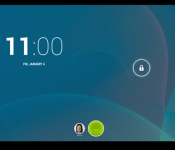
Android “L” release to include multi-user support for phones

Multi-user profile support has been available on tablets for some time but is yet to appear on Android phones. However, a recent post on the Android issue tracker may suggest that it’ll appear in the Android L release. A post was created complaining about the lack of support for multiple users on phones and was… Read more »
The post Android “L” release to include multi-user support for phones appeared first on AndroidGuys.
.CPlase_panel display:none;
 AIVAnet