


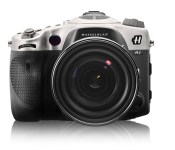
Hasselblad remakes a Sony DSLR out of aluminum, quadruples the price

Do you love your Sony A99 full-framed DSLR, but find it’s just not… aluminum-y enough? For an extra $8,700 (or $11,500 in total), you can score a Hasselblad HV remake with a Carl Zeiss 24-70mm F2.8 lens instead. That’ll get you a “much tougher” machined, high-grade aluminum body instead of the original’s garden-variety magnesium. It also benefits from something called “physical vapor deposition hardening,” comes in a “high performance” case and, well, that’s about it. You’ll otherwise be taking the same (nice) snaps as Joe Sixpack with his regular A99, thanks to the original camera’s 24.3-megapixel sensor and 25,600 max ISO. Still, what the deuce, Jarvis, fetch my checkbook.
Filed under: Cameras
Via: Sony Alpha Rumors
Source: Hasselblad

Daily Roundup: Google’s Chromecast SDK, Facebook Paper hands-on and more!

You might say the day is never really done in consumer technology news. Your workday, however, hopefully draws to a close at some point. This is the Daily Roundup on Engadget, a quick peek back at the top headlines for the past 24 hours — all handpicked by the editors here at the site. Click on through the break, and enjoy.

GTA 5 is best selling game of 2013
Grand Theft Auto 5 was the best-selling game of 2013, but that should come as no surprise since the title pulled in $1 billion at its debut. Click on through for more information.

Facebook Paper hands-on
Facebook’s new app, named Paper, hopes to become your go-to new source, but does it really offer any advantages over the plethora of other aggregators out there? Follow the link to our hands on and find out.

Google unveils Chromecast SDK
If you’re a developer who’s been waiting to take advantage of Mountain View’s $35 dongle, you’re in luck. Earlier today, Google released the Chromecast SDK and invited coders to get hackin’. Click through for details.

PS4 update brings Pulse headset support
PS4 owners with a Pulse headset will soon be able to take advantage of Sony’s version 1.6 update. Set to arrive late tonight, the update will bring PlayStation 4 support for both the regular Pulse and Elite editions. Click the link for more.
Unknown Sony Xperia Phone Pictured by Blurrycam with Incredibly Thin Bezels

Mr. Blurrycam strikes again, this time showing us an unknown Sony Xperia device with some barely there bezels. Now this hasn’t always been the case with Sony devices. Sony hasn’t strived in the bezel thinning out department, but they have directed their efforts more to the durability of the devices. They might be changing things up, so squint your eyes and take a look at these blurry, yet almost bezel-less pictures.

These images came off of a Chinese forum called Digi-wo , and there really isn’t much more we can tell you about this mystery device. Some may assume this is Sony’s new Xperia flagship, Sirius (or Z2), but most likely not. If we we find out anything more about this mystery, g-string bezel device, we will let you know.
Source: Digi-wo
Via: Android Headlines
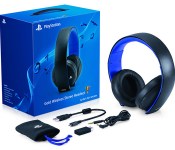
PlayStation 4 update supports Sony’s pricey headsets, including a new model

PlayStation 3 owners who quickly moved to the PS4 couldn’t take their expensive Pulse headsets with them, but that won’t be a problem for long. A version 1.6 update reaching the newer console late this evening will bring full support for both the regular Pulse and its Elite Edition, giving players 7.1-channel virtual surround sound and voice chat through Sony’s official hardware. Elite Edition owners will also get to use a Headset Companion App (due later this month) that sets custom audio profiles. To mark the occasion, Sony is launching some new audio gear: the Gold Wireless Headset offers 7.1-channel audio, voice and game profiles in a travel-ready, foldable design. It should sell for $100 when it hits store shelves early this month.
Filed under: Gaming, Peripherals, Sony
Source: PlayStation Blog

Playstation 4 Companion App Updates with Live Video Feed Support
Sony’s PlayStation App has received an update today moves it to version 1.60.5. The update brings in a Live from PlayStation feature that lets you watch various streams of game play and gamers videos. You can browse through the various game videos, but when you attempt to watch your selections 1 of 2 things will happen. If it is UStream video you will be directed to open that app if it is installed, if it is a Twitch.tv stream you are directed through to your browser to watch the video. Basically the you just get a list of video to watch, but will have to physically watch them else where.


 The app also received some stability improvements as well as killing off the automatic connection to your Playstation 4 when it is in standby mode.
As always, feel free to hit the badge below to go straight to the app in the Play Store to snag the update or install it for the first time. If you are a new downloader, be prepared to sign in with your PSN info.


Should Brits buy the new, slimmer and pricier PlayStation Vita?

Decisions, decisions, decisions. Saying it three times won’t make things any easier, but that’s where we come in. Sony’s latest iteration of the PlayStation Vita handheld, which we’re going to call the Vita Slim from now on (as seems to be the fashion), is coming to the UK, having previously only been available in Asia. It’s up for pre-order right now and will launch a week from today — so, do you want one? The choice is ultimately yours, of course, and it’s a delicate one, but if the pressure is too much to bear then head past the break where we explore how the Slim stacks up against the Vita of old, and whether it’s really worth the extra £50 for a console that delivers essentially the same experience.
Hardware
Now, we’re not here to tell you that the PS Vita is an essential purchase — whichever version you’re looking at. If you’re unfamiliar with the handheld, or perhaps the PlayStation brand as a whole, then it’s really a matter of how you like to game on the go. Are you more Killzone than Brain Training, more Need for Speed than Mario Kart, or maybe you’re happy killing commute time with a bit of Angry Birds and don’t need another device at all? If you’re going in blind, then it’s probably best to start with a quick browse of the Vita’s game catalog, and check out our full reviews of the original and Slim models to get acquainted.
The Vita, in general, is serious and well-built hardware. Dual thumbsticks, a 5-inch touchscreen display, another touch panel on the rear, stereo speakers and two cameras facing forward and back. Most importantly, it delivers the best graphics of any handheld, verging on last-gen console territory.
As the Vita Slim isn’t a sequel, you’ll find everything mentioned across both iterations, so what’s the hook? As you’ve probably guessed, the Vita Slim is everything the Vita is, but in a smaller package: 20 percent thinner and 15 percent lighter, to be exact. At 15mm thick and weighing 219g, it’s still not pocket-sized by any means, but the nip and tuck’s welcome nonetheless, alongside a few other minor revisions that make it more comfortable to hold.

(Note: The white model in the comparison shot above is available in Japan only. The UK Slim model is black.)
This is one of the main draws of the Vita Slim — it’s just that bit more portable. Beyond aesthetic changes, there’s a far more important improvement to battery life. Instead of 3-5 hours game time on the original Vita, you’re looking at around 8 hours with the Slim. Forgetting price difference, it’s hard to recommend the old Vita on that stat alone. If a portable console can’t manage a decent-length plane ride without needing a recharge, then we should revisit the definition of portable.
How did Sony achieve this with less space to work with? Well, that’s the one drawback of the Vita Slim. It’s dropped the OLED display of the OG Vita for an LCD panel, which is where much of the power savings come from. There’s no getting around it: the OLED panel is better. Color representation and viewing angles trump those of the LCD screen, but unless you’re a huge videophile, you’ll likely appreciate the extra battery life way more. The screen may’ve been downgraded, but that’s not to say it’s of poor quality.

The Vita Slim is different in two other respects: it’s equipped with WiFi only, whereas the older model has a 3G option, and it has 1GB of internal storage where the other has none. We can’t imagine the lack of 3G is a deal-breaker for anyone, which is probably why Sony couldn’t be bothered with a cellular variant. A gig of storage might not sound like much, it won’t go a long way, and you can pick up a 4GB Vita-specific memory card (thanks, Sony) for under a tenner. Getting 1GB free, though, is just one less thing to think about when you tear it from the box and wanna dive right in. In a pure hardware match-up, we’d have to put our money on the Vita Slim, but how much money are we talking about exactly?
Price
A number of sites have now opened up pre-orders for the Vita Slim, and although it’s more expensive than the older model, it’s still a significant saving over the WiFi-only OG model that launched in 2012 for £230. Yes, it’s still way more expensive in the UK than in its home country of Japan, but you’re British and should be used to paying more for everything, so suck it up. A couple of retailers — Amazon, Game, Simply Games and ShopTo, for example — have stuck to Sony’s RRP of £180 for the console alone. (There are other sites asking as much as £200, but let’s ignore those.) The latter two retailers are also plugging bundles that add just a fiver to the price of the handheld alone. ShopTo has the greatest selection, bundling the Vita Slim with a number of single, high-profile titles, or download vouchers and memory cards. The best deal seems to be the Slim with ten-game download voucher plus a 16GB memory card, which you’ll need to store those voucher titles on anyway. Sure, most are old, but there are a few gems such as WipeOut, and that 16GB card is worth around the price of Vita game itself.
Currently, ShopTo also appears to have the best deal on the original Vita, with the WiFi and 3G model priced at only £130. This appears to be a transient deal, however, and most other retailers have the same model on offer for £140 to £150. At this point, we wouldn’t entertain the thought of getting an OG Vita bundle as their prices haven’t reacted to the Slim’s impending arrival. Game is selling the same £185 Slim bundle we listed above with the old Vita for £155, but even this deal should see a reduction when the Slim’s launch has had a chance to impact retailer pricing.

Wrap-Up
We’re sure OG Vita bundles will be revised in due course, but for early Slim adopters, those with a refreshed interest in the Vita, or those thinking about upgrading, this is how things stand at the moment. Some PS fans will no doubt jump at the Slim due to the “shiny factor” (it’s new, gotta have it), but unless you can trade in or sell your current Vita for a fair price, we wouldn’t bother upgrading. Definitely not before the price of the Slim comes down, anyway. If you’re sure now is the time to get Vita’d up, then ShopTo’s £130 offer for the original model is certainly tempting. If you can stretch to £185 though, go for one of the Slim bundles with a 16GB memory card thrown in. Any console is an investment, however late you are to the party, and due solely to the portability improvements the Slim boasts, we’d call it the smarter one.
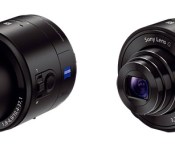
Sony upgrades smartphone-pairing QX10 and QX100 lens cameras with higher ISO and 1080p video capture

Shutterbugs who shunned traditional point-and-shoots in favor of Sony’s QX10 and QX100 lens cameras can now take even better images and videos. Thanks to a firmware upgrade, both smartphone lens attachments are now capable of recording clips with a higher resolution (1,920 x 1,080) than before (1,440 x 1,080). It also cranks up the clip-ons’ max ISO settings from 1,600 to 3,200 on the QX10 and from 3,200 to 12,800 on the QX100, which is bound to please those especially fond of nighttime photography. Other than these two feature boosts, folks with the more expensive QX100 get an extra shutter speed mode for their devices. Unfortunately, users can’t upgrade over their phones and will have to download the firmware on a Windows (XP/Vista/7/8) or a Mac computer.
Via: SonyAlphaRumors, Softpedia

PlayStation 4 companion app update highlights live game broadcasts

The latest update for Sony’s PlayStation mobile app is out for Android and iOS, and it’s surprisingly video-focused. Thanks to the new Live from PlayStation section, available game streams can be browsed directly from your device — although they won’t open in the app itself. Ustream feeds open in the service’s own application (at least on Android), while Twitch.tv streams are relegated to your mobile device’s browser. The change log also notes that video notifications from the PS Store are supported, and you’ll find them under the What’s New section on the home screen. Additionally, the update promises to not pull your PS4 out of sleep mode when you open the app to, say, accept a friend request or queue a game download — perfect if you’re looking to conserve a little electricity.
Filed under: Cellphones, Gaming, Home Entertainment, HD, Mobile, Sony
Via: Wario64 (Twitter)
Source: Google Play, iTunes

Sony Xperia Z1 Compact review: a good thing in a small(ish) package

Last year, Sony finally reached the end of the alphabet with its Xperia Z. It wasn’t just that the company ran out of letters, though: With the Xperia Z, we saw Sony streamline its scattered phone strategy, piping all its attention into a single high-end device. Then, it followed up with the Z1, which brought a massive 20.7-megapixel camera.
Today, we once again have a new phone to talk about, except it’s perhaps not the device you might have been expecting. Nope, this isn’t a Z2, and no it doesn’t bring an even higher-resolution camera. Instead, Sony’s joining the small-flagship club, with the Xperia Z1 Compact. Interestingly, unlike some of its rivals, Sony is promising that you won’t have to compromise on features for the sake of a more pocket-friendly handset. At £440 SIM-free in the UK, that apparently includes a no-compromise price, too. By the looks of it, though, Sony has worked hard to stick with the same specs as the original — bar, of course, the screen size. So, is this finally proof that “mini” doesn’t have to mean mediocre? We put it to the test to find out.
Hardware
At first glance the original Z1 and the Compact are nearly identical — apart from the physical dimensions, of course. Look a little closer, however, and you’ll spot a few small differences. For example, the Z1 Compact now has all the connections and ports on the left side, complete with the usual protective flaps. The microSD slot and micro-USB port sit up top, with the (micro) SIM slot hanging out on the bottom edge. (To jog your memory, the Xperia Z1′s SIM port is over on the top-right edge.) Other differences: The headphone jack is ever so slightly farther inset on the top edge, and the camera flash now sits beside, not below, the lens. As you can see, we’re already scraping around for significant differences. It’s also worth noting that the build materials once again include glass and aluminum, so you won’t have to suffer any plastic downgrade here (we’re looking at you, HTC).
With the Compact, Sony stuck with its so-called OmniBalance design, which means for now, at least, it’s passing on the chance to reimagine its phones. Instead, the company has been making subtle tweaks with each new device. And that’s OK, too. After all, we’ve found little fault with the build quality and design on the Z and Z1, so why change it? As you can imagine, then, the Compact feels just as premium as the other Z-series phones, and possibly more so, given how dense it is. It’s so dense, in fact, that at 137 grams, it’s even heavier than some bigger flagships, like the Nexus 5.

Of course, this well-trodden design path brings many of the same trade-offs. In our Z1 review, we noted that it was something of a fluff-magnet; every time you retrieved it from your pocket, it would bring with it a renewed collection of lint. Unfortunately, that’s just as true of the Compact. It’s impressive to see how efficiently it extracts the finest fibers from your pocket every time you remove it. If you ever need to take photos of this phone — say, for a review — you’ll definitely need canned air, a lint-free cloth and an abundance of patience.
Another unfortunate carryover is the speaker placement, along the bottom edge of the phone. When we were testing the original Z1, we found that holding the phone in landscape to watch a movie meant one of your hands inevitably obscured the speaker, muffling the audio. Nothing has changed this time around, which means if you’re watching something in landscape, you’ll want to make sure you have some headphones on hand. Granted, this is a common location for the speaker, but for some reason — perhaps the slight recess — it’s particularly noticeable on the Compact.
On a more positive note, Sony decided to break away from its normal black, white and purple color choices. The Compact does come in black and white, but also a zesty lime hue and a fairly wild pink option. Our review unit was the lime one (though it’s a very yellowish lime), and we quite like how bold it is — a treatment we hope Sony decides to keep giving its phones. Another nice touch is that the metal edges match, or complement, the body color. On the lime one, for example, the aluminum sections are a light gold, or “champagne” tone, and it definitely gives the overall design a coherent feel. Be warned, though, that after barely three days with the Compact, we noticed a small part of the champagne finish had chipped off, revealing the true metal color beneath.

As with the exterior design, talking about the Compact’s specs is an exercise in repetition. It’s like-for-like with the original Z1, for the most part. For those of you who don’t keep track of such things (that’s most of you, we’d hope), the two phones share a quad-core 2.2GHz Snapdragon 800 processor, a 20.7-megapixel camera (1/2.3-inch sensor) and 16GB of onboard storage (expandable by 64GB via microSD). Additionally, it packs 2GB of RAM, Bluetooth 4.0 (with aptX support), ANT+, GPS/GLONASS and NFC. Our global (D5503) model supports LTE Bands 1, 2, 3, 4, 5, 7, 8 and 20 — this covers almost all European networks. While there’s no word on a US release, it’s compatible with T-Mobile and AT&T, and potentially some areas on Verizon too. There’s a bevy of media options as well, with support for Miracast, DLNA and MHL. No wireless charging, though, which is a shame. As usual, the battery is locked inside, so you can’t swap it out and pop in a spare.
The key things to note are that the display is now 4.3 inches in size with “only” 720p resolution (the Z1 measures five inches on the nose and boasts 1080p). That sees the pixel density drop slightly from 441 pixels per inch to around the 340-ppi mark, but that’s still pretty decent. Similarly, the battery now has a capacity of 2,300mAh, down from 3,000mAh in the original. The positive spin there is that a smaller display sucks less juice, so in theory, it’s a technical, not functional trade-off. Given that the main difference is the size, Sony’s done a fine job of shoehorning all that technology into a smaller package. We already mentioned that the Compact definitely feels denser, but it’s a smidge fatter too — about one millimeter thicker.
If you’re used to using a larger phone, the Compact might not initially feel as small as you’d expect, especially with the decent-sized bezel at the top and bottom. Overall, it’s probably right to call this mid-sized, rather than small or mini. (In all fairness to Sony’s marketing team, “compact” is a more appropriate word.) It actually has a similar footprint to the iPhone — which is unsurprising, given that Sony is probably going after Apple customers here. In short, Sony’s managed to create something that’s very easy to use one-handed, without feeling particularly small or slight.
| Sony Xperia Z1 Compact | |
|---|---|
| Dimensions | 127 x 64.9 x 9.5 mm |
| Weight | 137g |
| Screen size | 4.3 inches |
| Screen resolution | 1,280 x 720 |
| Screen type | Triluminos LCD with 16 million colors |
| Battery | 2,300mAh Li-ion (non-removable) |
| Internal storage | 16GB (12GB free) |
| External storage | microSDXC, up to 64GB |
| Rear camera | 20.7MP (1/2.3-inch sensor, f/2.0 lens with 27mm equiv. focal length) |
| Front-facing cam | 2MP stills, 1080p video |
| Video capture | 1080p |
| NFC | Yes |
| Radios |
HSPA+ (850/900/1700/1900/2100); GSM GPRS/EDGE (850/900/1800/1900); LTE (Bands 1, 2, 3, 4, 5, 7, 8, 20) |
| Bluetooth | v4.0 |
| SoC | Qualcomm Snapdragon 800 (MSM8974) |
| CPU | 2.2GHz quad-core Krait 400 |
| GPU | Adreno 330 |
| RAM | 2GB |
| Entertainment | MHL, Miracast, WiFi Direct, DLNA |
| WiFi | Dual-band, 802.11a/ac/b/g/n |
| Wireless Charging | No |
| Operating system | Android 4.3 (Sony-specific UI) |
Display

We’ve already covered most of what you need to know about the display: It’s 4.3 inches with 720p resolution. But, given that aspects of the displays in both the Xperia Z and Xperia Z1 have previously left us underwhelmed, it’s clearly an area worth revisiting. Our primary concern until now has been the viewing angles. The Xperia Z, in particular, suffered from a terribly narrow viewing range, with the image soon fading away to unwatchable levels if you weren’t standing directly in front of it. The situation didn’t improve with the Z1.
At last, the Compact puts this issue to rest. The display is not only easily readable from a wider range of positions, but colors are vibrant without being oversaturated (take note, Samsung). This is no doubt thanks to Sony’s X-Reality engine, which, according to the marketing, selectively processes everything you watch to make it as lifelike as possible. That might be so, but it also appears to add some slight pixelation to contrasting edges (think white text on a black background). There’s also still room for improvement with the blacks, which continue to appear slightly faded. Overall, though, the display here is a clear improvement over its predecessors.
Camera

A good display is not much fun if you don’t have anything exciting to view on it. That’s partly where the camera comes in, and at 20.7 megapixels, this one’s quite a doozy — at least on paper. It’s also the exact same Sony G Lens, 1/2.3-inch sensor with Exmor RS and BIONZ mobile image processing that we saw in the full-size Z1. Once again, there’s a dedicated camera button, which also serves as a shortcut to the camera (via a long-press).
We wish there were something new to add here that we didn’t go over last time. But alas, Sony’s determination to make sure that you get the same experience evidently means you’re getting, well, the full experience, and nothing more. At the very least, if you were a fan of Sony’s homegrown camera app suite (that can provide image-based information, social sharing of your photos, etc.), you’ll be glad to know it’s still here in the Compact.
If you weren’t interested in the Z1, then you’ll definitely want a quick recap of the camera performance. Sony’s claim is simple: The Z1 family sports one of the highest-resolution sensors on the market. The company’s also thrown in a bunch of technology borrowed from its standalone cameras, including that BIONZ image processing. It even claims that the sensor here is the “equivalent” size to that used in the firm’s Cyber-shot line, but that doesn’t tell us much with so many other factors involved. The idea clearly was to have media, photos and video be a central feature. The reality is that it’s not the best camera we’ve found in a phone (that would be the Nokia Lumia 1020′s PureView cam), but it’s certainly one of the more capable Android cameras we’ve come across. If we’re determined to find it a “best” title, then it’s the best camera we’ve seen on a Android phone.

So why is that? It comes down to a number of factors, not least of which is the pixel count. There’s also, of course, the fast f/2.0 27mm-equivalent G lens. That wide aperture allows plenty of light to pour in, giving it consistently solid results, even when conditions are somewhat dim. It also provides a good depth of field, ideal for those who like a bit of “bokeh” — that blend of sharpness on the subject, and out-of-focus background.
As for noise, the usual telltale sign of a cameraphone? When viewing images at 100 percent (quite a task at 20.7 megapixels) you’ll find some artifacts, along with color washout in areas around the edge of your subject, or where the lighting contrasts with the metered area (e.g., if you have the metering mode set to central, the edges might suffer). All that said, this was a small detail we noticed while checking some of our sample shots for this review. What’s more, smoother edges render quite well. Clouds are an abundant resource in London at this time of year, and we were actually impressed by how the textures and moody grays came out, really showing off the rich palette at the Compact’s disposal.
Photographers will most likely be happy with the camera’s “Superior Auto” mode, which generally delivers pleasing results: rich colors, good white balance and even exposure. If you’re more of a tinkerer, you’ll want to flip into manual mode where you can take control of the ISO, exposure compensation, white balance and metering mode, et cetera, and have much finer control over the results. If video is more your thing, we’d encourage you to keep the SteadyShot feature on for everything except static objects, as camera shake will otherwise render your videos a little, well, shaky to say the least.
Software

Historically, Sony’s been relatively kind to Android users, with minimal skinning and unobtrusive add-ons. That’s pretty much the case this time around, too, although the company has left a few sticky fingerprints around the interface to remind you of its presence. Mostly this means that where a Sony app or service is available, in addition to a standard Android one, you won’t have to look hard to find it. That means it’s “Album” instead of “Gallery,” “Walkman” instead of “Google Play Music,” et cetera. If you’ve ever used an Xperia phone, you’ll most likely already be familiar with this, but it’s all easy to remove, ignore or replace, should you prefer.
Unfortunately, the native onscreen keyboard here drove us crazy. Have you ever had a dream where your life depended on typing something, or dialing a number on a phone, yet for some inexplicable reason it became the hardest thing to do? That’s a bit like using the swipe mode on the default keyboard. I’m experienced in both Android’s stock swipe input, and third-party options like SwiftKey, and have never experienced one like this. Writing a short message frequently made me feel like I was drunk, with the words onscreen often barely resembling my intended prose. Perhaps it’s a case of getting used to the slightly smaller keyboard — maybe I was too vigorous in my swipes — but there was definitely a lot of cussing, deleting and hunting-and-pecking.

To counter this minor annoyance, we were reminded of a neat addition to the multitask screen we’ve seen in previous Xperia Z models — an understated bonus. Press the familiar double-square button, and you’ll get the currently running apps all stacked on top of each other as usual. At the bottom, however, are some additional options. On the left is an arrow that, when pressed, reveals shortcuts to configurable favorites. To the right of that are buttons for some additional quick apps. We’d actually call them utilities, really, as they include a calculator, basic browser, notepad, timer, audio recorder and screen grabber.
The other interesting thing here is that these apps operate slightly differently than those from the main menu. If you open up the browser, for example, it launches in a new window that floats on top of whatever you are/were doing. Effectively, it brings multitasking if you want to quickly Google something, perhaps while lingering over an email. In that case, you can shift your attention briefly without ever having to close the email window. This isn’t earth-shattering, of course, but it’s a nice inclusion — and one that’s easy to overlook, precisely because it’s mostly hidden away.
Performance and battery life
| Xperia Z1 Compact | Xperia Z1 | Droid Mini | |
|---|---|---|---|
| Quadrant 2.0 | 21,038 | 22,145 | 7,741 |
| Vellamo 2.0 | 2,959 | 2,891 | 1,373 |
| 3DMark | 18,470 | N/A | 10,093 |
| SunSpider 1.0 (ms, lower is better) | 816 | 804 | 1,274 |
| GFX Bench T-Rex 2.7 1080p Offscreen (fps) | 22 | N/A | 16 |
| CF-Bench | 37,218 | 31,702 | 13,713 |
| Battery rundown test | 11:37 | 12:34 | 6:45 |
What about the phone’s overall performance? This is where we take our hats off to the fine folks at Qualcomm. Whatever tea they were drinking when they came up with the 2.2GHz MSM8974 chip inside this phone, we’ll take two packs. Given the shared DNA between this handset and the Z1, we expected the numbers to be similar, but to our surprise, the Compact actually bests its predecessor in some benchmarks.
This is reflected in our usage of the phone, too. We never felt like we were taxing that hefty quad-core engine. We threw video at it, along with graphically intense games like Grand Theft Auto, and the Compact took it all in stride. We did have the camera app crap out on us twice, but that was during the first five minutes, and it never happened again after a restart. Equally solid is the performance when it comes to calls and internet connectivity. All our calls sounded clear, while London’s O2 network regularly delivered speeds around 30 Mbps –– definitely in the high end for my neck of the woods.
While we’re handing out gold stars for performance, the Compact deserves a nod for battery life. It’s one of the specifications that took a hit in the downsize, but the 2,300mAh cell actually does a sterling job. In our usual battery test (WiFi on, screen at 50 percent brightness, video looping), it managed well over 11 hours. In more conventional usage, the Compact can last well into day two before forcing you to hunt for an outlet. The even better news is that this is all in standard mode. Sony’s added not one, but two power-saving modes that will let you eke out even more juice (at the cost of notifications, backlight and the other usual power-sucking suspects). We’d say you won’t really need to bother with that; instead, save those options for when you’re planning on staying away from civilization for a little longer than usual.
The competition

If we’re talking mini flagships, we can’t ignore HTC’s One mini or Samsung’s Galaxy S4 Mini, especially given that they both run Android. HTC’s offering ran a similar price to the Compact at launch, though you can now pick it up for about £100 cheaper. That’s a good thing, too, as its 1.4GHz dual-core processor and 4MP shooter (UltraPixel sensor or otherwise), will seem positively arcane compared to the Compact. Samsung’s mini S4, on the other hand, falls short on the display (it’s the same size, but 960 x 540), the camera (8MP), RAM (1.5GB) and processor (1.7GHz dual-core). The only saving grace is that it’s cheaper than both HTC and Sony at around £250 SIM-free. While not a “mini,” Motorola’s Moto G might appeal to some of the same customers, if a mid-sized 720p Android phone is what they want. The £189 price helps, too. There’s also, of course, the iPhone 5c, which, while not a mini, per se, falls into a similar size range.
Wrap-up

There’s no point in beating about the bush: Sony’s “mini” flagship is what companies should have been doing all along. If you want a top-spec Android phone, but don’t want a finger-stretching screen, this isn’t just your best option; it’s your only option right now. To call it a good all-rounder might sound like we’re playing it down, but with the camera, software, display and processor all putting in equally solid performances, there isn’t one aspect that stands out above the others. Yes, there is the odd software kink or minor design feature (fluff-attracting glass!), but even then, we’re mostly playing a game of fault-finding.
Of course, you could argue that Sony missed the opportunity to improve on an already good phone (the Z1), given that some months have passed since the Z1 was first released. Instead, Sony was content to take that flagship and simply scale it down. That, it has achieved with aplomb. Even if the Z1 Compact isn’t the smaller phone you’ve been waiting for, you should still be glad it exists: at the very least, it might inspire the competition to up their “mini” game. And that can never be a bad thing.
Edgar Alvarez contributed to this review.
Filed under: Cellphones, Mobile, Sony
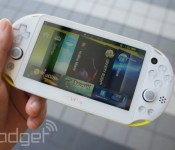
Sony’s slimmer PlayStation Vita coming to the UK for around £180, pre-orders start today

Alright, so perhaps we took Sony’s invite to its London PlayStation event a little too seriously when we speculated Vita TV news was on the agenda. Although it’s not technically the “slimmest” PS device, Sony’s brought us here to welcome the late-2013 PlayStation Vita iteration (aka the PCH-2000) to UK shores. Thinner, lighter and generally better than it’s predecessor, this is the first trip for the new Vita outside of Asia. That plane ride ain’t free, though, as the circa £180 price tag (around $300) is a significant mark-up on the cost of the handheld in its homeland (18,980 yen; around $185). Pre-orders for the device start today, with the proper launch penned in for February 7th.
 AIVAnet